


Full Stack Development Articles
Claude for Architecture and Engineering Documentation
Freelancing as a Python Developer: Getting Your First Client


Get In Touch For Details! Request More Information
JavaScript Events Complete Guide: addEventListener, Bubbling & More (2026)
Sep 09, 2026 7 Min Read 19086 Views
(Last Updated)
Every interactive action on a website starts with an event. A click can open a menu. A keypress can trigger a search. A form submission can send user data. Even moving the mouse over an element can change what appears on the screen.
In JavaScript, events make these interactions possible by allowing the browser to detect user or system actions and run the appropriate code in response.
From form validation and dropdown menus to keyboard shortcuts and dynamic content updates, JavaScript events are fundamental to modern web development. Understanding how they work is essential for building responsive and interactive applications.
This guide explains events in JavaScript step by step, including common event types, addEventListener(), event bubbling and capturing, event delegation, and asynchronous event handling.
Table of contents
- Quick Answer:
- What Is a JavaScript Event?
- How Do JavaScript Events Work?
- Event Triggering
- Event Listening
- Event Handling
- Event Execution
- How to Create an Event in JavaScript?
- Step 1: Create the Event
- Step 2: Select the Target Element
- Step 3: Dispatch the Event
- Complete Example
- Types of Events in JavaScript
- Click Event
- Submit Event
- Keydown Event
- Mouseover Event
- Load Event
- Focus Event
- JavaScript Event Phases
- Event Capturing
- Event Targeting
- Event Bubbling
- Event Bubbling vs Event Capturing- Visualized Explanation
- Event Capturing
- Event Bubbling
- Event Delegation Pattern- Why It Matters for Performance
- Async Events- Promises vs Event Listeners
- Event Listeners
- Promises
- Using Events and Promises Together
- Common JavaScript Event Interview Questions for Frontend Roles
- What Is a JavaScript Event?
- What Does addEventListener() Do?
- What Is Event Bubbling?
- What Is Event Capturing?
- What Is Event Delegation?
- What Is the Difference Between event.target and event.currentTarget?
- What Does preventDefault() Do?
- What Does stopPropagation() Do?
- What Is the Difference Between onclick and addEventListener()?
- Why Is Event Delegation Useful?
- Conclusion
- FAQs
- What Are the Most Common JavaScript Events?
- What Is addEventListener() in JavaScript?
- What Is the Difference Between Event Bubbling and Event Capturing?
- What Is Event Delegation in JavaScript?
- What Is the Difference Between JavaScript Events and Promises?
Quick Answer:
JavaScript events are actions such as clicks, keypresses, form submissions or mouse movements that trigger specific code in a web page.
addEventListener()attaches event handlers to elements.- Common events include
click,submit,keydownandmouseover. - Event bubbling moves from child to parent elements.
- Event capturing moves from parent to child elements.
- Event delegation handles multiple child elements with one parent listener.
What Is a JavaScript Event?
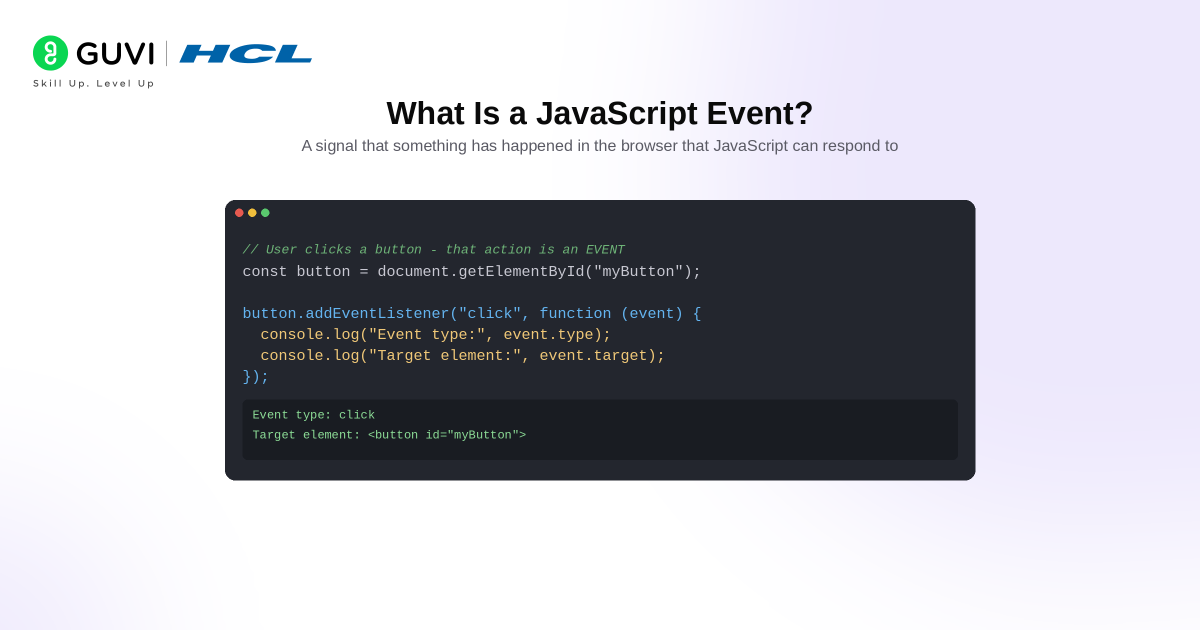
A JavaScript event is an action or occurrence detected by the browser that can trigger a specific piece of code.
Events can be caused by user interactions such as:
- Clicking a button
- Pressing a key
- Submitting a form
- Moving the mouse
- Focusing on an input field
They can also be triggered by the browser itself, such as when a page finishes loading.
For example:
User clicks a button
→ Browser detects the click event
→ Event listener runs
→ JavaScript executes the required action
Events in JavaScript are handled through event handlers or event listeners. These are functions that tell JavaScript what should happen when a specific event occurs.
In simple terms:
Event → Action occurs
Event listener → Detects the action
Event handler → Runs the required code
This event-driven behaviour is what makes websites respond dynamically instead of behaving like static pages.
Also, Find Out the Best JavaScript Roadmap Beginners Should Follow
How Do JavaScript Events Work?
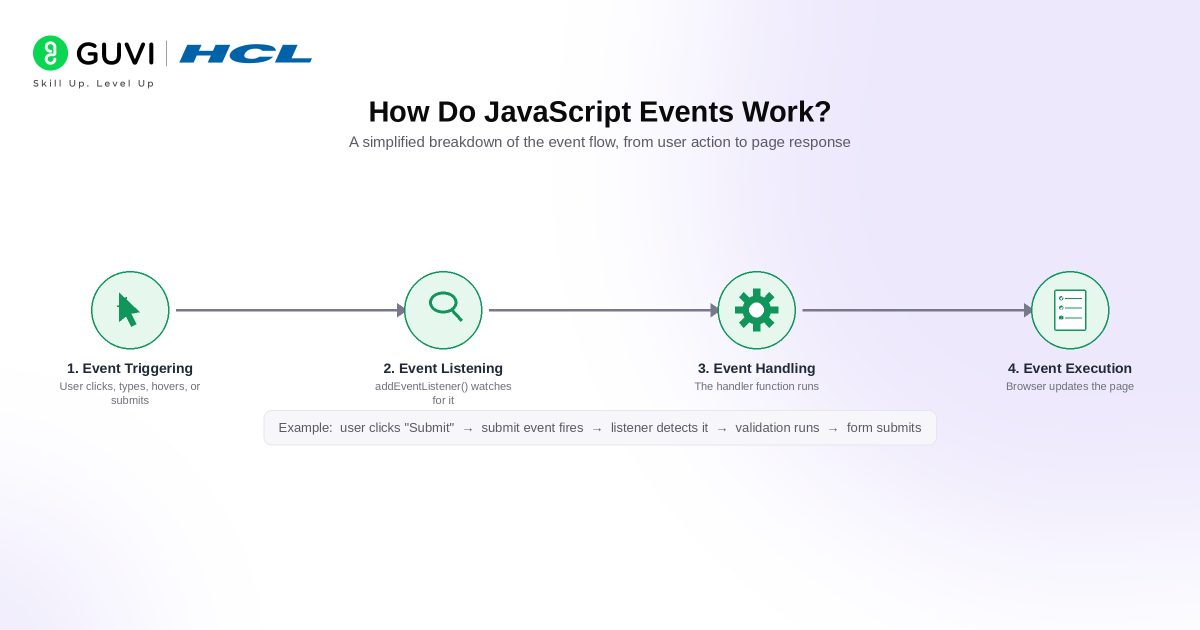
Here’s a simplified breakdown of how events work in JavaScript:
1. Event Triggering
An event occurs when a user or the browser performs an action.
Examples include:
- Clicking a button
- Typing in an input field
- Hovering over an element
- Submitting a form
- Loading a page
2. Event Listening
JavaScript needs to know which event it should watch for.
This is usually done with addEventListener().
button.addEventListener("click", handleClick);
Here, JavaScript listens for a click event on the button.
3. Event Handling
When the event occurs, JavaScript runs the associated event handler function.
function handleClick() {
  console.log("Button clicked");
}
The handler contains the code that should execute in response to the event.
4. Event Execution
Once the event is detected, the browser executes the handler and updates the page or performs the required action.
The complete flow looks like:
User action
→ Event triggered
→ Event listener detects it
→ Event handler runs
→ Page responds
For example:
User clicks "Submit"
→ submit event fires
→ listener detects the event
→ validation function runs
→ form is submitted or an error is shown
Understanding this event flow is essential for building interactive web applications because it allows JavaScript to respond dynamically to user actions and browser activity.
Also Read: 42 JavaScript Questions Towards Better Interviews
How to Create an Event in JavaScript?
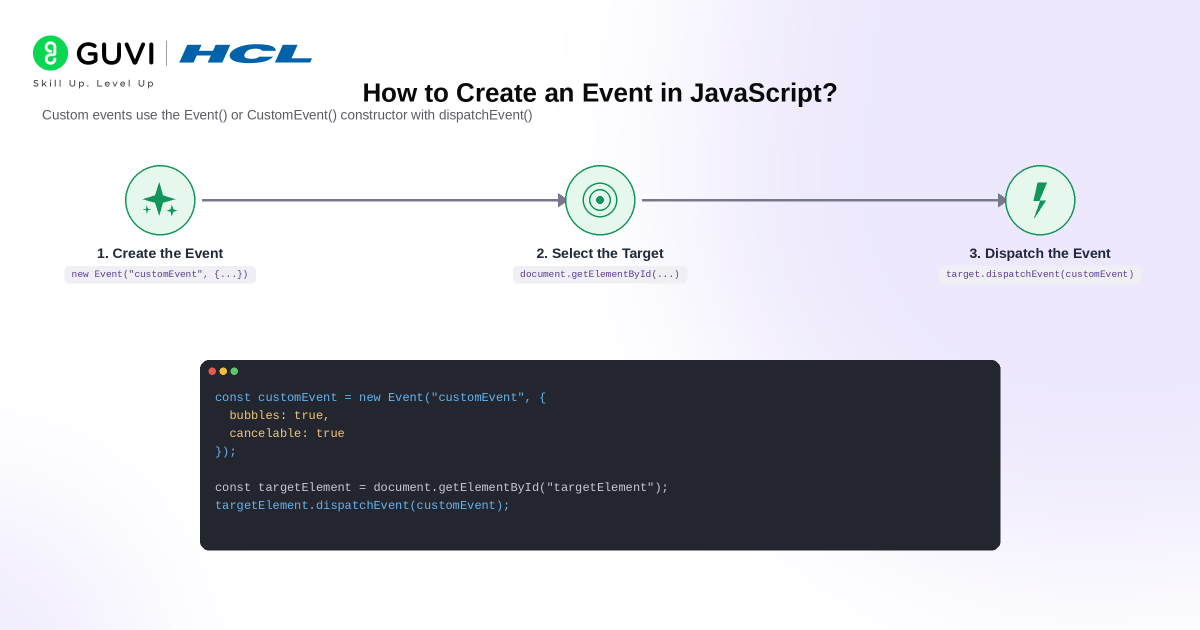
JavaScript can respond to built-in browser events such as click and keydown, but developers can also create and dispatch their own custom events.
The modern approach uses the Event() or CustomEvent() constructor along with dispatchEvent().
Step 1: Create the Event
Create a new event object and give it a descriptive event type.
const customEvent = new Event("customEvent", {
  bubbles: true,
  cancelable: true
});
Here:
customEventis the event type.bubbles: trueallows the event to move upward through the DOM.cancelable: trueallows its default behaviour to be cancelled when applicable.
Step 2: Select the Target Element
Choose the element where the event should originate.
const targetElement = document.getElementById("targetElement");
Step 3: Dispatch the Event
Use dispatchEvent() to trigger the custom event.
targetElement.dispatchEvent(customEvent);
Complete Example
<button id="targetElement">Trigger Event</button>

<script>
const targetElement = document.getElementById("targetElement");

targetElement.addEventListener("customEvent", function () {
  console.log("Custom event triggered");
});

const customEvent = new Event("customEvent", {
  bubbles: true,
  cancelable: true
});

targetElement.dispatchEvent(customEvent);
</script>
The complete flow is:
Create event
→ Select target
→ Attach listener
→ Dispatch event
→ Event handler runs
If you need to pass additional information with an event, use CustomEvent().
const userEvent = new CustomEvent("userLogin", {
  detail: {
    username: "Vaishali"
  }
});

document.dispatchEvent(userEvent);
The additional information can then be accessed through event.detail.
document.addEventListener("userLogin", function (event) {
  console.log(event.detail.username);
});
Custom events are useful when different components of an application need to communicate without being tightly connected.
Also Read: The Beginner’s Guide To Closures In JavaScript
Now that you understand how events can be created and dispatched, the next step is learning the event types you will use most often in web applications.
Types of Events in JavaScript
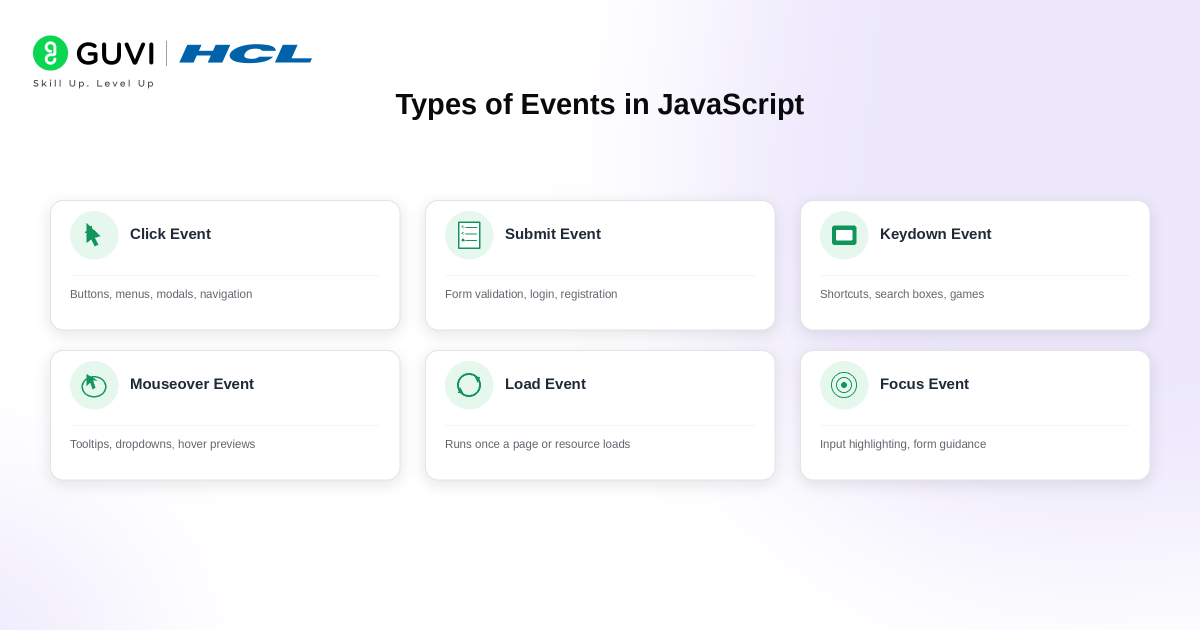
JavaScript supports many browser and user-generated events. The following are some of the most commonly used events in frontend development.
1. Click Event
The click event occurs when a user clicks an element.
It is commonly used for:
- Buttons
- Menus
- Modals
- Navigation
- Interactive cards
Example:
<button id="myButton">Click Me</button>

<script>
const button = document.getElementById("myButton");

button.addEventListener("click", function () {
  console.log("Button clicked");
});
</script>
2. Submit Event
The submit event occurs when a form is submitted.
It is commonly used for:
- Form validation
- Login forms
- Registration
- Search forms
- Sending data to APIs
Example:
<form id="signupForm">
  <input type="text" id="name" required>
  <button type="submit">Submit</button>
</form>

<script>
const form = document.getElementById("signupForm");

form.addEventListener("submit", function (event) {
  event.preventDefault();

  const name = document.getElementById("name").value;

  console.log("Submitted by:", name);
});
</script>
event.preventDefault() prevents the browser from performing its normal form submission.
3. Keydown Event
The keydown event fires when the user presses a keyboard key.
It is useful for:
- Keyboard shortcuts
- Search boxes
- Games
- Form navigation
- Enter and Escape key handling
Example:
<input id="searchInput" type="text" placeholder="Search">

<script>
const input = document.getElementById("searchInput");

input.addEventListener("keydown", function (event) {
  console.log("Key pressed:", event.key);

  if (event.key === "Enter") {
    console.log("Search started");
  }
});
</script>
4. Mouseover Event
The mouseover event fires when the pointer enters an element or one of its child elements.
It is commonly used for:
- Tooltips
- Dropdown menus
- Hover previews
- Image effects
- Interactive cards
Example:
<div id="card">Hover over me</div>

<script>
const card = document.getElementById("card");

card.addEventListener("mouseover", function () {
  card.textContent = "Mouse detected";
});
</script>
5. Load Event
The load event fires when a page or resource has finished loading.
Example:
window.addEventListener("load", function () {
  console.log("Page loaded");
});
It can be useful when code depends on assets being completely available.
6. Focus Event
The focus event occurs when an element receives focus.
Example:
<input id="email" type="email">

<script>
const email = document.getElementById("email");

email.addEventListener("focus", function () {
  email.style.backgroundColor = "lightblue";
});
</script>
It is commonly used for:
- Input highlighting
- Form guidance
- Validation
- Accessibility improvements
Also Read: 7 Best Reasons to Learn JavaScript | 1 Bonus Point
Understanding individual event types is only part of event handling. You also need to understand how an event moves through the DOM after it occurs.
JavaScript Event Phases
A DOM event normally passes through three phases:
Capturing
→ Target
→ Bubbling
1. Event Capturing
Event capturing is the phase where an event travels from the outermost ancestor toward the element that triggered it.
Consider:
<div id="parent">
  <button id="child">Click Me</button>
</div>
During capturing:
document
   ↓
body
   ↓
parent
   ↓
button
Capturing can be enabled with:
parent.addEventListener(
  "click",
  function () {
    console.log("Parent capturing");
  },
  { capture: true }
);
You can learn more about the complete event flow in the DOM.
2. Event Targeting
The target phase occurs when the event reaches the element that originally triggered it.
For example, if a user clicks:
<button id="child">Click Me</button>
the button becomes the event.target.
child.addEventListener("click", function (event) {
  console.log(event.target);
});
3. Event Bubbling
Event bubbling occurs after the target phase.
The event travels upward through the element’s ancestors.
button
   ↑
parent
   ↑
body
   ↑
document
Bubbling is the default behaviour for many common DOM events and is the foundation of event delegation.

Also Read: 7 Best JavaScript Practices Every Developer Must Follow
Event Bubbling vs Event Capturing- Visualized Explanation
Event bubbling and capturing describe the direction in which an event travels through the DOM.
Consider:
<div id="parent">
  <button id="child">Click Me</button>
</div>
The entire event flow looks like:
CAPTURING

document
   ↓
body
   ↓
parent
   ↓
button

TARGET
[button]
BUBBLING button ↑ parent ↑ body ↑ document
Event Capturing
Capturing moves from the outer DOM toward the target.
Parent → Child
Use:
parent.addEventListener(
  "click",
  function () {
    console.log("Capturing");
  },
  { capture: true }
);
Event Bubbling
Bubbling starts at the target and moves toward its ancestors.
Child → Parent
Example:
child.addEventListener("click", function () {
  console.log("Child clicked");
});

parent.addEventListener("click", function () {
  console.log("Parent clicked");
});
Clicking the button produces:
Child clicked
Parent clicked
| Factor | Event Bubbling | Event Capturing |
|---|---|---|
| Direction | Target → Ancestors | Ancestors → Target |
| Flow | Child → Parent | Parent → Child |
| Default behaviour | Common default | Must normally be enabled |
addEventListener() | Default | { capture: true } |
| Common use | Event delegation | Intercepting events earlier |
Also Read: 30 Best JavaScript Project Ideas For You [3 Bonus Portfolio Projects]
Event Delegation Pattern- Why It Matters for Performance
Event delegation means attaching one event listener to a parent rather than attaching separate listeners to every child element.
Consider:
<ul id="productList">
  <li><button data-id="1">Product 1</button></li>
  <li><button data-id="2">Product 2</button></li>
  <li><button data-id="3">Product 3</button></li>
</ul>
You could attach a separate listener to every button:
const buttons = document.querySelectorAll("#productList button");

buttons.forEach(function (button) {
  button.addEventListener("click", function () {
    console.log("Product clicked");
  });
});
A more scalable approach is to use one listener on the parent:
const productList = document.getElementById("productList");

productList.addEventListener("click", function (event) {
  if (event.target.matches("button")) {
    console.log("Product ID:", event.target.dataset.id);
  }
});
This works because the button’s click event bubbles to productList.
Instead of:
1,000 elements
→ 1,000 listeners
you can often use:
1 parent
→ 1 listener
Event delegation is particularly useful for:
- Lists
- Tables
- Menus
- Dynamic content
- Repeated components
- Large interfaces
Another advantage is that dynamically added child elements can automatically work with the parent’s existing listener.
const newItem = document.createElement("li");

newItem.innerHTML =
  '<button data-id="4">Product 4</button>';

productList.appendChild(newItem);
No additional click listener is required for the new button.
Async Events- Promises vs Event Listeners
Event listeners and Promises both deal with operations that may happen later, but they serve different purposes.
Event Listeners
An event listener waits for an event to occur.
button.addEventListener("click", function () {
  console.log("Clicked");
});
The event may occur:
- Once
- Multiple times
- Much later
- Never
The listener can continue responding whenever the event occurs.
Promises
A Promise represents the eventual completion or failure of an asynchronous operation.
fetch("/api/users")
  .then(function (response) {
    return response.json();
  })
  .then(function (data) {
    console.log(data);
  })
  .catch(function (error) {
    console.error(error);
  });
A Promise normally moves from:
Pending
→ Fulfilled
or:
Pending
→ Rejected
Once settled, the same Promise does not settle again.
| Factor | Event Listeners | Promises |
|---|---|---|
| Main purpose | Respond to events | Represent async completion |
| Frequency | Can fire repeatedly | Settles once |
| Example | click, keydown, submit | API request |
| Typical API | addEventListener() | Promise, fetch(), async/await |
| Best for | Repeated interactions | One async result |
Using Events and Promises Together
Real applications frequently combine both.
const button = document.getElementById("loadUsers");

button.addEventListener("click", async function () {
  try {
    const response = await fetch("/api/users");
    const users = await response.json();

    console.log(users);
  } catch (error) {
    console.error("Failed to load users:", error);
  }
});
Here:
User clicks button
→ click event fires
→ event listener executes
→ fetch() starts
→ Promise resolves
→ data is processed
In simple terms:
Event listeners → wait for events
Promises → wait for asynchronous results
Common JavaScript Event Interview Questions for Frontend Roles
1. What Is a JavaScript Event?
A JavaScript event is an action or occurrence detected by the browser that can trigger JavaScript code.
2. What Does addEventListener() Do?
addEventListener() attaches an event listener to an element.
button.addEventListener("click", handleClick);
It allows multiple listeners to be attached without replacing existing listeners.
3. What Is Event Bubbling?
Event bubbling occurs when an event starts at its target and then travels upward through its ancestor elements.
4. What Is Event Capturing?
Event capturing occurs when an event travels from the outer ancestors toward the target element.
5. What Is Event Delegation?
Event delegation places an event listener on a parent and uses event bubbling to handle events from child elements.
6. What Is the Difference Between event.target and event.currentTarget?
event.target is the element that originally triggered the event.
event.currentTarget is the element whose event listener is currently running.
parent.addEventListener("click", function (event) {
  console.log(event.target);
  console.log(event.currentTarget);
});
7. What Does preventDefault() Do?
preventDefault() prevents the browser’s default action.
form.addEventListener("submit", function (event) {
  event.preventDefault();
});
8. What Does stopPropagation() Do?
stopPropagation() prevents an event from continuing through the propagation path.
button.addEventListener("click", function (event) {
  event.stopPropagation();
});
9. What Is the Difference Between onclick and addEventListener()?
onclick assigns a handler directly:
button.onclick = handleClick;
addEventListener() attaches a listener:
button.addEventListener("click", handleClick);
addEventListener() is generally more flexible because it supports multiple listeners and options such as capture, once and passive.
10. Why Is Event Delegation Useful?
Event delegation can reduce the number of listeners required for repeated elements and automatically works with dynamically added child elements.
For more frontend interview preparation, read these JavaScript interview questions.
Ready to boost your web development career? Join HCL GUVI’s Full Stack Development Course! Learn both front-end and back-end skills through easy-to-follow projects and expert tips. This course covers everything from basics to advanced web apps. Enroll today!
Conclusion
JavaScript events form the foundation of interactive web applications. They allow browsers to respond to actions such as clicks, keyboard input, form submissions and mouse interactions without requiring the page to reload.
Start by understanding common events and addEventListener(). Then learn how capturing, targeting and bubbling control event propagation. Once those concepts are clear, patterns such as event delegation and asynchronous event handling become much easier to understand.
The best way to master JavaScript events is to build small interactive components and experiment with how events travel through the DOM.
FAQs
What Are the Most Common JavaScript Events?
The most common JavaScript events include click, submit, keydown, keyup, mouseover, focus, change, input and load. These events allow developers to respond to user actions and browser activity.
What Is addEventListener() in JavaScript?
addEventListener() is a JavaScript method used to attach an event listener to an element. It allows code to run whenever a specified event occurs.button.addEventListener("click", function () { console.log("Button clicked"); });
What Is the Difference Between Event Bubbling and Event Capturing?
Event bubbling moves from the target element upward through its parent elements. Event capturing moves from outer parent elements down toward the target. Bubbling is the default phase used by most event listeners.
What Is Event Delegation in JavaScript?
Event delegation is a pattern where one event listener is added to a parent element instead of adding separate listeners to every child element. It uses event bubbling and is especially useful for dynamic lists, tables and repeated UI components.
What Is the Difference Between JavaScript Events and Promises?
JavaScript events respond to actions that can occur repeatedly, such as clicks or key presses. Promises represent the completion or failure of an asynchronous operation and settle only once. Event listeners are commonly used for user interactions, while Promises are used for operations such as API requests.
Success Stories

About the Author
Vaishali
I'm a seasoned writer with four years of experience across technical, non-technical, and just about every genre or niche you can imagine. Adaptable and curious, I enjoy exploring new topics and making information engaging and easy to understand. Fueled by a steady stream of tea, I approach each project with creativity, reliability, and genuine enthusiasm for storytelling.
View all posts by Vaishali
Connect with me @



























Did you enjoy this article?