


Full Stack Development Articles
Claude for Architecture and Engineering Documentation
Freelancing as a Python Developer: Getting Your First Client


Get In Touch For Details! Request More Information
Angular Roadmap: Best Guide for Beginners in 2026
Jul 13, 2026 8 Min Read 779 Views
(Last Updated)
Table of contents
- TL;DR Summary
- What is Angular?
- What does an Angular developer do?
- Why Learn Angular in 2026?
- Angular is strong for large applications
- Angular is becoming more modern
- Angular Roadmap for Beginners
- Step 1: Learn HTML, CSS, and JavaScript
- Step 2: Learn TypeScript
- Step 3: Understand Angular CLI
- Step 4: Learn Angular Components
- Step 5: Learn Templates and Data Binding
- Step 6: Learn Angular Routing
- Step 7: Learn Services and Dependency Injection
- Step 8: Learn Forms in Angular
- Step 9: Learn APIs and HTTP Client
- Step 10: Learn RxJS and Async Data
- Step 11: Learn Angular Signals
- Step 12: Learn SSR, Hydration, and Performance Basics
- Step 13: Learn Testing and Debugging
- Step 14: Build and Deploy Angular Projects
- Month-Wise Angular Roadmap
- Key Angular Concepts Beginners Should Know
- Angular vs AngularJS
- Standalone components vs NgModules
- Tools Required to Learn Angular
- Beginner tools
- Intermediate tools
- Useful learning habits
- Best Angular Projects for Beginners
- Beginner Angular projects
- Intermediate Angular projects
- Portfolio-level Angular projects
- Angular Developer Career Path
- Skills needed for Angular developer roles
- How long does it take to learn Angular?
- Real-World Examples of Angular
- Example 1: EdTech learning dashboard
- Example 2: Enterprise admin panel
- Common Mistakes to Avoid While Learning Angular
- Starting Angular without JavaScript basics
- Ignoring TypeScript
- Copying projects without understanding structure
- Learning only old Angular tutorials
- Not building deployable projects
- Build Full Stack Foundations with HCL GUVI
- Conclusion
- FAQs
- What is the best Angular Roadmap for beginners?
- Is Angular worth learning in 2026?
- Do I need JavaScript before learning Angular?
- Is TypeScript required for Angular?
- How long does it take to learn Angular?
- Should I learn Angular or React first?
- What projects should I build while learning Angular?
- What is the difference between Angular and AngularJS?
- Are Angular signals important for beginners?
- Can Angular help in full-stack development?
TL;DR Summary
Angular Roadmap for beginners starts with HTML, CSS, JavaScript, TypeScript, Angular CLI, components, templates, data binding, routing, services, forms, APIs, RxJS, signals, testing, performance, and real projects. Angular is a TypeScript-based frontend framework used to build scalable web applications. In 2026, learners should also understand standalone components, signals, server-side rendering, hydration, deferrable views, and modern Angular performance practices. Start with small projects, then build dashboards, admin panels, e-commerce pages, and API-based applications.
Angular Roadmap is useful for anyone who wants to learn frontend development in a structured way instead of jumping between random tutorials.
Angular is used to build scalable, component-based web applications with TypeScript, routing, forms, services, APIs, and testing.
This Angular roadmap explains what to learn first, what to skip initially, which projects to build, and how Angular fits into frontend and full-stack development in 2026.
What is Angular?
Angular is a TypeScript-based web application framework used to build dynamic, scalable, and structured frontend applications.
It helps developers build applications using components, templates, services, routing, forms, dependency injection, and testing tools.
Unlike a small JavaScript library, Angular gives you a complete framework for building large applications. It includes many built-in features that teams need for enterprise-level frontend development.
According to Angular’s official overview, Angular supports components, signals, server-side rendering, static site generation, hydration, dependency injection, routing, and forms.
What does an Angular developer do?
An Angular developer builds frontend applications using Angular, TypeScript, HTML, CSS, APIs, routing, forms, reusable components, and testing tools. They usually work with designers, backend developers, QA teams, and product managers to build user-facing web applications.
Why Learn Angular in 2026?
Angular is still relevant in 2026 because many companies use it for large, structured, and long-term web applications.
In the 2025 Stack Overflow Developer Survey, Angular was used by 18.2% of all respondents under web frameworks and technologies, while professional developers reported 19.8% usage. This shows Angular still has a strong presence in professional development environments.
Angular is especially useful for applications that need structure, maintainability, routing, forms, dashboards, authentication, and team-based development.
Angular is strong for large applications
Angular is commonly used in enterprise applications because it gives teams a clear structure. Components, services, routing, dependency injection, and TypeScript make large applications easier to manage.
For example, an admin dashboard may have login pages, user roles, charts, reports, tables, filters, forms, and API calls. Angular helps organize these features into modules, components, services, and routes.
Angular is becoming more modern
The official Angular roadmap focuses on improving developer experience, AI experience for developers, and framework performance.
Angular has also moved toward modern features such as signals, standalone components, hydration, deferrable views, and improved server-side rendering support.
This means beginners should not learn Angular only through old AngularJS or NgModule-heavy tutorials. A 2026 Angular learner should understand modern Angular patterns.
Angular supports update automation through the ng update command, which helps developers move from one major Angular version to another with guided code transformations. This is useful for learners because Angular projects can stay updated without rewriting everything manually.
Angular Roadmap for Beginners
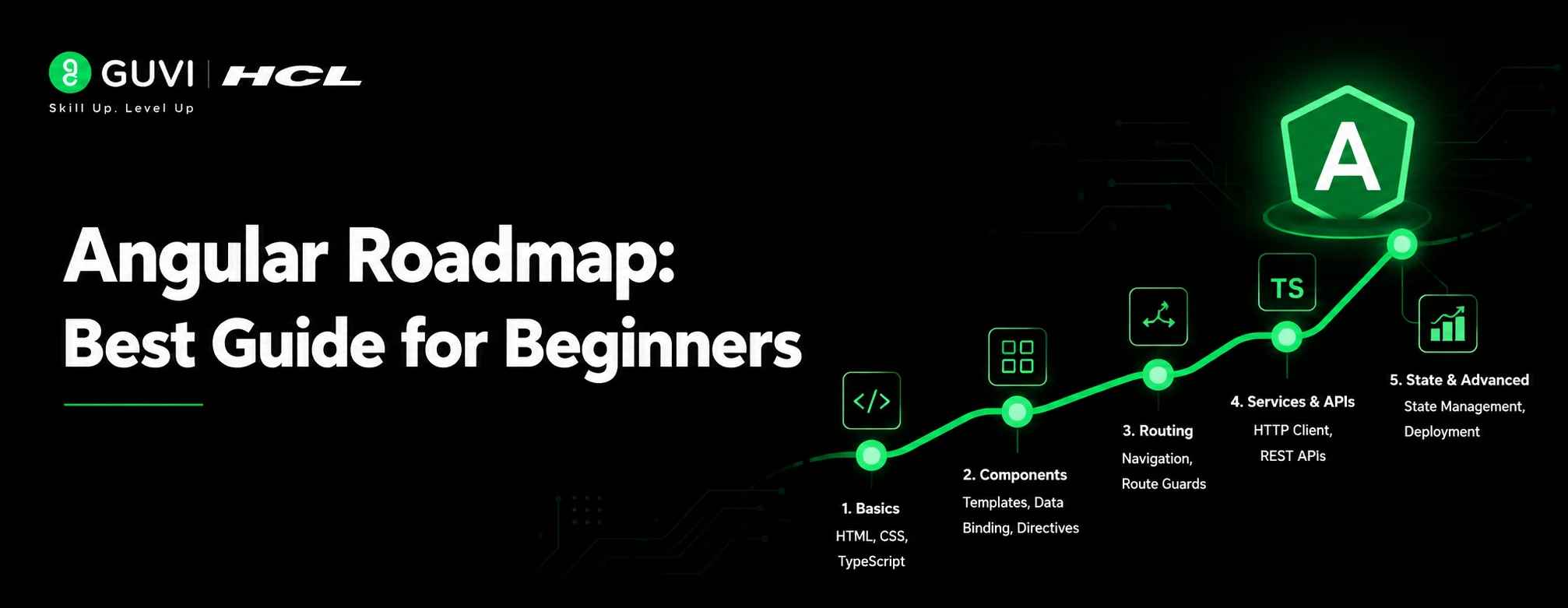
The best Angular Roadmap starts with web basics, then moves to TypeScript, Angular CLI, components, routing, services, forms, APIs, RxJS, signals, testing, and deployment.
Do not start Angular without understanding JavaScript and TypeScript basics. Angular becomes much easier when you already understand functions, arrays, objects, classes, modules, async code, and APIs.
Step 1: Learn HTML, CSS, and JavaScript
Angular is a frontend framework, so you need strong web basics first. Before starting Angular roadmap, follow a clear HTML and CSS roadmap to build strong frontend basics.
Start with:
- HTML tags
- Forms and inputs
- Semantic HTML
- CSS selectors
- Flexbox
- Grid
- Responsive design
- JavaScript variables
- Functions
- Arrays and objects
- DOM basics
- Events
- Promises
- async/await
- Fetch API
If JavaScript still feels confusing, follow this JavaScript roadmap for beginners before moving deeper into Angular.
Step 2: Learn TypeScript
Angular uses TypeScript by default, so this step is very important.
TypeScript adds types to JavaScript. This helps developers catch errors earlier and write cleaner code for large applications.
Focus on:
- Types
- Interfaces
- Classes
- Access modifiers
- Generics basics
- Modules
- Decorators basics
- Function return types
- Optional and union types
Start by understanding what TypeScript is and how it improves JavaScript for large applications.
You can also follow a TypeScript roadmap before building complex Angular projects.
Step 3: Understand Angular CLI
It is important to know in an Angular Roadmap that CLI helps you create, run, build, test, and manage Angular projects.
You should learn basic commands such as:
- Creating a new Angular project
- Running a local development server
- Generating components
- Generating services
- Building the application
- Running tests
The goal is not to memorize every command. The goal is to understand how Angular projects are created and organized.
Step 4: Learn Angular Components
Components are the building blocks of Angular applications.
A component usually has:
- TypeScript class
- HTML template
- CSS styles
- Component metadata
- Inputs and outputs
- Lifecycle hooks
For example, an e-commerce application may have separate components for product cards, filters, cart summary, checkout form, and order history.
Start with simple components first. Then learn parent-child communication, reusable components, lifecycle methods, and standalone components.
Angular’s current documentation says components are standalone by default, which means modern Angular learners should understand standalone component-based development.
Step 5: Learn Templates and Data Binding
Templates connect your component logic with the user interface, so the next step in the angular roadmap is to learn templates and data blinding.
Learn these Angular template concepts:
- Interpolation
- Property binding
- Event binding
- Two-way binding
- Template variables
- Conditional rendering
- List rendering
- Built-in pipes
- Custom pipes
For example, if a user types into a search box, data binding helps update the displayed product list based on the user’s input.
Step 6: Learn Angular Routing
Routing helps you create multiple pages inside a single-page application.
Learn:
- Route configuration
- Router outlet
- Navigation links
- Route parameters
- Query parameters
- Lazy loading
- Route guards
- Nested routes
For example, a learning platform may have routes like /courses, /courses/angular, /dashboard, /profile, and /payment.
Angular’s official overview describes routing as a feature-rich navigation toolkit with route guards, data resolution, lazy loading, and more.
Step 7: Learn Services and Dependency Injection
Services help you write reusable business logic.
A service can handle:
- API calls
- Authentication logic
- Shared data
- Form utilities
- Logging
- State management
- Business rules
Dependency injection helps Angular provide these services to components without manually creating objects everywhere.
For example, instead of writing API code separately in every component, you can create one product service and reuse it across product list, product detail, and cart components.
Step 8: Learn Forms in Angular
Forms are important because most real applications collect user input.
Angular supports both template-driven forms and reactive forms.
Learn:
- Form controls
- Form groups
- Validators
- Custom validation
- Error messages
- Dynamic forms
- Form submission
- Reactive forms
Reactive forms are especially useful for larger applications because they provide better control, testing, and structure.
Step 9: Learn APIs and HTTP Client
Most Angular applications connect to backend APIs, so while following an angular roadmap learning APIs becomes very important.
Learn how to:
- Send GET requests
- Send POST requests
- Handle loading states
- Handle errors
- Use interceptors
- Add authentication tokens
- Display API data
- Create reusable API services
For example, a student dashboard may fetch course details, progress reports, assignment status, and payment history from backend APIs.
Step 10: Learn RxJS and Async Data
RxJS is used in Angular for handling asynchronous data streams.
Beginners should start with practical concepts instead of trying to learn every operator.
Focus on:
- Observable
- Subscription
- Subject
- BehaviorSubject
- map
- filter
- switchMap
- debounceTime
- catchError
- async pipe
For example, in a search box, debounceTime can wait until the user stops typing before calling the API. This avoids unnecessary API requests.
Step 11: Learn Angular Signals
Signals are Angular’s modern way to manage reactive state.
Signals help you track and update values in a more direct way. They are useful for component-level state, computed values, and reactive UI updates.
Angular’s official overview describes signals as a fine-grained reactivity model combined with compile-time optimizations to help build faster apps by default.
Start with:
- signal
- computed
- effect
- linkedSignal
- Resource API basics
- When to use signals vs RxJS
Do not worry if signals feel new. Learn them after you understand components, templates, services, and API calls.
Step 12: Learn SSR, Hydration, and Performance Basics
Modern Angular is not only about building components. You also need to understand performance and rendering.
Angular supports server-side rendering, static site generation, and hydration.
Angular’s SSR guide explains that client-side rendering is the default, but hybrid rendering with SSR, SSG, and CSR can improve performance and user experience when used correctly.
Also learn:
- Lazy loading
- Deferrable views
- Bundle size basics
- Change detection
- Image optimization
- Core Web Vitals basics
Angular’s @defer blocks can reduce initial bundle size by delaying code that is not needed during initial rendering, which can improve initial load and Core Web Vitals.
Step 13: Learn Testing and Debugging
Testing helps you build reliable Angular applications.
Start with:
- Unit testing basics
- Component testing
- Service testing
- Mocking API calls
- Debugging in browser DevTools
- Console debugging
- Network tab debugging
- Error handling
You do not need advanced testing on day one. But you should know how to test important components, services, forms, and user flows.
Step 14: Build and Deploy Angular Projects
Once you understand the basics, build and deploy your projects.
Learn:
- Production build
- Environment files
- Hosting options
- GitHub repository setup
- README documentation
- API deployment basics
- Performance checks
Your project should not stay only on your laptop. Deploy it, document it, and add it to your portfolio.
Month-Wise Angular Roadmap
A month-wise Angular roadmap helps you learn Angular without confusion. This timeline is suitable for beginners who can study consistently and build small projects along the way.
| Month | What to Learn | Tools to Use | Practice Output |
| Month 1 | HTML, CSS, JavaScript basics | VS Code, Browser DevTools | Responsive landing page |
| Month 2 | TypeScript basics | TypeScript, VS Code | Typed JavaScript mini programs |
| Month 3 | Angular CLI, components, templates | Angular CLI, npm | Counter app, profile card app |
| Month 4 | Routing, services, dependency injection | Angular Router, services | Multi-page course listing app |
| Month 5 | Forms and API integration | Reactive Forms, HttpClient | Login form, API-based product list |
| Month 6 | RxJS basics and error handling | RxJS, async pipe | Search/filter app with API |
| Month 7 | Signals and modern Angular features | Signals, computed, effect | Signal-based task manager |
| Month 8 | Testing, performance, SSR basics | Jasmine/Karma, DevTools, SSR | Tested dashboard app |
| Month 9 | Portfolio projects and deployment | GitHub, Netlify/Vercel/Firebase | 2–3 deployed Angular projects |
If you already know JavaScript and TypeScript, you may move faster in this angular roadmap. If you are new to frontend development, spend more time on the first two months.

Key Angular Concepts Beginners Should Know
Angular has many concepts, but beginners should not try to learn everything at once.
Start with the concepts that appear in almost every Angular project.
| Concept | Why It Matters | Beginner Priority |
| Components | Builds reusable UI blocks | High |
| Templates | Connects UI and logic | High |
| Data Binding | Updates UI from data and events | High |
| Directives | Adds behavior to HTML | Medium |
| Pipes | Formats displayed data | Medium |
| Services | Reuses business logic | High |
| Dependency Injection | Shares services cleanly | High |
| Routing | Builds multi-page SPA flow | High |
| Forms | Handles user input | High |
| HttpClient | Connects to APIs | High |
| RxJS | Handles async data | Medium |
| Signals | Modern reactive state | Medium |
| Testing | Improves reliability | Medium |
Angular vs AngularJS
Angular and AngularJS are not the same.
AngularJS usually refers to the older 1.x framework. Angular refers to the modern TypeScript-based framework used today.
If you are learning in 2026, focus on modern Angular, not old AngularJS tutorials.
Standalone components vs NgModules
Modern Angular promotes standalone components.
Older tutorials may start with NgModules, but Angular’s newer direction is more standalone-first. Angular’s docs say standalone components simplify Angular apps by reducing the need for NgModules.
You should understand NgModules at a basic level because older projects still use them, but your main learning path should include standalone components.
Angular now has official features like signals, server-side rendering, hydration, routing, forms, Angular CLI, DevTools, and update tools built into its ecosystem. This is why Angular is useful for large web apps where teams need structure, performance, and maintainable code.
Tools Required to Learn Angular
You do not need too many tools to start Angular. A simple setup is enough.
Beginner tools
Start with:
- VS Code
- Node.js
- npm
- Angular CLI
- Browser DevTools
- Git and GitHub
- Postman or API testing tool
Intermediate tools
Once you build larger projects, learn:
- Angular DevTools
- ESLint
- Prettier
- RxJS debugging basics
- Chrome Performance tab
- GitHub Actions basics
- Firebase, Netlify, or Vercel deployment
Useful learning habits
Do not only watch tutorials. Build small projects after every concept.
For example:
- After components: build a profile card app
- After routing: build a multi-page portfolio
- After forms: build a registration form
- After APIs: build a product listing page
- After RxJS: build a search app
- After signals: build a task manager
As a beginner, start with a single-component Angular app first. Once you understand the basics, gradually move to multiple components, services, routing, and navigation.
Best Angular Projects for Beginners
Angular projects help you understand how concepts work together. Start small and then move toward real-world applications.
Beginner Angular projects
Start with:
- Counter app
- Todo list
- Weather card UI
- Student profile card
- Calculator
- Expense tracker
- Simple portfolio website
- Course card listing page
These projects help you practise components, templates, binding, events, and basic styling.
Intermediate Angular projects
Once you understand routing, services, forms, and APIs, build:
- Product listing app
- Blog dashboard
- Login and registration system
- Movie search app
- Student management system
- Quiz application
- Job listing portal
- Admin dashboard with filters
These projects help you practise routing, services, API calls, forms, validation, and state handling.
Portfolio-level Angular projects
For your resume or portfolio, build projects that look close to real products.
Good examples include:
- E-commerce frontend with cart
- Learning management dashboard
- CRM dashboard
- Hospital appointment booking UI
- Finance expense dashboard
- Real-time task management app
- HR employee management dashboard
- Angular + Node.js full-stack project
Add these to GitHub with:
- Project title
- Problem statement
- Tech stack
- Features
- Screenshots
- Setup steps
- Live demo link
- What you learned
Once you finish 2–3 Angular projects, next step in the angular roadmap is to practice Angular interview questions to prepare for developer roles.
Angular Developer Career Path
Angular can help you move into frontend and full-stack development roles.
Common roles include:
- Angular Developer
- Frontend Developer
- UI Developer
- Web Application Developer
- Full Stack Developer
- MEAN Stack Developer
- Software Engineer
Skills needed for Angular developer roles
Most Angular roles expect a mix of frontend, framework, and collaboration skills.
Focus on:
- HTML
- CSS
- JavaScript
- TypeScript
- Angular
- API integration
- Git
- Responsive design
- Debugging
- Testing basics
- Component architecture
- Performance basics
If you want to move into full-stack roles, also learn Node.js, Express.js, databases, authentication, REST APIs, and deployment.
How long does it take to learn Angular?
Most beginners need 4–6 months to learn Angular basics if they already know HTML, CSS, JavaScript, and TypeScript.
If you are new to frontend development, it may take 6–9 months because you need to build web fundamentals first.
Real-World Examples of Angular
Example 1: EdTech learning dashboard
An edtech platform can use Angular to build a student dashboard.
The dashboard may include course progress, assignments, certificates, payment history, mentor sessions, and learning analytics.
Angular is useful here because the app needs routing, reusable components, forms, API calls, guards, tables, filters, and role-based access.
Example 2: Enterprise admin panel
A company can use Angular to build an internal admin panel for employees, managers, and operations teams.
The panel may include employee records, reports, approval workflows, charts, search filters, and authentication.
Angular works well for this type of application because it supports structured code, reusable services, forms, routing, and maintainable frontend architecture.
Common Mistakes to Avoid While Learning Angular
1. Starting Angular without JavaScript basics
Many beginners jump into Angular before learning JavaScript properly. This makes TypeScript, components, services, and async code confusing.
Fix this by learning JavaScript functions, arrays, objects, events, promises, and async/await first.
2. Ignoring TypeScript
Angular uses TypeScript by default, so avoiding it will slow you down.
Fix this by learning types, interfaces, classes, modules, and function return types before building complex Angular apps.
3. Copying projects without understanding structure
Many learners copy Angular projects from YouTube but cannot explain components, routing, services, or API flow.
Fix this by building small features yourself and writing notes on how each part works.
4. Learning only old Angular tutorials
Old tutorials may focus heavily on NgModules or AngularJS-style thinking.
Fix this by learning modern Angular topics like standalone components, signals, modern control flow, SSR basics, hydration, and deferrable views.
5. Not building deployable projects
An Angular project is more useful when it is deployed and documented.
Fix this by uploading projects to GitHub, adding README files, and sharing live demo links.
Build Full Stack Foundations with HCL GUVI
Angular is a strong frontend framework, but real software projects often require more than frontend skills. You may also need backend APIs, databases, authentication, deployment, and project architecture.
If you want a structured path to build strong full-stack foundations, explore HCL GUVI’s Full Stack Development Program. It covers frontend and backend development, APIs, databases, real-time projects, mentorship, and placement-focused learning.
Conclusion
The Angular Roadmap in 2026 should start with HTML, CSS, JavaScript, and TypeScript before moving into Angular CLI, components, templates, routing, services, forms, APIs, RxJS, signals, testing, performance, and deployment. Angular is useful for learners who want to build structured frontend applications and move toward frontend or full-stack development roles. Do not rush through the basics or rely only on copied projects. Build small applications first, then create dashboard, e-commerce, admin panel, or API-based projects that show real Angular skills.
FAQs
1. What is the best Angular Roadmap for beginners?
The best Angular Roadmap starts with HTML, CSS, JavaScript, TypeScript, Angular CLI, components, templates, routing, services, forms, APIs, RxJS, signals, testing, and projects.
2. Is Angular worth learning in 2026?
Yes, Angular is worth learning in 2026, especially if you want to build structured, scalable, enterprise-style frontend applications. It is still used by professional developers and continues to receive official updates.
3. Do I need JavaScript before learning Angular?
Yes, you should learn JavaScript before Angular. Concepts like functions, arrays, objects, promises, async/await, and API handling make Angular easier to understand.
4. Is TypeScript required for Angular?
Yes, TypeScript is required for Angular because Angular applications are written using TypeScript. Learn types, interfaces, classes, modules, and basic generics before building large Angular projects.
5. How long does it take to learn Angular?
If you already know HTML, CSS, JavaScript, and TypeScript, you can learn Angular basics in 4–6 months with consistent practice. If you are new to frontend development, it may take 6–9 months.
6. Should I learn Angular or React first?
Choose Angular if you want a structured framework with built-in routing, forms, services, and enterprise-style architecture. Choose React if you prefer a flexible library and want to build a UI with a larger ecosystem of external tools.
7. What projects should I build while learning Angular?
Build projects like a todo app, product listing page, login form, movie search app, admin dashboard, e-commerce frontend, learning dashboard, and full-stack API-based Angular project.
8. What is the difference between Angular and AngularJS?
AngularJS refers to the older 1.x framework, while Angular refers to the modern TypeScript-based framework. Beginners in 2026 should focus on modern Angular.
9. Are Angular signals important for beginners?
Angular signals are important, but beginners should learn them after understanding components, templates, services, and API calls. Signals help manage reactive state in modern Angular applications.
10. Can Angular help in full-stack development?
Yes, Angular can be used as the frontend part of full-stack applications. You can combine Angular with backend technologies like Node.js, Express.js, databases, authentication, and APIs.
Success Stories

About the Author
Reemsha Khan
Always been a storyteller at heart. Now, I turn complex topics into simple, easy-to-understand stories through content. Hope you find it helpful.
View all posts by Reemsha Khan
Connect with me @































Did you enjoy this article?