


Interview Articles
InfyTQ Interview Experience 2026: Process, Questions, Preparation & Tips
Deloitte NLA Interview Experience 2026: Rounds, Questions and Preparation - Best Guide
Capgemini Exceller Interview Questions 2026: Coding, Technical, HR, and AI Prep - Best Guide
Wipro Elite NTH Interview Experience 2026: What Candidates Say


Get In Touch For Details! Request More Information

Top Angular Interview Questions and Answers in 2026
Aug 06, 2026 10 Min Read 1254 Views
(Last Updated)
Preparing for Angular interviews can be challenging when companies expect strong frontend and problem-solving skills. These Angular Interview Questions will help you understand commonly asked concepts and prepare with confidence.
In this blog, we cover some of the most important Angular interview questions and answers to help both freshers and experienced developers prepare for interviews in 2026.
Table of contents
- TL;DR Summary
- Angular Interview Questions and Answers
- A. Beginner Level Angular Questions
- How is Angular different from React or Vue in real project development?
- Which Angular feature did you use the most in your projects and why?
- How do you pass data between Angular components in a real application?
- What are the common challenges that occur while working with Angular forms?
- How do you usually connect an Angular frontend with backend APIs?
- What is the difference between Template-Driven Forms and Reactive Forms in Angular?
- How does dependency injection help in Angular projects?
- Why are Angular services important in large applications?
- What are lifecycle hooks in Angular, and where are they commonly used?
- How does Angular routing improve user experience in web applications?
- B. Intermediate Level Angular Questions
- What is MVVM architecture in Angular?
- How do you create and use a custom directive in Angular?
- What is data binding, and what are its types in Angular?
- How does Angular handle change detection in components?
- How do you implement HTTP GET and POST requests using HttpClient?
- What is the difference between Observables and Promises in Angular?
- How do you create reusable components in Angular?
- What is dependency injection, and how does it work in Angular?
- C. Advanced Level Angular Questions
- How does Angular implement zone-based change detection using Zone.js, and what are its limitations?
- How does Angular’s Ivy compiler improve rendering and performance compared to the View Engine?
- What is the internal working of the Angular Dependency Injection tree hierarchy, and how does it resolve tokens?
- How does Angular handle AOT (Ahead-of-Time) compilation, and what are its optimisation benefits?
- How does Angular manage memory leaks in Observables, and what role do AsyncPipe and Subscription management play internally?
- D. Scenario-Based Angular Questions
- In a large Angular application, multiple components are updating frequently, causing slow UI performance. How would you optimise change detection and improve performance?
- An Angular application is making multiple HTTP requests that depend on each other. How would you handle this efficiently using RxJS?
- A component is leaking memory after navigation due to active subscriptions. How would you identify and fix this issue in Angular?
- Conclusion
- FAQs
- How much JavaScript knowledge is needed before learning Angular?
- What type of Angular projects should I add to my resume?
- How can I improve confidence during Angular interviews?
- Which Angular topic usually feels difficult for beginners?
- How do interviewers test practical Angular knowledge?
- What mistakes should I avoid in Angular interviews?
TL;DR Summary
- Helps you prepare for interviews with Beginner, Intermediate, Advanced, and Scenario-Based Angular Questions in one place.
- Improves your understanding of commonly asked Angular concepts and practical interview questions, building your confidence.
- Gives you useful preparation tips and detailed answers to help you perform better in Angular interviews in 2026.
Angular was created by Misko Hevery and released by Google in 2010.
Angular Interview Questions and Answers
We have divided the Angular interview questions into 4 categories based on different difficulty levels and real interview patterns:
- Beginner Level Questions
- Intermediate Level Questions
- Advanced Level Questions
- Scenario-Based Questions
A. Beginner Level Angular Questions
1. How is Angular different from React or Vue in real project development?
We can better understand how Angular is different from React and Vue by looking at this comparison table:
| Angular | React / Vue |
| Angular is a full framework with everything built in, like routing, forms, HTTP, and DI. | React and Vue are more flexible tools, so you usually need to add extra libraries to get full functionality. |
| Angular supports two-way data binding, so UI and data stay in sync automatically. | React mainly uses one-way data flow, while Vue gives a mix of both. |
| Angular is built with TypeScript by default, which makes code more structured. | React uses JavaScript/JSX, and Vue is more flexible with JS. |
| Angular follows a strict project structure, so everything is well organised. | React and Vue give more freedom in structure, so developers can organise as they want. |
| Angular feels heavier and more complex at the start, but powerful for large apps. | React and Vue are more lightweight and easier to start with. |
Also Read: Top 6 Reasons Why AngularJS is Better than ReactJS
Angular uses JavaScript concepts, so it is important to learn them actively. Start with HCL GUVI’s free resources on JavaScript, where you will learn all the essential basic concepts comprehensively: JS eBook
2. Which Angular feature did you use the most in your projects and why?
Components, services, and routing are among the most commonly used Angular features in real projects because they help developers organise applications effectively.
- Components manage the UI and control how content is displayed on the screen.
- Services handle reusable business logic and API calls across the application.
- Routing helps users move between different pages smoothly without reloading the application.
Also Read: 6 Essential Prerequisites for Learning AngularJS
- Understand how Angular works instead of memorising definitions.
- Try building features such as login pages, forms, dashboards, or API integrations to build real interview confidence.
- Learn how to explain your approach clearly during technical discussions.
3. How do you pass data between Angular components in a real application?
Data can be passed between Angular components in different ways, but the most common method is using @Input() from a parent component to a child component. The example below shows how this works.
Parent Component:
export class AppComponent {
username = ‘Abhishek’;
}
<app-user [name]=”username”></app-user>
Child Component:
import { Component, Input } from ‘@angular/core’;
@Component({
selector: ‘app-user’,
template: `<h3>{{ name }}</h3>`
})
export class UserComponent {
@Input() name: string = ”;
}
Explanation:
- The parent component stores the data inside the username variable.
- The value is passed to the child component using property binding with [name]=”username”.
- In the child component, @Input() receives the data from the parent.
- The passed value is then displayed in the template using {{ name }}.
4. What are the common challenges that occur while working with Angular forms?
Working with Angular forms can sometimes feel confusing, especially in large applications where multiple inputs, validations, and user interactions need to be handled properly. Developers often face challenges while managing form validation, error messages, and dynamic form data.
- Handling form validation errors properly can become difficult when forms contain many fields.
- Managing dynamic forms and nested inputs may increase code complexity in large applications.
- Showing clear error messages and user feedback without affecting the user experience can be challenging.
5. How do you usually connect an Angular frontend with backend APIs?
Connecting an Angular frontend with backend APIs is commonly done using the HttpClient service. The example below shows how to fetch API data in an Angular component.
Service File:
import { HttpClient } from ‘@angular/common/http’;
import { Injectable } from ‘@angular/core’;
@Injectable({
providedIn: ‘root’
})
export class UserService {
constructor(private http: HttpClient) {}
getUsers() {
return this.http.get(‘https://api.example.com/users’);
}
}
Component File:
import { Component, OnInit } from ‘@angular/core’;
import { UserService } from ‘./user.service’;
@Component({
selector: ‘app-root’,
template: `<h3>{{ users | json }}</h3>`
})
export class AppComponent implements OnInit {
users: any;
constructor(private userService: UserService) {}
ngOnInit() {
this.userService.getUsers().subscribe((data) => {
this.users = data;
});
}
}
Explanation:
- The UserService handles the API request using HttpClient.
- The getUsers() method sends a GET request to the backend API.
- Inside the component, the service method is called using subscribe() to receive the API response.
- The fetched data is stored inside the users variable and displayed in the template.
6. What is the difference between Template-Driven Forms and Reactive Forms in Angular?
The table below helps understand the difference between Template-Driven Forms and Reactive Forms in Angular:
| Category | Observables | Promises |
| Approach | Uses a template (HTML-based) approach where form logic is defined in HTML. | Uses a model-driven (TypeScript-based) approach where form logic is defined in a component class. |
| Control | Form controls are created automatically using directives like ngModel. | Form controls are created explicitly using FormControl, FormGroup, and FormBuilder. |
| Validation | Validation is handled using HTML attributes like required, minlength, etc. | Validation is handled in TypeScript using built-in or custom validators. |
| Data Flow | Uses two-way data binding (ngModel) for syncing data. | Uses unidirectional data flow, giving more control over changes. |
| Use Case | Best for simple forms with less logic. | Best for complex and dynamic forms with advanced validation needs. |
7. How does dependency injection help in Angular projects?
Dependency Injection in Angular is a way to provide required services or functionality to components without creating them manually each time. It helps keep the code cleaner, more organised, and easier to manage in large applications.
For example, instead of writing API call logic separately inside multiple components, a single service can handle all API requests. Angular can then inject that service wherever it is needed, reducing duplicate code and making updates much easier across the application.
8. Why are Angular services important in large applications?
Angular services are reusable classes that contain business logic and data handling, and can be shared across multiple components.
These are the important reasons why Angular services are widely used in large applications:
- Code Reusability: Services allow the same logic to be used across multiple components.
- Separation of Concerns: Keeps business logic separate from UI code, improving structure.
- Centralised Data Handling: Makes it easier to manage and share data across the app.
- API Management: Handles all HTTP requests and backend communication in one place.
- Better Maintainability: Updates can be applied in a single service without changing multiple components.
9. What are lifecycle hooks in Angular, and where are they commonly used?
Lifecycle hooks in Angular are special methods that run at different stages of a component’s life, from creation to destruction. They help control component behaviour at the right time.
These are the lifecycle hooks used in Angular:
- ngOnInit – Used to initialise data when the component is loaded.
- ngOnChanges – Used when input values change in a component.
- ngDoCheck – Used to detect and act on custom changes in the component.
- ngAfterViewInit – Used after the component’s view is fully initialised.
- ngOnDestroy – Used to clean up resources before the component is removed.
10. How does Angular routing improve user experience in web applications?
Angular routing is used to navigate between pages in a web app without reloading the entire website. It feels like changing pages, but only the necessary part of the page actually changes, so the app runs faster and more smoothly.
Example:
- On a website, you may click on Login, Dashboard, or Profile. With Angular routing, when you click Login, only the login component loads, not the whole website.
- Then, when you go to Dashboard, it simply replaces the view with dashboard content, making it feel like a normal website but working like a fast single-page application.
This improves user experience because pages open quickly, there is no full refresh delay, and navigation feels smooth like a mobile app, making the website easier and faster to use.
B. Intermediate Level Angular Questions
11. What is MVVM architecture in Angular?
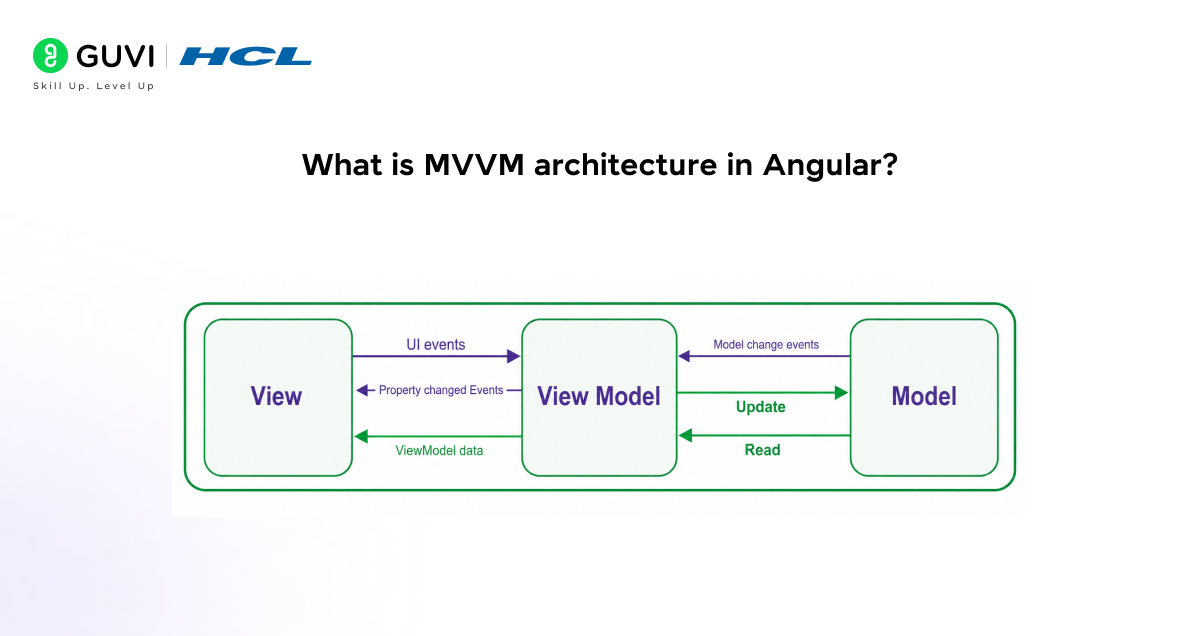
Let’s clearly understand the MVVM architecture in Angular in a simple, structured way before looking at the flow.
The MVVM (Model–View–ViewModel) architecture is a design pattern in Angular that separates UI, logic, and data handling. It helps make the application more organised, scalable, and easy to maintain by clearly dividing responsibilities across layers.
a. View
- The View is the UI layer (what the user sees on the screen).
- It sends UI events (such as button clicks and input changes) to the View Model.
- It also receives PropertyChanged events from the View Model to update the UI.
b. View Model
- The View Model acts as a middle layer between the View and Model.
- It receives UI events from the View and processes them.
- It sends Model Change Events to the Model when data needs updating.
- It also sends ViewModel Data back to the View to update the display.
c. Model
- The Model encapsulates the application’s data and business logic.
- It receives Update requests from the View Model.
- It performs data operations and sends back read responses to the View Model.
Complete Flow (Step-by-Step)
- View → View Model: sends UI events
- View Model → Model: sends Model change events
- Model → View Model: sends back Read data
- View Model → View: sends ViewModel data updates
- View Model → View: triggers Property changed events for UI refresh
12. How do you create and use a custom directive in Angular?
In Angular, a custom directive is used to change the behaviour or appearance of a DOM element.
You create it using the @Directive decorator and then apply it to HTML elements using a selector.
First, you create a directive class and define what it should do. Then you register it in a module so Angular can recognise it. After that, you can use it like a normal HTML attribute in your template.
Example: Custom Directive (Change Background Colour on Hover)
import { Directive, ElementRef, HostListener } from ‘@angular/core’;
@Directive({
selector: ‘[appHighlight]’
})
export class HighlightDirective {
constructor(private el: ElementRef) {}
@HostListener(‘mouseenter’) onMouseEnter() {
this.el.nativeElement.style.backgroundColor = ‘yellow’;
}
@HostListener(‘mouseleave’) onMouseLeave() {
this.el.nativeElement.style.backgroundColor = ”;
}
}
How to use it in HTML
<p appHighlight>
Hover over this text to see the effect
</p>
Explanation:
- @Directive: Defines a custom directive.
- selector: Name used in HTML like an attribute.
- ElementRef: Gives direct access to the DOM element.
- HostListener: Listens for events such as mouseenter and mouseleave.
- When the user hovers, the background changes dynamically.
13. What is data binding, and what are its types in Angular?
Data binding in Angular is a mechanism that connects the application data (component logic) with the user interface (HTML template).
It allows automatic synchronisation of data between the component and the view, so when the data changes in the component, the UI updates automatically, and when the user interacts with the UI, the component data can also be updated.
These are the following types of data binding in Angular:
- Interpolation – Used to display component data in the HTML template using {{ }} syntax to show dynamic values.
- Property Binding – Binds component properties to HTML element properties using square brackets [] to control element behaviour.
- Event Binding – Handles user events like clicks or keypresses using parentheses () to call methods in the component.
- Two-way Binding – Combines property binding and event binding using [( )] syntax to keep data in sync between component and view.
14. How does Angular handle change detection in components?
Angular handles change detection by keeping component data and the DOM (view) in sync. Whenever an event occurs, such as a user action, HTTP response, or timer update, Angular runs change detection to check if any data has changed.

If changes are detected, Angular automatically updates the view so the UI always reflects the application’s latest state.
Once that is done, Angular uses a system called Zone.js to detect asynchronous operations such as clicks, API calls, and setTimeout.
After detecting such changes, Angular starts the change detection cycle from the root component and checks all child components.
It compares the current state with the previous state and updates only the parts of the DOM that have changed, making the process efficient and fast.
15. How do you implement HTTP GET and POST requests using HttpClient?
In Angular, HttpClient is used to communicate with a backend server to send and receive data. To use it, we first import HttpClientModule in the main module and then inject HttpClient into a service or component using dependency injection.
After that, we can use methods like GET to fetch data and POST to send data. These methods return an Observable, which we subscribe to to receive the response.
Example: HTTP GET and POST using HttpClient
import { Injectable } from ‘@angular/core’;
import { HttpClient } from ‘@angular/common/http’;
import { Observable } from ‘rxjs’;
@Injectable({
providedIn: ‘root’
})
export class ApiService {
constructor(private http: HttpClient) {}
// GET request
getUsers(): Observable<any> {
return this.http.get(‘https://jsonplaceholder.typicode.com/users’);
}
// POST request
addUser(data: any): Observable<any> {
return this.http.post(‘https://jsonplaceholder.typicode.com/users’, data);
}
}
Explanation:
- First, we import and use HttpClientModule so Angular can enable HTTP communication. Then we create a service and inject HttpClient using dependency injection.
- The GET request is used to fetch data from the server using http.get(), while the POST request is used to send data using http.post() with a data object.
- Both methods return an Observable, which we subscribe to in the component to handle the response
16. What is the difference between Observables and Promises in Angular?
| Features | Observables | Promises |
| Data Handling | Can handle multiple values over time (stream of data). | Handles only one value (success or failure). |
| Execution | Lazy execution – starts only when subscribed. | Eager execution – starts immediately when created. |
| Cancellation | Can be cancelled using unsubscribe(). | Cannot be cancelled once started. |
| Operators | Supports powerful RxJS operators like map, filter, and merge. | Does not support advanced operators. |
| Use Case | Used for HTTP requests, real-time data, and event handling. | Used for simple async tasks like single API calls. |
17. How do you create reusable components in Angular?
Reusable components in Angular are designed to be used in multiple places without rewriting the same logic.
This is done by making the component generic, using @Input() to pass data into it and @Output() to send data out.
Once created, the component can be used anywhere in the application by its selector.
Example: Reusable Child Component
import { Component, Input, Output, EventEmitter } from ‘@angular/core’;
@Component({
selector: ‘app-user-card’,
templateUrl: ‘./user-card.component.html’
})
export class UserCardComponent {
@Input() userName: string = ”;
@Input() userRole: string = ”;
@Output() userClicked = new EventEmitter<string>();
onClick() {
this.userClicked.emit(this.userName);
}
}
HTML (Child Component)
<div (click)=”onClick()”>
<h3>{{ userName }}</h3>
<p>{{ userRole }}</p>
</div>
Usage in Parent Component
<app-user-card
[userName]=”‘Abhishek'”
[userRole]=”‘Developer'”
(userClicked)=”handleClick($event)”>
</app-user-card>
Explanation:
- A reusable component is designed to be used in multiple parts of an application with different data. In this example, we created a UserCardComponent that displays user details.
- We used @Input() to pass data like userName and userRole from the parent component. We also used @Output() with EventEmitter to send events back to the parent when the component is clicked.
- This makes the component flexible, reusable, and maintainable, because the same component can be used for different users without changing its internal code.
18. What is dependency injection, and how does it work in Angular?
Angular Modules (NgModule) are a fundamental building block in Angular applications. They are used to organise an application into functional blocks by grouping related components, directives, pipes, and services together.
Every Angular application has at least one module called the root module (AppModule), which is responsible for bootstrapping the application and connecting all parts together.
Modules help in structuring large applications by dividing them into smaller, manageable pieces. They also support lazy loading, which improves performance by loading only the modules needed.
In addition, Angular modules help control the scope of dependency injection, making the application more modular, scalable, and maintainable.
C. Advanced Level Angular Questions
19. How does Angular implement zone-based change detection using Zone.js, and what are its limitations?
Angular uses Zone.js to track all asynchronous operations, such as events, promises, and HTTP calls. When any async task completes, Zone.js notifies Angular, which then runs the change detection cycle to check for updated data and refresh the UI. This allows Angular to automatically update the view without manual intervention.
However, this approach can incur performance overhead because change detection runs frequently even when no changes are needed. In large applications, this may slow things down. To optimise this, Angular provides strategies like OnPush change detection to reduce unnecessary checks.
20. How does Angular’s Ivy compiler improve rendering and performance compared to the View Engine?
Angular’s Ivy compiler improves performance by compiling each component independently, leveraging locality, resulting in faster builds and smaller bundle sizes. It also improves tree-shaking by removing unused code during compilation, making applications lighter.
Compared to the older View Engine, Ivy generates more efficient code and reduces compilation complexity. This results in better runtime performance, faster debugging, and improved scalability for Angular applications.
21. What is the internal working of the Angular Dependency Injection tree hierarchy, and how does it resolve tokens?
Angular Dependency Injection (DI) works using a hierarchical injector system. When a service is requested, Angular first looks in the component-level injector, then moves up to parent injectors, and finally reaches the root injector. This creates a tree-like structure in which services can be shared or isolated based on where they are provided.
Token resolution is handled by the provider configuration. Angular matches the requested token (service name or injection token) with the registered provider in the injector tree. If found, it returns the existing instance; otherwise, it creates a new one based on the provider scope (e.g., a singleton at the root level or multiple instances at the component level).
22. How does Angular handle AOT (Ahead-of-Time) compilation, and what are its optimisation benefits?
Angular’s AOT compilation converts Angular HTML templates and TypeScript code into efficient JavaScript before the browser loads the application. This compilation occurs during the build process, meaning the browser receives precompiled code rather than compiling templates at runtime.
This improves performance by reducing application load time and the size of the Angular framework code in the browser. It also helps detect errors early during build time, improves security by removing template injection risks, and results in a more optimised, production-ready application.
23. How does Angular manage memory leaks in Observables, and what role do AsyncPipe and Subscription management play internally?
Angular manages memory leaks in Observables mainly by ensuring that subscriptions are properly cleaned up when a component is destroyed. If subscriptions are not unsubscribed, they continue running in the background, causing memory leaks and performance issues.
To handle this, Angular provides tools like the AsyncPipe, which automatically subscribes and unsubscribes from Observables in templates. Developers can also manually manage subscriptions using unsubscribe() or operators like takeUntil.
These mechanisms ensure efficient memory management and prevent unnecessary background processes.
D. Scenario-Based Angular Questions
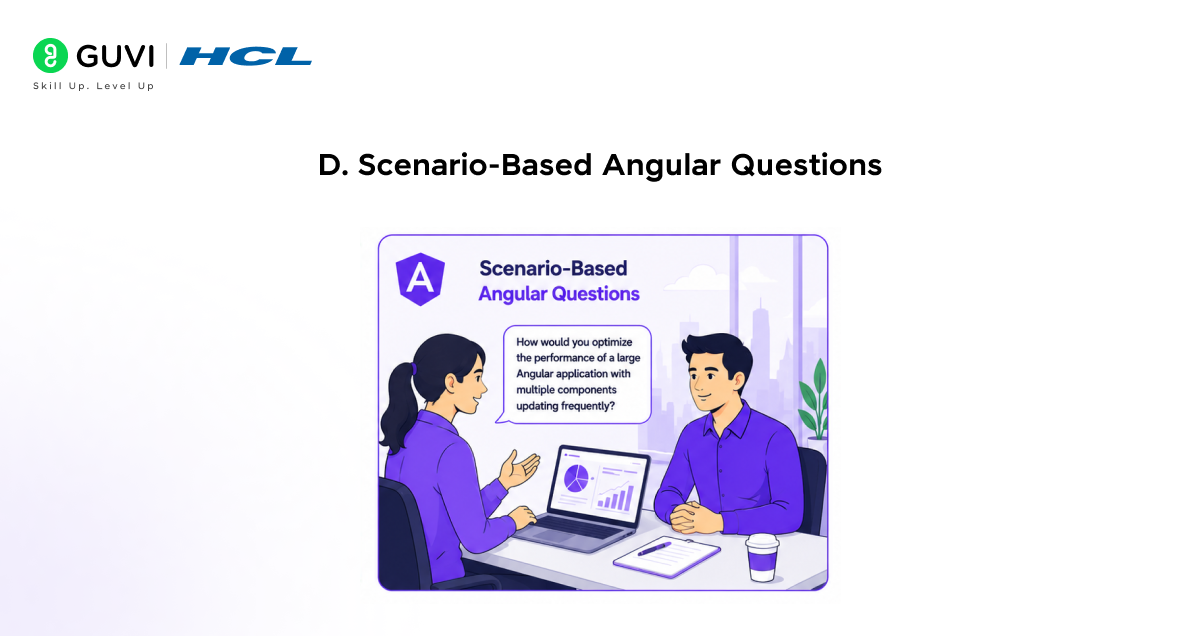
24. In a large Angular application, multiple components are updating frequently, causing slow UI performance. How would you optimise change detection and improve performance?
First, the focus is on reducing unnecessary change detection cycles in the application. This is done using the OnPush change detection strategy, which ensures Angular checks a component only when its @Input() values change, or a relevant event occurs. This immediately reduces unnecessary UI checks.
After that, list rendering can be optimised using *trackBy in ngFor, so Angular only updates changed items rather than re-rendering the entire list.
Next, move heavy computations from the template into the TypeScript logic to keep the UI layer lightweight. Finally, lazy-loading modules improve performance by loading only the required features instead of the entire application at once.
25. An Angular application is making multiple HTTP requests that depend on each other. How would you handle this efficiently using RxJS?
First, the dependency flow between API calls is identified to understand the correct sequence. Instead of nested subscriptions, RxJS operators are used to manage the flow cleanly.
switchMap or concatMap is used based on the requirement—either to cancel previous requests or to maintain strict order. When multiple requests need to run together, forkJoin is used to wait for all responses at once.
After structuring the flow, catchError is added to handle failures gracefully and prevent the entire stream from breaking.
26. A component is leaking memory after navigation due to active subscriptions. How would you identify and fix this issue in Angular?
Memory leaks are usually identified when subscriptions continue running even after the component is destroyed. This often leads to performance issues during navigation.
To fix this, subscriptions are properly cleaned using unsubscribe in ngOnDestroy to stop active streams.
A better approach is to use takeUntil with a Subject, which automatically completes all subscriptions when the component is destroyed. In addition, AsyncPipe is preferred wherever possible because it automatically manages subscription and unsubscription, reducing the risk of memory leaks.
Take your Angular skills to the next level with HCL GUVI’s Angular Advanced Course. Master advanced concepts like NGRX, RXJS, and API Integration while building scalable real-world applications. Upgrade your skills and become interview-ready with confidence!
Conclusion
Preparing for Angular interviews becomes much easier when you understand both the concepts and their real-world usage. These Angular Interview Questions and Answers covered beginner, intermediate, advanced, and scenario-based topics to help you improve your knowledge, build confidence, and perform better in Angular interviews in 2026.
FAQs
How much JavaScript knowledge is needed before learning Angular?
Basic concepts like functions, arrays, promises, and ES6 features are enough to get started.
What type of Angular projects should I add to my resume?
Projects like dashboards, e-commerce apps, or API-based applications are good choices.
How can I improve confidence during Angular interviews?
Practice explaining your projects and coding approach in simple words.
Which Angular topic usually feels difficult for beginners?
RxJS and dependency injection can feel confusing at first.
How do interviewers test practical Angular knowledge?
They usually ask about projects, API handling, debugging, and real coding situations.
What mistakes should I avoid in Angular interviews?
Avoid memorised answers and adding skills you cannot explain properly.
Success Stories














Did you enjoy this article?