


Javascript Articles
GraphQL with Strawberry Tutorial: Build Your First Python API
gRPC Tutorial: A Beginner's Guide to Building Fast, Modern APIs
Temporal Workflow Engine Tutorial: Build Reliable Workflows
Tauri 2.0 Desktop App Tutorial: Build Your First App Without the Bloat


Get In Touch For Details! Request More Information

What Is DOM Manipulation in JavaScript? Complete Beginner Guide With Examples [2026]
Sep 07, 2026 8 Min Read 13150 Views
(Last Updated)
Click a button and a menu opens. Add a product to your cart and the number beside the cart icon changes instantly. Submit a form incorrectly and an error message appears below the field without reloading the page.
JavaScript can create these interactions because it can access and modify the Document Object Model or DOM.
The DOM gives JavaScript a structured representation of the webpage. Instead of treating HTML as one long piece of text, the browser represents its elements as objects arranged in a tree. JavaScript can then find these objects and change their content, attributes, styles or position.
DOM manipulation is therefore one of the first concepts you should understand after learning basic JavaScript.
This guide explains what DOM manipulation is, how the DOM works, common DOM methods, event handling, DOM traversal, practical examples and best practices for writing safer and cleaner JavaScript.
Quick Answer: DOM manipulation is the process of using JavaScript and browser DOM APIs to read, create, update, move or remove elements on a webpage. It allows developers to change a page dynamically in response to user actions or application data without rebuilding the entire HTML document.
- Select elements: Use methods such as
getElementById(),querySelector()andquerySelectorAll(). - Change content and styles: Update text, classes, attributes and CSS properties.
- Create or remove elements: Add new DOM nodes or delete existing ones.
- Handle interactions: Use event listeners for clicks, typing, form submissions and other browser events.
- Build dynamic interfaces: Update menus, forms, lists, dashboards and other UI components in real time.
Table of contents
- What Is DOM Manipulation?
- Is the DOM Part of JavaScript?
- How Does the DOM Work?
- Why Is DOM Manipulation Important?
- Updating Content
- Showing and Hiding Elements
- Building Dynamic Lists
- Form Validation
- Responding to User Actions
- DOM Selector Methods: Quick Comparison
- Selecting DOM Elements
- Changing Text and Content
- Changing CSS With JavaScript
- Modifying HTML Attributes
- Creating New DOM Elements
- Removing and Replacing Elements
- How Event Handling Works With DOM Manipulation
- What Is Event Delegation?
- DOM Traversal: Moving Between Elements
- parentElement
- children
- firstElementChild
- nextElementSibling
- previousElementSibling
- closest()
- Practical DOM Manipulation Example
- HTML
- JavaScript
- DOM Manipulation With Forms
- DOM Manipulation vs Virtual DOM
- DOM Manipulation and jQuery
- Best Practices for DOM Manipulation
- Use Clear Selectors
- Prefer textContent for Plain Text
- Be Careful With innerHTML
- Use classList for Styling Changes
- Store Frequently Used Elements
- Use Event Delegation Where Appropriate
- Keep Accessibility in Mind
- Optimise for Readability Before Micro-Optimising
- Common DOM Manipulation Mistakes
- Using innerHTML for Everything
- Assuming an Element Always Exists
- Mixing Too Much Styling Into JavaScript
- Adding Too Many Individual Event Listeners
- Forgetting preventDefault()
- Manipulating Elements Before They Exist
- Is DOM Manipulation Still Important in Modern Web Development?
- How to Learn DOM Manipulation as a Beginner
- Conclusion
- FAQs
- What is DOM manipulation in JavaScript?
- What is an example of DOM manipulation?
- Why is DOM manipulation used?
- What are the most common DOM manipulation methods?
- What is the difference between DOM and HTML?
What Is DOM Manipulation?
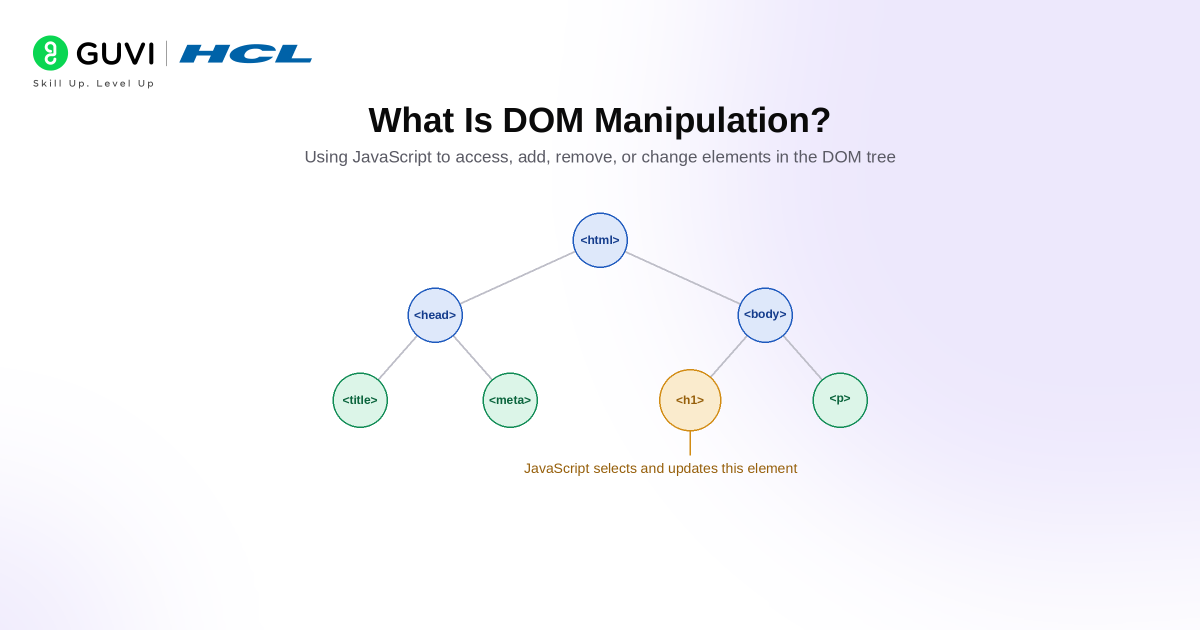
The Document Object Model (DOM) is a programming interface for HTML, XML and similar documents. A browser represents a webpage as a logical tree made up of nodes and objects. JavaScript can use DOM APIs to access and modify those objects.
DOM manipulation means changing this document structure through code.
For example, JavaScript can:
- Change a heading
- Hide or show an element
- Add a CSS class
- Update an image
- Create a new list item
- Remove an element
- Change an attribute
- React to a button click
- Update form validation messages
Consider this HTML:
<h1 id="title">Welcome</h1>
JavaScript can select and change the heading:
const title = document.getElementById("title");
title.textContent = "Welcome to JavaScript";
The original HTML does not need to be manually rewritten. JavaScript accesses the DOM representation and updates the page.
If you are still building your JavaScript foundation, follow this complete JavaScript roadmap for frontend development before moving into advanced browser APIs.
Is the DOM Part of JavaScript?
Not exactly.
JavaScript is the programming language. The DOM is a Web API provided by the browser.
The browser exposes objects such as:
document
window
Element
Node
Event
JavaScript can interact with these browser APIs.
This distinction explains why JavaScript can also run outside a traditional webpage environment, such as Node.js, where a browser DOM is not automatically available.
A simple way to remember it is:
HTML creates the page structure → Browser creates the DOM → JavaScript interacts with the DOM
How Does the DOM Work?
Suppose a webpage contains:
<!DOCTYPE html>
<html>
  <head>
    <title>My Website</title>
  </head>
  <body>
    <h1>Hello</h1>
    <p>Welcome to my website.</p>
  </body>
</html>
The browser interprets this document as a tree-like structure:
Document
└── html
    ├── head
    │   └── title
    │       └── "My Website"
    └── body
        ├── h1
        │   └── "Hello"
        └── p
            └── "Welcome to my website."
Each element becomes a node that JavaScript can access.
For example:
documentrepresents the document.<html>is the document element.<head>and<body>are elements inside<html>.<h1>and<p>are elements inside<body>.- The text inside an element is represented by text nodes.
Attributes such as href, class and id belong to an element, but they are not child nodes in the main DOM tree. MDN notes that attributes are associated with elements separately rather than existing as children in the document tree.
Understanding HTML structure first makes DOM relationships much easier. You can review the HTML tutorial for web development if you need a refresher.
Why Is DOM Manipulation Important?
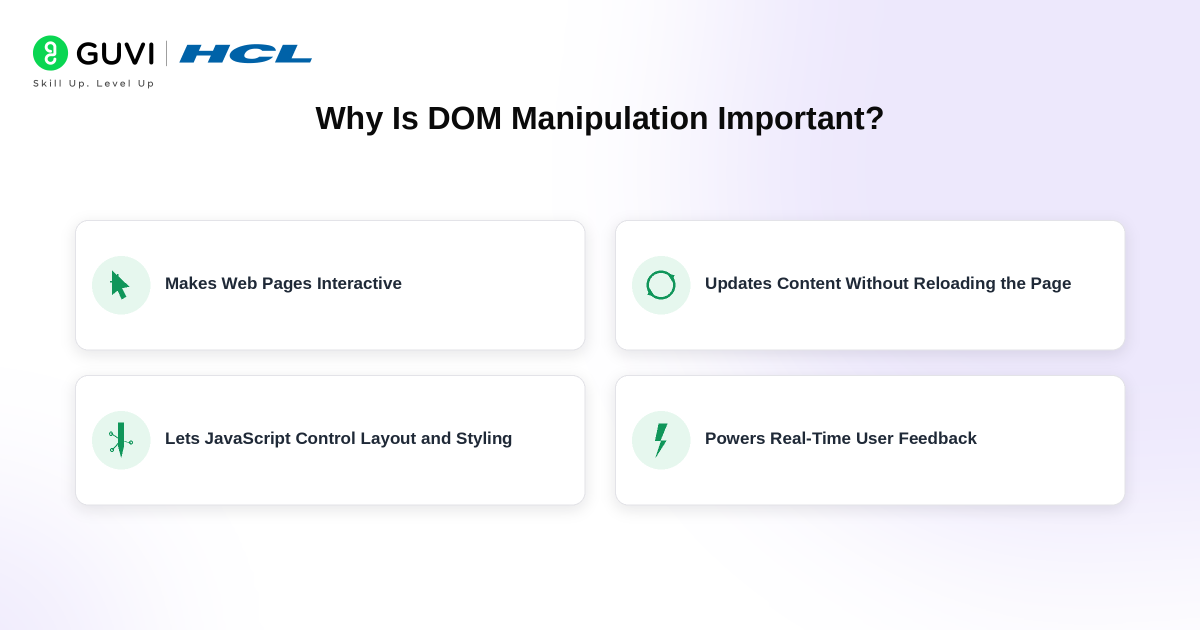
A page written only with HTML and CSS can display information, but JavaScript and DOM manipulation allow that interface to respond to users.
DOM manipulation is commonly used for:
1. Updating Content
Applications can change text or other content when data changes.
Examples include:
- Shopping cart totals
- Notification counters
- Form messages
- Live scores
- Dashboard values
2. Showing and Hiding Elements
Dropdown menus, popups, accordions and modal windows often rely on DOM changes.
3. Building Dynamic Lists
A task manager can add a new task immediately after the user submits a form.
4. Form Validation
JavaScript can display validation messages beside incorrect fields.
5. Responding to User Actions
DOM events allow the application to react to:
- Clicks
- Typing
- Scrolling
- Mouse movement
- Form submission
- Keyboard input
These interactions are fundamental to modern frontend development.
DOM Selector Methods: Quick Comparison
Before changing an element, JavaScript normally needs to select it.
| Method | What It Selects | Returns | Live or Static? |
|---|---|---|---|
getElementById() | Element matching an ID | Element or null | Single element |
querySelector() | First element matching a CSS selector | Element or null | Single element |
querySelectorAll() | All elements matching a CSS selector | NodeList | Static |
getElementsByClassName() | Elements matching a class | HTMLCollection | Live |
getElementsByTagName() | Elements matching a tag | HTMLCollection | Live |
getElementsByName() | Elements matching a name attribute | NodeList | Live |
For modern frontend code, querySelector() and querySelectorAll() are especially convenient because they accept familiar CSS selector syntax.
If CSS selectors are unfamiliar, read this guide to CSS selectors before practising DOM queries.
1. Selecting DOM Elements
Using getElementById()
Use an element’s unique ID:
<h2 id="message">Hello</h2>
const message = document.getElementById("message");
Using querySelector()
querySelector() returns the first element matching a CSS selector.
const button = document.querySelector(".submit-button");
You can use IDs, classes, attributes or other CSS selectors:
document.querySelector("#header");
document.querySelector(".card");
document.querySelector("input[type='email']");
Using querySelectorAll()
Use this when multiple elements need to be selected:
const cards = document.querySelectorAll(".card");
You can then iterate through the NodeList:
cards.forEach((card) => {
  console.log(card.textContent);
});
2. Changing Text and Content
One of the simplest DOM operations is updating text.
<p id="status">Waiting...</p>
const status = document.querySelector("#status");

status.textContent = "Completed";
textContent vs innerHTML
Both can change an element’s contents, but they behave differently.
element.textContent = "Hello";
inserts plain text.
element.innerHTML = "<strong>Hello</strong>";
parses the string as HTML.
innerHTML should be used carefully. Inserting untrusted user-controlled content through HTML-parsing APIs can create cross-site scripting vulnerabilities. MDN identifies innerHTML as a potential injection sink when unsafe input is inserted into the DOM.
For normal text, prefer:
element.textContent = userInput;
rather than:
element.innerHTML = userInput;
3. Changing CSS With JavaScript
JavaScript can modify styles directly:
const box = document.querySelector(".box");

box.style.backgroundColor = "black";
box.style.padding = "20px";
However, adding and removing CSS classes is usually cleaner.
box.classList.add("active");
Remove a class:
box.classList.remove("active");
Toggle a class:
box.classList.toggle("dark-mode");
Check whether a class exists:
box.classList.contains("active");
This keeps visual styling inside CSS instead of spreading large amounts of design logic throughout JavaScript.
4. Modifying HTML Attributes
JavaScript can read or modify element attributes.
Consider:
<img id="profile" src="default.jpg" alt="Profile image">
Change an attribute:
const image = document.querySelector("#profile");

image.setAttribute("src", "user-photo.jpg");
Read an attribute:
const source = image.getAttribute("src");
Remove one:
image.removeAttribute("title");
Some common properties can also be accessed directly:
image.src = "user-photo.jpg";
image.alt = "Vaishali's profile photo";
5. Creating New DOM Elements
JavaScript can generate elements that were not originally present in the HTML.
Create an element:
const item = document.createElement("li");
Add content:
item.textContent = "Learn DOM manipulation";
Insert it into the page:
const list = document.querySelector("#task-list");

list.append(item);
You can also use:
element.append()
element.prepend()
element.before()
element.after()
depending on where the new content should appear.
6. Removing and Replacing Elements
An existing element can be removed with:
const notification = document.querySelector(".notification");

notification.remove();
Replace a child element:
parent.replaceChild(newElement, oldElement);
Or replace all children:
container.replaceChildren(newElement);
These operations are useful when interfaces need to update sections based on changing application state.
How Event Handling Works With DOM Manipulation
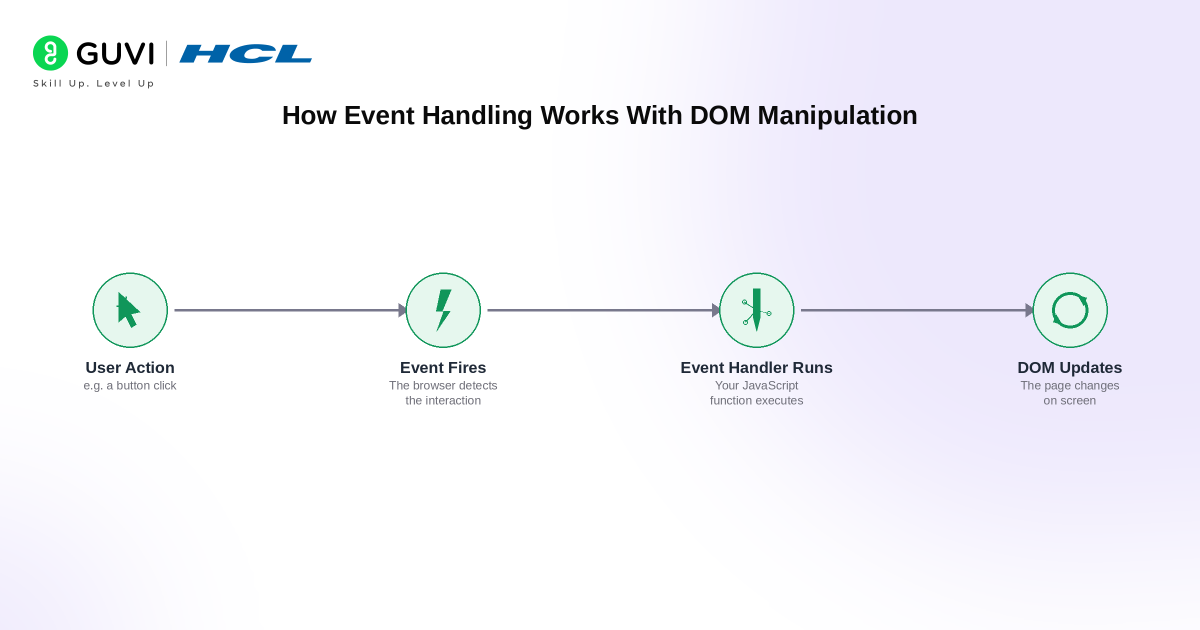
A webpage becomes truly interactive when DOM manipulation is combined with events.
Events describe something that happens inside the browser.
Common events include:
clickinputchangesubmitkeydownmouseoverscroll
Suppose you have:
<button id="changeButton">Change Text</button>
<p id="message">Original text</p>
JavaScript can listen for the click:
const button = document.querySelector("#changeButton");
const message = document.querySelector("#message");

button.addEventListener("click", () => {
  message.textContent = "The text has changed!";
});
The sequence is:
- JavaScript selects the button.
addEventListener()listens for a click.- The callback runs when the click occurs.
- JavaScript changes the paragraph in the DOM.
- The browser displays the updated content.
This pattern appears throughout frontend applications.
What Is Event Delegation?
Imagine a list containing 100 buttons.
Instead of attaching 100 separate listeners, you can sometimes place one listener on their parent.
const list = document.querySelector("#task-list");

list.addEventListener("click", (event) => {
  if (event.target.matches(".delete-button")) {
    event.target.closest("li").remove();
  }
});
This technique is called event delegation.
It works because many events propagate through ancestor elements.
Event delegation is especially useful when elements are created dynamically after the page has loaded.
DOM Traversal: Moving Between Elements
DOM manipulation often involves finding elements relative to another element.
Useful properties and methods include:
parentElement
element.parentElement;
Returns the parent element.
children
element.children;
Returns child elements.
firstElementChild
element.firstElementChild;
Returns the first child element.
nextElementSibling
element.nextElementSibling;
Returns the next sibling element.
previousElementSibling
element.previousElementSibling;
Returns the previous sibling.
closest()
closest() searches the element and its ancestors for a matching selector.
const card = button.closest(".product-card");
This is particularly useful in event-driven interfaces.
Practical DOM Manipulation Example
Consider a simple task list.

HTML
<input id="taskInput" type="text" placeholder="Enter a task">
<button id="addTask">Add Task</button>

<ul id="taskList"></ul>
JavaScript
const input = document.querySelector("#taskInput");
const button = document.querySelector("#addTask");
const list = document.querySelector("#taskList");

button.addEventListener("click", () => {
  const task = input.value.trim();

  if (!task) {
    return;
  }

  const listItem = document.createElement("li");
  listItem.textContent = task;

  list.append(listItem);

  input.value = "";
});
Several DOM concepts appear in this small example:
querySelector()selects elements.addEventListener()responds to the user..valuereads form input.createElement()creates a node.textContentadds safe text.append()places the element in the document.
This is why small JavaScript projects are useful when learning DOM manipulation. They combine several concepts instead of practising methods in isolation.
DOM Manipulation With Forms
Forms are another common use case.
Consider:
<form id="signupForm">
  <input id="email" type="email">
  <button type="submit">Sign Up</button>
</form>

<p id="error"></p>
JavaScript:
const form = document.querySelector("#signupForm");
const email = document.querySelector("#email");
const error = document.querySelector("#error");

form.addEventListener("submit", (event) => {
  event.preventDefault();

  if (!email.value.trim()) {
    error.textContent = "Please enter your email address.";
    return;
  }

  error.textContent = "";
});
preventDefault() stops the browser’s normal form submission behaviour so JavaScript can handle the interaction first.
DOM Manipulation vs Virtual DOM
You may also encounter the term Virtual DOM while learning frameworks such as React.
They are not the same thing.
| DOM | Virtual DOM |
|---|---|
| Browser representation of the document | JavaScript representation used by some frameworks |
| Directly affects the webpage | Used to determine what should change |
| Provided by the browser | Implemented by a library or framework |
| Can be manipulated with native Web APIs | Framework handles many DOM updates |
When you write:
document.querySelector("#title").textContent = "Hello";
you are directly manipulating the browser DOM.
Frameworks may abstract much of this work, but understanding native DOM manipulation remains valuable because the browser ultimately renders DOM elements.
DOM Manipulation and jQuery
Older web-development tutorials frequently use jQuery for DOM manipulation.
For example, jQuery might use:
$("#title").text("Hello");
Modern browser APIs can perform the same task directly:
document.querySelector("#title").textContent = "Hello";
jQuery still exists and is used in older projects, but modern JavaScript provides many native APIs that previously required helper libraries.
If you encounter it while maintaining older websites, this guide to what jQuery is and how it works can help you understand the difference.
Best Practices for DOM Manipulation
Writing working DOM code is only the first step. Good frontend code should also remain readable, maintainable and secure.
1. Use Clear Selectors
Prefer selectors that clearly identify the element’s role.
Instead of relying on fragile nested selectors such as:
document.querySelector("body div section div button");
use a meaningful class or ID.
document.querySelector(".checkout-button");
2. Prefer textContent for Plain Text
If you only need to insert text:
element.textContent = value;
This avoids unnecessarily parsing the value as HTML.
3. Be Careful With innerHTML
Never insert untrusted user input directly into innerHTML.
HTML injection can lead to cross-site scripting attacks. Use safe text insertion or properly sanitize trusted HTML when HTML markup is genuinely required.
4. Use classList for Styling Changes
Instead of changing ten individual style properties in JavaScript, define a CSS class and toggle it:
menu.classList.toggle("open");
This creates a cleaner separation between behaviour and presentation.
5. Store Frequently Used Elements
If the same element is needed throughout a script, select it once:
const menu = document.querySelector("#menu");
Then reuse the reference.
6. Use Event Delegation Where Appropriate
Dynamic lists, menus and tables can often share one event listener on a parent rather than attaching listeners to every child.
7. Keep Accessibility in Mind
DOM changes should remain understandable to keyboard and assistive-technology users.
For example:
- Use real
<button>elements for actions. - Maintain visible focus states.
- Update appropriate ARIA attributes when expanding components.
- Do not rely entirely on colour or animation to communicate a state change.
8. Optimise for Readability Before Micro-Optimising
DocumentFragment can be useful when assembling a group of nodes before adding them to the document:
const fragment = document.createDocumentFragment();

for (let i = 1; i <= 5; i++) {
  const item = document.createElement("li");
  item.textContent = `Item ${i}`;

  fragment.append(item);
}

list.append(fragment);
However, MDN notes that the performance benefit of DocumentFragment is sometimes overstated and recommends prioritising readable code rather than assuming it is automatically faster.
Build strong JavaScript and full-stack development skills to understand DOM manipulation with confidence through HCL GUVI’s Full Stack Development Course. Learn HTML, CSS, JavaScript, frontend development, backend APIs, databases, and real-world web projects through structured training designed for beginners and aspiring full-stack developers in 2026.
Common DOM Manipulation Mistakes
1. Using innerHTML for Everything
innerHTML is convenient, but it is unnecessary for plain-text updates and introduces additional security considerations.
2. Assuming an Element Always Exists
This can fail:
document.querySelector("#button").addEventListener("click", handler);
if #button does not exist.
A safer pattern is:
const button = document.querySelector("#button");

if (button) {
  button.addEventListener("click", handler);
}
3. Mixing Too Much Styling Into JavaScript
Large blocks of:
element.style...
make code difficult to maintain. Prefer CSS classes.
4. Adding Too Many Individual Event Listeners
Large dynamic collections may benefit from event delegation.
5. Forgetting preventDefault()
Forms and links have default browser behaviour. When JavaScript needs to control that behaviour, event.preventDefault() may be necessary.
6. Manipulating Elements Before They Exist
If a script runs before the relevant HTML is parsed, selectors may return null.
Placing scripts appropriately or waiting for the document to be ready prevents this problem.
Is DOM Manipulation Still Important in Modern Web Development?
Yes.
Frameworks such as React, Vue and Angular reduce the amount of direct DOM manipulation developers write manually, but the underlying browser still works with DOM nodes.
Understanding the DOM helps developers understand:
- Event propagation
- Browser rendering
- Form behaviour
- Accessibility
- Element relationships
- Debugging
- Framework behaviour
- Client-side security
GUVI’s current web development roadmap also places DOM manipulation and event handling among the core JavaScript concepts frontend developers should learn.
How to Learn DOM Manipulation as a Beginner
A good learning sequence is:
- Learn HTML elements and attributes.
- Understand JavaScript variables, functions and arrays.
- Practise selecting DOM elements.
- Change text and CSS classes.
- Create and remove elements.
- Learn events and event listeners.
- Practise forms.
- Learn DOM traversal.
- Build small interactive projects.
- Move towards APIs and frontend frameworks.
Projects are where DOM concepts start to make sense.
Try building:
- To-do list
- Counter
- FAQ accordion
- Modal window
- Image gallery
- Form validator
- Dark mode toggle
- Quiz
- Shopping cart interface
- Search filter
Conclusion
DOM manipulation is what turns basic HTML pages into interactive experiences.
The browser converts the document into a tree of objects. JavaScript can then select those objects, change their content, modify classes and attributes, create new elements, remove old ones and respond to events.
You do not need to memorise every DOM method at once.
Start with querySelector(), textContent, classList, createElement(), append() and addEventListener(). Build small projects with them. Once these operations feel natural, concepts such as event delegation, DOM traversal, dynamic forms and frontend frameworks become much easier to understand.
DOM manipulation remains a fundamental frontend skill because even when a framework handles many updates for you, the browser ultimately renders and interacts with the DOM.
FAQs
What is DOM manipulation in JavaScript?
DOM manipulation is the process of using JavaScript and DOM APIs to access and change a webpage’s document structure. Developers can modify text, attributes, styles and elements or respond to user interactions such as clicks and form submissions.
What is an example of DOM manipulation?
Changing a heading after a button click is a simple example:const heading = document.querySelector("h1"); heading.textContent = "New Heading";
JavaScript selects the existing <h1> node and changes the text represented in the DOM.
Why is DOM manipulation used?
DOM manipulation makes webpages interactive and dynamic. It allows applications to update only the parts of the interface that need to change instead of requiring developers to manually rewrite the HTML or reload the entire page for every visual update.
What are the most common DOM manipulation methods?
Common methods and properties include getElementById(), querySelector(), querySelectorAll(), createElement(), append(), remove(), setAttribute(), classList, textContent and addEventListener().
Beginners should first become comfortable with selecting elements, changing content, creating nodes and handling events.
What is the difference between DOM and HTML?
HTML is the markup written in the source document. The DOM is the browser’s object-based representation of that document in memory.
For example, HTML may initially contain a paragraph saying “Hello.” JavaScript can change the DOM so that the visible paragraph says “Welcome.” The browser displays the updated DOM even though the original HTML source sent by the server may remain unchanged.
Success Stories

About the Author
Vaishali
I'm a seasoned writer with four years of experience across technical, non-technical, and just about every genre or niche you can imagine. Adaptable and curious, I enjoy exploring new topics and making information engaging and easy to understand. Fueled by a steady stream of tea, I approach each project with creativity, reliability, and genuine enthusiasm for storytelling.
View all posts by Vaishali
Connect with me @














Did you enjoy this article?