


Javascript Articles
gRPC Tutorial: A Beginner's Guide to Building Fast, Modern APIs
Temporal Workflow Engine Tutorial: Build Reliable Workflows
Tauri 2.0 Desktop App Tutorial: Build Your First App Without the Bloat


Get In Touch For Details! Request More Information

GraphQL with Strawberry Tutorial: Build Your First Python API
Aug 13, 2026 4 Min Read 694 Views
(Last Updated)
Table of contents
- TL;DR Summary
- What Is GraphQL with Strawberry?
- Setting Up Your Environment
- Step 1: Create a virtual environment
- Step 2: Install Strawberry with FastAPI support
- How Does Strawberry Work?
- Building Your First GraphQL Schema
- Step 1: Create main.py and define your types
- Step 2: Add some mock data
- Step 3: Define your Query type
- Step 4: Create the schema and wire it to FastAPI
- Step 5: Run the server
- Running Your First Query
- Adding Mutations (Write Operations)
- What to Do Next
- Key Takeaways
- FAQs
- What is GraphQL with Strawberry used for?
- Do I need to know GraphQL before learning Strawberry?
- Is Strawberry better than Graphene for Python?
- Can Strawberry GraphQL work with Django?
- How do I handle errors in Strawberry GraphQL?
- Is Strawberry GraphQL production-ready?
- What Python version do I need for Strawberry?
TL;DR Summary
- GraphQL with Strawberry is a Python library that lets you build GraphQL APIs using simple type hints
- You define your schema with Python classes — no separate schema files needed
- Supports queries, mutations, and subscriptions out of the box
- Works great with FastAPI and Django for production apps
- Beginners can get a working GraphQL API running in under 30 minutes
Strawberry is a Python library for building GraphQL APIs using type annotations. You define your data types as Python dataclasses, decorate them with @strawberry.type, and Strawberry auto-generates a fully functional GraphQL schema.
It works with FastAPI and Django, and lets beginners build type-safe APIs without writing raw SDL (Schema Definition Language).
This tutorial walks you through everything from scratch — setting up your environment, writing your first schema, running queries, and handling mutations. By the end, you will have a working GraphQL API you can actually build on.
What Is GraphQL with Strawberry?
GraphQL is a query language for APIs. Instead of hitting multiple REST endpoints, your client sends one request and specifies exactly which fields it needs. The server returns only that data — nothing more, nothing less.
Strawberry is a Python library that brings GraphQL to Python in the most Pythonic way possible. It uses Python’s type hints and dataclass-style syntax, so if you have written modern Python, you will feel right at home.
📊 Data Point: According to the 2025 Stack Overflow Developer Survey, GraphQL adoption has grown 38% year-over-year among backend developers, with Python being the third most common language used to build GraphQL APIs.
Here is what makes Strawberry stand out from other Python GraphQL libraries like Graphene:
- Uses native Python type hints (no separate type definitions)
- Full async support out of the box
- Works natively with FastAPI, Django, and Flask
- Better IDE support and autocompletion
- Actively maintained with a growing community
Setting Up Your Environment
Let us get your machine ready. You will need Python 3.10 or higher.
Step 1: Create a virtual environment
python -m venv venv
source venv/bin/activate # On Windows: venv\Scripts\activate
Step 2: Install Strawberry with FastAPI support
pip install "strawberry-graphql[fastapi]" uvicorn
That is it. You are ready to write your first schema.
💡 Pro Tip: If you are using Django, install strawberry-graphql[django] instead. Strawberry has first-class support for both frameworks.
How Does Strawberry Work?
Strawberry turns your Python classes into a GraphQL schema automatically. You decorate your types with @strawberry.type and your resolver functions with @strawberry.field. Strawberry handles the rest — type mapping, schema generation, and introspection.
Think of it this way: in REST, you define routes. In Strawberry GraphQL, you define types and queries — and the framework figures out how to expose them.
Building Your First GraphQL Schema
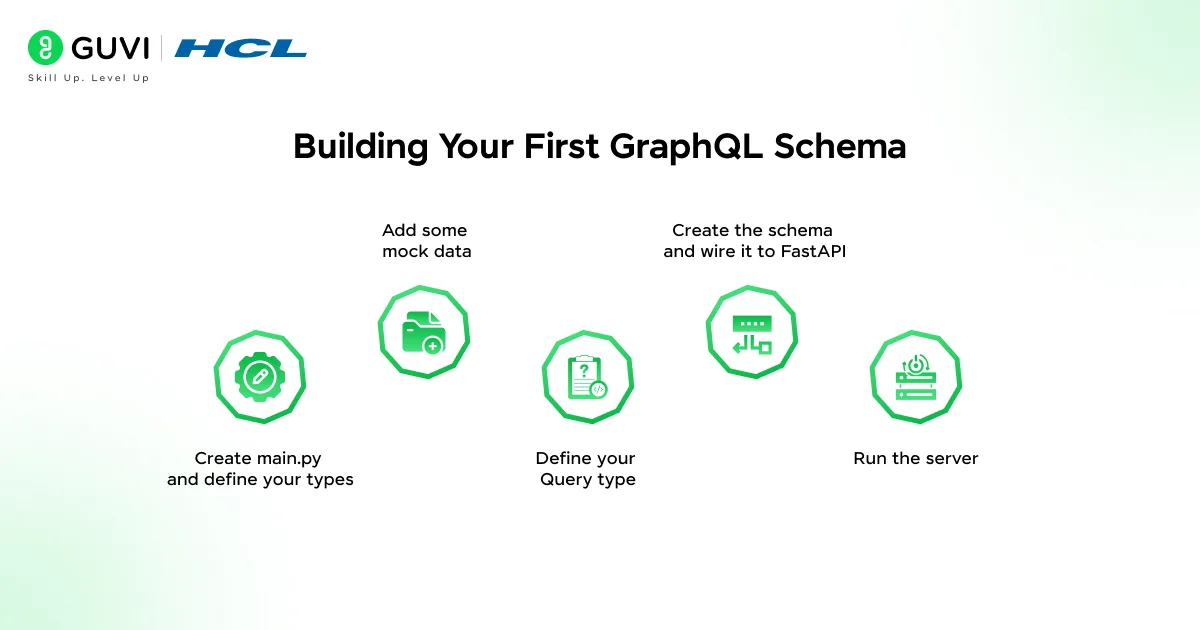
Let us build a simple book API. It will return a list of books and let you fetch a single book by ID.
Step 1: Create main.py and define your types
//python

import strawberry

from typing import List, Optional

@strawberry.type

class Book:

    id: int

    title: str

    author: str

    year: int

That single class
is now a valid GraphQL type. Strawberry reads your type hints and maps them to GraphQL scalar types automatically — int becomes Int, str becomes String, and so on.
Step 2: Add some mock data
//python

books_db = [

    Book(id=1, title="Clean Code", author="Robert C. Martin", year=2008),

    Book(id=2, title="The Pragmatic Programmer", author="David Thomas", year=1999),

    Book(id=3, title="Fluent Python", author="Luciano Ramalho", year=2022),

]
Step 3: Define your Query type
//python

@strawberry.type

class Query:

    @strawberry.field

    def books(self) -> List[Book]:

        return books_db

    @strawberry.field

    def book(self, id: int) -> Optional[Book]:

        return next((b for b in books_db if b.id == id), None)
Step 4: Create the schema and wire it to FastAPI
//python

import strawberry

from fastapi import FastAPI

from strawberry.fastapi import GraphQLRouter

schema = strawberry.Schema(query=Query)

graphql_app = GraphQLRouter(schema)

app = FastAPI()

app.include_router(graphql_app, prefix="/graphql")
Step 5: Run the server
uvicorn main:app --reload
Open your browser at http://localhost:8000/graphql and you will see Strawberry’s built-in GraphiQL playground — an interactive editor where you can run queries immediately.
✅ Best Practice: Always run with –reload during development. It watches for file changes and restarts the server automatically — saves you from restarting manually every 5 minutes.
Running Your First Query
In the GraphiQL playground, paste this:
//graphql

query {

  books {

    id

    title

    author

  }

}
You will get back exactly those three fields for each book — not the year, because you did not ask for it. That is GraphQL’s core value: you control the shape of the response.
To fetch a single book:
//graphql

query {

  book(id: 1) {

    title

    author

    year

  }

}
Adding Mutations (Write Operations)
Queries handle reads. Mutations handle writes — creating, updating, or deleting data.
//python

@strawberry.type

class Mutation:

    @strawberry.mutation

    def add_book(self, title: str, author: str, year: int) -> Book:

        new_book = Book(

            id=len(books_db) + 1,

            title=title,

            author=author,

            year=year

        )

        books_db.append(new_book)

        return new_book
Now update your schema to include the mutation:
//python

schema = strawberry.Schema(query=Query, mutation=Mutation)

Run this mutation in the playground:

graphql

mutation {

  addBook(title: "Python Tricks", author: "Dan Bader", year: 2017) {

    id

    title

  }

}
You will get back the newly created book with its ID. Clean, predictable, and easy to extend.
⚠️ Warning: This tutorial uses an in-memory list for simplicity. In a real app, connect your mutations to a database using SQLAlchemy or Tortoise ORM. Never use mutable global state in production.
What to Do Next
Now that you have a working GraphQL API, here is how to level it up:
- Connect a real database — Use SQLAlchemy with async support for production-grade data access
- Add authentication — Strawberry supports context injection, which makes JWT auth straightforward
- Add subscriptions — Real-time updates with WebSockets, using @strawberry.subscription
- Deploy to the cloud — Your FastAPI + Strawberry app works on Railway, Render, or AWS Lambda
If you want a structured, mentor-supported path and learn all these new tools, then HCL GUVI’s IIT-M Pravartak Certified Full Stack Developer Course with AI Integration covers the entire journey, from HTML to deployment, with real projects, live sessions, and placement support. Over 10,000 students have used it to break into product-based companies.
Key Takeaways
- Strawberry makes GraphQL feel native to Python — no context switching
- Your schema lives entirely in Python — no SDL files to maintain separately
- Queries handle reads; mutations handle writes — the same pattern scales to large APIs
- The built-in GraphiQL playground is great for testing during development
- Strawberry integrates cleanly with FastAPI, making it easy to add to existing projects
FAQs
What is GraphQL with Strawberry used for?
Strawberry is used to build GraphQL APIs in Python. It lets you define your schema using Python type hints and dataclasses, then exposes it as a fully functional GraphQL endpoint. It is popular for building flexible, efficient APIs where clients need to control what data they receive.
Do I need to know GraphQL before learning Strawberry?
Basic GraphQL concepts help, but you do not need deep expertise. If you understand what queries and mutations are, you can follow along with Strawberry from day one. The library’s Python-first approach makes it especially friendly for developers coming from a REST background.
Is Strawberry better than Graphene for Python?
For most new projects in 2026, yes. Strawberry has better async support, native type hint integration, and cleaner FastAPI compatibility. Graphene has more legacy tutorials, but Strawberry’s developer experience and active maintenance make it the stronger choice going forward.
Can Strawberry GraphQL work with Django?
Yes, Strawberry has official Django support. Install strawberry-graphql[django], add it to your INSTALLED_APPS, and define a URL route pointing to Strawberry’s GraphQLView. It integrates with Django’s ORM and auth system without much extra setup.
How do I handle errors in Strawberry GraphQL?
Strawberry lets you raise Python exceptions inside resolvers and maps them to GraphQL errors automatically. For custom error handling, you can use strawberry.extensions or return a Union type that includes both success and error states — a pattern called the “result type” pattern.
Is Strawberry GraphQL production-ready?
Yes. Strawberry is used in production by multiple companies and has stable releases with semantic versioning. It supports async resolvers, dataloaders for batching database calls, custom directives, and extensions — everything you need for a serious API.
What Python version do I need for Strawberry?
Strawberry requires Python 3.8 or higher, but Python 3.10+ is recommended for the cleanest type hint syntax, especially when using X | Y union syntax instead of Optional[X].
Success Stories

About the Author
Lukesh S
A professional content writer who has experience in freelancing and now working as a Technical Content Writer at HCL GUVI having sound knowledge in Blog Writing and Creative Writing!
View all posts by Lukesh S
Connect with me @















Did you enjoy this article?