


Javascript Articles
GraphQL with Strawberry Tutorial: Build Your First Python API
gRPC Tutorial: A Beginner's Guide to Building Fast, Modern APIs


Get In Touch For Details! Request More Information
Tauri 2.0 Desktop App Tutorial: Build Your First App Without the Bloat
Aug 13, 2026 4 Min Read 1018 Views
(Last Updated)
Table of contents
- TL;DR Summary
- What Is Tauri 2.0?
- Why Should You Use Tauri 2.0 Instead of Electron?
- What You Need Before You Start
- How to Create Your First Tauri 2.0 App
- Step 1: Scaffold the Project
- Step 2: Understand the Project Structure
- Step 3: Run the App in Dev Mode
- How to Add a Simple Feature: Read a File
- How to Build Your App for Production
- What to Do Next
- Key Takeaways
- FAQs
- Q: Do I need to know Rust to use Tauri 2.0?
- Q: Is Tauri 2.0 production-ready?
- Q: What operating systems does Tauri 2.0 support?
- Q: How is Tauri different from NW.js or Neutralino.js?
- Q: Can I use React or Vue with Tauri 2.0?
- Q: How long does the first build take?
TL;DR Summary
- Tauri 2.0 is a Rust-powered framework for building lightweight, cross-platform desktop apps using web tech (HTML, CSS, JS/TS).
- It produces apps that are 10–20x smaller than Electron equivalents — no bundled browser engine.
- You need Node.js, Rust, and a frontend framework (or plain HTML) to get started.
- The tauri init command scaffolds your project in minutes.
- Tauri 2.0 introduces mobile support (iOS + Android) — making it a genuine cross-platform powerhouse.
Tauri 2.0 is an open-source framework that lets you build desktop apps using HTML, CSS, and JavaScript — powered by a Rust backend. Unlike Electron, it doesn’t ship a full browser engine, so your final app can be under 5 MB. This Tauri 2.0 tutorial walks you through setup, project creation, and shipping your first working desktop app.
Tauri 2.0 solves that. And in this tutorial, you’ll learn exactly how to use it — even if you’ve never touched Rust in your life.
What Is Tauri 2.0?
Tauri is a framework for building desktop apps using web technologies. You write your UI in HTML, CSS, and JavaScript (or any frontend framework you already know — React, Vue, Svelte, whatever). Tauri wraps that UI in a native window using your operating system’s built-in webview instead of bundling Chromium.
The result? Apps that are tiny, fast, and genuinely native-feeling.
Tauri 2.0 is the big upgrade. It adds:
- Mobile support — build for iOS and Android from the same codebase
- A revamped plugin system — more flexible, better security model
- Improved IPC (Inter-Process Communication) — cleaner way to talk between your JS frontend and Rust backend
- Better multi-window support
📊 Data Point: A basic Tauri app ships at around 2–5 MB. The same app in Electron sits at 120–200 MB. That’s not a minor difference — it’s a different category of software.
Why Should You Use Tauri 2.0 Instead of Electron?
This comes up a lot, so let’s just address it head-on.
| Feature | Tauri 2.0 | Electron |
| App size | 2–10 MB | 120–200 MB |
| RAM usage | Low (uses OS webview) | High (ships Chromium) |
| Mobile support | ✅ Yes (v2.0+) | ❌ No |
| Language for backend | Rust | Node.js |
| Security model | Sandboxed by default | More permissive |
| Learning curve | Moderate (Rust helps) | Lower (Node.js) |
| Community size | Growing fast | Very established |
The one honest caveat: Tauri requires Rust for backend logic. You don’t need to be a Rust expert to use Tauri — but you’ll hit a wall if you need to write complex native functionality and have zero Rust exposure. For most apps though, you can get far with just the frontend.
💡 Pro Tip: You can write 90% of your Tauri app in plain JavaScript. Rust only comes into play when you need to do something the frontend can’t — like file system access, system tray controls, or shell commands.
What You Need Before You Start
Before you run a single command, make sure you have these installed:
1. Node.js (v18 or later)
Download it from nodejs.org. Run node -v to confirm it’s working.
2. Rust
Tauri’s build system is written in Rust. Install it via:
bash
curl --proto '=https' --tlsv1.2 -sSf https://sh.rustup.rs | sh
Then restart your terminal and run rustc –version to verify.
3. System dependencies
- Windows: Install Microsoft C++ Build Tools and WebView2 (usually pre-installed on Windows 10/11)
- macOS: Run xcode-select –install
- Linux (Ubuntu/Debian):
bash
sudo apt update
sudo apt install libwebkit2gtk-4.1-dev build-essential curl wget file \
libxdo-dev libssl-dev libayatana-appindicator3-dev librsvg2-dev
⚠️ Warning: Skipping system dependencies is the #1 reason beginners get stuck on cryptic build errors. Do this step first — don’t skip it.
How to Create Your First Tauri 2.0 App
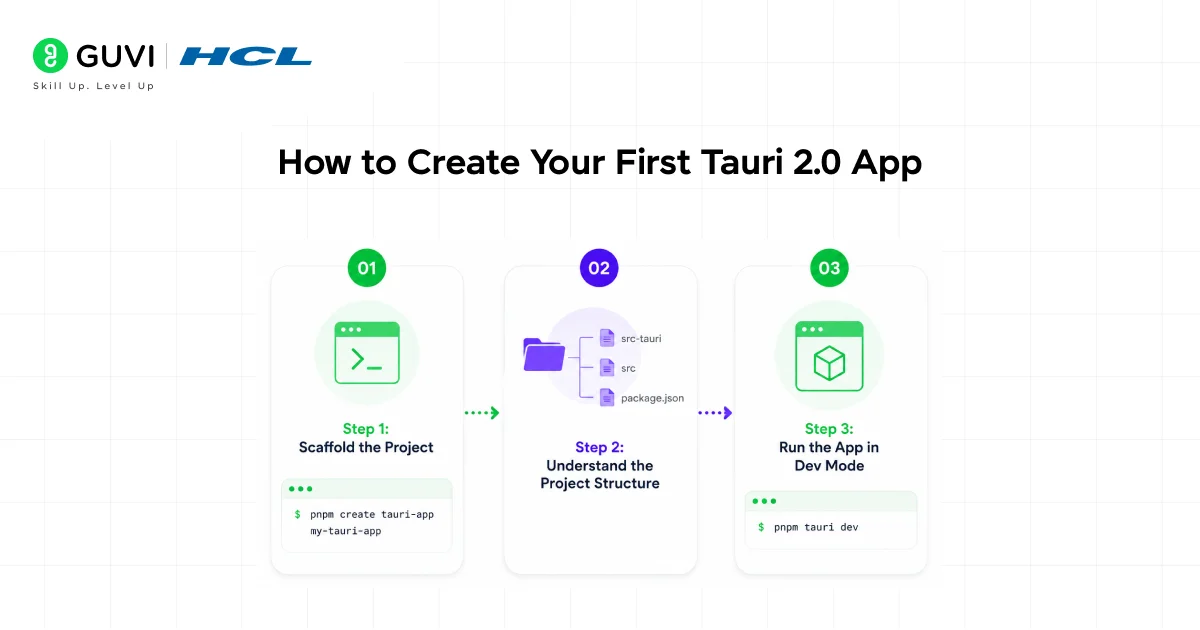
Step 1: Scaffold the Project
Open your terminal and run:
npm create tauri-app@latest
You’ll get a series of prompts:
Project name: my-tauri-app
Choose your package manager: npm
Choose your UI template: Vanilla (or React, Vue, Svelte — your pick)
Choose your UI flavor: TypeScript
Once it finishes, move into your project:
cd my-tauri-app
npm install
Step 2: Understand the Project Structure
Here’s what Tauri creates for you:
my-tauri-app/
├── src/ → Your frontend (HTML/JS/TS)
├── src-tauri/ → Rust backend + Tauri config
│ ├── src/
│ │ └── main.rs → Entry point for Rust
│ ├── tauri.conf.json → App config (name, window size, permissions)
│ └── Cargo.toml → Rust dependency file
├── package.json
└── index.html
The src-tauri folder is where Tauri lives. You’ll edit tauri.conf.json to change app settings like window size, title, and permissions.
Step 3: Run the App in Dev Mode
npm run tauri dev
The first run takes a while — Rust is compiling your app. Grab a coffee. After the first build, subsequent runs are much faster thanks to caching.
You should see a native window open with your app running. That’s it. You’re in.

💡 Pro Tip: Dev mode has hot-reload for your frontend. Change something in index.html or your JS — the window updates instantly. Rust changes still require a recompile.
How to Add a Simple Feature: Read a File
Let’s make this real. Here’s how you’d let users pick and read a text file — something that’s impossible in a plain browser but trivial in Tauri.
In your tauri.conf.json, enable the dialog and file system plugins:
//json

"plugins": {

  "dialog": {},

  "fs": {

    "scope": ["$DOCUMENT/*"]

  }

}
In your frontend JavaScript:
//javascript

import { open } from '@tauri-apps/plugin-dialog';

import { readTextFile } from '@tauri-apps/plugin-fs';

const button = document.getElementById('open-file');

button.addEventListener('click', async () => {

  const filePath = await open({

    filters: [{ name: 'Text', extensions: ['txt'] }]

  });

  if (filePath) {

    const content = await readTextFile(filePath);

    document.getElementById('output').innerText = content;

  }

});
Install the plugins first:
npm install @tauri-apps/plugin-dialog @tauri-apps/plugin-fs
cargo add tauri-plugin-dialog tauri-plugin-fs
That’s native file access — written entirely in JavaScript. Tauri handles the bridge to the OS for you.
How to Build Your App for Production
When you’re ready to ship:
npm run tauri build
This compiles your app into a native installer:
- .msi on Windows
- .dmg on macOS
- .deb / .AppImage on Linux
Find your built app in src-tauri/target/release/bundle/.
📊 Data Point: In a test project building a simple note-taking app, the final .deb output was 4.2 MB. The equivalent Electron build was 178 MB.
What to Do Next
Now that your first Tauri 2.0 app is running, here’s where to go:
- Add a system tray icon — Tauri’s tray plugin makes this a 10-line job
- Try the mobile build — run npm run tauri android init to start
- Explore the plugin ecosystem — tauri.app/plugin lists official plugins for notifications, clipboard, shell, and more
- Learn enough Rust — the official Rust book at doc.rust-lang.org/book is free and excellent
If you want a structured, mentor-supported path and learn all these new tools, then HCL GUVI’s IIT-M Pravartak Certified Full Stack Developer Course with AI Integration covers the entire journey, from HTML to deployment, with real projects, live sessions, and placement support. Over 10,000 students have used it to break into product-based companies.
Key Takeaways
- Tauri 2.0 lets you build desktop (and now mobile) apps with web tech + Rust
- App sizes are dramatically smaller than Electron — often under 5 MB
- You don’t need Rust expertise to get started — the frontend drives most of your app
- The npm create tauri-app command scaffolds everything in under a minute
- Plugins handle OS-level features (files, dialogs, tray) without writing raw Rust
FAQs
Q: Do I need to know Rust to use Tauri 2.0?
No, not for basic apps. You write your UI in HTML/CSS/JS. Rust only becomes necessary when you need custom native functionality beyond what the official plugins offer.
Q: Is Tauri 2.0 production-ready?
Yes. Tauri 2.0 was officially stable-released in October 2024. Companies like Cloudflare and 1Password have used Tauri in production products.
Q: What operating systems does Tauri 2.0 support?
Windows, macOS, and Linux for desktop. Tauri 2.0 also adds iOS and Android support, making it one of the few frameworks that targets all five major platforms from one codebase.
Q: How is Tauri different from NW.js or Neutralino.js?
All three avoid bundling Chromium. Tauri uses Rust for the backend, giving it a stronger security model and better performance. Neutralino is simpler but less capable. NW.js is older and rarely updated.
Q: Can I use React or Vue with Tauri 2.0?
Absolutely. During npm create tauri-app, you can pick React, Vue, Svelte, SolidJS, or plain vanilla JS. Tauri is frontend-agnostic — it just wraps whatever you build.
Q: How long does the first build take?
The very first npm run tauri dev can take 5–10 minutes because Rust compiles everything from scratch. After that, incremental builds are fast — usually under 30 seconds for small changes.
Success Stories

About the Author
Lukesh S
A professional content writer who has experience in freelancing and now working as a Technical Content Writer at HCL GUVI having sound knowledge in Blog Writing and Creative Writing!
View all posts by Lukesh S
Connect with me @











Did you enjoy this article?