


Artificial Intelligence and Machine Learning Articles
AI/ML Skills Gap 2026: Why Companies Can't Find Job-Ready Talent
20 AI/ML Interview Questions Recruiters Can Use Without a Tech Background - Best Guide
How Industry-Backed AI/ML Bootcamps Are Changing the AI/ML Hiring Pipeline - Best Guide 2026
From IT Support to AI Engineer: A Realistic Career Switch Guide 2026


Get In Touch For Details! Request More Information
Vibe Coding Data Apps with Replit + Snowflake
Jun 24, 2026 4 Min Read 442 Views
(Last Updated)
Building data applications has never been about difficulty alone; it’s always been about the process itself. Even to get the simplest idea up and running, you would have to juggle different applications, write some queries, construct some logic, and then build a user-friendly interface to tie it all together.
But that disconnect costs time and development effort.
Vibe coding is here to remove that barrier to entry completely. You no longer write a few steps and piece together the system. Instead, you describe what you are trying to build, and the AI Agent constructs the entire application for you.
Connecting to your live data on Snowflake from Replit transforms this experience; it becomes real-time, accessible, and incredibly useful.
TL;DR
- Vibe coding uses natural language to instruct an AI agent that will build applications for you without having to write code directly.
- With Replit + Snowflake, it is possible to build a data application using solely the former without the need to write any SQL queries or set up any backends.
- The entire workflow changes to connect, describe, iterate, and deploy.
- This is not only about reducing development time from hours/days to minutes, but also about its accessibility and usability.
Table of contents
- What Vibe Coding Really Entails
- Why Traditional Data App Development Was Slow
- Where Replit + Snowflake Changes the Game
- How the Snowflake Connector Works
- The New Way to Build Data Apps
- Step 1: Connect Your Data
- Step 2: Build with Natural Language
- Step 3: Refine and Iterate
- Step 4: Immediate Deployment
- What You Can Build Beyond Dashboards
- Important Benefits of This Method
- Limitations of Vibe Coding
- When to Use This Approach
- Best Practices
- Conclusion
- FAQs
- Do I need coding knowledge to use Vibe coding?
- Do I need to write SQL when using Snowflake in this setup?
- Is my data secure when connected to Replit?
- Can I deploy applications directly from Replit?
- What types of data apps can I build?
- Is this suitable for production-level systems?
What Vibe Coding Really Entails

Vibe coding basics essentially signify the act of performing intent-driven development. You are no longer concentrating on the underlying syntax or structure, but solely on the desired outcomes of your application.
Instead of composing queries or APIs, you can simply provide a natural language description of the tasks you wish for the application to perform. The entire process, including the logic, user interface, and connections, would be handled by the system that interprets your intent.
Why Traditional Data App Development Was Slow
Previously, building data apps meant that many different layers had to talk to each other.
You had to pull data from a data warehouse, massage it with a backend framework, and then visualize it using a frontend framework. Each step required a different language and/or toolkit.
Small updates would touch many parts of the stack. Simply adding a filter or changing the presentation of a chart was not a small change.
There was friction and dependency between the parts and people. Non-technical users could not get updates done easily without a developer’s input, and developers could spend a lot of time on setup that they would rather spend on actual data problems.
Where Replit + Snowflake Changes the Game
By connecting these parts, Replit and Snowflake are making it easier for both your data and your code to live in the same place. Instead of building apps for data that must be moved into your development workflow, your agent can work with the data that is already in your data warehouse.
This allows the system to respond instantly, which is the source of the speed and efficiency of this integration.
For a deeper understanding of how AI-driven development workflows work in practice, you can explore this GenAI ebook as a practical reference. Download the ebook here.
How the Snowflake Connector Works
The Snowflake connector is key to this integration because it gives you secure, fast, and easy access to your data warehouse without any of the cumbersome setup or configuration previously required.
Your agent can discover your schemas, tables, and relationships and use that information to write your queries for you.
Security is managed by giving your agent a controlled, often read-only, way to interact with your data warehouse, which keeps your data safe while enabling you to easily build applications on top of it.
The New Way to Build Data Apps
The process is much more straightforward and streamlined:
- Connect your data
- Describe what app you want
- The agent builds the app for you
- Refine your app via prompts
- Deploy your app with little effort
This moves us from a cumbersome, multi-step process to a continuous workflow:
Step 1: Connect Your Data
In this workflow, you need to connect Snowflake to Replit. This is taken care of for you through a built-in connector that takes care of authentication, tokens, and access control, and you don’t have to think about configuring pipelines or environments.
Once you connect, the data becomes immediately available to the agent in your editor and is accessible without any other configuration.
Step 2: Build with Natural Language
Here, vibe coding is realized. You tell the agent what you’d like your application to look like using natural language prompts, and it builds it for you by writing queries, determining logic, and designing the user interface simultaneously.
Let’s give you a different example to illustrate this clearly:
“Build me an inventory performance dashboard using my Snowflake data. Show stock levels by category, with emphasis on items that are running low. Include a weekly trend and filter by warehouse location.”
The agent interprets this description and builds a working app. You’re not typing SQL, and you’re not designing the UI. You’re expressing your intent.
Step 3: Refine and Iterate
Once the initial app is built, you’ll iterate on it. If anything is missing or ambiguous, you can tell the agent. If, for example, you want to add forecasting for stock depletion based on 30-day historical trends, or highlight items that will run out in 7 days, you would say:
“Add a forecast for stock depletion based on the last 30 days.”
“Highlight items that will run out within 7 days.”
“Switch to a dark theme and increase chart readability.”

Step 4: Immediate Deployment
Once the application is built, it’s extremely easy to deploy.
You simply click a “Publish” button in Replit to deploy the app directly. All the hosting, authentication, and security have already been handled. This cuts out separate deployment pipelines, DevOps setup, and enables you to get a working app out the door very quickly.
What You Can Build Beyond Dashboards
People often think this is solely for dashboards. This is actually a limiting perspective. You can use this for a range of applications beyond simple dashboards, for example, systems that help you monitor your business, trigger alerts, or even provide AI-assisted outputs for decisions.
This includes forecasting and internal analytics as well as decision support systems.
The difference from many dashboards is that you are interacting with actual live data and not just visualisations, and they evolve much faster.
Vibe Coding doesn’t just offer speed advantages—it fundamentally changes team collaboration. It often enables non-technical users to create their own tools, bypassing development teams and reducing cross-team dependency across the organization.
Additionally, it allows developers to spend less time on routine tasks and more time on problem-solving. This shift is key to understanding vibe coding beyond just its technical advantages.
Important Benefits of This Method
One of the primary benefits is the speed of development. It dramatically shortens the time from an idea to a functioning application.
The second crucial benefit is accessibility. Those with less technical backgrounds can create meaningful applications without deep coding knowledge.
The tight integration combines data, logic, and UI into a single workspace and decreases complexity.
Finally, the speed of iteration allows for better refinement of ideas and outcomes.
Limitations of Vibe Coding

The AI-generated logic still requires validation. Before relying on it for significant decisions, examine the queries and results.
There will be cases where more complicated systems will necessitate traditional coding. For rapid development and iterative design, this method is ideal.
These downsides must be comprehended if this method is to be used appropriately.
When to Use This Approach
This method is suitable for circumstances where you require rapid development.
Examples include prototypes, internal tools, analytics dashboards, and data exploration.
The technique is useful for rapidly testing hypotheses and verifying concepts.
For extremely critical or complex systems, you will likely require a blend of traditional and modern approaches, coupled with enhanced verification.
Best Practices
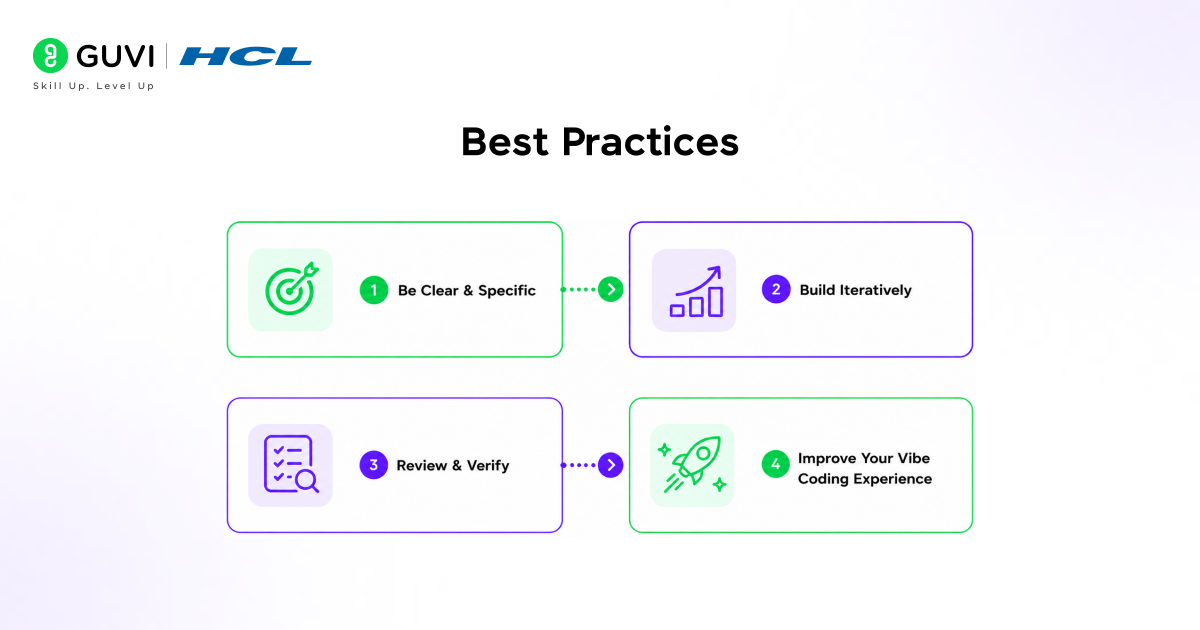
The clarity of prompts is very important. You should be specific in detailing your desires and intentions so that they may be accurately met.
The progressive application of development also helps. This approach to iterative design can simplify difficult or complicated tasks.
Review all results to ensure their accuracy.
These practices may improve your vibe coding experience.
To effectively use tools like Replit Agent 4 for vibe coding, understanding how natural language prompts, data workflows, and AI interact with structured datasets is essential for building better and more creative data applications on Snowflake. Programs like HCL GUVI’s Artificial Intelligence and Machine Learning Course can help build these skills through hands-on experience.
Conclusion
Vibe coding in Replit, combined with Snowflake, has changed what a data application is about. It removes friction and complexity, and it makes it accessible.
It shrinks the gap between conception and delivery of any data application to a bare minimum.
It’s not only about building quicker. It is also about building more intelligently. As these tools evolve, what a data application is will change with them.
FAQs
1. Do I need coding knowledge to use Vibe coding?
No. Vibe coding is designed to work with natural language prompts. You describe what you want, and the system builds it for you without requiring traditional coding skills.
2. Do I need to write SQL when using Snowflake in this setup?
No. The AI agent automatically generates SQL queries based on your instructions. You can still review or validate them if needed.
3. Is my data secure when connected to Replit?
Yes. Access is controlled using Snowflake’s role-based permissions, and it is typically read-only. This ensures your data remains protected while being used in applications.
4. Can I deploy applications directly from Replit?
Yes. Replit provides built-in deployment. You can publish your application with minimal setup, and hosting, security, and authentication are handled automatically.
5. What types of data apps can I build?
You can build dashboards, analytics tools, monitoring systems, forecasting apps, and AI-powered assistants that interact with your data in real time.
6. Is this suitable for production-level systems?
It can be used for real-world applications, especially internal tools and prototypes. However, complex or critical systems still require validation and may need additional development.
Success Stories

About the Author
Vishalini Devarajan
An Aerospace Engineer turned content writer, I focus on making complex concepts easy to understand through well-structured, reader-friendly blogs. Whether it’s a technical topic or a non-technical one, I love creating content that is clear, engaging, and impactful.
View all posts by Vishalini Devarajan
Connect with me @









Did you enjoy this article?