


Artificial Intelligence and Machine Learning Articles
What is Replit’s New Database Editor? A Beginner-Friendly Guide
LLM Engineer Skills: What You Need to Know in 2026


Get In Touch For Details! Request More Information
Vibe Coding Data Apps with Replit and Snowflake: Part 2
Jun 24, 2026 8 Min Read 292 Views
(Last Updated)
If you watched the first webinar on vibe coding with Replit and Snowflake, you already know the basic idea: describe what you want in plain English, let an AI assistant generate the code, and ship a working data application faster than any traditional development workflow allows. Part 2 goes further. The vibe coding Replit Snowflake combination is no longer just a demo concept; it is a repeatable workflow that engineering teams are using to deliver production-grade data apps.
This session builds directly on Part 1. It covers more complex query patterns, multi-step app logic, connecting to Snowflake’s newer features like Cortex and dynamic tables, and the practical lessons that came out of teams actually using this approach in the weeks after the first webinar.
In this article, we cover what was new in Part 2, the techniques demonstrated, a step-by-step walkthrough of the featured app build, what this workflow cannot do, and the best practices that make it reliable at scale. Let us get started.
Quick TL;DR Summary
1. Vibe coding Replit Snowflake Part 2 builds on the original webinar by covering more complex app patterns, Snowflake Cortex integration, and multi-step data workflows.
2. You describe what you want in plain English inside Replit’s AI-assisted editor, the code is generated for you, and it connects directly to Snowflake for data.
3. New in Part 2: dynamic table queries, Snowflake Cortex LLM functions, parameterised dashboards, and handling multi-tenant data access patterns.
4. The workflow still requires no local environment setup; everything runs in the browser through Replit, with Snowflake credentials stored securely as Replit Secrets.
5. This guide recaps the key techniques from the webinar with working code examples, a full app walkthrough, a comparison with traditional workflows, and best practices.
Table of contents
- What Is Vibe Coding with Replit and Snowflake?
- Prerequisites: What You Need Before You Start
- What You Need
- Step 1: Recap of the Snowflake Connection in Replit
- Step 2: What Was New in Part 2 of the Webinar
- Pattern 1: Parameterised Queries and Dynamic Filters
- Pattern 2: Snowflake Cortex LLM Functions
- Pattern 3: Querying Dynamic Tables
- Pattern 4: Multi-Tenant Data Access
- Step 3: Build the Featured App Customer Review Intelligence Dashboard
- Step 3.1: Set Up the Project Structure
- Step 3.2: The Flask Application
- Step 3.3: The HTML Template
- Step 3.4: Deploy in Replit
- Step 4: What Vibe Coding Actually Means in This Workflow
- How the AI-Assisted Build Worked
- Step 5: What This Workflow Cannot Do
- Current Limitations
- Best Practices for Vibe Coding Replit Snowflake App
- Always Review AI-Generated SQL Before Running It
- Use a Dedicated Snowflake Service Account for App Connections
- Set Warehouse Auto-Suspend to Two Minutes or Less for Internal Tools
- Describe Errors to the AI Assistant Before Debugging Manually
- Keep Cortex Queries Bounded With LIMIT
- Conclusion
- FAQs
- What is vibe coding with Replit and Snowflake?
- What was covered in Part 2 of the webinar that was not in Part 1?
- What is Snowflake Cortex, and how is it used in this workflow?
- Do I need Snowflake Enterprise edition for Cortex functions?
- Is vibe coding with AI assistants reliable enough for production apps?
What Is Vibe Coding with Replit and Snowflake?
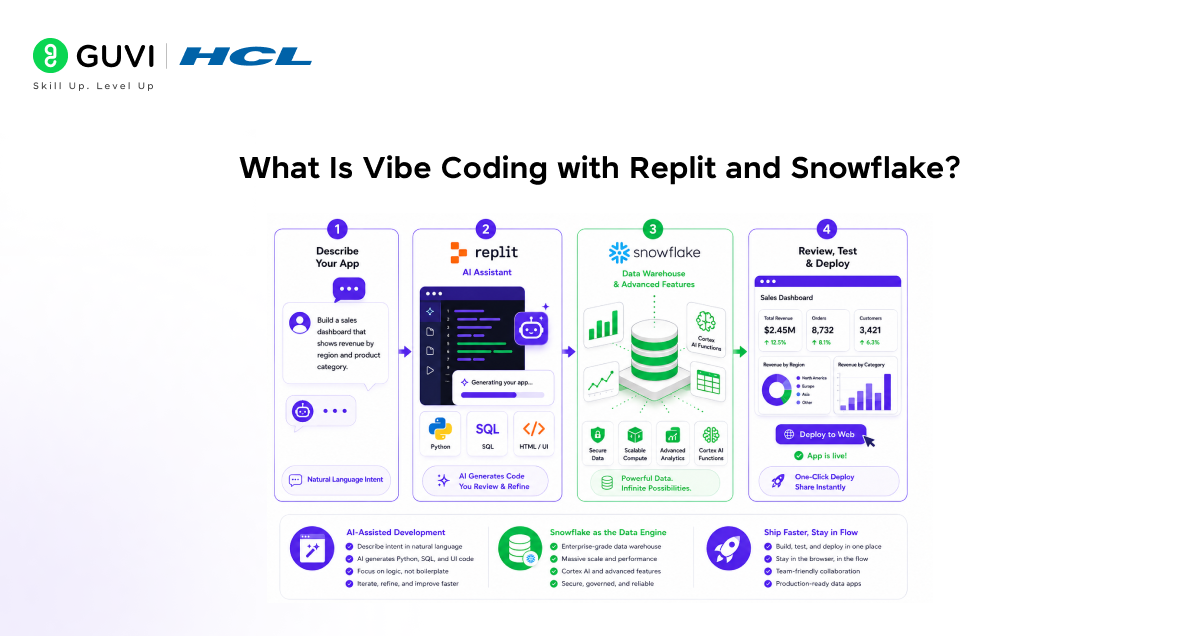
Vibe coding is the practice of building software by describing intent in natural language and letting an AI model generate the implementation. You stay in a high-level conversation about what the app should do, rather than writing every function manually.
In the Replit and Snowflake context, this means: you open a Replit project with an AI assistant active, describe the data app you want to build, and the assistant generates the Python, SQL, and HTML needed to query Snowflake and display the results. You review, refine, and deploy without leaving the browser.
Part 2 of the webinar series picks up where the introduction left off. The first session showed the basic connection and a simple query-to-table app. Part 2 focuses on patterns that real teams encounter: multi-step workflows, Snowflake-specific features, and making vibe-coded apps robust enough for internal production use.
Key points to remember:
- Vibe coding does not eliminate the need to understand what the code does — it eliminates the time spent writing it from scratch
- Replit provides the AI-assisted editor, the runtime environment, and the deployment layer
- Snowflake provides the data warehouse, compute, and advanced features like Cortex AI functions
Prerequisites: What You Need Before You Start
What You Need
- A Replit Core or Teams account with the AI assistant enabled.
- A Snowflake account with at least one active warehouse and a database you can query.
- A Snowflake user with the SYSADMIN or a custom role that has SELECT access to the tables you plan to use.
- Your Snowflake account identifier, username, password, warehouse name, database, and schema are stored as Replit Secrets.
- The snowflake-connector-python package is installed in your Replit project.
Snowflake processes over 4 billion queries per day across its global customer base. Its separation of storage and compute means that connecting a lightweight Replit-hosted web application to a Snowflake warehouse does not require provisioning dedicated infrastructure—you pay only for the compute used during each query, and the warehouse suspends automatically when idle. This makes the Replit + Snowflake combination particularly cost-efficient for internal tools with intermittent usage.

Step 1: Recap of the Snowflake Connection in Replit
Before moving to the new Part 2 content, here is the baseline connection pattern. Every app in this workflow starts here.
import snowflake.connector
import os
conn = snowflake.connector.connect(
user = os.environ[‘SNOWFLAKE_USER’],
password = os.environ[‘SNOWFLAKE_PASSWORD’],
account = os.environ[‘SNOWFLAKE_ACCOUNT’],
warehouse = os.environ[‘SNOWFLAKE_WAREHOUSE’],
database = os.environ[‘SNOWFLAKE_DATABASE’],
schema = os.environ[‘SNOWFLAKE_SCHEMA’]
)
Here is what is happening:
• All credentials come from Replit Secrets; they never appear in source code
• The connector opens an authenticated session to Snowflake using your account identifier
• The warehouse wakes automatically when the first query runs and suspends after the auto-suspend timeout
With this connection in place, every new feature in Part 2 is built on top of it without changing the authentication pattern.
Step 2: What Was New in Part 2 of the Webinar
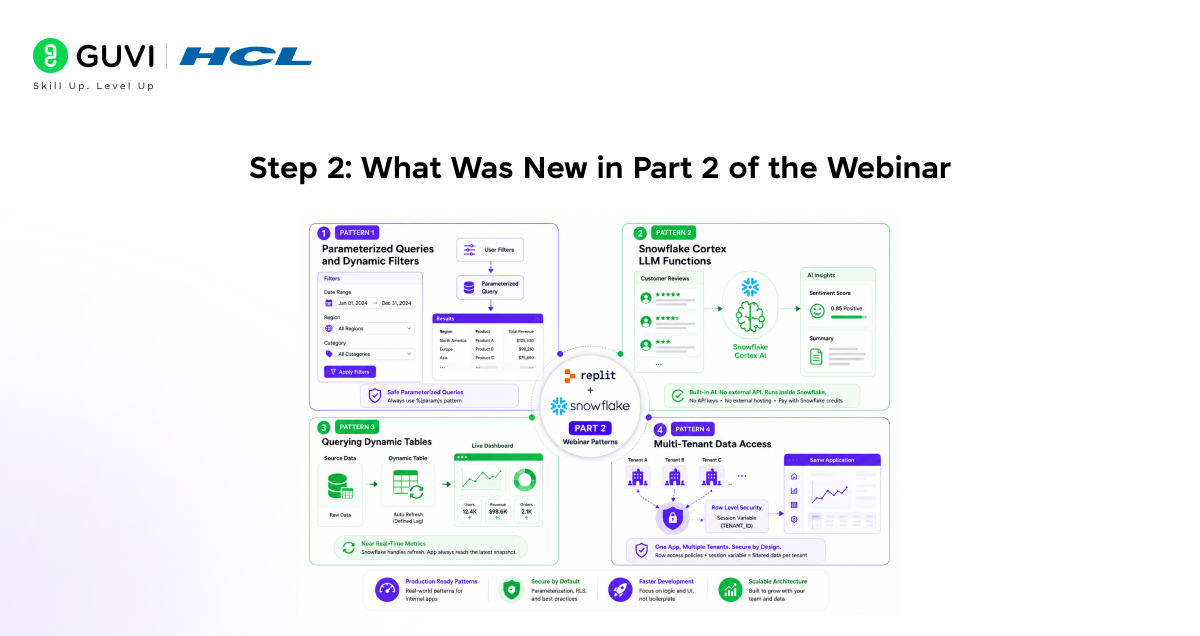
Pattern 1: Parameterised Queries and Dynamic Filters
The first Part 1 app showed a fixed query that always returned the same result set. Part 2 introduced parameterised queries, letting the user filter results by date range, region, or category through the web interface.
@app.route(‘/data’)
def get_data():
region = request.args.get(‘region’, ‘ALL’)
start = request.args.get(‘start’, ‘2024-01-01’)
end = request.args.get(‘end’, ‘2024-12-31’)
query = ”’
SELECT region, product, SUM(revenue) AS total
FROM sales.transactions
WHERE order_date BETWEEN %(start)s AND %(end)s
AND (%(region)s = ‘ALL’ OR region = %(region)s)
GROUP BY region, product
ORDER BY total DESC
”’
cursor = conn.cursor(DictCursor)
cursor. execute(query, {‘start’: start, ‘end’: end, ‘region’: region})
return jsonify(cursor.fetchall())
The key point from the webinar: always use parameterised queries with Snowflake — never format user input directly into a SQL string. The %(param)s pattern handles escaping safely.
Pattern 2: Snowflake Cortex LLM Functions
Part 2 introduced Snowflake Cortex, the built-in AI functions available directly in Snowflake SQL. These let you run LLM operations on your data without an external API call.
SELECT
customer_id,
review_text,
SNOWFLAKE.CORTEX.SENTIMENT(review_text) AS sentiment_score,
SNOWFLAKE.CORTEX.SUMMARIZE(review_text) AS summary
FROM customer_reviews
WHERE review_date >= CURRENT_DATE – 7
LIMIT 100;
From a Replit Flask app, you pass this query through the standard Snowflake connector. Cortex runs inside Snowflake’s compute; your application just receives the results. No OpenAI API key, no external model hosting, no additional cost beyond Snowflake credits.
Pattern 3: Querying Dynamic Tables
Snowflake Dynamic Tables automatically refresh based on a defined lag; they are like materialised views with a scheduler built in. Part 2 showed how to build a Replit app that reads from a dynamic table to display near-real-time aggregated metrics.
SELECT
metric_date,
active_users,
revenue_usd,
orders_completed
FROM analytics.daily_metrics_dynamic
ORDER BY metric_date DESC
LIMIT 30;
The application does not need to manage refresh logic. Snowflake handles the materialization. The Replit app simply reads from the table on each page load and always gets the most recent available snapshot.
Pattern 4: Multi-Tenant Data Access
The webinar covered how teams with multiple clients or business units can build a single Replit app that filters Snowflake data by tenant. The pattern uses row-level security in Snowflake combined with a session variable set at connection time.
def get_connection_for_tenant(tenant_id):
conn = snowflake.connector.connect(
user = os.environ[‘SNOWFLAKE_USER’],
password = os.environ[‘SNOWFLAKE_PASSWORD’],
account = os.environ[‘SNOWFLAKE_ACCOUNT’],
warehouse = os.environ[‘SNOWFLAKE_WAREHOUSE’],
database = os.environ[‘SNOWFLAKE_DATABASE’],
schema = os.environ[‘SNOWFLAKE_SCHEMA’]
)
conn.cursor().execute(f”ALTER SESSION SET TENANT_ID = ‘{tenant_id}'” )
return conn
Combined with a Snowflake row access policy that filters on the session variable, this pattern gives each tenant a filtered view of the data without needing separate Snowflake accounts or databases.
Step 3: Build the Featured App Customer Review Intelligence Dashboard
The app featured in Part 2 of the webinar combined parameterised queries, Cortex sentiment analysis, and a dynamic table read into a single internal tool: a Customer Review Intelligence Dashboard. Here is the full build.
Step 3.1: Set Up the Project Structure
1. Create a new Replit Python project.
2. Add these files: main.py, templates/index.html, and requirements.txt.
3. In requirements.txt, add: flask, snowflake-connector-python.
4. Run pip install -r requirements.txt in the Shell.
5. Add all Snowflake credentials to Replit Secrets.
Step 3.2: The Flask Application
from flask import Flask, render_template, jsonify, request
from snowflake. connector import DictCursor
import snowflake.connector, os
app = Flask(__name__)
def get_conn():
return snowflake.connector.connect(
user = os.environ[‘SNOWFLAKE_USER’],
password = os.environ[‘SNOWFLAKE_PASSWORD’],
account = os.environ[‘SNOWFLAKE_ACCOUNT’],
warehouse = os.environ[‘SNOWFLAKE_WAREHOUSE’],
database = os.environ[‘SNOWFLAKE_DATABASE’],
schema = os.environ[‘SNOWFLAKE_SCHEMA’]
)
@app.route(‘/’)
def index():
return render_template(‘index.html’)
@app.route(‘/api/reviews’)
def reviews():
days = request.args.get(‘days’, 7)
conn = get_conn()
cursor = conn.cursor(DictCursor)
cursor.execute(”’
SELECT
customer_id,
review_text,
SNOWFLAKE.CORTEX.SENTIMENT(review_text) AS sentiment,
SNOWFLAKE.CORTEX.SUMMARIZE(review_text) AS summary
FROM customer_reviews
WHERE review_date >= CURRENT_DATE – %(days)s
LIMIT 50
”’, {‘days’: int(days)})
data = cursor.fetchall()
conn.close()
return jsonify(data)
if __name__ == ‘__main__’:
app.run(host=’0.0.0.0′, port=5000)
Step 3.3: The HTML Template
In templates/index.html, build a simple interface that calls the API and renders the results:
<!DOCTYPE html>
<html>
<head><title>Review Intelligence</title></head>
<body>
<h1>Customer Review Intelligence</h1>
<label>Days back: <input id=’days’ value=’7′></label>
<button onclick=’load()’>Load</button>
<div id=’results’></div>
<script>
async function load() {
const d = document.getElementById(‘days’).value;
const r = await fetch(‘/api/reviews?days=’ + d);
const data = await r.json();
document.getElementById(‘results’).innerHTML =
data.map(row => `<p><b>${row.CUSTOMER_ID}</b>: ${row.SUMMARY} (${row.SENTIMENT})</p>`).join(”);
}
</script>
</body>
</html>
Step 3.4: Deploy in Replit
1. Click Run, and the app starts immediately and gets a public URL.
2. Open the URL, enter a number of days, and click Load.
3. Each row shows the customer ID, a Cortex-generated summary of the review, and a sentiment score, all computed inside Snowflake.
4. Enable Always On in Replit for persistent deployment.
This is the complete vibe coding Replit Snowflake workflow in practice. The vibe coding part was the prompting and iteration. The AI assistant in Replit generated the initial Flask structure and SQL with Cortex functions from a plain-English description. The engineer reviewed, adjusted the query, and deployed
Step 4: What Vibe Coding Actually Means in This Workflow
How the AI-Assisted Build Worked
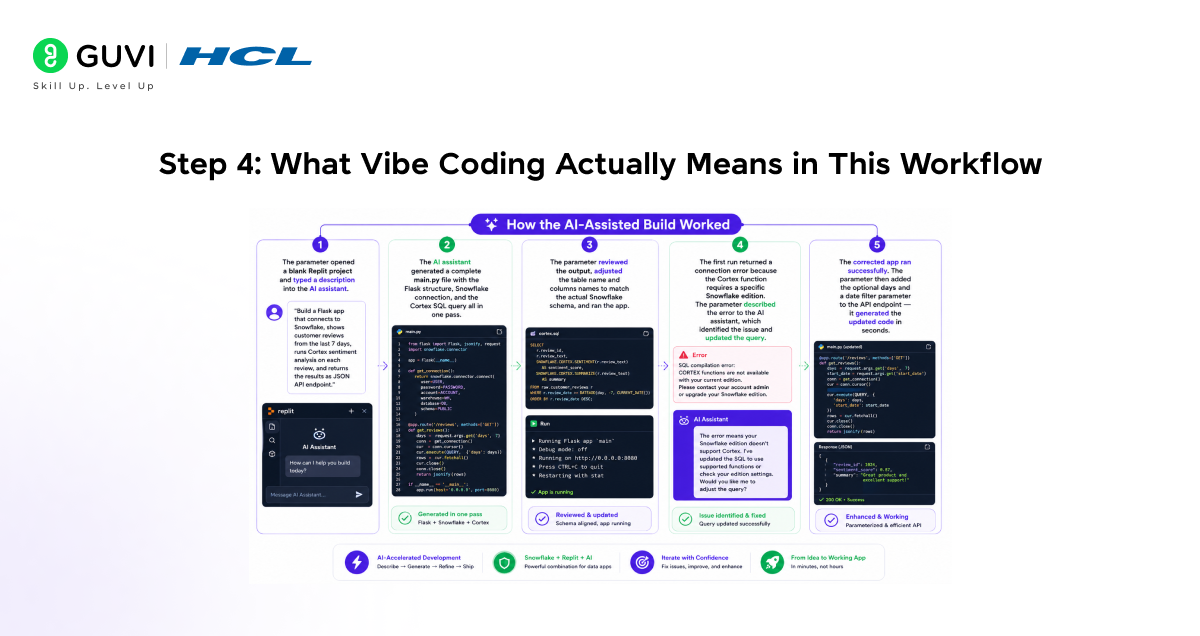
1. The presenter opened a blank Replit project and typed a description into the AI assistant: “Build a Flask app that connects to Snowflake, queries customer reviews from the last N days, runs Cortex sentiment analysis on each review, and returns the results as a JSON API endpoint.”
2. The AI assistant generated a complete main.py file with the Flask structure, Snowflake connection, and the Cortex SQL query all in one pass.
3. The presenter reviewed the output, adjusted the table name and column names to match the actual Snowflake schema, and ran the app.
4. The first run returned a connection error because the Cortex function requires a specific Snowflake edition. The presenter described the error to the AI assistant, which identified the issue and adjusted the query.
5. The corrected app ran successfully. The presenter then asked the assistant to add a date filter parameter to the API endpoint, which generated the updated route in seconds.
Step 5: What This Workflow Cannot Do
Vibe coding with Replit and Snowflake is fast and practical. It has real limits that matter for enterprise use.
Current Limitations
1. AI-generated code is a starting point, not a finished product. Generated SQL may use incorrect column names, outdated Snowflake syntax, or inefficient query patterns. Every piece of generated code needs review before it touches production data.
2. Cortex functions are not available on all Snowflake editions. SENTIMENT, SUMMARIZE, and COMPLETE require Snowflake Enterprise edition or higher on supported cloud regions. Verify availability before building Cortex features into your app.
3. Replit is not a replacement for production-grade deployment infrastructure. For high-traffic, mission-critical applications, dedicated cloud hosting with proper load balancing, logging, and failover is more appropriate than Replit Always On.
4. Connection pooling is not built in. Each Flask request in the simple pattern opens and closes a new Snowflake connection. For apps with significant concurrent usage, connection pooling with SQLAlchemy or a similar library is necessary to avoid hitting connection limits.
5. Vibe coding works best for apps with a clear scope. Describing a simple dashboard or a parameterised report works well. Describing a complex multi-service system with authentication, role management, and audit logging produces incomplete or inconsistent results.
The workflow is best understood as a rapid delivery tool for well-scoped internal applications, not a general replacement for structured software engineering on large systems.
Best Practices for Vibe Coding Replit Snowflake App
1. Always Review AI-Generated SQL Before Running It
AI assistants generate plausible SQL, not always correct SQL. Check the table names, column names, and WHERE clause logic before running a query against real data. A wrong filter on a production table can be a costly mistake.
2. Use a Dedicated Snowflake Service Account for App Connections
Create a dedicated Snowflake user for each application with only the permissions it needs. Do not use a personal account or an admin account for application-layer queries. This limits the blast radius if credentials are ever exposed.
3. Set Warehouse Auto-Suspend to Two Minutes or Less for Internal Tools
Internal tools have intermittent usage patterns. A warehouse that auto-suspends after 10 minutes will accumulate idle compute costs throughout the day. Set auto-suspend to 60 or 120 seconds for apps where query latency on cold start is acceptable.
4. Describe Errors to the AI Assistant Before Debugging Manually
When the generated app throws an error, paste the full error message and stack trace into the AI assistant and describe the context. This resolves the majority of generation-related errors — wrong method names, missing imports, incorrect Snowflake connector syntax — faster than manual debugging.
5. Keep Cortex Queries Bounded With LIMIT
Cortex functions like SUMMARIZE and SENTIMENT are compute-intensive. Running them on unbounded result sets will produce unexpected credit consumption and slow response times. Always add a LIMIT clause or a WHERE filter that constrains the row count before applying Cortex functions.
Did You Know?
Snowflake’s CORTEX. The SUMMARIZE function can condense long-form text into a concise summary in a single SQL call with no model hosting, no API key, and no data, leaving your Snowflake account. For enterprise teams building customer feedback tools, support ticket analysers, or document review dashboards, this makes Snowflake not just a data warehouse but an AI processing layer that sits directly on top of your operational data.
If you want to learn more about building skills for Claude Code and automating your procedural knowledge, do not miss the chance to enroll in HCL GUVI’s Intel & IITM Pravartak Certified Artificial Intelligence & Machine Learning courses. Endorsed with Intel certification, this course adds a globally recognized credential to your resume, a powerful edge that sets you apart in the competitive AI job market.
Conclusion
In conclusion, vibe coding Replit Snowflake Part 2 demonstrated that the workflow introduced in Part 1 is not just a demo technique; it is a practical delivery method for internal data applications when the scope is clear and iteration speed matters.
Parameterised queries, Snowflake Cortex AI functions, dynamic table reads, and multi-tenant access patterns are all achievable through this workflow without changing the core approach. You describe the app, the AI generates a working starting point, you review and adjust, and you deploy from the same browser tab.
The workflow has real limits: AI-generated code requires review, Cortex requires the right Snowflake edition, and Replit is not the right deployment layer for every production system. Used within those limits, vibe coding with Replit and Snowflake continues to be one of the fastest paths from a data question to a deployed, shareable answer.
FAQs
1. What is vibe coding with Replit and Snowflake?
Vibe coding with Replit and Snowflake means building data applications by describing what you want in plain English to an AI assistant inside Replit. The assistant generates the Python, SQL, and HTML needed to connect to Snowflake and display data. You review, adjust, and deploy all from the browser, without local setup.
2. What was covered in Part 2 of the webinar that was not in Part 1?
Part 2 introduced parameterised query patterns, Snowflake Cortex AI functions in SQL, querying Snowflake dynamic tables, and multi-tenant data access using session variables and row access policies. It also covered practical lessons from teams that had applied the Part 1 workflow in real projects.
3. What is Snowflake Cortex, and how is it used in this workflow?
Snowflake Cortex is a set of built-in AI functions available directly in Snowflake SQL. Functions like SENTIMENT, SUMMARIZE, and TRANSLATE run inside Snowflake’s compute layer with no external API. In the Replit app, you call them the same way as any other SQL function. The connector passes the query and receives the results.
4. Do I need Snowflake Enterprise edition for Cortex functions?
Yes. Snowflake Cortex LLM functions require Snowflake Enterprise edition or higher, and are available in specific cloud regions. Before building Cortex-dependent features into your app, verify that your Snowflake account and region support the specific functions you plan to use.
5. Is vibe coding with AI assistants reliable enough for production apps?
For internal tools with clear scope dashboards, parameterised reports, pipeline trigger interfaces, the workflow produces reliable results when the generated code is reviewed before deployment. For complex systems with authentication, role management, and high traffic, traditional structured development is more appropriate.
Success Stories

About the Author
Vishalini Devarajan
An Aerospace Engineer turned content writer, I focus on making complex concepts easy to understand through well-structured, reader-friendly blogs. Whether it’s a technical topic or a non-technical one, I love creating content that is clear, engaging, and impactful.
View all posts by Vishalini Devarajan
Connect with me @








Did you enjoy this article?