


Artificial Intelligence and Machine Learning Articles
AI/ML Skills Gap 2026: Why Companies Can't Find Job-Ready Talent
20 AI/ML Interview Questions Recruiters Can Use Without a Tech Background - Best Guide
How Industry-Backed AI/ML Bootcamps Are Changing the AI/ML Hiring Pipeline - Best Guide 2026
From IT Support to AI Engineer: A Realistic Career Switch Guide 2026


Get In Touch For Details! Request More Information
Improving Skill-Creator: Test, Measure, and Refine Agent Skills
Sep 08, 2026 7 Min Read 923 Views
(Last Updated)
If you have ever built an Agent Skill and felt confident it was working, only to discover it silently broke after a model update, you already know the problem that AI agent skills improvement is designed to solve.
Most skill authors have been editing their SKILL.md files, running a single test manually, and calling it ‘good enough.’ The honest truth is that without structured evals, benchmarks, and description tuning, you are flying completely blind even when things feel like they are working.
This guide walks you through everything introduced in Anthropic’s skill-creator update from writing your first eval to running benchmarks and tuning your skill description for more reliable triggering. Whether you are a subject matter expert with no engineering background or a developer building production workflows, this is your practical starting point. Let us get into it!
Quick TL;DR Summary
1. This guide covers Anthropic’s skill-creator update, which brings testing, benchmarking, and description optimization to Agent Skills — so authors can build and maintain skills with real confidence, not guesswork.
2. Skill-creator now operates in four modes: Create, Eval, Improve, and Benchmark each targeting a different stage of the AI agent skills improvement cycle without requiring any code.
3. The Eval mode lets you write test prompts, define what good output looks like, and run them against your skill to get structured pass/fail results with explanations.
4. Multi-agent support runs evals in parallel in isolated contexts, eliminating context bleed between test runs and cutting evaluation time significantly.
5. A built-in comparator agent performs blind A/B comparisons between two skill versions or skill vs. no skill — so you can measure whether a change actually helped.
6. The guide also covers real-world use cases, tips, and 8 FAQs that match the most common developer questions about testing, benchmarking, and refining agent skills.
Table of contents
- What Are Agent Skills and Why Do They Need Testing?
- The Two Types of Agent Skills
- Capability Uplift Skills
- Encoded Preference Skills
- Introducing the Skill-Creator Update
- Step 1: Write Evals to Test Your Skill
- How to Write a Good Eval
- Step 2: Run Benchmarks to Measure Performance
- Step 3: Use Multi-Agent Support for Faster Testing
- Step 4: Tune Your Skill Description for Reliable Triggering
- What Causes Poor Triggering
- Tips and Best Practices for AI Agent Skills Improvement
- Conclusion
- FAQs
- What is skill-creator and what does it do?
- What are Agent Skills in Claude?
- How do I test an Agent Skill without writing code?
- What is context bleed and why does it matter for skill testing?
- What is a comparator agent in skill-creator?
- What is the difference between an AI course and an AI & ML course?
- Why is SQL important for AI & ML professionals?
- What job roles can I apply for after completing an AI & ML course?
- How do I choose the best AI course for my career goals?
- What should I look for before enrolling in an AI & ML course?
- How should I evaluate AI & ML certifications before enrolling?
What Are Agent Skills and Why Do They Need Testing?
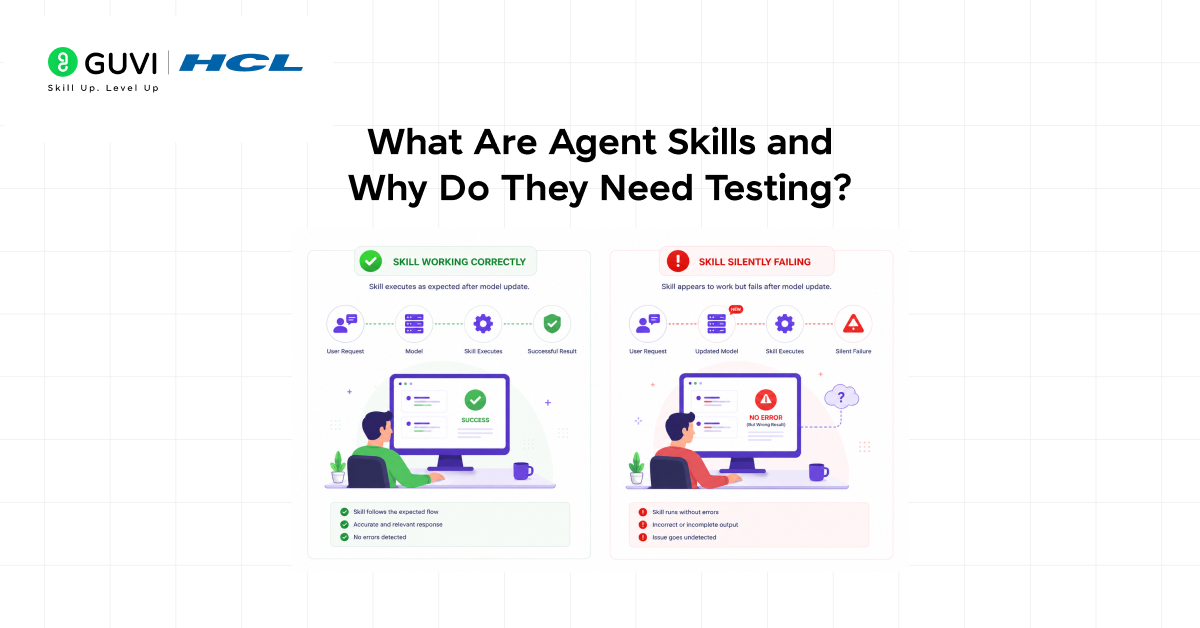
Agent Skills are custom markdown-based instructions that extend what an AI agent can do. Think of them as reusable workflows a skill for creating PDFs, a skill for writing reports, a skill for querying a database. They tell the agent exactly how to approach a specific task in a repeatable, consistent way.
The problem is that skills are not static. AI models evolve, your workflows change, and what worked reliably last month can silently degrade today. Most skill authors only notice something is wrong when a user reports a bad output by which point the damage is already done.
AI agent skills improvement through structured testing solves this problem. Just like software engineers write unit tests to catch regressions before they reach users, skill authors now have tools to verify their skills, measure their performance, and catch breakdowns before they cause real failures.
A study from ETH Zurich found that developer-written context files improved agent task completion by only ~4%, while unvalidated ones sometimes reduced performance and increased costs by over 20%.
The key insight: untested skills can quietly harm workflows. Proper testing and validation turn something that merely seems to work into something you can reliably trust.
The Two Types of Agent Skills
Before diving into testing, it helps to understand the two categories of skills because they have different testing priorities and different lifespans as AI models improve.
Capability Uplift Skills
These skills help an AI agent do tasks it might struggle with on its own, like creating specific file formats, placing text correctly in a PDF, or handling complex steps. They basically guide the agent on how to do things properly. As AI models improve over time, some of these skills may no longer be needed because the model can handle them by itself.
Encoded Preference Skills
These skills define how your team prefers a task to be done, like following a specific order, tone, or format.
They don’t add new abilities but ensure consistency, and their quality depends on how well they match your real workflow, which is checked using evaluations.
Introducing the Skill-Creator Update
Anthropic‘s updated skill-creator brings the rigor of software development to skill authoring without requiring anyone to write code.
The update introduces structured evals, parallel multi-agent testing, performance benchmarks, and a description tuning tool, all accessible directly through Claude.ai, Cowork, or as a plugin for Claude Code.
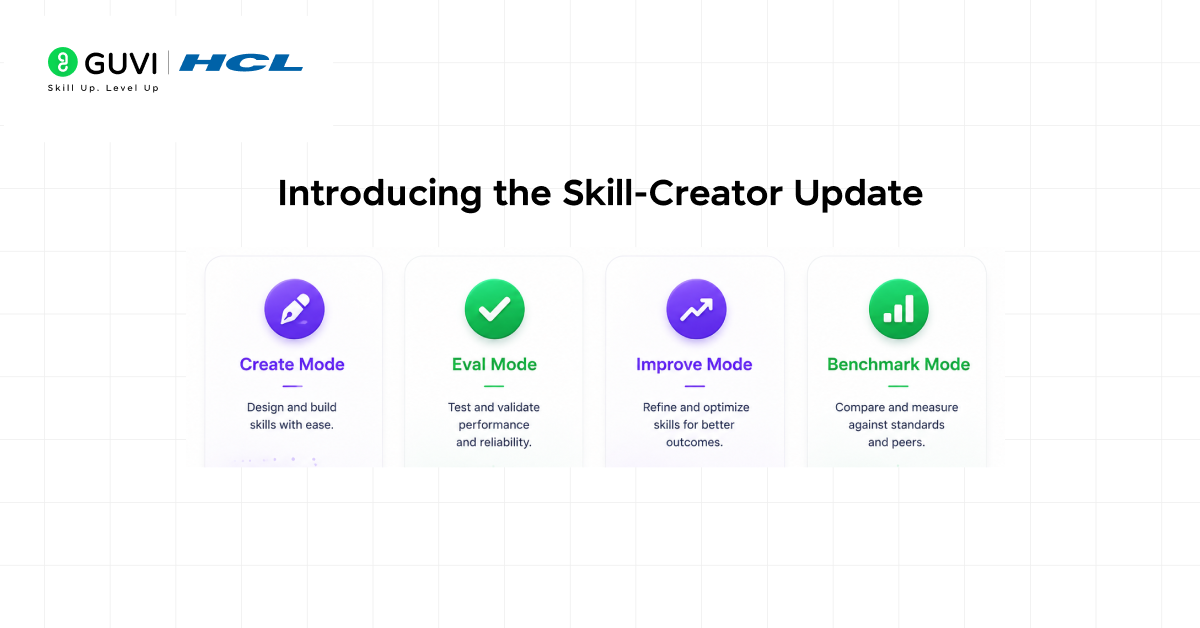
The updated skill-creator operates in four distinct modes. Each mode targets a specific stage in the AI agent skills improvement cycle. You do not need to use all four in sequence you can jump to whichever stage matches where you are in your workflow today.
- Create Mode: Drafts a new skill from scratch based on your description of the task and your requirements.
- Eval Mode: Writes test cases, runs them against your skill, and returns structured pass/fail results with explanations.
- Improve Mode: Takes eval feedback and rewrites the skill to address failures, conflicts, and weak areas.
- Benchmark Mode: Tracks pass rate, execution time, and token usage across skill versions for objective comparison.
To get started, open Claude.ai or Cowork and ask Claude to use the skill-creator. Claude Code users can install it as a plugin or download it directly from the repository. No setup beyond that is required.
Step 1: Write Evals to Test Your Skill
Evals are tests that check whether Claude does what you expect for a given prompt. If you have written software tests before, this will feel familiar. If you have not, think of evals as a checklist of situations you want your skill to handle correctly with a clear description of what ‘correct’ looks like for each one.
How to Write a Good Eval
- Define test prompts that represent real tasks your skill should handle.
- Add any supporting files the task requires, if your skill normally works with documents or data.
- Describe what good output looks like for each prompt, be specific, not vague.
- Ask skill-creator to run the eval set and return results.
- Review the pass/fail results and explanations for each case.
Start with a small set of 10 to 20 prompts. This is enough to surface regressions and confirm improvements early. The goal is not to encode every possible scenario upfront it is to capture the situations you care about most, especially the ones that have broken before
The skill-creator can automatically generate test cases using its test-creator feature. Instead of writing every evaluation prompt manually, you simply describe the skill’s purpose and real-world scenarios.
It then produces a structured test set, making it especially valuable for subject matter experts who understand their domain but may not have experience writing formal tests.
Step 2: Run Benchmarks to Measure Performance
Passing an eval tells you whether the skill works. Benchmarking tells you how well it works and whether it is getting better or worse over iterations. Benchmark Mode tracks three metrics across every skill version you run it against.
- Pass rate: The percentage of eval cases the skill handles correctly. This is your primary quality signal.
- Execution time: How long the skill takes to complete each task. Slower is not always worse, but unexplained slowdowns are a signal worth investigating.
- Token usage: How many tokens the skill consumes per run. Bloated skills cost more and can degrade performance. Benchmarking helps you spot unnecessary instructions that should be removed.
A built-in comparator agent rounds out the benchmark suite. It performs blind A/B comparisons between two skill versions or between skill and no skill without knowing which is which. This removes evaluator bias and gives you a genuinely fair comparison of whether an edit helped, hurt, or made no difference.
The comparator was run across Anthropic’s own document-creation skills. The result: description improvements triggered correctly on 5 out of 6 public skills an improvement that would have been invisible without the measurement infrastructure to verify it
Step 3: Use Multi-Agent Support for Faster Testing
Running evals sequentially in a single context has a hidden problem: context bleed. When one test case runs and leaves residue in the conversation context, the next test case is no longer starts from a clean slate. This skews your results and makes your evals less reliable than they look.
Skill-creator’s multi-agent support solves this by running evals in parallel using independent agents, each in its own isolated context. There is no bleed between runs. The results reflect how the skill actually performs, not how it performs after accumulating context from previous tests.

The four sub-agents work together in the eval pipeline. An executor runs the skill against each test prompt. A grader evaluates the output against your defined expectations. A comparator does the blind A/B comparison between versions.
An analyzer surfaces patterns that aggregate statistics alone might miss, like a specific type of prompt that consistently underperforms even when the overall pass rate looks healthy.
Step 4: Tune Your Skill Description for Reliable Triggering
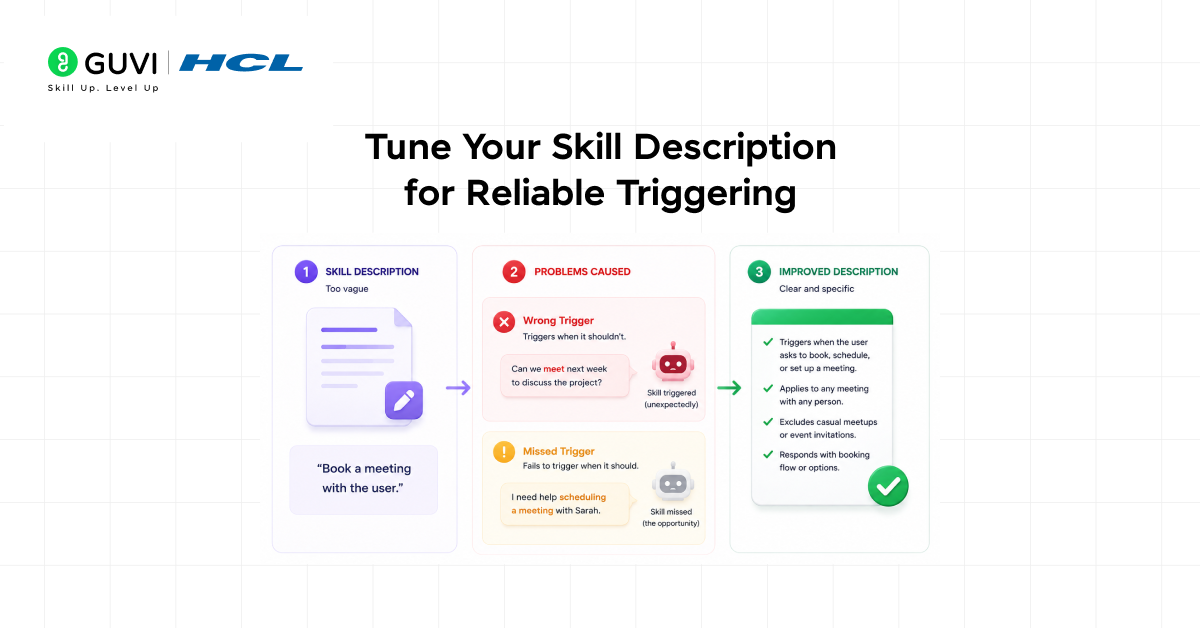
A skill that works perfectly is useless if it never triggers or if it triggers when it should not. As your collection of skills grows, description precision becomes critical. Too broad a description causes false positives, where the wrong skill activates for the wrong task. Too narrow and it never fires at all.
Skill-creator’s description tuning tool analyses your current description against a set of sample prompts. It identifies which prompts cause false positives, which cause false negatives, and suggests specific edits to the description that reduce both. You do not need to guess whether your wording is right the tool shows you the evidence.
What Causes Poor Triggering
- Descriptions that are too generic, matching many different tasks instead of one specific workflow
- Descriptions that use technical jargon your users would never type naturally
- Missing context about when the skill should not activate the absence of exclusion criteria
- Descriptions written for one model version that use phrasing the current model interprets differently
Treat your skill description as a first-class part of the skill itself not a label you write once and forget. Tuning it based on real prompt data is one of the highest-leverage improvements you can make to your overall skill reliability.
When Anthropic ran its description tuner across public document-creation skills, it found improvements in 5 out of 6 skills. Most descriptions were either too broad, too narrow, or poorly phrased, causing them to miss real user prompts.
The takeaway: even professionally maintained skills need refinement so first-draft skills almost always require tuning to perform reliably.
Tips and Best Practices for AI Agent Skills Improvement
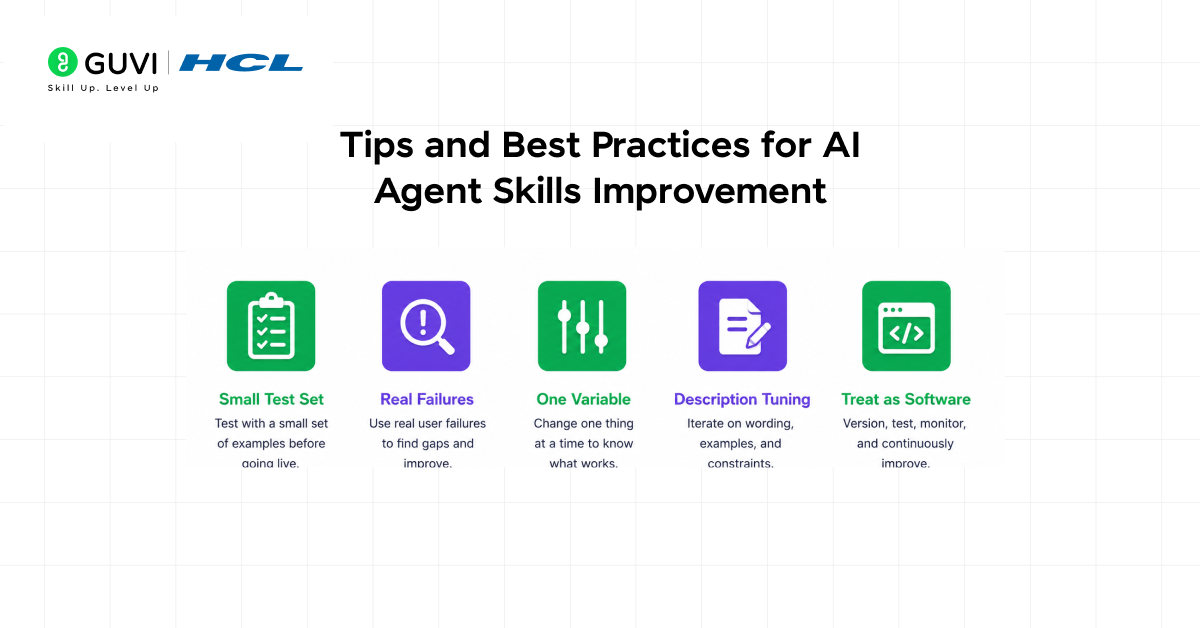
- Start small 10–20 real test cases are better than many generic ones. Add failures as you find them.
- Change one thing at a time so you know what actually improved.
- Check how the agent works, not just the final output hidden issues matter.
- Update the skill description whenever you change what it does.
- Treat skills like software: test, version, and improve continuously.
- Avoid strict “ALWAYS/NEVER” rules explain why instead for better results.
If you’re serious about mastering AI-powered coding tools and want to apply them in real-world scenarios, don’t miss the chance to enroll in HCL GUVI’s Intel & IITM Pravartak Certified Artificial Intelligence & Machine Learning Course, co-designed by Intel. It covers Python, Machine Learning, Deep Learning, Generative AI, Agentic AI, and MLOps through live online classes, 20+ industry-grade projects, and 1:1 doubt sessions, with placement support from 1000+ hiring partners, helping you build intelligent systems and work efficiently with modern AI development tools
Conclusion
In conclusion, AI agent skills improvement is no longer optional it is the foundation of any reliable agentic workflow. Skills break silently, models evolve, and workflows shift. Without testing, benchmarking, and description tuning, you cannot know whether your skills are actually working or just appearing to work.
Skill-creator’s four modes Create, Eval, Improve, and Benchmark give every skill author the tools to move from intuition to evidence. Start with evals on your most critical skill. Let the results show you where to improve. Run benchmarks to confirm the change actually helped. Tune your description so the skill fires when it should.
The teams getting the most from AI agents are the ones who treat skills like software. Test before shipping. Measure before claiming improvement. Refine based on real data, not gut feeling.
FAQs
1. What is skill-creator and what does it do?
Skill-creator is a tool built by Anthropic for creating, testing, and improving Agent Skills in Claude. It operates in four modes: Create, Eval, Improve, and Benchmark. The updated version brings structured evaluation, parallel multi-agent testing, and description optimization to skill authoring without requiring any coding knowledge.
2. What are Agent Skills in Claude?
Agent Skills are custom markdown-based instruction files (SKILL.md) that extend what a Claude agent can do in a repeatable, structured way. They fall into two categories: capability uplift skills, which teach the agent to do tasks it cannot do reliably on its own, and encoded preference skills, which capture how a specific team or workflow wants a task completed.
3. How do I test an Agent Skill without writing code?
Use skill-creator’s Eval mode inside Claude.ai or Cowork. Ask Claude to use the skill-creator, describe your skill, and provide sample prompts that represent real tasks. Skill-creator will run them against your skill and return structured pass/fail results with explanations for each case no code required at any step.
4. What is context bleed and why does it matter for skill testing?
Context bleed happens when one test case leaves residue in the conversation context, affecting the next test case and skewing your results. Skill-creator’s multi-agent support eliminates this by running each eval in a separate, isolated agent context. This ensures every test starts from a clean state, giving you results that accurately reflect actual skill performance.
5. What is a comparator agent in skill-creator?
A comparator agent performs blind A/B comparisons between two skill versions or between using a skill and not using one. It evaluates the outputs without knowing which version produced which result, eliminating bias. This gives you an objective, evidence-based answer to the question: did this change actually improve the skill?
What is the difference between an AI course and an AI & ML course?
An AI course focuses on artificial intelligence concepts, while an AI & ML course includes machine learning, deep learning, NLP, computer vision, and practical model-building skills. If you’re looking for hands-on AI and ML training, explore the HCL GUVI AI & ML Programme.
Why is SQL important for AI & ML professionals?
SQL helps AI & ML professionals extract, clean, and analyze data from databases, making it essential for building accurate machine learning models. Most industry-focused AI & ML programmes include SQL as a core data skill.
What job roles can I apply for after completing an AI & ML course?
You can apply for roles such as AI Engineer, Machine Learning Engineer, Data Scientist, NLP Engineer, Computer Vision Engineer, and AI Developer. To prepare for these roles, consider a project-based AI & ML Programme with career support.
How do I choose the best AI course for my career goals?
Choose an AI course based on your career goals, curriculum, hands-on projects, mentor support, industry tools, and placement assistance. A structured AI & ML Programme can help you build practical skills and a strong portfolio.
What should I look for before enrolling in an AI & ML course?
Look for a structured curriculum, practical projects, experienced mentors, updated AI tools, certification value, and career support. Compare programmes carefully before enrolling in an AI & ML Programme.
How should I evaluate AI & ML certifications before enrolling?
Evaluate AI & ML certifications based on industry recognition, curriculum relevance, hands-on learning, project experience, and career outcomes. You can also compare what’s included in the HCL GUVI AI & ML Programme before making a decision.
Success Stories

About the Author
Vishalini Devarajan
An Aerospace Engineer turned content writer, I focus on making complex concepts easy to understand through well-structured, reader-friendly blogs. Whether it’s a technical topic or a non-technical one, I love creating content that is clear, engaging, and impactful.
View all posts by Vishalini Devarajan
Connect with me @









Did you enjoy this article?