


Artificial Intelligence and Machine Learning Articles
What is Replit’s New Database Editor? A Beginner-Friendly Guide
LLM Engineer Skills: What You Need to Know in 2026


Get In Touch For Details! Request More Information
Ship Enterprise Data Apps Faster with Replit and Databricks
Jun 24, 2026 7 Min Read 310 Views
(Last Updated)
If your engineering team is building data-intensive applications on top of Databricks, you already know how much of the delivery cycle gets consumed by environment setup, deployment friction, and the gap between your data platform and your front-end tooling. Replit Databricks enterprise data apps close that gap, directly giving teams a collaborative cloud development environment that connects to Databricks compute without the usual DevOps overhead.
Instead of configuring local environments, managing dependency conflicts, or waiting on infrastructure tickets, you build and ship inside Replit. Your app connects to Databricks jobs, SQL warehouses, and Delta Lake tables through a straightforward integration, and your entire team can work on the same codebase in real time.
In this article, we will walk through what this combination does, how to connect the two platforms, what you can build, a step-by-step project, practical examples, and the limits. Let us get started.
Quick TL;DR Summary
1. Replit Databricks enterprise data apps combine Replit’s cloud-based collaborative IDE with Databricks’ data and AI platform to accelerate app delivery.
2. You write and deploy your application entirely in Replit while querying Databricks SQL warehouses, running jobs, and accessing Delta Lake tables.
3. No local environment setup is required; teams can collaborate on the same codebase in real time from any browser.
4. The integration uses the Databricks SQL Connector, Jobs API, and REST APIs standard tools with no additional licensing.
5. This guide covers setup, a step-by-step app build, practical use cases, a comparison with alternative approaches, and best practices
Table of contents
- What is the Replit and Databricks Integration?
- Prerequisites: What You Need Before You Start
- What You Need
- Step 1: Connect Replit to Databricks
- How to Connect
- Step 2: Write Your First Databricks Query From Replit
- Step 3: Build a Real App Sales Analytics Dashboard
- Step 3.1: Set Up the Project Structure
- Step 3.2: Write the Flask API
- Step 3.3: Build the HTML Template
- Step 3.4: Run and Deploy
- Practical Use Cases for Engineering Teams
- Internal Reporting Tools
- Data Quality Monitoring Dashboards
- Self-Service Data Exploration Interfaces
- ML Model Output Viewers
- Workflow Trigger Interfaces
- Current Limitations
- Best Practices When Building Replit Databricks Enterprise Data Apps
- Always Aggregate in Databricks, Not in Python
- Use Replit Secrets for Every Credential
- Cache Results for Repeated Queries
- Close Connections After Every Query
- Build With Least Privilege
- Conclusion
- FAQs
- What are Replit Databricks enterprise data apps?
- Do I need DevOps experience to deploy an app using Replit and Databricks?
- What Databricks plan is required for this integration?
- Is the Databricks SQL Connector free to use?
- Can multiple developers collaborate on the same Replit project connected to Databricks?
What is the Replit and Databricks Integration?
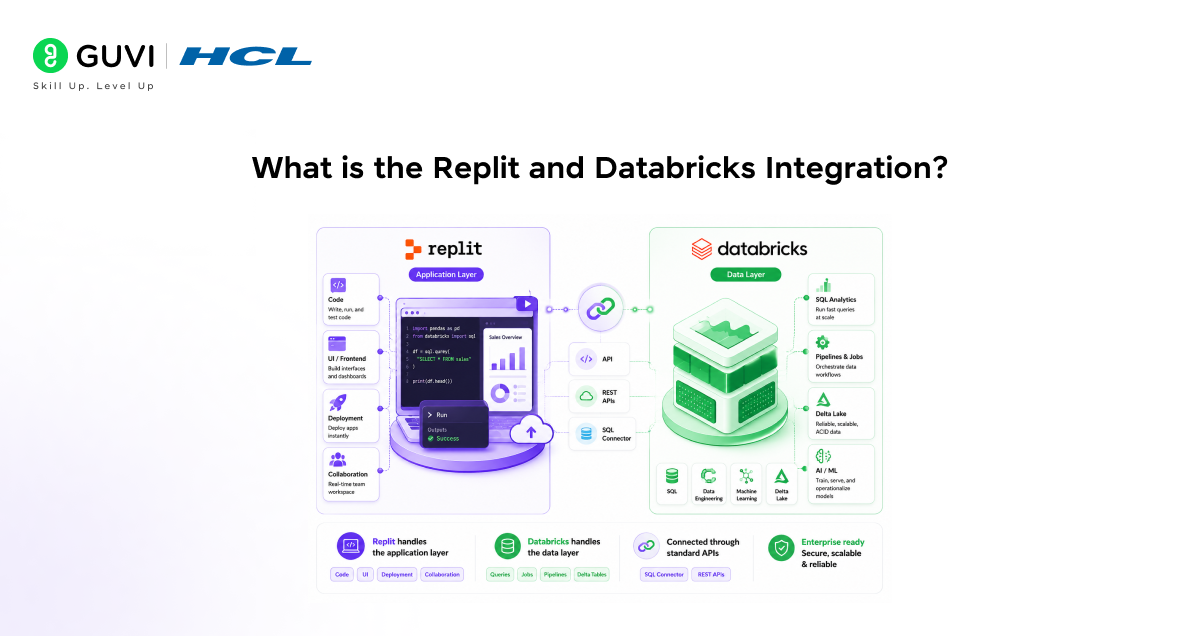
Replit is a cloud-based development environment where you can write, run, and deploy applications entirely in a browser. It supports Python, Node.js, and dozens of other languages, and gives teams a shared workspace where every collaborator sees the same code, output, and environment.
Databricks is the unified data and AI platform that engineering and data teams use for large-scale data processing, SQL analytics, machine learning pipelines, and Delta Lake-based data architecture.
Together, they let you build enterprise data applications where the front-end logic, API layer, and deployment live in Replit, and the data processing, warehouse queries, and compute-heavy work run in Databricks. Each platform does what it is best at, connected through standard APIs.
Key points to remember:
- Replit handles the application layer code, UI, deployment, and collaboration
- Databricks handles the data layer queries, jobs, pipelines, and Delta tables
- The connection uses the Databricks SQL Connector and REST APIs, both publicly available and well-documented
Prerequisites: What You Need Before You Start
Before building, make sure you have the following in place. Most teams working with Databricks already have the majority of these covered.
What You Need
- A Replit account, a free account, works for development; a Replit Core or Teams plan is recommended for production deployments.
- A Databricks workspace on AWS, Azure, or GCP with at least one running SQL Warehouse.
- A Databricks personal access token generated from your Databricks user settings under Developer.
- The Databricks workspace URL and SQL Warehouse HTTP path are both found in the connection details of your SQL Warehouse.
- Basic familiarity with Python and either Flask or FastAPI for the application layer.
Replit runs over 30 million projects and supports teams across more than 200 countries. Its Always On feature keeps deployed applications running without a server to manage. When combined with Databricks, which processes over one exabyte of data monthly across its cloud deployments, you get a full-stack enterprise data application environment where neither the compute layer nor the deployment layer requires local infrastructure.

Step 1: Connect Replit to Databricks
Getting the two platforms talking takes about ten minutes. Here is the exact process.
How to Connect
1. Create a new Replit project and choose Python as the language.
2. Open the Secrets panel in Replit (the lock icon in the left sidebar) and add two secrets: DATABRICKS_HOST (your workspace URL) and DATABRICKS_TOKEN (your personal access token).
3. Open the Shell in Replit and install the Databricks SQL Connector:
pip install databricks-sql-connector
4. Create a file called db_connect.py and add the connection code shown in Step 2 below.
5. Run the file to verify the connection returns data from your Databricks warehouse.
Replit Secrets stores your credentials as environment variables. Your token never appears in the source code, which is the correct approach for shared team projects.
Step 2: Write Your First Databricks Query From Replit
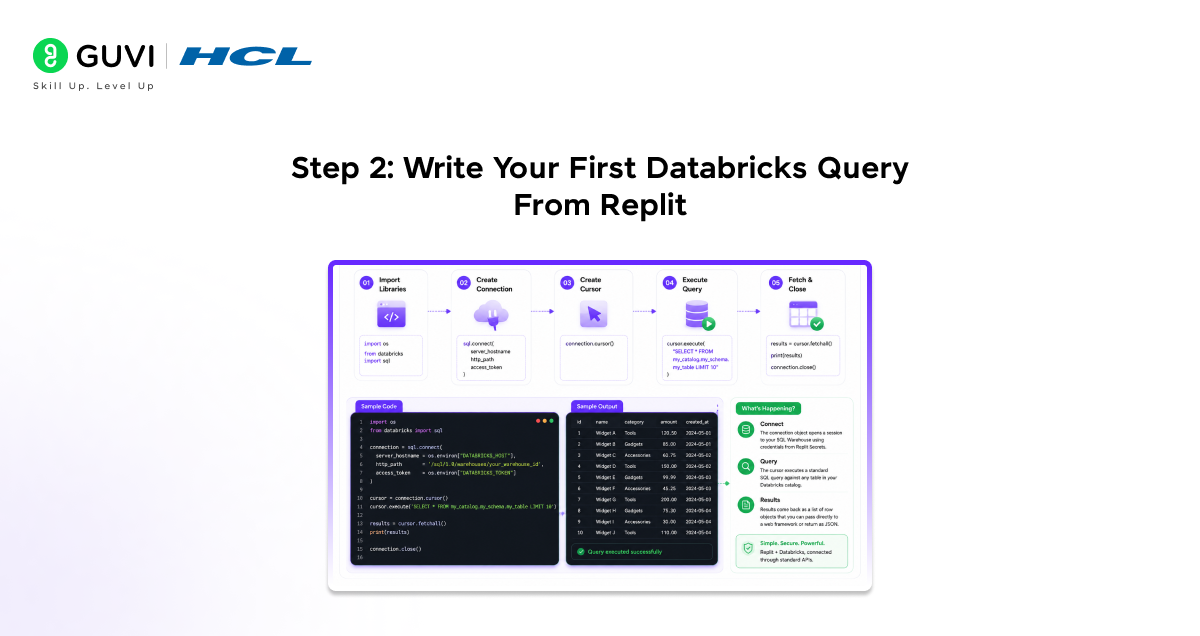
Once the connector is installed, connecting to your Databricks SQL Warehouse and running a query takes less than ten lines of Python. Here is the minimal working example.
import os
from databricks import sql
connection = sql.connect(
server_hostname = os.environ[‘DATABRICKS_HOST’],
http_path = ‘/sql/1.0/warehouses/your_warehouse_id’,
access_token = os.environ[‘DATABRICKS_TOKEN’]
)
cursor = connection.cursor()
cursor.execute(‘SELECT * FROM my_catalog.my_schema.my_table LIMIT 10’)
results = cursor.fetchall()
print(results)
connection.close()
Here is what is happening:
- The connection object opens a session to your SQL Warehouse using credentials from Replit Secrets
- The cursor executes a standard SQL query against any table in your Databricks catalog
- Results come back as a list of row objects that you can pass directly to a web framework or return as JSON
The variable name does not carry the complexity of the Databricks cluster. The connection object handles authentication, session management, and result streaming automatically.
Step 3: Build a Real App Sales Analytics Dashboard
Now that the connection works, let us build something practical. We will create a Sales Analytics Dashboard, a web application that queries a Databricks sales table, aggregates revenue by region, and displays the results as a live data table. It is a straightforward project that clearly shows how Replit Databricks enterprise data apps come together.
Step 3.1: Set Up the Project Structure
1. In your Replit project, create the following files: main.py, templates/index.html, and requirements.txt.
2. In requirements.txt, add: flask, databricks-sql-connector.
3. Run pip install -r requirements.txt in the Shell.
Step 3.2: Write the Flask API
In main.py, build a simple Flask application that queries Databricks and returns results:
from flask import Flask, render_template, jsonify
from databricks import sql
import os
app = Flask(__name__)
def get_sales_by_region():
conn = sql.connect(
server_hostname = os.environ[‘DATABRICKS_HOST’],
http_path = os.environ[‘DATABRICKS_HTTP_PATH’],
access_token = os.environ[‘DATABRICKS_TOKEN’]
)
cursor = conn.cursor()
cursor.execute(”’
SELECT region, SUM(revenue) AS total_revenue
FROM sales.transactions
WHERE order_date >= CURRENT_DATE – INTERVAL 30 DAYS
GROUP BY region ORDER BY total_revenue DESC
”’)
rows = cursor.fetchall()
conn.close()
return [{‘region’: r[0], ‘revenue’: r[1]} for r in rows]
@app.route(‘/’)
def index():
data = get_sales_by_region()
return render_template(‘index.html’, data=data)
@app.route(‘/api/sales’)
def api_sales():
return jsonify(get_sales_by_region())
if __name__ == ‘__main__’:
app.run(host=’0.0.0.0′, port=5000)
Step 3.3: Build the HTML Template
In templates/index.html, create a simple table that renders the query results:
<!DOCTYPE html>
<html>
<head><title>Sales by Region</title></head>
<body>
<h1>Revenue by Region (Last 30 Days)</h1>
<table border=’1′>
<tr><th>Region</th><th>Total Revenue</th></tr>
{% for row in data %}
<tr><td>{{ row.region }}</td><td>{{ row.revenue }}</td></tr>
{% endfor %}
</table>
</body>
</html>
Step 3.4: Run and Deploy
1. Click Run in Replit. The app starts immediately and displays a public URL.
2. Open the URL you will see a live table populated with data from your Databricks warehouse.
3. To keep it running permanently, enable Always On in the Replit deployment settings.
This is where Replit Databricks enterprise data apps show their value. The entire loop from query to deployed, shareable URL takes minutes rather than the hours that local environment setup and deployment pipelines typically require.
Practical Use Cases for Engineering Teams
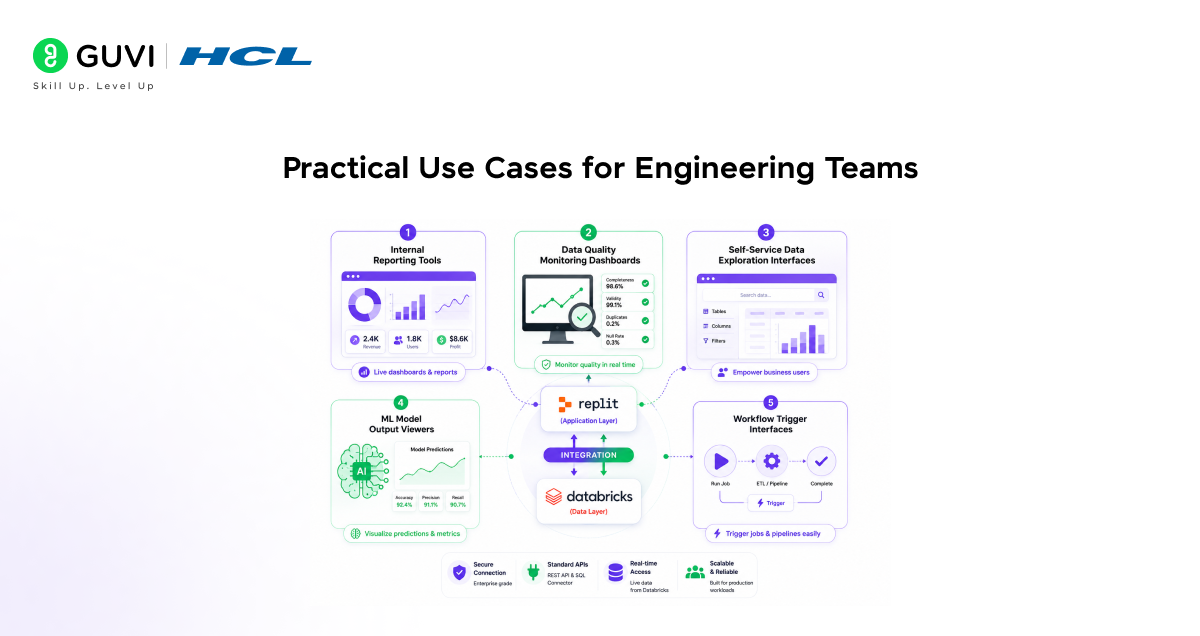
Here are the most common types of enterprise data applications that teams build using this combination. Each one follows the same pattern: Replit handles the application layer, Databricks handles the data layer.
1. Internal Reporting Tools
Replace static spreadsheet exports with live web applications that query Databricks directly. Product managers and business analysts get up-to-date dashboards without waiting for a data team to pull numbers.
2. Data Quality Monitoring Dashboards
Query Delta Lake table statistics, row counts, null rates, and schema drift metrics from Databricks and surface them in a Replit-hosted web app. Operations teams get a live view of data health without accessing the Databricks workspace directly.
3. Self-Service Data Exploration Interfaces
Build lightweight query interfaces where non-technical users describe what they want to see, the application translates it into SQL, and Databricks returns the result. Useful for support teams, finance teams, and operations managers who need data access without Databricks licenses.
4. ML Model Output Viewers
After running a machine learning job in Databricks, write the results to a Delta table and build a Replit app that reads and displays predictions, model performance metrics, or classification outputs in a human-readable format.
5. Workflow Trigger Interfaces
Use the Databricks Jobs REST API from Replit to build simple web forms that trigger Databricks jobs, ETL runs, model retraining, and data refresh pipelines without requiring the person triggering the job to access the Databricks UI.
Databricks Jobs API supports triggering, monitoring, and retrieving results from any Databricks job programmatically. When combined with a Replit-hosted interface, this means your data pipelines get a clean, shareable front-end that any stakeholder can use without touching the Databricks workspace or requiring a licence. The entire trigger interface can be built, deployed, and shared from Replit in under an hour.
What This Approach Cannot Do
This combination is powerful for application delivery, but it has real limits worth knowing before you commit to it for a specific use case.
Current Limitations
1. Replit is not a replacement for Databricks notebooks. Exploratory data analysis, notebook-based collaboration, and interactive Spark execution still belong in the Databricks workspace. Replit is for the application layer, not the analysis layer.
2. Large result sets need careful handling. Querying millions of rows through the SQL Connector and rendering them in a web app will be slow and memory-intensive. Aggregate in Databricks SQL first; only send summary data to the application layer.
3. Replit’s free tier has compute limits. For production enterprise applications with concurrent users, a Replit Core or Teams plan is necessary. The free tier is sufficient for development and internal tools with light traffic.
4. Databricks SQL Warehouse costs apply. Every query from your Replit app runs against your SQL Warehouse and incurs DBU costs. Applications with high query volumes need connection pooling and query caching to manage cost.
5. Real-time streaming is not straightforward. If your use case requires sub-second data freshness, the SQL Connector polling approach has latency. Structured Streaming and Kafka-based architectures in Databricks are the right tools for true real-time requirements.
Think of Replit as the application delivery layer and Databricks as the data processing layer. Work that crosses those boundaries cleanly is where the combination thrives. Work that blurs them requires more architectural thought.
Best Practices When Building Replit Databricks Enterprise Data Apps
A few habits will make your Replit and Databricks applications more reliable, cost-efficient, and easier to maintain as they grow.
1. Always Aggregate in Databricks, Not in Python
Do the GROUP BY, filtering, and aggregation in your SQL query before results reach Replit. Pulling raw rows and processing them in Python defeats the purpose of Databricks’ distributed compute.
2. Use Replit Secrets for Every Credential
Never hardcode your Databricks token, workspace URL, or HTTP path in source code. Replit Secrets injects them as environment variables at runtime. This is especially important for team projects where multiple people access the codebase.
3. Cache Results for Repeated Queries
If your app serves the same data to multiple users, cache query results in memory or a lightweight store. Running a fresh Databricks SQL query for every page load is unnecessary and expensive for high-traffic internal tools.
4. Close Connections After Every Query
Always call connection.close() after your query completes. Open connections consume SQL Warehouse resources and accumulate DBU costs. Use Python context managers for cleaner connection handling in production code.
5. Build With Least Privilege
Create a Databricks service principal with read-only access to the specific catalogs and schemas your application needs. Avoid using a personal access token tied to an admin account for application-layer queries.
Replit’s multiplayer editing feature means that when your entire team is in the same Replit project, every keystroke is visible in real time—similar to Google Docs for code. For enterprise data application teams where a data engineer writes the SQL and a front-end developer builds the template, this removes the handoff friction that normally adds days to a delivery cycle. Both roles can work in the same file simultaneously.
If you want to learn more about building skills and automating your procedural knowledge, do not miss the chance to enroll in HCL GUVI’s Intel & IITM Pravartak Certified Artificial Intelligence & Machine Learning courses. Endorsed with Intel certification, this course adds a globally recognized credential to your resume, a powerful edge that sets you apart in the competitive AI job market.
Conclusion
In conclusion, Replit Databricks enterprise data apps give engineering teams a direct path from data to a deployed application without local environment setup, without a CI/CD pipeline to configure, and without DevOps tickets to open.
Replit handles the application layer cleanly. Databricks handles the data layer cleanly. The Databricks SQL Connector bridges them in a handful of lines of Python. The result is a workflow where an internal tool, a reporting dashboard, or a job trigger interface can go from idea to shareable URL in a single day.
Understanding where this approach excels, rapid delivery, internal tools, team collaboration, and where it has limits, real-time streaming, very high-traffic production systems, complex CI/CD requirements, helps you use it where it genuinely fits. Used in the right context, this combination removes more friction from enterprise data application delivery than almost any other change a team can make.
FAQs
1. What are Replit Databricks enterprise data apps?
Replit Databricks enterprise data apps are web applications built and deployed using Replit’s cloud development environment, connected to Databricks for data processing, SQL queries, and Delta Lake access. Replit handles the application layer, and Databricks handles the data layer linked through the Databricks SQL Connector and REST APIs.
2. Do I need DevOps experience to deploy an app using Replit and Databricks?
No. Replit manages the deployment infrastructure. You write your code in Replit, click Run, and your application gets a public URL. For persistent deployment, you enable Always On in the Replit settings. No server configuration, containerisation, or CI/CD pipeline is required.
3. What Databricks plan is required for this integration?
Any Databricks plan that includes a SQL Warehouse is sufficient. The SQL Connector connects to SQL Warehouses specifically. Databricks Community Edition does not include SQL Warehouses, so a Standard, Premium, or Enterprise Databricks workspace is needed.
4. Is the Databricks SQL Connector free to use?
The connector itself is a free, open-source Python library. However, every query you run through it executes against your Databricks SQL Warehouse and incurs standard DBU costs based on your Databricks contract. There is no additional cost for the connector itself.
5. Can multiple developers collaborate on the same Replit project connected to Databricks?
Yes. Replit’s multiplayer feature allows multiple developers to edit the same project simultaneously in real time. Credentials are stored in Replit Secrets, which are shared across the project team on paid plans, so all collaborators use the same Databricks connection without each person managing their own credentials.
Success Stories

About the Author
Vishalini Devarajan
An Aerospace Engineer turned content writer, I focus on making complex concepts easy to understand through well-structured, reader-friendly blogs. Whether it’s a technical topic or a non-technical one, I love creating content that is clear, engaging, and impactful.
View all posts by Vishalini Devarajan
Connect with me @









Did you enjoy this article?