


Artificial Intelligence and Machine Learning Articles
Finance Manager to Data Analytics: Career Growth, Salary and Seniority
How to Evaluate LLM Outputs in Production Deployments
AI/ML Skills Gap 2026: Why Companies Can't Find Job-Ready Talent
20 AI/ML Interview Questions Recruiters Can Use Without a Tech Background - Best Guide


Get In Touch For Details! Request More Information
Model Context Protocol: One Bridge for AI and Your Apps
Jul 07, 2026 6 Min Read 904 Views
(Last Updated)
Imagine hiring the smartest assistant in the world, someone who can write code, draft emails, analyze documents, and answer almost any question but they have no access to your computer, your files, your databases, or the tools you use every day. That is the reality of most AI models right now.
MCP powers real-world wins beyond theory: AI coding tools like Cursor and Windsurf grant live access to your file system, Git history, tests, and docs for working with actual codebases. Enterprises connect AIs to databases, wikis, and CRMs salespeople get instant deal summaries, support bots handle account lookups, orders, and ticket updates in one flow.
In this article, you will learn what MCP is, why it matters, how its architecture works, what tools it gives you out of the box, and how it is already changing the way developers and companies build AI-powered software. Whether you are just starting out in tech or trying to understand where AI is heading, this guide will walk you through everything in plain language.
TL;DR: Model Context Protocol (MCP) in 5 Points
- The Fix for AI Isolation: MCP, launched by Anthropic in Nov 2024, lets AI models easily connect to real-world tools like databases, GitHub, or Slackending the mess of custom integrations for every app.
- Client-Server Magic: Hosts (like Claude Desktop) use Clients to talk to Servers wrapping your tools; discover capabilities automatically, with strict security like user approvals for actions.
- Core Building Blocks: Tools (AI executes actions), Resources (read data), Prompts (smart templates) all standardized so any MCP-compatible AI works with any server.
- Industry Takeover: OpenAI, Google, Microsoft jumped on board by 2025; now 5,800+ community servers, donated to Linux Foundation for neutral governance.
- Real Impact: Powers AI coding in Cursor, enterprise data queries, support bots start easy with Claude Desktop or SDKs in Python/TS.
Table of contents
- The Problem MCP Was Built to Solve
- How MCP Works: The Architecture
- The Host: Your AI's Brain
- The Client: Secure Messenger
- The Three Core Primitives: What Servers Can Offer
- How a Request Actually Flows Through MCP
- Why the Industry Got Behind MCP So Quickly
- Quiet Launch, Explosive Growth
- Escaping the Fragmentation Trap
- Locked In as Open Standard
- Real-World Use Cases That Show the Value
- Getting Started With MCP
- Wrapping Up
- FAQs
- What's MCP in plain English?
- Why was MCP needed?
- How does a request work?
- Is MCP safe?
- How do I try it?
The Problem MCP Was Built to Solve
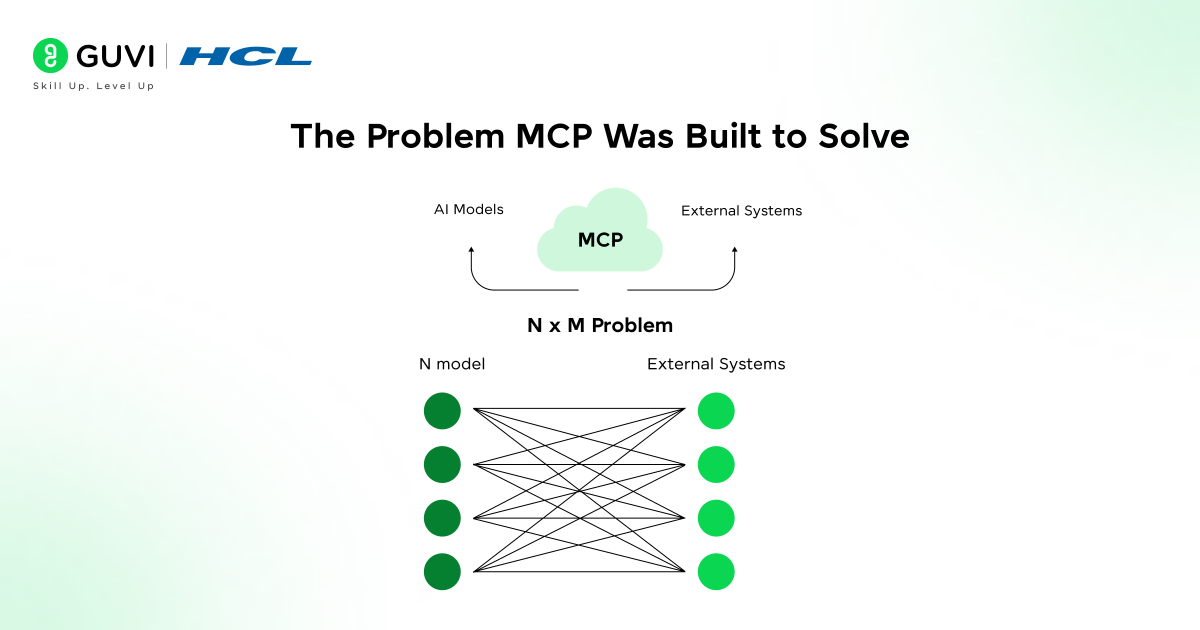
Before MCP arrived, connecting an AI model to the real world was a patchwork job.
- If you wanted your AI assistant to read files from Google Drive, query a Postgres database, and send a message in Slack, you had to write three completely separate integrations, one for each service, using each service’s own API format and authentication rules.
- Now multiply that by every AI app and every tool in your organization. The result is what engineers call an N×M problem: if you have 10 AI applications and 100 tools, you potentially need 1,000 different custom connectors to wire everything together.
- That is not just a lot of work, it is fragile work. Every time an API changes, every connector that touches it breaks. Teams end up spending more time maintaining these integration pipelines than actually building useful AI features.
- Developers were essentially reinventing the same plumbing over and over again for every new combination of model and tool. There was no shared standard, no reusable layer, and no way for one developer’s integration work to benefit anyone else building with a different AI model or a different set of tools.
- MCP fixes this by introducing a single protocol layer that sits between the AI model and all external systems. A developer builds an MCP server once for their tool or data source, and from that point forward, any AI application that supports MCP can connect to it immediately with no additional integration work required.
- The protocol reduces that N×M integration problem to a much simpler N+M equation: each AI implements MCP once, and each tool implements MCP once, and they all work together automatically.
How MCP Works: The Architecture
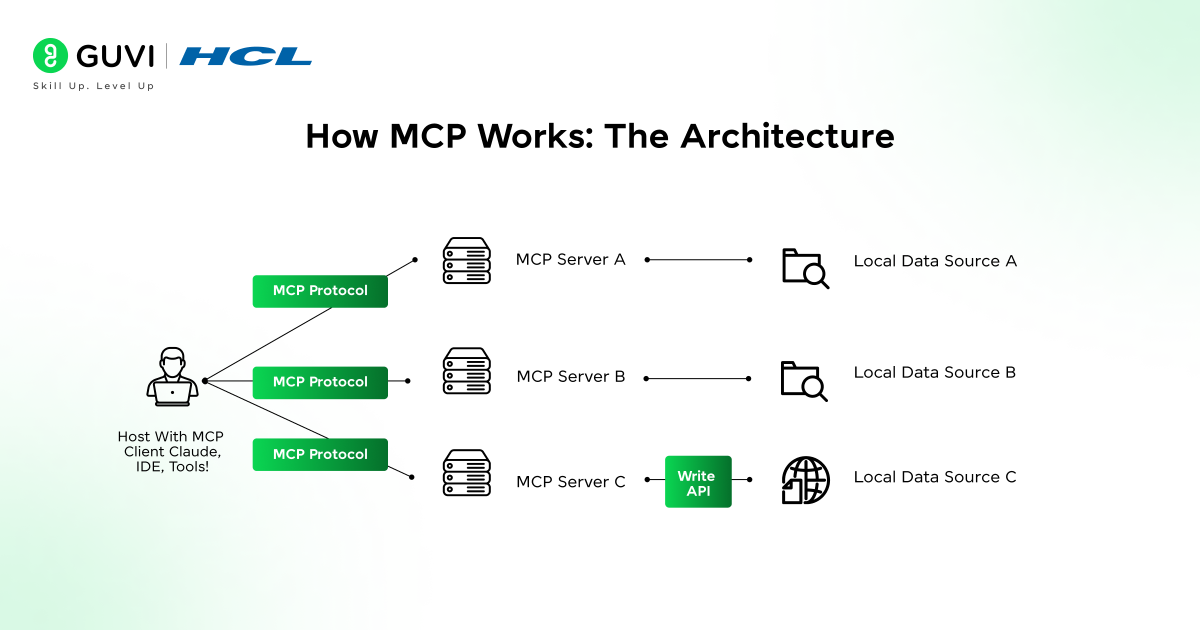
The Host: Your AI’s Brain
The Host is the AI-powered app you chat with directly, like Claude Desktop, Cursor IDE, or any MCP-supporting chatbot. It houses the large language model, processes your requests, and figures out next steps. When it needs external help like fresh data or actions it hands off the job through the MCP layer.
The Client: Secure Messenger
Living inside the Host, the Client manages one-on-one chats with each MCP server. Connect to GitHub, Slack, and Postgres? That’s three Clients, each isolated for securityno cross-talk between them. It handles handshakes, discovers server capabilities, and shuttles standardized messages back and forth.
The Server: Tool Wrapper
The Server is an external program that packages your tools or data (databases, files, APIs) into a universal MCP format any Client can use. Run it locally or remotely; Anthropic offers ready-made ones for Google Drive, Slack, GitHub, Git, Postgres, and Puppeteer so you skip building from scratch.
The Three Core Primitives: What Servers Can Offer
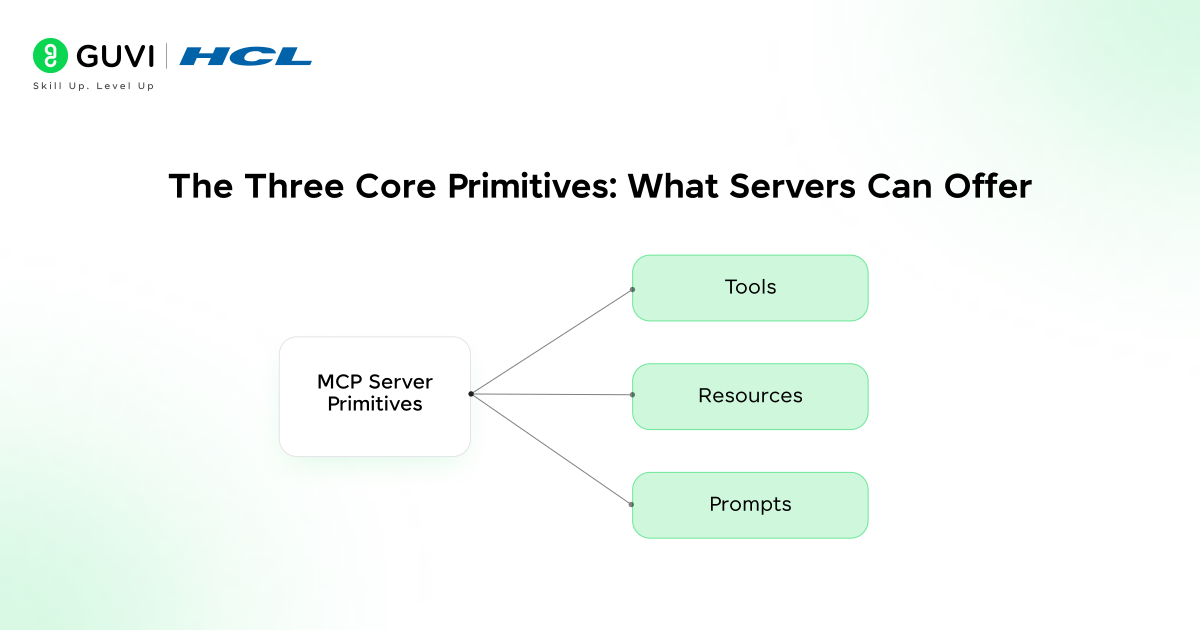
Once a client connects to an MCP server, the server can offer three types of capabilities, which the MCP specification calls primitives. These are the building blocks of everything an AI model can do through MCP.
1. Tools- They are executable functions that the AI model can call to take action. They are the most powerful primitive because they allow the AI to actually do things, not just read things. A PostgreSQL MCP server might expose a tool for running SQL queries.
A GitHub MCP server might expose tools for creating pull requests, listing issues, or cloning repositories. Tools are model-controlled, meaning the AI decides when to use them based on what you ask it to do. Crucially, tools represent real code execution, so MCP requires explicit user permission before any tool is invoked; this is a deliberate safety boundary built into the protocol.
2. Resources- These are data sources that provide context to the AI model. Unlike tools, resources are mostly read-only; they give the AI information to work with rather than letting it change something.
A resource might be the contents of a file, a database record, the output of a search query, or the schema of a table. Resources are application-controlled, meaning the host application decides what resource data gets loaded into the model’s context, rather than the model deciding on its own.
3. Prompts- They are reusable templates that guide how the AI interacts with a specific tool or system. They let developers package up the best way to phrase a request for a particular server so that every AI model using that server automatically gets the benefit of that knowledge.
You can think of prompts as pre-written, optimized instructions that come bundled with the server itself. They are user-controlled, meaning a user or application can invoke them intentionally to kick off a specific workflow.
Explore: Cursor Enterprise: AI Coding Platform for Developer Teams
How a Request Actually Flows Through MCP
Walking through a single request helps make the architecture concrete. Imagine you open Claude Desktop and ask: “What are the open issues in my project’s GitHub repository?”
When your host application starts up, its MCP clients connect to any configured MCP servers and perform a capability discovery handshake, essentially asking each server, “What can you do?”
- The GitHub MCP server responds with a list of available tools, including something like a list_issues function. The host registers these capabilities and makes them available to the AI model.
When you submit your question, the AI model recognizes that answering it requires fetching live data from GitHub. It signals its intent to use the list_issues tool with the relevant parameters.

- The host application displays a permission prompt you approve the request. The MCP client sends a standardized JSON-RPC request to the GitHub MCP server, which calls the real GitHub API, retrieves the issues, and returns the result in a standard format back to the client.
The AI model receives this data, incorporates it into its understanding of the conversation, and gives you a clear, accurate answer drawn from live information rather than its training data.
- This entire loop from your question to the final answer can happen in seconds. The AI appears to “know” live information it could never have been trained on, because MCP is bridging the gap in real time.
Why the Industry Got Behind MCP So Quickly
Quiet Launch, Explosive Growth
Anthropic open-sourced MCP in November 2024 with little buzz, but it snowballed fast. By March 2025, OpenAI integrated it into Agents SDK and ChatGPT desktop; Google DeepMind followed for Gemini.
Microsoft added Windows 11 support, GitHub launched its own server, and downloads skyrocketed from 100,000 to over 8 million by mid-2025, with 5,800+ community servers for databases, Figma, and more.
Escaping the Fragmentation Trap
Major AI labs were stuck building proprietary tool-calling formats OpenAI’s one way, Anthropic’s other meaning integrations didn’t cross models. MCP broke the cycle as a vendor-neutral standard: build once for any AI, no custom tweaks needed.
Locked In as Open Standard
In December 2025, Anthropic donated MCP to the Agentic AI Foundation under the Linux Foundation. This keeps it community-driven, truly open, and free from any single company’s control.
Real-World Use Cases That Show the Value
MCP powers real-world wins beyond theory. In AI coding tools like Cursor and Windsurf, it grants live access to your file system, Git history, tests, and docsso AIs work with your actual codebase, not guesses.
Enterprises wire AIs to databases, wikis, and CRMs: salespeople query deal data for instant summaries; support bots check accounts, orders, and update tickets in one flow of manual hunts.
For devs building apps, MCP slashes integration time from weeks to hours. Wrap any data or tool in an MCP server, and your AI connects instantly. SDKs in Python, TypeScript, Java, Kotlin, and C# make it beginner-easy.
In April 2025, researchers identified MCP vulnerabilities such as prompt injection attacks and malicious lookalike servers that could trick AI systems into using unauthorized tools.
The response included stronger authentication, access controls, and monitoring standards. Best practice: use trusted servers, carefully review tool permissions, and choose transparent configurations for safer MCP usage.
Getting Started With MCP
- If you want to start experimenting with MCP, the most accessible entry point is the Claude Desktop application, which supports connecting MCP servers directly through its settings.
- Anthropic provides a growing library of pre-built server implementations on their GitHub repository, covering Google Drive, Slack, GitHub, file systems, databases, and more. You can connect one of these to Claude Desktop in a matter of minutes without writing any code.
- For developers who want to build their own MCP server, the official SDKs make the process straightforward. You define the tools, resources, and prompts your server offers, write the underlying logic that executes each capability, and let the SDK handle all the protocol-level communication.
- Anthropic notes that Claude itself is particularly good at helping you build MCP server implementations quickly. You can describe your data source or tool and ask Claude to scaffold the server for you.
- The MCP documentation at modelcontextprotocol.io is the canonical reference for the specification, and the Anthropic Academy offers free courses that cover MCP in the context of building real AI agents and applications.
If you’re exploring Model Context Protocol to build AI agents that can truly connect to your tools and data, understanding how to orchestrate and deploy those agents is the next step. To go deeper, check out GUVI’s IIT‑M Pravartak AI and ML Course to master real‑world agent development and unlock the full power MCP brings to your startup workflows.
Wrapping Up
The Model Context Protocol represents a genuine shift in how AI systems interact with the world. For too long, the gap between an AI model’s capabilities inside a conversation and its usefulness in real-world systems required enormous custom engineering effort to bridge. MCP closes that gap with a simple, open, universally adoptable standard one that is already backed by every major AI company and deployed at scale by hundreds of enterprises.
For anyone starting out in tech today, understanding MCP is quickly becoming as foundational as understanding how APIs work. The future of AI is not models that know everything, it is models that can connect to everything. MCP is the protocol that makes that connection possible.
FAQs
1. What’s MCP in plain English?
It’s like USB-C for AI: a universal plug that lets smart AIs (like Claude) safely grab live data or run actions in your tools, without building custom cables every time.
2. Why was MCP needed?
AIs were stuck in chat bubbles, blind to your files or apps. MCP turns the “10 AIs x 100 tools = 1,000 integrations” nightmare into “build once, use everywhere.”
3. How does a request work?
You ask an AI something needing real data (e.g., “GitHub issues?”); it requests permission, pings the server, gets fresh info, and replies like magic, but secure.
4. Is MCP safe?
Yes, with user consent for every tool run and isolated connections. Early 2025 bugs (like prompt injections) got fixed fast via community standards, trust sources and review everything.
5. How do I try it?
Download Claude Desktop, link pre-built servers (GitHub, Slack) from Anthropic’s GitHubno code needed. Devs: Use SDKs to wrap your own tools in hours.
Success Stories

About the Author
Vishalini Devarajan
An Aerospace Engineer turned content writer, I focus on making complex concepts easy to understand through well-structured, reader-friendly blogs. Whether it’s a technical topic or a non-technical one, I love creating content that is clear, engaging, and impactful.
View all posts by Vishalini Devarajan
Connect with me @













Did you enjoy this article?