


Database Articles
SQL Window Functions: Practical Examples Every Analyst Needs
Microservices vs Monolith: Making the Right Architectural Choice


Get In Touch For Details! Request More Information
10 Best Database Management Systems For Software Developers
Oct 01, 2026 8 Min Read 65750 Views
(Last Updated)
Every modern application needs somewhere to store and retrieve data. But choosing a database is no longer as simple as selecting SQL or NoSQL.
A transactional banking application may need strict consistency and complex SQL queries. A content platform may require flexible documents. A gaming application may need sub-millisecond access to session data. Search-heavy applications need efficient indexing, while mobile applications may require a database that runs directly inside the device.
This is why software developers need to understand not only which database management systems are popular, but also what workload each one is designed to handle.
This guide compares 10 of the best database management systems for software developers in 2026, including Oracle, MySQL, SQL Server, PostgreSQL, MongoDB, Redis, Elasticsearch, MariaDB, IBM Db2, and SQLite.
Table of contents
- Quick Answer
- What Is a Database Management System?
- 10 Best Database Management Systems for Software Developers
- Oracle
- Key Features
- Best For
- When Not to Choose It
- MySQL
- Key Features
- Best For
- Why Developers Choose It
- Microsoft SQL Server
- Key Features
- Best For
- PostgreSQL
- Key Features
- Best For
- Why Developers Choose It
- MongoDB
- Key Features
- Best For
- When MongoDB Makes Sense
- Redis
- Best For
- Database or Cache?
- Elasticsearch
- Key Features
- Best For
- Typical Architecture
- MariaDB
- Key Features
- Best For
- MariaDB vs MySQL
- IBM Db2
- Key Features
- Best For
- SQLite
- Key Features
- Best For
- When SQLite Is Not Enough
- Relational vs NoSQL vs In-Memory vs Search Databases
- Relational Databases
- Document Databases
- In-Memory Databases
- Search Engines
- How to Choose the Right DBMS for Software Development
- Identify the Data Model
- Define Transaction Requirements
- Examine Query Patterns
- Estimate Scale
- Consider Consistency and Availability
- Evaluate Operational Complexity
- Which Database Should You Use for Different Applications?
- Can One Application Use Multiple Databases?
- Common Mistakes Developers Make When Choosing a Database
- Choosing Based Only on Popularity
- Using NoSQL to Avoid Schema Design
- Using Redis as Permanent Storage Without Understanding Persistence
- Treating Elasticsearch as the Source of Truth
- Ignoring Index Design
- Optimising for Hypothetical Scale Too Early
- How Databases Are Changing in 2026
- Conclusion
- FAQs
- Which Is the Best Database Management System for Software Developers?
- Which Database Is Best for Beginners?
- Is PostgreSQL Better Than MySQL?
- Should Developers Learn SQL or NoSQL First?
- Which Database Is Best for AI Applications?
- Can a Software Application Use Both SQL and NoSQL Databases?
Quick Answer
The best database management system depends on the application’s data model, consistency requirements, query patterns, scale, and deployment environment.
- PostgreSQL: Strong general-purpose choice for advanced SQL and complex application data.
- MySQL: Popular relational database for web applications and transactional workloads.
- MongoDB: Useful for document-oriented applications requiring flexible schemas.
- Redis: Designed for high-speed in-memory workloads such as caching and sessions.
- SQLite: Ideal for embedded, mobile, desktop, and lightweight local applications.
What Is a Database Management System?
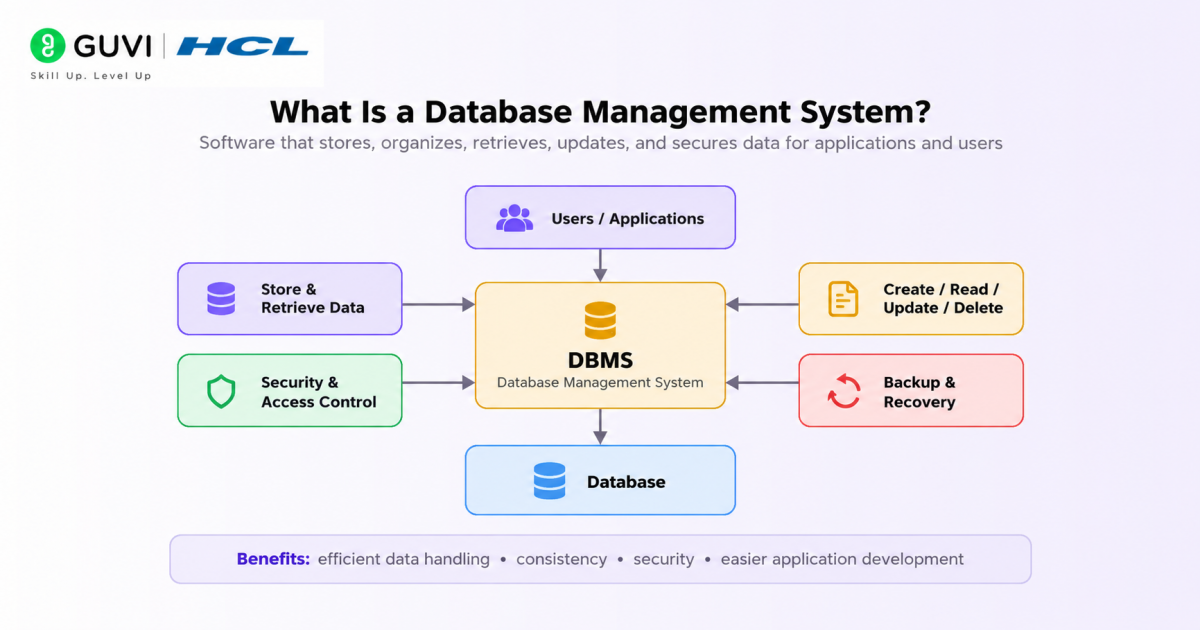
A Database Management System (DBMS) is software that allows applications and users to create, store, retrieve, update, secure, and manage structured or semi-structured data.
Instead of an application directly controlling files on disk, the DBMS provides an organised layer between the application and its stored data.
Depending on the database, a DBMS may manage:
- Tables or documents
- Schemas
- Queries
- Transactions
- Indexes
- Concurrency
- User permissions
- Backups
- Replication
- Recovery
- Data integrity
- High availability
For example, when an e-commerce customer places an order, the database may need to update inventory, create an order record, record payment information, and preserve consistency even if several users purchase products simultaneously.
Database knowledge is therefore fundamental for backend and full-stack development.
10 Best Database Management Systems for Software Developers
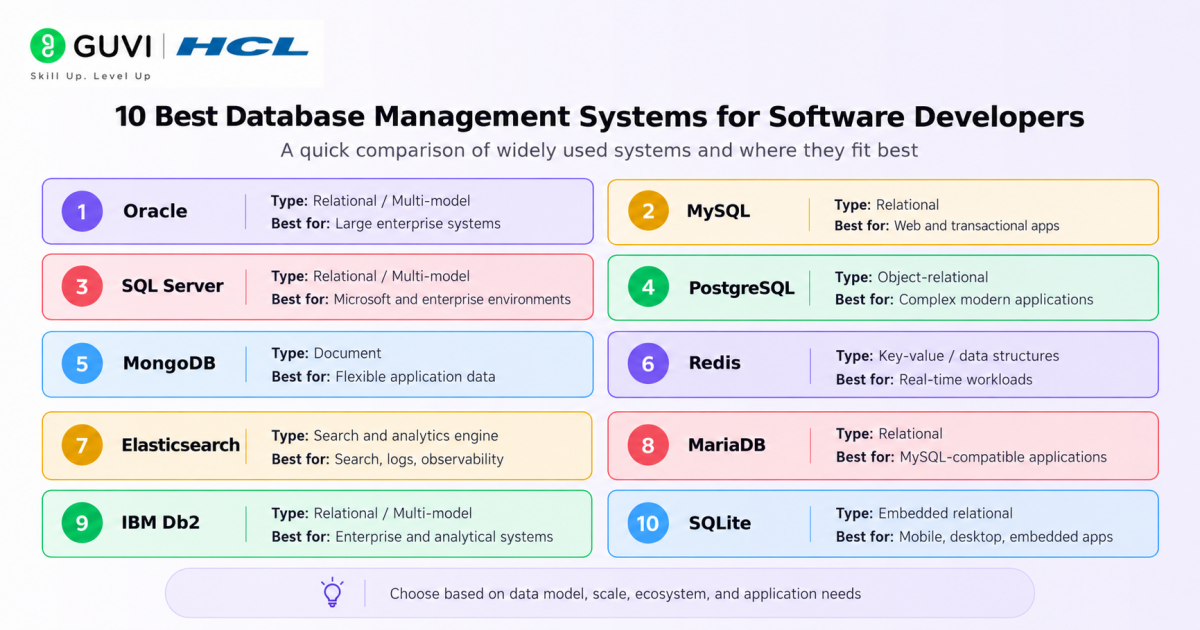
The following databases are not ranked from best to worst. Each solves a different class of development problems.
| Database | Primary Model | Best Suited For | Key Strength |
| Oracle | Relational / Multi-model | Large enterprise systems | Transactions, availability, enterprise workloads |
| MySQL | Relational | Web and transactional apps | Simplicity and mature ecosystem |
| SQL Server | Relational / Multi-model | Microsoft and enterprise environments | T-SQL, BI, security, hybrid integration |
| PostgreSQL | Object-relational | Complex modern applications | Advanced SQL and extensibility |
| MongoDB | Document | Flexible application data | JSON-like document model |
| Redis | In-memory key-value / data structures | Caching and real-time workloads | Extremely low-latency access |
| Elasticsearch | Search and analytics engine | Search, logs, observability | Full-text and distributed search |
| MariaDB | Relational | MySQL-compatible applications | Open-source relational ecosystem |
| IBM Db2 | Relational / Multi-model | Enterprise and analytical systems | Enterprise transactions and optimisation |
| SQLite | Embedded relational | Mobile, desktop, embedded apps | Serverless architecture |
1. Oracle
Oracle Database is an enterprise-grade relational database platform designed for high-volume transactional, analytical, and mission-critical workloads.
Modern Oracle deployments extend far beyond conventional relational tables. Oracle AI Database 26ai is its current long-term-support generation and includes native vector data, AI Vector Search, JSON-relational capabilities, graph features, and support for AI-oriented application development.
Key Features
- ACID transactions
- Advanced SQL
- Partitioning
- Replication and high availability
- JSON support
- Graph capabilities
- Stored procedures
- Security and access controls
- Vector storage and similarity search
- Enterprise backup and recovery
Oracle’s AI Vector Search allows developers to store vector embeddings alongside business data and perform semantic similarity searches. This can support applications such as Retrieval-Augmented Generation, recommendation systems, and enterprise semantic search.
Best For
Oracle is particularly suited to:
- Banking platforms
- ERP systems
- Large enterprise applications
- Telecommunications
- Healthcare systems
- High-volume transactional platforms
- Enterprise AI applications using existing operational data
When Not to Choose It
Oracle may be excessive for a small application that only needs a lightweight relational database. Licensing, administration, and enterprise architecture requirements should also be considered before adopting it.
2. MySQL
MySQL is one of the most established open-source relational database management systems.
It is frequently used in web applications because developers can combine a familiar SQL model with a mature ecosystem, client libraries, replication capabilities, indexing, and transaction support.
The MySQL 8.4 line is the current Long-Term Support branch, with Oracle continuing to publish maintenance releases for it.
Key Features
- SQL-based relational model
- Primary and foreign keys
- Indexing
- Views
- Stored procedures
- Replication
- Transactions
- JSON data support
- Mature connector ecosystem
With storage engines such as InnoDB, MySQL supports ACID properties required for reliable transactional applications.
Best For
MySQL works well for:
- E-commerce platforms
- Content management systems
- SaaS applications
- Web backends
- REST APIs
- Transactional applications
Why Developers Choose It
MySQL has a relatively approachable learning curve and integrates with languages and frameworks across the web-development ecosystem.
It is especially practical when the application’s data is naturally relational and does not require some of the more specialised extensibility available in PostgreSQL.
3. Microsoft SQL Server
Microsoft SQL Server is an enterprise relational database platform designed for transactional systems, analytics, business intelligence, and Microsoft-centric application environments.
SQL Server 2025 extends the platform with native JSON capabilities, vector and keyword search, REST-oriented development features, and stronger connections with Azure and Microsoft Fabric.
Key Features
- Transact-SQL or T-SQL
- ACID transactions
- Stored procedures
- Full-text search
- JSON support
- Replication
- High availability
- Security controls
- PolyBase
- Business intelligence integration
- Vector and AI-oriented functionality
PolyBase can query external storage and data sources, including supported object-storage and ODBC-accessible systems.
Best For
SQL Server is particularly suitable for:
- .NET applications
- Enterprise business software
- Microsoft technology stacks
- Transaction processing
- Business intelligence
- Hybrid Azure environments
- Enterprise analytics
Developers already working with .NET, Azure, Power BI, and the wider Microsoft ecosystem may find SQL Server particularly convenient.
4. PostgreSQL
PostgreSQL is a powerful open-source object-relational database system known for advanced SQL support, extensibility, reliability, and a rich type system.
PostgreSQL supports conventional relational data alongside JSON/JSONB, arrays, ranges, UUIDs, geometric data, custom types, full-text search, and multiple specialised indexing strategies.
PostgreSQL 18 is the current stable major release as of September 2026. PostgreSQL 19 remains in beta at this point.
Key Features
- Advanced SQL
- ACID transactions
- JSON and JSONB
- Common Table Expressions
- Window functions
- Materialised views
- Rich indexing options
- Full-text search
- Extensions
- Custom data types
- Stored procedures
- Replication
PostgreSQL 18 added improvements including asynchronous I/O, expanded index usage, uuidv7(), virtual generated columns, and OAuth authentication support.
Best For
PostgreSQL is a strong option for:
- SaaS applications
- Fintech systems
- API backends
- Geospatial applications
- Data-intensive platforms
- Analytics applications
- Applications containing both relational and JSON data
Why Developers Choose It
Its extensibility is one of PostgreSQL’s biggest advantages. Developers can add specialised capabilities such as geospatial processing, vector search, time-series functions, or custom data types through extensions.
For many new backend applications, PostgreSQL provides a strong balance of relational integrity and modern developer flexibility.
5. MongoDB
MongoDB is a document-oriented NoSQL database that stores records as BSON documents rather than rows inside conventional relational tables.
A document can contain nested objects and arrays, allowing application data to be represented in a structure that often closely matches objects used in application code.
Key Features
- Flexible document schemas
- Nested documents and arrays
- Secondary indexes
- Aggregation pipelines
- Replication
- Horizontal scaling through sharding
- Transactions
- Time-series collections
- Queryable encryption
- Managed deployment through MongoDB Atlas
MongoDB 8.0 introduced performance and scaling enhancements, improved time-series processing, bulk-write capabilities, and expanded Queryable Encryption functionality.
Best For
MongoDB can work well for:
- Content platforms
- Product catalogues
- User profiles
- Mobile backends
- Event data
- IoT applications
- Applications containing rapidly evolving document structures
Developers exploring connected-device architectures can also read this guide to IoT.
When MongoDB Makes Sense
MongoDB is particularly useful when related information naturally belongs inside a document and the structure may evolve frequently.
However, a document database should not be selected simply to avoid schema design. Applications containing complex relational constraints and join-heavy transactional workflows may still be better served by a relational system.
6. Redis
Redis is fundamentally different from PostgreSQL, MySQL, or Oracle.
It is an in-memory data platform designed for extremely fast access to key-value data and specialised data structures.
Redis supports structures such as:
- Strings
- Hashes
- Lists
- Sets
- Sorted sets
- Streams
- JSON
- Time-series data
- Probabilistic structures
- Vector-oriented capabilities
Redis 8 unified several previously separate capabilities into Redis Open Source. Redis 8.8, released in June 2026, added additional data structures, rate-limiting capabilities, stream improvements, and performance enhancements.
Best For
Redis is commonly used for:
- Application caching
- Session storage
- Rate limiting
- Leaderboards
- Counters
- Real-time feeds
- Queues
- Pub/sub workloads
- Fast recommendation or similarity workloads
Database or Cache?
Redis can function as a database, but developers frequently deploy it alongside another primary database.
For example:
PostgreSQL → Persistent application data
Redis → Frequently accessed cached results
This architecture reduces repeated database queries and can improve response latency.
7. Elasticsearch
Elasticsearch is a distributed search and analytics engine.
It should not normally be treated as a direct replacement for a transactional relational database. Its primary strength is indexing data so that developers can perform sophisticated search and analytical queries efficiently.
Key Features
- Full-text search
- Inverted indexes
- Relevance scoring
- Distributed indexing
- Aggregations
- Geospatial queries
- Log analytics
- Observability
- Vector search
- Hybrid retrieval
Elastic 9.5, released in August 2026, expanded Elasticsearch with capabilities including columnar mode and specialised VectorDB indexing for vector-search workloads.
Best For
Elasticsearch is suited to:
- Website search
- Product search
- Log analysis
- Observability
- Security analytics
- Document retrieval
- Semantic search
- AI retrieval layers
Typical Architecture
Many applications use Elasticsearch together with a transactional database:
PostgreSQL/MySQL → System of record
Elasticsearch → Search index
When data changes in the primary database, relevant records are synchronised into Elasticsearch for fast search.
This separation allows each system to handle the workload it performs best.
8. MariaDB
MariaDB is an open-source relational database that originated as a fork of MySQL.
It retains substantial MySQL ecosystem compatibility while developing its own storage, optimisation, replication, security, and newer vector capabilities.
Key Features
- SQL
- ACID transactions
- Multiple storage engines
- Replication
- Clustering options
- JSON functionality
- Stored procedures
- Window functions
- Common Table Expressions
- Vector functionality
MariaDB 11.8 is a Long-Term Support release and introduced MariaDB Vector alongside optimiser, security, replication, UUID, and standards-compatibility improvements. MariaDB also maintains newer rolling and stable branches.
Best For
MariaDB is useful for:
- Web applications
- Existing MySQL-oriented environments
- E-commerce applications
- Open-source relational deployments
- Linux-based infrastructure
- Applications requiring conventional transactional SQL
MariaDB vs MySQL
The two systems remain similar enough that developers familiar with one can understand much of the other.
However, they are no longer identical products. Feature behaviour, storage engines, release policies, optimisers, replication capabilities, and newer features can differ. Compatibility should therefore be tested rather than assumed.
9. IBM Db2
IBM Db2 is an enterprise relational database platform designed for transactional, analytical, hybrid, and data-intensive workloads.
It is particularly established within large enterprise environments where reliability, security, workload management, and integration with existing IBM infrastructure matter.
Key Features
- SQL
- ACID transactions
- Row and column-organised storage
- High availability
- Workload management
- Federation
- Replication
- Security controls
- Advanced query optimisation
- Vector capabilities
Db2 12.1 introduced an AI-assisted query optimiser, and later 12.1 updates added vector storage and vector indexes for semantic-search and Retrieval-Augmented Generation workloads.

Best For
Db2 is particularly relevant for:
- Large enterprises
- Financial services
- Regulated environments
- Hybrid deployments
- Transaction processing
- Data warehousing
- Enterprise analytics
Its analytical capabilities also make it relevant to applications connected with data science.
10. SQLite
SQLite is a lightweight embedded relational database engine.
Unlike traditional client-server databases, SQLite does not require developers to operate a separate database server.
The database is typically stored in a local file, while the SQLite library runs inside the application process.
SQLite describes itself as a self-contained, serverless SQL database engine and reports version 3.53.4 as its current release in September 2026.
Key Features
- Serverless architecture
- Zero configuration
- ACID transactions
- SQL support
- Single-file databases
- Small deployment footprint
- Cross-platform support
- Public-domain source code
Best For
SQLite is ideal for:
- Mobile applications
- Desktop applications
- Embedded devices
- Local application storage
- Testing
- Prototypes
- Browser or edge-oriented environments
- Applications requiring offline data
When SQLite Is Not Enough
SQLite is not designed to replace a large distributed client-server database where many remote application servers concurrently write to the same central database.
Its strength is local and embedded storage.
Relational vs NoSQL vs In-Memory vs Search Databases
Choosing a database becomes easier when systems are grouped according to their primary workload.
Relational Databases
Examples:
- PostgreSQL
- MySQL
- Oracle
- SQL Server
- MariaDB
- IBM Db2
- SQLite
Choose these when:
- Relationships between records matter
- Transactions are important
- Structured queries are common
- Referential integrity is required
Document Databases
Example:
Choose document databases when:
- Data naturally maps to nested documents
- Schemas evolve regularly
- Applications frequently retrieve whole aggregates
In-Memory Databases
Example:
- Redis
Choose them when:
- Very low latency matters
- Data is accessed repeatedly
- Caching, sessions, counters, or real-time state dominate the workload
Search Engines
Example:
- Elasticsearch
Choose them when:
- Full-text search matters
- Ranking by relevance is required
- Large collections of logs or documents need analysis
A single application may use several of these systems simultaneously.
Build practical database management skills with HCL GUVI’s Mastering MySQL Course. Learn relational database concepts, schema design, SQL queries, indexing, stored procedures, transactions, security, and performance optimization through hands-on learning and practical exercises.
How to Choose the Right DBMS for Software Development
Database selection should start with workload requirements rather than popularity rankings.
1. Identify the Data Model
Ask whether the application primarily contains:
- Highly relational tables
- Flexible documents
- Key-value state
- Search indexes
- Graph relationships
- Time-series events
- Vector embeddings
The shape of the data often narrows the database choice immediately.
2. Define Transaction Requirements
Applications handling payments, account balances, inventory, or financial records frequently require strong transactional behaviour.
In those cases, relational databases with mature ACID support are natural candidates.
3. Examine Query Patterns
Do not optimise for how data is written without considering how it will be read.
Ask:
- Will the application perform many joins?
- Does it need full-text search?
- Will records be retrieved by primary key?
- Are analytical aggregations common?
- Is semantic vector search required?
4. Estimate Scale
Consider:
- Dataset size
- Requests per second
- Read/write ratio
- Number of concurrent users
- Geographic distribution
- Expected growth
Scale should be based on realistic workload projections rather than theoretical maximums.
5. Consider Consistency and Availability
Some applications prioritise immediate consistency.
Others can tolerate temporary replication delays in exchange for higher availability or geographic distribution.
The required behaviour should be identified before choosing an architecture.
6. Evaluate Operational Complexity
A powerful database is not automatically the best database.
Consider:
- Backups
- Monitoring
- Failover
- Security patches
- Replication
- Cloud management
- Developer expertise
- Licensing
- Infrastructure cost
The simplest system that reliably satisfies requirements is often preferable to unnecessary architectural complexity.
Build full-stack development skills while strengthening your understanding of databases with HCL GUVI’s Full Stack Development Course. Learn frontend and backend development, database integration, APIs, and real-world application development through structured training and hands-on projects.
Which Database Should You Use for Different Applications?
| Application | Suitable Starting Point |
| Standard web application | PostgreSQL or MySQL |
| MERN application | MongoDB |
| Enterprise Microsoft system | SQL Server |
| Enterprise transaction platform | Oracle or Db2 |
| Local mobile application | SQLite |
| Cache or session store | Redis |
| Website search engine | Elasticsearch |
| Flexible document-heavy backend | MongoDB |
| Complex SQL application | PostgreSQL |
| Existing MySQL-compatible environment | MySQL or MariaDB |
These are starting points, not universal rules.
Real systems may combine multiple databases.
Can One Application Use Multiple Databases?
Yes.
Modern software frequently uses polyglot persistence, where different storage technologies handle different workloads.
For example, an e-commerce system might use:
- PostgreSQL: Customers, orders, and transactions
- Redis: Shopping carts and cached sessions
- Elasticsearch: Product search
- Object Storage: Product images and large files
A system should only introduce another database when it solves a real architectural problem. Every additional database also adds monitoring, security, backup, deployment, and synchronisation complexity.
Common Mistakes Developers Make When Choosing a Database
1. Choosing Based Only on Popularity
A popular database can still be wrong for a specific workload.
Start with data and query requirements.
2. Using NoSQL to Avoid Schema Design
Flexible schemas do not remove the need for data modelling.
Poorly structured documents can become difficult to query and migrate.
3. Using Redis as Permanent Storage Without Understanding Persistence
Redis offers persistence options, but its architecture and operational behaviour differ from conventional disk-oriented relational databases.
Understand recovery requirements before using it as the primary system of record.
4. Treating Elasticsearch as the Source of Truth
Elasticsearch is excellent for search but is commonly paired with a primary transactional database.
5. Ignoring Index Design
Indexes can dramatically improve reads but consume storage and increase write costs.
Index only around actual query patterns.
6. Optimising for Hypothetical Scale Too Early
An unnecessarily distributed architecture can create more problems than it solves.
Start with realistic requirements and scale when measurements justify it.
How Databases Are Changing in 2026
The boundary between database categories is becoming less rigid.
Traditional relational systems are adding document, graph, vector, and AI capabilities. Oracle AI Database includes native vector search, while SQL Server 2025 provides vector and keyword search. Db2 has added vector storage and indexing, and MariaDB has introduced vector capabilities into its LTS line.
Redis now includes vector-oriented structures and an expanded set of native data types, while Elasticsearch continues to strengthen vector and hybrid retrieval capabilities for AI search.
For developers, this means database selection is increasingly based on workload architecture rather than rigid labels such as SQL, NoSQL, or vector database.
A modern database may support several models, but its original architectural strengths still matter.
If you want to strengthen backend, database, and application-development skills together, HCL GUVI’s Full Stack Web Development Course covers full-stack development and practical application building, including technologies from the MERN stack.
Conclusion
The best database management system is not necessarily the one with the longest feature list. It is the one whose data model, consistency guarantees, query capabilities, scalability, and operational requirements align with the application being built.
PostgreSQL and MySQL remain strong general-purpose choices for relational development. Oracle, SQL Server, and Db2 serve demanding enterprise workloads. MongoDB provides a flexible document model, Redis specialises in fast in-memory data access, Elasticsearch powers sophisticated search, MariaDB provides a mature open-source relational option, and SQLite remains exceptionally useful for embedded storage.
For software developers, the most valuable skill is therefore not memorising database names. It is understanding why one database architecture fits a particular workload better than another and knowing when multiple systems should work together.
FAQs
Which Is the Best Database Management System for Software Developers?
There is no single best DBMS for every developer. PostgreSQL and MySQL are strong general-purpose relational options, MongoDB is useful for document-oriented applications, Redis works well for low-latency in-memory workloads, Elasticsearch specialises in search, and SQLite is ideal for embedded applications.
Which Database Is Best for Beginners?
SQLite, MySQL, and PostgreSQL are good starting points. SQLite has almost no server-management overhead, while MySQL and PostgreSQL teach developers concepts such as schemas, relationships, indexes, transactions, joins, users, and client-server database architecture.
Is PostgreSQL Better Than MySQL?
Neither is universally better. PostgreSQL offers extensive SQL features, data types, indexing strategies, and extensibility. MySQL provides a mature ecosystem and remains widely used for transactional web applications. The better option depends on workload requirements and existing infrastructure.
Should Developers Learn SQL or NoSQL First?
Most software developers benefit from learning SQL and relational database fundamentals first. Concepts such as tables, keys, joins, indexes, constraints, transactions, and normalisation provide a strong database foundation. NoSQL systems can then be learned according to application requirements.
Which Database Is Best for AI Applications?
The answer depends on what the AI application stores. PostgreSQL and other relational platforms can store application data, specialised vector capabilities can support embeddings, Elasticsearch can provide hybrid retrieval, Redis can serve low-latency retrieval workloads, and enterprise systems such as Oracle, SQL Server, and Db2 increasingly include native vector capabilities.
Can a Software Application Use Both SQL and NoSQL Databases?
Yes. Many applications use multiple data stores. A transactional database might store orders, a document database may hold flexible content, Redis may cache frequently accessed values, and Elasticsearch may power search. This approach is useful when each additional database solves a clearly defined workload requirement.
Success Stories

About the Author
Vaishali
I'm a seasoned writer with four years of experience across technical, non-technical, and just about every genre or niche you can imagine. Adaptable and curious, I enjoy exploring new topics and making information engaging and easy to understand. Fueled by a steady stream of tea, I approach each project with creativity, reliability, and genuine enthusiasm for storytelling.
View all posts by Vaishali
Connect with me @

Did you enjoy this article?
Comments








You write very well