


Database Articles
SQL Window Functions: Practical Examples Every Analyst Needs
Microservices vs Monolith: Making the Right Architectural Choice


Get In Touch For Details! Request More Information
ER Model in DBMS (2026): Step-by-Step Guide
Sep 19, 2026 4 Min Read 2190 Views
(Last Updated)
An ER Model is a way to visually represent how data is organized in a database — using entities, attributes, and relationships instead of complicated technical schemas. It’s usually the first step before any actual database gets built, since it helps map out the structure clearly on paper before writing a single line of code.
Ahead, you’ll see how entities, attributes, and relationships actually fit together, what separates a Basic ER Model from an Enhanced one, and how to construct one yourself, step by step, without getting lost in the symbols.
Table of contents
- TL;DR Summary
- What is an ER Model?
- Advantages of an ER Model
- Types of ER Model: Comparison Table
- Core Components of ER Model in DBMS
- Entities and Their Types
- Attributes in ER Model
- Relationships in ER Model
- ER Diagram Symbols
- How to Construct an ER Model
- Conclusion
- FAQs
- What's the difference between ER model and ER diagram?
- What are the types of ER models?
- Why is ER diagram used?
- What is the difference between ERD and UML?
- How to draw an ER diagram?
TL;DR Summary
- An ER Model maps out how data is organized in a database using entities, attributes, and relationships, before anything actually gets built.
- There are two types — Basic ER Model for simple structures, and Enhanced ER Model (EER) for more complex ones with generalization and inheritance.
- Every ER Model is built from the same core pieces — entities, attributes, relationships, and the symbols used to represent them in a diagram.
- Building one isn’t complicated — identify entities, define their attributes, connect them with relationships, and assign keys before drawing it out.
- Getting this step right early saves a lot of effort later, since it catches design flaws before they turn into real database problems.
The ER Model, introduced by Peter Chen in 1976, remains one of the most influential concepts in database design and is still widely used as the foundation for modern systems.
What is an ER Model?
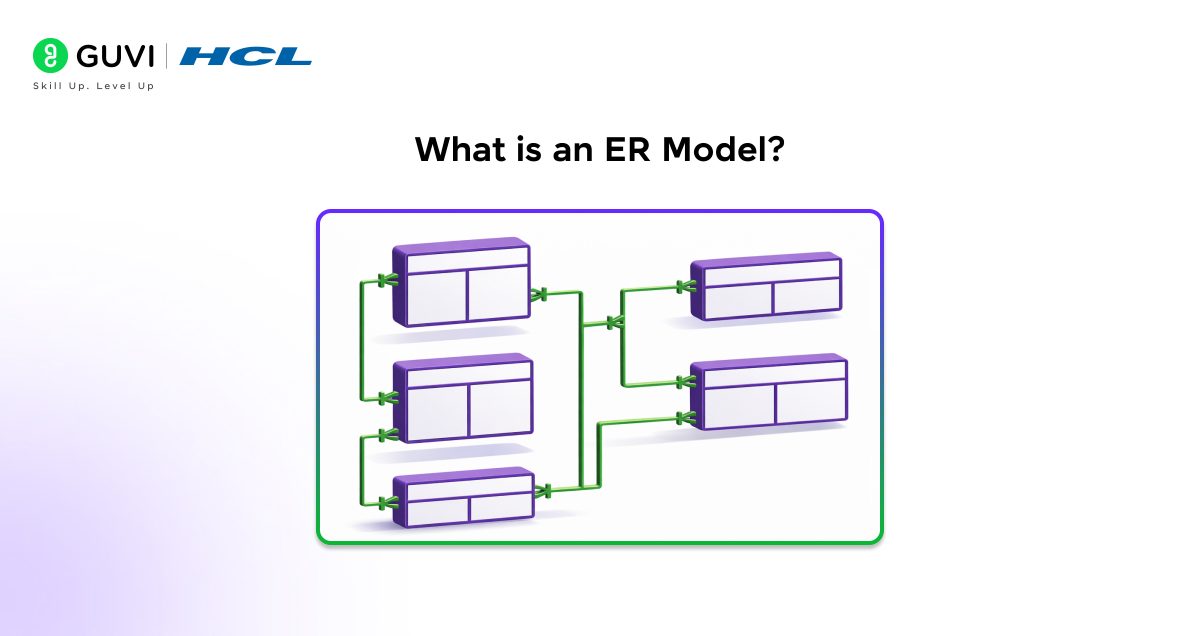
An ER Model (Entity-Relationship Model) is a visual representation used to design and conceptualize how information is organized in a database. It revolves around three key components: entities (real-life objects, such as a student or a book), attributes (such as name or age), and relationships (how entities are interlinked, such as a student borrowing a book).
The model will help you gain a clear understanding of how the various data elements are interconnected before creating the actual database tables.
The ER model is a simplification that does not require working directly with complex tables; instead, it presents everything as a diagram. It is a guide that helps developers organize data effectively, eliminate confusion, and build a well-structured database system.
Also Read: Best DBMS Projects to Showcase in Your Professional Portfolio
Advantages of an ER Model
These are the following advantages of an ER model:
- Easy to understand at a glance, complex data is clearly represented in ER diagrams.
- Aids in improved database design and planning, therefore developers are able to design data appropriately before implementation.
- Enhances knowledge of entities, attributes, and relationships, helping avoid confusion during the software development process.
- Minimizes data redundancy through efficient data structuring and elimination of unnecessary data.
- Facilitates easier conversion to a relational database schema, enabling smoother database creation.
Understanding ER Models is just the theory side of building real applications — the practical side is where HCL GUVI’s Software and AI Engineer Course comes in, teaching you React.js, Node.js, and database-backed projects hands-on, guided by mentors from top tech companies, with placement support included. Enroll today and start building the systems you just learned to design!
Types of ER Model: Comparison Table
There are 2 main types of ER Model:
- Basic ER Model
- Enhanced ER Model (EER)
Let’s compare them side by side to see how they differ:
| Point of Comparison | Basic ER Model | Enhanced ER Model (EER) |
|---|---|---|
| Meaning | The original model using entities, attributes, and relationships to represent data | An extended version of the basic model, adding extra features for more complex data |
| Complexity | Simple — covers straightforward data structures | More advanced — handles complex, real-world relationships |
| Key Additions | None — just the core building blocks | Generalization, Specialization, Aggregation |
| ER Diagram Used | Simple diagram with entities, attributes, and relationships only | Diagram includes extra symbols for hierarchy, inheritance, and aggregation |
| Best For | Small, simple databases with basic relationships | Larger systems needing hierarchy and inheritance, like object-oriented data |
| Real-World Example | Student-Course database — Student and Course are simple entities linked by an “enrolls in” relationship, nothing more | Hospital system — Staff is the parent entity, with Doctor, Specialist, and Surgeon as sub-types that inherit Staff’s details but also have their own extra attributes |
Core Components of ER Model in DBMS
The ER model in DBMS is constructed with the aid of several basic elements that aid in the representation of data in a clear and structured manner.
These are various types of entities, attributes, relationships between entities, and the standard symbols of the ER diagram that would help visually present everything, and thus, it is very easy to design a database and comprehend it.
1. Entities and Their Types
Entities are items or objects of the real world that we would like to store in a database, such as a Student, a book, or an employee. They are the primary structure of the database and reflect the type of data that the system is going to deal with.
All these entities assist in structuring the information in a meaningful and orderly manner.
Types of Entities:
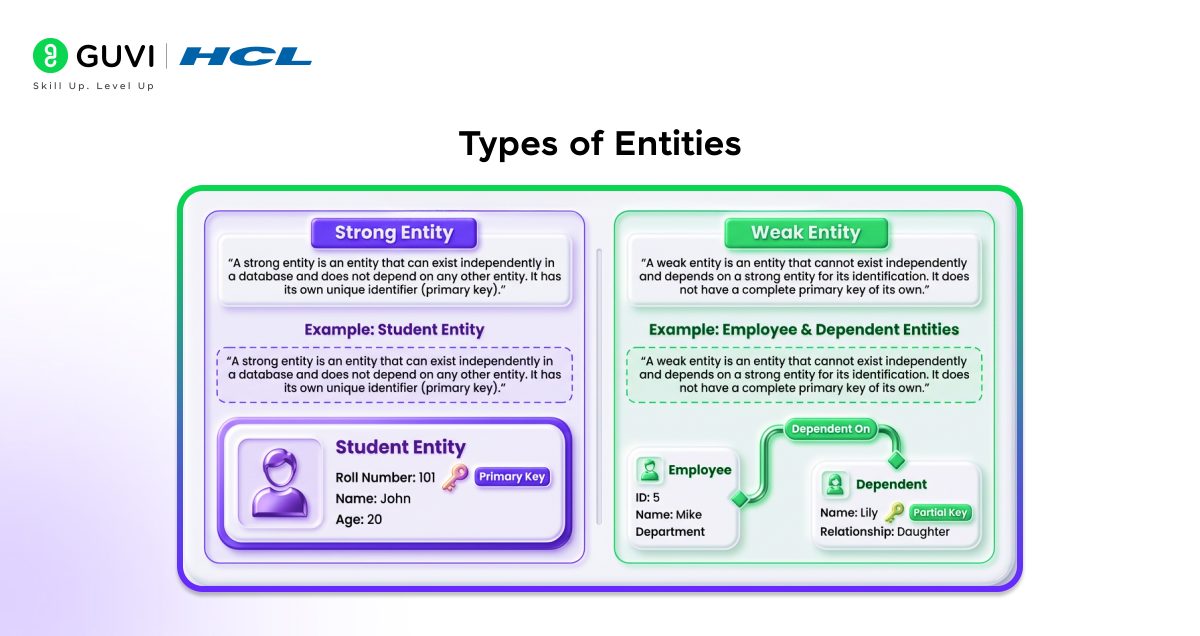
a. Strong Entity
A strong entity is an entity that can exist on its own within a database, and it is not reliant upon another entity. It possesses a distinct identifier (primary key).
Example: A Student object may have its own entity with such information as roll number, name, and age.
b. Weak Entity
A weak entity is an entity that is not able to exist by itself and is identified by a strong entity. It lacks a full primary key of its own.

Example: A Dependent entity (such as a family member) cannot exist without an Employee entity.
2. Attributes in ER Model
Attributes refer to the characteristics or the description of an entity. For example, name, age, or roll number can be said to be attributes of a Student. They offer certain details on each entity and assist in establishing the features of data that are being stored in the database.
Types of Attributes:
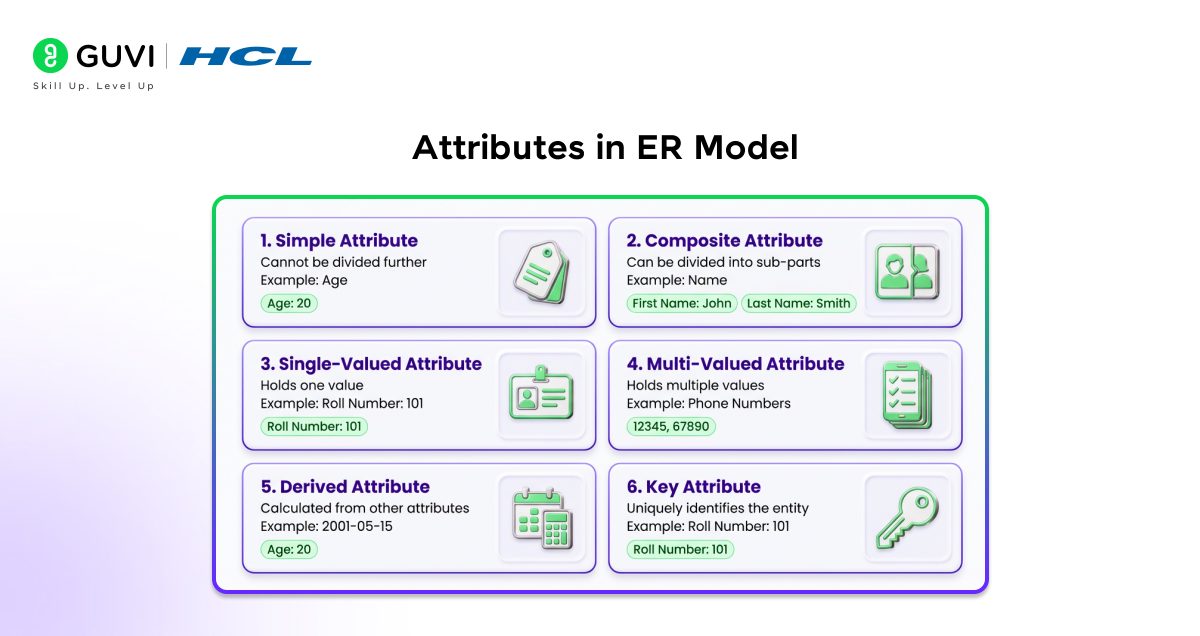
a. Simple Attribute
An attribute that is so simple cannot be broken down into any smaller parts. It stores basic, atomic data.
Example: Age of a student (it is impossible to subdivide it)
b. Composite Attribute
An attribute with numerous parts is called a composite attribute, which can be subdivided into smaller parts.
Example: Name may be divided into first name and last name.
c. Single-Valued Attribute
A single-valued attribute contains only one value per entity.
Example: A student’s roll number.
d. Multi-Valued Attribute
A multi-valued attribute may also contain many different values for one entity.
Example: There can be different phone numbers for a student.
e. Derived Attribute
A derived attribute cannot be stored directly, as it is a calculation of other attributes.
Example: Age can be calculated based on the date of birth.
f. Key Attribute
A key attribute uniquely identifies each entity in a database.
Example: Roll number identifies each student in a unique manner.
3. Relationships in ER Model
Relationships determine the association of various entities in a database. As an example, a Course can be associated with a Student. Such connections are useful in explaining how data interacts and how various entities rely on or are related to other entities.
Types of Relationships:
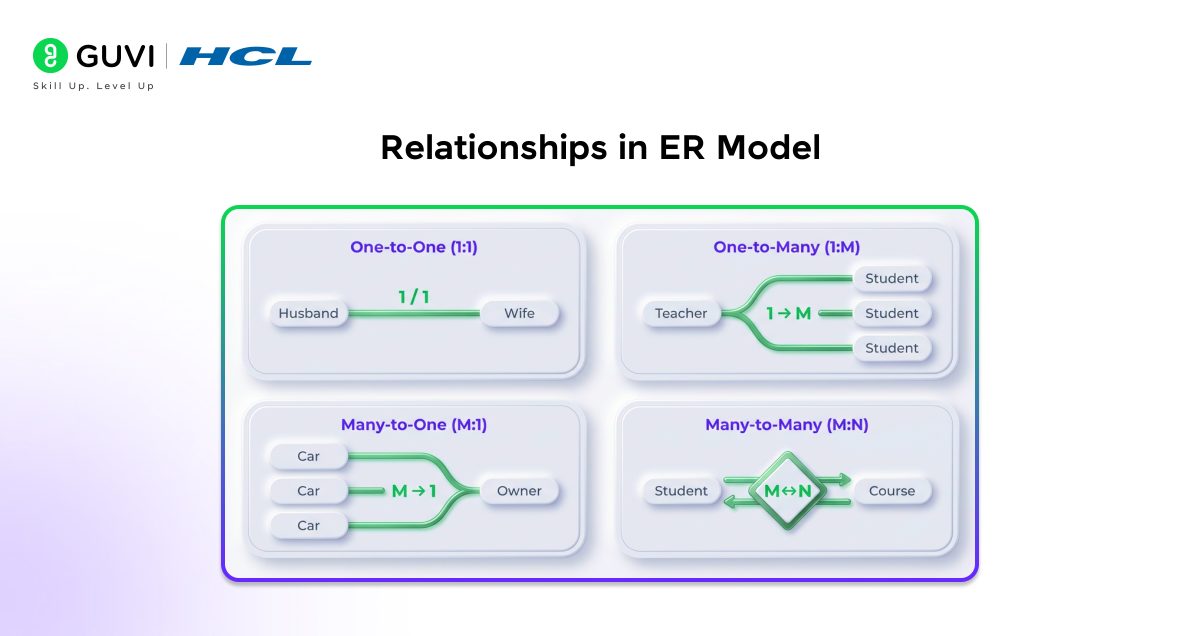
a. One-to-One (1:1): One Husband is related to one Wife, and vice versa.
b. One-to-Many (1:M): One Teacher can teach many Students.
c. Many-to-One (M:1): Many Cars can belong to one Owner.
d. Many-to-Many (M:N): Many Students can enroll in many Courses.
4. ER Diagram Symbols
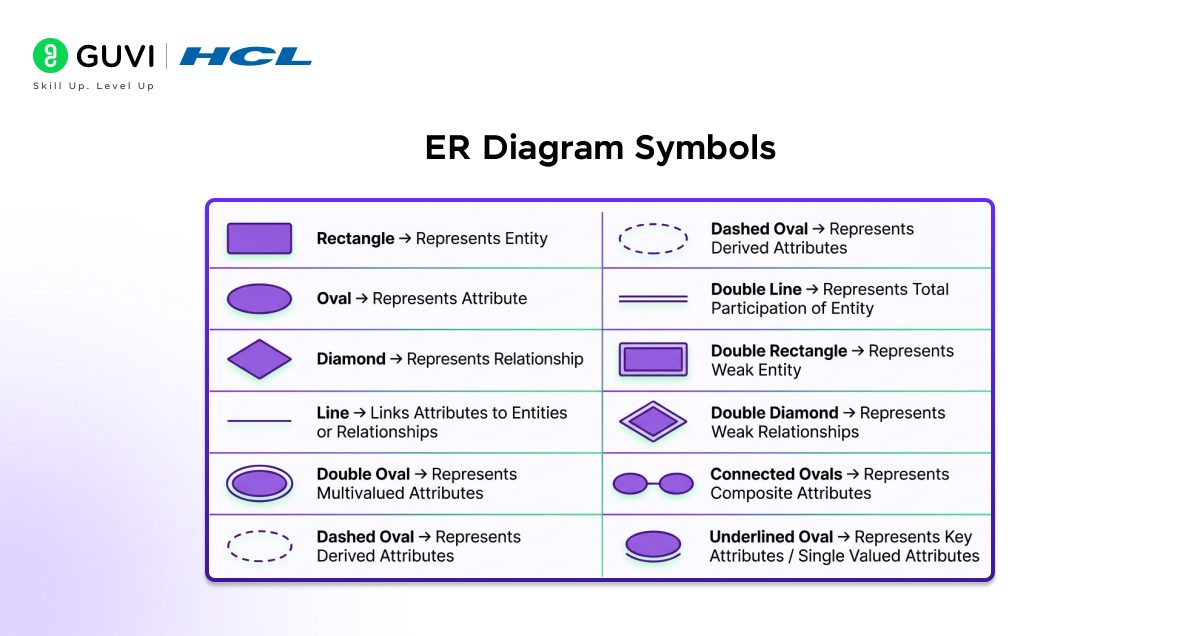
ER diagram symbols are universal symbols that are used to graphically depict entities, attributes, and relationships in an ER diagram. These symbols simplify the interpretation of the structure of the database and aid in the clear presentation of the overall design in a visual format.
Types of Symbols:
Apply ER Model concepts and step up to master relational database management system with HCL GUVI’s Basics of PostgreSQL. Learn installation, architecture, database management, and configuration—enroll now!
How to Construct an ER Model
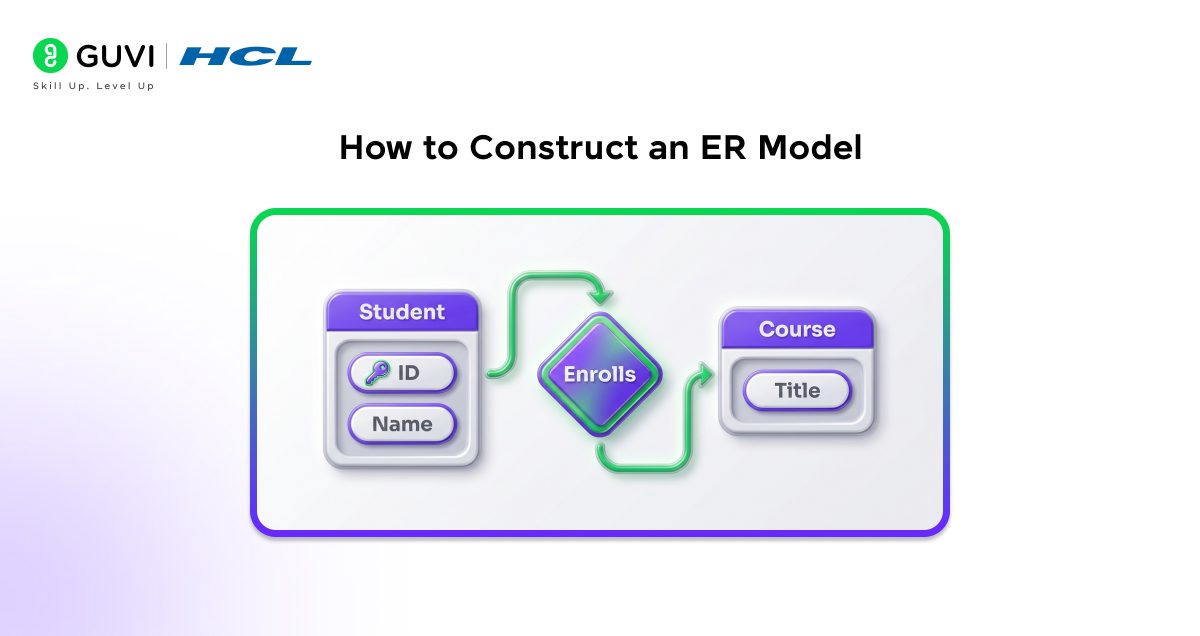
Follow these simple steps to construct an ER model in DBMS:
Step 1: Identify Entities
Begin by identifying the key entities (real-world objects) that you wish to store data on, such as Student, Book, or Employee.
Step 2: Define Attributes
The second step is to enumerate the attributes (info) of each entity, like name, age, or id, to characterize them.
Step 3: Determine Relationships
Next, specify connections among entities, such as a student enrolling in a Course, to indicate how they connect.
Step 4: Assign Keys
Select a primary key for each entity so each record is uniquely identified.
Step 5: Draw the ER Diagram
Entities, attributes, and relationships can be represented visually using standard ER diagram symbols (rectangle, oval, and diamond).
Step 6: Review and Refine
Lastly, proofread the diagram to remove errors, minimize redundancy, and ensure the design is understandable and accurate.
Conclusion
The ER model in a DBMS is an easy yet effective way to graphically organize and design data. Understanding the entities, attributes, relationships, and symbols of a diagram enables you to systematically plan a clear database structure before implementation. ER diagrams make complex data easy to understand, help reduce errors, and ensure a well-organized, efficient database system.
FAQs
1. What’s the difference between ER model and ER diagram?
ER Model is the underlying concept or idea. ER Diagram is the actual visual picture you draw to represent that concept.
2. What are the types of ER models?
Two main types — Basic ER Model (simple entities) and Enhanced ER Model, EER (adds generalization, specialization, and aggregation for complex data).
3. Why is ER diagram used?
It helps you plan a database structure before building it, so you catch design mistakes early.
4. What is the difference between ERD and UML?
ERD focuses only on data, entities, and relationships. UML covers the entire system, including processes and how different parts interact.
5. How to draw an ER diagram?
List out your entities first, add their attributes, connect them using relationships, then mark cardinality to clearly show how they’re linked.
Success Stories
















Did you enjoy this article?