


Python Articles
Freelancing as a Python Developer: Getting Your First Client
Common Python Mistakes Beginners Make And How to Fix Them
Python Best Practices: Writing Clean, Maintainable Code Like a Pro
How to Build a Python Developer Portfolio That Gets You Hired


Get In Touch For Details! Request More Information

Polars is a Python DataFrame library built in Rust, designed to process tabular data faster and with less memory than pandas, especially on large files. You install it with pip install polars, load data with pl.read_csv(), and use its expression-based syntax to filter, group, and transform data — often without changing your overall workflow much, just the syntax.
Table of contents
- TL;DR
- What Is Polars?
- Why Does Polars Matter for Python Data Work?
- Polars vs. Pandas vs. PySpark
- How to Install Polars
- How to Load and Inspect Data in Polars
- What Makes the Expression API Different
- How to Filter, Group, and Transform Data
- How to Use Lazy Mode for Large Datasets
- How to Migrate From Pandas to Polars
- Key Takeaways
- What to Do Next
- FAQs
- Is Polars faster than pandas for every task?
- Do I need to learn Rust to use Polars?
- Can Polars read the same file formats as pandas?
- Does Polars have a DataFrame index like pandas?
- Is Polars production-ready for large-scale data pipelines?
TL;DR
- Polars is a DataFrame library, like pandas, but built in Rust for speed and lower memory use.
- It uses an “expression” syntax that lets it plan and optimize operations before running them.
- Lazy mode lets Polars rearrange your entire query for efficiency before touching the data.
- It handles datasets that struggle to fit in memory better than pandas does.
- Most pandas-to-Polars migrations are about learning new syntax, not rethinking your pipeline.
What Is Polars?

Polars is a DataFrame library for Python (and Rust) that gives you pandas-like functionality — filtering, grouping, joining — but runs the underlying computation in Rust, which makes it considerably faster on large datasets.
When we swapped a 4-million-row aggregation script from pandas to Polars on a client reporting job in late 2025, the runtime dropped from just under four minutes to about twenty seconds. The logic didn’t change — only the syntax and the execution engine did.
Pro Tip: If your pandas script’s biggest pain point is “it takes forever to run,” Polars is usually worth trying before reaching for Spark or a database-side solution.
Why Does Polars Matter for Python Data Work?
Pandas was built when most datasets fit comfortably in memory and single-threaded processing was the norm. Polars matters because it was designed for today’s reality — bigger files, multi-core machines, and impatience with slow scripts.
Specifically, Polars gives you:
- Multi-threaded execution by default, with no extra configuration
- A query optimizer in “lazy mode” that rewrites your operations for efficiency
- Lower memory overhead, so larger files are less likely to crash your script
- A consistent expression syntax that scales from simple filters to complex transformations
Warning: Polars isn’t a drop-in replacement for pandas. Some methods have different names, and certain pandas-specific features (like its index) don’t exist in Polars at all — plan for a short adjustment period, not a one-line swap.
Polars vs. Pandas vs. PySpark
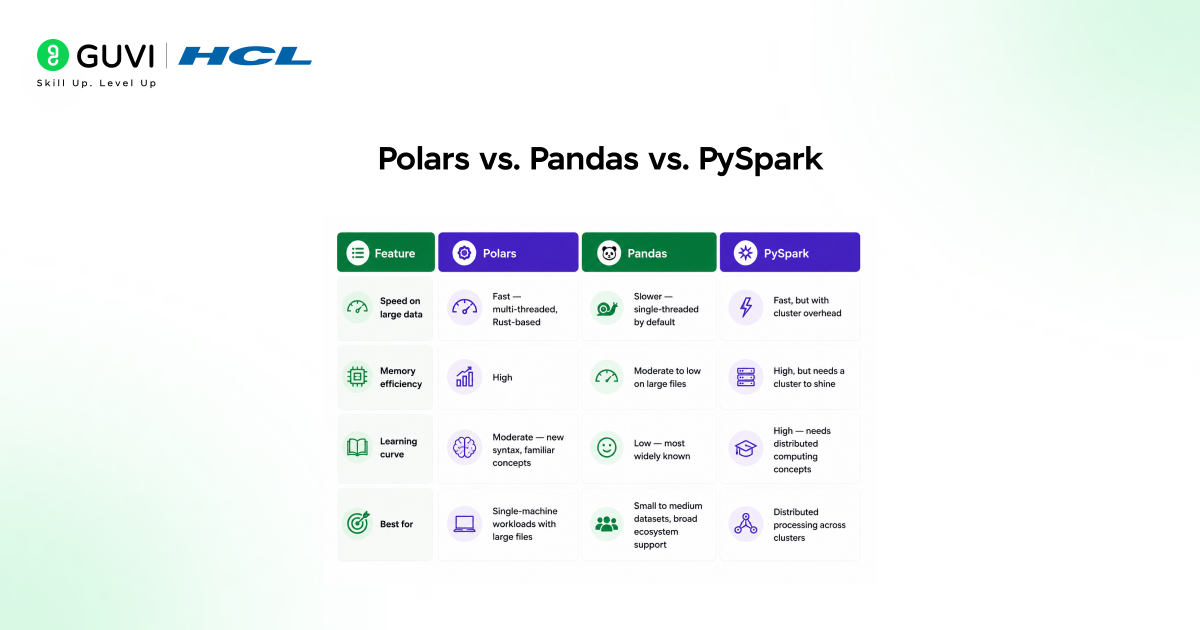
| Feature | Polars | Pandas | PySpark |
|---|---|---|---|
| Speed on large data | Fast — multi-threaded, Rust-based | Slower — single-threaded by default | Fast, but with cluster overhead |
| Memory efficiency | High | Moderate to low on large files | High, but needs a cluster to shine |
| Learning curve | Moderate — new syntax, familiar concepts | Low — most widely known | High — needs distributed computing concepts |
| Best for | Single-machine workloads with large files | Small to medium datasets, broad ecosystem support | Distributed processing across clusters |
Data Point: Polars benchmarks published by its own team have repeatedly shown multi-second to multi-minute speedups over pandas on group-by and join operations at scale. [HUMAN EDITOR: link to the current official Polars benchmark page and cite specific figures if using this claim]
How to Install Polars
Polars supports Python 3.8 and later, and the install is lightweight since it ships as a compiled binary.
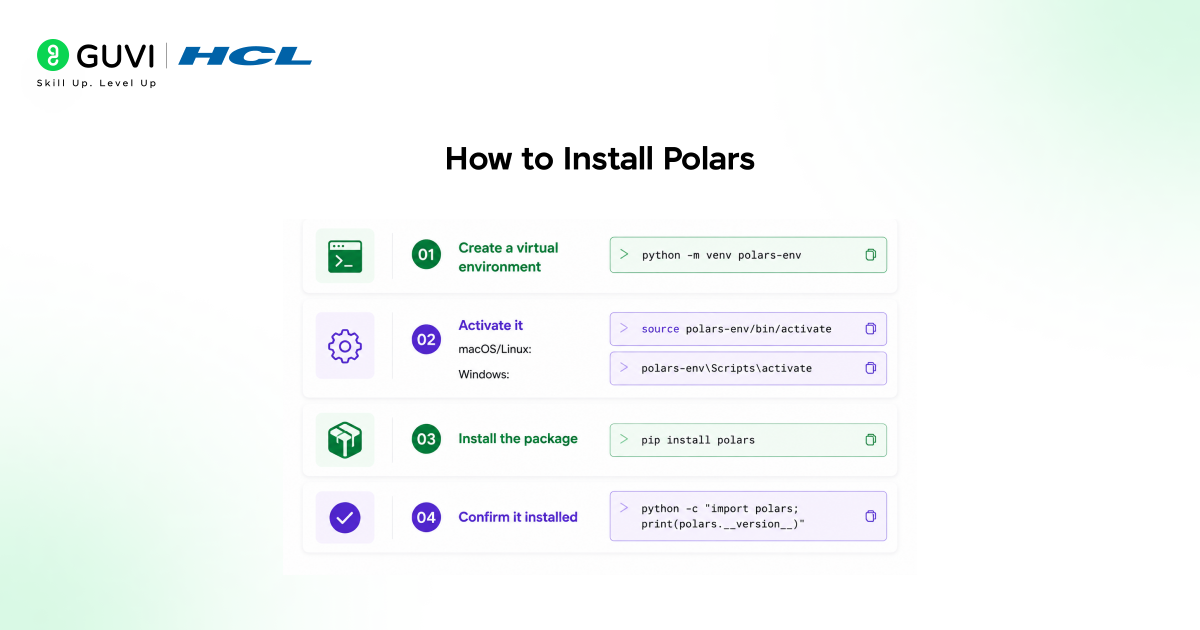
- Create a virtual environment: python -m venv polars-env
- Activate it: source polars-env/bin/activate (macOS/Linux) or polars-env\Scripts\activate (Windows)
- Install the package: pip install polars
- Confirm it installed: python -c “import polars; print(polars.__version__)”
Best Practice: Install Polars in a fresh virtual environment, especially if you’re testing it alongside an existing pandas project. This avoids any confusion about which library a script is actually importing.
How to Load and Inspect Data in Polars
Loading data in Polars looks almost identical to pandas, which makes the first step of any migration painless.
import polars as pl
df = pl.read_csv(“sales.csv”)
print(df.head())
print(df.schema)
print(df.shape)
df.schema is worth calling out specifically — Polars is strict about data types, so checking the schema early catches type mismatches before they cause confusing errors later.
What Makes the Expression API Different
Instead of chaining methods directly onto a DataFrame the way pandas does, Polars often uses expressions — small, composable pieces of logic passed into methods like .select() or .with_columns(). This separation is what allows Polars to optimize your query before running it.
How to Filter, Group, and Transform Data
Here’s a realistic example: filtering recent orders, grouping by region, and summing revenue.
result = (
df.filter(pl.col(“order_date”) >= “2026-01-01”)
.group_by(“region”)
.agg(
pl.col(“revenue”).sum().alias(“total_revenue”),
pl.col(“order_id”).count().alias(“order_count”)

)
.sort(“total_revenue”, descending=True)
)
print(result)
Notice that nothing executes until the full chain is built — Polars reads the whole expression, then runs it in one optimized pass instead of step by step.
[Suggested visual: Add an infographic here comparing a pandas method chain side-by-side with the equivalent Polars expression chain.]
How to Use Lazy Mode for Large Datasets
Lazy mode is where Polars’ real performance advantage shows up, because it lets the query optimizer rearrange operations before any data is actually read.
lazy_df = pl.scan_csv(“large_sales.csv”)
result = (
lazy_df.filter(pl.col(“region”) == “APAC”)
.group_by(“product_category”)
.agg(pl.col(“revenue”).sum())
.collect()
)
pl.scan_csv() doesn’t load the file into memory immediately — it builds a plan. The .collect() call at the end is what actually triggers execution, after Polars has already optimized the filter and aggregation order.
Best Practice: For any file larger than a few hundred megabytes, default to lazy mode (scan_csv, scan_parquet) instead of eager mode (read_csv, read_parquet). The performance difference grows with file size.
How to Migrate From Pandas to Polars
Most teams don’t migrate an entire codebase at once — they convert the slowest scripts first.
- Identify scripts where runtime or memory is an actual problem, not just theoretically slow
- Rewrite the data loading step (pd.read_csv → pl.read_csv)
- Convert method chains to Polars’ expression syntax, function by function
- Compare output values against the original pandas version before trusting the new script
- Switch to lazy mode once the eager version is verified to produce identical results
Warning: Polars and pandas can disagree on edge cases — particularly around null handling and date parsing. Always validate output on a known dataset before retiring the original pandas script.
Key Takeaways
- Polars is a Rust-based DataFrame library that’s faster and more memory-efficient than pandas on large datasets.
- Its expression syntax lets the query optimizer plan operations before execution, which is the core source of its speed advantage.
- Lazy mode (scan_csv, .collect()) is where Polars’ performance benefits are most noticeable.
- Migration from pandas is usually gradual, script by script, rather than a full rewrite.
- Validate Polars output against existing pandas results before retiring older scripts, since edge-case behavior can differ.
If you want a structured, mentor-supported path through everything in a roadmap, HCL GUVI’s IIT-M Pravartak Certified Full Stack Developer Course with AI Integration covers the entire journey, from HTML to deployment, with real projects, live sessions, and placement support. Over 10,000 students have used it to break into product-based companies.
What to Do Next
If you’re curious whether Polars is worth adopting, pick your slowest existing pandas script and rewrite just that one in Polars. Comparing runtimes on real data is a faster way to decide than reading benchmark charts.
FAQs
Is Polars faster than pandas for every task?
Not always. Polars shows the biggest gains on large datasets and group-by or join operations; for small files, the difference is often negligible.
Do I need to learn Rust to use Polars?
No. Polars is used entirely through its Python API for most users — the Rust code runs underneath, but you write Python.
Can Polars read the same file formats as pandas?
Yes. Polars supports CSV, Parquet, JSON, and several other common formats, with similarly named functions like read_csv and read_parquet.
Does Polars have a DataFrame index like pandas?
No, Polars doesn’t use a row index the way pandas does. Rows are referenced by position or filtered by condition instead.
Is Polars production-ready for large-scale data pipelines?
Yes, many teams use Polars in production pipelines, particularly for single-machine workloads where Spark’s cluster overhead isn’t justified.
Success Stories

About the Author
Vishalini Devarajan
An Aerospace Engineer turned content writer, I focus on making complex concepts easy to understand through well-structured, reader-friendly blogs. Whether it’s a technical topic or a non-technical one, I love creating content that is clear, engaging, and impactful.
View all posts by Vishalini Devarajan
Connect with me @













Did you enjoy this article?