


Programming Languages Articles
Product Manager Portfolio: How to Build The Best One That Gets You Hired in 2026
Code Review Best Practices: How to Give and Receive Feedback Effectively
Accumulate Function in C++: Syntax, Examples, Use Cases
Cracking the Code: Your First Dive into the Fractional Knapsack Problem


Get In Touch For Details! Request More Information

Bubble Sort in C: A Complete Beginner’s Guide
Aug 04, 2026 7 Min Read 1868 Views
(Last Updated)
Imagine you have a pile of unsorted cards on a table. You want to arrange them in order. One simple approach is to compare adjacent cards and swap them if they are in the wrong order. You repeat this process until all cards are sorted. This is exactly how bubble sort works.
Bubble sort is one of the simplest sorting algorithms and one of the best ways to learn how sorting works. Even though it is not the fastest algorithm for large datasets, it is perfect for beginners because the logic is easy to understand. You compare two items, swap them if needed, and repeat until everything is sorted.
If you are learning to program in C, studying data structures, or trying to understand sorting algorithms, bubble sort is the perfect starting point. It teaches you fundamental concepts like loops, comparisons, and array manipulation.
This guide explains what bubble sort in C is, how the algorithm works step by step, and shows you complete C code examples you can run and modify.
Table of contents
- Quick TL;DR Summary
- How Bubble Sort Works
- Step 1: Compare the first two elements
- Step 2: Swap if needed
- Step 3: Move to the next pair
- Step 4: Complete one pass
- Step 5: Repeat until sorted
- Why the name bubble sort?
- Simple Bubble Sort in C
- Optimized Bubble Sort
- Bubble Sort for Sorting Strings
- Time Complexity of Bubble Sort
- Conclusion
- FAQs
- Why is bubble sort called bubble sort?
- What is the time complexity of bubble sort?
- Is bubble sort used in real applications?
- Can I sort in descending order with bubble sort?
- How does bubble sort compare to other algorithms?
Quick TL;DR Summary
- This guide explains bubble sort, a simple sorting algorithm that repeatedly compares adjacent elements and swaps them if they are in the wrong order until the entire array is sorted.
- You will learn how bubble sort works through step-by-step examples, why it is called bubble sort, and how the algorithm keeps making passes through the data until no more swaps are needed.
- The guide covers complete C code implementations including the basic version and optimized versions that stop early when the array is already sorted.
- You will understand the time and space complexity of bubble sort, how to analyze its performance, and when bubble sort is actually useful despite being slower than other algorithms.
- You will see practical examples of sorting numbers and strings using bubble sort in C, and learn how to modify the code for different scenarios.
What Is Bubble Sort?
Bubble sort is a simple sorting algorithm that repeatedly steps through a list, compares adjacent elements, and swaps them if they are in the wrong order. Each pass through the list pushes the largest unsorted element to its correct position, similar to bubbles rising to the surface—hence the name. The process continues until no swaps are needed, indicating that the list is fully sorted. Although easy to understand and implement, bubble sort is inefficient for large datasets compared to more advanced sorting algorithms.
The algorithm gets its name because smaller elements “bubble” to the top (beginning) of the list with each pass, similar to how bubbles rise to the surface of water.
Bubble sort is one of the easiest sorting algorithms to understand and implement. It requires no extra space beyond the array itself. However, it is slow for large datasets compared to algorithms like quicksort or mergesort.
Read More: Sorting in Data Structure: Categories & Types
How Bubble Sort Works
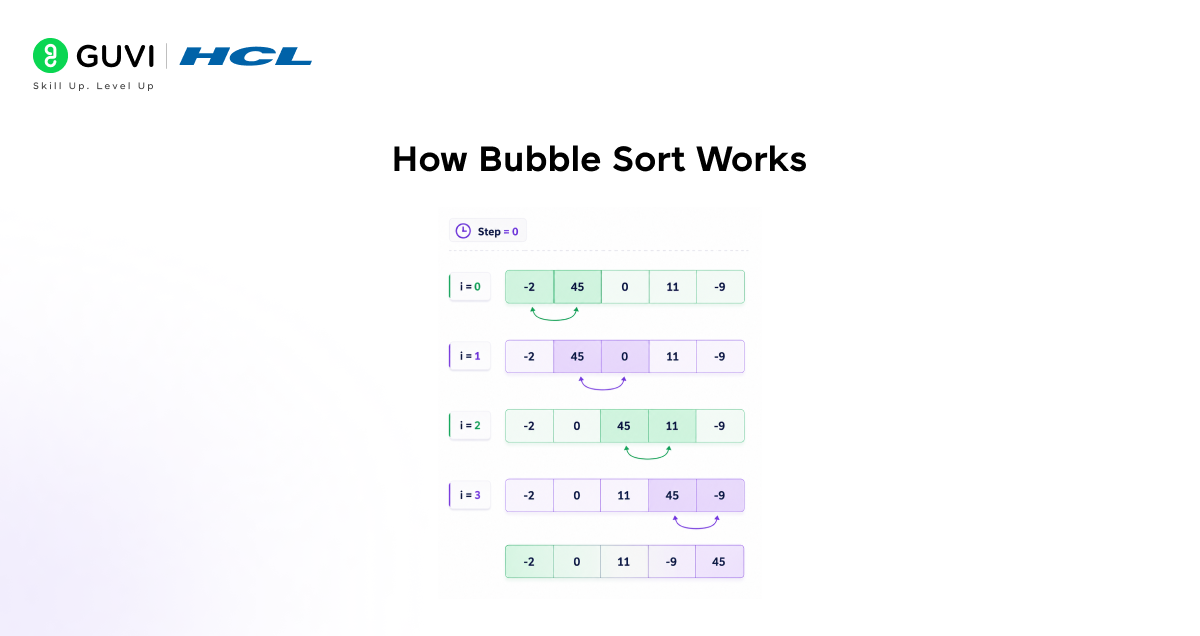
Step 1: Compare the first two elements
Start at the beginning of the array. Look at the first element and the second element. Compare them to see which is larger.
Step 2: Swap if needed
If the first element is larger than the second, swap them. The larger element moves forward. If the first element is smaller, leave them as they are.
Step 3: Move to the next pair
Move to the next pair of adjacent elements (second and third). Compare them and swap if needed. Continue this process through the entire array.
Step 4: Complete one pass
After comparing and swapping all adjacent pairs, you have completed one pass through the array. The largest unsorted element is now in its correct position at the end.
Step 5: Repeat until sorted
Do another pass through the array, but this time stop one position earlier because you know the last position is already correct. Continue making passes, reducing the range each time, until no swaps occur in a complete pass.
Why the name bubble sort?
After each pass, the largest unsorted element moves to its correct position like a bubble rising through water. With each pass, more elements settle into their correct positions. Eventually, all elements are sorted.
Bubble sort is one of the earliest and simplest sorting algorithms introduced in computer science education. It works by repeatedly comparing adjacent elements and swapping them if they are in the wrong order, causing smaller elements to gradually “bubble” toward the beginning of the list—hence its name, sometimes also referred to as “sinking sort”. Although it is inefficient for large datasets due to its O(n²) time complexity, bubble sort remains widely taught because it provides a clear and intuitive introduction to fundamental algorithmic concepts such as iteration, comparison, and in-place sorting, serving as a stepping stone to more advanced sorting techniques.
Understanding the swap-and-compare logic on paper is step one; implementing it correctly (and knowing its O(n²) limitations) is what interviews and coursework actually check. HCL GUVI’s Code Kata gives you real sorting-algorithm coding problems to build that muscle memory.
Simple Bubble Sort in C
- Complete C code for basic bubble sort
#include <stdio.h>
void bubbleSort(int array[], int size) {
// Outer loop for the number of passes
for (int i = 0; i < size – 1; i++) {
// Inner loop for comparing adjacent elements
for (int j = 0; j < size – i – 1; j++) {
// Compare adjacent elements
if (array[j] > array[j + 1]) {
// Swap if left is larger than right
int temp = array[j];
array[j] = array[j + 1];
array[j + 1] = temp;
}
}
}
}
void printArray(int array[], int size) {
for (int i = 0; i < size; i++) {
printf(“%d “, array[i]);
}
printf(“\n”);
}
int main() {
int array[] = {64, 34, 25, 12, 22, 11, 90};
int size = 7;
printf(“Original array: “);
printArray(array, size);
bubbleSort(array, size);
printf(“Sorted array: “);
printArray(array, size);
return 0;
}
- How the code works
The bubbleSort function takes an array and its size as parameters. The outer loop controls how many passes through the array you make. The inner loop compares adjacent elements and swaps them if the left element is larger.
The swap is done using a temporary variable. You store the first value in temp, move the second value to the first position, and then place the temp value in the second position.
- Output of the program
Original array: 64 34 25 12 22 11 90
Sorted array: 11 12 22 25 34 64 90
- Understanding the pass process
In the first pass, the largest element (90) bubbles to the end. In the second pass, the second-largest element (64) settles into position. With each pass, one more element finds its correct location. After six passes (size – 1), all seven elements are sorted.
Did you know? Bubble sort is sometimes used ironically in programming challenges as a joke or difficulty test. This actually teaches valuable lessons about algorithm efficiency and why choosing the right algorithm matters. Most experienced developers avoid bubble sort in production code.
Optimized Bubble Sort
- The problem with basic bubble sort
The basic version makes the same number of passes regardless of whether the array becomes sorted early. If your array is already sorted, the basic version still does all the passes and comparisons.
- Optimized version with early stopping
#include <stdio.h>
void optimizedBubbleSort(int array[], int size) {
// Outer loop for passes
for (int i = 0; i < size – 1; i++) {
int swapped = 0; // Flag to check if swap occurred
// Inner loop for comparing adjacent elements
for (int j = 0; j < size – i – 1; j++) {
if (array[j] > array[j + 1]) {
// Swap elements
int temp = array[j];

array[j] = array[j + 1];
array[j + 1] = temp;
swapped = 1; // Mark that a swap happened
}
}
// If no swap occurred, array is already sorted
if (swapped == 0) {
break; // Exit early
}
}
}
void printArray(int array[], int size) {
for (int i = 0; i < size; i++) {
printf(“%d “, array[i]);
}
printf(“\n”);
}
int main() {
int array[] = {11, 12, 22, 25, 34, 64, 90};
int size = 7;
printf(“Original array: “);
printArray(array, size);
optimizedBubbleSort(array, size);
printf(“Sorted array: “);
printArray(array, size);
return 0;
}
- How optimization helps
The optimized version uses a flag called swapped to track whether any swap occurred during a pass. If a complete pass happens with no swaps, it means the array is already sorted. The algorithm stops immediately instead of continuing through remaining passes.
For nearly sorted arrays, this optimization saves significant time. For already sorted arrays, the algorithm completes in just one pass instead of multiple passes.
Bubble Sort for Sorting Strings
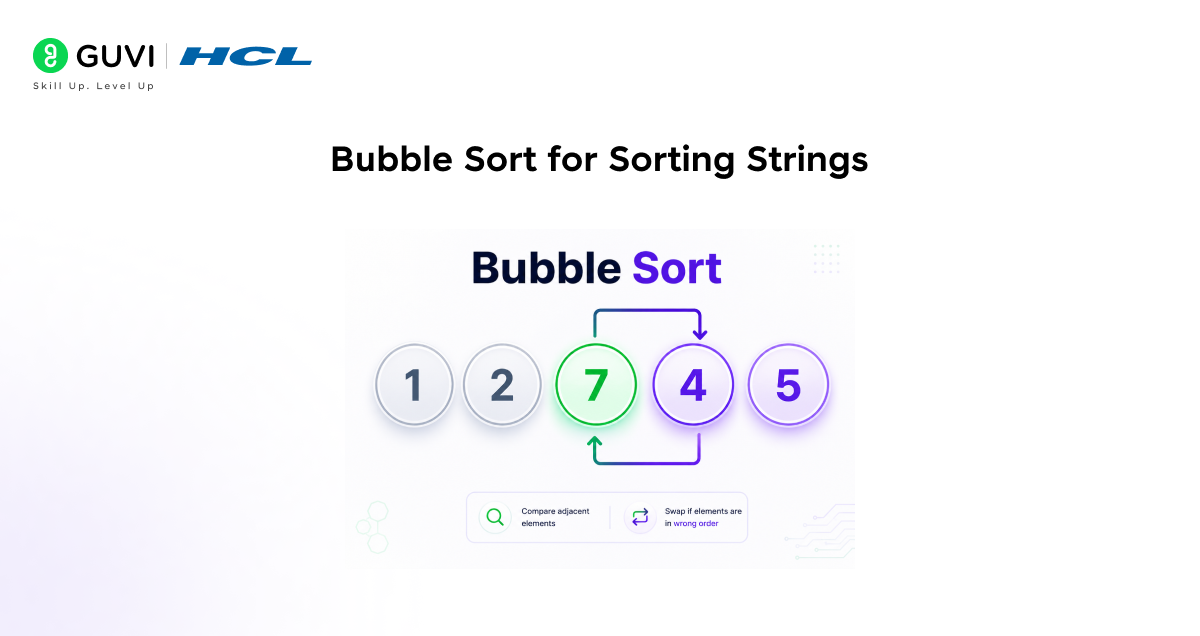
- C code to sort strings alphabetically
#include <stdio.h>
#include <string.h>
void bubbleSortStrings(char words[][50], int size) {
// Outer loop for passes
for (int i = 0; i < size – 1; i++) {
// Inner loop for comparing adjacent strings
for (int j = 0; j < size – i – 1; j++) {
// Compare strings using strcmp
if (strcmp(words[j], words[j + 1]) > 0) {
// Swap strings if first is alphabetically after second
char temp[50];
strcpy(temp, words[j]);
strcpy(words[j], words[j + 1]);
strcpy(words[j + 1], temp);
}
}
}
}
void printStrings(char words[][50], int size) {
for (int i = 0; i < size; i++) {
printf(“%s “, words[i]);
}
printf(“\n”);
}
int main() {
char words[5][50] = {“zebra”, “apple”, “mango”, “banana”, “cherry”};
int size = 5;
printf(“Original words: “);
printStrings(words, size);
bubbleSortStrings(words, size);
printf(“Sorted words: “);
printStrings(words, size);
return 0;
}
- Key differences for sorting strings
Instead of comparing numbers with >, you use strcmp() function to compare strings. The strcmp() function returns a positive value if the first string comes alphabetically after the second string.
Use strcpy() to copy string values instead of simple variable assignment. You cannot assign strings directly in C, so you use string copy functions for swapping.
- Output
Original words: zebra apple mango banana cherry
Sorted words: apple banana cherry mango zebra
Time Complexity of Bubble Sort

- Best case: O(n)
If the array is already sorted, the optimized version completes in one pass with no swaps. Time complexity is O(n) because you make one pass through n elements. This is the fastest possible performance for bubble sort.
- Average case: O(n²)
For random data, bubble sort makes approximately n²/2 comparisons and swaps. This simplifies to O(n²). If you have 100 elements, expect roughly 5000 operations.
- Worst case: O(n²)
If the array is sorted in reverse order, bubble sort needs the maximum number of passes and comparisons. It still makes approximately n²/2 operations, which is O(n²).
- Space complexity: O(1)
Bubble sort requires only a small amount of extra space for the temporary variable during swaps. It does not need extra arrays or data structures. Space complexity is O(1), meaning constant space regardless of input size.
- Why bubble sort is slow
For large datasets, O(n²) becomes very slow. For 10,000 elements, you need about 50 million operations. For 100,000 elements, you need about 5 billion operations. Faster algorithms like quicksort with O(n log n) are much better for large datasets.
To learn more about Pointers in C, enroll in this HCL GUVI’s C Programming course designed for beginners and aspiring developers. The course covers essential C programming concepts including pointers, memory management, arrays, functions, file handling, loops, operators, and more through hands-on practice and real-world examples. With self-paced learning, expert guidance, and an industry-recognized NSDC certification, this course helps you strengthen your programming fundamentals and coding skills.
Conclusion
Bubble sort is one of the simplest sorting algorithms and perfect for beginners learning to code. It repeatedly compares adjacent elements and swaps them until the entire array is sorted.
The algorithm is easy to understand with clear logic. You compare, swap if needed, and repeat. Despite being slow for large datasets with O(n²) time complexity, bubble sort teaches important programming concepts.
The optimized version with early stopping is much better than the basic version. It detects when the array is sorted and stops immediately, saving unnecessary passes.
Bubble sort is best used for learning, small datasets, or nearly sorted data. For large datasets in production code, use faster algorithms like quicksort or mergesort.
FAQs
1. Why is bubble sort called bubble sort?
The algorithm gets its name because larger elements “bubble” to their correct positions at the end of the array with each pass, similar to how bubbles rise through water. After each pass, one more element settles into its final sorted position.
2. What is the time complexity of bubble sort?
Best case is O(n) for already sorted data using optimized version. Average and worst cases are O(n²). This means for 1000 elements, you need about 1 million comparisons in the worst case. Faster algorithms like quicksort use O(n log n) time.
3. Is bubble sort used in real applications?
Bubble sort is rarely used in production code for sorting data. However, the concept is fundamental in education. Some specialized situations use bubble sort-like approaches, but modern systems use more efficient algorithms.
4. Can I sort in descending order with bubble sort?
Yes, just change the comparison from > to <. Instead of swapping when the left element s larger, swap when it is smaller. This sorts the array in descending order.
5. How does bubble sort compare to other algorithms?
Bubble sort is slower than quicksort, mergesort, and heapsort. However, it uses less space than mergesort and is simpler to understand. For production code, use optimized sorting provided by your language libraries.
Success Stories

About the Author
Vishalini Devarajan
An Aerospace Engineer turned content writer, I focus on making complex concepts easy to understand through well-structured, reader-friendly blogs. Whether it’s a technical topic or a non-technical one, I love creating content that is clear, engaging, and impactful.
View all posts by Vishalini Devarajan
Connect with me @















Did you enjoy this article?