


Full Stack Development Articles
Claude for Architecture and Engineering Documentation
Freelancing as a Python Developer: Getting Your First Client


Get In Touch For Details! Request More Information
How to Convert Object to Array in PHP (5 Easy Methods, 2026)
Sep 16, 2026 5 Min Read 2950 Views
(Last Updated)
To convert object to array in PHP, you can use built-in functions like type casting, get_object_vars(), or json_decode() depending on how simple or nested your data is. Since each method behaves differently, the right choice depends on your specific use case.
That’s exactly what this guide covers, 5 practical techniques with code examples, along with the common errors developers run into along the way.
Table of contents
- TL;DR Summary
- What Are Objects and Arrays in PHP?
- Why Convert Object to Array?
- Techniques to Convert an Object to an Array in PHP
- Type Casting (array)$object
- Using get_object_vars()
- Using json_encode() and json_decode()
- Using a Loop (Manual Conversion)
- Using a Custom Function (object_to_array())
- PHP Object to Array: Methods Compared
- Common Errors When Converting Object to Array in PHP
- Conclusion
- FAQs
- How do you convert an object to array in PHP?
- Why does casting an object to array show strange keys?
- Can you convert a nested object to array in PHP?
- What is the fastest way to convert PHP object to array?
- Does json_encode() include private properties when converting?
TL;DR Summary
- There are several ways to convert object to array in PHP, and the right one depends on how simple or nested your data is.
- Type casting
(array) $objectis the fastest option for simple, non-nested data. get_object_vars()returns only public properties as an array, keeping private data protected.json_encode()combined withjson_decode()is the go-to method for deep or nested structures.- A manual
foreachloop gives you full control over keys and values while building the array yourself. - A custom recursive function is the most reusable way to convert object to array, handling both simple and deeply nested objects automatically.
What Are Objects and Arrays in PHP?
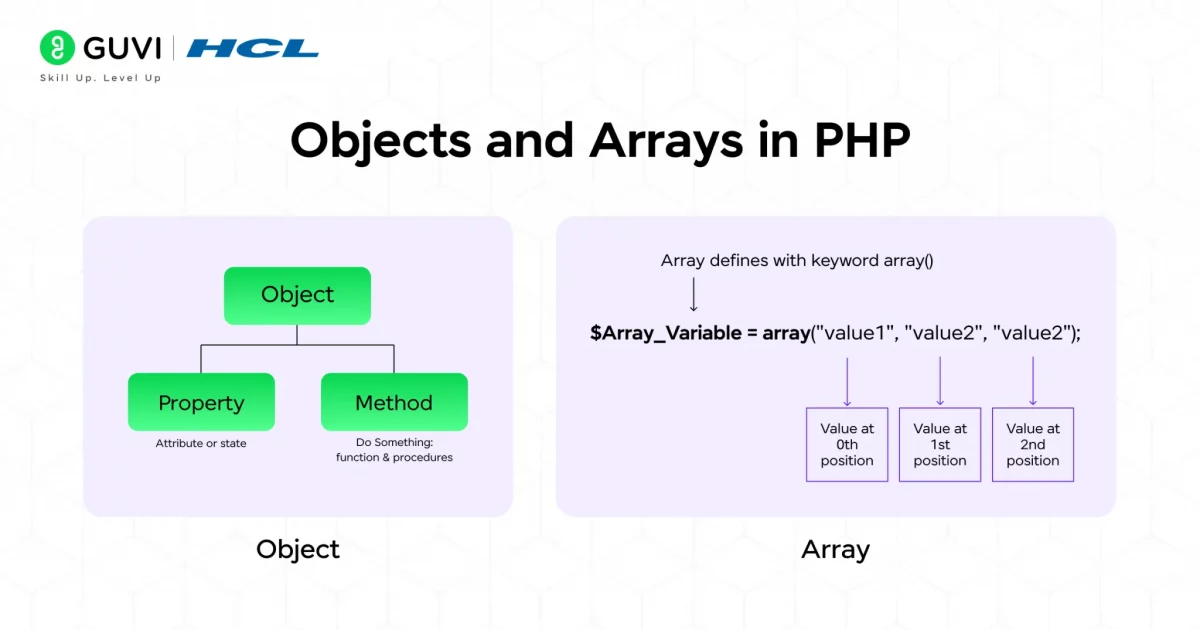
Objects:
In PHP, an object is a type of data structure that represents an instance of a class. It allows programmers to categorize data variables (properties) and functions; as a result, modeling real-world entities becomes easier and more straightforward.
Objects are generally considered an ideal choice for organizing complex datasets because, while creating objects, we can assign unique values to each object while sharing the same structure defined by the same class.
Arrays:
An Array, on the other hand, is a dynamic data structure that provides flexibility to store multiple data values under a single variable. Data are stored in these variables by index or as key-value pairs (where the key represents the index position of the data value).
The primary purpose of utilizing arrays is to perform various data manipulation tasks, such as sorting, filtering, searching, merging, mapping, and many more.
Also Read: PHP Array Length
Learning individual concepts is one thing, applying them in real production systems is another. HCL GUVI’s Software and AI Engineer Programme takes you beyond the basics into full stack or backend engineering, covering React, Node.js, MongoDB, APIs, and AI-assisted development, backed by mentor support and real-world projects. Enroll now and build the skills top tech companies actually hire for!
Why Convert Object to Array?
Converting an object into an array in PHP is crucial because arrays are more flexible and easier to use for various programming tasks. It lets developers quickly access and modify data using PHP’s built-in functions.
In addition, converting objects into arrays gives you more control and efficiency in processing data, which makes your PHP code cleaner, faster, and easier to maintain.
This conversion of variables is necessary, especially in practical situations where data needs to be manipulated, analyzed, and presented to the end users based on their dynamic interactions (event triggering).
Real-World Example
In an e-commerce website, you know how vital the product catalog section is. To display that section with essential details such as descriptions, user ratings and reviews, high-quality images, and brief video elements, APIs are integrated into the code to fetch information from the server database.
When the data is fetched, the API returns the product data as an object. Now, for displaying those products in a structured fashion, features such as product sorting, category filters, and popular items recommendations need to be added.
To enable this feature, converting the data objects into arrays is essential (through functions like array_filter(), usort(), array_map(), etc.), as it improves the application’s performance and speed.
Also Read: Is PHP Dead in 2026?
Ready to go beyond the basics? HCL GUVI’s PHP Developer Bootcamp covers everything from core PHP to OOP, databases, and security practices. Join today and turn what you’re learning into a real, job-ready skill.
Techniques to Convert an Object to an Array in PHP
The following are the most effective conversion techniques:
1. Type Casting (array)$object
It is the simplest and fastest method for converting an object to an array in PHP. In this method, you just have to place the array variable before the object, and the PHP language will interpret it automatically and transform it into an associative array.
This is the ideal way to convert an object when it’s small and not deeply nested.
How to Execute: First, take your object and place (array) before it — PHP will automatically convert all its properties into an associative array.
(Code)
{
Input:
<?php
$person = (object) [
‘name’ => ‘John’,
‘age’ => 25
];
$array = (array) $person;
print_r($array);
?>
______________________________________
Output:
Array ( [name] => John [age] => 25 )
}
2. Using get_object_vars()
It is a function that is utilized for returning all the public properties of an object in the form of an associative array.
It is beneficial only when the data are stored in public variables rather than in private ones. Sensitive properties won’t be displayed in the output; in a way, they are protected.
How to Execute: You call the get_object_vars() function and pass your object inside it — this function then collects all the object’s public properties and returns them as an array.
(Code)
{
Input:
<?php
$person = (object) [
‘name’ => ‘John’,
‘age’ => 25
];
$array = get_object_vars($person);
print_r($array);
?>
______________________________________
Output:
Array ( [name] => John [age] => 25 )
}
3. Using json_encode() and json_decode()
For nested and complex objects, this method is the most effective way to convert an object into a JSON string and then decode it into an array variable.
Because it supports deep conversion, it’s often used for handling data from APIs or JSON responses.
How to Execute: First, convert the object into a JSON string using json_encode(), then immediately decode it back into an array with json_decode() by setting the second parameter to true.
(Code)
{
Input:
<?php
$person = (object) [
‘name’ => ‘John’,
‘details’ => (object) [
‘age’ => 25,
‘city’ => ‘New York’
]
];
$array = json_decode(json_encode($person), true);
print_r($array);
?>
______________________________________
Output:
Array ( [name] => John [details] => Array ( [age] => 25 [city] => New York ) )
}
4. Using a Loop (Manual Conversion)
In this conversion technique, you have to manually go through each property inside the object using a foreach loop and store it in an empty array.
This gives you complete control over the conversion. Here, you can easily skip, rename, or modify the keys while the conversion process is taking place.

How to Execute: You loop through the object’s properties using foreach and, for each key-value pair, store them in a new array — manually building your array step by step.
(Code)
{
Input:
<?php
$person = (object) [
‘name’ => ‘John’,
‘age’ => 25
];
$array = [];
foreach ($person as $key => $value) {
$array[$key] = $value;
}
print_r($array);
?>
______________________________________
Output:
Array ( [name] => John [age] => 25 )
}
5. Using a Custom Function (object_to_array())
Designing a custom function tailored to your problem objective is the most flexible and reusable approach.
Utilizing a custom function can help you convert both simple and nested object types into arrays. And you can implement it anywhere in your program without the tedious process of repeating or rewriting code.
How to Execute: You create a reusable function that checks if the value is an object or array, and then recursively converts everything — including nested objects — into arrays automatically.
(Code)
{
Input:
<?php
function object_to_array($obj) {
if (is_object($obj)) {
$obj = get_object_vars($obj);
}
if (is_array($obj)) {
return array_map(‘object_to_array’, $obj);
}
return $obj;
}
$person = (object) [
‘name’ => ‘John’,
‘details’ => (object) [
‘age’ => 25,
‘city’ => ‘New York’
]
];
$array = object_to_array($person);
print_r($array);
?>
______________________________________
Output
Array ( [name] => John [details] => Array ( [age] => 25 [city] => New York ) )
}
PHP Object to Array: Methods Compared
Here are the most effective ways to convert object to array in PHP, along with when to use each one:
| Method | Syntax Example | What It Does | Ideal For | Performance |
|---|---|---|---|---|
| Type Casting | (array) $object | Converts the object into an array by simply placing (array) before it | Small, non-nested objects | Fastest |
| get_object_vars() | get_object_vars($object) | Returns all public properties of an object as an array | Objects with public properties only | Fast |
| json_encode() + json_decode() | json_decode(json_encode($object), true) | Converts the object to JSON, then decodes it back into an array | Nested/complex objects, API data | Moderate |
| Manual Loop (foreach) | foreach ($object as $key => $value) | Loops through each property and manually builds a new array | Full control over key/value handling | Moderate |
| Custom Function | object_to_array($object) | Recursively converts objects (including nested ones) into arrays | Reusable, recursive nested conversions | Moderate to Slow |
Common Errors When Converting Object to Array in PHP
A few mistakes come up often when developers convert object to array in PHP, especially with private properties or nested data. Here’s what to watch out for:
- Mangled keys with type casting: Casting (array) $object doesn’t skip private or protected properties cleanly. It includes them, but with strange key prefixes that make them difficult to access normally.
class Person {
    private $name = "John";
}
$array = (array) new Person();
print_r($array);
// Key shows up as "\0Person\0name" instead of "name"
- Private properties skipped silently: get_object_vars() only returns public properties when called from outside the class. Private and protected properties simply won’t show up, and PHP won’t warn you.
- Missing data with json_encode(): Since json_encode() only serializes public properties by default, private or protected values quietly disappear when you convert object to array this way. It’s easy to miss unless you check the output carefully.
- Nested objects stay unconverted: A simple (array) cast only converts the top level. Any objects nested inside remain objects unless you use a recursive approach, like combining json_decode() with json_encode(), or writing a custom function.
- Null results from invalid data: If the object holds data PHP can’t encode, such as circular references, json_encode() fails silently and json_decode() returns null instead of a proper array.
Note: For objects with private properties or deep nesting, a custom recursive function or the json_encode()/json_decode() combination is a safer way to convert object to array without silently losing data.
Conclusion
Ultimately, converting an object to an array in PHP is crucial for ensuring code adaptability across different situations. From handling API data and processing JSON to managing template rendering and configuring file parsing, each task becomes simpler after this conversion.
We covered practical techniques for converting an object to an array, along with code snippet examples. I hope this blog helped guide you through all aspects of this conversion. To explore more interesting topics, visit HCL GUVI’s comprehensive and insightful blog page to satisfy your curiosity.
FAQs
1. How do you convert an object to array in PHP?
The simplest way to convert object to array in PHP is type casting: (array) $object. For nested objects, use json_decode(json_encode($object), true) instead.
2. Why does casting an object to array show strange keys?
When you convert object to array using a simple cast, private and protected properties get prefixed with hidden characters in their key names. Stick to public properties, or use get_object_vars() for cleaner output.
3. Can you convert a nested object to array in PHP?
Yes, but a basic type cast won’t work for nested data. Use json_decode(json_encode($object), true) or write a recursive custom function to convert object to array at every level.
4. What is the fastest way to convert PHP object to array?
Type casting (array) $object is the fastest method to convert PHP object to array, but it only works well for simple, non-nested objects.
5. Does json_encode() include private properties when converting?
No. json_encode() only serializes public properties by default, so private and protected data gets left out when you convert object to array this way.
Success Stories






































Did you enjoy this article?