


Software Development Articles
System Engineer Roles and Responsibilities: 12 Proven Duties for Growth
SAP Consultant Roles and Responsibilities: 12 Proven Duties for Growth and Success
Network Engineer Roles and Responsibilities: 12 Essential Duties for Success
How to Avoid Burnout as a Software Developer: 7 Practical Strategies


Get In Touch For Details! Request More Information

How to Read and Understand System Design Diagrams?
Aug 17, 2026 3 Min Read 894 Views
(Last Updated)
Modern software systems consist of multiple interconnected components, making them difficult to understand through text alone. System design diagrams provide a visual representation of architecture, data flow, and system interactions, helping teams analyze and communicate complex systems more effectively.
Table of contents
- TL;DR
- Data Point
- Quick Answer
- What Are System Design Diagrams?
- Key Components of System Design Diagrams
- Did You Know?
- Why Are System Design Diagrams Important?
- Benefits of Understanding System Design Diagrams
- Data Point
- How to Read and Understand System Design Diagrams
- Identify the Main Components
- Follow the Data Flow
- Examine Relationships Between Components
- Understand the Diagram Type
- Look for Scalability Features
- Identify Reliability and Failure Points
- Warning
- How System Design Diagrams Improve Communication
- Key Areas Improved by System Design Diagrams
- Real-World Applications of System Design Diagrams
- Software Architecture Design
- Cloud Infrastructure Planning
- API Integration Projects
- System Design Interviews
- Enterprise Application Development
- Best Practice
- Key Takeaways
- What To Do Next
- Conclusion
- FAQs
- What are system design diagrams?
- Why are system design diagrams important?
- What are the most common types of system design diagrams?
- How do I start reading a system design diagram?
- What is the purpose of arrows in system diagrams?
- How do system design diagrams help during interviews?
- Are system design diagrams only useful for architects?
TL;DR
- System design diagrams visually represent how software components interact within a system.
- Understanding these diagrams helps developers analyze architecture, data flow, scalability, and dependencies.
- Common diagram types include UML diagrams, architecture diagrams, data flow diagrams, and network diagrams.
- Learning to interpret components, connections, and workflows improves technical communication and problem-solving skills.
- System design knowledge is essential for software engineers working on modern applications and distributed systems.
Data Point
Software architecture diagrams are widely used to communicate technical designs and system behavior across development, operations, and business teams.
Source: https://www.ibm.com/topics/software-architecture
Quick Answer
System design diagrams are visual representations of software systems that show components, relationships, data flow, and interactions. They help developers, architects, and stakeholders understand how a system functions, identify dependencies, analyze scalability, and communicate technical designs more effectively.
Source: https://www.geeksforgeeks.org/system-design/system-design-tutorial/
What Are System Design Diagrams?

System design diagrams are visual tools used to represent the structure and behavior of software systems. Instead of describing technical architectures through lengthy documentation, diagrams present information in an organized and easy-to-understand format.
They help teams visualize how different components interact, how data moves through the system, and how users engage with applications. As systems become more complex, diagrams become increasingly important for planning, development, troubleshooting, and maintenance.
Key Components of System Design Diagrams
- Components – Services, databases, servers, and applications.
- Connections – Relationships between system elements.
- Data Flow – Movement of information through the system.
- Users – External actors interacting with the system.
- Infrastructure – Cloud services, networks, and deployment environments.
- Dependencies – Interactions between internal and external systems.
Did You Know?
Many large technology companies use architecture diagrams during system design interviews to evaluate a candidate’s ability to design scalable and reliable software systems.
Source: https://aws.amazon.com/architecture/
Why Are System Design Diagrams Important?
Understanding system design diagrams allows developers to quickly grasp how a system operates without reading extensive technical documentation. They improve collaboration between developers, architects, product teams, and stakeholders by providing a shared visual language.
Benefits of Understanding System Design Diagrams
| Benefit | Why It Matters |
| Better Communication | Simplifies technical discussions |
| Faster Learning | Helps understand systems quickly |
| Improved Debugging | Reveals system relationships and dependencies |
| Scalability Planning | Identifies growth opportunities |
| Stronger Design Skills | Improves architectural thinking |
Data Point
The C4 Model was created to simplify software architecture visualization by providing different diagram levels that help technical and non-technical stakeholders understand systems more effectively.
Source: https://c4model.com
How to Read and Understand System Design Diagrams
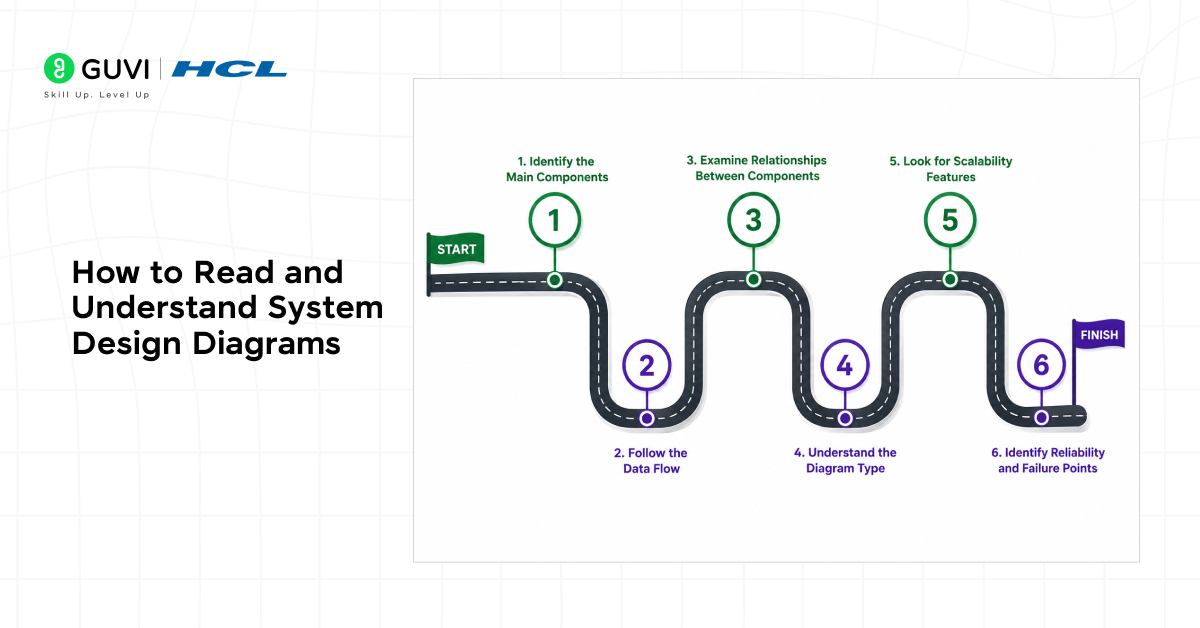
1. Identify the Main Components
Start by locating the key elements shown in the diagram. These may include users, frontend applications, backend services, databases, APIs, load balancers, and cloud resources.
Understanding the purpose of each component provides context for the rest of the diagram.
2. Follow the Data Flow
Next, trace how information moves through the system.
For example, a user request might travel from a web browser to an API server, then to a database, before returning a response. Understanding this flow helps reveal how the system operates.
3. Examine Relationships Between Components
Lines and arrows often indicate communication paths and dependencies.
Pay attention to how services interact with one another, as these relationships can reveal bottlenecks, integration points, and potential failure areas.
4. Understand the Diagram Type
Different diagrams serve different purposes.
Common examples include:
- Architecture Diagrams
- UML Diagrams
- Data Flow Diagrams
- Network Diagrams
- Deployment Diagrams
Knowing the diagram type makes interpretation significantly easier.
5. Look for Scalability Features
Modern systems often include scalability mechanisms such as:
- Load Balancers
- Caching Layers
- Message Queues
- Distributed Databases
- Content Delivery Networks (CDNs)
These components indicate how the system handles increased traffic and workload.
6. Identify Reliability and Failure Points
Well-designed diagrams often highlight redundancy and fault tolerance mechanisms.
Look for backup databases, replicated services, failover systems, and monitoring tools that help maintain system availability.

Warning
Avoid focusing solely on individual components when reading a system diagram. Understanding how components interact is often more important than understanding each component in isolation. Missing these relationships can lead to incorrect interpretations of system behavior.
To strengthen your understanding of architectural patterns and scalable software systems, HCL GUVI’s System Design Course offers practical, industry-relevant training in modern system design concepts.
How System Design Diagrams Improve Communication
System diagrams serve as a common language between technical and non-technical stakeholders.
Instead of explaining architectures through lengthy documents, teams can use diagrams to discuss workflows, identify issues, review designs, and plan future improvements more efficiently.
Key Areas Improved by System Design Diagrams
- Technical Communication
- Architecture Planning
- Requirement Analysis
- Troubleshooting
- Team Collaboration
- Knowledge Sharing
- System Documentation
- Decision Making
Organizations often rely on visual architecture documentation to align engineering efforts with business objectives.
Real-World Applications of System Design Diagrams

1. Software Architecture Design
Architects use diagrams to design and validate system structures before development begins.
2. Cloud Infrastructure Planning
Teams visualize cloud resources, deployment strategies, and networking configurations.
3. API Integration Projects
Developers map interactions between internal and external services.
4. System Design Interviews
Candidates use diagrams to communicate technical solutions and architectural decisions.
5. Enterprise Application Development
Large organizations rely on diagrams to manage complex systems involving numerous services and teams.
Best Practice
When reviewing system design diagrams, start with high-level architecture before analyzing individual components. Understanding the overall system context makes detailed analysis much easier and prevents confusion.
To deepen your system design skills, HCL GUVI’s System Design Course provides hands-on exposure to real-world architecture and design concepts.
Key Takeaways
- System design diagrams simplify complex software architectures.
- Understanding data flow is essential for interpreting diagrams.
- Different diagram types serve different architectural purposes.
- Scalability and reliability components reveal system capabilities.
- Visual representations improve collaboration and technical communication.
What To Do Next
After learning these concepts, explore:
- System Design Primer
- Software Architecture Patterns
- UML Diagram Types
- Distributed Systems Design
- API Architecture
- Cloud Infrastructure Design
- System Design Interview Preparation
Developing strong diagram-reading skills will help you understand and design software systems more effectively.
Conclusion
Understanding system design diagrams enables developers to visualize complex architectures, identify component relationships, and analyze system behavior more effectively. As modern applications become increasingly distributed and scalable, diagram-reading skills are essential for software design, troubleshooting, and collaboration. By mastering these visual representations, developers can communicate technical ideas clearly and make more informed architectural decisions.
FAQs
1. What are system design diagrams?
System design diagrams are visual representations of software architectures, components, and interactions within a system.
2. Why are system design diagrams important?
They help developers understand system structure, data flow, dependencies, and scalability.
3. What are the most common types of system design diagrams?
Common types include UML diagrams, architecture diagrams, data flow diagrams, network diagrams, and deployment diagrams.
4. How do I start reading a system design diagram?
Begin by identifying the main components, then follow the data flow and relationships between services.
5. What is the purpose of arrows in system diagrams?
Arrows typically represent communication paths, dependencies, or data movement between components.
6. How do system design diagrams help during interviews?
They allow candidates to clearly communicate architectural decisions and demonstrate problem-solving skills.
7. Are system design diagrams only useful for architects?
No. Developers, testers, DevOps engineers, product managers, and stakeholders can all benefit from understanding system design diagrams.
Success Stories

About the Author
Vishalini Devarajan
An Aerospace Engineer turned content writer, I focus on making complex concepts easy to understand through well-structured, reader-friendly blogs. Whether it’s a technical topic or a non-technical one, I love creating content that is clear, engaging, and impactful.
View all posts by Vishalini Devarajan
Connect with me @
















Did you enjoy this article?