


Software Development Articles
How to Read and Understand System Design Diagrams?
System Engineer Roles and Responsibilities: 12 Proven Duties for Growth
SAP Consultant Roles and Responsibilities: 12 Proven Duties for Growth and Success
Network Engineer Roles and Responsibilities: 12 Essential Duties for Success


Get In Touch For Details! Request More Information

Caching in System Design: Concepts & Strategies Explained
Jun 24, 2026 6 Min Read 2604 Views
(Last Updated)
Imagine visiting a website and waiting ten seconds for the homepage to load. You’d probably leave before it even finishes.
That’s the exact problem caching was built to solve. When systems need to serve millions of users simultaneously, think Google, Amazon, or Netflix, reading from a database every single time is simply not sustainable. It’s slow, expensive, and puts enormous pressure on your infrastructure.
Caching is one of the most fundamental concepts in system design. Whether you’re preparing for a system design interview or architecting a real-world application, understanding caching is non-negotiable. In this guide, you’ll learn what caching is, how it works, the different types and strategies, and how companies use it to build blazing-fast systems at scale.
Table of contents
- TL;DR Summary
- What is Caching in System Design?
- Why Caching Matters
- How Caching Works?
- Cache Hit Ratio
- TTL: Time-to-Live
- Types of Caches
- Client-Side Cache
- CDN Cache (Content Delivery Network)
- Application-Level Cache (In-Memory Cache)
- Database Cache
- Distributed Cache
- Cache Writing Strategies
- Cache-Aside (Lazy Loading)
- Write-Through
- Write-Behind (Write-Back)
- Write-Around
- Cache Eviction Policies
- LRU: Least Recently Used
- LFU: Least Frequently Used
- FIFO: First In, First Out
- Random Replacement
- Real-World Caching Tools
- Redis
- Memcached
- Varnish Cache
- Common Caching Challenges
- Cache Invalidation
- Cache Stampede (Thundering Herd)
- Cache Penetration
- Cache Avalanche
- Conclusion
- FAQs
- What is caching in system design?
- What is the difference between a cache hit and a cache miss?
- What is the most commonly used cache eviction policy?
- What is the difference between Redis and Memcached?
- What is cache invalidation, and why is it hard?
TL;DR Summary
- This article introduces caching as a core system design concept and explains why it is essential for building fast, scalable, and reliable applications.
- It covers how caching works under the hood, from cache hits and misses to the role of TTL (Time-to-Live) in managing data freshness.
- The guide walks through the major types of caches, including client-side, server-side, CDN, and distributed caches, with practical context for each.
- It explains the four primary cache writing strategies, write-through, write-behind, write-around, and cache-aside, and when to use each one.
- The article covers cache eviction policies like LRU, LFU, and FIFO, helping you understand how systems decide what to remove when the cache is full.
- It also highlights real-world tools like Redis and Memcached, common challenges such as cache invalidation and thundering herd, and best practices to design caching effectively.
What is Caching in System Design?
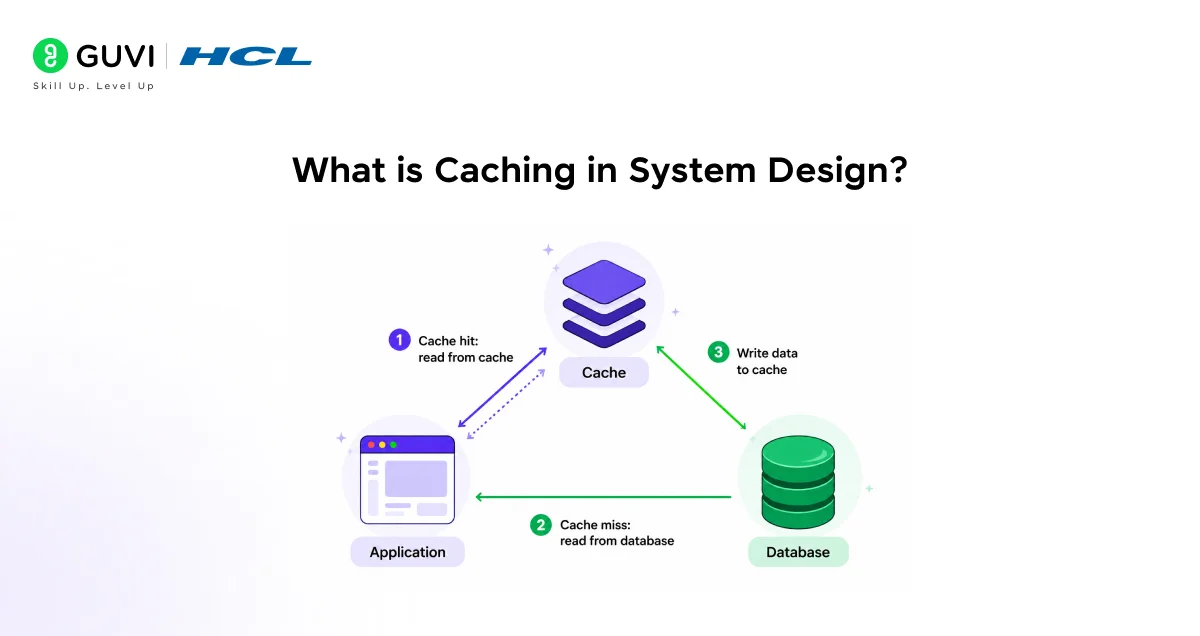
At its core, caching is the process of storing frequently accessed data in a fast, temporary storage layer so it can be retrieved quickly, without repeatedly fetching it from the original, slower source.
Think of it this way. Every time a user requests data, your system could go all the way to the database to fetch it. But if that data doesn’t change very often, why make that expensive trip every single time? Instead, you store a copy of the result closer to where it’s needed, in the cache, and serve it directly.
The original data source (usually a database) is called the backing store. The cache sits in front of it and intercepts requests before they hit the database.
This simple idea has a massive impact on:
- Response time: Data is served in milliseconds instead of hundreds of milliseconds
- Database load: Fewer queries hit your database, reducing the risk of overload
- Infrastructure cost: Less compute and I/O usage means lower cloud bills
- User experience: Faster apps keep users engaged
Why Caching Matters
To understand why caching is so critical, you need to think about what happens without it.
Say your application serves 10,000 users per second, and each request triggers a database query. That’s 10,000 database reads per second, most of them probably fetching the same product listing, user profile, or configuration data. Your database becomes a bottleneck, latency spikes, and eventually, the system buckles under the pressure.
Now introduce a cache. If 95% of those requests can be served from cached data, you’ve cut your database load by 95%. This is why large-scale systems treat caching not as an optimisation, but as a requirement.
Did You Know?
Facebook reportedly handles over 100 million requests per second to its Memcached layer. At that scale, even a 1-millisecond improvement in cache lookup time translates to thousands of hours of user time saved every single day.
How Caching Works?
Here’s what actually happens when a user makes a request to a cached system:
Step 1: Cache Lookup: When a request comes in, the system first checks the cache. This is called a cache lookup.
Step 2: Cache Hit: If the requested data exists in the cache, it’s returned immediately. This is a cache hit, the ideal scenario.
Step 3: Cache Miss: If the data isn’t in the cache, the system fetches it from the backing store (database or API). This is a cache miss. The data is then stored in the cache for future requests.
Cache Hit Ratio
The cache hit ratio is the percentage of requests served from cache versus total requests. A higher ratio means your cache is doing its job well.
- A hit ratio of 90%+ is generally considered good
- Below 70% usually signals a problem with your caching strategy
TTL: Time-to-Live
Every cached entry has an expiry time, known as TTL (Time-to-Live). Once the TTL expires, the cache considers the entry stale and removes it. The next request will trigger a fresh fetch from the source.
Setting the right TTL is a balancing act:
- Too short: Frequent cache misses, defeating the purpose
- Too long: Stale data served to users, causing inconsistency
Types of Caches
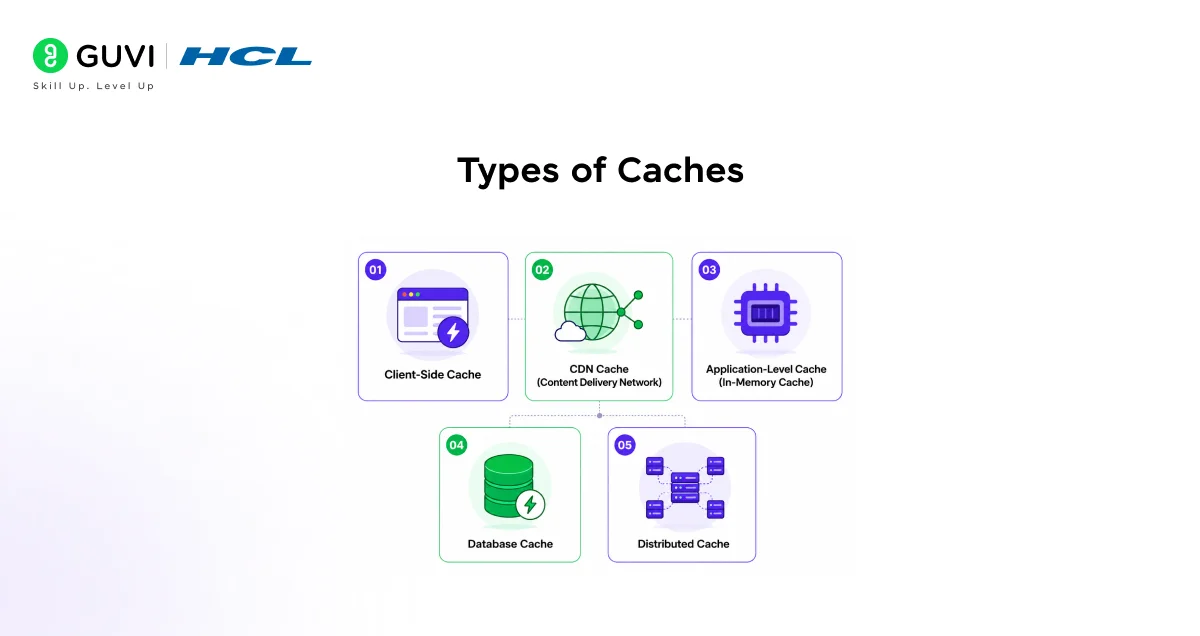
Not all caches are created equal. Different layers of your system call for different types of caching. Here’s a breakdown of the most common ones.
1. Client-Side Cache
This lives in the user’s browser or device. When you visit a website and your browser doesn’t reload all the CSS and images on the second visit, that’s client-side caching in action.
It’s controlled via HTTP headers like Cache-Control and ETag. You don’t have direct control over it as a backend engineer, but you can influence it.
2. CDN Cache (Content Delivery Network)
A CDN stores copies of static assets, images, videos, and JavaScript files at edge servers distributed across the world. When a user in Chennai requests an image, it’s served from a nearby CDN node instead of a server in the US.
Popular CDNs: Cloudflare, AWS CloudFront, Akamai
3. Application-Level Cache (In-Memory Cache)
This is the most common type you’ll encounter in system design. Data is stored in the application’s memory (RAM) for extremely fast retrieval.
This is where tools like Redis and Memcached come in, which you’ll read about shortly.
4. Database Cache
Databases have their own internal caching layers. For example, MySQL uses a query cache to store the results of frequently run queries. PostgreSQL uses a shared buffer pool for the same purpose.
You often don’t configure this directly, but it’s worth knowing it exists.
5. Distributed Cache
When your application scales across multiple servers, a single in-memory cache per server creates inconsistency. A distributed cache is shared across all nodes, ensuring every server sees the same cached data.
Redis running in cluster mode is the most popular implementation of this.
Cache Writing Strategies
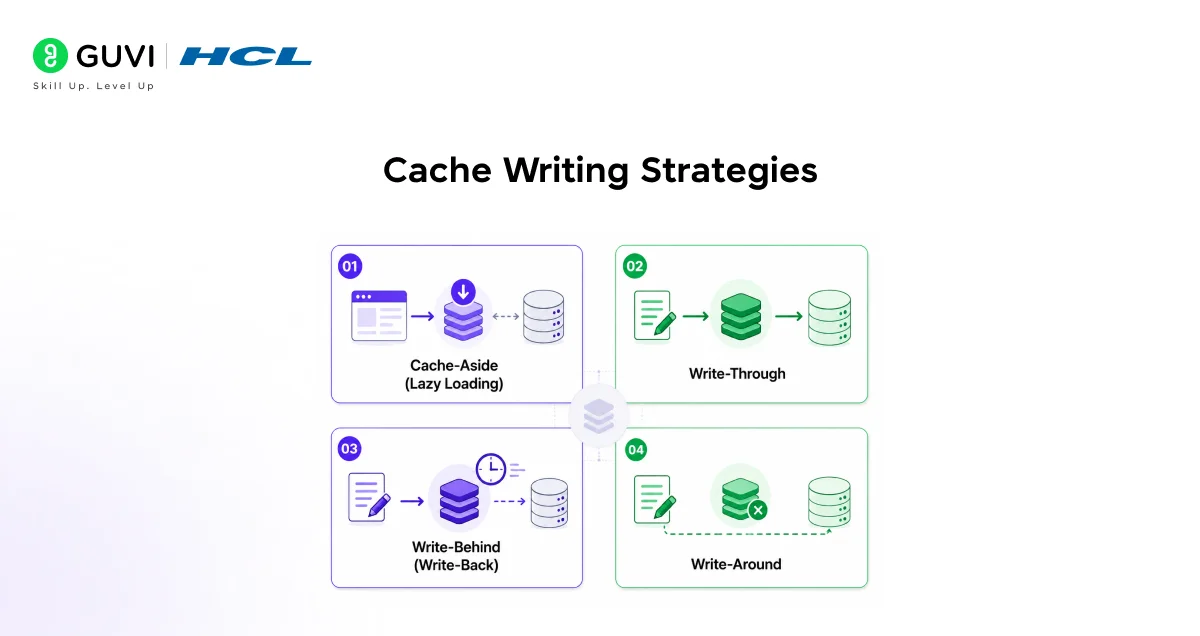
One of the trickier parts of caching is deciding how and when data gets written to the cache when something changes. There are four main strategies.
1. Cache-Aside (Lazy Loading)
This is the most commonly used pattern.
The application checks the cache first. If there’s a miss, it fetches from the database, stores the result in the cache, and returns it. Future requests are served from cache.
Best for: Read-heavy workloads where not all data needs to be pre-loaded
Watch out for: Initial cache misses and potential stale data if TTL isn’t set correctly
2. Write-Through
Every write to the database also writes to the cache simultaneously. The cache is always in sync with the database.
Best for: Systems where data consistency between cache and database is critical
Watch out for: Every write takes slightly longer since it updates two places
3. Write-Behind (Write-Back)
Data is written to the cache first, and the database is updated asynchronously after a short delay. This is fast but carries risk.
Best for: Write-heavy applications where speed matters more than immediate consistency
Watch out for: If the cache fails before the database is updated, you can lose data
4. Write-Around
Data is written directly to the database, bypassing the cache entirely. The cache is only populated on a cache miss.

Best for: Data that is written once but rarely read, so there’s no point caching it upfront
Cache Eviction Policies
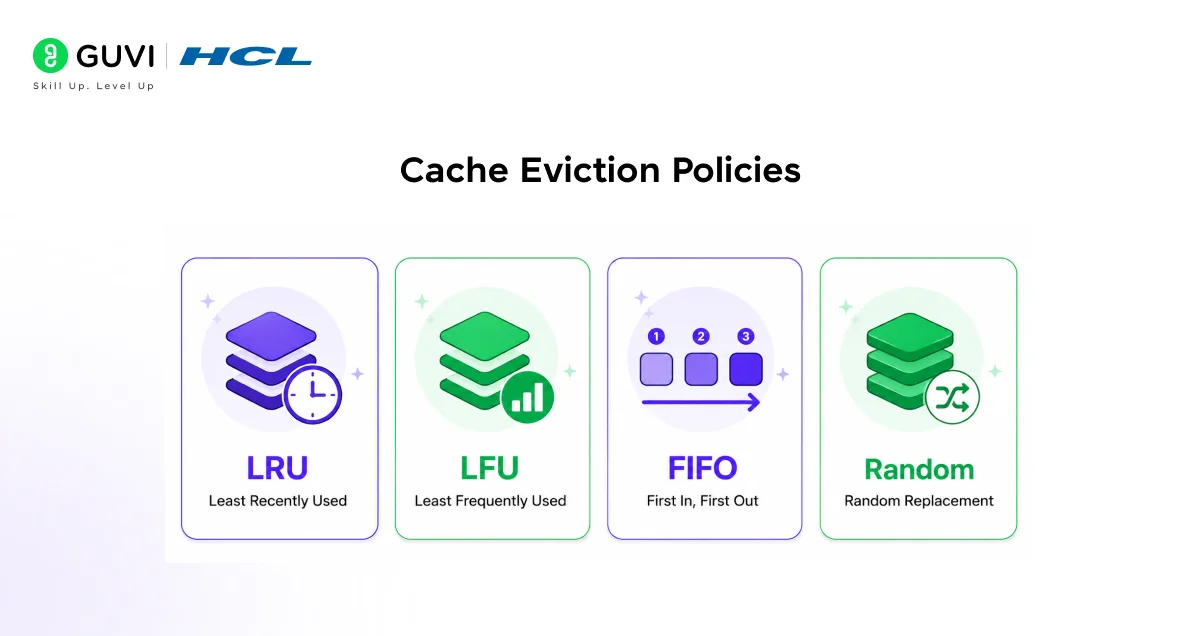
Your cache has a limited amount of space. When it fills up, the system needs to decide what to remove to make room for new entries. This is called cache eviction, and the rules that govern it are called eviction policies.
LRU: Least Recently Used
The most popular policy. When the cache is full, the entry that was accessed least recently is removed first. The logic is simple: if you haven’t used something in a while, you probably won’t need it soon.
Used by: Redis (default), many browser caches
LFU: Least Frequently Used
Instead of recency, this policy tracks frequency. The entry that has been accessed the fewest times gets evicted first.
Best for: Scenarios where some data is accessed regularly over a long period, even if not recently
FIFO: First In, First Out
The oldest entry in the cache is removed first, regardless of how often or recently it was accessed.
Best for: Simple use cases where access patterns are predictable
Random Replacement
A random entry is chosen for eviction. It’s simple to implement and occasionally performs surprisingly well, but it’s rarely the best choice.
The concept of caching dates back to the 1960s, when CPU designers introduced small, fast memory units (what we now call L1 and L2 caches) to bridge the speed gap between the processor and RAM. The same fundamental idea, keep frequently needed data close and fast, is what drives caching in modern distributed systems today.
Real-World Caching Tools
Knowing the theory is important, but you’ll also want to know what tools are actually used in production.
Redis
Redis (Remote Dictionary Server) is the industry standard for application-level caching. It stores data as key-value pairs entirely in memory, which makes it extremely fast.
Key features:
- Supports multiple data structures (strings, lists, hashes, sets)
- Built-in TTL support
- Supports pub/sub messaging
- Can be configured as a distributed cache cluster
Redis is used by Twitter, GitHub, Stack Overflow, and countless other high-traffic platforms.
Memcached
Memcached is a simpler, lightweight alternative to Redis. It’s purely a key-value store with no support for complex data types or persistence.
If you need raw speed with minimal complexity, Memcached is a solid choice. But for most modern use cases, Redis is preferred because of its richer feature set.
Varnish Cache
Varnish is a HTTP accelerator designed specifically for caching web content. It sits in front of your web server and serves cached HTTP responses, dramatically reducing load on the application layer.
It’s particularly useful for high-traffic media and news websites.
Common Caching Challenges
Caching solves a lot of problems, but it also introduces new ones. Here are the most important challenges you’ll need to understand.
Cache Invalidation
This is widely considered one of the hardest problems in computer science. When underlying data changes, how do you ensure the cache reflects the update?
There’s no universal answer. Common approaches include:
- Setting a short TTL so data expires naturally
- Explicitly deleting cache entries on write operations
- Using event-driven invalidation triggered by database updates
Cache Stampede (Thundering Herd)
Imagine a popular cache entry expires. Suddenly, thousands of requests hit the database at the same time trying to rebuild the cache. This surge can overwhelm your system.
Solutions include probabilistic early expiration (refreshing the cache slightly before it expires) and request coalescing (letting only one request rebuild the cache while others wait).
Cache Penetration
This happens when users query for data that doesn’t exist — say, a product ID that’s been deleted. These requests always result in a cache miss and hit the database every time.
A common fix is to cache a null response with a short TTL, so future identical requests are served from cache even though the result is empty.
Cache Avalanche
If a large number of cache entries expire at the same time, there’s a sudden rush of requests hitting the database. This is different from a stampede — it’s a mass expiry event.
The fix is to stagger TTL values by adding random jitter, so entries don’t all expire simultaneously.
If you want to learn more about system designs like this and want to implement them in your workflow, then consider enrolling for HCL GUVI’s Self-Paced System Design Online Course and dive into the world of low-level and high-level design principles, design patterns, databases, scaling, caching, and more with industry-grade certification!
Conclusion
In conclusion, caching is not just a performance trick, it’s a foundational building block of scalable system design. Once you understand how it works, you’ll start seeing it everywhere: in the browser loading assets faster, in APIs returning results in milliseconds, and in distributed systems handling millions of requests without breaking a sweat.
The key is knowing what to cache, how long to cache it, and how to handle the edge cases when things go stale or fail. Master those three dimensions, and caching becomes one of the most powerful tools in your system design toolkit.
If you’re looking to go deeper into system design concepts like these, hands-on practice and structured learning will always take you further faster.
FAQs
What is caching in system design?
Caching is the process of storing copies of frequently accessed data in a temporary, fast-access storage layer so that future requests can be served quickly without hitting the original data source every time.
What is the difference between a cache hit and a cache miss?
A cache hit occurs when the requested data is found in the cache and returned directly. A cache miss occurs when the data isn’t in the cache, requiring the system to fetch it from the database or API.
What is the most commonly used cache eviction policy?
LRU (Least Recently Used) is the most widely used eviction policy. It removes the entry that hasn’t been accessed in the longest time, which works well for most general use cases.
What is the difference between Redis and Memcached?
Both are in-memory key-value stores used for caching. Redis supports richer data structures, persistence, clustering, and pub/sub messaging. Memcached is simpler and faster for basic use cases but lacks Redis’s feature set. Redis is the preferred choice for most modern applications.
What is cache invalidation, and why is it hard?
Cache invalidation is the process of removing or updating stale data in the cache when the underlying data changes. It’s considered hard because there’s no single perfect strategy, every approach involves trade-offs between consistency, performance, and complexity.
Success Stories

About the Author
Lukesh S
A professional content writer who has experience in freelancing and now working as a Technical Content Writer at HCL GUVI having sound knowledge in Blog Writing and Creative Writing!
View all posts by Lukesh S
Connect with me @
















Did you enjoy this article?