


Artificial Intelligence and Machine Learning Articles
Finance Manager to Data Analytics: Career Growth, Salary and Seniority
How to Evaluate LLM Outputs in Production Deployments
AI/ML Skills Gap 2026: Why Companies Can't Find Job-Ready Talent
20 AI/ML Interview Questions Recruiters Can Use Without a Tech Background - Best Guide


Get In Touch For Details! Request More Information

Windsurf IDE: The AI Code Editor Changing How Developers Work
Jul 10, 2026 7 Min Read 1487 Views
(Last Updated)
If you have just stepped out of college with a computer science degree or a coding bootcamp certificate, you are probably already hearing about AI coding tools everywhere. ChatGPT, GitHub Copilot, Cursor, the list goes on.
But one tool that has been quietly making a big impression among developers is Windsurf IDE, and it is worth understanding what it actually does before everyone else figures it out. Windsurf is not just another AI chatbot you paste code into.
It was built from the ground up to work as an intelligent development environment, meaning the AI is not an add-on sitting in a corner; it is woven into everything from how you type code to how you debug and refactor it. The tool was created by a company called Codeium and has since gone through some significant changes in ownership, but the core product has only gotten stronger with time.
In this article, we will walk through everything you need to know about Windsurf IDE, what it is, how it works, what makes it different, and whether it is the right tool to have in your developer toolkit as you start your career.
Table of contents
- TL;DR:
- Is windsurfing good for beginners?
- How Windsurf Was Built and Who Made It
- Mastering Cascade: Windsurf's AI Core
- Setting Up Windsurf: It Is Easier Than You Think
- Step 1: Download and Install Windsurf
- Step 2: Import Settings from VS Code
- Step 3: Sign In to Codeium Account
- Step 4: Open Project and Index Codebase
- What Windsurf Feels Like in Real Use
- Windsurf Pricing: What Do You Actually Get for Free?
- How Windsurf Compares to Other Tools
- Things to Be Aware Of Before You Dive In
- Should You Start Using Windsurf?
- Final Thoughts
- FAQs
- Is Windsurf suitable for complete coding beginners?
- How does Cascade handle large codebases?
- What's the free tier limit, and when to upgrade?
- Can I use my VS Code extensions in Windsurf?
- Is Turbo Mode safe for production work?
TL;DR:
- AI-Native VS Code Fork: Familiar UI with Cascade’s repo-scale smarts for multi-file edits.
- 3 Cascade Modes: Write (AutoGPT-like autonomy), Chat (copilot control), Turbo (terminal automation).
- Memory Magic: Learns your style/APIs over time for personalized boosts.
- Generous Free Tier: 25 credits/mo + unlimited completions; Pro at $15/mo.
- Ownership Twist: Codeium → Cognition AI (post-OpenAI flop), eyeing Devin fusion.
- Edge Over Copilot/Cursor: Deeper agentic workflows for full-stack AI/ML dev.
What Exactly Is Windsurf IDE?
Windsurf is an AI-native code editor built on top of the VS Code foundation, making it instantly familiar to developers who already use Visual Studio Code. Existing extensions, themes, and keyboard shortcuts work with minimal friction. What differentiates Windsurf is its integrated AI system called Cascade, which goes beyond a simple sidebar chatbot by deeply understanding the codebase and actively assisting with coding, navigation, and development workflows directly inside the editor.
Is windsurfing good for beginners?
Windsurf is primarily built for developers who already know how to code and want AI to speed up their work. It is not a no-code tool.
- However, its guided workflows and intelligent suggestions do make it easier for newcomers to write better code faster, understand project structure, and learn good practices along the way. If you are just starting, it can actually be a great learning companion.
- Unlike a simple chat window, Cascade can read your full codebase, make changes across multiple files, run terminal commands, and execute multi-step tasks without you directing every action. Think of it as a coding partner that is always watching your project, understanding how things are connected, and jumping in to help whenever you need it.
- Windsurf differentiates itself from competitors in three key ways: Cascade’s agentic architecture, VS Code compatibility, and particularly strong support for web developers working across the full stack, modifying a React component, updating the API route that feeds it, and adjusting the database migration, all in a single Cascade session.
How Windsurf Was Built and Who Made It
Windsurf was originally developed by Codeium, an AI infrastructure company founded in 2021. Codeium had already built a popular AI code completion plugin before deciding to take things further and create a full IDE from scratch.
Windsurf has had a turbulent ownership history. OpenAI announced a $3 billion acquisition in mid-2025, but the deal collapsed over IP-sharing concerns with Microsoft. After a brief period where Google DeepMind hired key staff, including the CEO, Cognition AI, the company behind the autonomous coding agent Devin, acquired Windsurf in late 2025.
Cognition plans to deepen the integration between Windsurf and Devin, their autonomous coding agent, to eventually support fully autonomous software development workflows.
At the time of acquisition, Windsurf had $82M ARR with enterprise revenue doubling quarter-over-quarter, 350+ enterprise customers, and a team of 210 employees. These are not small numbers for a code editor, and they reflect just how seriously the developer community has taken it.
Mastering Cascade: Windsurf’s AI Core
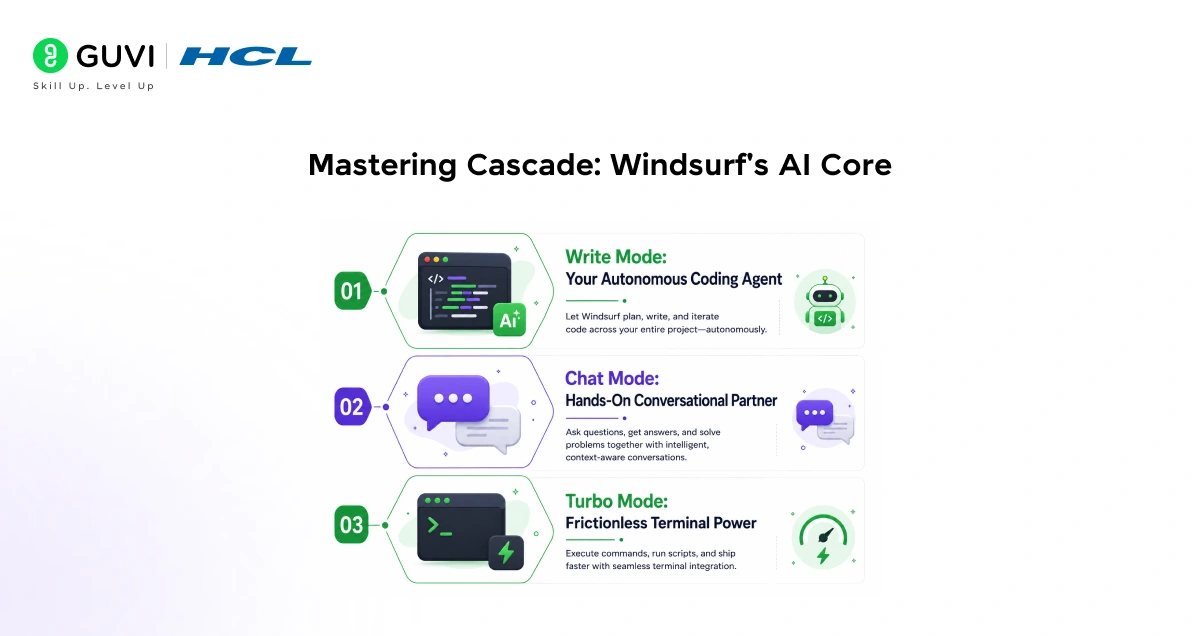
The most important thing to grasp about Windsurf is Cascade, its revolutionary AI system that everything else orbits around. Cascade excels at multi-file reasoning, repository-scale comprehension, and multi-step task execution, making it a game-changer for complex projects. What sets it apart is the persistent memory layer, which learns your unique coding style, common patterns, and preferred APIs as you work.
The longer you use Windsurf on a project, the smarter Cascade becomes, anticipating your needs and reducing repetitive boilerplate. For Python devs building AI apps (think Replit-style workflows), this means less context switching and iteration.
- Write Mode: Your Autonomous Coding Agent
In Write Mode, Cascade transforms into a fully autonomous agent, akin to AutoGPT but tuned for code. Give it a high-level goal like “Build a Flask API for user auth with JWT and PostgreSQL integration,” and it will:
- Generate multiple files (e.g., app.py, models.py, requirements.txt).
- Run setup scripts, install dependencies, and execute initial tests.
- Debug errors iteratively, fixing issues like import mismatches or DB connection failures.
You simply review and accept checkpoints via a simple UI prompt, then watch it run in the integrated terminal. This mode shines for scaffolding enterprise AI tools or ML prototypes, saving hours on setup.
- Chat Mode: Hands-On Conversational Partner
Chat Mode dials back autonomy for more control, acting as a collaborative copilot. Ask, “Refactor this Python function for async handling with asyncio,” and Cascade responds with:
- Optimized code blocks you can copy-paste.
- Step-by-step instructions, like “Add asyncio.run() wrapper and update event loop.”
- Explanations tailored to your memory profile (e.g., suggesting your go-to libraries like FastAPI).
Ideal for debugging tricky ML models or integrating Claude/Replit APIs, it keeps you in the driver’s seat while accelerating hands-on work.
- Turbo Mode: Frictionless Terminal Power
For power users, Turbo Mode unlocks autonomous terminal execution, a massive time-saver. Command it to “Install Poetry, add pandas and scikit-learn, then run poetry run pytest,” and Cascade handles it all without tab switching or syntax recall. Key perks:
- Safe sandboxing prevents destructive ops.
- Real-time logs and rollback on failures.
- Chains commands for workflows, like “npm build && deploy to Vercel.”
Perfect for CI/CD-like tasks in AI app dev, it streamlines everything from package management to test suites.
Key Features You Should Know About
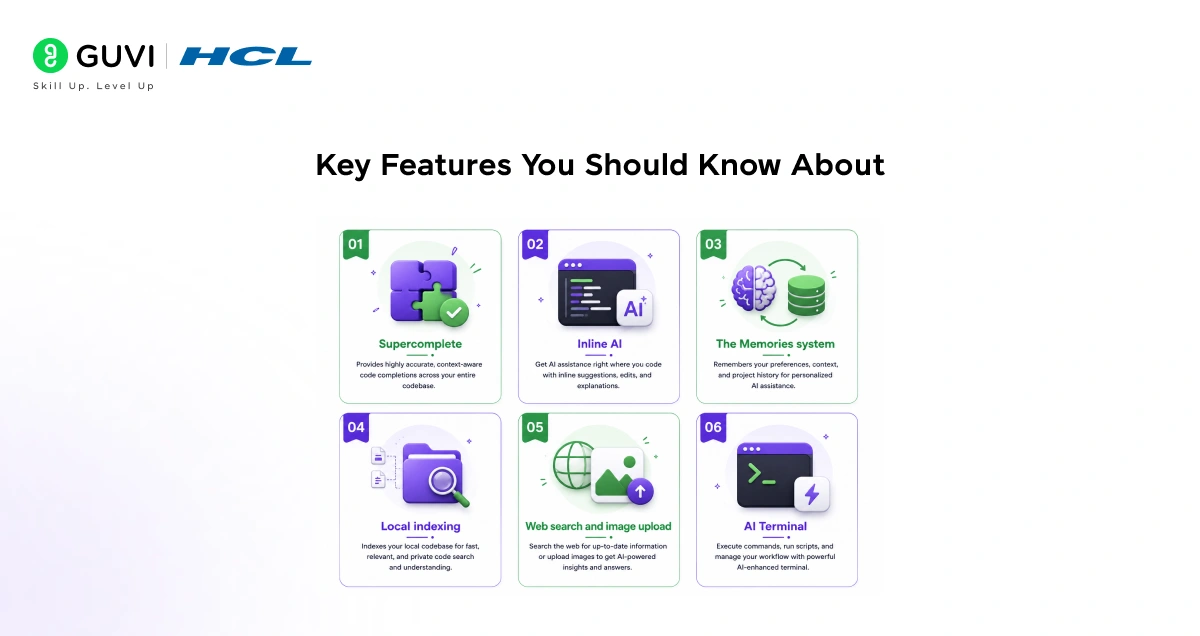
Windsurf comes packed with features that go well beyond standard autocomplete. Here is what makes it genuinely useful in a real coding workflow.
- Supercomplete is the first thing most developers notice. Windsurf’s Supercomplete goes beyond traditional autocompletion. Rather than simply predicting the next word or line, it predicts your intent. For instance, it can generate Python functions with correct docstrings and functionality tailored to the context of your code and prior actions. This is a meaningful step up from standard tab-completion tools.
- Inline AI gives you precise, surgical control over changes. With Inline AI, you can ask Windsurf to make changes to specific lines of code, generate docstrings, refactor sections, and more, all without touching the rest of your codebase. This ensures only the selected portions are affected, giving you precise control over your code edits. You can trigger this with a simple keyboard shortcut.
- The Memories system is one of Windsurf’s more underrated features. Windsurf’s Memories system allows it to persist context across conversations, ensuring continuity.
There are two types of memories: user-generated memories that are explicitly defined by the user, such as specific APIs or communication styles, and automatically generated memories created by Cascade based on your interactions. Over time, this makes the AI feel much less like a generic assistant and more like someone who actually understands your project.
- Local indexing is what powers Cascade’s awareness of your entire codebase. The Indexing Engine retrieves context from your entire codebase, not just the files you have recently interacted with. This significantly improves the quality of autocomplete suggestions and chat responses, making it ideal for large projects.
- Web search and image upload are also built right in. Cascade can intuitively parse and analyze web pages and documentation in real time, providing relevant and actionable context for your code. You can also upload images, such as screenshots of your website, directly into Cascade, and Windsurf can then generate HTML, CSS, and JavaScript code to mimic the design. This is a surprisingly powerful feature when you are building front-end interfaces.
- AI Terminal brings intelligence to your command line. With the integrated AI terminal, you can ask Windsurf to generate code directly in the terminal or even troubleshoot and fix errors. This streamlines the development process by combining coding and debugging in one place.
Setting Up Windsurf: It Is Easier Than You Think
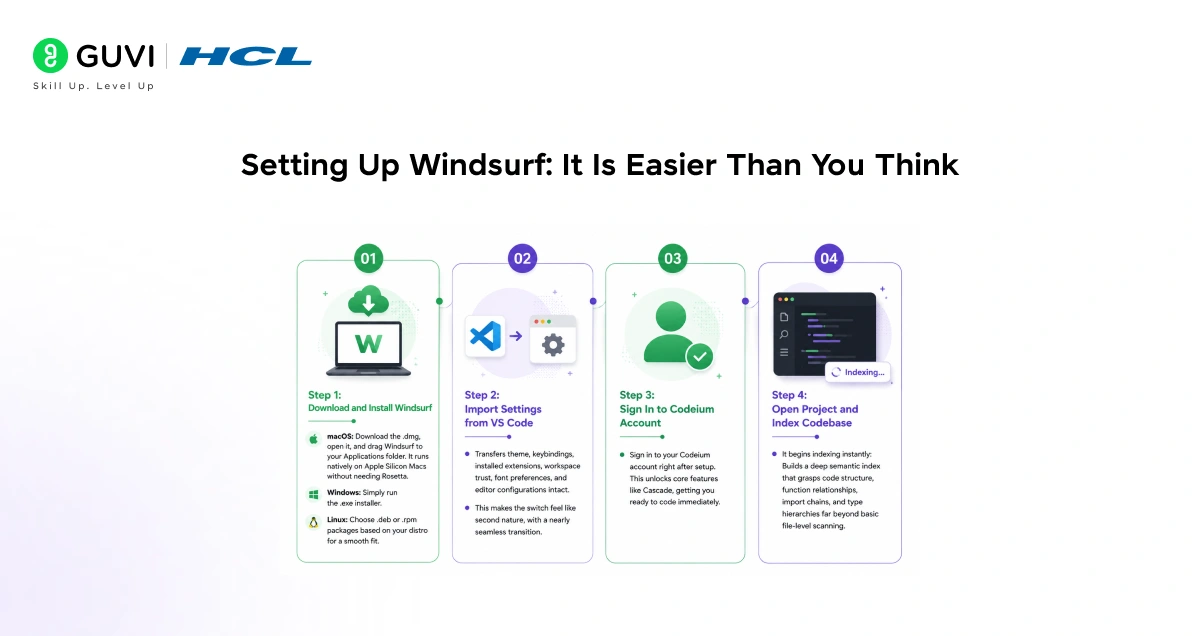
Step 1: Download and Install Windsurf
Head to windsurf.com and select the installer for your operating system no complicated setup required, especially if you’re familiar with VS Code.
- macOS: Download the .dmg, open it, and drag Windsurf to your Applications folder. It runs natively on Apple Silicon Macs without needing Rosetta.
- Windows: Simply run the .exe installer.
- Linux: Choose .deb or .rpm packages based on your distro for a smooth fit.
Step 2: Import Settings from VS Code
Once installed and launched, Windsurf detects VS Code and offers to import your settings automatically.
- Transfers theme, keybindings, installed extensions, workspace trust, font preferences, and editor configurations intact.
- This makes the switch feel like second nature, with a nearly seamless transition.
Step 3: Sign In to Codeium Account
Sign in to your Codeium account right after setup.
- This unlocks core features like Cascade, getting you ready to code immediately.

Step 4: Open Project and Index Codebase
Open any project folder to start using Windsurf.
- It begins indexing instantly: Builds a deep semantic index that grasps code structure, function relationships, import chains, and type hierarchies far beyond basic file-level scanning.
What Windsurf Feels Like in Real Use
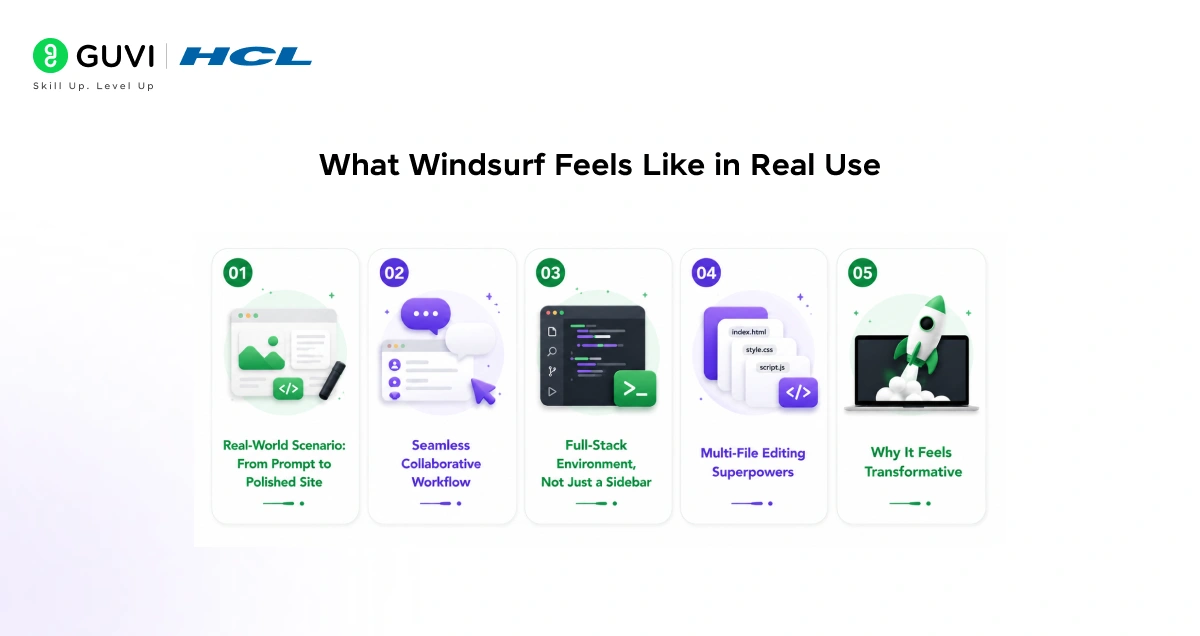
1. Real-World Scenario: From Prompt to Polished Site
One of the best ways to understand Windsurf is through real project scenarios. Developers rave that it feels fundamentally different from other AI tools. Picture this: A dev prompts, “I need a company website with a contact form.” In about a minute, Cascade generates a clean, professional site HTML, CSS, JS, and backend handler included.
2. Seamless Collaborative Workflow
What follows is a fluid dance of human-AI collaboration. Edit code directly if you want, but natural language shines: “Add rounded corners to buttons” or “Remove extra cards.” Cascade updates instantly, learning your style via its memory layer, making iterations feel intuitive and fast.
3. Full-Stack Environment, Not Just a Sidebar
Windsurf isn’t a bolted-on AI; it’s a full-stack development environment powered by Cascade. Unlike sidebar assistants, it comprehends your entire project. Change one file? Cascade propagates impacts automatically, preventing ripple errors in multi-file setups.
4. Multi-File Editing Superpowers
Cascade’s multi-file prowess stands out: Rename a function across 10 files? Done. Debug iteratively by running terminal commands, analyzing errors, and applying fixes until resolved. For new devs, this slashes hours of manual refactoring.
5. Why It Feels Transformative
This repo-scale awareness and autonomy create a “massive” practice shift. It’s not subtle it’s a new way to build, especially for AI/ML apps where interconnected files (e.g., Python backends with React fronts) demand holistic intelligence.
Windsurf Pricing: What Do You Actually Get for Free?
- Pricing Tiers
Windsurf offers four tiers to suit different needs:
- Free ($0): 25 prompt credits/month, unlimited tab completions ideal for fresh graduates starting out.
- Pro ($15/month): 500 credits, SOC 2 compliance for enhanced security.
- Teams ($30/user/month): Adds admin controls for collaboration.
- Enterprise ($60/user/month): Custom deployment options.
The free tier provides a genuine taste of the tool, comfortably covering daily use for most individual developers and personal projects.
- Key Considerations
Upgrade to Pro or higher for SOC 2 compliance, as the free tier lacks these security guarantees. Avoid pasting proprietary or sensitive code there.
- Pro tier’s $15/month is reasonable, especially versus competitors, with higher limits and premium models.
- The free plan suffices for learning and non-sensitive personal work.
Windsurf’s Cascade, originally developed by Codeium, gained rapid enterprise traction through pilots with hundreds of customers and reportedly scaled to major recurring revenue growth by late 2025. The platform became especially popular for features like Memories, which automatically learn coding preferences and recurring project patterns, and Supercomplete, which predicts larger blocks of logic beyond simple autocomplete. Windsurf also introduced multimodal workflows where developers can upload a UI screenshot and generate corresponding React + Tailwind code, reflecting the broader industry shift toward AI-native software development environments.
How Windsurf Compares to Other Tools
It is hard to talk about Windsurf without mentioning Cursor and GitHub Copilot since those are the tools most developers are already familiar with.
- GitHub Copilot
It is essentially a plugin. It lives inside your existing editor and gives you fast, inline suggestions. It is excellent for autocomplete and getting through repetitive code, but it does not have the project-wide, agentic understanding that Windsurf offers. Copilot does not have the deep, project-wide understanding or agentic smarts of Windsurf or Cursor.
- Cursor
It is probably Windsurf’s closest competitor. Both are AI-native editors built on VS Code’s foundation, and both offer multi-file editing and an AI chat interface. Cursor has historically shipped updates and new features faster, though Windsurf’s pace has accelerated through 2025 and into 2026. The main practical difference comes down to philosophy. Cursor gives you more precise manual control, while Windsurf leans more into autonomous, proactive assistance through Cascade.
Windsurf has earned its place as one of the top AI coding environments in 2026. Its Cascade agent is genuinely impressive for multi-file, multi-step coding tasks. The free tier is among the most generous in the space, and the $15/month Pro plan undercuts Cursor meaningfully.
Things to Be Aware Of Before You Dive In
Like any tool, Windsurf has a few rough edges worth knowing about upfront.
- Post-acquisition uncertainty is a real consideration. Cognition’s acquisition of Windsurf raises legitimate questions about product direction.
- Will Windsurf remain a standalone IDE, or will it gradually merge into Devin? Will pricing change? These questions do not have clear answers yet, and developers building workflows around Windsurf should factor in this uncertainty.
- The credit system can also be a limitation if you rely heavily on Cascade for complex tasks. Power users who rely heavily on Cascade for agentic workflows may find themselves hitting limits, especially compared to competitors that offer more generous usage.
- There is also a learning curve in terms of prompting. Turbo Mode embodies Windsurf’s core tension: speed and automation versus trust and control.
- Letting an AI execute commands without oversight can lead to errors or unintended side effects. As you get started, it is a good idea to review what Cascade is doing before accepting its changes blindly, especially in the terminal.
Should You Start Using Windsurf?
If you are a fresh developer looking for a tool that will genuinely improve how you work, Windsurf is worth taking seriously. It is not a magic wand that writes code for you while you sit back; you still need to understand what you are building.
- It removes a significant amount of the tedious, repetitive, and error-prone parts of development, letting you focus on the creative and logical challenges that actually make coding interesting.
- There are many small features that you will love once you start using Windsurf; give it at least two weeks. It is fast, accurate, and provides robust AI integrations.
- The two-week suggestion is genuine advice; like most powerful tools, it takes a little time before you develop the intuition for how to work with it effectively.
- The developer world is moving fast, and AI coding tools are no longer optional extras. They are becoming part of how professional software gets built.
- Getting comfortable with something like Windsurf early in your career puts you in a much stronger position, not because it replaces your skills but because it multiplies them.
If you’re serious about mastering Windsurf IDE Cascade agentic AI, Supercomplete autocomplete, Devin cloud agents, and production-ready workflows, don’t miss the chance to enroll in HCL GUVI’s Intel & IITM Pravartak Certified Artificial Intelligence & Machine Learning Course, co-designed by Intel.
Final Thoughts
Windsurf IDE represents a genuine shift in how developers interact with their tools. It moves the AI from a passive suggestion engine to an active collaborator that understands context, maintains memory, and can take multi-step actions across an entire project.
For someone just entering the field, that combination of familiar interface and powerful AI makes it one of the smartest tools to learn right now.
The free plan is a solid starting point. Download it, open a project you have been working on, and start a conversation with Cascade. You will probably be surprised at how quickly it starts feeling less like a tool and more like a second pair of hands.
FAQs
1. Is Windsurf suitable for complete coding beginners?
Yes, its guided suggestions and project awareness help newcomers learn structure and best practices faster, though it’s optimized for devs with basic coding knowledge not a no-code builder.
2. How does Cascade handle large codebases?
Cascade’s Local Indexing Engine semantically indexes your entire repo, understanding function relationships and imports for accurate multi-file edits and suggestions, even in 100k+ line projects.
3. What’s the free tier limit, and when to upgrade?
Free offers 25 prompt credits/month (ample for daily use) plus unlimited autocompletions. Upgrade to Pro ($15/mo) for 500 credits, SOC 2 security, and heavy Cascade workflows.
4. Can I use my VS Code extensions in Windsurf?
Absolutely import themes, keybindings, and extensions seamlessly on setup, with near-zero friction for VS Code users.
5. Is Turbo Mode safe for production work?
Yes, with sandboxing, real-time logs, and easy rollbacks, but always review commands initially to build trust, especially on sensitive repos.
Success Stories

About the Author
Vishalini Devarajan
An Aerospace Engineer turned content writer, I focus on making complex concepts easy to understand through well-structured, reader-friendly blogs. Whether it’s a technical topic or a non-technical one, I love creating content that is clear, engaging, and impactful.
View all posts by Vishalini Devarajan
Connect with me @













Did you enjoy this article?