


Forward Deployed Engineer Articles
Anthropic Applied AI Engineer Interview: What's Different
How to Ace the FDE "Decomposition" Case Study Round
Prompt Engineering Skills for Forward Deployed AI Engineers
RAG and Vector Databases: A Forward Deployed Engineer's Primer


Get In Touch For Details! Request More Information
Working With Legacy Systems: A Forward Deployed Engineer’s Survival Guide
Sep 18, 2026 4 Min Read 36 Views
(Last Updated)
Legacy systems for forward deployed engineers can be one of the most challenging parts of customer-focused technical work. Many organizations still depend on older applications, databases, and infrastructure that may have limited documentation, outdated technologies, or difficult integration requirements.
FDEs often need to connect modern applications with these existing systems without disrupting critical business operations. This requires more than coding skills. Engineers must understand the existing environment, identify risks, troubleshoot issues, and find practical ways to introduce modern tools and automation.
This guide explains how forward deployed engineers can work effectively with legacy systems, overcome common technical challenges, integrate modern technologies, and gradually improve outdated environments without creating unnecessary operational risk.
Table of contents
- TL;DR Summary
- What Are Legacy Systems?
- Why Do FDEs Work With Legacy Systems?
- What Challenges Do Legacy Systems Create for FDEs?
- Limited Documentation
- Difficult Integrations
- Technical Debt
- Security Risks
- Operational Risk
- How Should an FDE Approach a Legacy System?
- Understand Before Changing
- Talk to the People Who Use It
- Start With a Small Prototype
- Add Observability
- Document What You Discover
- Which Skills Help FDEs Work With Legacy Systems?
- API and Integration Skills
- Database Knowledge
- Linux and Networking
- Debugging
- Cloud and DevOps
- Communication
- How Can FDEs Modernize Legacy Systems Safely?
- Build an Integration Layer
- Automate Manual Processes
- Introduce Monitoring
- Modernize Incrementally
- Start Your Learning Journey with HCL GUVI
- Conclusion
- FAQs
- What does a forward deployed engineer do with legacy systems?
- Are legacy systems always outdated or useless?
- What skills should an FDE have for working with legacy systems?
- How can FDEs modernize legacy systems safely?
- Why is documentation important for legacy systems?
- Should an FDE recommend replacing every legacy system?
TL;DR Summary
- A legacy systems forward deployed engineer must work with outdated applications, databases, infrastructure, and limited documentation.
- FDEs often modernize legacy environments without immediately replacing the systems customers depend on.
- API integration, database access, automation, monitoring, and careful migration strategies are essential skills.
- Start by understanding the existing system before making architectural changes.
- Use small, reversible improvements to reduce risk while gradually improving reliability and maintainability.
- Strong communication helps FDEs balance technical improvements with customer requirements, business constraints, and operational risks.
What Are Legacy Systems?
Legacy systems are older applications, databases, infrastructure, or technologies that organizations still depend on even though newer alternatives are available.
A legacy system is not necessarily useless or broken. In many organizations, these systems support critical business processes and contain years of valuable data.
For a legacy systems forward deployed engineer, the challenge is often to build new capabilities around these systems without disrupting existing operations.
For example, an FDE might need to connect a modern AI application to an older customer database that has limited APIs. Replacing the database may be unrealistic, so the engineer needs to find a practical integration approach.
Strengthen your AI engineering skills with HCL GUVI’s Artificial Intelligence & Machine Learning Course. Develop practical knowledge of AI, machine learning, and real-world application development through hands-on projects.
Why Do FDEs Work With Legacy Systems?
FDEs often work directly within customer environments. This means they encounter technology stacks that vary significantly between organizations.
A customer may use modern cloud infrastructure alongside:
- Older databases
- On-premises servers
- Custom internal applications
- Outdated programming languages
- File-based data exchange
- Legacy authentication systems
- Applications with limited documentation
Customers usually cannot replace these systems immediately because they may be expensive, business-critical, or deeply connected to other applications.
The FDE’s job is therefore to find a way to deliver the required solution while respecting those constraints.
A system can be considered “legacy” because of its architecture, technology, documentation, or maintenance challenges, not simply because it is old.
What Challenges Do Legacy Systems Create for FDEs?
Working with older technology introduces several challenges.
1. Limited Documentation
Some legacy applications have incomplete documentation. The original developers may have left the organization, leaving the current team to understand how the system works.
An FDE may need to inspect code, database schemas, logs, configuration files, and system behavior to understand the environment.
2. Difficult Integrations
Modern applications often expect APIs, structured data, and standard authentication methods. Older systems may instead rely on files, direct database access, custom protocols, or manual processes.
This makes integration more complicated.
3. Technical Debt
Years of quick fixes and workarounds can make legacy systems difficult to modify safely.
A small change might unexpectedly affect another part of the application because dependencies are poorly documented.
4. Security Risks
Older systems may use outdated libraries, authentication mechanisms, or infrastructure that is difficult to secure.
FDEs need to identify security risks before connecting new applications to the environment.
5. Operational Risk
Legacy systems may support critical business operations. Even a small outage could affect customers, employees, or revenue.
That makes careful testing and rollback planning essential.
Warning: Never assume that an old system can be changed safely simply because the requested modification appears small. Understand its dependencies before making production changes.
How Should an FDE Approach a Legacy System?
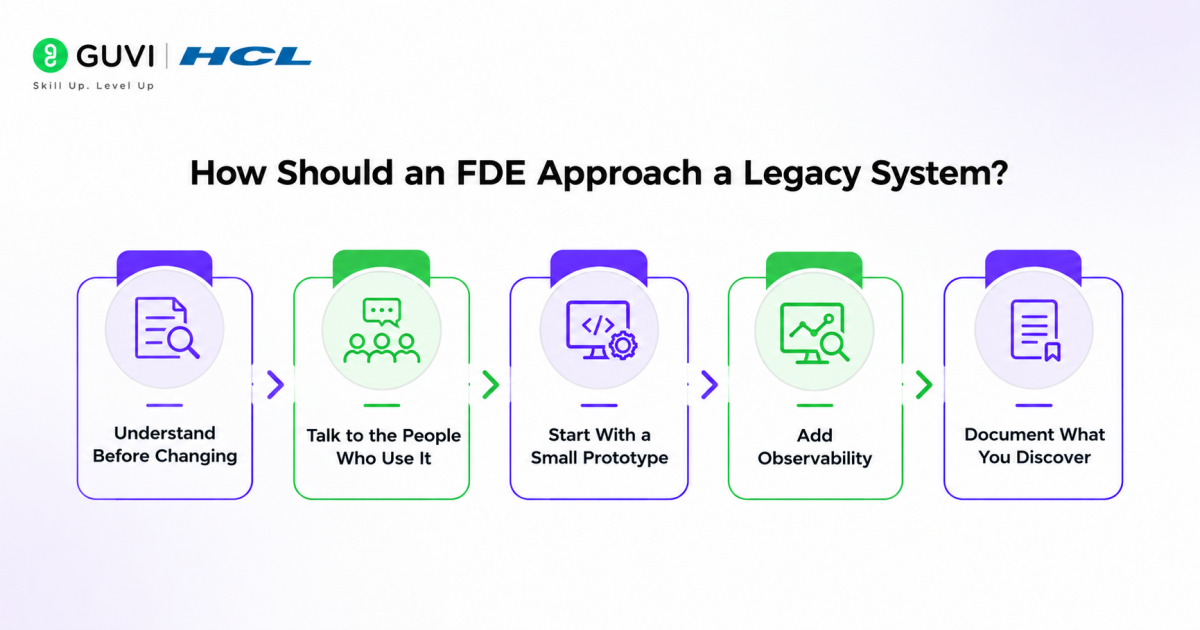
A structured process helps reduce risk.
1. Understand Before Changing
Start by mapping the system.
Identify:
- Applications
- Databases
- APIs
- Data flows
- Authentication mechanisms
- Dependencies
- Infrastructure
- Critical business processes
The goal is to understand what the system does before deciding what should change.
2. Talk to the People Who Use It
Technical documentation may not tell the complete story.
Speak with customer engineers, administrators, and business users to understand:
- Which workflows are critical
- Which failures cause the biggest problems
- Which systems cannot be interrupted
- What manual workarounds already exist
This customer context is especially important for FDEs.
3. Start With a Small Prototype
Instead of immediately redesigning the entire environment, test one integration or workflow.
For example, an FDE could first build a read-only connection between a modern application and a legacy database.

This reveals technical constraints without creating unnecessary production risk.
4. Add Observability
Logs and monitoring become particularly valuable when working with systems that are difficult to understand.
Monitor:
- Requests
- Errors
- Processing time
- Data quality
- Failed jobs
- System availability
Good observability helps an FDE troubleshoot issues without repeatedly making changes to the legacy system.
5. Document What You Discover
Documentation is one of the most valuable improvements an FDE can leave behind.
Record system dependencies, data flows, configuration requirements, known limitations, and troubleshooting steps.
This makes future maintenance easier for both the customer and engineering teams.
Which Skills Help FDEs Work With Legacy Systems?
A strong FDE needs broad technical knowledge because legacy environments rarely follow a single architecture.
Important skills include:
1. API and Integration Skills
Understanding REST APIs, authentication, webhooks, data formats, and integration patterns helps connect legacy applications with modern systems.
2. Database Knowledge
SQL, schemas, queries, indexes, transactions, and database connectivity are useful when APIs are unavailable.
3. Linux and Networking
FDEs may need to troubleshoot servers, ports, DNS, firewalls, connectivity, and application processes.
4. Debugging
Reading logs, tracing requests, reproducing failures, and isolating dependencies are essential when documentation is limited.
5. Cloud and DevOps
Knowledge of containers, CI/CD, infrastructure, monitoring, and cloud services helps engineers build modern components around legacy infrastructure.
6. Communication
Technical skills alone are not enough. FDEs must explain risks, limitations, and proposed solutions to both technical and non-technical stakeholders.
How Can FDEs Modernize Legacy Systems Safely?
Modernization does not always mean replacing everything.
An FDE can introduce improvements gradually.
1. Build an Integration Layer
Instead of changing the legacy application directly, create a service that translates between the old system and modern applications.
This reduces coupling and provides a controlled interface.
2. Automate Manual Processes
If employees regularly move files, copy data, or perform repetitive checks, automation can reduce errors and save time without requiring a complete system replacement.
3. Introduce Monitoring
Adding monitoring and centralized logging can improve visibility even when the underlying application remains unchanged.
4. Modernize Incrementally
Break a large modernization project into smaller stages.
For example:
Understand → Integrate → Automate → Monitor → Replace or modernize selected componentsThis approach reduces risk and allows customers to see value sooner.
Best Practice: Prefer incremental modernization when a legacy system is business-critical. Small, measurable improvements are often safer than a complete rewrite.
Start Your Learning Journey with HCL GUVI
Strengthen your AI engineering skills with HCL GUVI’s Artificial Intelligence & Machine Learning Course. Develop practical knowledge of AI, machine learning, and real-world application development through hands-on projects.
Conclusion
Working with legacy systems is one of the situations where a forward deployed engineer’s adaptability becomes especially valuable. Instead of assuming that customers can replace outdated technology, FDEs need to understand the existing environment and find practical ways to connect modern solutions to it.
The best approach is usually not a risky rewrite. Start by understanding dependencies, build small integrations, improve observability, automate repetitive work, and modernize the environment gradually. By combining technical problem-solving with customer awareness, FDEs can turn difficult legacy environments into manageable engineering challenges.
FAQs
What does a forward deployed engineer do with legacy systems?
A forward deployed engineer helps customers integrate, troubleshoot, automate, and gradually modernize legacy systems while minimizing disruption to critical business operations.
Are legacy systems always outdated or useless?
No. A legacy system can still be reliable and business-critical. It is considered legacy because it uses older technology, architecture, infrastructure, or maintenance practices.
What skills should an FDE have for working with legacy systems?
FDEs benefit from skills in APIs, databases, networking, Linux, debugging, cloud infrastructure, DevOps, monitoring, and customer communication.
How can FDEs modernize legacy systems safely?
FDEs can modernize legacy environments incrementally through integration layers, automation, monitoring, targeted component upgrades, and gradual migration.
Why is documentation important for legacy systems?
Legacy systems often have incomplete or outdated documentation. Recording dependencies, configurations, data flows, and troubleshooting procedures makes the environment easier and safer to maintain.
Should an FDE recommend replacing every legacy system?
No. Replacement may be expensive, risky, or unnecessary. An FDE should first understand the customer’s requirements and determine whether integration, automation, or incremental modernization can solve the problem.
Success Stories

About the Author
HCL GUVI
This article was selected and published as part of the HCL GUVI AI Blogathon 2026, an initiative designed to encourage students, AI enthusiasts, and aspiring tech writers to simplify complex AI concepts through impactful technical content. The contest recognized high-quality, original, and insightful AI-focused blogs, with selected authors receiving publication opportunities on the HCL GUVI blog platform along with official author credits and recognition.
View all posts by HCL GUVI
Connect with me @









Did you enjoy this article?