


Artificial Intelligence and Machine Learning Articles
Finance Manager to Data Analytics: Career Growth, Salary and Seniority
How to Evaluate LLM Outputs in Production Deployments
AI/ML Skills Gap 2026: Why Companies Can't Find Job-Ready Talent
20 AI/ML Interview Questions Recruiters Can Use Without a Tech Background - Best Guide


Get In Touch For Details! Request More Information

Cursor Enterprise: AI Coding Revolution for Teams
Jun 24, 2026 5 Min Read 1606 Views
(Last Updated)
The way software gets built is changing fast. A few years ago, developers wrote every line by hand, scoured Stack Overflow, and spent days debugging. Today, AI sits inside code editors, accelerating write/fix/ship cycles unimaginable before. Among AI coding tools, Cursor dominates engineering teams worldwide.
Cursor isn’t a copy-paste chatbot; it’s a full VS Code-based editor with AI woven into every feature. Built by Anysphere (four MIT grads, founded 2022), it evolved from a solo dev tool to an enterprise staple. Stripe, Coinbase, Uber, Adobe, and Shopify run it across teams.
By late 2025, Cursor hit $1B annualized revenue, history’s fastest-growing software. From individual productivity hack to scale-adopted powerhouse in under 4 years.
In this article, we are going to break down what Cursor Enterprise is, what features it offers to large teams, why so many companies are switching to it, and whether it might be the right choice for an engineering organization.
Table of contents
- Quick TL;DR:
- OVERVIEW OF CURSOR ENTERPRISE
- How Cursor Works as a Code Editor
- Step 1: VS Code Familiarity, Zero Learning Curve
- Step 2: AI Built into the Core (Not a Bolt-On Plugin)
- Step 3: Agent Mode for True Autonomous Execution
- Step 4: Model Choice Freedom with Pro-Grade Routing
- What Makes the Enterprise Plan Different
- Beyond Pro: Enterprise Control and Visibility
- SSO and User Lifecycle Mastery
- Granular Policy Enforcement
- Security and Privacy at the Enterprise Level
- Codebase Intelligence That Learns Your Team
- Scaling to Massive Codebases
- Context-Aware Intelligence + Onboarding Boost
- Real Results from Real Companies
- Coinbase's Rapid Transformation
- Stripe's Organic Explosion
- Measurable Output Surge
- 93% Engineer Preference
- Pricing and How to Get Started
- Conclusion
- Frequently Asked Questions
- Is Cursor just VS Code with AI?
- How secure is Cursor for enterprises?
- What's Agent Mode?
- Real productivity gains?
- Pricing for teams?
Quick TL;DR:
- VS Code fork + core AI: autocomplete blocks, English refactors, codebase chat
- Agent Mode: Autonomous multi-file tasks (code/tests/terminal/debug)
- Enterprise controls: SSO/SCIM, model restrictions, usage dashboard, SOC 2 privacy
- Codebase smarts: Indexes millions LOC, learns your style, accelerates onboarding
- Proven wins: Coinbase/Stripe/Uber; 50% more code, 93% preference
- Pricing: Teams $40/user; Enterprise custom $1B ARR by 2025
What Is Cursor Enterprise?
Cursor Enterprise is the version of Cursor built for large organizations that need more than just a personal AI coding assistant. It provides the tools required to deploy Cursor across hundreds or thousands of developers while keeping everything secure, organized, and under control.
OVERVIEW OF CURSOR ENTERPRISE
Cursor Enterprise is an AI-powered code editor designed for teams that need centralized control, security compliance, and scalable access to AI models. It includes Single Sign-On, admin controls, privacy protections, and usage analytics, all built to meet the security standards that large companies require.
How Cursor Works as a Code Editor
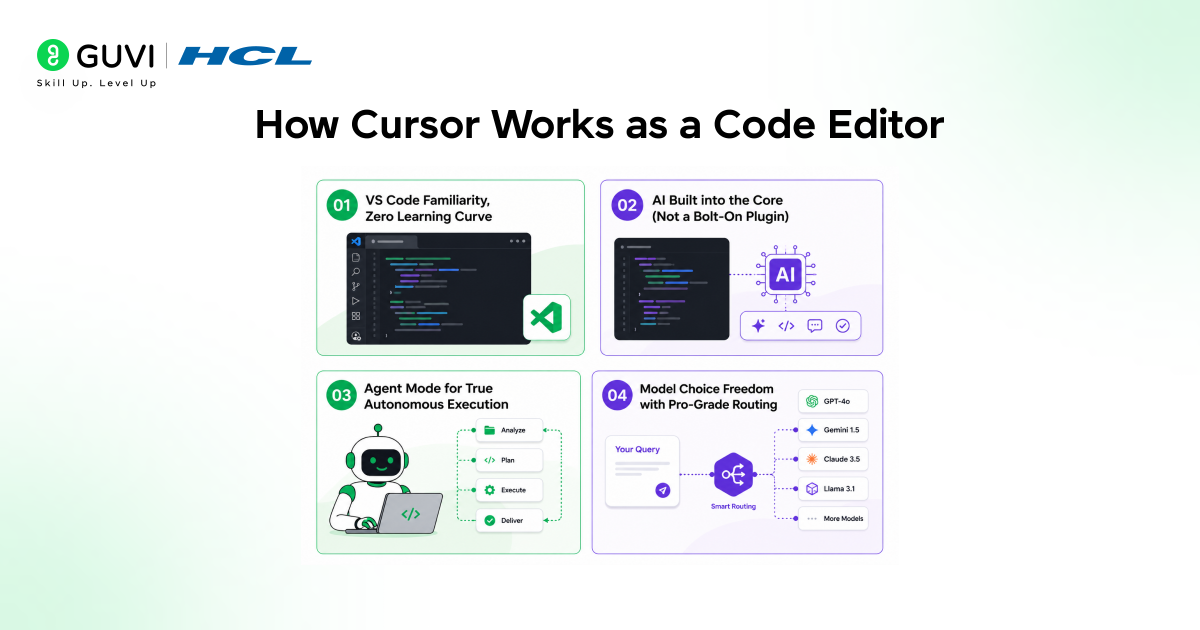
Step 1: VS Code Familiarity, Zero Learning Curve
Before diving into enterprise features, understand Cursor’s foundation: it’s a VS Code fork built for seamless transition. Import your entire VS Code setup extensions (like GitLens and Prettier), custom themes, and keybindings in seconds via one-click sync. No relearning navigation, debugging, or Git integration. Teams adopt instantly; productivity starts Day 1 without training overhead.
Step 2: AI Built into the Core (Not a Bolt-On Plugin)
Forget clunky sidecar tools; AI is baked into the editor’s DNA. Tab-to-accept autocomplete generates multi-line functions, entire API handlers, or React components based on context. Highlight buggy logic, type “refactor to async/await,” and it rewrites flawlessly. Sidebar Composer chat dives deep. “Explain this regex.” “Find all unused imports” or “Migrate this to TypeScript” instant, codebase-aware answers.
Step 3: Agent Mode for True Autonomous Execution
Unlock Agent Mode for hands-off firepower: assign “@agent build user auth flow,” and it independently reads schemas, scaffolds routes, writes tests, runs migrations, and iterates on errors.
Handles cross-file refactors (e.g., “add logging to all services”), executes npm installs, and even debugs via terminal all while you multitask. Like delegating to a capable junior who doesn’t need step-by-step guidance but delivers production-ready code.
Step 4: Model Choice Freedom with Pro-Grade Routing
Tailor AI to your stack: switch seamlessly between OpenAI (GPT-4o), Anthropic (Claude 3.5), Google Gemini 2.0, and xAI Grok, each optimized for its strengths (Claude for reasoning, Gemini for multimodal). Enterprise auto-routes complex tasks to best-fit models. Fine-tune with custom rules, track usage/costs per project. No vendor lock-in; peak performance for any workload.
What Makes the Enterprise Plan Different
1. Beyond Pro: Enterprise Control and Visibility
The Pro plan suits solo devs, but hundreds of engineers demand control, visibility, and security. Cursor Enterprise delivers via a centralized dashboard. Admins track team usage, AI changes, and productivity trends. Leaders gain data-driven insights into workflows.
- Monitor active teams and AI-assisted edits
- Track productivity shifts across org
- Make informed resource decisions
- Visibility scales to enterprise needs
2. SSO and User Lifecycle Mastery
SSO is table stakes for big orgs. Supports SAML with Okta, Azure AD, and Google Workspace. Enforce org-wide and kill local logins. SCIM auto-provisions/deprovisions users, with no ex-employee access risks.
- SAML integration with top IdPs
- Mandatory SSO, no local overrides
- SCIM for join/leave automation
- Zero lingering access post-offboard
3. Granular Policy Enforcement
Admins lock down capabilities server-side. Restrict AI models, timeouts, privacy, and extensions. Devs can’t bypass policies, stick regardless of local tweaks. Security without friction.
- Model whitelisting/blacklisting
- Session timeouts and privacy modes
- Extension approval controls
- Server-enforced, tamper-proof
Security and Privacy at the Enterprise Level
For most companies, especially those dealing with financial data, healthcare records, or proprietary technology, sending code to an external AI service raises serious questions. Cursor has addressed this directly through its privacy mode and security architecture.
- When Privacy Mode is enabled at the organization level, your code is never stored by Cursor or any of its AI model providers. Cursor maintains what are called “zero data retention” agreements with all its model providers, including OpenAI and Anthropic.
- This means the code sent for processing enters temporary memory for the duration of the request and is discarded immediately after. It is never used to train AI models.
- Cursor is also SOC 2 Type II certified, which is one of the most recognized security compliance standards in the software industry. The platform uses AES-256 encryption for data at rest and TLS 1.2 or higher for data in transit.
- Regular penetration testing is conducted, and security reports are available through Cursor’s Trust Center for enterprise customers who need them during vendor reviews.
- It is worth noting that Cursor does not currently offer an on-premises deployment option. All AI processing happens in the cloud.
- For most companies, the security controls above are sufficient, but organizations in highly regulated industries may want to evaluate this carefully with their security teams before full deployment.

Codebase Intelligence That Learns Your Team
Scaling to Massive Codebases
One thing setting Cursor Enterprise apart: handling millions of lines across hundreds of thousands of files. Most AI tools falter; Cursor indexes and navigates efficiently.
Context-Aware Intelligence + Onboarding Boost
Devs get codebase-specific answers, understanding your structure, conventions, and patterns. No generics; suggestions match your style. Learns architecture/standards over time for precise AI. Onboarding slashes from weeks to days: new hires query code directly for instant, contextual ramp-up.
Real Results from Real Companies
1. Coinbase’s Rapid Transformation
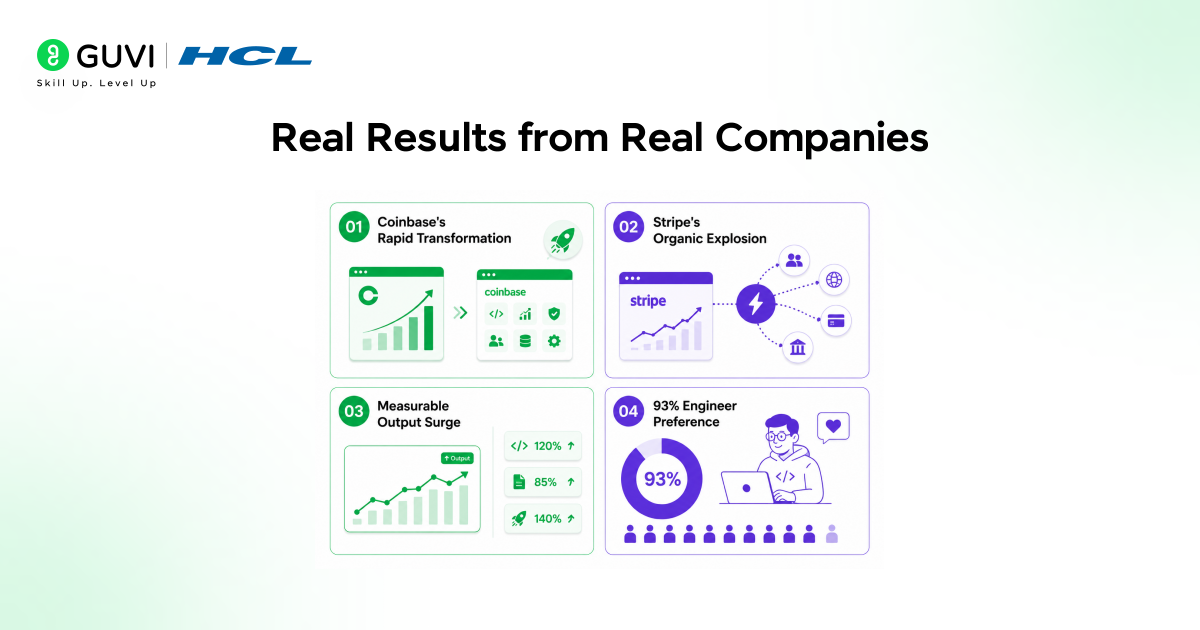
The strongest case for Cursor Enterprise lies in real company results, not features. Coinbase rolled it out company-wide by February 2025 every engineer used it, and it became the preferred IDE. Months-long tasks like old codebase refactors or greenfield services? Now solo engineers finish in days.
2. Stripe’s Organic Explosion
At Stripe, Cursor spread from hundreds to thousands of engineers purely by word-of-mouth. Leadership highlighted that since software creation is their biggest investment, efficiency gains directly boost business outcomes.
3. Measurable Output Surge
One enterprise team post-Cursor adoption saw 25%+ PR volume increase and 100%+ average PR size growth, delivering 50% more code without extra headcount.
4. 93% Engineer Preference
Head-to-head evaluations across companies? 93% of engineers picked Cursor over rivals as their top AI coding tool.
Cursor reportedly reached $1B in annualized revenue by late 2025, with adoption across teams at companies like Stripe, Coinbase, Uber, Adobe, and Shopify.
It can understand massive codebases—handling millions of lines across 100k+ files—helping reduce developer onboarding time from weeks to days.
Enterprise teams report up to 50% more code shipped (through increased PR volume and size) without adding headcount, with strong developer preference in comparisons.
Cursor is SOC 2 Type II certified with zero data retention, and learns project-specific patterns for context-aware suggestions, though it currently does not offer an on-prem deployment option.
Pricing and How to Get Started
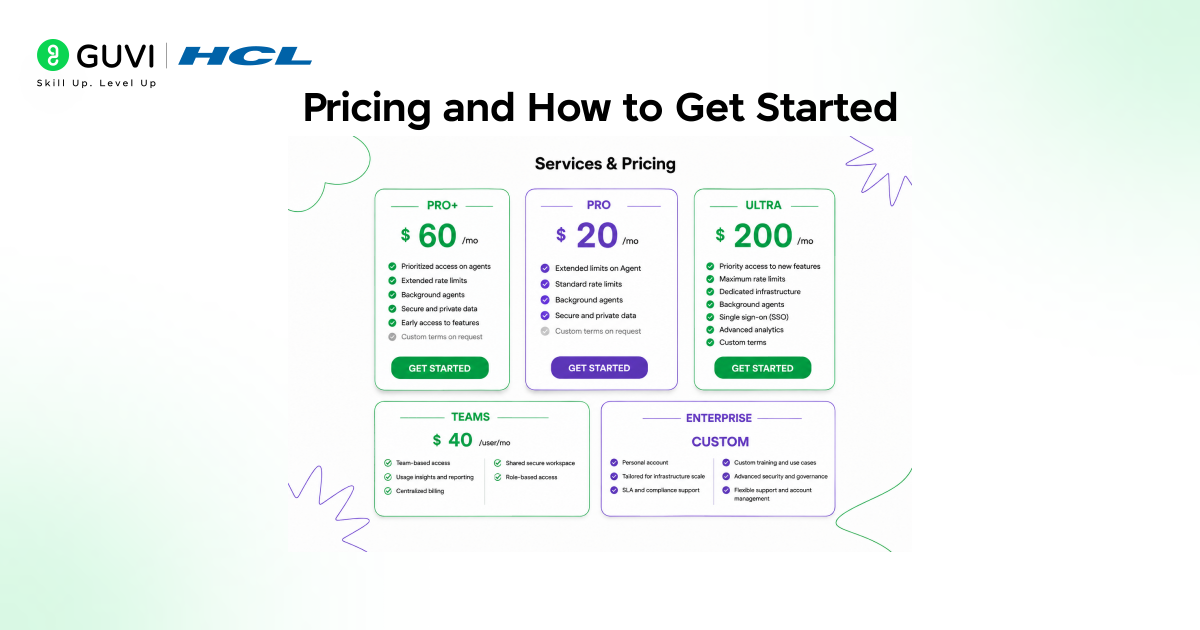
- Cursor offers a few tiers for teams and enterprises. The Teams plan starts at $40 per user per month and includes SSO, admin controls, shared coding rules, and centralized billing. This works well for companies with dozens to a few hundred developers.
- For larger organizations, Cursor Enterprise uses custom pricing and includes additional features like SCIM provisioning, MDM policy deployment, audit logging, a dedicated account manager, and priority support.
- The Enterprise tier is typically arranged through a conversation with Cursor’s sales team, and pricing tends to vary based on seat count and the specific needs of the organization.
- If you are a developer who just wants to try Cursor before recommending it to your team, there is a free tier available as well.
- The Pro plan at $20 per month is a solid way to get a feel for all the AI features before your company commits to a team or enterprise contract.
Unlock pro tips on Cursor Enterprise features like repo-aware autocomplete, team collaboration, SCIM/SSO security, and scalable AI coding for large teams by enrolling in HCL GUVI’s Intel & IITM Pravartak Certified AI/ML Course.
Conclusion
Cursor Enterprise makes the most sense for engineering teams that work on large, complex codebases and want AI to be a reliable, company-wide tool rather than something individual developers are using on their own without any oversight.
The combination of deep codebase understanding, strong security controls, centralized administration, and support for multiple AI models makes it a mature product for serious teams.That said, Cursor is not a silver bullet. It works best when developers understand what it is doing and take time to review AI-generated code before merging it.
The productivity gains are real, but they come from using the tool thoughtfully, not from blindly accepting every suggestion it makes. For anyone stepping into the software industry today, learning to use tools like Cursor effectively is quickly becoming as important as knowing how to write code itself.
The best developers in the coming years will not be the ones who avoid AI tools they will be the ones who know how to work with them efficiently and responsibly.
Frequently Asked Questions
1. Is Cursor just VS Code with AI?
Yes a fork with AI baked in, not plugged. Zero learning curve: import extensions/themes/keybindings instantly. Agent Mode adds autonomous multi-file execution.
2. How secure is Cursor for enterprises?
SOC 2 Type II, AES-256/TLS encryption, and zero-data retention with OpenAI/Anthropic. SSO (Okta/Azure/Google), SCIM, server-side policies. No on-prem, all cloud processed.
3. What’s Agent Mode?
Autonomous junior-dev simulator: “@agent build auth flow” → reads schemas, writes/tests code, runs commands, iterates errors. Handles cross-file tasks hands-free.
4. Real productivity gains?
50% more code (one team: 25%+ PRs, 100%+ size). Coinbase: months → days for refactors. 93% pick Cursor over rivals. Scales to massive codebases.
5. Pricing for teams?
Teams: $40/user/month (SSO, admin controls). Enterprise: custom (SCIM, MDM, audit logs). Pro ($20) or free tier to test first.
Success Stories

About the Author
Vishalini Devarajan
An Aerospace Engineer turned content writer, I focus on making complex concepts easy to understand through well-structured, reader-friendly blogs. Whether it’s a technical topic or a non-technical one, I love creating content that is clear, engaging, and impactful.
View all posts by Vishalini Devarajan
Connect with me @













Did you enjoy this article?