


Artificial Intelligence and Machine Learning Articles
Finance Manager to Data Analytics: Career Growth, Salary and Seniority
How to Evaluate LLM Outputs in Production Deployments
AI/ML Skills Gap 2026: Why Companies Can't Find Job-Ready Talent
20 AI/ML Interview Questions Recruiters Can Use Without a Tech Background - Best Guide


Get In Touch For Details! Request More Information
What Is Google Gemini? Everything Beginners Need to Know in 2026
Sep 16, 2026 8 Min Read 13444 Views
(Last Updated)
Google Gemini is Google’s AI assistant and family of advanced AI models designed to understand and generate text, images, audio, video, and code. It helps users complete tasks, find information, solve problems, and create content using natural language.
As AI becomes part of everyday life, Google Gemini is helping people work smarter, learn faster, and be more productive. This guide explains how it works, its key features, and why it matters in 2026.
Table of contents
- TL;DR Summary
- What is Google Gemini?
- Evolution of Google AI Models:
- Key Features of Google Gemini
- Comparative Performance on Key Benchmarks:
- Google Gemini vs Google Search: Which One Should You Use?
- Multimodal Capabilities
- How Google Gemini Works
- Different Versions of Google Gemini
- Technical Specifications and Comparisons:
- Accessing and Using Gemini
- Gemini Chatbot
- Integration with Google Services
- Mobile Applications
- Developer Access
- Applications of Google Gemini
- Limitations and Challenges
- Future of Google Gemini
- Conclusion
- FAQs
- What exactly is Google Gemini?
- Is Google Gemini free?
- Is Google Gemini good or bad?
- Why do I need Gemini if I have Google?
- Is it safe to use Gemini on my phone?
TL;DR Summary
- Google Gemini is Google’s multimodal AI model that understands text, images, audio, video, and code, making it a powerful assistant for learning, creating, and problem-solving.
- Unlike traditional search engines, Google Gemini can explain concepts, summarize information, generate content, and answer follow-up questions in a single conversation.
- Available in Nano, Pro, Flash, and Ultra versions, Google Gemini is designed to support everything from on-device AI experiences to advanced enterprise and developer use cases.
- Through deep integration with Gmail, Docs, Drive, Maps, Android, and developer tools, Google Gemini brings AI-powered assistance across the Google ecosystem.
- As multimodal AI continues to evolve, Google Gemini is expected to play a bigger role in productivity, software development, research, and everyday digital experiences in 2026.
What is Google Gemini?
Google Gemini is a multimodal LLM that represents a significant evolution in AI technology. Positioned as a direct competitor to OpenAI’s GPT models, Gemini is designed to understand and generate human-like responses across various types of data—text, images, and audio.
This capability makes it a versatile tool in numerous applications, from natural language understanding to complex problem-solving tasks in domains like science, education, and creative industries.
This revolutionary AI can craft creative texts, adapt its style and tone to suit different contexts, and even compose poems, scripts, and musical pieces.
Evolution of Google AI Models:
| Model | Capabilities | Applications | Limitations |
| Google Assistant | Voice-activated AI, Text-based | Smart home control, voice searches | Limited to text and voice; basic responses |
| Google Bard | Text-based LLM | Text generation, chatbots | No multimodal capability; limited reasoning |
| Google Gemini | Multimodal (Text, Image, Audio) | Comprehensive AI tasks, creative content | Early bugs, AI hallucinations in complex tasks |
Curious about what Google Gemini can really do? Why stop at using AI when you can learn to build it? HCL GUVI’s Artificial Intelligence and Machine Learning Course takes you beyond AI tools with hands-on training in Machine Learning, Deep Learning, LLMs, RAG, AI Agents, and real-world projects. If you’re ready to level up from AI user to AI builder, this is your next move.
Key Features of Google Gemini
Gemini’s key features set it apart in the AI landscape:
1. Multimodal Processing: Google Gemini’s standout feature is its ability to process and generate content across multiple modalities. This means it can seamlessly combine text, images, and audio into a cohesive output.
For instance, a user could input a description of a scene, and Gemini could generate a corresponding image, or it could transcribe and summarize a spoken lecture while highlighting key points in visual diagrams.
2. High-Performance Benchmarks: Gemini Ultra leads the market in performance benchmarks, significantly outpacing its competitors like GPT-4 in several key areas. For instance, on the MMLU benchmark, which tests knowledge across 57 different subjects, Gemini Ultra scores an impressive 90%, compared to GPT-4’s 86.4%.
In addition, it excels in Big-Bench Hard tasks, which require advanced reasoning and problem-solving capabilities.
Would you like to learn to use Gemini and more such generative AI tools, strategies, and applications? Then, HCL GUVI’s Generative AI Course is the perfect resource for you!
Comparative Performance on Key Benchmarks:
| Benchmark | Gemini Ultra | GPT-4 | Falcon 180B |
| General MMLU | 90.0% | 86.4% | 84.7% |
| Big-Bench Hard | 83.6% | 80.9% | 78.5% |
| GSM8K (Math) | 94.4% | 92.0% | 89.2% |
| HumanEval (Python) | 74.4% | 67.0% | 69.5% |
| Image Generation | Advanced | Basic | N/A |
3. Integration with Google Services: One of Gemini’s strengths is its deep integration within the Google ecosystem. For example, within Google Docs, Gemini can assist in drafting, editing, and even suggesting research points based on real-time data.
In Google Maps, it can generate optimized travel routes based on current traffic patterns and user preferences. On YouTube, Gemini can curate personalized playlists or generate video summaries based on user behavior.
4. AI Studio and Vertex AI: Google provides developers with tools to customize and deploy Gemini via AI Studio and Vertex AI. This allows enterprises to tailor Gemini’s capabilities to specific business needs, such as customer service automation, advanced data analytics, or custom content generation.
Developers can access Gemini’s API to integrate it with existing systems, enabling a range of applications from automated report generation to complex problem-solving tasks in research environments.
In the upcoming section, we will discuss the key feature that truly makes Gemini unique and a must-have AI tool.
Google Gemini vs Google Search: Which One Should You Use?
To better understand Google Gemini, it’s helpful to compare it with Google Search. The table below highlights the key differences.
| Use Cases | Google Gemini | Google Search |
|---|---|---|
| Get a direct explanation of a topic | ✅ Yes | ⚠️ You’ll need to open multiple websites |
| Write an email, article, or social media post | ✅ Yes | ❌ No |
| Summarize a long PDF or document | ✅ Yes | ❌ No |
| Compare products or ideas in one answer | ✅ Yes | ⚠️ You’ll compare information yourself |
| Find the latest news or live information | ⚠️ Yes, but verify with sources | ✅ Best choice |
| Visit a specific website | ❌ Not ideal | ✅ Best choice |
| Continue asking follow-up questions | ✅ Yes, like chatting with an assistant | ❌ No conversation |
| Research using multiple sources | ⚠️ Provides summaries with sources when available | ✅ Gives you full access to original websites |
Multimodal Capabilities
Gemini’s multimodal capabilities are at the core of its innovative design. Unlike previous AI models, Gemini was trained on images, audio, and video alongside text. This integrated approach allows Gemini to:
- Process and understand various input types natively.
- Seamlessly reason across different modalities.
- Interpret complex visuals like charts and figures without external optical character recognition (OCR).
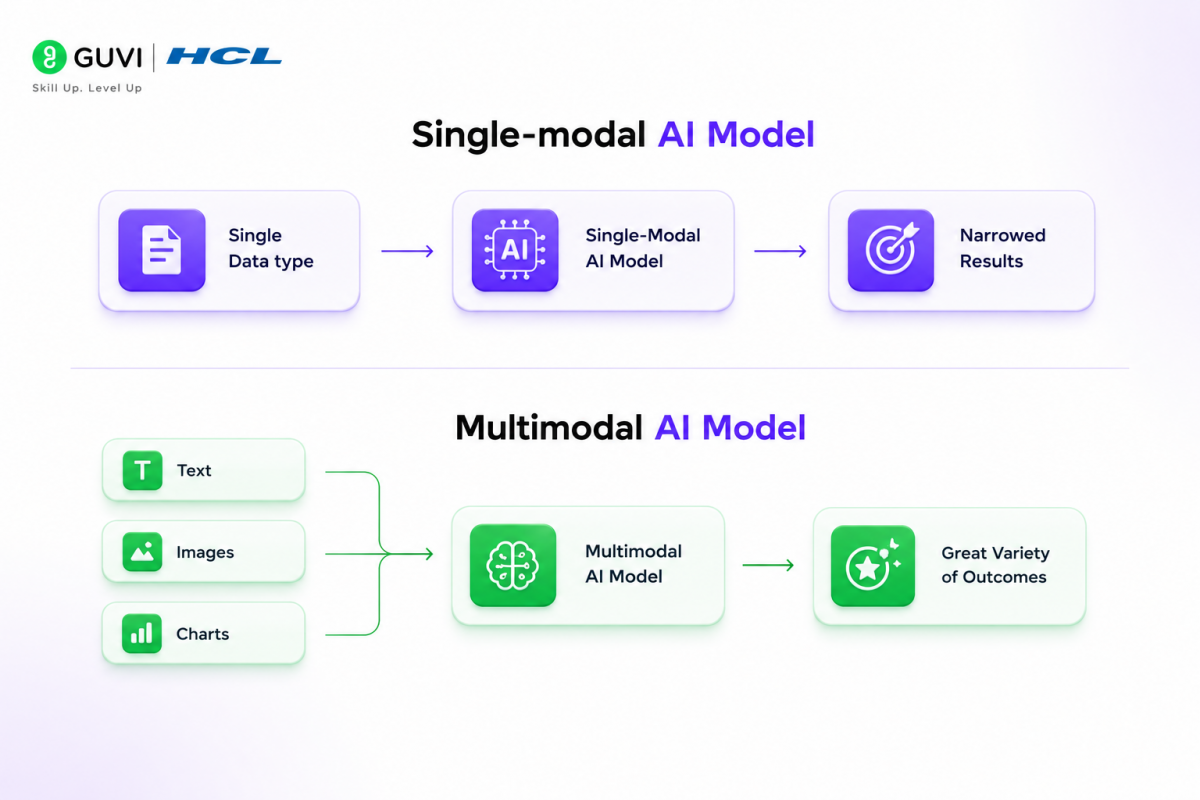
This multimodal training results in a more intuitive understanding of concepts. For example, Gemini can grasp the nuanced meaning of phrases like “monkey business” beyond literal interpretations.
Gemini’s architecture supports direct ingestion of text, images, audio waveforms, and video frames as interleaved sequences. This enables cross-modal reasoning abilities, allowing Gemini to analyze and respond to complex queries involving multiple data types.
To put it in perspective, here’s a table showcasing Gemini’s multimodal capabilities:
| Capability | Description |
| Text Processing | Understanding and generating human-like text |
| Image Analysis | Interpreting and describing visual content |
| Audio Processing | Comprehending and working with audio inputs |
| Video Understanding | Analyzing and reasoning about video content |
| Code Manipulation | Translating, generating, and fixing code |
Gemini’s multimodal capability opens up new possibilities for virtual assistants, chatbots, and more intuitive human-computer interactions.
How Google Gemini Works
Google Gemini represents a significant advancement in AI technology, combining cutting-edge NLP techniques, multimodal fusion, massive training data, and scalable architecture.
These innovations enable Gemini to generate highly accurate, contextually relevant responses across various input types, making it a powerful tool for diverse applications. Let’s discuss them in detail:
1. Advanced NLP Techniques: At its core, Google Gemini employs a transformer-based architecture, similar to that used in GPT models, but with significant enhancements.
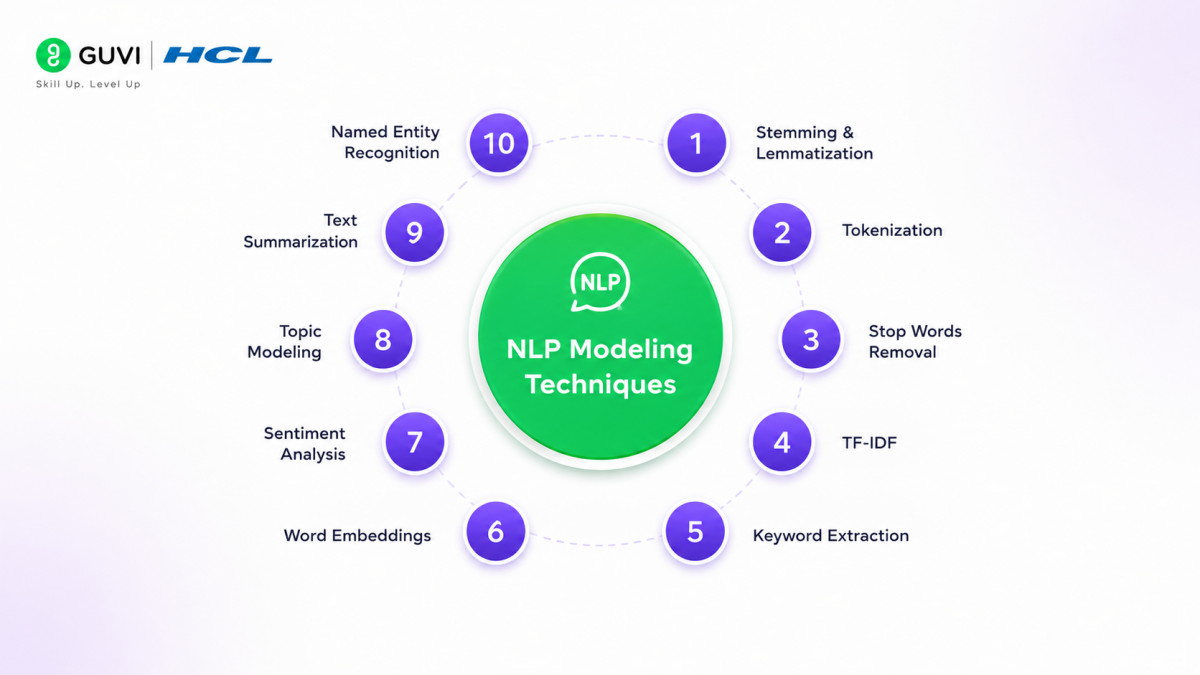
These include better contextual understanding and a more sophisticated approach to natural language processing (NLP). This allows Gemini to generate more accurate and contextually appropriate responses, even in complex conversational scenarios.
2. Multimodal Fusion: One of the unique aspects of Gemini is its ability to perform multimodal fusion—combining inputs from text, images, and audio to produce more sophisticated outputs. For example, Gemini can analyze a photo, describe it in detail, and even generate related content, such as a written article or an audio description.
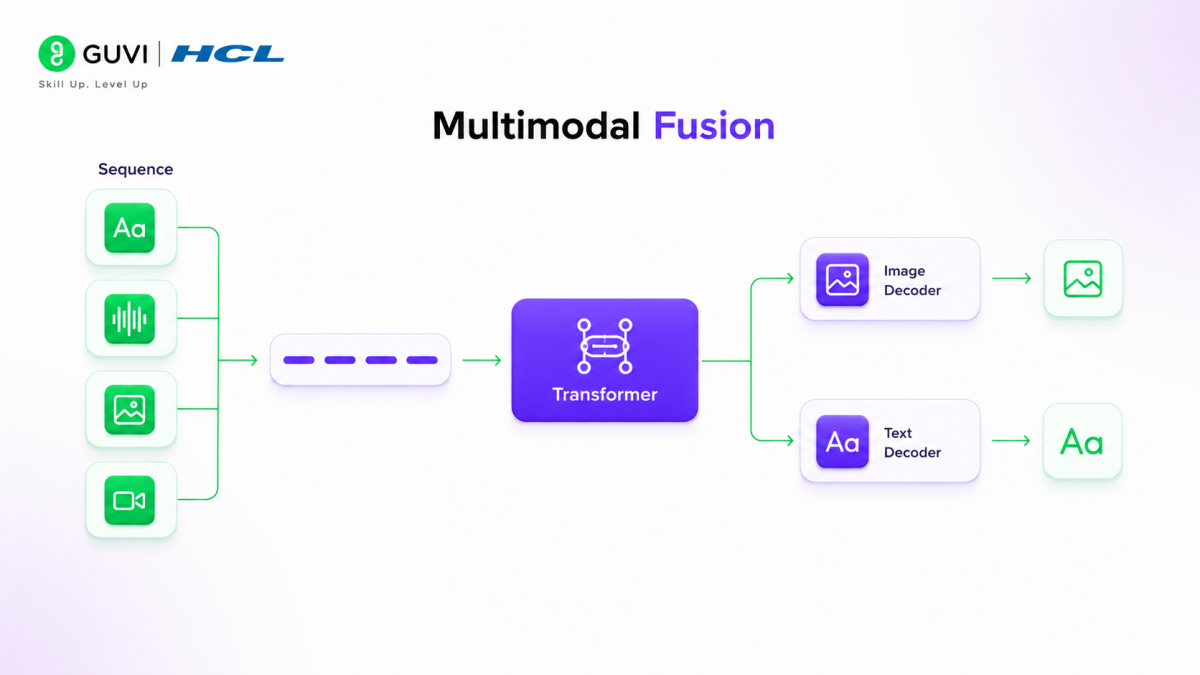
This is achieved through a combination of deep learning techniques, including convolutional neural networks (CNNs) for image processing and recurrent neural networks (RNNs) for audio analysis.
3. Massive Training Data: Gemini has been trained on a vast and diverse dataset, including not only text from the web but also images, audio files, and even code repositories.
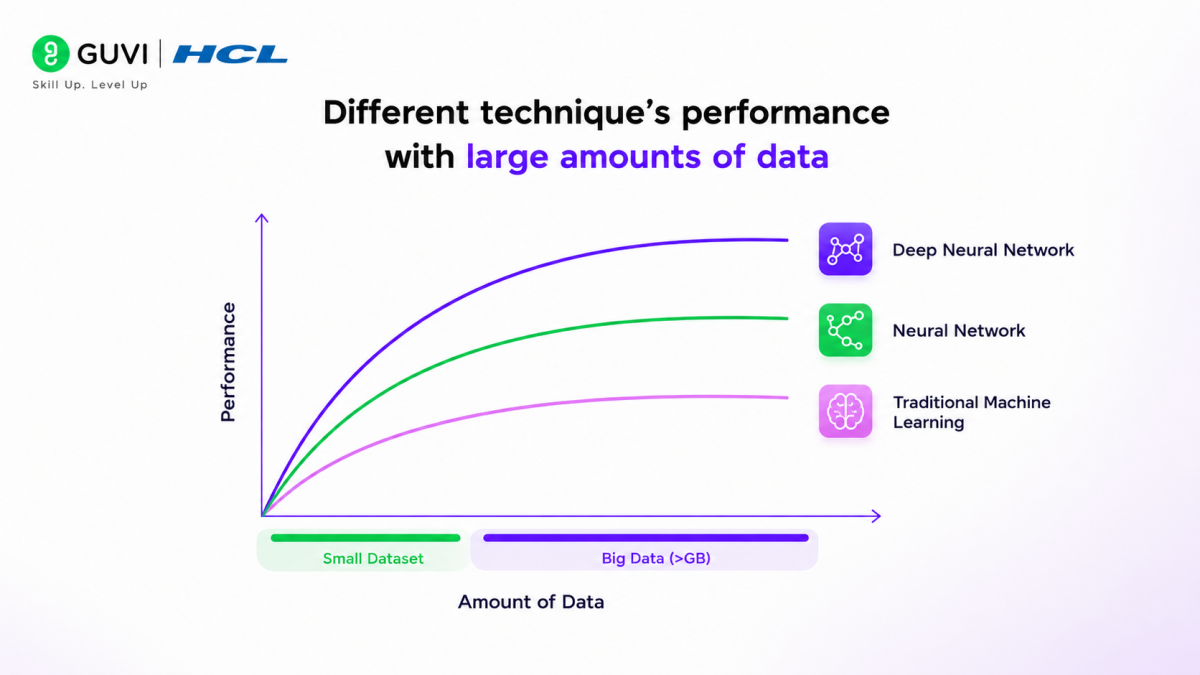
This extensive training allows Gemini to understand and generate content that is not only accurate but also relevant to the specific context in which it is used.
4. Scalable Architecture: Google has designed Gemini to be highly scalable, meaning it can be deployed across a wide range of devices, from mobile phones to high-performance cloud servers.
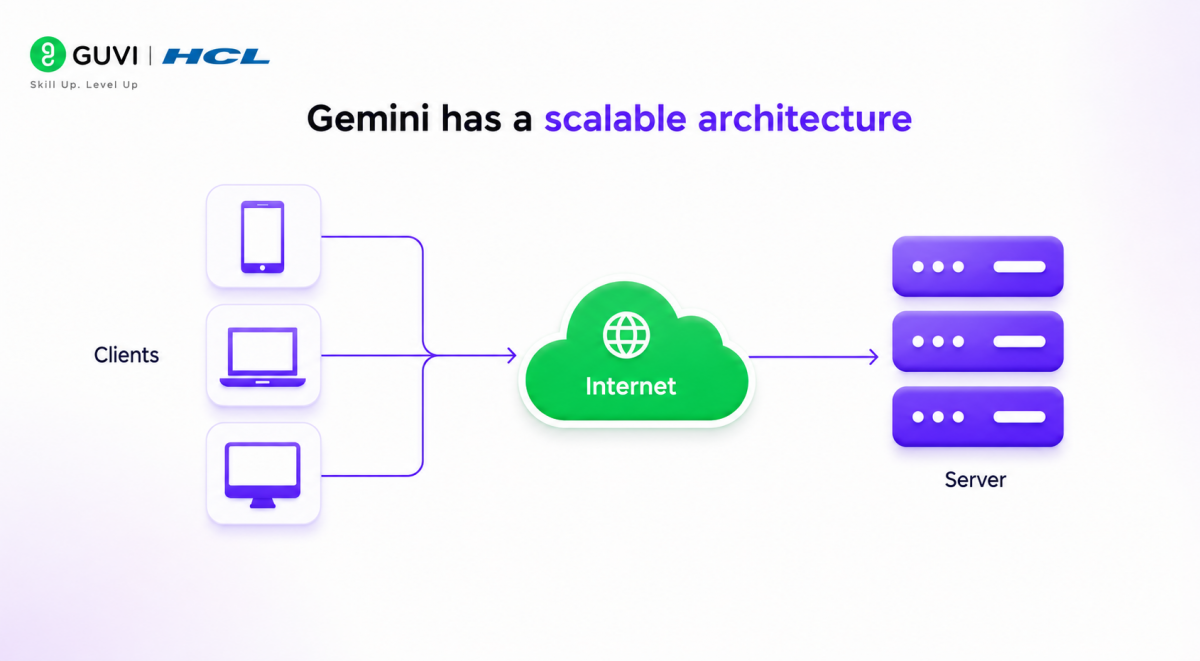
This scalability is achieved through a combination of efficient model architecture and optimized training processes that ensure Gemini can operate effectively in various environments.
Different Versions of Google Gemini
1. Gemini Nano: Tailored for lightweight, on-device AI processing, Gemini Nano is embedded within applications such as Gboard, enabling quick, contextual responses without relying heavily on cloud resources. This makes it ideal for mobile environments where latency and connectivity are concerns.
2. Gemini Pro: Serving as the standard version of the Gemini model, Gemini Pro is designed for a broader range of applications, including content generation, data analysis, and coding support.
It is more powerful than its predecessors, and capable of handling complex reasoning tasks and large datasets. For example, Gemini Pro can process up to 700,000 words and 30,000 lines of code in a single operation, making it suitable for both academic research and enterprise-level applications.
3. Gemini Ultra: As the most advanced model in the Gemini suite, Gemini Ultra supports high-level multimodal tasks such as image generation, detailed scientific problem-solving, and advanced coding.
It is also designed to excel in benchmarks that test reasoning across multiple subjects, such as the Massive Multitask Language Understanding (MMLU). Available through a subscription, Gemini Ultra is positioned as a premium tool for professionals and researchers who require cutting-edge AI capabilities.
4. Gemini Flash: Optimized for ultra-fast processing, Gemini Flash is designed for real-time AI applications that demand immediate response times. It excels in scenarios requiring instantaneous data processing, such as live analytics, real-time translation, and dynamic content generation during video streams.
Leveraging edge computing, Gemini Flash minimizes latency by processing data close to the source, making it ideal for environments where speed is critical.
Technical Specifications and Comparisons:
| Feature | Gemini Ultra | Gemini Pro | Gemini Nano | Gemini Flash |
| Primary Use | Complex tasks, coding | Versatile, wide range of tasks | On-device tasks | Real-time AI processing |
| Context Window | Up to 1 million tokens | 128,000 tokens (standard) | Limited (device-dependent) | Dynamic, real-time adjustment |
| Multimodal Capabilities | Advanced | Yes | Expanding (text + images) | Real-time multimodal fusion |
| Deployment | Cloud-based | Cloud-based | On-device | Edge computing, low-latency environments |
| Cost | Premium ($19.99/month with Google One AI Premium Plan) | Varies | Included with device | Premium, tailored for enterprise applications |
| Key Strength | Highest capability | Balanced performance | Mobile optimization | Ultra-low latency, instantaneous processing |
Accessing and Using Gemini
Gemini, Google’s cutting-edge AI model, is accessible through various platforms, catering to different user needs. Here’s how you can start using this powerful tool:

Gemini Chatbot
To access the Gemini chatbot, visit here and sign in with your Google account. The web app supports most browsers, including Chrome, Safari, Firefox, Opera, and Edge. Gemini is available in 40 languages across over 230 countries.
For mobile users, you can install the Gemini app from the Google Play store on Android devices with 2 GB RAM or more, running Android 10 or newer. iOS users can access Gemini via a tab within the Google app.
To start a conversation:
- Type your request in the “Enter your prompt here” field.
- You can speak, upload images, write code, or ask about online videos.
- Make your prompts specific and provide context for better results.
- Ask follow-up questions to continue the conversation.
To enhance your experience:
- Use the “Good response” or “Bad response” icons to provide feedback.
- Modify responses using the “Modify response” filter to adjust length, simplify language, or change tone.
- Enable Dark mode in Settings for a different visual experience.
Integration with Google Services
Gemini seamlessly integrates with Google’s suite of tools and services, enhancing your productivity across various applications. Here’s how Gemini enhances some popular Google products:
- Gmail: Gemini powers features like Smart Compose and Smart Reply, helping you write emails faster and respond quickly on the go.
- Google Docs, Sheets, and Slides: The AI assists with grammar and style suggestions, automates repetitive tasks, and generates data insights.
- Google Calendar: Gemini suggests optimal meeting times based on participants’ availability and preferences.
- Google Drive: The AI enhances search functionality by understanding context and intent, making it easier to locate specific files and folders.
- Google Photos: Gemini automatically tags photos based on content, creates collages, and enhances images without manual editing.
- Google Maps: The AI provides accurate traffic predictions and suggests places of interest based on your preferences.
- Google Assistant: Gemini powers the assistant’s ability to understand and process complex voice commands.
Mobile Applications
Gemini has been integrated into various mobile applications, providing AI-powered assistance on the go. On Android devices, Gemini is fully integrated into the user experience, offering context-aware capabilities that go beyond just reading the screen.
You can access Gemini by long-pressing the power button or saying “Hey Google”. Some key features include:
- Screen context: You can ask Gemini about what’s on your screen, getting help with any app you’re using.
- YouTube integration: While watching videos, you can ask questions about the content directly to Gemini.
- Image generation: Gemini can create images that you can drag and drop directly into apps like Gmail and Google Messages.
- Upcoming extensions: Google plans to launch new extensions for Keep, Tasks, Utilities, and expanded features on YouTube Music in the coming weeks.
By integrating Gemini across its product ecosystem, Google aims to create a more intuitive and efficient user experience, leveraging AI to enhance productivity and creativity across various tasks and applications.
Developer Access
Developers can access Gemini through multiple channels:
- Google AI Studio: A free, web-based tool for quick prototyping and app launching using an API key.
- Google Cloud Vertex AI: Offers a fully managed AI platform with customization options, enterprise security, and compliance features.
- Android Development: Developers can build with Gemini Nano, the most efficient model for on-device tasks, via AICore in Android 14 (starting with Pixel 8 Pro devices).
To integrate Gemini into your applications, you can use various programming languages:
- Python: Use the google.generativeai library.
- JavaScript: Utilize the @google/generative-ai package.
- Go: Import the github.com/google/generative-ai-go/genai package.
- Kotlin and Swift: Native support is available for Android and iOS development.
By leveraging these access points and integration methods, you can harness the power of Gemini for a wide range of applications, from chatbots to complex AI-driven solutions.
Applications of Google Gemini
- Creative Industries: In the creative sector, Gemini is used to generate high-quality content, including written articles, visual designs, and even music. For example, a digital marketing agency could use Gemini to create custom advertising campaigns that include targeted written content, visually appealing graphics, and even promotional videos—all generated by AI.
- Scientific Research: Gemini’s advanced reasoning capabilities make it an invaluable tool in scientific research. It can process large datasets, generate hypotheses, and even design experiments. For instance, in genomics, Gemini can analyze complex genetic data to identify potential areas of research, suggest experimental designs, and predict outcomes.
- Healthcare: In the healthcare sector, Gemini can be used to assist in diagnostics by analyzing medical images, patient records, and research papers to provide doctors with comprehensive reports and treatment recommendations. Its ability to process multimodal data means it can combine patient history, lab results, and imaging studies to offer more accurate diagnoses.
- Business Intelligence: Gemini is increasingly being used in business intelligence to automate the analysis of large datasets, generate insights, and even produce detailed reports. For example, a financial analyst could use Gemini to analyze market trends, predict stock movements, and generate investment strategies.
Limitations and Challenges
- Early Development Issues: Like any emerging technology, Gemini has faced challenges during its early development. Initial users have reported bugs and limitations, particularly in the context of voice-activated commands and hands-free operations. These issues are being addressed through continuous updates and improvements.
- AI Hallucinations: A significant challenge with all advanced AI models, including Gemini, is the phenomenon of AI hallucinations, where the model generates incorrect or nonsensical information. Google is actively working on improving the accuracy of Gemini’s responses, particularly in complex or ambiguous scenarios.
- Data Privacy Concerns: Given its ability to process vast amounts of data, including personal and sensitive information, there are concerns about data privacy and security. Google has implemented stringent data protection measures, but users and organizations must remain vigilant about how Gemini is used and what data is processed.
Future of Google Gemini
- Continuous Improvement: Google is committed to continuously improving Gemini, with plans to expand its capabilities and refine its performance. Future versions are expected to offer even more advanced multimodal processing, deeper integration with emerging technologies like augmented reality (AR) and virtual reality (VR), and enhanced user interaction features.
- Broader Applications: As Gemini evolves, it is likely to find applications in an even wider range of industries, from autonomous vehicles to personalized education. Its ability to process and generate multimodal content positions it as a key player in the future of AI-driven innovation.
- Competition and Market Positioning: While Gemini is currently one of the most advanced AI models available, it faces stiff competition from other models, including OpenAI’s GPT-4 and new entrants like Falcon 180B- Advanced Multimodal Integration: Gemini’s future iterations are expected to expand its ability to seamlessly integrate text, images, and audio into even more sophisticated outputs. For instance, in the realm of AR and VR, Gemini could potentially generate real-time, contextually aware virtual environments based on simple verbal or textual descriptions.
- Enhanced Reasoning and Creativity: As part of its ongoing development, future versions of Gemini may incorporate more sophisticated reasoning algorithms, enabling it to not only process existing information but also generate novel solutions to complex problems in real time. This could revolutionize fields like education, where AI could dynamically create personalized learning experiences for students based on their individual needs and progress.
Conclusion
Google Gemini represents a significant advancement in the field of AI, offering unparalleled multimodal capabilities and setting a new benchmark for large language models. Its ability to process and generate content across multiple types of data makes it a versatile tool with applications ranging from creative industries to scientific research.
While still in its early stages, Gemini’s potential is vast, and its future developments could reshape the AI landscape. I hope this article has been the perfect guide to get you started on your AI journey using Gemini AI.
FAQs
1. What exactly is Google Gemini?
Think of Google Gemini as an AI assistant that can chat with you, explain ideas, help you write, and solve problems. Instead of simply finding information, it helps you use that information.
2. Is Google Gemini free?
Yes. Most people can use Gemini for free. If you need access to the latest AI models or extra features, Google also offers premium plans.
3. Is Google Gemini good or bad?
Gemini is a useful tool when you use it wisely. It can save time and boost productivity, but it’s still AI—so double-check important facts before relying on its answers.
4. Why do I need Gemini if I have Google?
Google Search helps you discover information across the web. Gemini goes a step further by explaining, summarizing, comparing, and creating content based on your questions, making many tasks faster.
5. Is it safe to use Gemini on my phone?
Yes, it’s generally safe if you use the official Google app or website. Just avoid sharing passwords, banking details, or other sensitive information in your conversations.
Success Stories












Did you enjoy this article?