


Artificial Intelligence and Machine Learning Articles
Claude for E-commerce: Product Descriptions at Scale
How to Use Claude Without Sharing Sensitive Data


Get In Touch For Details! Request More Information
Devin AI: Autonomous AI Software Engineer Guide
Jun 11, 2026 6 Min Read 672 Views
(Last Updated)
You hire a software engineer. You give them a task. They write the code, test it, debug it, and deploy it. You do not have to tell them how to use their terminal or remind them to run tests. They just get it done.
Devin AI works exactly like that, except it is an AI. It is not a code completion tool that finishes your sentences. It is not a chatbot that answers programming questions. It is an autonomous AI software engineer that takes a task description and completes the entire development workflow from start to finish.
This is why Devin AI represents a fundamental shift in how software gets built. Traditional AI coding tools assist developers. Devin AI works as a developer. It plans, codes, debugs, tests, and deploys just like a human engineer would, but it does it autonomously.
This guide explains exactly what Devin AI is, how it works differently from other AI coding tools, and what it means for the future of software development.
Table of contents
- Quick TL;DR Summary
- Why Traditional AI Coding Tools Fall Short
- How Devin AI Works: The Core Mechanism
- Step 1: Receive and analyze the task requirements
- Step 2: Break down the task into executable steps
- Step 3: Execute development with access to real tools
- Step 4: Test, debug, and iterate autonomously
- Step 5: Deploy and verify the solution
- The Autonomous Agent Architecture: Why It Changes Everything
- What Devin AI Can Actually Do: Real Capabilities
- Getting Maximum Value From Devin AI
- Real-World Applications of Devin AI
- Conclusion
- FAQs
- What is the difference between Devin AI and GitHub Copilot?
- Can Devin AI actually replace software developers?
- How much does Devin AI cost?
- What programming languages does Devin support?
- Is the code Devin writes production-ready?
Quick TL;DR Summary
- This guide explains what Devin AI is and how it functions as an autonomous AI software engineer that can complete entire coding projects independently.
- You will learn the difference between Devin AI and traditional AI coding assistants like GitHub Copilot and when each tool is the right choice.
- The guide covers the core capabilities of Devin AI including autonomous coding, debugging, testing, and deployment across real-world projects.
- Step-by-step explanations show you how Devin AI approaches software development tasks and what makes its autonomous workflow different.
- You will understand the strengths and limitations of autonomous AI engineers and how this technology is reshaping software development.
What Is Devin AI?
Devin AI is an autonomous AI software engineering system developed by Cognition AI that can independently plan, write, debug, test, and deploy software projects with minimal human supervision. It is designed to function as an AI software engineer capable of handling multi-step development workflows rather than only generating isolated code snippets.
Why Traditional AI Coding Tools Fall Short
- They only assist, they do not execute independently
GitHub Copilot and ChatGPT help you write code faster by suggesting completions and answering questions. But you still need to integrate their suggestions, run the code, fix errors, and manage the development process. They are assistants, not autonomous workers. They cannot take a project description and deliver working software without constant human guidance.
- They lack long-term planning capabilities
Code completion tools work line by line or function by function. They do not understand the bigger picture of what you are building. They cannot break down a complex feature request into subtasks, decide on an architecture, implement it piece by piece, and verify everything works together. They optimize for the next line of code, not the complete solution.
- They cannot use developer tools independently
Real software development requires using terminals, debuggers, browsers, version control systems, and deployment platforms. Traditional AI coding assistants cannot open a terminal and run commands on their own. They cannot debug a failing test by examining stack traces and trying different fixes. They need you to be their hands.
- They have no ability to learn from mistakes
When code suggested by a traditional AI tool fails, you have to identify the error, understand why it happened, and ask for a different solution. The AI does not debug its own output. It does not iteratively refine until tests pass. Devin AI does all of this autonomously, learning from errors and fixing them without human intervention.
- They cannot handle multi-step workflows
Deploying a web application requires writing code, setting up databases, configuring servers, running tests, fixing bugs, and monitoring the deployment. Traditional AI tools help with individual pieces. Devin AI executes the entire workflow end to end, managing all the steps and handling problems that arise along the way.
Read More: Top 10 Game-Changing AI Tools for Developers

How Devin AI Works: The Core Mechanism
Step 1: Receive and analyze the task requirements
Devin AI starts by understanding what you want built. You provide a natural language description of the task, whether that is building a new feature, fixing a bug, or deploying an application. Devin analyzes the requirements, asks clarifying questions if needed, and forms a plan for how to approach the work.
Step 2: Break down the task into executable steps
Like an experienced engineer, Devin breaks complex tasks into smaller, manageable pieces. If you ask it to build a web application, it plans out database schema design, backend API development, frontend implementation, testing, and deployment as separate subtasks. This planning phase is what separates autonomous agents from simple code generators.
Step 3: Execute development with access to real tools
Devin has its own command line, code editor, and browser. It writes code in the editor, runs commands in the terminal, searches documentation in the browser, and uses version control systems just like a human developer. This tool access is critical because real development is not just about writing code, it is about using the entire development environment.
Step 4: Test, debug, and iterate autonomously
When Devin writes code that has bugs, it does not stop and ask for help. It runs the tests, reads the error messages, examines stack traces, searches for solutions, and tries different fixes until the code works. This autonomous debugging loop is what makes it genuinely autonomous rather than just an advanced code generator.
Step 5: Deploy and verify the solution
Once the code works locally, Devin can deploy it to production environments, configure necessary services, run integration tests, and verify the deployment succeeded. It monitors for errors and fixes deployment issues that arise. The task is only complete when working software is running in production, not just when code is written.
Did You Know? Devin AI was developed by Cognition AI, a startup founded by Scott Wu and a team of competitive programming champions. The company raised significant funding based on early demonstrations showing Devin successfully completing real software engineering tasks from GitHub issues and Upwork freelance projects.
The Autonomous Agent Architecture: Why It Changes Everything
- What makes Devin truly autonomous
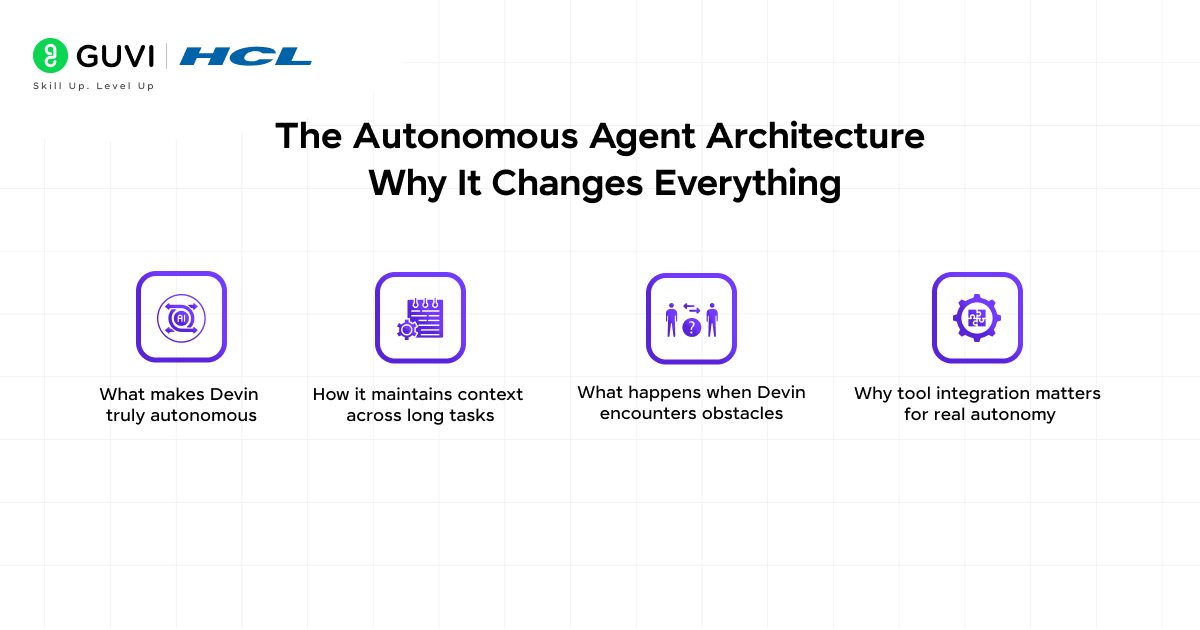
Devin AI is built on an agent architecture that can take actions, observe outcomes, and adjust its approach based on results. It does not just predict the next token in a code file. It executes commands, sees what happens, and decides what to do next based on the feedback. This sense-plan-act loop is fundamental to autonomous behavior.
- How it maintains context across long tasks
Software projects involve hundreds of files and thousands of lines of code. Devin maintains context about the project structure, what has been implemented, what is still needed, and how different components interact. This long-term memory allows it to work on complex projects that span hours or days, not just quick code snippets.
- What happens when Devin encounters obstacles
When Devin hits a problem it cannot immediately solve, it does not give up. It searches documentation, examines similar code, tries alternative approaches, and learns from failed attempts. This problem-solving ability mirrors how human developers work through challenges rather than expecting perfect solutions on the first try.
- Why tool integration matters for real autonomy
The difference between answering coding questions and actually building software is tool access. Devin can install packages, configure environments, run databases, deploy to cloud platforms, and interact with APIs. This is not simulated or theoretical. Devin operates in real development environments using actual developer tools.
Want to strengthen your AI and machine learning fundamentals? Download HCL GUVI’s free Generative AI ebook and understand the technologies powering autonomous AI systems today.
What Devin AI Can Actually Do: Real Capabilities
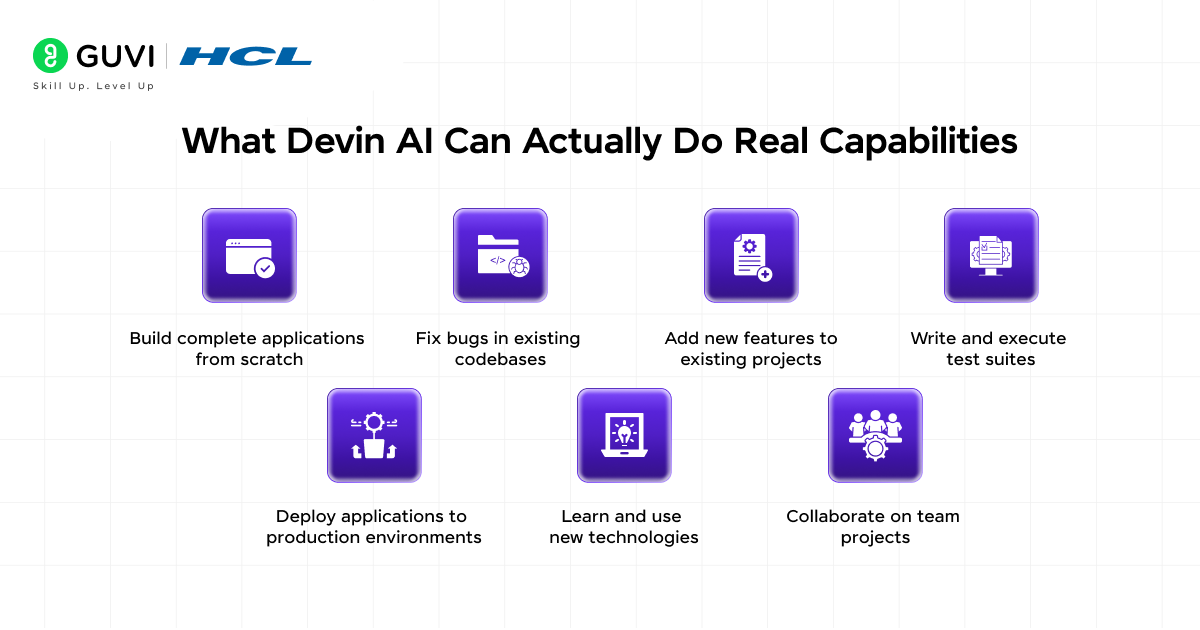
Here is exactly what Devin AI can accomplish autonomously in real software development scenarios.
- Build complete applications from scratch
Devin can take a project description and build a full application including frontend, backend, database, and deployment. It chooses appropriate technologies, sets up the project structure, implements features, writes tests, and deploys the working application. This end-to-end capability is what makes it qualify as an autonomous engineer.
- Fix bugs in existing codebases
Give Devin a bug report and access to a codebase. It will read through the relevant code, reproduce the bug, identify the root cause, implement a fix, verify the fix works, and submit a pull request with the corrected code. It handles the entire debugging workflow without human intervention.
- Add new features to existing projects
Devin can extend existing applications with new functionality. It analyzes the current codebase to understand architecture and conventions, implements the new feature following the existing patterns, integrates it properly with existing code, writes appropriate tests, and verifies nothing breaks.
- Write and execute test suites
Testing is where many AI coding tools fail because they cannot actually run code and observe results. Devin writes unit tests, integration tests, and end-to-end tests, then executes them to verify everything passes. When tests fail, it debugs the failures and fixes the code or the tests as needed.
- Deploy applications to production environments
Devin can configure cloud infrastructure, set up CI/CD pipelines, deploy applications to platforms like Vercel, Heroku, or AWS, configure environment variables and secrets, and verify deployments succeeded. It handles the entire deployment process that typically requires significant DevOps knowledge.
- Learn and use new technologies
When Devin encounters an unfamiliar library or framework, it reads documentation, examines example code, and figures out how to use it correctly. This ability to learn on the job means it is not limited to technologies it was explicitly trained on, which is crucial for real-world development work.
- Collaborate on team projects
Devin can work within team workflows using Git for version control, creating branches, making commits with meaningful messages, and submitting pull requests. It can incorporate feedback from code reviews and make requested changes. This lets it fit into existing development team processes.
Getting Maximum Value From Devin AI
- Start with well-defined tasks before complex projects
- Review all code Devin produces before merging to production
- Use Devin for repetitive tasks that follow clear patterns
- Provide detailed requirements to get better results
- Treat Devin like a junior developer who needs review and guidance
Devin AI, introduced by Cognition Labs, drew major attention for its performance on the SWE-bench benchmark, which evaluates AI systems using real-world software engineering tasks drawn from actual GitHub issues. Unlike traditional code-completion assistants, Devin was designed to handle broader engineering workflows such as debugging, editing multiple files, running tests, and iterating on fixes autonomously. Its benchmark results demonstrated a significant step toward more capable AI software engineering agents rather than simple autocomplete systems.
Real-World Applications of Devin AI
- Startup MVP development
Small startups use Devin to build minimum viable products faster. Instead of hiring a full development team immediately, they use Devin to build initial versions of their product, validate ideas, and get to market quickly. This dramatically reduces early-stage development costs.
- Maintenance and bug fixing
Engineering teams use Devin to handle routine bug fixes and maintenance tasks. This frees up senior engineers to focus on complex features and architectural decisions while Devin handles the high-volume, lower-complexity work that still needs to get done.
- API integration and automation
Integrating third-party APIs often follows predictable patterns. Devin excels at reading API documentation, writing integration code, handling authentication and error cases, and building reliable API clients. This saves developers from repetitive integration work.
To learn more about AI in software development and autonomous AI systems, do not miss the chance to enroll in this AI and Machine Learning course covering AI fundamentals, Python, deep learning, NLP, and computer vision through hands-on projects and expert guidance with certification.
Conclusion
Devin AI represents a fundamental evolution in how AI assists with software development. The difference between code completion and autonomous engineering is the difference between a spell-checker and a writer. One makes you faster, the other can produce complete work independently.
The autonomous agent architecture is what makes it different. Devin does not just generate code, it executes entire workflows using real developer tools, learning from mistakes and iterating until tasks are complete.
This technology is still early. Devin works best on well-defined tasks and still requires human oversight for production systems. But it demonstrates that autonomous AI software engineers are possible, and they will only get more capable.
If you are building software, Devin AI is a glimpse of how development workflows will change over the next decade.
FAQs
1. What is the difference between Devin AI and GitHub Copilot?
GitHub Copilot is a code completion tool that suggests code as you type. Devin AI is an autonomous agent that can complete entire projects independently, using developer tools, debugging code, and deploying applications without constant human guidance.
2. Can Devin AI actually replace software developers?
Not yet, and probably not entirely. Devin handles well-defined tasks effectively but struggles with ambiguous requirements, complex architecture decisions, and problems requiring deep product understanding. It works best as a tool that augments human developers.
3. How much does Devin AI cost?
Pricing information is available directly from Cognition AI. Access has been initially limited as the company scales capacity and refines the product based on early user feedback.
4. What programming languages does Devin support?
Devin works with most popular programming languages including Python, JavaScript, TypeScript, Java, Go, and others. It performs best with widely-used languages where more training data is available.
5. Is the code Devin writes production-ready?
Devin can write functional code that passes tests, but like code from any developer, it should be reviewed before going to production. Treat Devin like a junior developer whose work needs review, especially for security-critical or business-critical applications.
Success Stories

About the Author
Vishalini Devarajan
An Aerospace Engineer turned content writer, I focus on making complex concepts easy to understand through well-structured, reader-friendly blogs. Whether it’s a technical topic or a non-technical one, I love creating content that is clear, engaging, and impactful.
View all posts by Vishalini Devarajan
Connect with me @








Did you enjoy this article?