


Artificial Intelligence and Machine Learning Articles
Q-Learning Explained: A Beginner's Guide
Deep Q-Networks (DQN) Explained


Get In Touch For Details! Request More Information

Is Zed Ready for AI Power Users in 2026?
Jul 07, 2026 5 Min Read 1502 Views
(Last Updated)
Speed has always been a promise in developer tooling. Editors come and go, each claiming to be faster, leaner, and smarter than the last. But Zed is different in a meaningful way: it was built with performance as a first-class constraint, not an afterthought.
Now, with AI becoming a core part of how developers work, the question is no longer just “Is Zed fast?” It is: “Is Zed smart enough?” For Zed editor AI power users in 2026, the bar is high. They need contextual completions, agentic workflows, codebase-wide understanding, and deep integration with frontier models.
In this article, we examine exactly what Zed offers, where it excels, where it still lags, and whether it is ready to serve the most demanding developers working with AI today.
Table of contents
- TL;DR
- What Makes Zed Different From Other Code Editors?
- Zed's AI Features in 2026: What's Actually Built In?
- Inline AI Completions
- The AI Assistant Panel
- Model Flexibility
- How Zed Handles Codebase-Wide Context
- Zed's Collaboration Features: Built for Teams
- Zed vs. Cursor vs. VS Code: A Practical Comparison for AI Power Users
- Zed vs. Cursor
- Zed vs. VS Code
- Real-World Use Cases Where Zed Excels
- Example: Navigating a Large Rust Codebase
- Example: Remote Pair Programming with AI
- Limitations You Should Not Ignore
- Conclusion
- FAQs
- Is Zed free for individual developers?
- Does Zed support all programming languages?
- Can I use my own API keys with Zed's AI features?
- How does Zed's performance compare to VS Code on large projects?
- Is Zed available on Windows in 2026?
TL;DR
- Zed is a GPU-accelerated, Rust-based editor designed for speed and minimal overhead.
- It now ships with native AI assistant support, inline completions, and model flexibility.
- For Zed editor AI power users in 2026, the experience is compelling but still maturing.
- It lacks some ecosystem depth compared to VS Code, but compensates with raw performance.
- Whether Zed is ‘ready’ depends heavily on your workflow — this article breaks it down.
What Is the Zed Editor and Why Do AI Power Users Care?
Zed is a high-performance, GPU-accelerated code editor built from scratch in Rust. It is designed to be fast at every layer, including startup, file loading, rendering, and collaboration. In 2026, AI power users are evaluating whether Zed has matured enough to replace heavier AI-integrated editors like Cursor or VS Code with Copilot.
What Makes Zed Different From Other Code Editors?
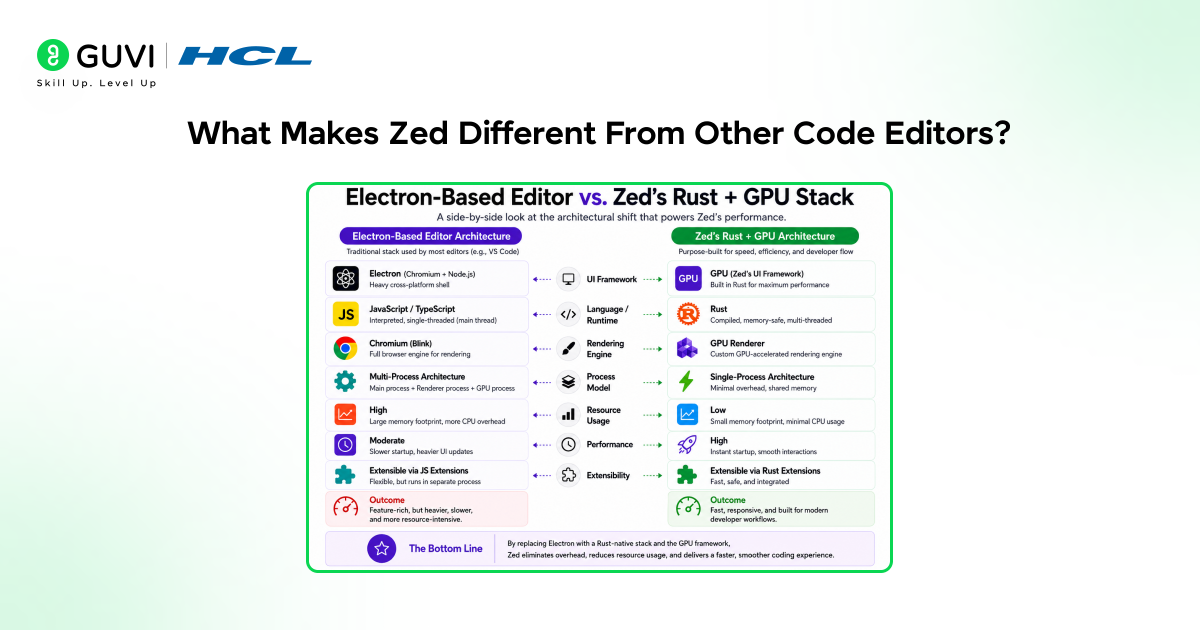
Most code editors today are built on Electron, a framework that runs a browser engine under the hood. VS Code, Cursor, and most modern editors are Electron-based. This makes them highly portable and easy to extend, but comes at a significant performance cost.
Zed takes a completely different approach. It is written entirely in Rust and uses a custom GPU rendering engine called GPUI. This means the editor renders at the same layer as a video game, not inside a browser wrapper.
The result is striking:
• Startup time measured in milliseconds, not seconds
• Buttery-smooth scrolling even in 100,000-line files
• Significantly lower RAM and CPU usage than Electron alternatives
• No input lag or rendering stutter, even with large diffs or syntax trees
For developers who spend 8–10 hours a day in their editor, these performance characteristics are not just nice to have; they meaningfully reduce cognitive friction and fatigue.
Zed’s AI Features in 2026: What’s Actually Built In?
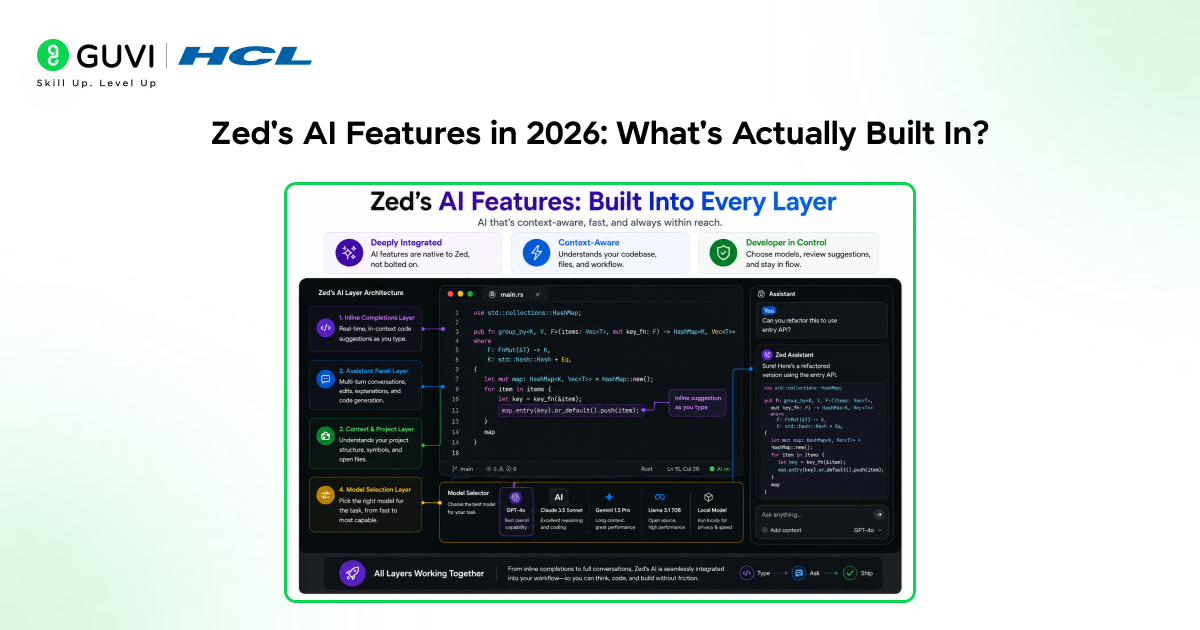
When Zed first launched, it was purely a speed-focused editor. AI was on the roadmap, not in the product. That has changed significantly. By 2026, Zed ships with a native AI assistant layer that is deeply integrated into the editing experience.
Inline AI Completions
Zed supports inline completions powered by your choice of model. It works similarly to Copilot or Cursor’s tab completion; the editor predicts what you’re about to write and offers a suggestion you can accept with a keystroke.
What sets Zed apart here is that completions render at native speed. There is no visible flickering or latency caused by the editor itself; any delay you experience is purely network latency from the model API.
The AI Assistant Panel
Zed includes a built-in assistant panel where you can chat with an AI model in context. You can reference open files, selected code blocks, or your entire project directory.
Key capabilities of the assistant panel:
• Ask questions about specific files or functions
• Request refactors and apply them directly to the editor
• Generate boilerplate from natural language descriptions
• Explain error messages and suggest fixes inline
Model Flexibility
Unlike editors locked to a single provider, Zed lets you choose your model. In 2026, it supports Anthropic Claude, OpenAI GPT-4, and locally-hosted models via Ollama or LM Studio. This is a significant advantage for Zed editor AI power users who want control over privacy, cost, and model capability.
How Zed Handles Codebase-Wide Context
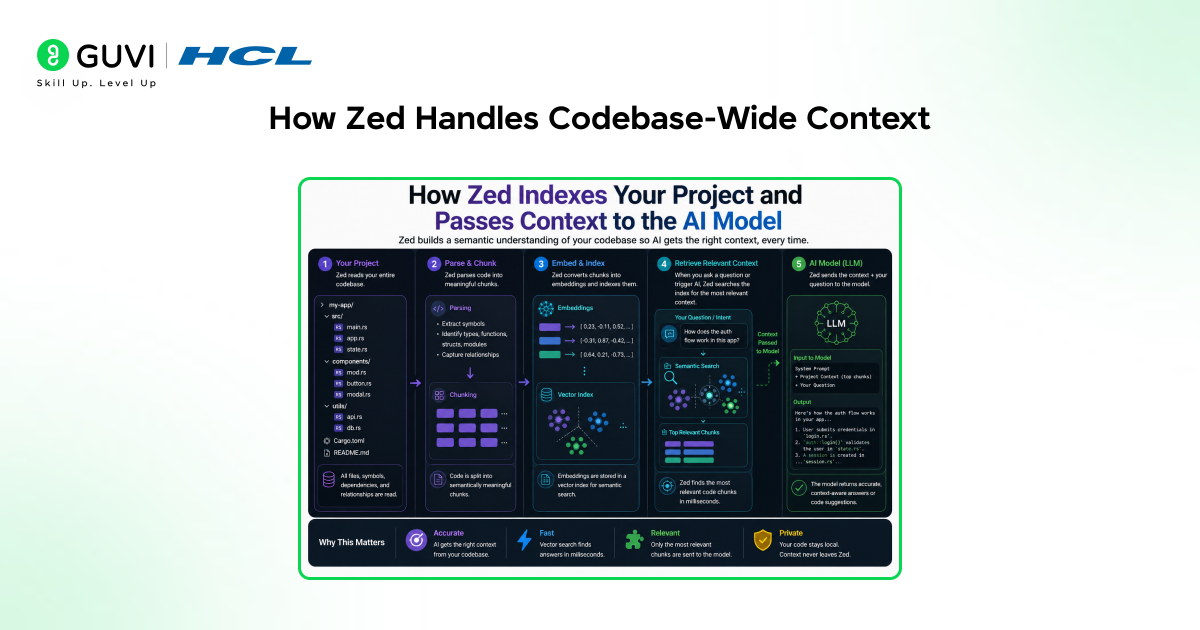
One of the most important capabilities for AI power users is codebase awareness. An AI that only sees the currently open file is far less useful than one that understands the entire project structure.
Zed uses a semantic indexing system powered by embeddings to give the AI relevant context from across your project. When you ask a question in the assistant panel, Zed doesn’t just pass the current file; it retrieves the most relevant code chunks from anywhere in your codebase.
Example:
You open a new service file and ask: “How does the existing AuthService handle token refresh?” Zed finds the relevant code across multiple files and surfaces it in the assistant response without you needing to manually open or reference those files.
This contextual retrieval is comparable to what Cursor offers, though Cursor’s implementation is currently more mature and battle-tested across larger codebases.
Zed’s Collaboration Features: Built for Teams
Zed was built with real-time collaboration as a first-class feature, not a plugin. Multiple developers can work in the same file simultaneously, with changes rendered in real time, similar to Google Docs, but inside a native code editor.
Collaboration capabilities include:
• Multiplayer editing with visible user cursors
• Voice channels built directly into the editor
• Shared terminal sessions within the same workspace
• AI assistance visible to all collaborators in a session
For AI power users working in team environments, this is a meaningful differentiator. The ability to pair-program with both a human and an AI simultaneously inside the same editor session opens up genuinely new workflows.
Zed was co-founded by Nathan Sobo and Antonio Scandurra, both former engineers behind the Atom editor at GitHub.
After building Atom and seeing VS Code become the dominant editor, they set out to create a new tool designed with one priority from the start: uncompromising performance and architecture.
Zed vs. Cursor vs. VS Code: A Practical Comparison for AI Power Users
For Zed editor AI power users in 2026, the real question is not whether Zed is impressive in isolation. It is how it stacks up against the tools already in the ecosystem.
Zed vs. Cursor
Cursor is currently the dominant AI-first editor. It offers deeper codebase context, multi-file autonomous editing, and a more polished diff review workflow. However, it is built on Electron and carries that performance overhead.

Zed is faster and lighter. If you spend hours in large files or work on resource-constrained machines, Zed’s performance advantage is real. But Cursor’s AI tooling is currently more mature and feature-complete for complex agentic tasks.
Zed vs. VS Code
VS Code’s advantage is its ecosystem: thousands of extensions, deep integration with GitHub, and universal team adoption. Zed cannot match this breadth yet. But for developers who don’t rely on obscure plugins, Zed’s native feature set covers most workflows faster and with fewer moving parts.
Summary:
- Choose Zed if: Raw performance matters, you want model flexibility, or you value simplicity.
- Choose Cursor if: You need the most advanced AI coding features available right now.
- Choose VS Code if: Your team uses it, and extension compatibility is non-negotiable.
Real-World Use Cases Where Zed Excels
Beyond benchmarks and feature lists, the real test is how Zed performs in day-to-day development scenarios.
Example: Navigating a Large Rust Codebase
A systems engineer is working on a 200,000-line Rust project. Opening files, jumping to definitions, and running global searches are instantaneous in Zed. In VS Code or Cursor, the same operations introduce noticeable lag.
They use the assistant panel to ask: “Find all places where this struct is mutated and explain any potential race conditions.” Zed retrieves the relevant code, passes it to Claude, and returns an analysis in seconds.
Example: Remote Pair Programming with AI
Two developers on different continents open a shared Zed session. One drives, the other observes and comments. Both have access to the AI assistant panel. They work through a complex bug together, using AI to explain unfamiliar parts of the codebase while both see the same context in real time.
This kind of human + AI collaboration session is uniquely native to Zed. No other editor supports it at this level of integration today.
Limitations You Should Not Ignore
Zed is impressive, but it is not without real limitations. Understanding them is essential for making an informed decision.
- Extension ecosystem is limited: Zed’s plugin system is newer and smaller than VS Code’s. If your workflow depends on specific extensions, check compatibility before switching.
- AI features are still maturing: Compared to Cursor, Zed’s AI tooling lacks multi-file autonomous edits and a polished agent workflow. It is powerful, but not yet at the frontier.
- Linux and Windows support lags macOS: Zed started as a macOS-first product. Linux support has improved significantly, but Windows is still catching up. Windows-primary developers may face rough edges.
- No built-in debugger UI yet: For developers who rely heavily on graphical debugging, Zed does not yet offer a built-in debugger comparable to VS Code’s.
None of these limitations is permanent. Zed is under active development, and ships updates rapidly. But for AI power users who need a battle-tested, fully-featured environment today, these gaps are worth weighing carefully.
If you want to learn more about building skills for Claude Code and automating your procedural knowledge, do not miss the chance to enroll in HCL GUVI’s Intel & IITM Pravartak Certified Artificial Intelligence & Machine Learning courses. Endorsed with Intel certification, this course adds a globally recognized credential to your resume, a powerful edge that sets you apart in the competitive AI job market.
Conclusion
Zed in 2026 is not a finished product, and that is part of what makes it exciting. It has already delivered on its core promise: an editor so fast it gets out of your way. And now, with native AI integration, model flexibility, and real-time collaboration, it is building a compelling case for the most demanding developers.
For Zed editor AI power users in 2026, the honest answer is: it depends on your priorities. If you want the most advanced AI features available right now, Cursor is still ahead. If you want a blazing-fast, privacy-flexible, collaboratively-native editor that is rapidly closing the AI gap, Zed deserves serious consideration.
The best developers don’t wait for a perfect tool. They adopt early, adapt their workflow, and gain an edge. Zed may not be fully ready for every power user today, but it is ready enough for many, and the trajectory is clear. It is worth trying now.
FAQs
1. Is Zed free for individual developers?
Yes. Zed is free for individual use. Team and enterprise plans with additional collaboration and admin features are available as paid tiers. The core editor, including AI integrations with your own API keys, remains free.
2. Does Zed support all programming languages?
Zed supports syntax highlighting and language server integration for most major languages, including Rust, Python, JavaScript, TypeScript, Go, C/C++, and more. Support is added continuously, though some niche languages may lag behind VS Code’s breadth.
3. Can I use my own API keys with Zed’s AI features?
Yes. Zed allows you to configure your own Anthropic, OpenAI, or local model endpoints. This gives you full control over which model powers your completions and assistant, as well as privacy over what code leaves your machine.
4. How does Zed’s performance compare to VS Code on large projects?
Significantly faster in most benchmarks. Startup time, file loading, and scrolling in large files are all noticeably snappier. Developers working on large monorepos or systems-level codebases report the difference as substantial and meaningful.
5. Is Zed available on Windows in 2026?
Windows support exists but is less mature than macOS and Linux. Zed started as a macOS-first editor and has been expanding platform support. Windows developers should check the latest release notes, as support improves with each update.
Success Stories

About the Author
Vishalini Devarajan
An Aerospace Engineer turned content writer, I focus on making complex concepts easy to understand through well-structured, reader-friendly blogs. Whether it’s a technical topic or a non-technical one, I love creating content that is clear, engaging, and impactful.
View all posts by Vishalini Devarajan
Connect with me @











Did you enjoy this article?