


Artificial Intelligence and Machine Learning Articles
Finance Manager to Data Analytics: Career Growth, Salary and Seniority
How to Evaluate LLM Outputs in Production Deployments
AI/ML Skills Gap 2026: Why Companies Can't Find Job-Ready Talent
20 AI/ML Interview Questions Recruiters Can Use Without a Tech Background - Best Guide


Get In Touch For Details! Request More Information
Replit Expands Google Cloud Collaboration with New Google Cloud Marketplace Listing
Jun 24, 2026 6 Min Read 1482 Views
(Last Updated)
If your engineering team builds on Google Cloud, procuring and deploying developer tooling through the Google Cloud Marketplace is already part of how you work. The Replit Google Cloud Marketplace listing changes how your team accesses one of the most capable AI-assisted development environments available today, placing it directly inside the procurement and billing infrastructure you already use.
Replit’s expanded collaboration with Google Cloud means enterprise teams can now discover, subscribe to, and deploy Replit through the Google Cloud Marketplace, with billing consolidated into their existing Google Cloud spend. For organizations that run on Google Cloud infrastructure, this removes the friction of managing a separate vendor relationship and a separate procurement process for their development environment.
In this article, we cover what the listing includes, why it matters for enterprise teams, how to access and deploy Replit through the Marketplace, what this means for Google Cloud workflows, how it compares to alternative setups, and what to expect next from this partnership. Let us get started.
Table of contents
- Quick TL;DR Summary
- What Changed in the Replit and Google Cloud Collaboration?
- What the Expanded Collaboration Includes
- How to Access Replit Through the Google Cloud Marketplace
- How to Subscribe
- What Your Team Gets After Subscribing
- Step-by-Step: Building a Google Cloud Connected App in Replit
- Step 1: Set Up the Replit Project
- Step 2: Connect to Google Cloud SQL
- Step 3: Deploy and Share
- What the Marketplace Listing Does Not Change
- What Stays the Same
- Best Practices for Teams Adopting Replit Through the Google Cloud Marketplace
- Use a Dedicated Google Cloud Billing Account for Developer Tools
- Connect the Subscription to a Google Cloud Organization Account, Not a Personal Account
- Store All Google Cloud Service Credentials as Replit Secrets
- Review Committed Use Agreement Eligibility Before Subscribing
- Use Replit's Team Features Intentionally From Day One
- Conclusion
- FAQs
- What is the Replit Google Cloud Marketplace listing?
- Does the Google Cloud Marketplace listing change how Replit works?
- Who is the Google Cloud Marketplace subscription designed for?
- Does the Replit Google Cloud Marketplace subscription include Gemini AI access?
- Can Replit applications connect to Google Cloud services like Cloud SQL and BigQuery?
Quick TL;DR Summary
- Replit’s Google Cloud Marketplace listing makes Replit available for enterprise procurement directly through Google Cloud, with billing consolidated into existing GCP spend.
- Engineering teams on Google Cloud can now discover, subscribe to, and use Replit without a separate vendor contract or billing account.
- The listing reflects an expanded collaboration between Replit and Google Cloud that builds on earlier integrations, including Gemini AI model access inside Replit.
- Enterprise benefits include centralized billing, IAM-compatible access controls, and access to Replit’s AI-assisted development environment through GCP’s procurement infrastructure.
- This guide covers what the listing includes, how to access it, what changed in the Google Cloud collaboration, a comparison with other setups, and best practices for teams adopting it.
What Is the Google Cloud Marketplace Listing?
The Google Cloud Marketplace is Google Cloud’s catalog of software, services, and developer tools that can be purchased, deployed, and billed through a Google Cloud account. Enterprise teams use it to discover and adopt third-party software without separate contract negotiations or billing setups.
What Changed in the Replit and Google Cloud Collaboration?
The Marketplace listing is the latest step in an ongoing collaboration between Replit and Google Cloud that began with AI model integrations and has expanded to cover enterprise access, deployment, and billing.
Earlier in the partnership, Replit integrated Google’s Gemini models directly into its AI assistant, giving developers in Replit access to Gemini for code generation, explanation, and debugging. That integration made Replit’s AI capabilities partly powered by Google Cloud’s AI infrastructure.
The new Marketplace listing moves the collaboration to the enterprise procurement layer. It is no longer just about which AI models power Replit’s assistant; it is about how enterprise teams buy and manage access to Replit as part of their broader Google Cloud footprint.
What the Expanded Collaboration Includes
• Replit is available as a subscribable product in the Google Cloud Marketplace catalog
• Billing integration so Replit charges appear on the Google Cloud invoice
• Continued Gemini model access inside Replit for AI-assisted development
• Enterprise access management through Google Cloud organizational accounts
How to Access Replit Through the Google Cloud Marketplace
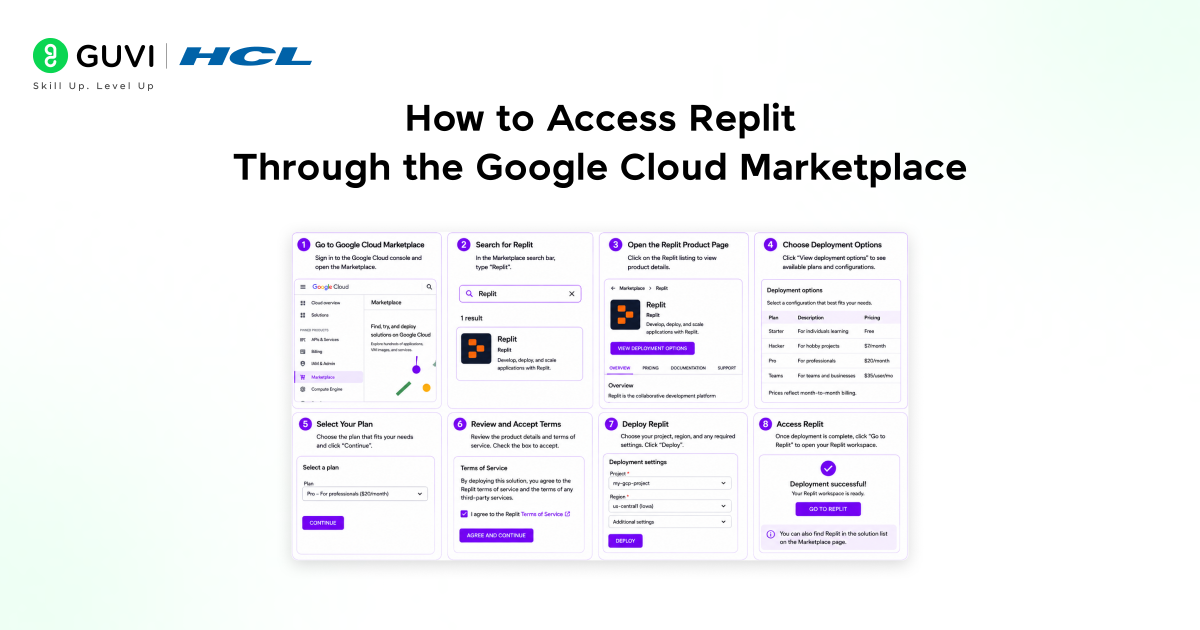
Accessing Replit through the Google Cloud Marketplace follows the same process as any other Marketplace subscription. Here is the exact workflow.
How to Subscribe
1. Open the Google Cloud Console and navigate to the Marketplace section from the left sidebar.
2. Search for Replit in the Marketplace catalog.
3. Open the Replit listing and review the plan options and pricing details.
4. Click Subscribe and select the plan appropriate for your team size.
5. Confirm that billing through your Google Cloud billing account charges will appear on your GCP invoice.
6. Follow the activation link to connect your Google Cloud subscription to your Replit organization account.
Once subscribed, team members are provisioned through Replit’s standard team management interface. The Google Cloud Marketplace handles billing and the subscription lifecycle. Replit handles user access, projects, and the development environment itself.
What Your Team Gets After Subscribing
• Access to Replit Teams with the full AI-assisted development environment
• Replit’s multiplayer editing for real-time collaboration on shared projects
• Always On deployment for applications built in Replit
• Gemini-powered AI assistant for code generation, debugging, and explanation
• Usage billed to your Google Cloud account, visible in Cloud Billing dashboards
Enterprise teams using Google Cloud Committed Use Contracts can sometimes count Marketplace software purchases toward their overall cloud spend commitments.
This means adding tools like Replit via the Marketplace may contribute to the same commitment thresholds as compute and storage, instead of being tracked as a separate expense.
Step-by-Step: Building a Google Cloud Connected App in Replit
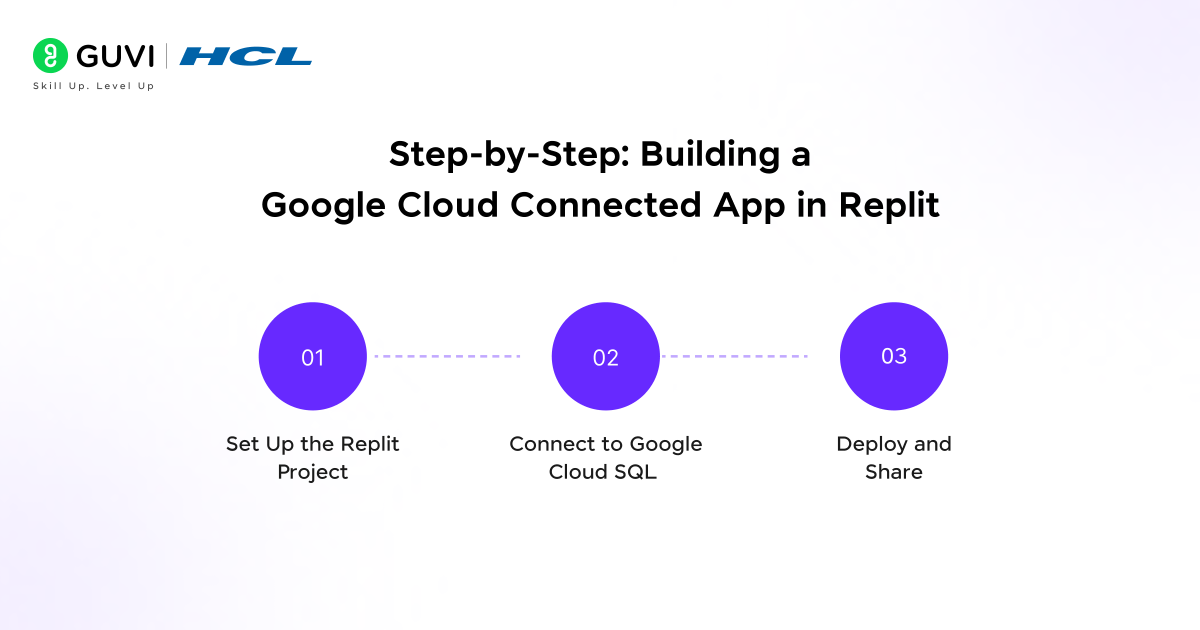
One practical benefit of the Replit and Google Cloud collaboration is how naturally the two platforms work together for teams building applications that use Google Cloud services. Here is a concrete example showing a Replit app that connects to a Google Cloud SQL database.
Step 1: Set Up the Replit Project
1. Create a new Python project in Replit through your Marketplace-provisioned Replit Teams workspace.
2. Open the Secrets panel and add your Google Cloud SQL connection details: DB_HOST, DB_NAME, DB_USER, and DB_PASSWORD.
3. Install the required packages in the Shell:
pip install flask cloud-sql-python-connector pg8000
Step 2: Connect to Google Cloud SQL
import os
from flask import Flask, jsonify
from google.cloud.sql.connector import Connector
import pg8000
app = Flask(__name__)
connector = Connector()
def get_conn():
return connector.connect(
os.environ[‘CLOUD_SQL_INSTANCE’],
‘pg8000’,
user = os.environ[‘DB_USER’],
password = os.environ[‘DB_PASSWORD’],
db = os.environ[‘DB_NAME’]
)
@app.route(‘/api/data’)
def get_data():
conn = get_conn()
cursor = conn.cursor()
cursor.execute(‘SELECT id, name, value FROM records LIMIT 20’)
rows = cursor.fetchall()
conn.close()
return jsonify([{‘id’: r[0], ‘name’: r[1], ‘value’: r[2]} for r in rows])
if __name__ == ‘__main__’:
app.run(host=’0.0.0.0′, port=5000)
Here is what is happening:
• The Cloud SQL connector manages the authenticated connection to your Google Cloud SQL instance
• Credentials come from Replit Secrets and never appear in source code
• The Flask route returns data from Cloud SQL as a JSON API that any front-end can consume
Step 3: Deploy and Share
1. Click Run in Replit, the application starts, and receives a public URL.
2. Test the /api/data endpoint to confirm the Google Cloud SQL connection is working.
3. Enable Always On for persistent availability.
4. Share the URL with stakeholders or integrate the API into an existing Google Cloud application.
For teams with their data on Google Cloud SQL, BigQuery, Firestore, or other GCP data services, this pattern connects Replit-hosted applications to Google Cloud data infrastructure with minimal configuration overhead.
The Cloud SQL Auth Proxy and Cloud SQL Python Connector automatically manage authentication and encrypted connections to Cloud SQL using Application Default Credentials or service account keys.
In Replit applications, simply storing credentials as a Replit Secret and referencing them in the connector call is enough to establish a secure, authenticated database connection from a browser-based environment.

What the Marketplace Listing Does Not Change
The Google Cloud Marketplace listing changes how enterprise teams buy and manage access to Replit. It does not change the core product or how developers use it day to day.
What Stays the Same
1. Replit’s development environment is unchanged. The editor, AI assistant, multiplayer collaboration, and deployment features work identically whether your subscription comes through the Marketplace or a direct Replit account.
2. Individual free accounts are not affected. The Marketplace listing is for enterprise and team subscriptions. Free-tier Replit accounts are managed directly through Replit and are not part of the Google Cloud billing integration.
3. Replit does not become a Google Cloud product. Replit remains an independent company. The Marketplace listing is a procurement and billing integration, not an acquisition or a product merger.
4. Google Cloud services still require their own setup. Connecting a Replit application to Cloud SQL, BigQuery, or other GCP services requires the same service account configuration and credential management as connecting any external application to those services.
5. Replit’s user management stays within Replit. Adding and removing team members, managing project permissions, and configuring the workspace all happen inside Replit’s interface, not through Google Cloud IAM directly.
The simplest way to think about it: the Marketplace listing changes where you pay and how you buy. Everything about how you build stays the same.
Best Practices for Teams Adopting Replit Through the Google Cloud Marketplace
A few practices make the adoption process smoother and ensure the subscription is set up in a way that scales with your team.
1. Use a Dedicated Google Cloud Billing Account for Developer Tools
If your organization uses multiple Google Cloud billing accounts for different cost centers, subscribe to Replit through the billing account associated with your engineering or developer tools budget. This keeps developer tooling spend visible and attributable without mixing it into infrastructure or production service costs.
2. Connect the Subscription to a Google Cloud Organization Account, Not a Personal Account
Subscribe through a Google Cloud organization account, not an individual Google account. This ensures the subscription persists if the subscribing individual leaves the organization and gives IT administrators visibility into the subscription from the organization-level console.
3. Store All Google Cloud Service Credentials as Replit Secrets
For Replit projects that connect to Google Cloud services, Cloud SQL, BigQuery, Pub/Sub, and Cloud Storage always store service account keys and connection strings as Replit Secrets. Never hardcode credentials into source code in a shared team project.
4. Review Committed Use Agreement Eligibility Before Subscribing
If your organization has a Google Cloud committed use or enterprise agreement, check with your Google Cloud account team whether Marketplace purchases through Replit count toward your committed spend thresholds. This can affect the total cost of the subscription relative to a direct purchase.
5. Use Replit’s Team Features Intentionally From Day One
When provisioning team members after subscribing, set up a shared project structure that reflects how your team actually works, separate projects for different products or squads, consistent naming conventions, and shared templates for common app patterns. This prevents the organic sprawl that makes team workspaces hard to navigate after six months.
Google Cloud Marketplace private offers allow enterprises to negotiate custom pricing for software like Replit based on their scale and commitment.
For organizations with large engineering teams, working with a Google Cloud account representative can unlock pricing that aligns with enterprise usage, rather than standard per-seat rates.
Conclusion
In conclusion, the Replit Google Cloud Marketplace listing is a practical development for enterprise engineering teams on Google Cloud. It does not change how Replit works or what it does as a development environment. It changes where and how you buy it, consolidating procurement, billing, and subscription management into the Google Cloud infrastructure most enterprise GCP customers already use.
For teams that have approved Google Cloud as their primary cloud provider and want to minimize the number of separate vendor relationships they manage, the Marketplace listing removes a real friction point. Developer tooling that previously required a separate procurement process now fits inside the existing GCP purchasing workflow.
The expanded collaboration between Replit and Google Cloud, including the Gemini model integration and the Marketplace listing, signals a consistent direction: Replit is building deeper integration with Google Cloud infrastructure at both the AI capabilities layer and the enterprise procurement layer. For teams already invested in Google Cloud, that direction makes Replit an increasingly natural fit for the development environment layer.
FAQs
1. What is the Replit Google Cloud Marketplace listing?
The Replit Google Cloud Marketplace listing makes Replit available for enterprise subscription through Google Cloud’s software catalog. Teams on Google Cloud can subscribe to Replit through the Marketplace, with billing consolidated into their Google Cloud billing account rather than managed through a separate Replit invoice.
2. Does the Google Cloud Marketplace listing change how Replit works?
No. The Marketplace listing changes how enterprise teams purchase and manage access to Replit. The development environment, AI assistant, multiplayer editing, deployment features, and everything else about the product are identical to a direct Replit Teams subscription.
3. Who is the Google Cloud Marketplace subscription designed for?
It is designed for enterprise engineering teams that already run on Google Cloud and want to consolidate developer tooling procurement and billing into their existing GCP infrastructure. It is not intended for individual developers or teams not on Google Cloud, who are better served by a direct Replit subscription.
4. Does the Replit Google Cloud Marketplace subscription include Gemini AI access?
Yes. Replit’s AI assistant is powered in part by Google’s Gemini models as part of the broader Replit and Google Cloud collaboration. Teams subscribing through the Marketplace have the same Gemini-powered AI assistant as teams on direct Replit subscriptions.
5. Can Replit applications connect to Google Cloud services like Cloud SQL and BigQuery?
Yes. Replit applications can connect to Google Cloud SQL, BigQuery, Firestore, Cloud Storage, and other GCP services using the standard Google Cloud client libraries and the Cloud SQL Python Connector. Credentials are stored as Replit Secrets and referenced at runtime. The Marketplace subscription does not provide automatic access to GCP services that require their own IAM and service account configuration.
Success Stories

About the Author
Vishalini Devarajan
An Aerospace Engineer turned content writer, I focus on making complex concepts easy to understand through well-structured, reader-friendly blogs. Whether it’s a technical topic or a non-technical one, I love creating content that is clear, engaging, and impactful.
View all posts by Vishalini Devarajan
Connect with me @













Did you enjoy this article?