


Artificial Intelligence and Machine Learning Articles
Finance Manager to Data Analytics: Career Growth, Salary and Seniority
How to Evaluate LLM Outputs in Production Deployments
AI/ML Skills Gap 2026: Why Companies Can't Find Job-Ready Talent
20 AI/ML Interview Questions Recruiters Can Use Without a Tech Background - Best Guide


Get In Touch For Details! Request More Information

The Best Agentic IDEs Heading into 2026: Top Picks for Developers
Jun 11, 2026 6 Min Read 1793 Views
(Last Updated)
Writing code has always been a thinking job. You read requirements, understand context, plan a solution, write the code, test it, debug it, and repeat. For decades, the tools we used only helped with one small part of that loop, typing the code itself. That is changing fast.
Agentic IDEs are a new category of development environment where the AI does not just suggest your next line of code. It understands your entire project, plans tasks, runs commands, reads error messages, and fixes problems without you having to spell out every single step.
This guide will walk you through what agentic IDEs actually are, which ones are worth using right now, and how to start getting real value from them. Heading into 2026, these tools are no longer experimental.
Quick TL;DR Summary
- This blog explains what agentic IDEs are and why they are changing how developers write code in 2026.
- It breaks down the core problem developers face when using traditional code editors that do not help them think, plan, or act.
- The article walks through how agentic IDEs work, from understanding your codebase to running multi-step tasks on your behalf.
- It highlights key features like autonomous task execution, codebase awareness, terminal access, and built-in AI reasoning.
- The blog covers the best agentic IDEs available right now and what makes each one stand out for different types of developers.
- It also includes pros, cons, and practical tips to help you pick the right agentic IDE for your workflow without getting overwhelmed.
Table of contents
- What is an Agentic IDE?
- Why Traditional Code Editors Are Holding Developers Back in 2026
- How Agentic IDEs Work: From Understanding Code to Taking Action
- How to Get Started With an Agentic IDE: A Step-by-Step Guide
- Step 1: Pick One Tool to Start With
- Step 2: Set Up Properly
- Step 3: Start With a Real Task, Not a Test
- Step 4: Read What the Agent Is Doing
- Step 5: Review Before Accepting
- Step 6: Give Feedback in Plain Language
- Step 7: Build Up to Longer Tasks Gradually
- Step 8: Keep Your Own Skills Sharp
- 6 Key Features to Look for in an Agentic IDE
- Best Agentic IDEs in 2026: Top Tools Compared
- Pros and Cons of Agentic IDEs
- Pros:
- Cons:
- How to Use an Agentic IDE Effectively: 6 Proven Strategies
- Conclusion
- FAQs
- Are agentic IDEs suitable for beginners?
- How much do agentic IDEs cost?
- Are agentic IDEs safe to use with private or proprietary codebases?
- How do agentic IDEs handle mistakes?
- Will agentic IDEs replace developers?
What is an Agentic IDE?
An agentic IDE is a development environment where the AI can take actions, not just make suggestions. In a regular code editor, AI features like autocomplete or inline suggestions show you what to type next. You still have to understand the problem, plan the approach, and carry out every step yourself.
In an agentic IDE, the AI reads and understands your entire codebase, breaks tasks into steps, runs terminal commands, installs packages, writes and runs tests, and searches documentation when it needs more information. It does not wait for you to feed it context, it goes and finds what it needs.
The key difference is autonomy. You describe a goal in plain English, and the IDE works toward it across files, commands, and error loops. You stay in control, but you stop doing the repetitive heavy lifting that slows most developers down.
Read More: What Is Agentic AI?
Why Traditional Code Editors Are Holding Developers Back in 2026
Traditional code editors like VS Code, Sublime Text, or even older versions of JetBrains IDEs were built around one idea: give the developer a great place to write text that happens to be code. Over time, these editors got smarter. Syntax highlighting, IntelliSense, Git integration, and plugin ecosystems made them genuinely powerful.
Then AI features arrived, GitHub Copilot autocomplete, ChatGPT for explaining errors, and inline AI chat panels. But even with all of that, there is still a big gap. The AI in most editors does not know your project. It sees the file you have open, maybe a few related files if you paste them in, and that is it.
Every time you start a new task, you have to give the AI context again. You paste error messages and explain what the function is supposed to do. This works for simple tasks, but as codebases grow, it becomes painful. Developers spend more time feeding context than building. Agentic IDEs solve this by adding context awareness, planning, and action into the environment itself.
How Agentic IDEs Work: From Understanding Code to Taking Action
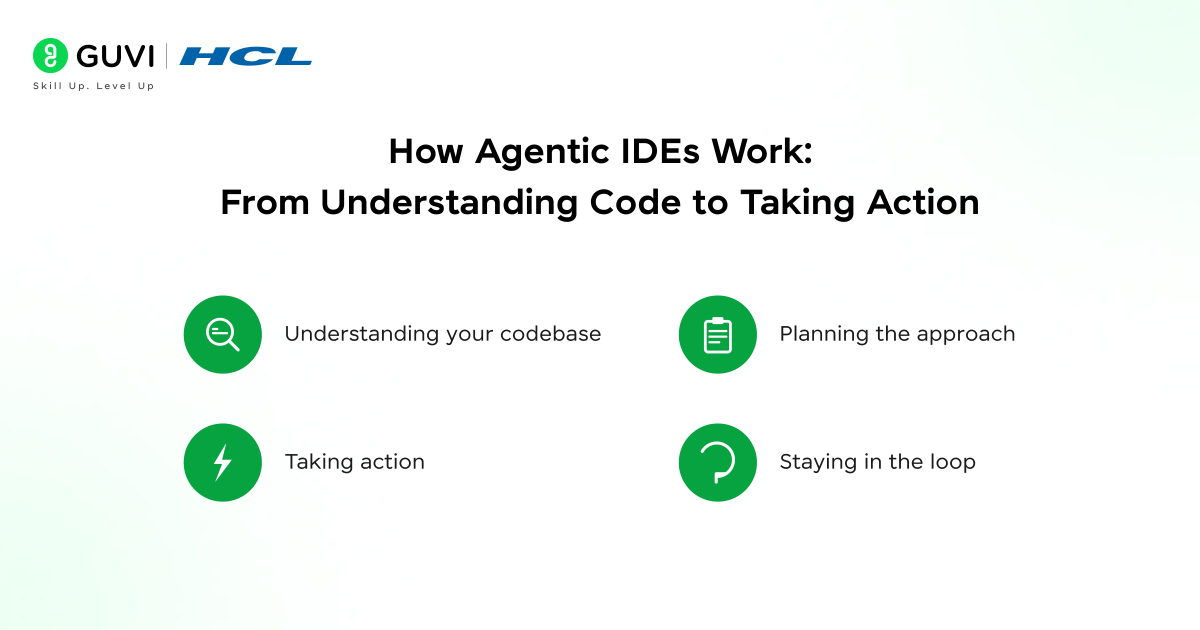
At a high level, an agentic IDE combines a capable AI model with a set of tools the model can use and the intelligence to decide which tools to use and when.
Here is what is happening under the hood when you give an agentic IDE a task:
- Understanding your codebase:
The IDE indexes your project files, structure, dependencies, and sometimes your Git history. The AI uses this to understand what already exists before it starts writing anything new.
- Planning the approach:
Rather than jumping straight to code, the AI breaks the task into steps. This might look like: read the relevant files, understand the current approach, identify what needs to change, write the changes, run the tests, and check the output.
- Taking action:
The AI does not just write code in a text box for you to copy. It creates files, edits existing ones, runs terminal commands, and responds to their output. If a test fails, it reads the error and tries again.
- Staying in the loop:
Good agentic IDEs show you what they are doing at each step. You can review, approve, or redirect before anything irreversible happens.
How to Get Started With an Agentic IDE: A Step-by-Step Guide
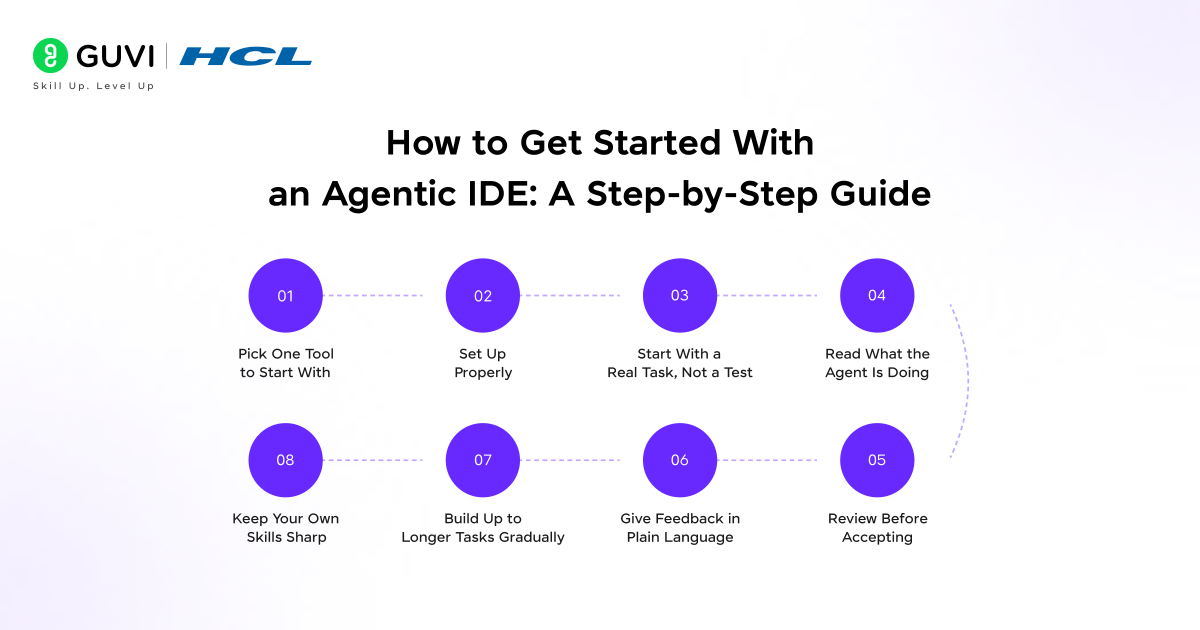
Here is how to go from zero to productive with an agentic IDE, without making common early mistakes.
Step 1: Pick One Tool to Start With
Do not try to evaluate five IDEs at once. Pick one based on your language, stack, or the recommendation in this guide, and commit to using it for at least two weeks. You will not get a fair sense of any tool if you keep switching.
Step 2: Set Up Properly
Follow the setup documentation carefully. Agentic IDEs often need access to your file system, terminal, and API keys. Rushing through setup leads to a degraded experience that feels like the tool is less capable than it actually is.
Step 3: Start With a Real Task, Not a Test
Give the IDE a genuine problem from your actual work. Simple examples do not reveal the tool’s real strengths or weaknesses. Something like “add email validation to the signup form and write a test for it” is a much better starting point than “write a hello world function.”
Step 4: Read What the Agent Is Doing
Do not just watch the code appear. Read the reasoning, the plan, and the steps the agent is taking. This helps you catch mistakes early and teaches you how to give better instructions next time.
Step 5: Review Before Accepting
Every change the agent makes is a change you own. Get into the habit of reviewing diffs before approving them. This is not about distrust, it is about staying in control of your own codebase.
Step 6: Give Feedback in Plain Language
If the agent does something wrong or misunderstands the task, correct it in simple, direct language. “That is not what I meant, the function should return a list, not a single value” works perfectly well. You do not need to prompt-engineer your corrections.
Step 7: Build Up to Longer Tasks Gradually
Once you are comfortable with simple tasks, start experimenting with multi-step tasks. “Refactor the authentication module to use JWT instead of sessions, update the tests, and make sure nothing breaks” is the kind of task agentic IDEs are built for.
Step 8: Keep Your Own Skills Sharp
Using an agentic IDE is not a reason to stop understanding code. The developers who get the most out of these tools are the ones who can evaluate what the agent produces and know when to push back.
6 Key Features to Look for in an Agentic IDE
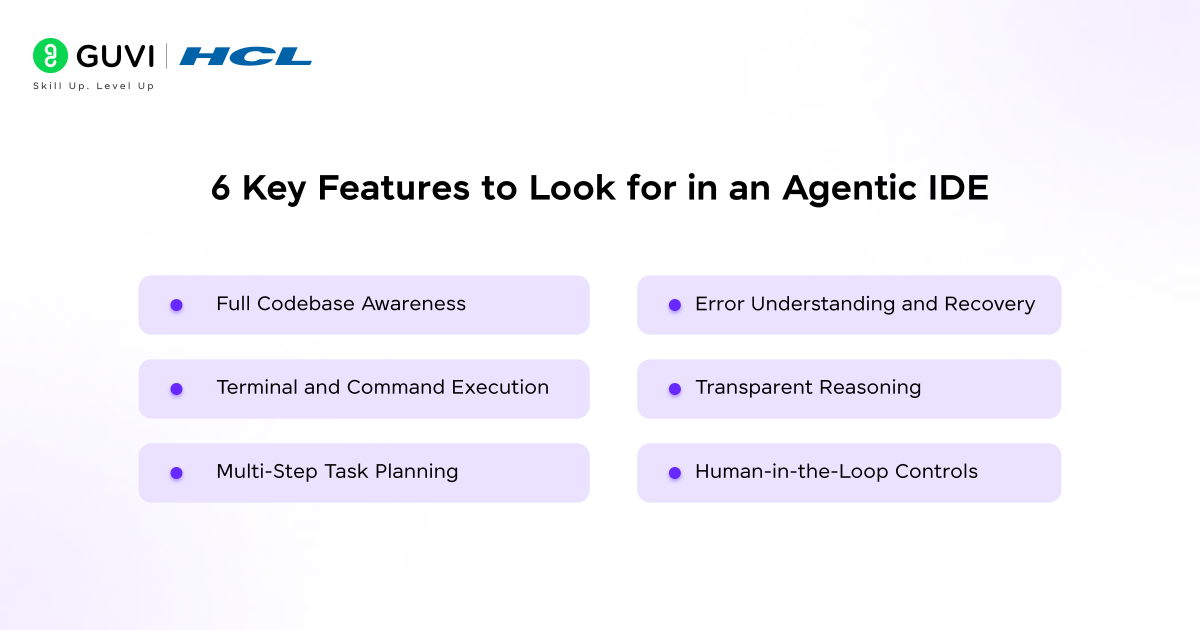
Not every IDE with AI features qualifies as truly agentic. Here is what to look for.
- Full Codebase Awareness
The IDE should be able to read and understand your entire project, not just the open file. This means it can trace function calls across files, understand your folder structure, and spot where a change in one place will affect another.
- Terminal and Command Execution
A genuine agentic IDE can run terminal commands directly. It can install dependencies, run your test suite, start a dev server, or check build output and then respond to what comes back.
- Multi-Step Task Planning
The agent should break complex goals into steps and work through them systematically, not just make one change and stop. Look for tools that show you the plan before they start executing it.
- Error Understanding and Recovery
When something goes wrong, a test fails, a build breaks, a type error appears, the agent should be able to read that output, understand what it means, and take a corrective action without you having to paste the error message into a chat window.

- Transparent Reasoning
You should be able to see why the agent is doing what it is doing. Tools that work silently and just produce output are harder to trust and harder to correct.
- Human-in-the-Loop Controls
The best agentic IDEs let you set how much autonomy the agent has. You might want it to ask for approval before deleting files or running scripts. Look for tools that give you that control.
Developers using agentic IDEs report completing multi-file refactoring tasks up to 70% faster than with traditional AI-assisted editors. The biggest time savings come not from writing speed, but from the elimination of context-switching, copying errors, pasting code, and re-explaining the same codebase over and over.
Best Agentic IDEs in 2026: Top Tools Compared
- Claude Code
Claude Code is Anthropic’s command-line agentic coding tool built directly on Claude. It runs in your terminal, reads your codebase, and can handle complex multi-step engineering tasks. It is particularly strong at understanding large codebases quickly and reasoning about code behavior and consequences.
- Cursor
Cursor is a full IDE built on top of VS Code, so it feels familiar to most developers. It adds deep AI features like codebase-wide context, multi-file editing, and an agent mode for handling tasks across your project. It is widely adopted due to its low onboarding friction.
- Windsurf (by Codeium)
Windsurf is Codeium’s agentic IDE, also built on VS Code foundations. It introduces “Flows,” where the AI and developer collaborate in a shared context. It is fast, has strong autocomplete, and handles multi-file tasks well.
- Replit Agent
Replit Agent lets you describe a project in plain language and have the agent scaffold, build, and deploy it inside the browser. It is especially useful for quickly turning ideas into working apps. It is best suited for greenfield projects.
- Devin by Cognition
Devin is a highly autonomous AI software engineer that can handle end-to-end tasks like research, coding, testing, and deployment. It works independently, making it powerful for long tasks. It requires trust and clear task descriptions.
- GitHub Copilot Workspace
GitHub Copilot Workspace extends Copilot into a more agentic workflow. It can plan, write, and iterate on code changes across your repository from a task or issue. It integrates naturally with GitHub tools like pull requests and code review.
As of early 2026, agentic IDE usage among professional developers has grown by over 300% compared to the same period in 2024. The shift is being driven not by large enterprises alone but by independent developers and small teams who see the biggest productivity gains relative to their size.
Pros and Cons of Agentic IDEs
Like any significant change to your workflow, moving to an agentic IDE comes with real upsides and real trade-offs.
Pros:
- Speeds up multi-step tasks that would take hours manually
- Reduces context-switching by keeping everything in one environment
- Handles debugging loops without re-pasting or re-explaining errors
- Scales well for large codebases
- Makes working in new languages or frameworks easier
- Helps less experienced developers move faster
Cons:
- Requires trust calibration, knowing when to follow or push back
- Mistakes can compound without proper review
- Cloud dependency may raise data security concerns
- Not all tools support every stack equally well
- Requires practice to write clear and effective task descriptions
- Over-reliance can slow your technical growth
How to Use an Agentic IDE Effectively: 6 Proven Strategies
Here is how to make agentic IDEs genuinely useful rather than just impressive in demos.
- Be specific about what done looks like:
Vague tasks produce vague results. Instead of “improve the performance of the app,” try “reduce the load time of the dashboard page below 2 seconds by optimising the data fetching in the main component.”
- Break big goals into meaningful chunks:
Agentic IDEs are powerful but they are not magic. A task that spans multiple days of work is better broken into a series of focused sessions where you can review progress and redirect if needed.
- Always understand the output before merging:
The agent wrote the code. You are responsible for it. Make reviewing the changes part of your workflow before anything goes into version control.
- Use the agent to learn, not just to produce:
Ask the agent to explain why it made a particular choice. This is one of the most underused features of agentic IDEs and one of the most valuable for developers who want to grow alongside the tool.
- Maintain a good project structure:
Agentic IDEs perform better when your codebase is well-organised. Clean folder structures, meaningful file names, and consistent conventions all help the agent understand context faster.
- Keep sensitive code and credentials out of agent context:
Be thoughtful about what your agent can see. Most tools give you control over which files and directories are included. Use that control.
If you’re serious about getting the most out of agentic IDEs, enrolling in HCL GUVI’s Intel & IITM Pravartak Certified Artificial Intelligence and Machine Learning Course is exactly where you need to be. This live online programme is taught directly by Intel engineers and industry experts. You also get the opportunity to attend 1:1 doubt sessions with top SMEs, work on 20+ industry-grade projects including a capstone project, learn in your preferred language, and receive placement assistance through 1000+ hiring partners.
Conclusion
The jump from AI autocomplete to agentic IDEs is one of the biggest shifts in developer tooling in a generation. For the first time, the environment itself can understand your goal, make a plan, and carry that plan out across your entire codebase.
Heading into 2026, these tools are mature enough to trust with real work and varied enough for almost every developer workflow. The question is no longer whether agentic IDEs are worth using. It is which one fits your stack, your team, and your way of working.
The developers who get the most out of these tools are not the ones who hand everything over to the agent. They stay engaged, review carefully, and use AI to take on more ambitious work. That combination, human judgment and AI capability working together, is what makes agentic IDEs genuinely exciting.
FAQs
Are agentic IDEs suitable for beginners?
Yes, but beginners should learn from the output instead of treating it as a black box. Use explanations and reasoning, not just the code.
How much do agentic IDEs cost?
Pricing varies. Some offer free tiers and paid plans, while others are priced for teams or tied to subscriptions. Most provide free trials.
Are agentic IDEs safe to use with private or proprietary codebases?
It depends on the tool and policies. Many send code to external servers, while some offer private deployments. Always check data handling policies.
How do agentic IDEs handle mistakes?
They include review flows so you can catch errors before committing. You can correct the agent in plain language and it will adjust.
Will agentic IDEs replace developers?
No. They increase productivity but still require human judgment to guide, review, and make decisions.
Success Stories

About the Author
Lukesh S
A professional content writer who has experience in freelancing and now working as a Technical Content Writer at HCL GUVI having sound knowledge in Blog Writing and Creative Writing!
View all posts by Lukesh S
Connect with me @













Did you enjoy this article?