


Project Articles
Automated Resume Screener: NLP-Based Python Project with Source Code
Business Analysis in Digital Transformation Projects - Best Guide
Build No-Code AI Agents with Flowise AI: Step-by-Step Beginner Guide


Get In Touch For Details! Request More Information
10 Best HTML and CSS Project Ideas in 2026 for Beginners to Build a Job-Ready Portfolio
Sep 07, 2026 7 Min Read 83415 Views
(Last Updated)
Learning HTML and CSS becomes much easier when you stop only reading syntax and start building actual webpages. A landing page teaches layout. A portfolio helps you understand page structure. A responsive gallery shows how CSS behaves across different screen sizes.
For beginners, these small projects are also the first step towards building a portfolio that proves what you can create. Instead of simply listing HTML and CSS as skills on a resume, you can show recruiters working examples of responsive layouts, forms, animations and real website sections.
This guide covers 10 of the best HTML and CSS project ideas for beginners in 2026, from simple portfolio pages to more advanced responsive interfaces. Each project focuses on practical skills that can prepare you for JavaScript, frontend frameworks and larger web development projects.
Quick Answer- The best HTML and CSS project ideas for beginners in 2026 include portfolio websites, responsive landing pages, pricing pages, photo galleries, forms and CSS animation projects. These projects help learners practise semantic HTML, responsive layouts, Flexbox, Grid and modern CSS while building work they can showcase in a frontend development portfolio.
Table of contents
- Why HTML and CSS Projects Are Important for Beginners?
- HTML and CSS Project Ideas: Quick Comparison Table
- 10 Best HTML and CSS Project Ideas for Beginners
- Personal Portfolio Website
- Responsive Landing Page
- Interactive Photo Gallery
- Product Pricing Page
- CSS Flexbox and Grid Practice
- Animated CSS Buttons
- Newsletter Signup Form
- Weather App Interface
- CSS Card Flip Animation
- Social Media Profile Clone
- Best HTML and CSS Project Ideas in India in 2026
- Tips to Build Impressive HTML and CSS Projects
- Plan the Layout Before Coding
- Use Semantic HTML
- Make Every Project Responsive
- Keep Your CSS Organised
- Focus on Accessibility
- Add Meaningful Visual Details
- Optimise Images and Performance
- Validate and Test Your Code
- Publish Your Projects
- Improve Each Project After Feedback
- Common Mistakes to Avoid in HTML and CSS Projects
- Using Fixed Heights Everywhere
- Positioning Everything With Absolute Values
- Building Only for Sample Content
- Creating Unnecessary CSS Specificity
- Copying a Design Without Understanding the Code
- Forgetting Interactive States
- Using Placeholder Text as a Form Label
- Overcomplicating the First Version
- Leaving Broken or Empty Links
- Ignoring Content Overflow
- Wrap Up
- FAQs
- What projects can I make using HTML and CSS?
- Can I build projects using only HTML and CSS?
- What are the best HTML and CSS projects for beginners?
- Is HTML and CSS enough to get a job?
- How can I practise HTML and CSS projects?
Why HTML and CSS Projects Are Important for Beginners?
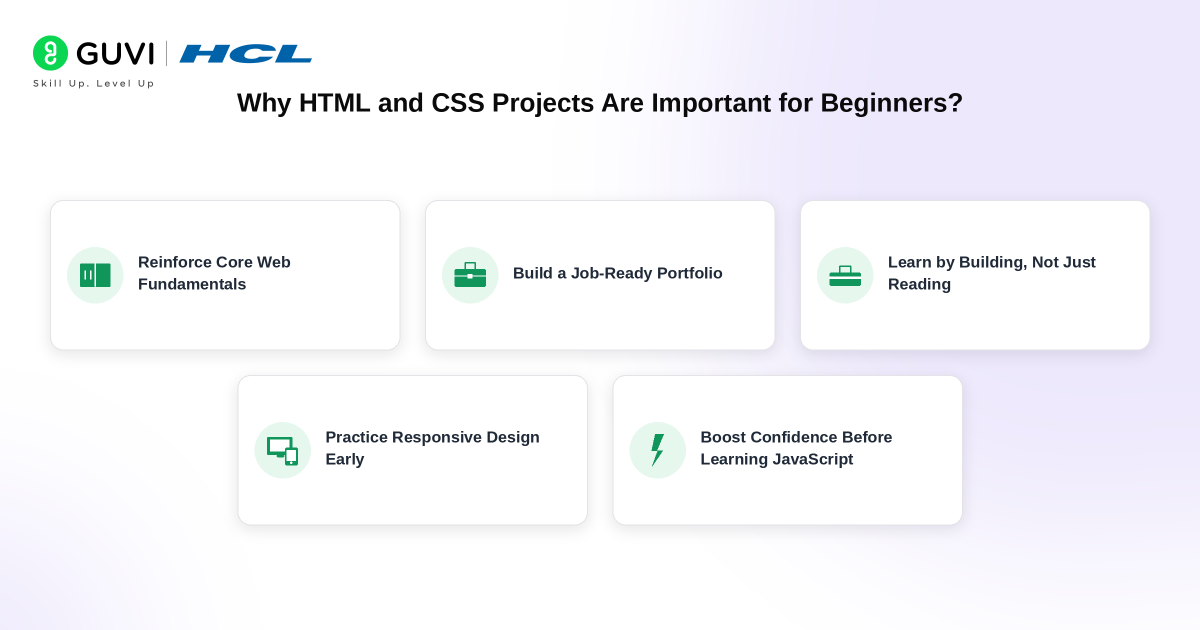
Working on HTML and CSS projects helps beginners understand the foundation of web development. These two core languages build the structure and design of every website. Developing small projects allows learners to apply basic tags, selectors, and layout techniques in real scenarios. It strengthens their coding logic and improves problem-solving skills.
HTML projects improve your understanding of webpage elements, while CSS projects refine your ability to design and align visual components. Through consistent practice, you start recognizing how responsive layouts, typography, and color schemes impact user experience. Projects also make it easier to explain your learning progress in interviews and technical discussions.
Recruiters value candidates who can show real work through a portfolio instead of only listing skills. Simple yet well-structured HTML and CSS projects display your attention to detail and creativity. They also give you confidence to move toward advanced tools like JavaScript and React once your basics are strong.
Before diving into your first project, bookmark HCL GUVI’s free HTML and CSS handbooks — they cover every tag, property, selector, and layout technique you’ll use across all 10 projects: HTML5 Tutorial | CSS Tutorial
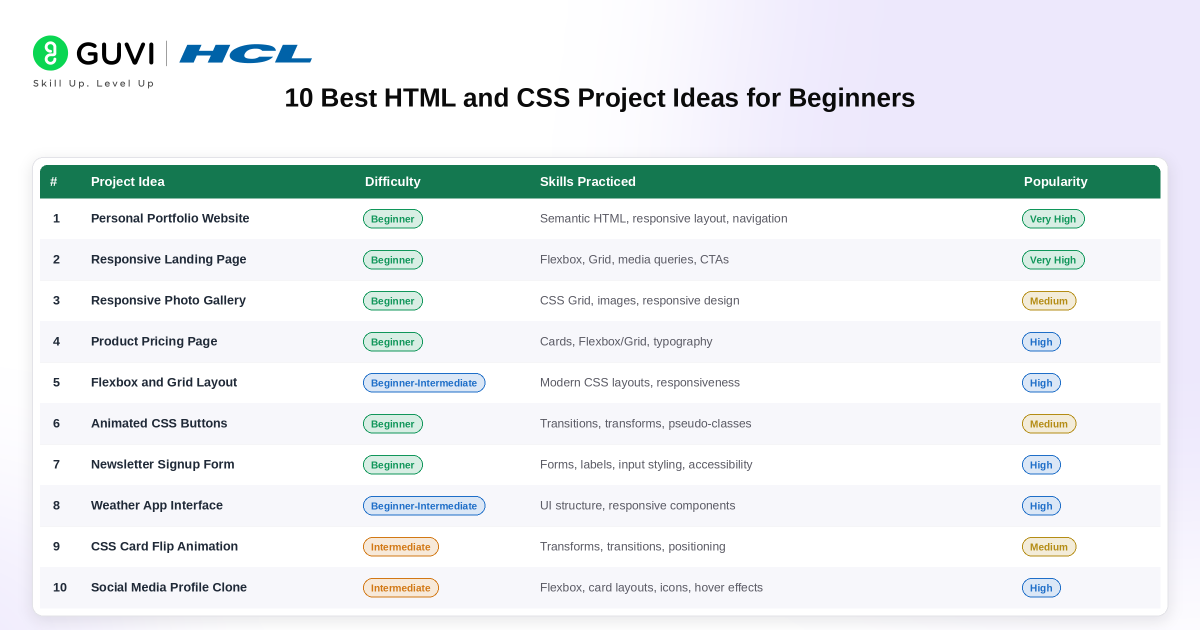
HTML and CSS Project Ideas: Quick Comparison Table
| Project Idea | Difficulty | Key Skills Practised | Best Portfolio Value |
|---|---|---|---|
| Personal Portfolio Website | Beginner | Semantic HTML, responsive layout, navigation | Very High |
| Responsive Landing Page | Beginner | Flexbox, Grid, media queries, CTAs | Very High |
| Responsive Photo Gallery | Beginner | CSS Grid, images, responsive design | Medium |
| Product Pricing Page | Beginner | Cards, Flexbox/Grid, typography | High |
| Flexbox and Grid Layout | Beginner–Intermediate | Modern CSS layouts, responsiveness | High |
| Animated CSS Buttons | Beginner | Transitions, transforms, pseudo-classes | Medium |
| Newsletter Signup Form | Beginner | Forms, labels, input styling, accessibility | High |
| Weather App Interface | Beginner–Intermediate | UI structure, responsive components | High |
| CSS Card Flip Animation | Intermediate | Transforms, transitions, positioning | Medium |
| Social Media Profile Clone | Intermediate | Complex layouts, reusable UI sections | Very High |
10 Best HTML and CSS Project Ideas for Beginners
Let’s read about the best HTML and CSS Project Ideas for Beginners, which will help you to start with your HTML and CSS journey:
1. Personal Portfolio Website
Creating a personal portfolio website would be the best HTML and CSS project idea. It helps you to showcase your skills and projects. You can include sections for your bio, skills, and a portfolio gallery. This project will help you practice structuring a webpage and styling it using CSS.
- Features:
- Bio section
- Skills showcase
- Project portfolio gallery
- Technologies:
- HTML for structure
- CSS for styling
Also Explore: Top 11 CSS Frameworks for Front-End Developers: A Comprehensive Guide
2. Responsive Landing Page
The next HTML and CSS project idea is designing a responsive landing page for a fictional product or service. Also, ensure your design adapts seamlessly to different screen sizes, emphasizing the importance of responsive web design principles.
- Features:
- Responsive design for different screen sizes
- Clear call-to-action
- Technologies:
- HTML for structure
- CSS for styling (with a focus on media queries for responsiveness)
3. Interactive Photo Gallery
Building an interactive photo gallery is another great HTML and CSS project idea where users can click on images to view them in a modal or lightbox. This project will give you hands-on experience with HTML image tags, CSS styling, and potentially some basic JavaScript for interactivity.
- Features:
- Clickable images opening in a modal or lightbox
- Smooth transitions
- Navigation controls for the gallery
- Technologies:
- HTML for structure
- CSS for styling
- Optional: Basic JavaScript for interactivity
4. Product Pricing Page
Another one is developing a product pricing page for an imaginary e-commerce site. You can practice creating a clear and visually appealing layout, complete with pricing tables and call-to-action buttons.
- Features:
- Pricing tables
- Call-to-action buttons
- Product descriptions
- Technologies:
- HTML for structure
- CSS for styling
Also, Explore the Top 30 Creative Website Ideas For 2026
5. CSS Flexbox and Grid Practice
Building a responsive webpage with Flexbox and CSS Grid is one of the best ways to strengthen your layout skills. You can create sections such as navigation bars, card grids, galleries and dashboard-style layouts while learning when to use each CSS layout system.
This project helps you understand alignment, spacing, responsive columns and how page elements adjust across different screen sizes.
Features:
- Responsive multi-column layout
- Navigation and content sections
- Flexible card or gallery arrangement
- Mobile-friendly design
Technologies:
- HTML for page structure
- CSS Flexbox for one-dimensional layouts
- CSS Grid for two-dimensional layouts
- Media queries for responsiveness
CSS Flexbox and Grid are the two layout skills tested in almost every frontend developer interview. HCL GUVI’s free CSS handbook covers both in detail — with visual examples and real use cases: CSS Tutorial
6. Animated CSS Buttons
The next one you can try is experimenting with CSS animations by creating a set of animated buttons. You can focus on hover effects and transitions to add a dynamic element to your webpage.
- Features:
- Hover effects
- Transition animations
- Technologies:
- HTML for structure
- CSS for styling (with a focus on animations)
7. Newsletter Signup Form
Designing and coding a newsletter signup form for a website. This project will provide you with valuable experience in working with HTML forms and styling them using CSS.
- Features:
- Input fields for name and email
- Submit button
- Stylish form design
- Technologies:
- HTML for structure
- CSS for styling
8. Weather App Interface
Developing a simple weather app interface. Utilize HTML for structure and CSS for styling to create a visually appealing and user-friendly design. This project can serve as a gateway to more complex projects involving APIs and JavaScript.
- Features:
- Weather information display
- Clean and user-friendly design
- Technologies:
- HTML for structure
- CSS for styling
The Weather App interface is where HTML/CSS ends and JavaScript begins. Adding real weather data requires a JavaScript API call — a concept that unlocks the full power of web development: JavaScript Tutorial Ready to go from static pages to dynamic web apps? MERN Full Stack Course
9. CSS Card Flip Animation
A CSS card flip animation is a good project for learning how transforms and transitions can create interactive effects without JavaScript. You can design a card with information on both sides and make it rotate when a user hovers over or focuses on it.
This project helps you understand 3D transforms, positioning and smooth state changes while keeping the interface lightweight.
Features:
- Front and back card designs
- Flip effect on hover or focus
- Smooth transition between both sides
- Responsive card layout
Technologies:
- HTML for card structure
- CSS transforms and transitions
- CSS positioning for front and back panels
10. Social Media Profile Clone
Choose a social media platform and attempt to recreate its profile page using HTML and CSS. This project will challenge you to mimic a well-known design and improve your attention to detail.
- Features:
- A profile picture and cover photo
- Post feed and user details
- Technologies:
- HTML for structure
- CSS with a focus on CSS3 animations and transitions
If you want to learn more about HTML and CSS, with other related fundamentals and their practice, then you must sign up for the HCL GUVI’s full stack development course, which gives you in-depth knowledge of the practical implementation of frontend & backend development through various real-life full-stack development projects.
Best HTML and CSS Project Ideas in India in 2026
For students and freshers in India, the most useful HTML and CSS projects are those that demonstrate skills commonly required before progressing to JavaScript and frontend frameworks.
Start with a responsive portfolio website because it gives recruiters one place to view your skills and projects. A landing page demonstrates responsive design, typography and layout skills, while a pricing page or form project shows that you can recreate common components used on real websites.
Learners can then build a social media profile clone or complete responsive interface to demonstrate more complex layout skills.
A strong beginner portfolio in 2026 should ideally demonstrate:
- Semantic HTML
- Responsive web design
- CSS Flexbox and Grid
- Forms and accessibility
- Mobile-first layouts
- CSS transitions and transforms
- Clean and reusable styles
- GitHub-hosted source code
- A live deployed version of each major project
These skills provide a foundation for moving into JavaScript, React and full-stack development. For career context, Glassdoor currently reports an average frontend developer base salary of around ₹6 lakh per year in India, with a typical base-pay range of approximately ₹4-9 lakh per year. Actual salaries vary significantly with experience, location, company and technical skills.

Tips to Build Impressive HTML and CSS Projects
1. Plan the Layout Before Coding
Sketch the basic structure before opening your code editor. Decide where the header, navigation, main sections, cards, forms and footer will appear. A simple layout plan reduces unnecessary changes later.
2. Use Semantic HTML
Choose elements such as <header>, <nav>, <main>, <section>, <article> and <footer> where appropriate instead of relying on <div> for everything. Semantic HTML makes your code easier to understand and improves accessibility.
3. Make Every Project Responsive
Test each project on desktop, tablet and mobile screen sizes. Use Flexbox, CSS Grid, relative units and media queries to create layouts that adapt rather than break on smaller screens.
4. Keep Your CSS Organised
Group related styles together and use clear class names. Avoid repeating the same declarations unnecessarily. CSS custom properties can also help you manage commonly used values such as colours, spacing and typography.
5. Focus on Accessibility
Add descriptive alt text to meaningful images, connect form inputs with labels and maintain readable colour contrast. Users should also be able to understand and navigate your interface without depending only on visual effects.
6. Add Meaningful Visual Details
Small touches such as hover states, transitions, consistent spacing and clear typography can make a basic project look polished. Use animations carefully so they support the interface rather than distract from it.
7. Optimise Images and Performance
Large images can make even a simple webpage slow. Resize and compress assets before using them. Modern image formats such as WebP can also reduce file size while maintaining good visual quality.
8. Validate and Test Your Code
Check your HTML and CSS for syntax errors before considering the project finished. Test the page in multiple browsers and verify that links, buttons, forms and layouts behave as expected.
9. Publish Your Projects
Do not leave completed projects only on your computer. Upload the source code to GitHub and deploy the finished website so recruiters, mentors and other developers can see it working.
10. Improve Each Project After Feedback
Your first version does not need to be perfect. Ask someone to review the layout, responsiveness and usability. Small improvements made after feedback often teach more than building another project from scratch.
Common Mistakes to Avoid in HTML and CSS Projects
1. Using Fixed Heights Everywhere
Setting fixed heights on cards, sections and containers can cause text to overflow when the content becomes longer. Let elements grow naturally whenever possible and use properties such as min-height only when the design requires them.
2. Positioning Everything With Absolute Values
Using position: absolute for major page sections may make the design look correct initially, but it often breaks when the screen size changes. Use normal document flow, Flexbox or Grid for primary layouts and reserve absolute positioning for specific interface elements.
3. Building Only for Sample Content
A card may look perfect with a two-line heading but break when the title becomes longer. Test your layouts with different text lengths, image sizes and content combinations to ensure the design remains usable.
4. Creating Unnecessary CSS Specificity
Deep selectors and repeated !important declarations make styles difficult to override. Keep selectors simple and avoid creating CSS rules that depend on long chains of parent elements.
5. Copying a Design Without Understanding the Code
Recreating existing interfaces is useful for practice, but copying complete code defeats the purpose. Build each section yourself and understand why a particular layout, selector or property works.
6. Forgetting Interactive States
Buttons and links should not look identical in every state. Consider hover, focus, active and disabled states where relevant so users receive clear visual feedback when interacting with the page.
7. Using Placeholder Text as a Form Label
Placeholder text disappears when someone starts typing and should not replace a proper label. Every important form field should have a visible or appropriately accessible label explaining what information is required.
8. Overcomplicating the First Version
Beginners sometimes add multiple sections, animations and decorative elements before the basic page works correctly. This makes debugging harder. Build the core layout first and add complexity only after the structure is stable.
9. Leaving Broken or Empty Links
Portfolio projects often contain buttons with href="#", unfinished navigation items or social links that lead nowhere. Before publishing a project, check that every visible link and button either works or is intentionally removed.
10. Ignoring Content Overflow
Long words, URLs, large images and unexpected text can push elements outside their containers. Test how your project handles overflow instead of assuming all content will fit neatly within the original design.
Most HTML/CSS mistakes come from not knowing the correct syntax or browser behavior. HCL GUVI’s free handbooks explain the right way to use every element and property — with examples: HTML5 Tutorial | CSS Tutorial
Wrap Up
HTML and CSS projects are where frontend development starts becoming practical. Instead of only memorising tags and properties, you begin learning how layouts behave, how interfaces respond across screen sizes and how small design decisions affect the final user experience.
Start with one simple project such as a landing page or portfolio website. Then move towards forms, responsive layouts, animations and more detailed interface clones. With every project, focus on writing cleaner code and improving the finished result.
Most importantly, publish what you build. A small collection of well-designed and responsive projects can demonstrate your HTML and CSS skills far better than simply listing them on a resume. Once these fundamentals feel comfortable, you will also be better prepared to move into JavaScript, React and larger frontend development projects.
FAQs
What projects can I make using HTML and CSS?
Beginners can build portfolio websites, landing pages, pricing pages, photo galleries, forms, product cards, blog layouts, restaurant websites and social media profile interfaces using HTML and CSS. Start with simple single-page projects before moving to complex responsive layouts.
Can I build projects using only HTML and CSS?
Yes. Many useful frontend projects can be built entirely with HTML and CSS, including portfolios, landing pages, forms, galleries and responsive layouts. JavaScript becomes necessary when a project requires dynamic data, complex user interaction or application logic.
What are the best HTML and CSS projects for beginners?
A personal portfolio website, responsive landing page, pricing page, signup form and photo gallery are among the best beginner projects. Together, they help practise semantic HTML, Flexbox, Grid, forms, responsive design and common website components.
Is HTML and CSS enough to get a job?
HTML and CSS are essential frontend skills, but most frontend developer roles also require JavaScript. Beginners can use HTML and CSS projects to build a strong foundation and portfolio before progressing to JavaScript, Git, APIs and frameworks such as React.
How can I practise HTML and CSS projects?
Choose a small interface, build it without copying finished code, test it across different screen sizes and validate the HTML and CSS. Upload the source code to GitHub and deploy the completed page so recruiters or other developers can view the finished project.
Success Stories

About the Author
Vaishali
I'm a seasoned writer with four years of experience across technical, non-technical, and just about every genre or niche you can imagine. Adaptable and curious, I enjoy exploring new topics and making information engaging and easy to understand. Fueled by a steady stream of tea, I approach each project with creativity, reliability, and genuine enthusiasm for storytelling.
View all posts by Vaishali
Connect with me @

Did you enjoy this article?
Comments












Amazing Blog!!