


Roadmap Articles
Angular Roadmap: Best Guide for Beginners in 2026
Embedded Systems Roadmap: Best Guide for Beginners in 2026
TypeScript Roadmap 2026: Complete Beginner to Advanced Guide
C++ Developer Roadmap 2026: Complete Beginner to Advanced Guide


Get In Touch For Details! Request More Information
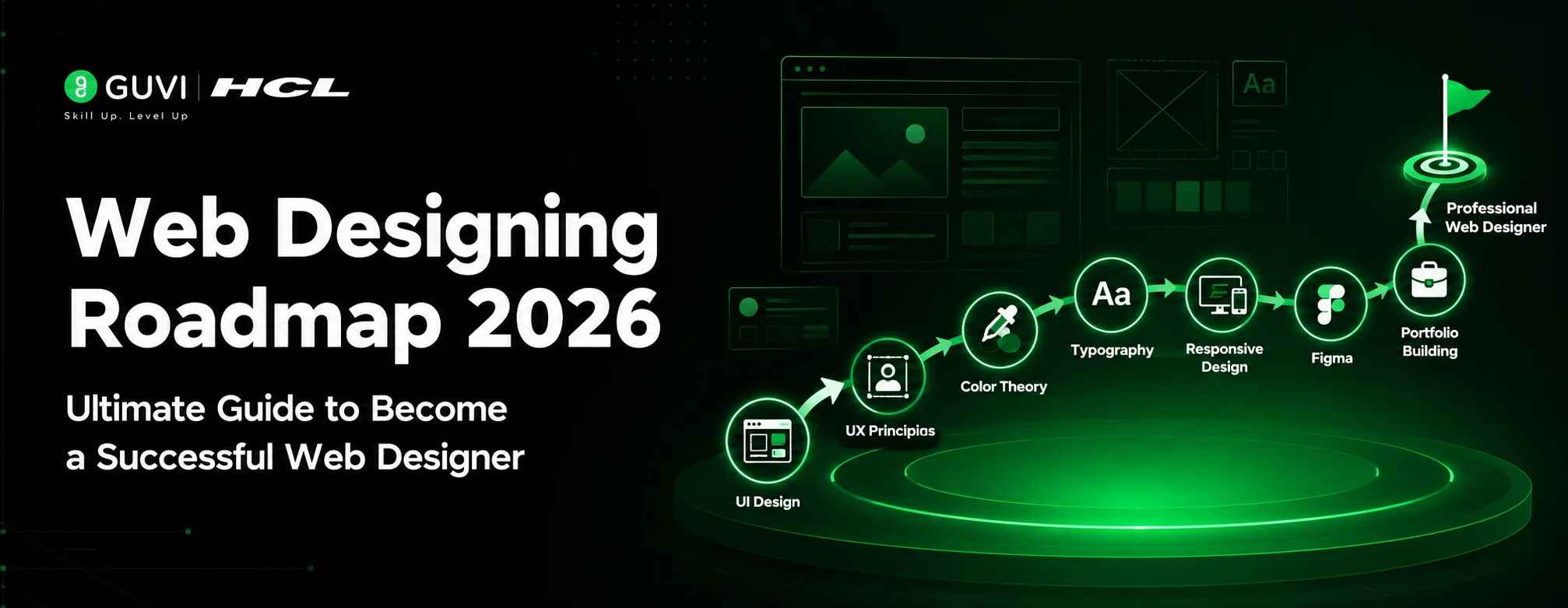
Web Designing Roadmap 2026: Best Guide to Become a Successful Web Designer
Jul 07, 2026 5 Min Read 1500 Views
(Last Updated)
Are you someone who loves web designing but feels confused about where to start because of growing competition, AI tools, and changing industry trends?
Then you have landed in the perfect place. This Web Designing Roadmap is a complete beginner-friendly guide to learning modern web design, building real-world projects, and becoming a job-ready web designer in 2026.
Today, web designing is not just about creating simple desktop websites. Businesses now expect websites to be:
- Mobile-friendly
- Fast and responsive
- Visually attractive
- Easy to use
In fact, 94% of first impressions are design-related, and 75% of a website’s credibility depends on its design.
Even with AI tools, creativity, responsive design, and user experience still remain the foundation of successful web designing. This roadmap also covers real-world projects and client expectations.
Table of contents
- TL;DR Summary
- What Is Web Designing?
- Why is Web Designing a Smart Career Choice in 2026?
- Step by Step Web Designing Roadmap for Beginner
- Step 1: Understand How Websites Actually Work
- Step 2: Learn the Core Skills Required for Web Designing
- Step 3: UI/UX & Design Thinking (Practical Way)
- Step 4: Learn Industry Design Tools
- Step 5: Follow Modern Web Design Trends
- Step 6: Build Real-World Projects
- Step 7: Create Your Portfolio and Resume
- Start Earning With Web Designing
- What are the opportunities You Can Explore?
- Web Designing Salary in India (2026)
- Sources: Ambition Box ,Glassdoor
- Train Yourself for the Real World
- Recommended Courses
- Conclusion
- FAQS
- Is web designing a good career in 2026?
- How to Become a Web Designer?
- Which tool is best for beginners in web designing?
- Is Figma enough for web designing?
- What projects should beginners build in web designing?
- Is web designing and web development the same?
- Can I become a web designer without a degree?
- How long does it take to learn web designing?
- Does web designing require coding?
- What is responsive web design?
- What is the salary of a web designer in India?
- Can web designers work remotely?
TL;DR Summary
A Web Designing Roadmap in 2026 starts with understanding how websites work, learning HTML, CSS, and basic JavaScript, followed by UI/UX design, responsive layouts, modern design tools like Figma, and real-world projects to become a job-ready web designer.
What Is Web Designing?
Web designing is the digital design that determines the look and feel of a website. It includes:
- Layouts
- Colors
- Fonts
- User experience
- Think of it like landing on a blogging website.The way articles are arranged, how easily you navigate pages, the readability, colors, buttons, and mobile experience are all part of web designing.
Before we dive into becoming a web designer, let’s quickly clear up one of the biggest beginner confusions: web designing and web development are not the same.

[In-article image 1: The infographic should depict the same title as in the reference picture and also the illustration similar to the one below]
Why is Web Designing a Smart Career Choice in 2026?
Web designing continues to be one of the most in-demand creative tech careers
- Businesses are rapidly moving online
- Mobile-first websites are now a priority
- Companies focus heavily on user experience and design
- Websites require regular updates and redesigns
- From startups to local shops, companies are actively investing in websites.
Fun fact: Many people start thinking about their website name, logo, and design even before launching their actual business. That’s how important a strong online presence has become today.
Step by Step Web Designing Roadmap for Beginner
Step 1: Understand How Websites Actually Work
As the first step in this Web Designing Roadmap, let’s go behind the scenes and understand how websites actually work.
Think of it like understanding a house structure before decorating it.
Real-world example:
Quick Task: Open your favorite website and observe its layout, navigation, mobile view, and overall user experience to start thinking like a web designer.
Step 2: Learn the Core Skills Required for Web Designing
- HTML Builds the structure of a webpage using elements like headings, forms, images, and sections.
- CSS Adds style and design including colors, spacing, layouts, fonts, and responsiveness.
10 Websites to See Real-World CSS Designs for Inspiration
- JavaScript adds interactivity like buttons, menus, popups, and dynamic actions.
- Responsive design ensures websites adapt smoothly to mobile, tablet, and desktop screens.
Quick Note: Mobile First Design
Today, most users browse websites on mobile devices, which is why mobile first design has become an important part of modern web designing.
Tools: Figma, Google Stitch, Chrome DevTools, CSS Media Queries
Design Mobile App UI with Google Stitch: The Complete Guide
Focus on creating responsive and mobile friendly layouts from the beginning.
Step 3: UI/UX & Design Thinking (Practical Way)
- UI vs UX (Real Examples) :UI is how a website looks, UX is how it feels to use.
Example Instagram UI includes buttons, colors, and layout. UX is smooth scrolling, easy navigation, and simple posting.
- Wireframing (Quick Sketching) Wireframing is creating a basic layout of a page before designing it.
Example drawing a simple login page with fields and a login button before using tools like Figma.
- User Flow (Journey Design): User flow is the step by step path a user follows inside an app or website.
Example Home page → Product page → Cart → Payment in Amazon.
- Color Theory (Smart Use) : Color theory is using colors in a way that creates meaning and emotion in design.
Example blue is used for trust in banking apps and red is used for offers or sale buttons.
- Typography (Clean Design) :Typography is the way text is styled and arranged to improve readability.
Example using clean fonts like Inter or Roboto for better website reading experience.
- User-Focused Layouts : User-focused layouts are designs made to make websites easy and smooth for users, especially on mobile.
Example mobile first layout with big buttons and simple navigation.
Consider reading: Top 10 UI/UX Project Ideas for Beginners
Step 4: Learn Industry Design Tools
| Tool | Best For | Common Use Case |
| Figma | UI/UX design, web design, collaboration | Designing websites, apps, and prototypes |
| Canva | Quick graphics and visual content | Social media posts and marketing creatives |
| Adobe XD | UI prototyping and wireframing | Creating interactive design flows |
| Photoshop | Advanced image editing | Photo editing and graphic enhancement |
Also read: Turn a Figma Landing Page into a Live Website
- A few years ago, minimal websites were the biggest trend, but modern web designing is becoming more bold, creative, and experimental.
- Today, everything from dark mode UI and retro styles to heavy visuals, animations, and expressive layouts is trending in the web designing industry.
Step 5: Follow Modern Web Design Trends
This web designing roadmap is not just a random learning path. If you follow it consistently and build projects along the way, it can genuinely help you become a skilled web designer.
| Pro Tip: If you want to get hired faster as a web designer, keep up with the latest trends and modern design styles, as it helps you stay industry-ready and ahead of the competition. |

Step 6: Build Real-World Projects
Start building projects along with your web designing journey because practical experience is what truly helps you grow faster as a designer
What are the Projects You Should Build?
- Portfolio Website – Showcase your skills, projects, and resume
- Business Website – Create a modern website for a company or startup
- E commerce Layout – Design product pages, shopping sections, and checkout UI
- Blogging Website – Build a clean and responsive blog interface
- Landing Pages – Create high converting pages for products or services
The more real world projects you build, the more confident and industry ready you become as a web designer.
Step 7: Create Your Portfolio and Resume
What You Should Do:
- Create a strong personal portfolio website
- Showcase your best projects and live work
- Optimize your LinkedIn and resume for web designing roles
| Do’s | Don’ts |
| Showcase real projects with live links | Add copied or incomplete projects |
| Keep the portfolio clean and responsive | Use confusing or cluttered layouts |
| Highlight your best work first | Ignore mobile friendly design |
Start Earning With Web Designing
If you genuinely follow this web designing roadmap, practice consistently, and build real projects, you can start earning through freelancing, internships, and client work even as a beginner.
What are the opportunities You Can Explore?
- Freelance Web Designer
- Web Designer
- UI Designer
- Frontend Designer
- WordPress Designer
Many beginners start earning through small business websites, landing pages, portfolio websites, and freelance UI design projects.
Best Websites For Finding Freelance Jobs in 2026
Web Designing Salary in India (2026)
| Role | Average Fresher Salary in India |
| Web Designer | ₹3 – ₹5 LPA |
| UI Designer | ₹4 – ₹7 LPA |
| Frontend Designer | ₹4 – ₹8 LPA |
| WordPress Designer | ₹2.5 – ₹5 LPA |
| Freelance Web Designer | Depends on projects and clients |
Sources: Ambition Box ,Glassdoor
Train Yourself for the Real World
- Start your web designing journey with structured learning, real-world projects, and practical skills that can help you become job-ready faster.
- Take up the HCL GUVI Courses for Smart learning.
Recommended Courses
Conclusion
This web designing roadmap covered everything from web design basics and Figma to responsive design, portfolios, projects, and modern design trends.
It is designed to help beginners understand what to learn and how to gradually become industry ready.
With smart work, consistency, and regular practice through real-world projects, you can steadily improve your skills and move closer to becoming a professional web designer.
FAQS
Is web designing a good career in 2026?
Yes, web designing continues to be a strong career option because businesses, startups, and brands constantly need modern and user friendly websites.
How to Become a Web Designer?
To become a web designer, start by learning HTML, CSS, and JavaScript, then understand UI/UX design principles and tools like Figma. Practice by creating real website projects, build a strong portfolio, and stay updated with modern design trends and responsive design techniques.
Which tool is best for beginners in web designing?
Figma is one of the best tools for beginners because it is widely used for UI/UX design, wireframing, and website prototyping.
Is Figma enough for web designing?
Yes, mastering Figma can take you very far in web designing because many startups and product companies use it for modern design workflows.
What projects should beginners build in web designing?
Beginners can start with portfolio websites, landing pages, business websites, blogging websites, and responsive UI layouts.
Is web designing and web development the same?
No, web designing mainly focuses on the visual appearance, layout, and user experience of a website, while web development focuses on building the functionality and backend systems of the website.
Can I become a web designer without a degree?
Yes, many web designers learn through online courses, practice projects, and portfolios instead of traditional degrees.
How long does it take to learn web designing?
With consistent practice, beginners can learn web designing fundamentals within 4 to 6 months and start building real projects.
Does web designing require coding?
Basic coding knowledge is important in web designing, especially HTML, CSS, and simple JavaScript for interactive websites.
What is responsive web design?
Responsive web design ensures a website works properly on mobiles, tablets, laptops, and desktops.
What is the salary of a web designer in India?
Beginner web designers in India can earn around ₹3 LPA to ₹6 LPA, while experienced designers and freelancers can earn much more depending on skills and projects.
Can web designers work remotely?
Yes, web designing is one of the best remote-friendly careers with opportunities in freelancing, startups, agencies, and global companies.
Success Stories

About the Author
Reemsha Khan
Always been a storyteller at heart. Now, I turn complex topics into simple, easy-to-understand stories through content. Hope you find it helpful.
View all posts by Reemsha Khan
Connect with me @










Did you enjoy this article?