


Artificial Intelligence and Machine Learning Articles
AI/ML Skills Gap 2026: Why Companies Can't Find Job-Ready Talent
20 AI/ML Interview Questions Recruiters Can Use Without a Tech Background - Best Guide
How Industry-Backed AI/ML Bootcamps Are Changing the AI/ML Hiring Pipeline - Best Guide 2026
From IT Support to AI Engineer: A Realistic Career Switch Guide 2026


Get In Touch For Details! Request More Information
Weights & Biases Tutorial: A Practical Guide for Machine Learning Engineers
Sep 17, 2026 5 Min Read 464 Views
(Last Updated)
Machine learning experiments can become difficult to manage very quickly. Models are trained with different datasets. Hyperparameters keep changing. Training metrics are stored in notebooks, spreadsheets, screenshots, or local files. After a few experiments, it becomes hard to remember which model performed best and why.
Weights & Biases solves this problem by giving machine learning teams a structured way to track experiments, compare model runs, version datasets, log artifacts, monitor metrics, and manage model development workflows.
This Weights & Biases tutorial explains what W&B is, why it is used, how to install it, how to track experiments, how to log metrics, how to use artifacts, how to run sweeps, and how to manage model outputs. It is written for beginners who understand basic Python, machine learning, training loops, and model evaluation.
Table of contents
- TL;DR
- What is Weights & Biases?
- Why is Weights & Biases Used?
- Key Benefits
- Common Use Cases
- Weights & Biases Architecture
- Main Components
- Weights & Biases Tutorial: Step-by-Step Guide
- Install Weights & Biases
- Log in to W&B
- Initialize a W&B Run
- Log Training Metrics
- Track Hyperparameters
- Log Model Files with Artifacts
- Log Predictions with W&B Tables
- Run Hyperparameter Sweeps
- Compare Experiments
- Create Reports
- Use Model Registry
- Best Practices for Using Weights & Biases
- Use Clear Project and Run Names
- Log Only Relevant Metrics
- Store Hyperparameters in Config
- Use Artifacts for Model and Dataset Versioning
- Compare Runs Before Selecting a Model
- Conclusion
- FAQs
- What is Weights & Biases in simple words?
- Is Weights & Biases an MLOps tool?
- What is a run in Weights & Biases?
- What are W&B artifacts used for?
- Can beginners use Weights & Biases?
TL;DR
- Weights & Biases is an MLOps platform used for experiment tracking and model management.
- It helps teams log metrics, hyperparameters, charts, datasets, predictions, and model files.
- A W&B run represents one machine learning experiment.
- Data scientists use W&B for model comparison, reproducibility, hyperparameter tuning, and collaboration.
- Key features include runs, dashboards, artifacts, tables, sweeps, reports, and model registry.
- W&B works with Python, PyTorch, TensorFlow, Keras, Hugging Face, Scikit-learn, and other ML tools.
What is Weights & Biases?

Weights & Biases, also called W&B, is a machine learning platform used to track, visualize, compare, and manage ML experiments. It records training metrics, model configurations, system usage, datasets, model files, and experiment outputs in one dashboard.
A machine learning project may have hundreds of experiments. Each experiment may use a different learning rate, batch size, optimizer, dataset version, or model architecture. W&B helps teams understand which run produced the best result and what settings were used. At a basic level, W&B connects your Python training script with an online or private workspace. Once connected, it automatically stores training information so teams can review results later.
Why is Weights & Biases Used?
Weights & Biases is used because machine learning development needs traceability. A model accuracy number is not enough. Teams need to know the dataset, code version, training settings, loss curve, evaluation metric, and output files behind that number.
Key Benefits
- Tracks experiments in real time
- Stores hyperparameters and metrics
- Compares multiple model runs
- Logs datasets and model artifacts
- Supports hyperparameter sweeps
- Helps debug training performance
- Improves ML reproducibility
- Supports collaboration across teams
- Creates reports for model review
Common Use Cases
- Image classification experiments
- NLP model fine-tuning
- LLM evaluation workflows
- Computer vision model tracking
- Hyperparameter optimization
- Dataset and model versioning
- MLOps pipeline monitoring
- Model registry and release workflows
- Research experiment documentation
Weights & Biases Architecture
Weights & Biases has a few important building blocks. A run stores one experiment. A project groups related runs. A dashboard visualizes metrics and charts. Artifacts version datasets, models, and outputs. Sweeps automate hyperparameter search.
Main Components
- Run: Represents one experiment or training job.
- Project: Groups related ML experiments.
- Config: Stores hyperparameters and training settings.
- Metrics: Stores values such as loss, accuracy, F1 score, or RMSE.
- Artifacts: Version datasets, models, checkpoints, and output files.
- Tables: Store predictions, labels, images, text, and structured evaluation data.
- Sweeps: Run automated hyperparameter tuning.
- Reports: Convert experiment results into shareable summaries.
- Registry: Helps organize model versions for review and production use.
Weights & Biases Tutorial: Step-by-Step Guide
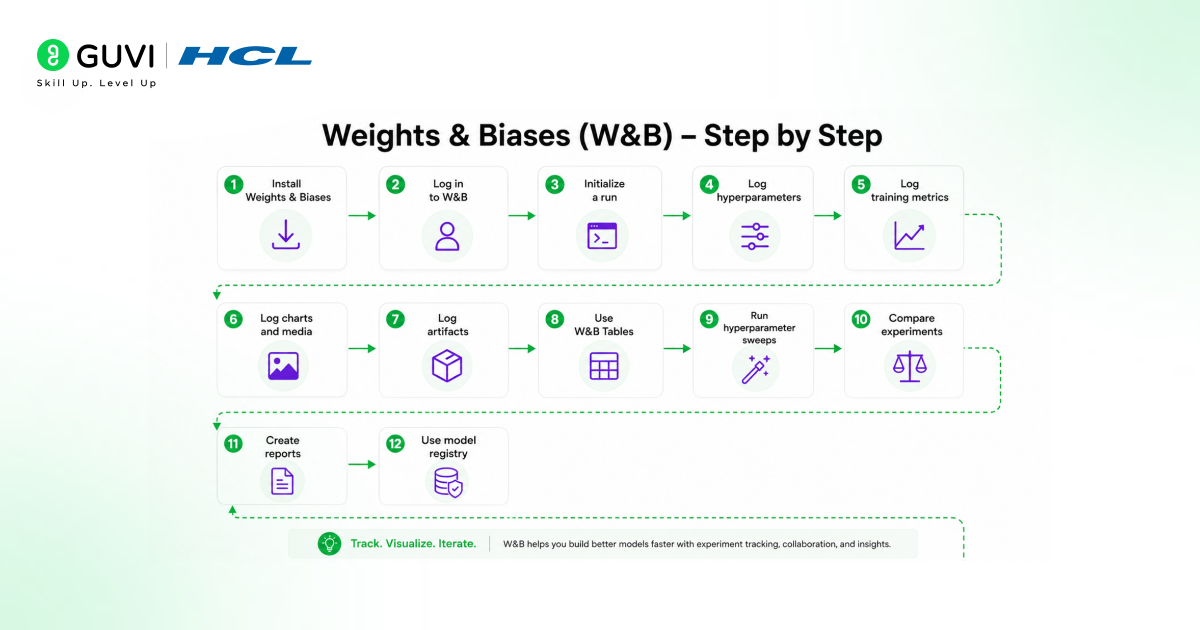
1. Install Weights & Biases
Weights & Biases can be installed with pip.
pip install wandbAfter installation, import the package in your Python script or notebook.
import wandbThis allows your training code to connect with the W&B workspace.
2. Log in to W&B
Before tracking experiments, log in with your W&B account.
wandb.login()This connects your local environment with your W&B account. In team environments, the same setup can be used inside notebooks, training servers, or ML pipelines.
3. Initialize a W&B Run
A run is the core unit of experiment tracking in W&B. Each training job should usually start with wandb.init().
import wandb

run = wandb.init(

    project="image-classification-demo",

    name="baseline-cnn",

    config={

        "learning_rate": 0.001,

        "epochs": 10,

        "batch_size": 32,

        "optimizer": "adam"

    }

)
The project name groups related experiments. The run name helps identify a specific experiment. The config stores training settings.
Build industry-ready AI and machine learning skills with HCL GUVI’s Artificial Intelligence and Machine Learning Program. Learn Python, SQL, ML, MLOps, Generative AI, Agentic AI, and real-world model development through live online classes, Intel-designed curriculum, 1:1 doubt sessions, industry-grade projects, capstone learning, and placement assistance with 1000+ hiring partners.
4. Log Training Metrics
Metrics can be logged during training with wandb.log().
for epoch in range(10):

    train_loss = 0.45 - epoch * 0.02

    val_accuracy = 0.70 + epoch * 0.02

    wandb.log({

        "epoch": epoch,

        "train_loss": train_loss,

        "val_accuracy": val_accuracy

    })
This creates real-time charts for loss, accuracy, and other values. Data scientists can compare curves across multiple runs instead of manually checking notebook outputs.
5. Track Hyperparameters
Hyperparameters are stored inside the run config. This helps teams reproduce results later.
config = wandb.config

learning_rate = config.learning_rate

epochs = config.epochs

batch_size = config.batch_size
This is useful when several experiments use different learning rates, optimizers, dropout values, or model sizes.
Build strong foundations in machine learning and MLOps with HCL GUVI’s Machine Learning Course. Learn core concepts like model building, training workflows, data handling, and real-world ML applications through structured, hands-on training designed for aspiring ML engineers.

6. Log Model Files with Artifacts
Artifacts help version files used or produced by ML experiments. These files may include datasets, model checkpoints, tokenizers, feature files, or prediction outputs.
artifact = wandb.Artifact(

    name="cnn-model",

    type="model"

)

artifact.add_file("model.pt")

wandb.log_artifact(artifact)
Artifacts make model tracking more reliable because each output can be linked to the run that created it.
7. Log Predictions with W&B Tables
W&B Tables help inspect predictions, labels, scores, images, and text outputs.
table = wandb.Table(

    columns=["image_id", "actual_label", "predicted_label", "confidence"]

)

table.add_data("img_001", "cat", "cat", 0.94)

table.add_data("img_002", "dog", "cat", 0.61)

wandb.log({"prediction_table": table})
Tables are useful for error analysis. A team can quickly find misclassified examples and understand where the model fails.
8. Run Hyperparameter Sweeps
Sweeps help automate hyperparameter tuning. Instead of manually running many experiments, teams define a search space.
sweep_config = {

    "method": "random",

    "metric": {

        "name": "val_accuracy",

        "goal": "maximize"

    },

    "parameters": {

        "learning_rate": {

            "values": [0.001, 0.0005, 0.0001]

        },

        "batch_size": {

            "values": [16, 32, 64]

        }

    }

}

sweep_id = wandb.sweep(

    sweep_config,

    project="image-classification-demo"

)

A sweep agent can then run experiments using different combinations.

wandb.agent(sweep_id, function=train_model, count=5)
Sweeps are useful for improving model performance without manual experiment tracking.
9. Compare Experiments
The W&B dashboard allows teams to compare runs by accuracy, loss, runtime, hyperparameters, and system metrics. This helps answer practical questions.
- Which model performed best?
- Which learning rate worked better?
- Which run overfitted?
- Which dataset version was used?
- Which checkpoint should be promoted?
This makes W&B useful for both research teams and production machine learning teams.
10. Create Reports
Reports help turn experiment results into shareable documentation. Teams can include charts, metrics, notes, tables, and run comparisons in one place.
Reports are useful for model review, stakeholder updates, research summaries, and internal technical documentation.
11. Use Model Registry
The model registry helps organize model versions across development, review, staging, and production workflows. Teams can track which model version is approved and which artifact belongs to each release.
This is important in MLOps because production models need clear ownership, version history, and reproducible training records.
Best Practices for Using Weights & Biases
1. Use Clear Project and Run Names
Create meaningful project names and run names so every experiment is easy to identify later. A name like resnet50-lr-0.001-batch32 is more useful than test-run-1.
2. Log Only Relevant Metrics
Track important metrics such as training loss, validation accuracy, F1 score, precision, recall, and inference latency. Avoid logging too many unnecessary values because they can make dashboards harder to read.
3. Store Hyperparameters in Config
Save key training settings inside wandb.config, including learning rate, batch size, optimizer, number of epochs, model type, and dataset version. This makes every experiment easier to reproduce.
4. Use Artifacts for Model and Dataset Versioning
Log model files, checkpoints, datasets, and prediction outputs as W&B Artifacts. This helps teams connect every model result with the exact files used during training.
5. Compare Runs Before Selecting a Model
Use the W&B dashboard to compare experiments before choosing the best model. Check validation scores, loss curves, overfitting signs, runtime, and hyperparameters before promoting any model.
Conclusion
A good Weights & Biases tutorial should not stop at logging accuracy. The real value comes from tracking the full machine learning workflow. W&B helps teams connect training settings, metrics, datasets, model files, predictions, and reports in one system.
For machine learning engineers, data scientists, AI researchers, and MLOps teams, Weights & Biases is a practical tool for improving experiment visibility, reproducibility, and model development speed.
FAQs
What is Weights & Biases in simple words?
Weights & Biases is a tool that helps machine learning teams track experiments, log metrics, compare models, version files, and manage model development workflows.
Is Weights & Biases an MLOps tool?
Yes. Weights & Biases is widely used as an MLOps tool for experiment tracking, model versioning, hyperparameter tuning, collaboration, and model management.
What is a run in Weights & Biases?
A run is one machine learning experiment. It stores metrics, hyperparameters, logs, charts, files, and outputs from a training or evaluation job.
What are W&B artifacts used for?
W&B artifacts are used to version datasets, model files, checkpoints, prediction outputs, and other files connected to machine learning experiments.
Can beginners use Weights & Biases?
Yes. Beginners can start with simple metric logging using Python. As they grow, they can use artifacts, tables, sweeps, reports, and model registry workflows.
Success Stories

About the Author
Vaishali
I'm a seasoned writer with four years of experience across technical, non-technical, and just about every genre or niche you can imagine. Adaptable and curious, I enjoy exploring new topics and making information engaging and easy to understand. Fueled by a steady stream of tea, I approach each project with creativity, reliability, and genuine enthusiasm for storytelling.
View all posts by Vaishali
Connect with me @









Did you enjoy this article?