


Data Engineering Articles
Apache Iceberg Tutorial: A Practical Guide for Data Engineers
12 Important Data Architect Roles and Responsibilities
Delta Lake Tutorial: A Practical Guide for Data Engineers
Azure Data Engineer Roadmap: A Step-by-Step Guide to Becoming an Azure Data Engineer


Get In Touch For Details! Request More Information
Mage AI Tutorial: A Practical Guide for Data Engineers
Oct 06, 2026 6 Min Read 887 Views
(Last Updated)
Data pipelines look simple at first. But as data grows, teams face failed runs, messy code, unclear steps, and missing logs. Mage AI solves this problem by giving data teams a cleaner way to build, run, monitor, and manage data pipelines.
Mage AI is an open-source data pipeline tool that combines a notebook-style development experience with modular pipeline blocks, scheduling, testing, and orchestration features. It turns scattered ETL scripts into structured, testable, repeatable workflows.
This Mage AI tutorial explains what the tool is, how it works, and how to build a basic pipeline using simple steps, ending with one complete, consolidated pipeline you can copy and run.
Table of contents
- TL;DR Summary
- What is Mage AI?
- Key Benefits of Mage AI
- Common Use Cases
- Main Components of Mage AI Architecture
- Mage AI Tutorial: Step-by-Step Guide
- Install Mage AI
- Start a Mage Project
- Start Mage AI with Docker
- Understand the Mage AI Interface
- Create a New Pipeline
- Add a Data Loader Block
- Load Data from a CSV File
- Add a Transformer Block
- Filter Data in Mage AI
- Add a Data Exporter Block
- Export Data to a Database
- Run the Pipeline
- Full Pipeline Example: Putting It All Together
- Add a Data Validation Test
- Use Pipeline Variables
- Schedule a Pipeline
- Monitor Pipeline Runs
- Organize Your Projects
- Conclusion
- FAQs
- Is Mage AI used for ETL?
- Is Mage AI better than Airflow?
- Does Mage AI need Docker?
- Can Mage AI be used with Python and SQL?
TL;DR Summary
- What it is: an open-source data pipeline tool for building and orchestrating data workflows
- Languages supported: Python, SQL, R, batch pipelines, streaming pipelines, and modular pipeline blocks
- Where it’s used: ETL, ELT, API ingestion, data transformation, warehouse loading, and machine learning workflows
- How a pipeline is built: usually with data loader, transformer, and data exporter blocks
- What you get: a visual interface where teams can write code, preview outputs, test blocks, and monitor pipeline runs
What is Mage AI?

Mage AI is an open-source data pipeline tool used to build, run, and manage data workflows. It helps data engineers create pipelines using Python, SQL, or R inside a visual development environment.
A Mage AI pipeline is made of blocks. Each block performs one specific task, such as loading data from an API, cleaning columns, filtering records, joining datasets, or exporting data to a database. These blocks are connected together to form a complete data pipeline.
Key Benefits of Mage AI
- Supports Python, SQL, and R for pipeline development
- Uses modular blocks for cleaner pipeline design
- Provides a notebook-style interface for faster development
- Allows data preview after each pipeline block
- Supports manual runs and scheduled pipeline triggers
- Helps teams debug failed pipeline steps with logs
- Works with APIs, databases, warehouses, and cloud storage
- Supports batch, streaming, and transformation workflows
- Makes pipeline code easier to organize and reuse
Common Use Cases
- ETL and ELT pipelines
- API data ingestion
- Database-to-warehouse pipelines
- Data cleaning and transformation workflows
- Customer analytics pipelines
- Marketing and sales data pipelines
- Machine learning feature preparation
- Data quality checks
- Warehouse loading jobs
- Scheduled reporting workflows
Main Components of Mage AI Architecture
- Project: A workspace that contains pipelines, configuration files, metadata, and reusable code.
- Pipeline: A workflow made of connected blocks that run in a defined order.
- Data Loader Block: Loads data from a source such as an API, file, database, or warehouse.
- Transformer Block: Cleans, filters, joins, reshapes, or enriches the loaded data.
- Data Exporter Block: Sends processed data to a target such as a database, warehouse, file, or storage system.
- Trigger: Defines when a pipeline should run manually, hourly, daily, weekly, monthly, or through another schedule.
- Logs: Show execution details, errors, warnings, and debugging information.
- Variables: Store configurable values used inside pipelines.
- Secrets: Help manage sensitive values such as passwords, tokens, and database credentials.
Mage AI Tutorial: Step-by-Step Guide
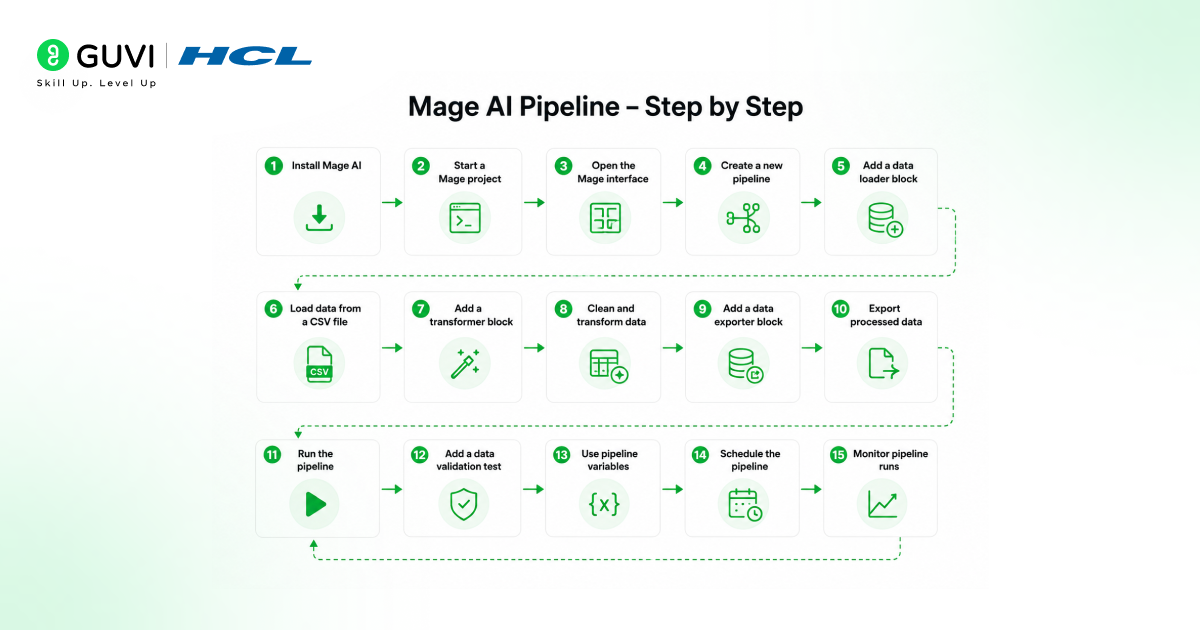
1. Install Mage AI
Mage AI can be installed using Docker, pip, or conda. Docker is commonly preferred because it creates a clean containerized environment and reduces dependency issues.
To install with pip, use:
pip install mage-aiAfter installation, check whether it’s available:
mage versionThis confirms it’s installed in the local Python environment. For many beginners, Docker is a cleaner option because it avoids conflicts with local Python packages. Data engineers working in teams may also prefer Docker because the same environment can be shared across systems.
2. Start a Mage Project
A Mage project is the main workspace where pipelines, blocks, metadata, and configuration files are stored.
Create a new Mage project using:
mage start mage_tutorial_projectThis command starts a new Mage project named mage_tutorial_project.
After the server starts, Mage usually runs on a local browser interface. The common local URL is:
http://localhost:6789Open this URL in the browser to access the interface.
3. Start Mage AI with Docker
Docker is useful when you want it to run in an isolated environment.
A basic Docker command looks like this:
docker run -it -p 6789:6789 -v $(pwd):/home/src mageai/mageai \
  /app/run_app.sh mage start mage_tutorial_project
This command starts Mage AI inside a Docker container and maps the local project folder to the container. The port 6789 allows the interface to open in the browser.
On Windows, Docker commands may need small path changes depending on the terminal being used.
Build industry-ready AI and machine learning skills with HCL GUVI’s Artificial Intelligence and Machine Learning Program. Learn Python, SQL, ML, MLOps, Generative AI, Agentic AI, and real-world data workflow concepts through live online classes and Intel-designed curriculum.
The program also includes 1:1 doubt sessions, industry-grade projects, capstone learning, and placement assistance with 1000+ hiring partners.
4. Understand the Mage AI Interface
After it opens in the browser, you will see a workspace for managing projects and pipelines. The interface helps data engineers create pipeline blocks, write code, preview results, run workflows, and check logs.
The main sections include:
- Pipelines for creating and managing workflows
- Blocks for writing pipeline logic
- Triggers for scheduling pipeline runs
- Runs for checking pipeline execution history
- Files for viewing project code
- Logs for debugging failed runs
This makes it useful for both learning and production pipeline development because the workflow is visible at every step.
5. Create a New Pipeline
A pipeline is the complete data workflow. It may start with data loading, move into transformation, and end with exporting data.
In the interface, create a new pipeline and name it:
customer_spend_pipelineA simple pipeline may follow this flow:
- Load customer data
- Clean column names
- Filter invalid records
- Calculate customer spend category
- Export the final dataset
This structure makes the workflow easy to read and debug. We’ll build out every one of these blocks below, then assemble them into one complete pipeline at the end of this tutorial.
6. Add a Data Loader Block
A data loader block pulls data from a source. The source can be a CSV file, API, database, cloud bucket, or warehouse. Create a data loader block named:
load_customer_dataUse this example Python code:
import pandas as pd

@data_loader
def load_data(*args, **kwargs):
    data = {
        "customer_id": [1, 2, 3, 4, 5],
        "name": ["Aarav", "Naina", "Rohan", "Meera", "Kabir"],
        "city": ["Delhi", "Mumbai", "Bengaluru", "Pune", "Hyderabad"],
        "spend": [2500, 4200, 3100, 3900, 2800]
    }
    df = pd.DataFrame(data)
    return df
This block creates a small customer dataset and returns it as a Pandas DataFrame. In real projects, this block may read from an API, database, CSV file, Google Sheets, Amazon S3, or a data warehouse.
7. Load Data from a CSV File
Many data engineering workflows begin with CSV files. Data can be read using Pandas.
Example:
import pandas as pd

@data_loader
def load_data(*args, **kwargs):
    file_path = "data/customers.csv"
    df = pd.read_csv(file_path)
    return df
This code reads a CSV file and returns the data for the next pipeline block.
CSV-based pipelines are useful for internal reports, vendor files, marketing exports, finance datasets, and small batch ingestion jobs.
8. Add a Transformer Block
A transformer block changes the data. It may clean column names, remove missing values, create new columns, change data types, or apply business logic.
Create a transformer block named transform_customer_data. Use this example:
@transformer
def transform(df, *args, **kwargs):
    df.columns = [column.lower().strip().replace(" ", "_") for column in df.columns]
    df = df.dropna(subset=["customer_id", "spend"])
    df["spend_category"] = df["spend"].apply(
        lambda value: "High" if value >= 3500 else "Standard"
    )
    return df
This block cleans column names, removes incomplete records, and creates a spend_category column.
Transformer blocks are useful because they keep business logic separate from extraction and loading logic. This makes the pipeline easier to test and maintain.
9. Filter Data in Mage AI
Filtering is common in data pipelines. Teams may need to remove invalid records, test rows, duplicate values, or low-quality data.
Example:
@transformer
def transform(df, *args, **kwargs):
    df = df[df["spend"] > 2500]
    return df
This block keeps only customers whose spend is greater than 2500. Filtering is helpful in reporting pipelines, customer segmentation, transaction processing, and data quality workflows.

10. Add a Data Exporter Block
A data exporter block sends processed data to a destination. The destination can be a CSV file, database, warehouse, cloud storage, or analytics system.
Create a data exporter block named export_customer_data. Use this example:
@data_exporter
def export_data(df, *args, **kwargs):
    output_path = "output/customer_spend_output.csv"
    df.to_csv(output_path, index=False)
This block exports the transformed dataset as a CSV file. In production, a data exporter block may write data into PostgreSQL, BigQuery, Snowflake, Redshift, S3, or another storage system.
11. Export Data to a Database
Data engineers often use Mage AI to load cleaned data into databases or warehouses.
A simple PostgreSQL export can look like this:
from sqlalchemy import create_engine

@data_exporter
def export_data(df, *args, **kwargs):
    engine = create_engine("postgresql://user:password@localhost:5432/analytics")
    df.to_sql(
        "customer_spend",
        engine,
        if_exists="replace",
        index=False
    )
This code writes the final DataFrame into a PostgreSQL table named customer_spend. Production teams should avoid hardcoding usernames and passwords. Secrets or environment variables should be used for database credentials.
12. Run the Pipeline
After all blocks are created, run the pipeline from the interface.
The pipeline will execute in order:
- Data loader block runs first
- Transformer block receives the loaded data
- Data exporter block saves the final output
Mage shows the status of each block. If a block fails, logs help identify the error. This is one of the main advantages of the tool, data engineers do not have to guess which script failed, the interface shows the failing step clearly.
Full Pipeline Example: Putting It All Together
Steps 6 through 12 built one pipeline incrementally, block by block. Here’s that same customer_spend_pipeline shown as a single, complete example, exactly what you’d have across your three block files once every step above is done.
load_customer_data (data loader block):
import pandas as pd

@data_loader
def load_data(*args, **kwargs):
    data = {
        "customer_id": [1, 2, 3, 4, 5],
        "name": ["Aarav", "Naina", "Rohan", "Meera", "Kabir"],
        "city": ["Delhi", "Mumbai", "Bengaluru", "Pune", "Hyderabad"],
        "spend": [2500, 4200, 3100, 3900, 2800]
    }
    return pd.DataFrame(data)
transform_customer_data (transformer block):
@transformer
def transform(df, *args, **kwargs):
    df.columns = [column.lower().strip().replace(" ", "_") for column in df.columns]
    df = df.dropna(subset=["customer_id", "spend"])
    df = df[df["spend"] > 2500]
    df["spend_category"] = df["spend"].apply(
        lambda value: "High" if value >= 3500 else "Standard"
    )
    return df
export_customer_data (data exporter block):
@data_exporter
def export_data(df, *args, **kwargs):
    output_path = "output/customer_spend_output.csv"
    df.to_csv(output_path, index=False)
Connect these three blocks in that order inside a pipeline named customer_spend_pipeline.
Running it end-to-end loads the sample customer data, cleans and filters it, tags each row’s spend category, and writes the result to output/customer_spend_output.csv, a complete, working ETL pipeline in under 25 lines of code across three files.
13. Add a Data Validation Test
Data validation helps catch bad data before it reaches reports or warehouses. Test logic can live inside blocks.
Example:
@test
def test_output(df, *args) -> None:
    assert df is not None, "Output should not be None"
    assert len(df) > 0, "Output should contain records"
    assert "customer_id" in df.columns, "customer_id column is missing"
    assert "spend" in df.columns, "spend column is missing"
This test checks whether the output exists, contains records, and includes important columns.
Validation is useful for preventing silent failures in analytics pipelines. A pipeline should fail early when critical data is missing.
14. Use Pipeline Variables
Pipeline variables allow teams to make workflows more flexible. Instead of hardcoding values, data engineers can pass parameters into the pipeline.
Example:
@transformer
def transform(df, *args, **kwargs):
    min_spend = kwargs.get("min_spend", 3000)
    df = df[df["spend"] >= min_spend]
    return df
This code filters records based on a configurable min_spend value.
Variables are useful when the same pipeline needs to run for different dates, regions, customers, files, or business rules.
15. Schedule a Pipeline
A pipeline can be run manually during development. Production workflows usually need a schedule.
Triggers support scheduled pipeline runs. A trigger can run a pipeline hourly, daily, weekly, monthly, or based on another configuration.
Common examples include:
- Daily sales ingestion at midnight
- Hourly API sync for product data
- Weekly customer segmentation refresh
- Monthly finance report preparation
- Continuous processing for active data workflows
Scheduling helps teams move from manual execution to automated production workflows.
16. Monitor Pipeline Runs
Monitoring is important because pipelines can fail due to API downtime, schema changes, missing files, expired credentials, or database issues.
Run history and logs are available for pipeline execution. Data engineers can check:
- Which pipeline ran
- When it started
- When it ended
- Which block failed
- What error message appeared
- How long each block took
This makes debugging easier and helps teams improve pipeline reliability over time.
17. Organize Your Projects
A clean project is easier to maintain. Teams should keep block names clear, avoid large blocks, and separate extraction, transformation, and loading logic.
Good naming examples include:
load_orders_from_api
clean_customer_records
calculate_monthly_revenue
export_orders_to_bigquery
Bad naming examples include:
block1
test_new
final_code
data_work
Clear naming helps other team members understand the pipeline without reading every line of code.
Conclusion
A good Mage AI tutorial should go beyond one basic pipeline. It should explain how the tool organizes workflows, uses blocks, supports testing, enables scheduling, and improves visibility.
For data engineers, it helps build ETL pipelines, ELT workflows, API ingestion jobs, warehouse loading pipelines, and ML data preparation flows.
Anyone in data engineering, analytics engineering, cloud platforms, or modern data stacks can benefit from learning Mage AI.
If you want to build this skill as part of a complete data engineer path rather than one tool in isolation, HCL GUVI’s Big Data Engineering Course covers Spark, Hadoop, ETL pipelines, cloud platforms, and data lakes through hands-on projects, the full toolkit this tutorial’s pipeline work sits inside.
FAQs
Is Mage AI used for ETL?
Yes, Mage AI is commonly used for ETL and ELT pipelines. It can extract data from sources, transform it using Python, SQL, or R, and load it into databases, warehouses, files, or cloud storage systems.
Is Mage AI better than Airflow?
Mage AI is easier for many beginners because it provides a visual interface, modular blocks, and live data previews. Airflow is more established for complex orchestration. The better choice depends on team size, workflow complexity, and existing infrastructure.
Does Mage AI need Docker?
No, Mage AI does not always need Docker. It can be installed using pip or conda. Docker is often preferred because it creates a cleaner setup and avoids local dependency issues.
Can Mage AI be used with Python and SQL?
Yes, Mage AI supports Python, SQL, and R. Data engineers can use these languages to build pipeline blocks for loading, transforming, testing, and exporting data.
Success Stories

About the Author
Jebasta
I translate the language of data into stories that anyone can understand. As a writer with a data science background, I simplify analytics, AI, and decision-making so beginners and enthusiasts can confidently explore the world of data.
View all posts by Jebasta
Connect with me @









Did you enjoy this article?