


Salesforce Articles
Top 10 Apex Interview Questions & Answers in Salesforce
Salesforce Trigger Interview Questions & Answers
Salesforce API: Integration and Automation Guide
What is Salesforce Architecture: Components, Layers & Workflow


Get In Touch For Details! Request More Information
Salesforce Admin Interview Questions and Answers for Success in 2026
Jul 09, 2026 4 Min Read 800 Views
(Last Updated)
Salesforce Admin interview questions typically focus on Salesforce basics, user management, security settings, workflow automation, reports, dashboards, validation rules, and real-world CRM problem-solving. Preparing for Salesforce Admin interviews requires both theoretical understanding and hands-on Salesforce platform experience. This guide covers the most commonly asked Salesforce Admin interview questions and answers for freshers and experienced professionals.
Table of contents
- What Does a Salesforce Admin Do?
- Why Prepare for Salesforce Admin Interviews?
- Salesforce Admin Interview Questions for Freshers
- What is Salesforce?
- What is a Salesforce Admin?
- What are Profiles in Salesforce?
- What is a Role in Salesforce?
- What is the difference between Roles and Profiles?
- What are Reports in Salesforce?
- What are Dashboards in Salesforce?
- What is Workflow in Salesforce?
- What is a Validation Rule?
- What is an Object in Salesforce?
- Salesforce Admin Interview Questions for Experienced Professionals
- What is the difference between Workflow and Process Builder?
- What is a Permission Set?
- What is Field-Level Security?
- What is a Sandbox in Salesforce?
- What is a Data Loader?
- Scenario-Based Salesforce Admin Interview Questions
- How would you restrict access to sensitive data?
- A user cannot see a record. How would you troubleshoot it?
- How would you automate email notifications in Salesforce?
- Common Salesforce Admin Tools & Features
- Tips to Crack Salesforce Admin Interviews
- Learn Salesforce Fundamentals
- Practice Hands-On in Salesforce
- Prepare Scenario-Based Questions
- Learn Salesforce Automation Tools
- Work on Real-World Projects
- Salesforce Admin Interview Preparation Framework
- Stage 1: Learn Salesforce Basics
- Stage 2: Understand Security & Permissions
- Stage 3: Learn Automation
- Stage 4: Practice Reports & Dashboards
- Stage 5: Prepare Real-World Scenarios
- Improve Your Salesforce Skills with HCL GUVI
- Conclusion
- FAQs
- What does a Salesforce Admin do?
- What are the most common Salesforce Admin interview questions?
- Is Salesforce Admin a good career?
- What skills are required for Salesforce Admin roles?
- How can freshers prepare for Salesforce Admin interviews?
- What tools do Salesforce Admins use?
- What is the difference between Roles and Profiles in Salesforce?
- Are Salesforce Admin interviews difficult?
- Do Salesforce Admin interview questions include scenario-based problems?
What Does a Salesforce Admin Do?
A Salesforce Administrator manages and customizes the Salesforce CRM platform to help organizations automate workflows, manage users, improve customer relationships, and optimize business processes.
A Salesforce Admin is responsible for:
- User management
- Data security
- Workflow automation
- Reports and dashboards
- Process optimization
- Data management
Salesforce Admins help businesses improve productivity, customer engagement, and operational efficiency using cloud-based CRM solutions.
According to IDC, Salesforce remained the World’s #1 CRM provider in 2024 with a 20.7% global CRM market share, leading all CRM vendors for the 12th consecutive year.
Why Prepare for Salesforce Admin Interviews?
Salesforce Admin interviews evaluate both technical knowledge and practical problem-solving abilities.
Interviewers typically assess:
- Salesforce platform understanding
- CRM concepts
- Security & permissions
- Workflow automation
- Reporting skills
- Business problem-solving
According to industry hiring trends, Salesforce professionals continue to remain in high demand as organizations increasingly adopt CRM and cloud-based technologies.
You can also explore:
Salesforce Admin Interview Questions for Freshers
1. What is Salesforce?
Salesforce is a cloud-based Customer Relationship Management (CRM) platform that helps businesses manage sales, customer service, marketing, and operational workflows efficiently.
It enables organizations to automate business processes, improve customer interactions, and manage data using cloud technology.
2. What is a Salesforce Admin?
A Salesforce Administrator is responsible for managing users, maintaining data, configuring security settings, generating reports, and automating workflows within the Salesforce platform.
Salesforce Admins customize Salesforce according to organizational requirements.
3. What are Profiles in Salesforce?
Profiles in Salesforce control user permissions and access settings.
Profiles determine:
- Object permissions
- Field-level access
- App visibility
- User privileges
Profiles help organizations maintain proper access control and security.
4. What is a Role in Salesforce?
Roles in Salesforce control record visibility through the role hierarchy.
The role hierarchy allows users to access records owned by users below them in the organizational structure.
5. What is the difference between Roles and Profiles?
| Feature | Profiles | Roles |
| Purpose | Control permissions | Control record visibility |
| Access Type | Functional access | Data access |
| Example | Object permissions | Hierarchy-based sharing |
6. What are Reports in Salesforce?
Reports in Salesforce are organized lists of records used to analyze business data and generate insights.
Organizations use reports to:
- Track sales performance
- Analyze KPIs
- Monitor customer activity
- Generate business insights
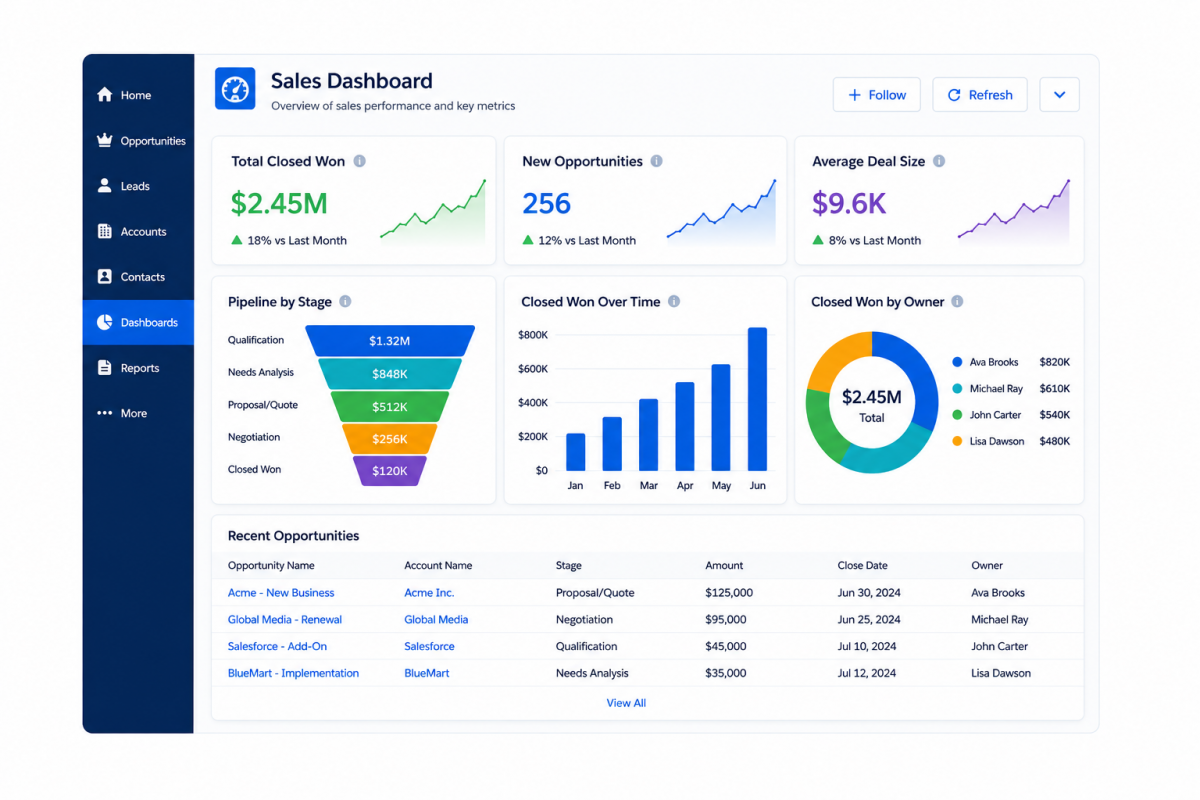
7. What are Dashboards in Salesforce?
Dashboards in Salesforce visually represent report data using charts, graphs, and tables.
Dashboards help organizations monitor performance metrics in real time.
8. What is Workflow in Salesforce?
Workflow in Salesforce is an automation tool used to automate standard internal business processes and repetitive tasks.
Workflow actions can include:
- Email alerts
- Field updates
- Task creation
- Outbound messages
9. What is a Validation Rule?
Validation Rules in Salesforce ensure that data entered into the system meets specific business conditions before records are saved.
Example:
A Validation Rule can prevent users from saving incomplete records.
10. What is an Object in Salesforce?
Objects in Salesforce are database tables used to store records and information.
Types of Salesforce Objects:
- Standard Objects
- Custom Objects
Examples of standard objects include:
- Accounts
- Contacts
- Opportunities
- Leads
Salesforce Admin Interview Questions for Experienced Professionals
11. What is the difference between Workflow and Process Builder?
| Feature | Workflow | Process Builder |
| Complexity | Simple automation | Advanced automation |
| Actions | Limited actions | Multiple actions |
| Logic Handling | Basic | Complex conditions |
Process Builder provides greater flexibility and automation capabilities compared to Workflow Rules.
12. What is a Permission Set?
Permission Sets in Salesforce provide additional permissions to users without changing their profiles.
Permission Sets help organizations grant temporary or specialized access efficiently.
13. What is Field-Level Security?
Field-Level Security in Salesforce controls a user’s access to specific fields within an object.
It helps organizations protect sensitive information and maintain data security.
14. What is a Sandbox in Salesforce?
A Sandbox in Salesforce is a testing environment used for development, testing, and training purposes without affecting live production data.
15. What is a Data Loader?
Data Loader is a Salesforce tool used to import, export, update, and delete large amounts of data efficiently.
It supports bulk data operations and data migration activities.
Salesforce estimates that its ecosystem in India could generate over 1.8 million new Salesforce jobs and $88.6 billion in new business revenue by 2028.
Scenario-Based Salesforce Admin Interview Questions
16. How would you restrict access to sensitive data?
Sensitive data in Salesforce can be protected using:
- Profiles
- Permission Sets
- Field-Level Security
- Sharing Rules
These Salesforce security features help organizations maintain secure access control.
17. A user cannot see a record. How would you troubleshoot it?
To troubleshoot Salesforce record visibility issues, you should verify:
- Profile permissions
- Role hierarchy
- Sharing settings
- Organization-wide defaults
- Record ownership
This structured troubleshooting process helps identify visibility-related problems efficiently.
18. How would you automate email notifications in Salesforce?
Email notifications in Salesforce can be automated using:
- Workflow Rules
- Process Builder
- Flow Automation
These Salesforce automation tools help improve operational efficiency and communication workflows.
Common Salesforce Admin Tools & Features
Salesforce Admins frequently work with:
- Reports & Dashboards
- Workflow Rules
- Process Builder
- Flow Builder
- Data Loader
- Validation Rules
- Security Settings
CRM and cloud-based automation platforms continue to grow rapidly as businesses increasingly adopt digital transformation strategies.

Tips to Crack Salesforce Admin Interviews
Preparing strategically can significantly improve your chances of clearing Salesforce Admin interviews successfully.
1. Learn Salesforce Fundamentals
Focus on:
- CRM basics
- Objects & fields
- Security settings
- Reports & dashboards
2. Practice Hands-On in Salesforce
Practical platform experience is extremely important for Salesforce Admin interview preparation.
Practice:
- Creating reports
- Automating workflows
- Managing users
- Building dashboards
3. Prepare Scenario-Based Questions
Many Salesforce Admin interview questions focus on real-world business scenarios instead of theory alone.
Scenario-based preparation improves problem-solving confidence significantly.
4. Learn Salesforce Automation Tools
Understand:
- Workflow Rules
- Process Builder
- Flow Builder
Automation knowledge is highly valuable for Salesforce Administration roles.
5. Work on Real-World Projects
Salesforce projects demonstrate practical platform understanding and business problem-solving abilities.
Example Projects:
- CRM workflow automation
- Sales dashboard creation
- Customer support process setup
Employers often prefer candidates with hands-on Salesforce project experience because it demonstrates real-world CRM and automation knowledge.
Salesforce Admin Interview Preparation Framework
Stage 1: Learn Salesforce Basics
- CRM concepts
- Salesforce navigation
- Objects and fields
Stage 2: Understand Security & Permissions
- Profiles
- Roles
- Permission Sets
- Sharing Rules
Stage 3: Learn Automation
- Workflow Rules
- Process Builder
- Flow Builder
Stage 4: Practice Reports & Dashboards
- KPI tracking
- Data analysis
- Dashboard building
Stage 5: Prepare Real-World Scenarios
- Troubleshooting
- Data visibility
- Workflow automation
Improve Your Salesforce Skills with HCL GUVI
Strong Salesforce Administration skills can improve:
- CRM understanding
- Workflow automation
- Business process management
- Cloud platform expertise
- Career opportunities in CRM and business operations
Looking to strengthen your Salesforce Administration and CRM skills with hands-on learning?
Explore HCL GUVI’s Salesforce Course with Certification to learn Salesforce fundamentals, automation tools, workflows, security concepts, and real-world CRM applications through industry-focused training.
Conclusion
Salesforce Admin interviews evaluate both technical understanding and practical problem-solving abilities. Learning Salesforce fundamentals, automation tools, reports, dashboards, workflows, and security concepts can significantly improve interview performance.
Consistent practice, hands-on platform experience, and structured preparation are the keys to cracking Salesforce Admin interviews successfully.
As CRM and cloud technologies continue to grow, Salesforce Administration remains one of the most valuable career paths in the business technology ecosystem.
FAQs
What does a Salesforce Admin do?
A Salesforce Admin manages users, security settings, reports, dashboards, workflows, and business process automation within the Salesforce platform to help organizations improve customer relationship management and operational efficiency.
What are the most common Salesforce Admin interview questions?
Some of the most commonly asked Salesforce Admin interview questions and answers include:
What is Salesforce?
What is the difference between Roles and Profiles in Salesforce?
What is Workflow in Salesforce?
What are Validation Rules in Salesforce?
What is Field-Level Security in Salesforce?
These Salesforce Admin interview questions help interviewers evaluate CRM knowledge, automation understanding, and platform administration skills.
Is Salesforce Admin a good career?
Salesforce Admin is considered a strong career path because organizations across industries increasingly use Salesforce CRM for customer management, workflow automation, and business operations.
Salesforce professionals often find opportunities in:
CRM Administration
Business Operations
Automation Management
Cloud Technology Roles
What skills are required for Salesforce Admin roles?
Salesforce Admin skills required for career growth include:
CRM understanding
Workflow automation
Reports and dashboards
Problem-solving
Data management
User and security management
Strong analytical and communication skills also help Salesforce Admins handle real-world business requirements effectively.
How can freshers prepare for Salesforce Admin interviews?
Freshers preparing for Salesforce Admin interviews should focus on:
Learning Salesforce basics
Practicing hands-on platform usage
Understanding automation tools
Creating reports and dashboards
Preparing scenario-based Salesforce Admin interview questions and answers
Consistent practice and real-world Salesforce projects can significantly improve interview performance and problem-solving confidence.
What tools do Salesforce Admins use?
Salesforce Admin tools commonly used in organizations include:
Reports & Dashboards
Workflow Rules
Process Builder
Flow Builder
Data Loader
Validation Rules
These Salesforce tools help automate business processes, manage data, improve reporting, and optimize CRM workflows efficiently.
What is the difference between Roles and Profiles in Salesforce?
The difference between Roles and Profiles in Salesforce is that Profiles control user permissions and feature access, while Roles control data visibility within the organizational hierarchy. Profiles define what users can do, whereas Roles define what data users can access.
Are Salesforce Admin interviews difficult?
Salesforce Admin interviews can be easier with structured preparation, hands-on platform practice, and a good understanding of Salesforce concepts such as workflows, reports, dashboards, security settings, and automation tools.
Interview difficulty usually depends on experience level and practical Salesforce knowledge.
Do Salesforce Admin interview questions include scenario-based problems?
Yes. Many Salesforce Admin interview questions include scenario-based problems related to:
User access management
Workflow automation
Data visibility
Reports and dashboards
Troubleshooting business processes
These questions help interviewers evaluate practical problem-solving and platform administration skills.
Success Stories










Did you enjoy this article?