


Salesforce Articles
Top 10 Apex Interview Questions & Answers in Salesforce
Salesforce Admin Interview Questions and Answers for Success in 2026


Get In Touch For Details! Request More Information
Top 10 Salesforce Projects for Beginners in 2026 [With Source Code] – Best Guide
Oct 01, 2026 7 Min Read 17783 Views
(Last Updated)
Table of contents
- TL;DR
- What Should You Know Before Starting Salesforce Projects?
- Why Are Salesforce Projects Important for Beginners in 2026?
- Top Project Ideas at a Glance
- Top 10 Beginner-Friendly Salesforce Projects in 2026
- Beginner‑Level Projects
- Intermediate Projects
- Advanced Projects
- Sales Pipeline Forecast Dashboard
- Agentforce Customer Support Agent
- How Should Beginners Choose Salesforce Projects?
- Real-World Example: Turn a Project Into a Portfolio Case Study
- Common Mistakes When Building a Salesforce Portfolio
- Build Stronger Salesforce Skills Before Your Next Project
- Conclusion
- FAQs
- What are the best Salesforce Projects for beginners?
- How many Salesforce Projects should I add to my portfolio?
- Can I build Salesforce Projects for free?
- Which Salesforce Projects are best for learning Flow?
- Should beginner Salesforce Projects include Apex?
- What skills should Salesforce Projects demonstrate?
- Can I use GitHub code for my Salesforce portfolio?
- Is Agentforce a good Salesforce project for beginners?
TL;DR
Salesforce Projects help beginners turn Salesforce concepts into practical portfolio work. In 2026, the strongest beginner Salesforce Projects should cover data modeling, Flow automation, Lightning Web Components, Apex, APIs, security, reporting, and newer Agentforce workflows. Start with simple Salesforce Projects such as a To-Do List, Contact Manager, or Expense Tracker, then move to integration and AI-based projects. Use Salesforce Developer Edition or a Trailhead Playground where possible, document what you built, and treat linked GitHub repositories as reference source code unless they exactly match the project.
What Should You Know Before Starting Salesforce Projects?
Salesforce Projects are one of the easiest ways to show that you can use Salesforce beyond theory. A good beginner project should solve one clear business problem while helping you practise objects, automation, security, UI, reporting, or integration.
This updated list of Salesforce Projects keeps the most useful ideas from the current article while refreshing outdated tools and product names for 2026.
If you are new to the platform, first understand what Salesforce is and then start with a small project you can build and explain confidently.

Why Are Salesforce Projects Important for Beginners in 2026?
Salesforce Projects give you a practical way to connect platform features with real business needs. Instead of only learning definitions, you practise how records are structured, how users move through a process, how automation is triggered, and how results appear in reports or Lightning pages.
When you add Salesforce Projects to a portfolio, explain the business problem, your design choice, the Salesforce features used, and what you would improve next. This makes the project easier to discuss in interviews.
If you need a learning order before starting, use this Salesforce roadmap for developers to revise data modeling, Flow, Apex, SOQL, LWC, integrations, and security.
Top Project Ideas at a Glance
| Project | Level | Main Skills |
| To-Do List App | Beginner | LWC, CRUD, SOQL |
| Contact Manager | Beginner | Objects, relationships, validation |
| Expense Tracker | Beginner | Flow, formulas, reports |
| Case Escalation Dashboard | Intermediate | Reports, dashboards, Apex |
| Community Feedback Portal | Intermediate | Experience Cloud, LWC, security |
| Event Registration System | Intermediate | Screen Flow, Apex callouts, APIs |
| Inventory Management App | Intermediate | Apex, Platform Events, automation |
| Sales Pipeline Forecast Dashboard | Intermediate | Opportunities, reports, CRM Analytics |
| Multi-Currency Order Processing | Advanced | Apex callouts, Queueable Apex, metadata |
| Agentforce Customer Support Agent | Advanced | Agentforce, actions, prompts, Salesforce data |
The best Salesforce Projects for a beginner are not always the most advanced ones. Start with one project you can explain clearly, then move to more complex work that adds Apex, APIs, analytics, or AI.
Top 10 Beginner-Friendly Salesforce Projects in 2026
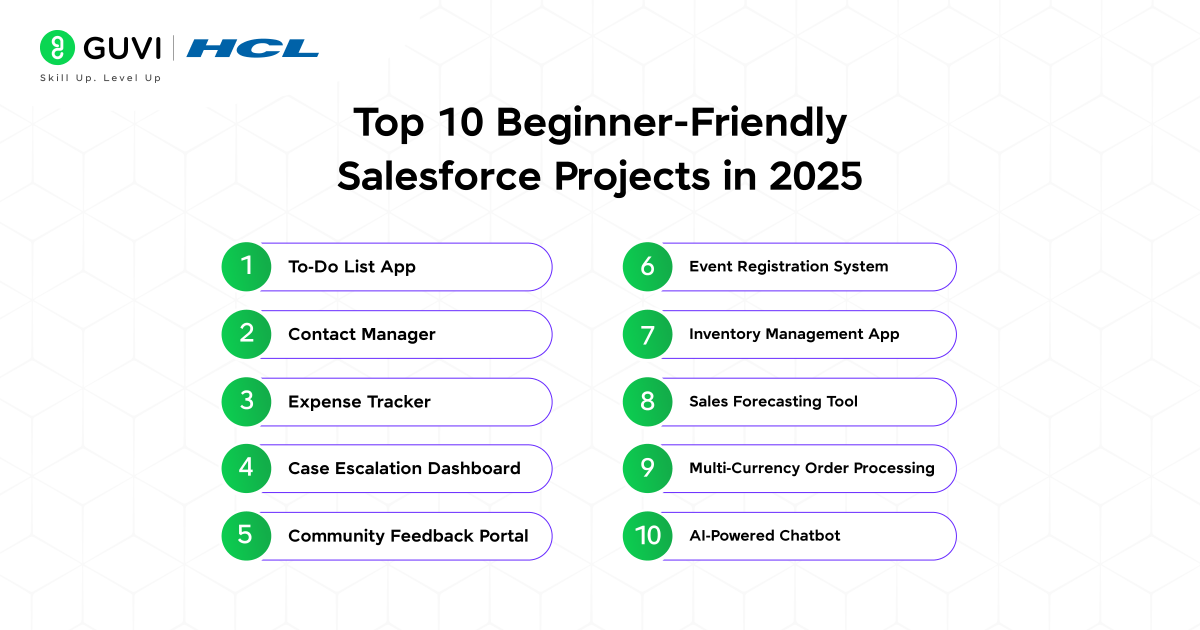
Building momentum in your Salesforce career as a beginner starts with projects that connect to familiar business needs. Each project below describes the business context and key Salesforce learning opportunities.
List of Top 10 Beginner‑Friendly Salesforce Projects in 2026
- To‑Do List App
- Contact Manager
- Expense Tracker
- Case Escalation Dashboard
- Community Feedback Portal
- Event Registration System
- Inventory Management App
- Sales Forecasting Tool
- Multi‑Currency Order Processing
- AI‑Powered Chatbot
Beginner‑Level Projects
- To‑Do List App
We begin with the To‑Do List App project, an excellent entry point for understanding custom components and Salesforce’s data model.
To execute this project, you’ll create a custom Task object, display tasks by priority, and implement complete or delete actions. That process solidifies component lifecycle understanding and record‑creation flows.
Skills Required
- Basic Apex controller for CRUD operations
- Lightning Web Components fundamentals
- SOQL for Task queries
- Custom object and field setup
Tools & Technologies
- Salesforce Developer Edition
- Visual Studio Code with Salesforce Extensions
- Salesforce CLI
- Salesforce Live Preview
Salesforce renamed Local Dev to Live Preview in Spring ’26. Live Preview lets you see Lightning Web Component changes in real time while you work.
Benefits
- Demonstrates ability to build custom UI
- Reinforces data model and user‑action handling
- Serves as a strong portfolio component
Source Code: https://github.com/trailheadapps/lwc-recipes
- Contact Manager
The next project is the Contact Manager, which expands your grasp of relationships between Salesforce records.
To implement this project, set up a Contact custom object linked to Account and Opportunity. Customize layouts, enforce sharing rules and implement an Apex trigger for unique email enforcement. That trigger teaches event handling and bulkification techniques.
Skills Required
- Lookup and master‑detail relationships
- Record‑triggered Apex triggers
- Page layouts with Lightning App Builder
- Validation rules
Tools & Technologies
- Salesforce Developer Edition
- Apex Test Framework
- Schema Builder
- Lightning App Builder
Benefits
- Builds relational data structuring skills
- Reinforces trigger design and testing
- Prepares you for roles focused on data governance
Source Code: https://github.com/trailheadapps/lwc-recipes
- Expense Tracker
Another great beginner project is the Expense Tracker, which focuses on automation and summarized reporting.
To build this project, capture and summarize expenses on daily and monthly levels. Use roll‑up summaries and build a Flow that sends email alerts when thresholds are crossed. That introduces non‑code automation with immediate effect.
Skills Required
- Roll‑up summary and formula fields
- Record‑triggered Flows
- Email Alert configuration
- Reports and dashboard components
Tools & Technologies
- Salesforce Flow Builder
- Process Automation Studio
- Reports & Dashboards
- Custom Metadata Types
Benefits
- Showcases declarative automation expertise
- Converts business rules into system logic
- Offers tangible flow and report examples for interviews
Source Code: https://github.com/trailheadapps/apex-recipes
Want to strengthen the programming skills behind Salesforce customization and automation? Start with these free resources:
These fundamentals help when working with integrations, data management, and automation workflows
Intermediate Projects
- Case Escalation Dashboard
The first intermediate project is the Case Escalation Dashboard, tailored for improving service workflows and case management.
To work on this project, highlight Cases approaching SLA breach. Define custom report types, configure dynamic dashboards and schedule a batch job to flag escalation needs. That blends clicks and code toward a service solution.
Skills Required
- Custom report types and bucket fields
- Dynamic dashboards
- Apex Scheduler
- SOQL aggregation
Tools & Technologies
- Salesforce Reports & Dashboards
- Developer Console
- Apex Scheduler
- Tableau CRM (optional)
Benefits
- Prepares you for analytics and reporting roles
- Demonstrates combined declarative and programmatic skills
- Showcases service‑case productivity monitoring
Source Code: https://github.com/trailheadapps/apex-recipes
- Community Feedback Portal
Next on the list is the Community Feedback Portal project, where you’ll build public interaction while managing data security.
To implement this project, launch an Experience Cloud site where users share ideas and vote. Set up sharing rules for guest access. Build Lightning components that show live vote counts via triggers or Platform Events. That project combines engagement and security.
Skills Required
- Experience Cloud site configuration
- Sharing rules and guest‑user setup
- LWC for real‑time UI updates
- Apex triggers with SOQL
Tools & Technologies
- Salesforce Experience Cloud
- Experience Builder
- Platform Events
- Shield Encryption (optional)
Benefits
- Demonstrates community portal setup
- Teaches best security practices for public sites
- Showcases interactive Lightning components
Source Code:https://github.com/trailheadapps/ebikes-lwc
- Event Registration System
Another intermediate project is the Event Registration System, ideal for learning user onboarding flows and third-party API integration.
To get started with this project, implement an event signup flow with custom objects, guided Flows and email confirmations. Integrate Google Calendar using an Apex callout. That spans record creation to external API integration
Skills Required
- Screen Flows
- Custom email templates and email alerts
- Apex HTTP callouts
- Named Credentials setup
Tools & Technologies
- Flow Builder
- Apex HTTP classes
- Named Credentials
- Postman
Benefits
- Covers UI and backend integration end to end
- Demonstrates Flow‑Apex coordination
- Provides practical external API integration
Source Code: https://github.com/trailheadapps/build-apps-with-lwc
- Inventory Management App
Wrapping up the intermediate section is the Inventory Management App, which highlights scalable automation using event-driven techniques.
This project involves tracking Products, stock levels and reorder alerts with scheduled Apex, Platform Events and notifications. That project focuses on scalable automation and event processing.
Skills Required
- Scheduled and Batch Apex
- Platform Events
- Custom Notifications
- Asynchronous Apex patterns
Tools & Technologies
- Salesforce CLI
- Developer Console
- Platform Event definitions
- Mobile Notifications
Benefits
- Demonstrates handling large data volumes
- Showcases event‑driven architecture
- Prepares you for supply chain or logistics roles
Source Code: https://github.com/trailheadapps/apex-recipes
Working with customer records and reports? Strengthen your database fundamentals with GUVI’s free SQL & DBMS Tutorial
Advanced Projects
8. Sales Pipeline Forecast Dashboard
This project helps you build a practical sales dashboard using Opportunity data instead of relying on an older prediction product. Create a dashboard that tracks pipeline value, deal stage, expected close dates, win rate, and sales performance.
Start with standard Salesforce reports and dashboards. If your org has access to CRM Analytics, you can add deeper analysis and interactive views.

Skills Required
- Opportunity data model
- Reports and dashboards
- SOQL basics
- Lightning Web Components for custom views
- CRM Analytics basics where available
Tools & Technologies
- Salesforce Reports & Dashboards
- Lightning App Builder
- Lightning Web Components
- CRM Analytics, optional
Benefits
- Shows how Salesforce data supports sales decisions
- Builds reporting and dashboard skills
- Gives you a project that is easy to explain in interviews
Reference Source Code:
https://github.com/trailheadapps/lwc-recipes
- Multi‑Currency Order Processing
Next, the Multi-Currency Order Processing project prepares you to manage international transactions in real-time.
To implement this project, set up a multi‑currency Order system with external rate fetching via Apex callouts. Store rates in custom metadata and process asynchronously via Queueable jobs. Build LWC to display converted totals.
Skills Required
- Apex callouts and JSON
- Custom metadata definition
- Queueable Apex
- LWC currency formatting
Tools & Technologies
- Named Credentials
- External Services
- Lightning Web Components
- Salesforce multi‑currency setup
Benefits
- Demonstrates currency integration and config
- Showcases global commerce readiness
- Highlights metadata‑driven development
Source Code:https://github.com/trailheadapps/apex-recipes
10. Agentforce Customer Support Agent
Replace the current AI-Powered Chatbot using Einstein Bots with an Agentforce-based project.
Build a simple customer support agent that can answer common questions, retrieve approved Salesforce information, and trigger safe actions such as checking an order or creating a support request.
Skills Required
- Agentforce basics
- Salesforce data access
- Prompt and action design
- Flow or Apex actions
- Permission and security setup
Tools & Technologies
- Agentforce
- Flow Builder
- Apex where required
- Salesforce data and permissions
Benefits
- Adds a current AI use case to your portfolio
- Shows how AI can work with Salesforce business data
- Introduces action design, permissions, and human review
Reference Source Code:
https://github.com/trailheadapps/coral-cloud
Note: The GitHub links below are official Salesforce sample or recipe repositories that you can use as reference code and adapt to your project requirements.
Salesforce placed Einstein Bots into Maintenance Mode on August 17, 2026. Existing bots remain supported, but Salesforce recommends Agentforce for new AI agent implementations.
Ready to turn Salesforce theory into real-world results? Our Salesforce course gives you hands-on projects, step-by-step guidance, and practical skills, no experience needed. Impress recruiters, build your portfolio, and become Salesforce job-ready faster.
Interested in automation and integrations? Start with HCL GUVI’s Python Programming Tutorial
How Should Beginners Choose Salesforce Projects?
Choose each project based on the skill you want to prove, not just the project name.
- Learn platform basics: To-Do List or Contact Manager
- Learn Flow automation: Expense Tracker
- Learn reporting: Case Escalation Dashboard or Sales Pipeline Forecast Dashboard
- Learn Experience Cloud: Community Feedback Portal
- Learn integrations: Event Registration System
- Learn asynchronous Apex: Inventory or Multi-Currency Order Processing
- Learn Salesforce AI: Agentforce Customer Support Agent
Start small and add one new technical layer at a time. Well-finished projects are easier to explain than complex projects that are only partly working.
Real-World Example: Turn a Project Into a Portfolio Case Study
Suppose you build the Inventory Management App for a small electronics retailer. The business problem is simple: staff need to know when stock is running low before an item becomes unavailable.
Your solution can track product quantities, trigger a low-stock alert, and show inventory status on a dashboard. In your portfolio, explain the objects you created, the automation you used, how permissions were handled, and the Salesforce testing tools you used to validate the flow.
This turns them into business case studies rather than isolated demos.
When the project is ready for your resume, use the Salesforce developer resume guide to present the project with clear problem, action, and result statements.
Common Mistakes When Building a Salesforce Portfolio
1. Building too much at once: Beginners often add too many objects, automations, and integrations. Start with one working business flow and improve it later.
2. Copying source code without understanding it: Use sample repositories to learn patterns, but make sure you can explain every important part you include.
3. Ignoring permissions and security: A project is incomplete if every user can access every record. Test profiles, permission sets, sharing, and guest access where relevant.
4. Using outdated Salesforce tools: Check current product names and retirement notices before adding a tool to your portfolio.
Good Salesforce Projects should be small enough to finish, test, explain, and improve.
Understanding APIs and backend workflows becomes easier with strong programming fundamentals. Explore the Java Tutorial
Build Stronger Salesforce Skills Before Your Next Project
If you want to build better Salesforce Projects, make sure your platform basics are clear first. You should understand data modeling, reports, dashboards, security, automation, and how Salesforce applications are structured before moving to advanced portfolio work.
You can use the HCL GUVI’s Salesforce Course Complete CRM & Cloud Training to strengthen these core concepts and then apply them while building your own Salesforce Projects. The course covers Salesforce fundamentals, data modeling, process automation, reports, dashboards, security, and data management.
This can make your Salesforce Projects easier to build, test, and explain during interviews.
Conclusion
Salesforce Projects are most useful when they show how you solve a clear business problem using the right Salesforce features. Begin with data modeling, Flow, reports, and Lightning components before moving into Apex, integrations, analytics, or Agentforce.
In 2026, your portfolio should include Salesforce Projects that demonstrate core platform skills first and newer capabilities only when they make sense for the project. Two or three well-documented Salesforce Projects are more valuable than a long list of unfinished demos. Build, test, document, and be ready to explain every important design choice in an interview.
FAQs
1. What are the best Salesforce Projects for beginners?
The best Salesforce Projects for beginners include a To-Do List App, Contact Manager, Expense Tracker, Case Dashboard, and Event Registration System. These projects help you practise core Salesforce concepts before moving to advanced integrations or AI.
2. How many Salesforce Projects should I add to my portfolio?
Two or three completed Salesforce Projects are enough if each one solves a different business problem and you can explain the design, automation, security, and testing clearly.
3. Can I build Salesforce Projects for free?
Many beginner projects can be practised using Salesforce Developer Edition or Trailhead Playgrounds. Some advanced features, especially certain analytics or AI capabilities, can depend on the org and licenses available to you.
4. Which Salesforce Projects are best for learning Flow?
An Expense Tracker and Event Registration System are strong choices because they let you practise record-triggered Flow, Screen Flow, validation, alerts, and guided user steps.
5. Should beginner Salesforce Projects include Apex?
Not every beginner project needs Apex. Start with declarative Salesforce features first, then use Apex when the requirement cannot be handled cleanly with standard tools or Flow.
6. What skills should Salesforce Projects demonstrate?
Strong Salesforce Projects can demonstrate data modeling, Flow automation, security, reports, SOQL, LWC, Apex, APIs, testing, or Agentforce depending on the project level.
7. Can I use GitHub code for my Salesforce portfolio?
Yes, but use sample code as a learning reference and adapt it to your own business requirement. You should be able to explain and test the code you include instead of presenting copied code as your own work.
8. Is Agentforce a good Salesforce project for beginners?
Agentforce is better after you understand basic Salesforce data, Flow, permissions, and automation. It works well as an advanced portfolio project once your core platform skills are clear.
Success Stories

About the Author
Reemsha Khan
Always been a storyteller at heart. Now, I turn complex topics into simple, easy-to-understand stories through content. Hope you find it helpful.
View all posts by Reemsha Khan
Connect with me @


Did you enjoy this article?
Comments










I want an future ready skills working prototype that can use in future projects to achieve success 🙌 please give me projects name 🙏 😊