


Full Stack Development Articles
Claude for Architecture and Engineering Documentation
Freelancing as a Python Developer: Getting Your First Client


Get In Touch For Details! Request More Information
Frontend and Backend: How They Communicate (2026)
Sep 19, 2026 4 Min Read 18204 Views
(Last Updated)
Frontend and backend communicate through APIs — the frontend sends a request, the backend processes it, and sends back a response. That’s the whole loop in one line, but there’s more happening underneath that’s worth understanding if you’re building anything real.
Every time you click a button, submit a form, or refresh a page, your browser (the frontend) quietly asks a server (the backend) for something — data, confirmation, an update. The backend does the work, like checking a database, and sends the result back so the frontend can show it to you.
Table of contents
- TL;DR Summary
- What is Frontend and Backend?
- Frontend
- Backend
- How Frontend and Backend Communicate
- The Role of APIs in Connecting Frontend and Backend
- Frontend vs Backend: Key Differences
- Why This Separation Between Frontend and Backend Matters
- Conclusion
- FAQs
- How to communicate between frontend and backend?
- Which is better, frontend or backend?
- How to run both frontend and backend together?
- Is AI better at frontend or backend?
- Which language is used for both frontend and backend?
- Which is harder, backend or frontend?
TL;DR Summary
- Frontend and backend are the two core parts of any website, one is what users see, the other works behind the scenes.
- Frontend and backend talk through HTTP requests, the frontend asks, the server and sometimes a database respond.
- APIs act as the go-between, letting frontend and backend communicate without knowing each other’s internals.
- Keeping frontend and backend separate makes apps easier to build, scale, and secure.
- Without that separation, even a small change, like a UI update, can end up breaking something important in the backend.
What is Frontend and Backend?
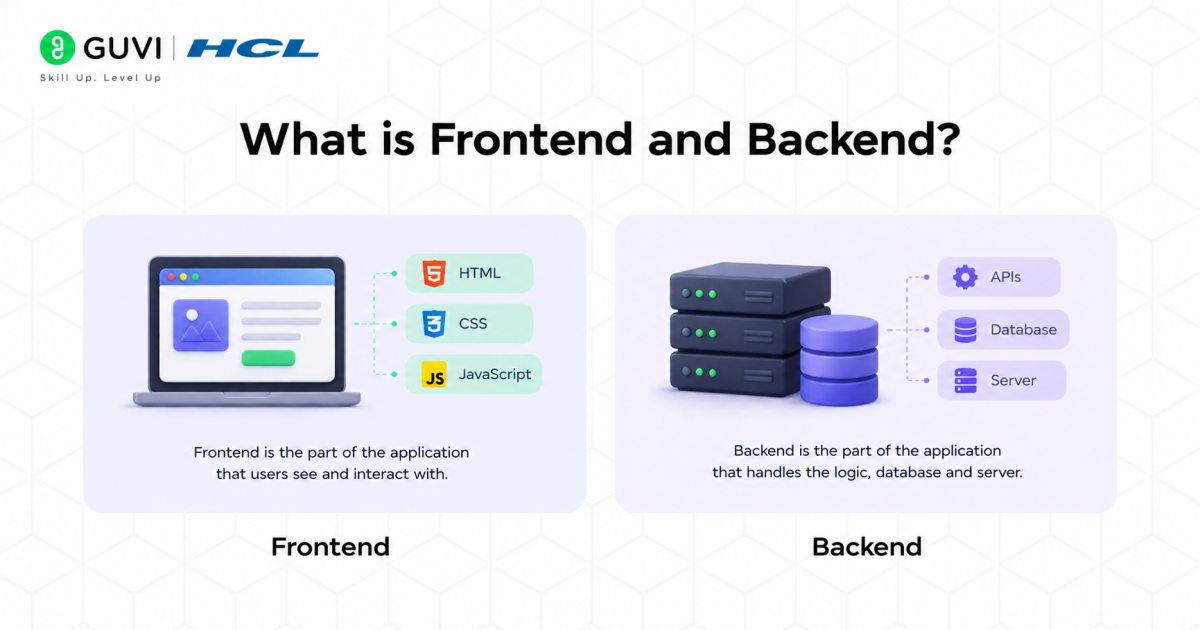
Every website or app is built on two connected parts — the frontend and backend — each handling a different side of what makes it work.
Frontend
The frontend is the part of a website or app that users see and interact with directly — the buttons, text, images, menus, and overall layout, all running in the user’s browser. It controls how the site looks and feels, ensuring everything is easy to navigate and visually clear. Whenever you scroll, click, or fill out a form, you’re interacting with the frontend.
Tools & Technologies Used
- HTML
- CSS
- JavaScript
- React
- Angular
- Vue.js
Also Read: HTML and CSS for Beginners
Backend
The backend is the server-side part of a website or app that works behind the scenes to make everything function correctly. It handles data storage, processes user requests, runs the application’s logic, and communicates with databases. While users never see it directly, the backend powers every action taken on the frontend.
Tools & Technologies Used
- Python
- Java
- Node.js
- Ruby
- MySQL
- MongoDB
Understanding how frontend and backend talk to each other is one thing. Being able to build that connection yourself is a completely different skill, and that’s what HCL GUVI’s Software & AI Engineer Course teaches from the ground up. You start with core software engineering fundamentals, then specialize in Full Stack or Backend Engineering, eventually working your way into APIs, deployment, and real production workflows. Enroll today and start building the skills top tech companies are actually hiring for!
Also Read: 10 Best Frontend Development Frameworks
How Frontend and Backend Communicate
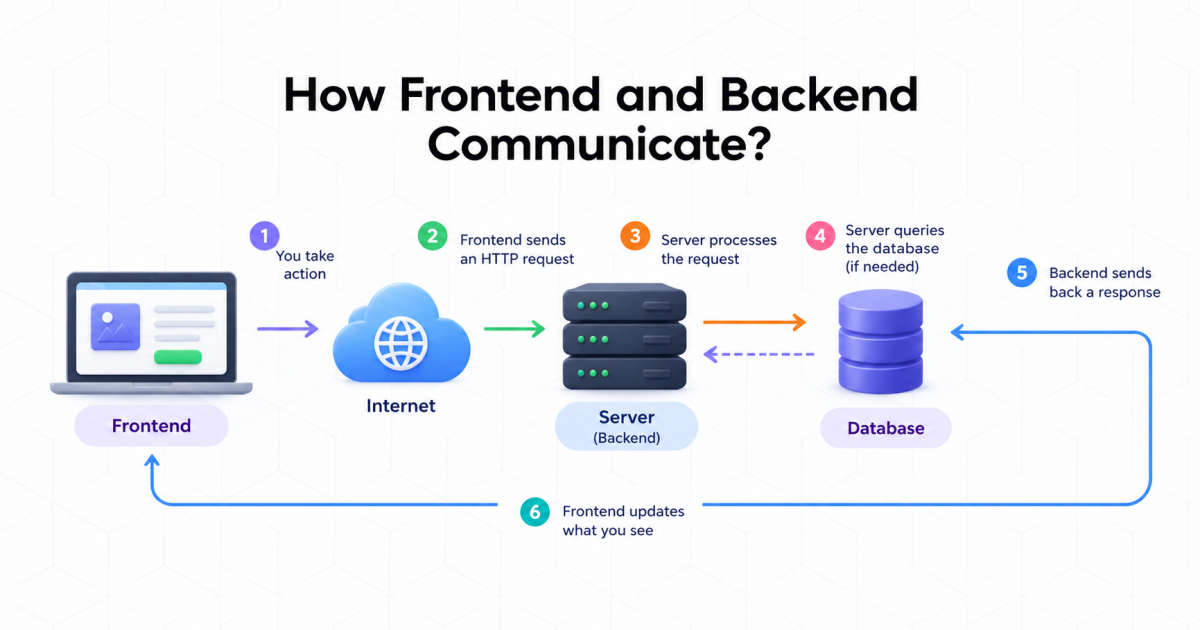
Once you understand what frontend and backend actually are, the next natural question is how they actually talk to each other. It’s not magic — it’s a simple, repeatable exchange that happens every time you use a website, whether you’re logging in, searching for something, or just loading a page.
At its core, frontend and backend communicate through something called an HTTP request, and behind that request are two more players: the server and the database. Here’s how that plays out, step by step:
- You take an action: This could be clicking a button, submitting a form, or opening a page. This is where the frontend comes in, since it’s what captures what you just did.
- The frontend sends a request: It packages up what you need, like “get my profile data” or “submit this form,” and sends it over the internet to a server.
- The server receives and processes the request: The server is the machine that’s always running and listening for incoming requests. This is the backend at work, figuring out exactly what needs to happen next.
- The server talks to the database if needed: For anything involving stored data, like your profile, past orders, or saved posts, the server queries a database to fetch, update, or save that information.
- The backend sends back a response: Once the server has what it needs, it packages the result, usually as data, a confirmation, or an error message, and sends it back to the frontend.
- The frontend updates what you see: This happens without reloading the entire page, thanks to modern frameworks handling it smoothly in the background.
This whole loop, from request to server to database and back, happens in a fraction of a second, and it repeats constantly as you use an app. This back-and-forth makes the interaction between frontend and backend feel instant, even though a full round trip happens every time.
Grab the free ebook and go from JavaScript basics to real-world development, one concept at a time: JS eBook
The Role of APIs in Connecting Frontend and Backend
An API (Application Programming Interface) lets the frontend and backend talk to each other without either side needing to know how the other works internally. It acts as a fixed set of rules that both sides agree to follow, so requests and responses always happen in a predictable, structured way.
Here’s how that connection actually flows:
- The frontend sends a request through the API instead of talking to the server or database directly.
- The API defines what’s allowed — what kind of requests can be made, what data needs to be sent, and what the response will look like.
- The backend receives the request through the API and does the actual work, like fetching data or saving something.
- The API delivers the response back to the frontend in a clean, expected format.
- Because both sides only need to agree on the API’s rules, frontend and backend teams can work independently, updating their own side without breaking the other.
Example:

Think of a train station’s ticket counter. You don’t walk onto the tracks or into the control room to get your ticket — you go to the counter, say where you want to go, and the counter gives you exactly what you asked for, without you needing to know how trains are scheduled or how tracks are managed.
An API works the same way: it’s the fixed point of contact where the frontend asks for something specific, and the backend delivers it, without either side needing to know the other’s internal details.
Frontend vs Backend: Key Differences
Here are the key differences between frontend and backend:
| Aspect | Frontend | Backend |
|---|---|---|
| Definition | The part of a website/app users see and interact with directly | The server-side part that processes data and powers functionality |
| Runs On | The user’s browser (client-side) | A server (server-side) |
| Primary Focus | Layout, design, and user experience | Logic, data processing, and security |
| Languages/Tools | HTML, CSS, JavaScript, React, Angular | Python, Java, Node.js, Ruby |
| Data Handling | Displays data received from the backend | Stores, retrieves, and manages data via databases |
| Visibility | Fully visible to the user | Hidden from the user |
| Responsible For | How the application looks and feels | Whether the application actually works correctly |
| Example Tasks | Rendering a search results page, Validating form inputs before submission, Animating a dropdown menu | Querying the database to fetch search results, Authenticating a user’s login credentials, Processing a payment transaction |
| Project Examples | A responsive landing page, A single-page app built in React, A mobile app’s UI | A REST API for an e-commerce site, A user authentication system, A recommendation engine |
Why This Separation Between Frontend and Backend Matters
Keeping frontend and backend separate isn’t just a technical convention, it’s what makes modern web development scalable and manageable.
When the two are cleanly separated, teams can work independently. Frontend developers can focus entirely on design and user experience, while backend developers focus on logic, data, and security, without stepping on each other’s work.
This separation also makes updates safer. You can redesign the entire interface without touching how data is processed, or upgrade the database without affecting what users see on screen.
It improves scalability too. As an application grows, the frontend and backend can be scaled independently based on where the actual load is, whether that’s more users hitting the interface or more requests hitting the server.
Finally, it strengthens security. Since backend logic and data stay hidden from the client, sensitive operations like authentication and database access are never exposed directly to the user.
This is ultimately why frontend and backend are built as separate layers instead of one tangled system, it keeps applications easier to build, safer to run, and simpler to maintain over time.
Example:
Imagine a banking app where the button showing your account balance is directly connected to the same code that pulls data from the bank’s database, with no separation at all. If a developer just wants to change the button’s color, they could accidentally break the code handling your money, and if there’s a flaw in the interface, it sits dangerously close to sensitive backend logic.
Conclusion
Once you get how frontend and backend actually talk to each other, a lot of confusing stuff starts falling into place: why certain bugs happen, why some changes are risky, and others aren’t, and why teams split work the way they do. This isn’t something you need to memorize, it’s just how the web works under the hood, and now you’ve got a real sense of it.
FAQs
1. How to communicate between frontend and backend?
They communicate through HTTP requests. The frontend sends a request, the backend processes it, and sends back a response, usually through an API.
2. Which is better, frontend or backend?
Neither is better. It depends on your interest. Frontend suits people who enjoy design and visuals. Backend suits people who enjoy logic and data.
3. How to run both frontend and backend together?
Run the backend server first, usually on one port. Then run the frontend, usually on another port. Connect them using an API so they can talk to each other.
4. Is AI better at frontend or backend?
AI tools currently help more with backend tasks like logic, APIs, and automation. But AI also assists frontend work through code generation and design suggestions.
5. Which language is used for both frontend and backend?
JavaScript. It runs in the browser for frontend and on servers using Node.js for backend.
6. Which is harder, backend or frontend?
Neither is harder overall. Frontend deals with complex UI and design consistency. Backend deals with complex logic, security, and data handling.
Success Stories































Did you enjoy this article?