


Artificial Intelligence and Machine Learning Articles
Finance Manager to Data Analytics: Career Growth, Salary and Seniority
How to Evaluate LLM Outputs in Production Deployments
AI/ML Skills Gap 2026: Why Companies Can't Find Job-Ready Talent
20 AI/ML Interview Questions Recruiters Can Use Without a Tech Background - Best Guide


Get In Touch For Details! Request More Information
Generate SQL with AI: A Complete Guide
Aug 19, 2026 7 Min Read 1074 Views
(Last Updated)
SQL is the universal language of data. Every time a business analyses sales performance, a developer queries a user database, or a data scientist pulls training data, SQL is almost certainly involved. It is powerful, precise, and ubiquitous.
It is also a barrier.
For analysts who are not developers, writing correct SQL requires learning syntax, understanding schema relationships, and debugging cryptic error messages. For developers, crafting complex queries involving multiple joins, window functions, and subqueries takes significant time that competes with higher-value work.
AI-powered SQL generation changes this dynamic entirely. By translating natural language into precise SQL queries, AI tools make databases accessible to anyone who can describe what they want and dramatically accelerate the workflow of those who already know SQL well.
This guide explains about SQL with AI, which tools lead the space, what the limitations are, and how to use these systems effectively in real development and analytics workflows.
Table of contents
- TL;DR
- Why Generating SQL with AI Matters
- The Non-Technical User Problem
- The Developer Productivity Problem
- How AI Generates SQL: The Technology Behind It
- Large Language Models as SQL Generators
- The Role of Schema Context
- How the Model Interprets the Query
- Leading AI Tools to Generate SQL
- General-Purpose LLMs: ChatGPT and Claude
- IDE-Integrated Tools: GitHub Copilot and Cursor
- Specialised Text-to-SQL Platforms
- Practical Guide: How to Generate SQL with AI Effectively
- Step 1: Provide Complete Schema Context
- Step 2: Describe Intent Precisely
- Step 3: Review Before Executing
- Step 4: Iterate Conversationally
- SQL Dialects: What AI Tools Support
- Real-World Use Cases for AI SQL Generation
- Business Analytics and Reporting
- Application Backend Development
- Data Engineering and ETL Pipelines
- Ad Hoc Data Investigation
- Limitations and Risks of AI-Generated SQL
- Schema Hallucination
- Incorrect JOIN Logic
- Performance and Query Optimisation
- Security Risks
- Conclusion
- FAQs
- Can AI generate SQL without knowing my database schema?
- Is AI-generated SQL safe to run on a production database?
- Which AI tool is best for generating SQL?
- Can AI generate SQL for BigQuery, Snowflake, or SQL Server?
- How accurate is AI-generated SQL?
TL;DR
- Text-to-SQL AI converts plain language descriptions into executable SQL queries using large language models.
- Tools like ChatGPT, GitHub Copilot, Claude, and specialised platforms like AI2sql and Defog handle SQL generation.
- Providing schema context table names, column names, and relationships dramatically improves output accuracy.
- AI-generated SQL should always be reviewed before execution, especially on production databases.
- Text-to-SQL is transforming analytics by democratising database access for non-technical teams.
What Is Text-to-SQL AI?
Text-to-SQL AI is a natural language processing (NLP) capability that converts plain language questions or instructions into executable SQL queries. Powered by large language models trained on code and structured data, it enables users to interact with databases using everyday language instead of manually writing SQL. This helps non-technical users access data more easily while also allowing developers and analysts to generate complex queries faster and more efficiently.
Why Generating SQL with AI Matters
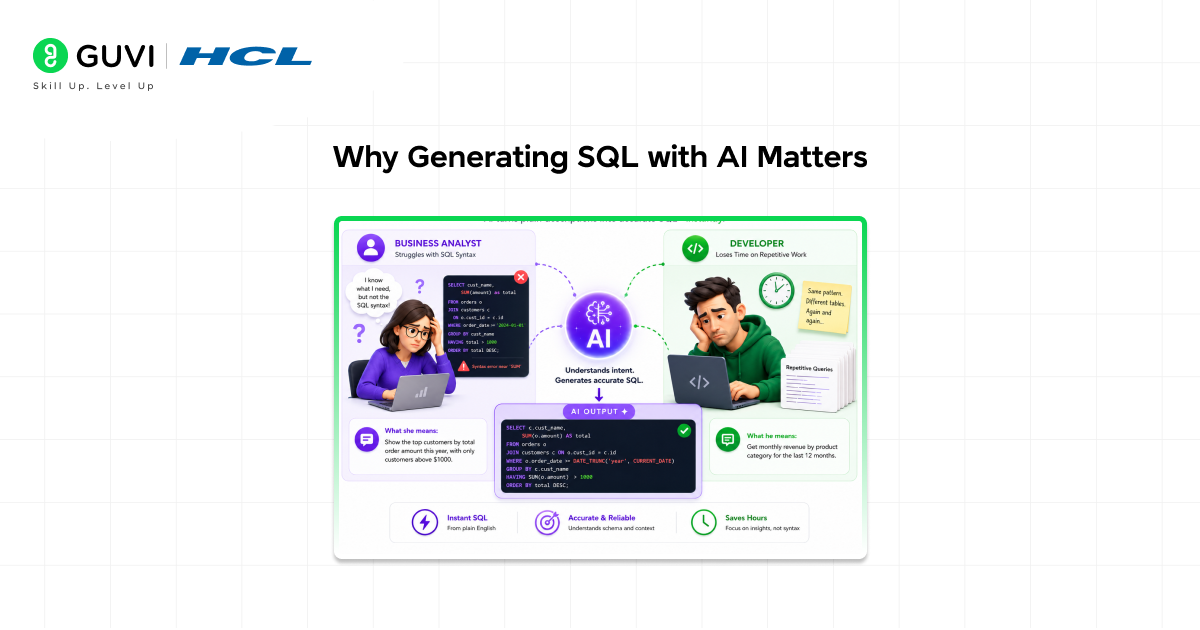
The case for AI-generated SQL is not purely about convenience. It addresses real productivity and accessibility problems that affect organisations of every size.
The Non-Technical User Problem
A significant proportion of database users, business analysts, product managers, marketing teams, and operations staff have the domain knowledge to ask the right questions of their data but lack the SQL skills to query databases directly. They depend on data engineers or developers to write queries on their behalf, creating bottlenecks that slow decision-making.
AI SQL generation removes this dependency. A product manager can describe what they need in plain English, generate the SQL, run it against their analytics database, and have the answer within minutes without filing a data request that may take days to fulfil.
The Developer Productivity Problem
For developers and data engineers who write SQL daily, the challenge is different — not accessibility, but speed. Complex queries involving multiple joins across normalised schemas, window functions for time-series analysis, or recursive CTEs for hierarchical data take significant time to write correctly.
AI SQL tools accelerate this workflow by generating the structural scaffold of a complex query, which an experienced developer then reviews, refines, and executes, reducing the time from problem to working query by 50 to 80 per cent on routine tasks.
How AI Generates SQL: The Technology Behind It
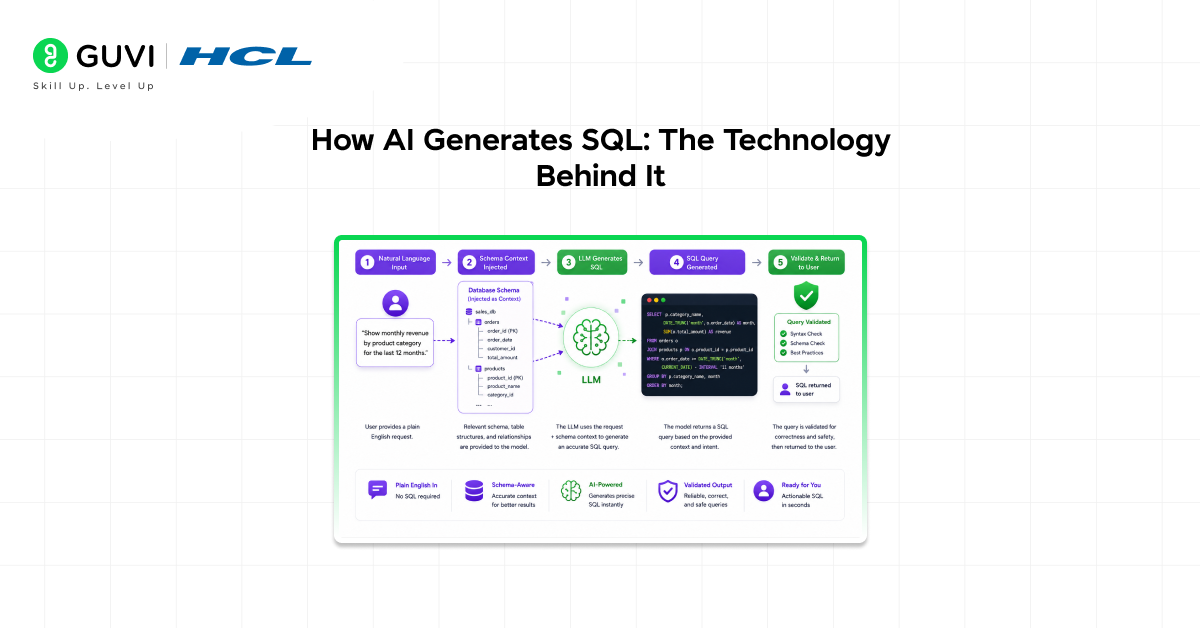
Understanding how AI generates SQL helps developers and analysts use these tools more effectively and understand their limitations.
Large Language Models as SQL Generators
Modern AI SQL tools are built on large language models, the same transformer-based architectures that power ChatGPT, Claude, and GitHub Copilot. These models are trained on massive datasets that include open-source code repositories, database documentation, SQL tutorials, Stack Overflow answers, and structured data examples.
Through this training, LLMs learn the syntax and semantics of SQL, how SELECT, JOIN, WHERE, GROUP BY, HAVING, and ORDER BY clauses interact, how subqueries and CTEs are structured, and which patterns correspond to which types of data questions.
The Role of Schema Context
Raw language model capability alone is not sufficient for accurate SQL generation. The model also needs to know the schema of the target database,e the names of tables, columns, data types, and relationships between tables.
Without schema context, the model generates plausible-looking S, QL but with fabricated table and column names that do not exist in the actual database. With schema context, the model generates queries that reference correct tables and columns, apply appropriate joins, and filter on valid field names.
This is why the quality of AI SQL generation is directly proportional to the quality and completeness of the schema information provided. Most professional text-to-SQL tools include a schema ingestion mechanism either through direct database connection, manual schema description, or schema file upload.
How the Model Interprets the Query
When a user submits a natural language question, the model performs several implicit steps:
1. Intent identification: What type of query is this? A retrieval (SELECT), an aggregation (GROUP BY), a time-series analysis, a ranking (window function), or a cross-table join?
2. Entity mapping: Which tables and columns in the schema correspond to the concepts mentioned in the question?
3. Condition extraction: What filters, constraints, and sorting requirements are implied by the question?
4. Query construction: Assemble the correct SQL clauses in the right order with appropriate syntax for the target database dialect.
The Spider benchmark is one of the most widely used academic evaluations for text-to-SQL systems. It tests whether AI models can generate correct SQL queries across more than 200 databases covering 138 different domains, requiring models to generalize beyond a single schema or dataset. Modern state-of-the-art systems have achieved very high accuracy on Spider when given complete schema context, demonstrating how rapidly natural language database querying capabilities have improved in recent years.
Leading AI Tools to Generate SQL
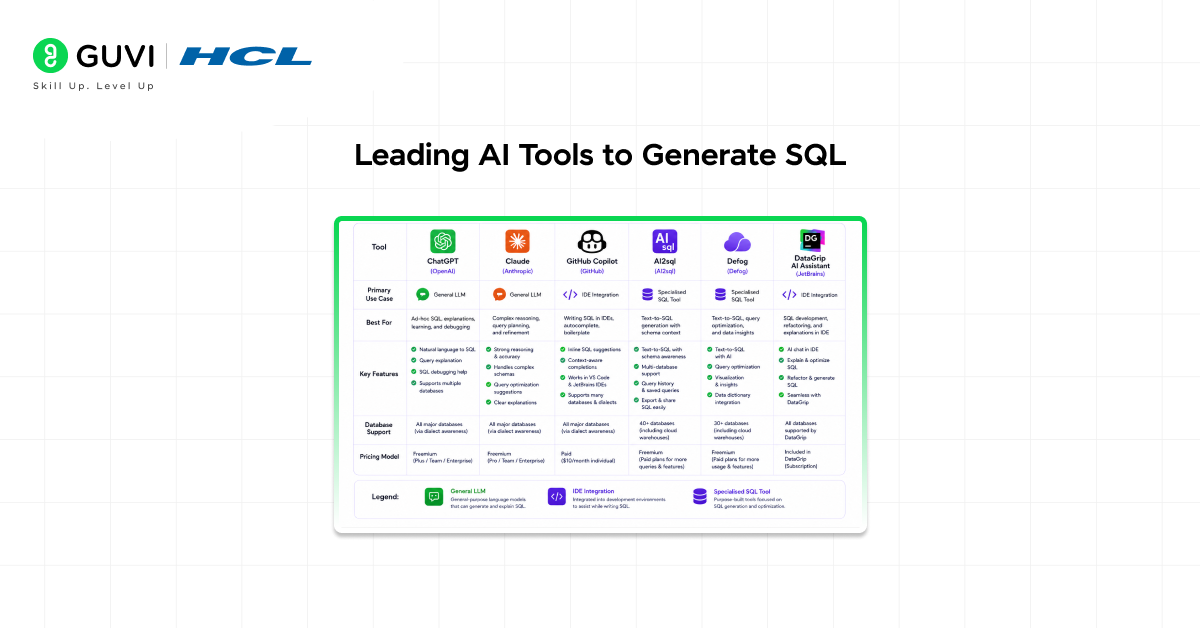
Several distinct categories of tools now offer AI SQL generation, each serving different workflows and user profiles.
General-Purpose LLMs: ChatGPT and Claude
General-purpose large language models OpenAI’s ChatGPT and Anthropic’s Claude are the most accessible starting points for AI SQL generation. A developer or analyst can paste their schema description, describe their question in plain English, and receive a complete SQL query in seconds.
These tools excel at complex, ad hoc queries where the user can provide full context conversationally. They support all major SQL dialects,s PostgreSQL, MySQL, SQLite, BigQuery, Snowflake, SQL Server and can explain the logic of a generated query, suggest optimisations, or rewrite a query in a different dialect on request.
• Best for: Ad hoc query generation, complex query construction, SQL learning, and query explanation.
• Limitation: No direct database connection. The schema must be provided manually in the prompt.
IDE-Integrated Tools: GitHub Copilot and Cursor
For developers who write SQL inside code editors or database IDEs, GitHub Copilot and Cursor provide inline SQL suggestions as part of the natural coding workflow. These tools generate SQL based on the surrounding code context, a Python script connecting to a database, a Django model definition, or a dbt model file.
- Best for: Developers writing SQL within application code, dbt models, or data pipeline scripts.
- Limitation: Less effective for standalone database querying without surrounding code context.
Specialised Text-to-SQL Platforms
A growing set of purpose-built tools focuses exclusively on text-to-SQL with direct database connectivity:
- AI2sql: A dedicated text-to-SQL interface that accepts natural language queries and generates SQL for multiple database types. Supports schema import from database connections.
- Defog: An open-source text-to-SQL tool designed for enterprise deployment. Supports self-hosting and provides a Python library for embedding SQL generation in applications.
- DataGrip AI Assistant: JetBrains’ database IDE includes an AI assistant that generates and explains SQL with awareness of the connected database schema.
- Outerbase: A database interface that allows natural language querying of connected databases, generating SQL and visualising results without requiring SQL knowledge.
- Vanna.AI: An open-source Python library that combines LLM-based SQL generation with retrieval-augmented generation, training on a company’s own historical queries and schema for higher accuracy.
Practical Guide: How to Generate SQL with AI Effectively
Getting accurate SQL from an AI tool is a skill in itself. The following practices consistently produce better results across all tools and use cases.
Step 1: Provide Complete Schema Context
The single most impactful step is giving the AI a clear description of your database schema before asking your question. Include table names and their purpose, column names and data types for each table, primary keys and foreign key relationships, and any relevant constraints.
A well-structured schema prompt might look like:
Tables:
– orders (order_id INT PK, customer_id INT FK, order_date DATE, total_amount DECIMAL, status VARCHAR)
– customers (customer_id INT PK, name VARCHAR, email VARCHAR, country VARCHAR, created_at DATE)
– order_items (item_id INT PK, order_id INT FK, product_id INT FK, quantity INT, unit_price DECIMAL)

Step 2: Describe Intent Precisely
Vague questions produce vague SQL. Be specific about what you want:
• Vague: “Show me customer orders.”
• Precise: “Show me the top 10 customers by total order value in the last 90 days, including their name, country, number of orders, and total spend, sorted by total spend descending.”
Specify the database dialect if you know it. PostgreSQL syntax differs from BigQuery or SQL Server in ways that affect function names, date arithmetic, and window function support.
Step 3: Review Before Executing
Always review AI-generated SQL before executing it, particularly against production databases. Check for:
- Correct table and column names to match your actual schema.
- Appropriate JOIN conditions, a missing or incorrect ON clause, can cause a Cartesian product.
- Filter conditions that match your intent, particularly date range calculations and NULL handling.
- Aggregate functions applied to the correct level of granularity.
Step 4: Iterate Conversationally
If the first query is not quite right, do not start over. Describe what needs to change and ask the AI to refine the query. Iterative refinement through conversation is one of the most powerful aspects of LLM-based SQL generation and consistently produces better results than restarting from scratch.
SQL Dialects: What AI Tools Support
SQL exists in multiple dialects, each with vendor-specific syntax, functions, and capabilities. Always specify the target dialect in your prompt; without specification, the model defaults to ANSI SQL or PostgreSQL syntax, which may not be compatible with your actual database.
- PostgreSQL: Rich window function support, JSONB operations, and advanced text search. The most feature-complete open-source dialect.
- MySQL / MariaDB: Widely used in web applications. Different date functions and limited window function support in older versions.
- BigQuery: Google’s cloud data warehouse dialect. Uses ARRAY and STRUCT types extensively and has unique partitioning and clustering syntax.
- Snowflake: Cloud data platform with a unique VARIANT type for semi-structured data and Snowflake-specific functions.
- SQL Server / T-SQL: Microsoft’s SQL dialect with specific syntax for TOP, date functions (GETDATE, DATEADD), and stored procedure conventions.
- SQLite: Lightweight embedded database with limited function support. Common in mobile applications and local data storage.
Real-World Use Cases for AI SQL Generation
Business Analytics and Reporting
BI teams use AI SQL generation to build the queries that power dashboards and reports. Rather than writing complex aggregation queries from scratch, analysts describe the metric they need, “month-over-month revenue growth by product category,” and refine the AI-generated SQL until it matches the required business logic. This accelerates dashboard development from days to hours.
Application Backend Development
Backend developers use AI SQL tools to generate the parameterised queries embedded in application code, user lookup queries, search filters, pagination logic, and data insertion statements. Tools like Copilot and Cursor generate these queries inline as the developer writes the surrounding application logic, significantly reducing context-switching between code and SQL documentation.
Data Engineering and ETL Pipelines
Data engineers building transformation pipelines in dbt, Apache Spark SQL, or raw SQL migration scripts use AI tools to generate the structural framework of complex transformations,s including deduplication logic, slowly changing dimension handling, and multi-table aggregations,s which they then review and adapt to their pipeline architecture.
Ad Hoc Data Investigation
Product managers, customer success teams, and operations staff use AI SQL tools to answer one-off data questions without filing tickets with the data team. Self-service queries that would otherwise wait days in a request queue can be answered in minutes.
Limitations and Risks of AI-Generated SQL
Schema Hallucination
Without a complete schema context, AI models generate syntactically correct SQL that references tables and columns that do not exist. This is the most common failure mode and is entirely preventable by providing complete schema information upfront. Always verify that every table and column name in the generated query exists in your actual database before executing.
Incorrect JOIN Logic
JOIN conditions are a frequent source of errors in AI-generated SQL, particularly when dealing with many-to-many relationships, self-joins, or schemas with ambiguous foreign key relationships. A missing or incorrect JOIN condition can cause a cartesian product — returning millions of rows instead of hundreds, or silently exclude records that should be included.
Performance and Query Optimisation
AI tools generate correct queries but rarely generate optimal ones. A query that returns the right results may use correlated subqueries where a JOIN would be more efficient, or miss opportunities to use indexes. For queries that will run on large datasets or in production environments, have an experienced developer or DBA review and optimise the query before deployment.
Security Risks
Never use raw, unreviewed AI-generated SQL in application code that accepts user input. Even if the AI generates correct SQL, it may not apply parameterisation correctly, potentially exposing the application to SQL injection vulnerabilities. Always use parameterised queries or prepared statements in application code, regardless of whether the SQL was AI-generated or written manually.
If you want practical experience working with activation functions, neural networks, and deep learning models, HCL GUVI’s AI and ML Course can help you understand how concepts like sigmoid, backpropagation, and gradient descent are implemented using frameworks such as TensorFlow and PyTorch through hands-on projects.
Conclusion
The ability to generate SQL with AI represents one of the most immediately practical applications of large language models in software development and data analytics. By bridging the gap between natural language and database query syntax, AI SQL tools make data accessible to a broader range of users and accelerate the workflow of experienced developers and analysts alike.
The tools are ready. ChatGPT, Claude, GitHub Copilot, and purpose-built platforms like Defog and Vanna.AI are already capable of generating accurate, complex SQL from plain language descriptions when given the right schema context and specific question framing.
The key discipline is not the generation itself but the review. AI-generated SQL should be treated as a highly capable first draft,t always verified for correctness, tested on sample data before production use, and reviewed for performance implications on large datasets. With that discipline in place, AI SQL generation is one of the most productive tools a developer or analyst can add to their workflow today.
FAQs
1. Can AI generate SQL without knowing my database schema?
AI can generate syntactically valid SQL without schema knowledge, but it will fabricate table and column names. Providing your actual schema table names, columns, and relationships is essential for generating executable, accurate queries.
2. Is AI-generated SQL safe to run on a production database?
Not without review. Always verify generated SQL for correct JOIN conditions, accurate filters, and appropriate NULL handling before executing on production data. Never use AI-generated SQL with raw user input in application code; always use parameterised queries to prevent SQL injection.
3. Which AI tool is best for generating SQL?
It depends on the workflow. ChatGPT and Claude excel at ad hoc complex query generation. GitHub Copilot and Cursor suit developers writing SQL within application code. Defog and Vanna.AI are best for teams wanting a self-hosted, schema-aware solution trained on their own data.
4. Can AI generate SQL for BigQuery, Snowflake, or SQL Server?
Yes. Most LLMs support all major SQL dialects, including PostgreSQL, MySQL, BigQuery, Snowflake, SQL Server, and SQLite. Always specify the target dialect in your prompt to ensure the generated syntax is compatible with your database.
5. How accurate is AI-generated SQL?
Accuracy varies by complexity and schema quality. Simple queries on well-described schemas achieve high accuracy. Complex queries involving multiple joins, window functions, or ambiguous schema naming require more iteration and careful human review before execution.
Success Stories

About the Author
Vishalini Devarajan
An Aerospace Engineer turned content writer, I focus on making complex concepts easy to understand through well-structured, reader-friendly blogs. Whether it’s a technical topic or a non-technical one, I love creating content that is clear, engaging, and impactful.
View all posts by Vishalini Devarajan
Connect with me @












Did you enjoy this article?