


Artificial Intelligence and Machine Learning Articles
Federated Learning: Training Models Without Centralizing Data
Attention Mechanism Explained: The Building Block of Transformers


Get In Touch For Details! Request More Information
Claude API Tool Use (Function Calling): A Deep Dive
Aug 07, 2026 4 Min Read 474 Views
(Last Updated)
Large Language Models (LLMs) are no longer limited to generating text. Modern AI applications can search databases, retrieve live information, send emails, execute code, schedule meetings, and interact with third-party APIs—all because of tool use, also known as function calling.
If you’re building AI-powered applications with the Claude API, understanding how tool use works is essential. Rather than guessing or hallucinating information, Claude can decide when to invoke a predefined tool, wait for the tool’s output, and use that result to generate an accurate response.
In this article, you’ll learn how Claude API Tool Use works, how it differs from traditional prompting, implementation best practices, common pitfalls, and real-world use cases for production applications.
Table of contents
- TL;DR Summary
- What Is Claude API Tool Use?
- Why Is Tool Use Important?
- How Does Claude Tool Use Work?
- What Is a Tool Schema?
- When Does Claude Decide to Call a Tool?
- Tool Use vs Prompt Engineering
- Common Use Cases
- Best Practices for Designing Tools
- Handling Tool Errors
- Tool Use vs Retrieval-Augmented Generation (RAG)
- Security Considerations
- Real-World Example
- Common Mistakes Developers Make
- Conclusion
- FAQs
- What is the Claude API Tool Use?
- Does Claude execute functions directly?
- How is Tool Use different from RAG?
- Can Claude call multiple tools in a single conversation?
- How do I improve tool selection accuracy?
- Is Tool Use secure by default?
- What kinds of applications benefit from Tool Use?
TL;DR Summary
- Tool Use enables Claude to interact with external systems.
- Developers define available tools—not Claude.
- Claude decides when a tool should be called.
- Tool results are returned to Claude before generating the final response.
- Function calling reduces hallucinations and enables real-time AI applications.
- Well-designed tool schemas improve reliability and accuracy.
Turn Claude into an agent with tool use, not just a chatbot. Learn AI & ML with HCL GUVI’s Artificial Intelligence and Machine Learning course.
What Is Claude API Tool Use?
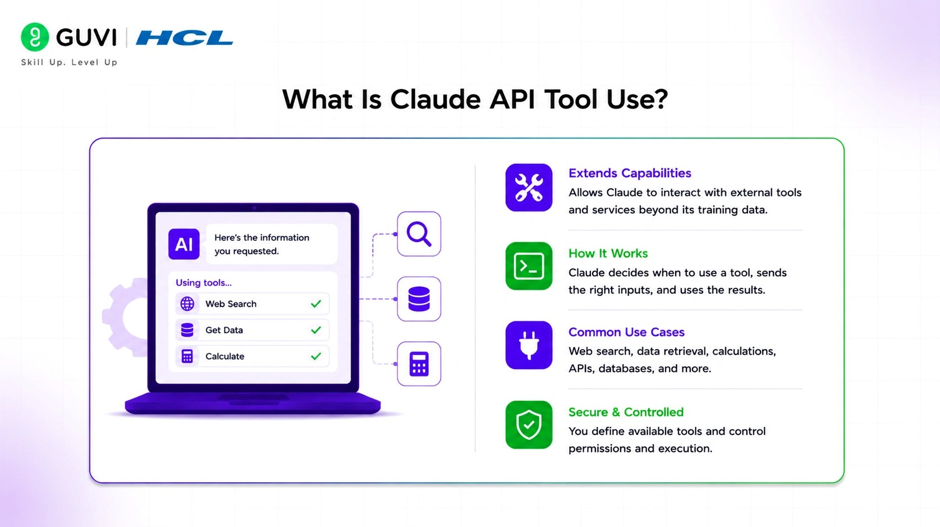
Claude API Tool Use is a capability that allows the model to request the execution of predefined functions when they are needed to answer a user’s question.
Instead of generating every answer from its training data, Claude can:
- Retrieve live weather
- Search databases
- Query internal documentation
- Book appointments
- Execute backend functions
- Call REST APIs
- Trigger business workflows
The model doesn’t execute code directly—it requests that your application execute the appropriate tool.
Why Is Tool Use Important?
Traditional LLMs generate responses based on learned patterns. While powerful, they cannot access live information or interact with external systems on their own.
Tool Use bridges this gap by allowing the model to retrieve real-time information and perform actions through developer-defined functions.
Benefits include:
- More accurate responses
- Access to live data
- Reduced hallucinations
- Workflow automation
- Better enterprise integrations
📊 Data Point
Many enterprise AI assistants now rely on tool calling alongside retrieval-augmented generation (RAG) to access current information, internal knowledge bases, and operational systems without embedding that data directly into the model.
How Does Claude Tool Use Work?
The interaction follows a structured workflow.
User Prompt
│
▼
Claude Analyzes Request
│
▼
Should a Tool Be Used?
│
┌────┴────┐
│ │
Yes No
│ │
▼ ▼
Tool Call Generate Response
│
▼
Application Executes Tool
│
▼
Tool Result Returned
│
▼
Claude Generates Final Answer
The application—not Claude—is responsible for executing the requested tool.
What Is a Tool Schema?
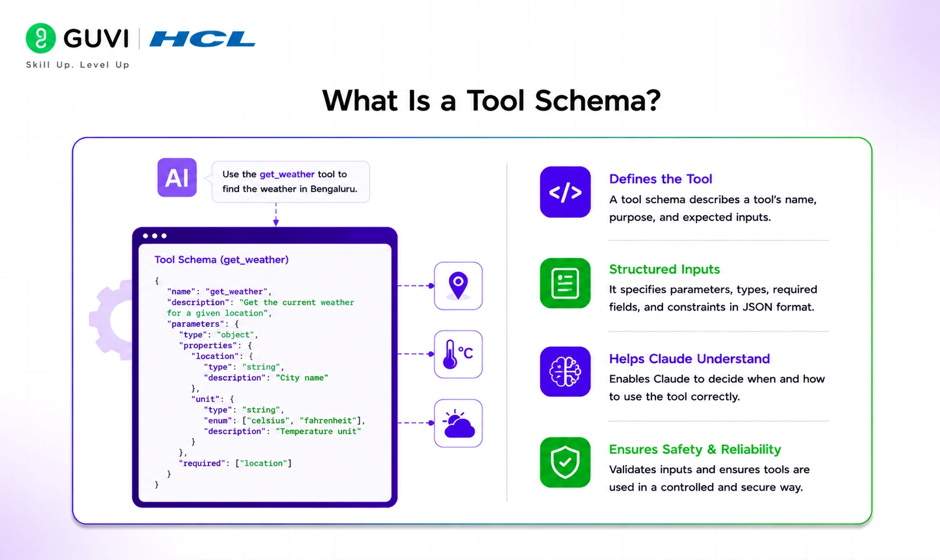
A tool schema defines what functions Claude can use and what inputs each function expects.
A schema typically includes:
- Tool name
- Description
- Input parameters
- Data types
- Required fields
For example:
| Tool | Purpose |
| get_weather | Retrieve current weather |
| search_products | Search an e-commerce catalog |
| create_ticket | Open a support ticket |
| check_inventory | Query stock availability |
| schedule_meeting | Book appointments |
Claude uses these descriptions to determine when a tool is appropriate.
When Does Claude Decide to Call a Tool?
Claude evaluates whether answering the user’s request requires external information or an action.
Examples include:
| User Request | Tool Call? |
| “Explain recursion.” | No |
| “What’s today’s weather in Chennai?” | Yes |
| “Find my last invoice.” | Yes |
| “Summarize this paragraph.” | No |
| “Book a meeting for tomorrow.” | Yes |
If no external information is needed, Claude usually responds directly.
💡 Pro Tip
Write clear tool descriptions. The better the schema explains a tool’s purpose, the more accurately Claude can determine when to use it.
Tool Use vs Prompt Engineering
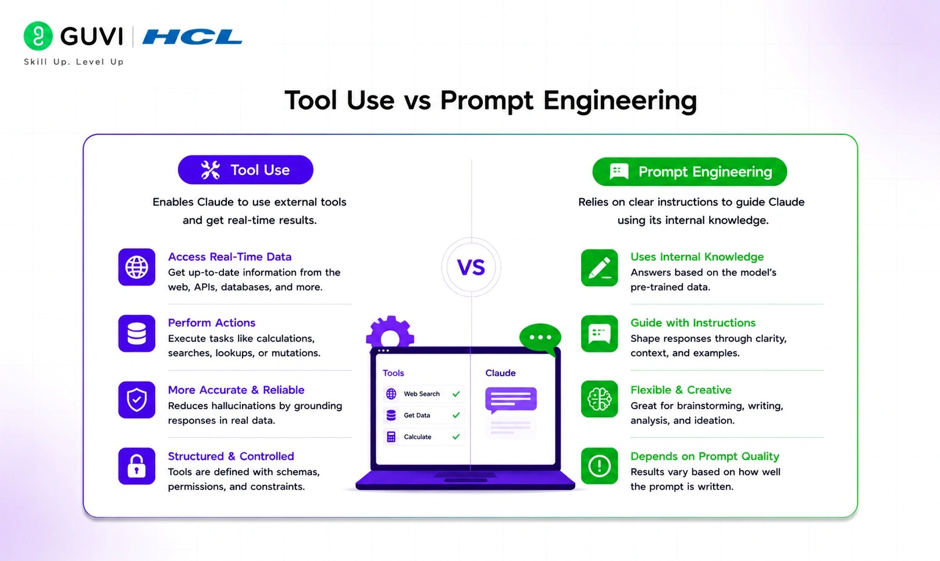
Prompt engineering influences how Claude generates responses, while Tool Use expands what Claude can actually do.
| Prompt Engineering | Tool Use |
| Improves instructions | Executes external functions |
| Uses existing knowledge | Retrieves live information |
| No external systems | Integrates APIs and databases |
| Text generation | Real-world actions |
Most production AI applications combine both approaches.
Common Use Cases
Tool Use enables a wide range of practical applications.
Popular use cases include:

- Customer support automation
- Database search
- CRM integration
- Calendar scheduling
- Email automation
- Weather services
- Financial dashboards
- E-commerce product search
- Internal knowledge retrieval
- Document management
These integrations allow AI assistants to move beyond conversation into workflow automation.
Best Practices for Designing Tools
Well-designed tools are easier for both developers and AI models to use.
Follow these guidelines:
- Give tools descriptive names.
- Keep each tool focused on a single task.
- Use clear parameter definitions.
- Validate inputs before execution.
- Return structured outputs.
- Handle failures gracefully.
✅ Best Practice
Instead of creating one large “do_everything” function, build smaller, specialized tools with clearly defined responsibilities.
Turn Claude into an agent with tool use, not just a chatbot. Learn AI & ML with HCL GUVI’s Artificial Intelligence and Machine Learning course.
Handling Tool Errors
External systems are not always available. Applications should prepare for failures such as:
- Network timeouts
- Authentication errors
- Invalid parameters
- API outages
- Missing resources
- Permission issues
Rather than exposing raw system errors, return structured error messages that Claude can explain naturally to users.
⚠️ Warning
Never assume tool execution will always succeed. Robust error handling is essential for production-grade AI applications.
Tool Use vs Retrieval-Augmented Generation (RAG)
Although often used together, Tool Use and RAG solve different problems.
| Tool Use | RAG |
| Executes actions | Retrieves documents |
| Calls APIs | Searches knowledge bases |
| Performs operations | Supplies context |
| Can modify external systems | Read-only information retrieval |
Many enterprise assistants use RAG for knowledge retrieval and Tool Use for taking actions.
Security Considerations
Tool Use introduces additional security responsibilities.
Developers should:
- Validate all inputs.
- Authenticate users.
- Restrict tool permissions.
- Log tool executions.
- Sanitize outputs.
- Protect sensitive credentials.
- Apply rate limiting where appropriate.
Never allow unrestricted execution of arbitrary functions.
Real-World Example
Imagine an AI-powered IT helpdesk.
A user asks:
“Reset my VPN password.”
Instead of generating generic advice, Claude determines that the request requires an external action.
It requests the reset_vpn_password tool.
Your backend:
- Verifies user identity.
- Calls the identity management system.
- Resets the password.
- Returns the result.
Claude then responds:
“Your VPN password has been reset successfully. You’ll receive a confirmation email shortly.”
This workflow combines conversational AI with secure backend automation.
Common Mistakes Developers Make
| Mistake | Better Approach |
| One massive tool | Create focused tools |
| Poor descriptions | Write detailed tool documentation |
| Weak validation | Validate every parameter |
| Ignoring failures | Return structured error responses |
| Returning inconsistent data | Standardize response formats |
| Giving excessive permissions | Follow least-privilege principles |
Conclusion
Claude API Tool Use transforms conversational AI into an intelligent application layer capable of interacting with APIs, databases, business systems, and automation workflows. By allowing Claude to request developer-defined functions, applications can deliver real-time, context-aware responses while reducing hallucinations and extending AI beyond text generation.
Success with Tool Use depends not only on integrating the API but also on designing clear tool schemas, implementing secure execution, and building resilient workflows. Combined with techniques like prompt engineering and Retrieval-Augmented Generation, Tool Use forms a core building block for modern, production-ready AI applications.
FAQs
What is the Claude API Tool Use?
Claude API Tool Use (Function Calling) enables Claude to request developer-defined functions to retrieve live data, interact with external systems, or perform actions before generating a response.
Does Claude execute functions directly?
No. Claude identifies when a tool is needed and returns a structured tool request. Your application is responsible for executing the function and sending the result back to Claude.
How is Tool Use different from RAG?
Tool Use performs actions or calls external services, while Retrieval-Augmented Generation (RAG) retrieves relevant information from knowledge sources to improve responses.
Can Claude call multiple tools in a single conversation?
Yes. Depending on the workflow and application logic, Claude can request multiple tool calls across one or more conversation turns.
How do I improve tool selection accuracy?
Use descriptive tool names, clear parameter definitions, focused functionality, and consistent response formats. Well-designed schemas help Claude choose the right tool more reliably.
Is Tool Use secure by default?
No. Developers must implement authentication, authorization, input validation, logging, and other security controls to ensure safe tool execution.
What kinds of applications benefit from Tool Use?
Customer support platforms, enterprise assistants, CRM systems, scheduling applications, e-commerce platforms, internal knowledge systems, and workflow automation tools are common examples.
Success Stories

About the Author
Vishalini Devarajan
An Aerospace Engineer turned content writer, I focus on making complex concepts easy to understand through well-structured, reader-friendly blogs. Whether it’s a technical topic or a non-technical one, I love creating content that is clear, engaging, and impactful.
View all posts by Vishalini Devarajan
Connect with me @









Did you enjoy this article?