


Artificial Intelligence and Machine Learning Articles
AI/ML Skills Gap 2026: Why Companies Can't Find Job-Ready Talent
20 AI/ML Interview Questions Recruiters Can Use Without a Tech Background - Best Guide
How Industry-Backed AI/ML Bootcamps Are Changing the AI/ML Hiring Pipeline - Best Guide 2026
From IT Support to AI Engineer: A Realistic Career Switch Guide 2026


Get In Touch For Details! Request More Information

Claude for Sales Teams: Prospecting and Proposal Writing
Aug 12, 2026 3 Min Read 216 Views
(Last Updated)
Sales teams spend significant time researching prospects, writing personalized outreach, and drafting proposals. Claude helps automate repetitive sales tasks, enabling sales professionals to focus on building relationships and closing deals. Claude for sales teams improves productivity while delivering more personalized customer communication.
Table of contents
- TL;DR
- Direct Answer Box
- Benefits of Using Claude for Sales Teams
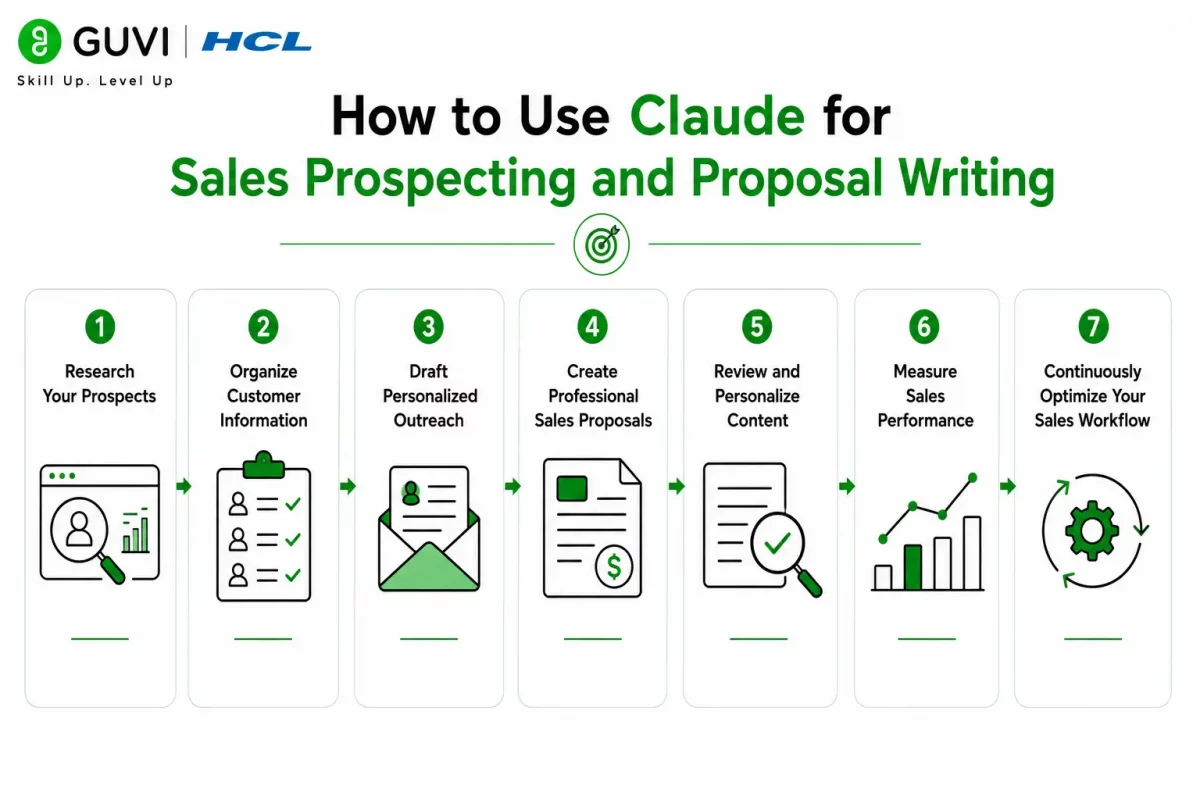
- How to Use Claude for Sales Prospecting and Proposal Writing
- Step 1: Research Your Prospects
- Step 2: Organize Customer Information
- Step 3: Draft Personalized Outreach
- Step 4: Create Professional Sales Proposals
- Step 5: Review and Personalize Content
- Step 6: Measure Sales Performance
- Step 7: Continuously Optimize Your Sales Workflow
- Sales Tasks You Can Automate with Claude
- Sales Tasks Claude Should Not Replace
- Best Practices for Using Claude in Sales
- Conclusion
- FAQs
- How can Claude help sales teams?
- Can Claude write sales proposals?
- Can Claude personalize sales outreach?
- Does Claude integrate with CRM systems?
- Can Claude replace sales representatives?
- What are the benefits of using Claude for sales?
- What are the best practices for using Claude in sales?
TL;DR
- Claude can help automate prospect research and proposal writing for sales teams.
- AI can improve sales productivity by personalizing outreach.
- Sales teams can use Claude to summarize client information and draft personalized proposals.
- Always have a human review proposals and outreach before sending them to customers.
- AI-powered sales workflows can help sales teams optimize their time and increase productivity.
📚 Data Point: HubSpot’s State of AI Report found that sales professionals are using generative AI to automate sales content creation, research prospects, and personalize outreach. This helps increase productivity while reducing the time spent on administrative work.
Source: HubSpot State of AI Report
Direct Answer Box
| Claude helps sales teams improve prospecting and proposal writing by automating research, drafting outreach, summarizing customer information, and creating professional proposals. AI-generated sales content enables sales professionals to spend more time engaging with customers while improving personalization and overall sales productivity. |
Benefits of Using Claude for Sales Teams
Sales teams spend hours researching leads, writing emails, and preparing proposals. Claude reduces administrative work by assisting with customer research, content creation, and sales documentation, allowing sales professionals to focus on building customer relationships and closing deals.
Key benefits include:
- Faster sales prospect research
- Personalized sales outreach
- Professional proposal writing assistance
- Improved sales team productivity
- Consistent sales communication
- Better customer engagement
- Reduced administrative workload
- More time for selling activities
How to Use Claude for Sales Prospecting and Proposal Writing
Step 1: Research Your Prospects
Find publicly available information about potential customers, including their industry, business size, products, and recent news. Understanding a prospect’s business helps personalize outreach and identify customer needs.
Research information such as:
- Company background
- Industry and business size
- Products and services
- Recent news and announcements
- Customer pain points
- Potential business opportunities
Step 2: Organize Customer Information
Before generating customer outreach or proposals, organize all prospect information into a structured format. Claude performs best when provided with a clear and organized business context.
Structure information such as:
- Company name
- Decision-maker names and roles
- Business challenges
- Sales goals
- Current solutions
- Customer needs
Step 3: Draft Personalized Outreach
Use Claude to generate personalized cold emails, follow-up emails, or introductory messages based on your prospect’s business needs and the information you’ve gathered.
Claude can generate:
- Cold emails
- Follow-up emails
- LinkedIn outreach messages
- Meeting requests
- Sales introductions
- Personalized messages
Step 4: Create Professional Sales Proposals
Use Claude to generate proposal drafts that explain your product or service, pricing, business value, and implementation approach. Always personalize proposals to match each client’s unique requirements.
A proposal typically includes:
- Executive summary
- Customer business challenges
- Proposed product or service
- Project scope
- Pricing overview
- Implementation details
- Business value and expected outcomes
Step 5: Review and Personalize Content
Always review AI-generated content for accuracy, tone, and personalization before sending it to a prospect or customer. Edit the content to reflect your brand voice and ensure it aligns with the customer’s goals.
Verify the following:
- Accuracy
- Personalization
- Brand voice
- Pricing and product information
- Customer business requirements
- Professional tone
Step 6: Measure Sales Performance
Track the success of AI-assisted sales activities using key sales metrics. Performance tracking helps identify opportunities to optimize outreach strategies and proposal quality.
Monitor metrics such as:
- Response rate
- Meeting bookings
- Proposal acceptance rate
- Sales conversion rate
- Customer engagement rate
- Revenue generated
Step 7: Continuously Optimize Your Sales Workflow
Sales activities and customer expectations continually evolve. Regularly review outreach performance, proposal success rates, and customer feedback to improve your sales process. Sales professionals who want to improve sales performance using data-driven insights and analytics can develop these skills through HCL GUVI’s Business Analytics Course.
High-performing sales teams spend less time on administrative work and more time building relationships with prospects. AI tools like Claude can automate research, cold emails, and proposal drafting, allowing sales professionals to spend more time selling and engaging with customers.

Sales Tasks You Can Automate with Claude
Claude can assist sales teams throughout the sales cycle.
It can help with:
- Prospect research
- Customer profile summaries
- Cold email drafting
- Follow-up email drafting
- Sales proposal drafting
- Meeting agenda creation
- Call summaries
- Sales presentation outlines
- Objection handling suggestions
- Product documentation summarization
- CRM note generation
- Sales process documentation
The HCL GUVI’s Artificial Intelligence eBook is an excellent resource for learning practical Artificial Intelligence concepts, prompt engineering, business automation, and real-world AI applications. It explains how AI improves productivity across sales, marketing, customer service, and other business functions.
Sales Tasks Claude Should Not Replace
Claude is a valuable sales assistant, but strategic sales decisions should remain the responsibility of experienced sales professionals.
Claude should not replace:
- Relationship building
- Sales negotiations
- Pricing approvals
- Contract and terms negotiations
- Final proposal approvals
- Strategic account planning
- Customer commitment decisions
- Legal and compliance reviews
- Executive sales decisions
While Claude can automate research and content creation, building trust and maintaining customer relationships remain responsibilities best handled by human sales professionals.
⚠️ Warning: Claude can generate personalized sales content, but AI-generated proposals and emails should always be reviewed before being shared with prospects or customers. Verify customer information, pricing, product details, and business claims to ensure accuracy and professionalism.
Best Practices for Using Claude in Sales
Sales teams should follow these best practices when using Claude:
- Research prospects before generating outreach.
- Personalize every email and proposal.
- Verify customer information for accuracy.
- Maintain a consistent brand voice.
- Review all Claude-generated content before sending.
- Track proposal performance and outreach success.
- Continuously refine prompts and sales workflows.
- Protect confidential customer information.
- Use Claude to assist sales teams, not replace them.
Conclusion
Claude helps sales teams increase productivity by automating prospect research, drafting personalized outreach, and creating professional sales proposals. When combined with human expertise, Claude enables sales professionals to spend less time on administrative work and more time building customer relationships. Continuous performance tracking and workflow optimization help maximize the value of AI-powered sales processes.
FAQs
1. How can Claude help sales teams?
Claude can automate prospect research, draft personalized outreach, summarize customer information, and assist in creating professional sales proposals. This helps sales teams reduce administrative work and focus more on customer engagement and closing deals.
2. Can Claude write sales proposals?
Yes. Claude can generate proposal drafts using customer requirements, business challenges, and proposed solutions. However, every proposal should be reviewed and customized before being shared with a customer.
3. Can Claude personalize sales outreach?
Yes. Claude can generate personalized emails, follow-up messages, LinkedIn outreach, and other sales communications using prospect information and business context provided by the sales team.
4. Does Claude integrate with CRM systems?
Claude can assist with CRM-related tasks such as summarizing customer interactions, generating CRM notes, and organizing sales information. Integration depends on the CRM platform and your implementation.
5. Can Claude replace sales representatives?
No. Claude can automate research, writing, and administrative tasks, but relationship building, negotiations, customer engagement, and strategic sales decisions require human expertise.
6. What are the benefits of using Claude for sales?
Key benefits include faster prospect research, improved proposal writing, personalized customer communication, increased productivity, reduced administrative work, and better sales efficiency.
7. What are the best practices for using Claude in sales?
Research prospects, personalize outreach, verify AI-generated content, maintain a consistent brand voice, track sales performance, protect customer data, and use Claude to support, not replace, human sales expertise.
Success Stories

About the Author
Vishalini Devarajan
An Aerospace Engineer turned content writer, I focus on making complex concepts easy to understand through well-structured, reader-friendly blogs. Whether it’s a technical topic or a non-technical one, I love creating content that is clear, engaging, and impactful.
View all posts by Vishalini Devarajan
Connect with me @













Did you enjoy this article?