


Artificial Intelligence and Machine Learning Articles
How to Evaluate LLM Outputs in Production Deployments
AI/ML Skills Gap 2026: Why Companies Can't Find Job-Ready Talent
20 AI/ML Interview Questions Recruiters Can Use Without a Tech Background - Best Guide
How Industry-Backed AI/ML Bootcamps Are Changing the AI/ML Hiring Pipeline - Best Guide 2026


Get In Touch For Details! Request More Information
Vibe Coding: The Future of Programming with AI
Sep 22, 2026 6 Min Read 2865 Views
(Last Updated)
AI coding tools have changed software development from writing every line manually to describing what you want and letting AI help implement it. This prompt-driven workflow is commonly called vibe coding, especially when developers focus more on the desired outcome than on manually writing or reviewing every line of generated code.
The term vibe coding was coined by AI researcher Andrej Karpathy in February 2025. His original description referred to a highly AI-driven workflow where natural-language prompts, generated code, error messages, and repeated iterations replace much of the traditional coding process.
By 2026, tools such as Cursor, Replit, and GitHub Copilot have moved beyond simple autocomplete. Coding agents can now inspect repositories, edit multiple files, run terminal commands, fix errors, write tests, and work through multi-step development tasks.
Table of contents
- Quick Answer
- What Is Vibe Coding? A Beginner’s Guide to Coding With AI
- How Vibe Coding Works (Step-by-Step)
- Example: Sort a List of Names
- Vibe Coding vs Traditional Coding vs Agentic Coding
- Why Developers Use Vibe Coding
- Best Practices for Vibe Coding in 2026
- Common Risks and Mistakes in Vibe Coding
- Accepting Every Generated Change
- Fixing Symptoms Instead of Root Causes
- Skipping Tests
- Letting the Codebase Become Unmaintainable
- Trusting Generated Security Logic
- Tools You Can Use for Vibe Coding
- Cursor
- Replit
- GitHub Copilot
- ChatGPT or Claude
- When Should You Use Vibe Coding?
- Future of Vibe Coding in 2026 and Beyond
- Final Thoughts
- FAQs
- What is vibe coding?
- Is vibe coding the same as AI-assisted coding?
- What are the best tools for vibe coding in 2026?
- Can beginners use vibe coding without knowing programming?
- Is vibe coding safe for production software?
- What is the difference between vibe coding and agentic coding?
Quick Answer
Vibe coding is an AI-assisted software development approach where you describe the desired functionality in natural language and use an AI coding tool to generate, modify, debug, and refine the implementation.
- Main Input: Natural-language instructions instead of manually writing every line.
- AI Role: Generates code, edits files, fixes bugs, and can execute development tasks.
- Human Role: Defines requirements, reviews behaviour, tests results, and guides iterations.
- Popular Tools: Cursor, Replit, GitHub Copilot, ChatGPT, and Claude.
- Best Use Cases: Prototypes, internal tools, small applications, experiments, and accelerating repetitive development work.
What Is Vibe Coding? A Beginner’s Guide to Coding With AI
Vibe coding is a way of creating software by expressing what you want in natural language and allowing an AI coding system to translate those instructions into working code.
Instead of manually writing:
Create component
Add route
Build form
Connect API
Validate input
Handle error
you might give an AI coding agent one instruction:
Build a registration page with name, email, and password fields.
Validate the form, display useful error messages, and submit the data
to the existing /api/register endpoint.
The AI can then inspect the existing project, determine which files need changes, generate the code, and in some tools run commands or tests to verify its work.
This is different from traditional autocomplete. Modern coding agents can operate across multiple files and perform sequences of actions rather than merely suggesting the next line of code.
The phrase was popularized by Andrej Karpathy, who described a workflow where he interacted heavily with AI-generated code through prompts rather than manually controlling every implementation detail
How Vibe Coding Works (Step-by-Step)
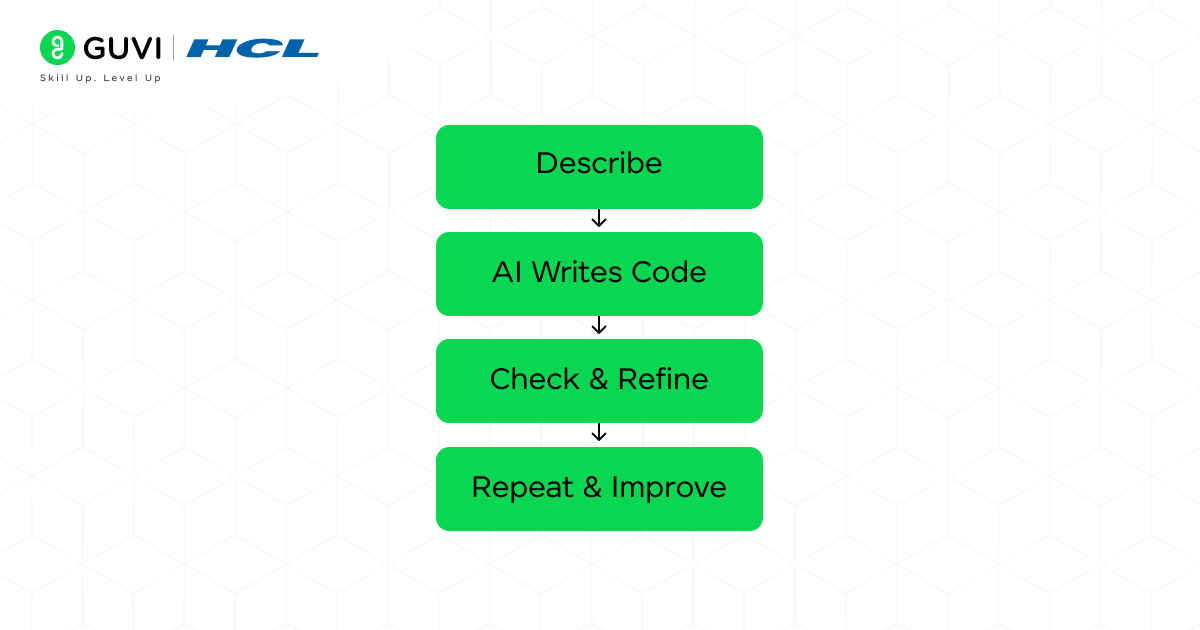
A typical vibe coding workflow follows a prompt, generate, test, and refine cycle.
- Describe the GoalTell the AI what the finished feature should do.Example:“Create a weather dashboard that lets users search for a city and displays temperature, humidity, wind speed, and current weather conditions.”
- Let the AI Generate the ImplementationThe coding assistant may create the required HTML and CSS, JavaScript, framework components, API calls, and supporting files.
- Run and Test the ResultOpen the application and check whether the functionality matches the requirement.
- Describe What Needs to ChangeInstead of manually editing every line, give targeted feedback.For example:“Show an error message when the city cannot be found and add a loading indicator while the API request is running.”
- Let the Agent Modify the CodeModern coding agents can locate the relevant files and update multiple parts of the project automatically. Cursor Agent, for example, can search a codebase, edit files, run terminal commands, and attempt to fix errors.
- Review and VerifyCheck the generated diff, test edge cases, run automated tests, and verify security-sensitive logic before accepting the implementation.
The workflow therefore becomes:
Describe → Generate → Run → Test → Refine → Review → Ship
Example: Sort a List of Names
Suppose you want a Python function that sorts names alphabetically.
You could prompt:
“Create a Python function that takes a list of names and returns them in alphabetical order.”
The AI might generate:
def sort_names(name_list):
    return sorted(name_list)
You could then refine it:
“Make the sorting case-insensitive without changing the original spelling.”
The updated version could become:
def sort_names(name_list):
    return sorted(name_list, key=str.lower)
This illustrates the core idea of vibe coding. Instead of manually rewriting the implementation, you describe the expected behaviour and let the AI translate that requirement into code.
Vibe Coding vs Traditional Coding vs Agentic Coding
Vibe coding is often used loosely to describe any AI-assisted programming, but the terms are not identical.
| Factor | Traditional Coding | Vibe Coding | Agentic Coding |
|---|---|---|---|
| Primary Input | Manually written code | Natural-language prompts | Goals and constraints |
| AI Involvement | Optional | High | High |
| Developer Control | Direct implementation | Guides through feedback | Supervises an autonomous agent |
| Code Review | Usually detailed | May be lighter during experimentation | Review usually occurs around agent changes |
| Multi-File Changes | Developer handles them | AI may generate them | Agent actively plans and edits them |
| Terminal Commands | Developer runs them | Depends on tool | Agent may run them |
| Testing | Developer initiates | Often prompt-driven | Agent may generate and run tests |
| Best Fit | Controlled production development | Rapid experimentation | Larger multi-step software tasks |
Cursor describes agentic coding as directing AI agents that can plan work, edit files, run commands, and verify their results.
Vibe coding is generally more outcome-focused. You describe what feels wrong or what should change and repeatedly steer the generated application.
Why Developers Use Vibe Coding
Vibe coding can significantly reduce the effort required to move from an idea to a functioning prototype.
- Faster Prototyping: Generate initial interfaces, APIs, scripts, and application structures from prompts.
- Less Boilerplate: AI can generate repetitive boilerplate code, configuration files, and common application patterns.
- Natural-Language Debugging: Paste or describe an error and ask the AI to investigate the likely cause.
- Rapid UI Iteration: Request design changes such as spacing, layouts, components, forms, or responsive behaviour through prompts.
- Code Explanation: Ask the AI to explain unfamiliar generated code before modifying it.
- Test Generation: Modern coding assistants can generate tests for existing functions and features.
- Lower Entry Barrier: Beginners can experiment with software ideas before mastering every syntax rule.
The biggest advantage is speed from idea to working implementation. However, faster generation does not remove the need to validate what the AI produces.
Best Practices for Vibe Coding in 2026
Vibe coding works better when prompts contain clear requirements instead of vague instructions.
- Define the Stack: Specify React, Python, Node.js, Django, or another required technology.
- State the Exact Feature: Describe inputs, outputs, user actions, and expected behaviour.
- Give Constraints: Mention existing APIs, database schemas, authentication requirements, or files that should not change.
- Build in Small Steps: Ask for one feature at a time rather than generating an entire complex application through one large prompt.
- Review Diffs: Check which files changed and whether unrelated code was modified.
- Run Tests: Test successful inputs, invalid inputs, edge cases, and failure scenarios.
- Ask for Tests: Request unit or integration tests for important logic.
- Use Version Control: Commit working versions so incorrect AI edits can be rolled back.
- Protect Secrets: Never place passwords, private keys, production credentials, or sensitive tokens directly into prompts or source code.
- Understand Critical Code: Authentication, payments, permissions, database migrations, and security-sensitive logic require careful human review.
A useful prompt is specific:
“Add email validation to signupForm.tsx. Keep the existing API endpoint and styling unchanged. Show an inline error for invalid addresses and add tests for empty and malformed inputs.”
That gives the AI far better constraints than:
“Fix the signup page.”
Common Risks and Mistakes in Vibe Coding
The biggest mistake in vibe coding is assuming that code is correct simply because the application appears to work.
1. Accepting Every Generated Change
AI can modify working code while trying to solve an unrelated issue.

Review the diff before accepting large changes.
2. Fixing Symptoms Instead of Root Causes
Repeatedly prompting:
“It still does not work. Fix it.”
can cause the model to layer patches over an underlying architectural problem.
Ask the AI to explain the root cause before generating another fix.
3. Skipping Tests
A successful visual result does not guarantee that edge cases work.
Test:
- Invalid input
- Empty data
- API failures
- Authentication failures
- Database errors
- Mobile layouts
- Permission boundaries
4. Letting the Codebase Become Unmaintainable
Repeated AI edits can introduce duplicate functions, unused dependencies, inconsistent naming, and unnecessary abstractions.
Periodically ask for focused refactoring and then review the proposed changes.
5. Trusting Generated Security Logic
Authentication, encryption, authorization, payment processing, and access control require additional review.
Martin Fowler notes that the narrow form of vibe coding, where generated code receives little inspection, can introduce maintainability, correctness, and security concerns.
Vibe coding is therefore most effective when rapid generation is combined with disciplined testing and review.
Tools You Can Use for Vibe Coding
1. Cursor
Cursor is an AI-focused code editor with agent capabilities.
Cursor Agent can:
- Search an existing codebase
- Read relevant files
- Edit multiple files
- Run terminal commands
- Build features
- Refactor code
- Fix bugs
- Run and verify changes
Developers can describe a task in natural language and review the generated edits through the editor’s diff interface.
2. Replit
Replit Agent focuses heavily on building complete applications from natural-language descriptions.
Users can describe an app or website and let Agent create the implementation through conversation. Replit currently supports workflows involving frontend code, backend logic, databases, authentication, integrations, and deployment from the same environment.
This makes it particularly useful for beginners who want to move quickly from an idea to a working application without configuring a complete local development environment.
3. GitHub Copilot
GitHub Copilot now extends beyond code completion.
Depending on the environment and plan, Copilot can:
- Generate code
- Explain existing code
- Fix bugs
- Refactor files
- Generate tests
- Edit multiple files
- Operate in agent mode
- Run development commands
- Work through multi-step coding tasks
In supported IDEs, Copilot Agent can determine which files require changes and iterate on the task until completion.
4. ChatGPT or Claude
General-purpose AI assistants can also support vibe coding workflows by generating code, explaining errors, planning application architecture, reviewing functions, creating tests, and helping refine requirements.
They are particularly useful when you need to reason through a problem before changing the implementation.
Want to go beyond vibe coding and actually master the AI powering it? Enrol in GUVI’s Certified AI & ML Course co-designed by Intel & IITM Pravartak and build real-world skills in Generative AI, Agentic AI, and more.
When Should You Use Vibe Coding?
Vibe coding is particularly useful when speed and experimentation matter more than manually controlling every implementation detail.
Good use cases include:
- Proof-of-concept applications
- Landing pages
- Internal tools
- Personal automation
- Small scripts
- Hackathon projects
- UI prototypes
- Data dashboards
- Early startup MVPs
- Learning experiments
More caution is required for:
- Payment systems
- Authentication infrastructure
- Healthcare software
- Financial applications
- Security-sensitive systems
- Critical production infrastructure
- Large applications with complex existing architectures
The higher the consequence of a bug, the more important traditional engineering practices such as code review, automated testing, threat modelling, observability, and controlled deployment become.
Future of Vibe Coding in 2026 and Beyond
Vibe coding is increasingly evolving into agentic software development.
Earlier AI coding tools primarily suggested individual functions or lines of code. Current coding agents can inspect repositories, plan changes, modify several files, execute commands, test their work, and continue iterating based on the results. Cursor describes this shift as moving from autocomplete to synchronous agents and then toward increasingly autonomous coding agents.
The development workflow is therefore shifting from:
Developer writes code → Computer executes code
toward:
Developer defines intent → AI plans implementation → Agent edits code → Tests run → Developer reviews outcome
Tools are also becoming more connected. For example, Replit announced integrations that allow software-building workflows to move directly from conversational AI environments into Replit for implementation and deployment.
This does not make software engineering knowledge irrelevant. As AI generates more implementation code, understanding architecture, debugging, security, testing, databases, APIs, and system design becomes increasingly important for verifying whether generated software is actually reliable.
Final Thoughts
Vibe coding changes the interface between people and software development. Instead of translating every idea manually into syntax, developers can increasingly describe the desired behaviour and let AI coding agents generate much of the implementation.
That makes prototyping faster and software creation more accessible. However, generating code quickly is different from building reliable software.
The strongest workflow combines both approaches: use AI to accelerate implementation, then apply human judgment to architecture, testing, security, maintainability, and final review.
In 2026, the real advantage of vibe coding is not avoiding coding knowledge altogether. It is allowing developers to spend less time typing routine implementation and more time defining problems, testing solutions, and deciding what software should actually do.
FAQs
1. What is vibe coding?
Vibe coding is an AI-assisted development approach where developers describe the software or feature they want in natural language, and an AI coding tool generates, modifies, or debugs much of the code.
2. Is vibe coding the same as AI-assisted coding?
Not exactly. AI-assisted coding is a broad term covering autocomplete, code generation, debugging, and code explanation. Vibe coding is more outcome-focused, with developers frequently guiding implementation through natural-language prompts instead of manually writing every line.
3. What are the best tools for vibe coding in 2026?
Popular vibe coding tools include Cursor, Replit, GitHub Copilot, ChatGPT, and Claude. The right tool depends on whether you need repository editing, autonomous agents, browser-based app building, debugging, or general coding assistance.
4. Can beginners use vibe coding without knowing programming?
Yes, beginners can use vibe coding to create simple applications and prototypes. However, learning programming fundamentals remains important for understanding generated code, debugging errors, reviewing security risks, and maintaining larger projects.
5. Is vibe coding safe for production software?
Vibe coding can support production development, but AI-generated code should be reviewed and tested before deployment. Security-sensitive areas such as authentication, payments, permissions, databases, and API access require particularly careful human verification.
6. What is the difference between vibe coding and agentic coding?
Vibe coding focuses on describing the desired outcome and iteratively guiding AI-generated code. Agentic coding gives AI agents greater autonomy to inspect repositories, plan tasks, edit multiple files, run commands, execute tests, and work through multi-step development tasks with developer supervision.
Success Stories

About the Author
Vaishali
I'm a seasoned writer with four years of experience across technical, non-technical, and just about every genre or niche you can imagine. Adaptable and curious, I enjoy exploring new topics and making information engaging and easy to understand. Fueled by a steady stream of tea, I approach each project with creativity, reliability, and genuine enthusiasm for storytelling.
View all posts by Vaishali
Connect with me @









Did you enjoy this article?