


Software Development Articles
How to Read and Understand System Design Diagrams?
System Engineer Roles and Responsibilities: 12 Proven Duties for Growth
SAP Consultant Roles and Responsibilities: 12 Proven Duties for Growth and Success
Network Engineer Roles and Responsibilities: 12 Essential Duties for Success


Get In Touch For Details! Request More Information

State Design Pattern Explained in 2026
Aug 05, 2026 4 Min Read 839 Views
(Last Updated)
The State Design Pattern is an efficient coding practice for developing object-oriented programs. It provides the flexibility to alter object behaviour (based on conditions) without writing messy code.
For your better comprehension, the State Design Pattern allows actions to be triggered when methods on its interface are invoked. Now, let’s move on to the next sections to better understand this topic.
TL;DR Summary
- This blog helped me understand the State Design Pattern in very simple terms, using real examples like a phone changing from locked to unlocked, making the concept easy to relate to real life.
- The Practical Code Example + if-else comparison clearly shows how behaviour changes without messy conditions and why the pattern is useful in real coding situations.
- The UML Diagram explanation helps connect how Context, State, and Concrete States work together in a simple flow.
- Overall, the definition and importance sections make it easy to understand when and why this pattern is used in real applications.
In complex apps, a single object can have 10+ states, and using the State Design Pattern helps manage them cleanly without messy conditions.
Table of contents
- State Design Pattern: Definition
- State
- Practical Code Example
- (Code)
- Code Explanation:
- Importance of State Design Pattern
- a. Clean Code
- b. Easy to Maintain
- c. Easy to Add New States
- d. Better Organisation
- e. Flexible Behaviour
- State Design Pattern UML Diagram
- Explanation:
- Conclusion
- FAQs
- When should the State Design Pattern be used?
- How is the State Design Pattern different from if-else conditions?
- Can a single object have multiple states at the same time?
- Is the State Design Pattern only used in large projects?
- What happens when a state changes in this pattern?
- Is the State Design Pattern hard for beginners to learn?
State Design Pattern: Definition
State Design Pattern is a software design pattern for altering an object’s behaviour based on changes to its internal state. In this design pattern, developers avoid writing a large amount of conditional code (such as if-else or switch statements) by creating distinct state objects.
Once the required number of states is created, the object simply switches between them, and its behaviour automatically changes.
Also Read: Creational Design Patterns
State
These are essentially entities that describe an object’s current state (condition). The status of the state represents the behaviour of that particular object.
Now, let’s proceed to the next section, where we will see a practical code example to understand how the State Design Pattern actually works.
But before that, check out our comprehensive course on Object-oriented programming, where you will learn all the key concepts like classes, objects, inheritance, polymorphism, and design patterns that were crucial to developing efficient and scalable software.
Practical Code Example
Here, in this example, we will use JavaScript to demonstrate the State Design Pattern:
(Code)
// States (using objects instead of classes)
const LockedState = {
pressButton() {
console.log(“Phone is locked 🔒”);
}
};
const UnlockedState = {
pressButton() {
console.log(“Phone is unlocked 📱”);
}
};
// Object (Phone)
class Phone {
state = LockedState; // default state
setState = (newState) => {
this.state = newState;
};
pressButton = () => {
this.state.pressButton(); // behavior depends on current state
};
}
// Usage
const phone = new Phone(); // OBJECT
phone.pressButton(); // LockedPhone is locked 🔒
phone.setState(UnlockedState); // State Changes after this method is invoked
phone.pressButton(); //Phone is unlocked 📱
Code Explanation:
- In this example, we have created a phone object using the constructor method.
- Here, you can also see that we have defined two distinct states, LockedState and UnlockedState, each with its own pressButton behaviour.
- After that, we have assigned the default state behaviour, LockedState, to the Phone object.
- Now, when the pressButton() method is invoked for the first time. It uses the current state(locked), which is the default state, and we get the output “Phone is locked 🔒”.
- Once that is completed, we now come to the most important step: phone.setState(UnlockedState). Here, we are altering the phone’s internal state behaviour.
- After the state is modified, we again call the pressButton() method, and now the phone object will change its behaviour because the state has changed to a new state (unlocked), and we will get the output “Phone is unlocked 📱”.
- So, to summarise the whole process: the same object behaves differently when its internal state changes, and this occurs through function invocations.
Also Read: A Comprehensive Guide On Objects, Methods, and Classes In JavaScript
Importance of State Design Pattern
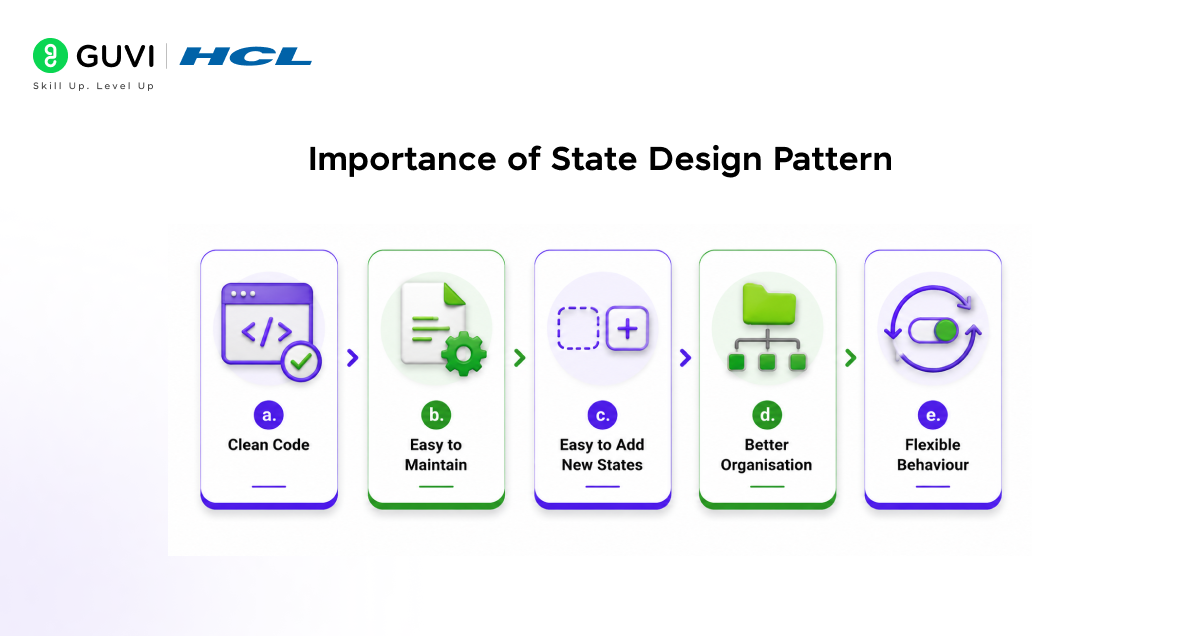
The following are the importance of the State Design Pattern, which makes it a crucial element during the software development process:
a. Clean Code
Keeps your code simple by avoiding long if-else blocks and making everything easier to read.

b. Easy to Maintain
You can update a single state without changing the entire codebase, making it less confusing.
c. Easy to Add New States
If a new state is needed, you can just add it without breaking existing code.
d. Better Organisation
Each state has its own logic, so everything is properly separated and not mixed up.
e. Flexible Behaviour
The object can change how it works at any time by changing its state.
State Design Pattern UML Diagram
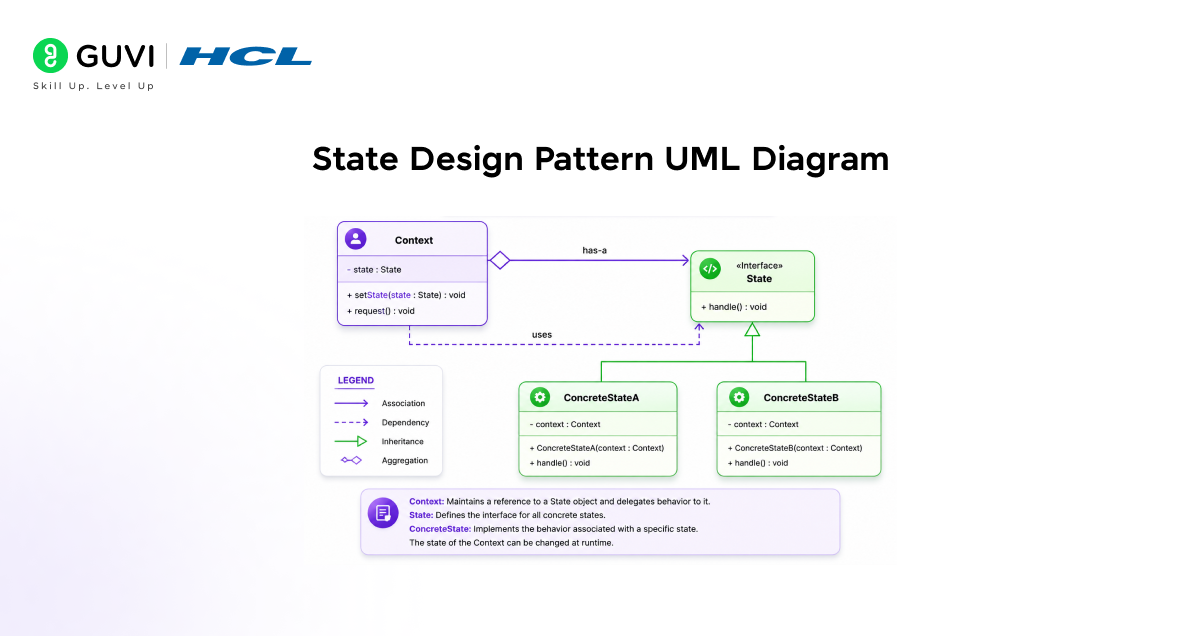
To get a better visualisation and understanding of how, in practice, objects change their behaviour in response to state changes, we will decode a UML (Unified Modelling Language) block diagram and examine the complete execution flow of this pattern.
Explanation:
- The Context (top left box) is the main object. It has a state variable and methods like setState() and request(). This means the Context always keeps track of “which state it is in” and calls that state when some action happens.
- The State (interface) (top right box) is like a common rule. It says every state must have a method like handle(). After that, all actual states follow the same structure, so they can be easily used by the Context.
- The ConcreteStateA and ConcreteStateB (bottom boxes) are the real states. Here you can see each one has its own handle() method. This means each state gives a different behaviour when the Context calls it.
- Execution Flow:
The Context has a state → it calls that state’s method → that state runs its own logic → if needed, Context changes to another state using setState() → after that, the same call gives a different result.
- This is how behaviour changes without writing any conditional statement, such as if-else.
Whether you are a fresh graduate or a working professional, if you aspire to make an impact in the field of Artificial Intelligence, look no further than HCL GUVI’s IITM Pravartak & MongoDB Certified AI Software Development Course. This program offers essential concepts and practical experience for designing high-quality software by integrating Generative AI. Take action today and enrol yourself in this highly interactive and enriching course!
Conclusion
After reading this blog, you might have understood the importance of the State Design Pattern. But if you are not able to do that, then I am giving you a brief on its cruciality.
See, in real-world scenarios, activities are not conducted in the same way. Many assumptions and considerations are applied at the time. So if that is the case, a developer who chooses not to implement the State Design Pattern will definitely end up spending a lot of time writing messy code, leading to poor readability, increased complexity in updating and debugging, and a higher risk of technical errors.
That’s why consistent use of the State Design Pattern in Object-oriented Programming (OOP) keeps things modular and maintainable.
FAQs
When should the State Design Pattern be used?
It is used when an object has multiple states and its behaviour changes based on those states.
How is the State Design Pattern different from if-else conditions?
It replaces long if-else blocks with separate state classes, making the code cleaner and easier to manage.
Can a single object have multiple states at the same time?
No, it holds only one active state at a time, which controls its behaviour.
Is the State Design Pattern only used in large projects?
It is most useful in medium- to large-scale projects where multiple states make the code complex.
What happens when a state changes in this pattern?
The object’s behaviour automatically changes based on the new active state.
Is the State Design Pattern hard for beginners to learn?
It becomes easier once the idea of separating an object’s state and behaviour is understood.
Success Stories
















Did you enjoy this article?