


Software Development Articles
How to Read and Understand System Design Diagrams?
System Engineer Roles and Responsibilities: 12 Proven Duties for Growth
SAP Consultant Roles and Responsibilities: 12 Proven Duties for Growth and Success
Network Engineer Roles and Responsibilities: 12 Essential Duties for Success


Get In Touch For Details! Request More Information

Structural Design Patterns: A Complete Beginner’s Guide
Jul 02, 2026 8 Min Read 1131 Views
(Last Updated)
Imagine you are putting together flat-pack furniture. The pieces are all there. But without the instruction sheet telling you how they connect, you end up with a table that wobbles or a chair that collapses. Structural design patterns are the instruction sheet for your code. They tell you how to connect your classes and objects so the whole thing holds together properly.
This guide explains all 7 structural design patterns in the most easy way. Every pattern gets a real-world analogy, a short code example, and a clear explanation of when to use it.
Quick Answer
Structural design patterns describe how to organise and connect classes and objects into larger, more manageable structures. The 7 structural design patterns covered here are Adapter, Bridge, Composite, Decorator, Facade, Flyweight, and Proxy. Each one solves a specific problem about how parts of a system fit together.
Table of contents
- What Are Structural Design Patterns?
- Adapter Pattern
- Bridge Pattern
- Composite Pattern
- Decorator Pattern
- Facade Pattern
- Flyweight Pattern
- Proxy Pattern
- Comparing All 7 Structural Design Patterns
- 💡 Did You Know?
- Conclusion
- FAQs
- What is the simplest structural design pattern for a complete beginner to start with?
- What is the difference between Decorator and inheritance?
- Can I use more than one structural design pattern in the same class?
- Is Facade the same as a service layer in web development?
- How are structural design patterns different from behavioral design patterns?
What Are Structural Design Patterns?
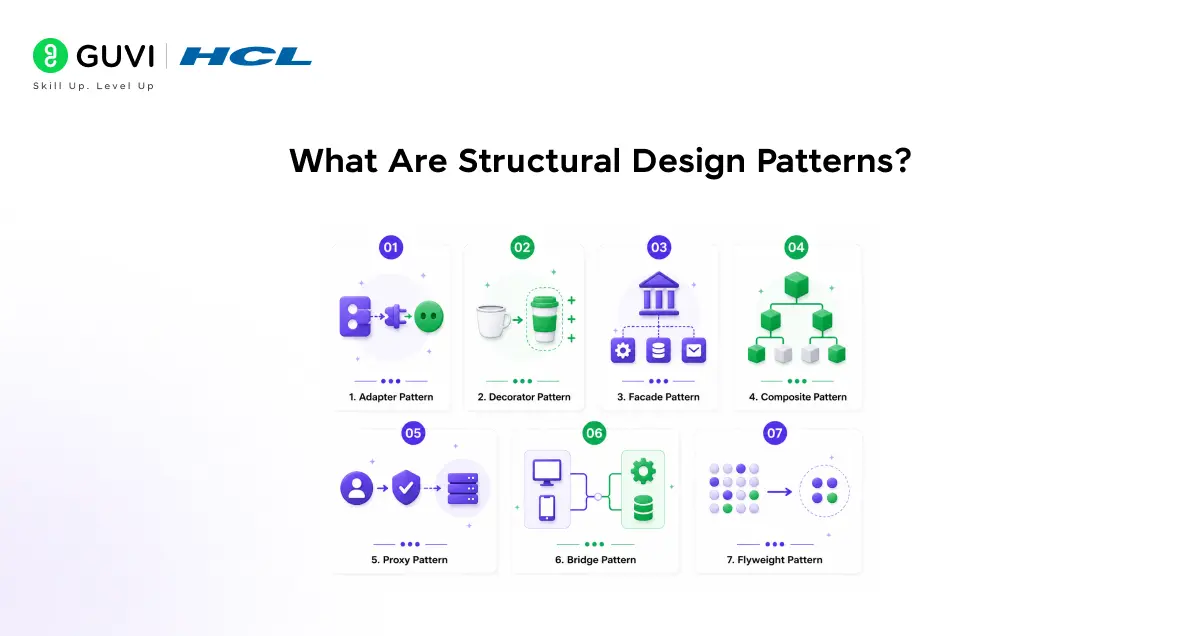
When you write an app, individual classes are easy. Structural design patterns handle what happens when those classes need to work together. A User class. A Product class. A PaymentMethod class. The hard part is making them work together cleanly as the app grows. That is where structural design patterns come in.
All structural design patterns solve one of three types of problems:
- Incompatibility: Two classes that need to work together but do not fit (Adapter, Bridge)
- Complexity: Systems that are getting too complicated to navigate (Facade, Flyweight)
- Flexibility: Adding new behaviour without rewriting existing code (Decorator, Proxy, Composite)
| Pattern | In one sentence |
| Adapter | Adapter: makes two incompatible things work together |
| Bridge | Prevents a class from splitting into too many combinations |
| Composite | Treats single items and groups of items the same way |
| Decorator | Adds new behaviour to an object by wrapping it |
| Facade | Hides a complicated system behind one simple interface |
| Flyweight | Shares data between similar objects to save memory |
| Proxy | Acts as a stand-in that controls access to another object |
Do check out HCL GUVI’s AI Software Development Course if you want to learn structural design patterns and build scalable software applications with real coding experience. This beginner-friendly program covers software architecture, system design, backend development, and AI-powered applications through hands-on projects, live mentoring, and industry-recognized certifications.
1. Adapter Pattern
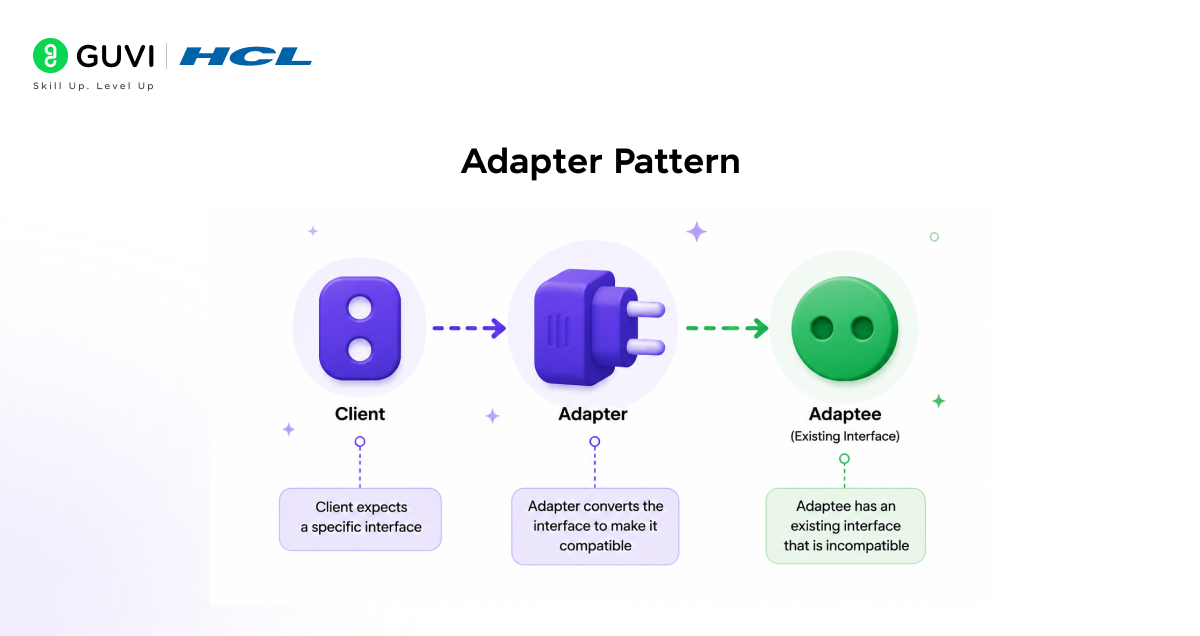
What problem does it solve?
You have two classes that need to work together. But one expects data in one format and the other provides it in a different format. You cannot change either class. You need something in the middle that translates.
Real-world analogy
Your Indian phone charger does not fit a UK socket. You use a travel adapter. The charger does not change. The socket does not change. The adapter translates between the two.
Simple code example
Here is a typical scenario for the Adapter structural design pattern. But you are adding a third-party library that uses make_payment() instead.
Simple python code example
# What your app expects
class PaymentProcessor:
    def pay(self, amount):
        pass

# Third-party library you cannot change
class RazorpayLibrary:
    def make_payment(self, amount):
        print(f"Razorpay: Processing Rs. {amount}")

# Adapter: bridges the gap
class RazorpayAdapter(PaymentProcessor):
    def __init__(self):
        self.razorpay = RazorpayLibrary()

    def pay(self, amount):           # your app calls pay()
        self.razorpay.make_payment(amount)  # adapter translates

# Your app works without any changes
payment = RazorpayAdapter()
payment.pay(500)
# Output: Razorpay: Processing Rs. 500
That is it. Your app calls pay(). The adapter handles the translation internally.
When to use Adapter
- Third-party libraries whose methods do not match what your code expects
- Legacy code that you need to connect to a modern system without rewriting it
- Testing when you want to replace a real service with a fake one that has the same interface
2. Bridge Pattern
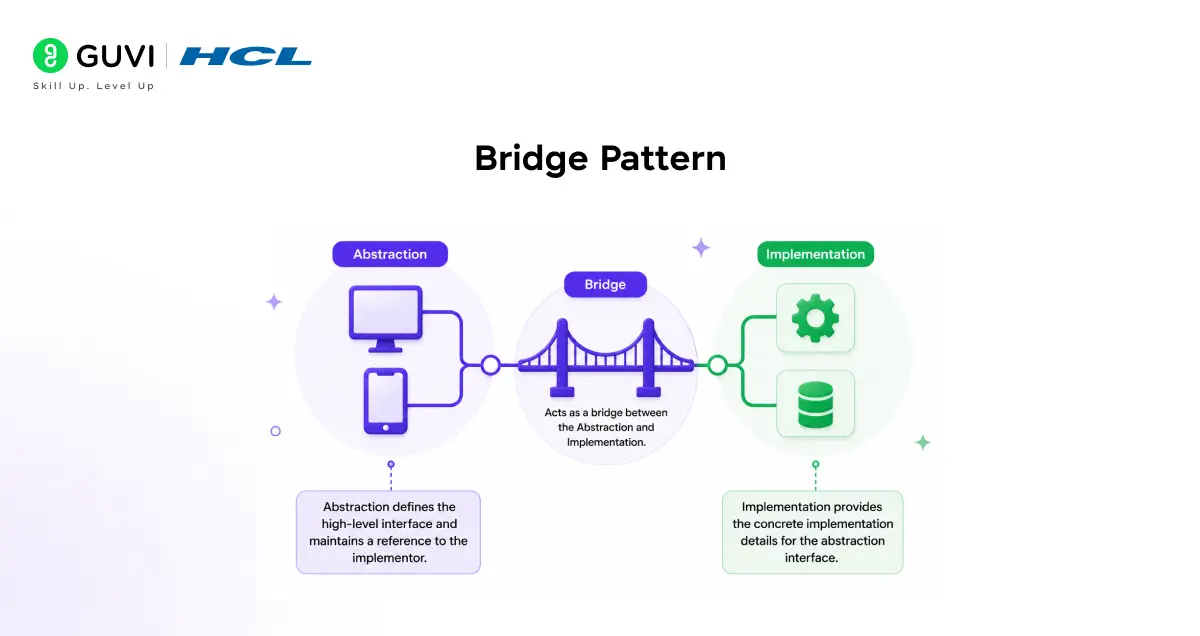
What problem does it solve?
Imagine a Shape class that can be Circle or Square, and each shape can be Red or Blue. If you use inheritance, you end up with: RedCircle, BlueCircle, RedSquare, BlueSquare. Add one new colour (Green) and you need two more classes. Add one new shape (Triangle) and two more. The classes multiply fast.
Bridge, the second structural design pattern, separates the two changing parts so they grow independently.
Real-world analogy
A TV remote works with any TV brand. The remote (what you interact with) is separate from the TV (the actual implementation). You can have one remote design that works with Samsung, Sony, or LG without creating a SamsungRemote, SonyRemote, and LGRemote.
Simple python code example
# The "implementation" side (colour)
class Colour:
    def fill(self):
        pass

class Red(Colour):
    def fill(self):
        return "red"

class Blue(Colour):
    def fill(self):
        return "blue"

# The "abstraction" side (shape) - holds a reference to colour
class Shape:
    def __init__(self, colour: Colour):
        self.colour = colour    # this is the "bridge"

class Circle(Shape):
    def draw(self):
        print(f"Drawing a {self.colour.fill()} circle")

class Square(Shape):
    def draw(self):
        print(f"Drawing a {self.colour.fill()} square")

# Mix and match freely
Circle(Red()).draw()    # Drawing a red circle
Circle(Blue()).draw()   # Drawing a blue circle
Square(Red()).draw()    # Drawing a red square
Adding a new colour class (Green) works immediately with all shapes. Adding a new shape (Triangle) works immediately with all colours. The two sides grow independently.
When to use Bridge
- When a class grows in two independent directions at the same time
- When you want to switch implementations at runtime without changing the abstraction
- UI rendering systems where you have different components and different rendering engines
3. Composite Pattern
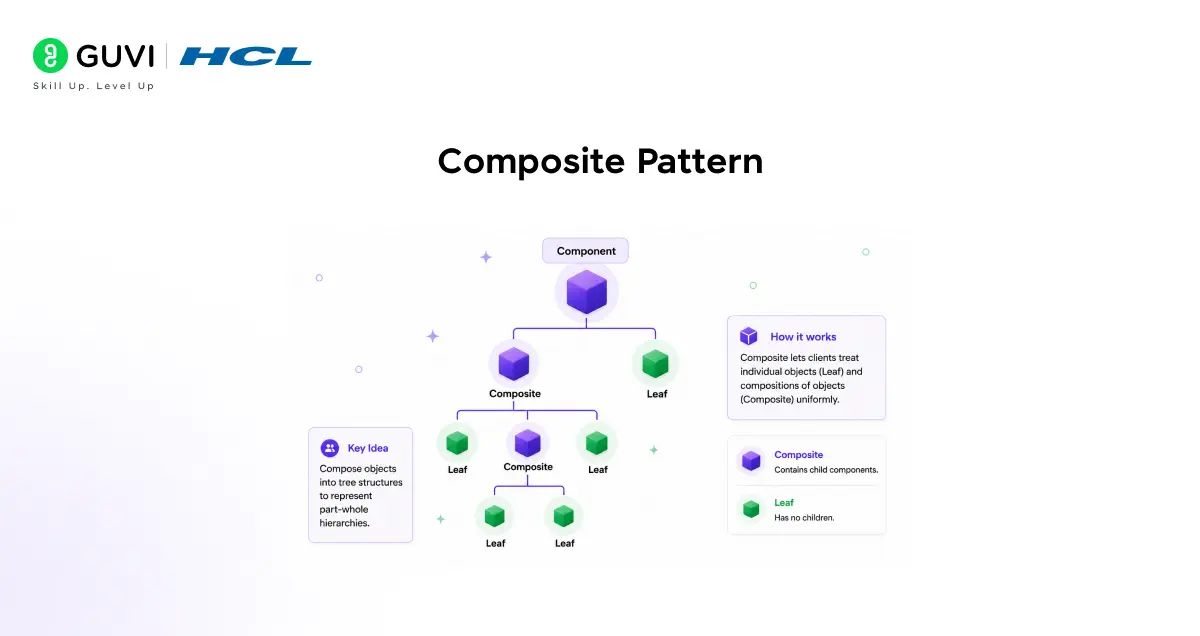
What problem does it solve?
You have a tree structure where some items are single objects (leaves) and some are containers (branches) that hold other items. You want to treat both the same way.
Real-world analogy
A file system. A single file has a size. A folder also has a size (the total of everything inside it). Whether you ask for the size of a file or a folder, you get a number back. You do not need to know which one you are dealing with.
Simple python code example
# Both File and Folder have the same interface
class File:
    def __init__(self, name, size):
        self.name = name
        self.size = size

    def get_size(self):
        return self.size

    def show(self, indent=0):
        print(" " * indent + f"📄 {self.name} ({self.size}KB)")

class Folder:
    def __init__(self, name):
        self.name = name
        self.items = []

    def add(self, item):
        self.items.append(item)

    def get_size(self):
        return sum(item.get_size() for item in self.items)

    def show(self, indent=0):
        print(" " * indent + f"📁 {self.name}/")
        for item in self.items:
            item.show(indent + 2)   # works for both files and folders

# Build a tree
project = Folder("my_project")
project.add(File("README.md", 5))

src = Folder("src")
src.add(File("app.py", 20))
src.add(File("utils.py", 10))

project.add(src)

project.show()
print(f"Total: {project.get_size()}KB")
Output:
📁 my_project/
  📄 README.md (5KB)
  📁 src/
    📄 app.py (20KB)
    📄 utils.py (10KB)
Total: 35KB
You call show() and get_size() the same way on files and folders. The tree handles itself recursively.
When to use Composite
- File systems (files and folders)
- UI component trees (a button inside a panel inside a window)
- Organisation charts (employees under managers under directors)
4. Decorator Pattern
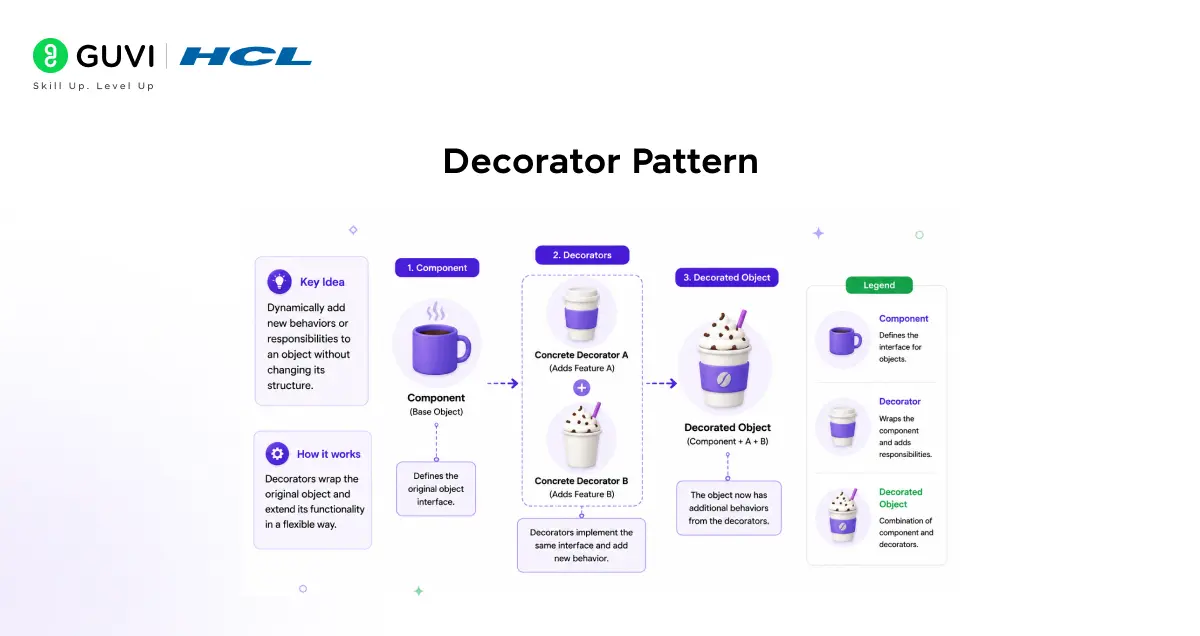
What problem does it solve?
Decorator is the fourth structural design pattern. You want to add new behaviour to an object without changing its class. And you want to combine behaviours in any order without creating a separate subclass for every combination.
Real-world analogy
Ordering coffee. You start with a plain espresso. Add milk, it becomes a latte. Add caramel on top, it becomes a caramel latte. Each addition wraps the previous cup. The original espresso never changed.
Simple python code example
# Base notification
class Notifier:
    def send(self, message):
        print(f"App: {message}")

# Decorator: adds email on top
class EmailDecorator:
    def __init__(self, notifier):
        self._notifier = notifier

    def send(self, message):
        self._notifier.send(message)          # original still runs
        print(f"Email: {message}")            # adds email on top

# Decorator: adds SMS on top
class SMSDecorator:
    def __init__(self, notifier):
        self._notifier = notifier

    def send(self, message):
        self._notifier.send(message)          # everything below still runs
        print(f"SMS: {message}")              # adds SMS on top

# Stack them in any combination
notifier = Notifier()
notifier = EmailDecorator(notifier)   # add email
notifier = SMSDecorator(notifier)     # add SMS on top of email

notifier.send("Your order was shipped!")
Output:
App: Your order was shipped!
Email: Your order was shipped!
SMS: Your order was shipped!
Remove the SMS decorator and only app and email fire. Add a WhatsApp decorator and it works immediately. No subclasses. No if-else switches.
When to use Decorator
- Notification systems (app, email, SMS, WhatsApp in any combination)
- Web request middleware (authentication, logging, rate limiting stacked on top of each other)
- Adding features optionally at runtime based on user settings
Riddle: You have a Report class. Some reports need encryption. Some need logging. Some need both. Some need neither. Using inheritance, how many subclasses do you need? Using Decorator, how many?
Answer: With inheritance: 4 subclasses (Plain, Encrypted, Logged, EncryptedAndLogged). Add one more feature and it doubles to 8. With Decorator: 2 decorator classes, usable in any combination. This is exactly why structural design patterns like Decorator exist.
5. Facade Pattern
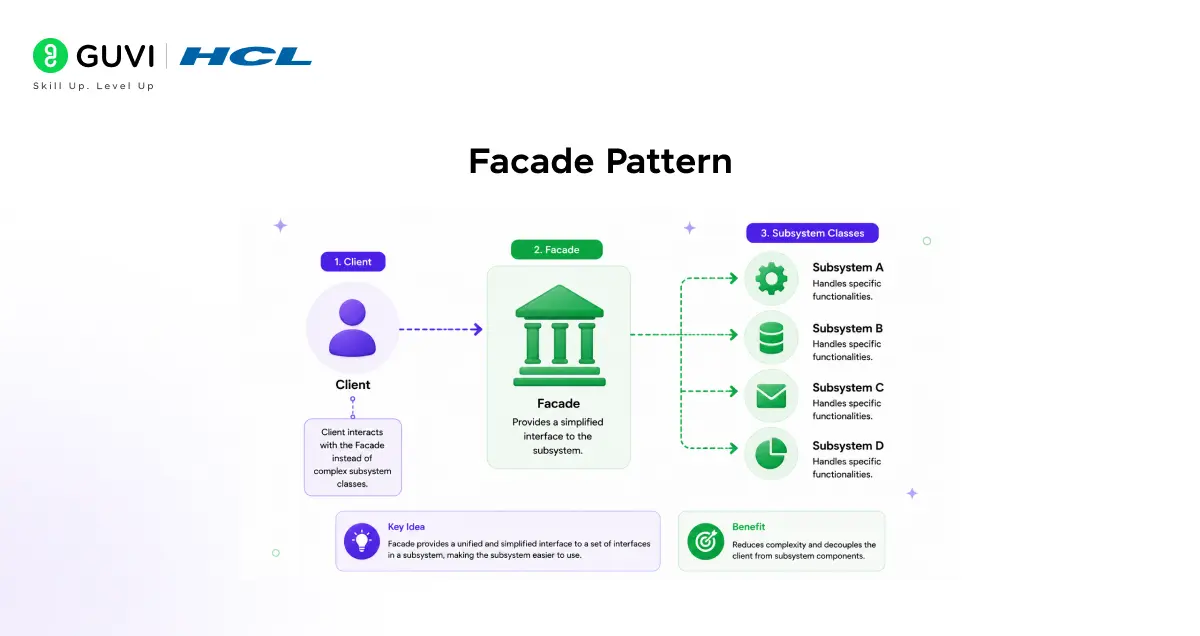
What problem does it solve?
Facade is the fifth structural design pattern. A system has many classes working together. The calling code has to interact with all of them just to do one thing. Facade hides all of that behind one simple method.
Real-world analogy
Ordering food online. You tap “Place Order” and that is it. Behind that one tap: your cart is validated, payment is charged, the restaurant is notified, a delivery driver is assigned, and a confirmation email is sent. You did not call each of those services yourself. The app’s order system is a Facade.
Simple python code example
# Complex subsystem with multiple classes
class PaymentService:
    def charge(self, amount):
        print(f"Payment charged: Rs. {amount}")

class InventoryService:
    def reserve(self, item):
        print(f"Inventory reserved: {item}")

class EmailService:
    def confirm(self, email):
        print(f"Confirmation email sent to {email}")

class DeliveryService:
    def schedule(self, address):
        print(f"Delivery scheduled to {address}")

# Facade: one simple method hides all the complexity
class OrderFacade:
    def __init__(self):
        self.payment = PaymentService()
        self.inventory = InventoryService()
        self.email = EmailService()
        self.delivery = DeliveryService()

    def place_order(self, item, amount, email, address):
        print("--- Placing Order ---")
        self.payment.charge(amount)
        self.inventory.reserve(item)
        self.email.confirm(email)
        self.delivery.schedule(address)
        print("Order placed successfully!")

# Caller only needs to know about Facade
order = OrderFacade()
order.place_order("Laptop", 65000, "[email protected]", "Chennai")
Output:

--- Placing Order ---
Payment charged: Rs. 65000
Inventory reserved: Laptop
Confirmation email sent to [email protected]
Delivery scheduled to Chennai
Order placed successfully!
When to use Facade
- Complex library integrations where you want to hide the setup and configuration
- Service layers in web apps (controllers call one service method, not five repositories)
- Making legacy systems usable by wrapping them behind a clean modern interface
6. Flyweight Pattern
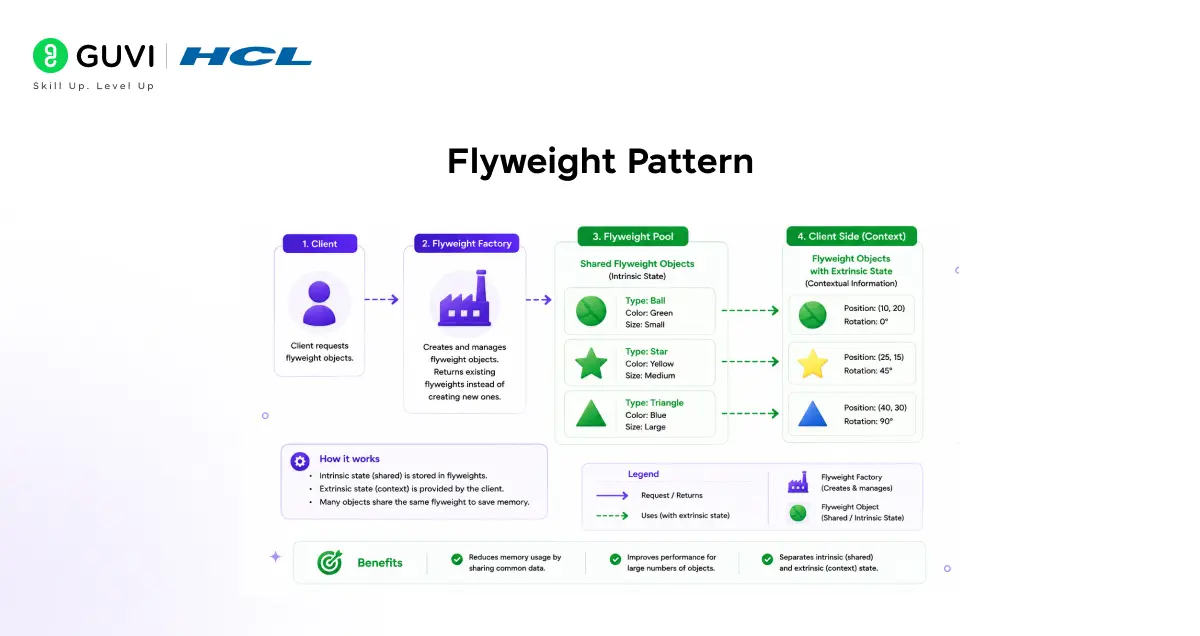
What problem does it solve?
Flyweight is the sixth structural design pattern. You are creating thousands of objects that share a lot of the same data. Each object storing its own copy of shared data wastes memory. Flyweight stores the shared data once and lets all objects reference it.
Real-world analogy
A forest in a video game. There are 10,000 trees on screen. Every oak tree looks the same (same texture, same colour, same model). Only the position (x, y) differs per tree. Instead of storing the full tree data 10,000 times, you store the oak tree data once and each tree object only stores its position.
Simple python code example
# Shared data stored once (intrinsic state)
class TreeModel:
    def __init__(self, species, texture):
        self.species = species   # same for all trees of this type
        self.texture = texture   # same for all trees of this type
        print(f"Created model for: {species}")

# Factory ensures models are reused, not recreated
class TreeFactory:
    _models = {}

    @classmethod
    def get_model(cls, species, texture):
        if species not in cls._models:
            cls._models[species] = TreeModel(species, texture)
        return cls._models[species]

# Each tree only stores its unique position
class Tree:
    def __init__(self, x, y, species):
        self.x = x
        self.y = y
        self.model = TreeFactory.get_model(species, f"{species}_texture")

    def render(self):
        print(f"{self.model.species} at ({self.x}, {self.y})")

# Create many trees - model is shared
trees = [
    Tree(10, 20, "Oak"),
    Tree(50, 80, "Oak"),     # reuses Oak model, no new object created
    Tree(30, 40, "Pine"),
    Tree(70, 90, "Oak"),     # reuses Oak model again
]

print("\nRendering forest:")
for tree in trees:
    tree.render()
Output:
Created model for: Oak
Created model for: Pine

Rendering forest:
Oak at (10, 20)
Oak at (50, 80)
Pine at (30, 40)
Oak at (70, 90)
3 oaks share one model object. Without Flyweight, that is 3 separate model objects. At 10,000 trees, the memory saving becomes significant.
When to use Flyweight
- Games with many identical objects (trees, bullets, particles, enemies)
- Text editors where each character type (the letter ‘a’) is stored once
- Any scenario where you create thousands of objects that share most of their data
7. Proxy Pattern
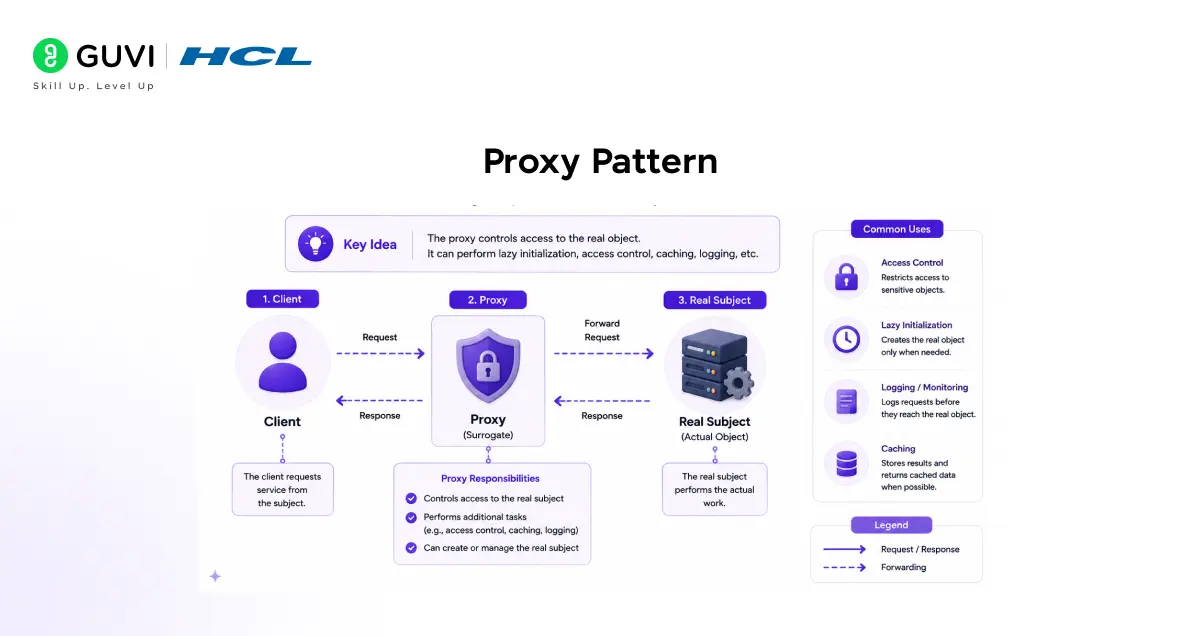
What problem does it solve?
Proxy is the seventh structural design pattern. You want to control access to an object. Maybe the object is expensive to create and you want to delay that cost. Maybe you want to check permissions before allowing access. Maybe you want to log every call. A Proxy sits in front of the real object and handles those concerns.
Real-world analogy
A receptionist at a corporate office. You do not walk directly into the CEO’s office. The receptionist checks if you have an appointment, logs your visit, and then lets you through. The receptionist is the Proxy. The CEO is the real object.
Simple python code example
# Real object (expensive or sensitive)
class ReportGenerator:
    def generate(self, report_type):
        print(f"Generating {report_type} report... (expensive operation)")
        return f"{report_type} report data"

# Proxy: adds permission check and logging
class ReportProxy:
    def __init__(self, user_role):
        self._generator = ReportGenerator()
        self._role = user_role

    def generate(self, report_type):
        # Permission check
        if report_type == "financial" and self._role != "manager":
            print(f"Access denied: {self._role} cannot view financial reports")
            return None

        # Logging
        print(f"LOG: {self._role} requested {report_type} report")

        # Delegate to real object
        return self._generator.generate(report_type)

# Usage
manager = ReportProxy("manager")
manager.generate("financial")   # allowed

print()

intern_user = ReportProxy("intern")
intern_user.generate("financial")   # blocked
intern_user.generate("summary")     # allowed
Output:
LOG: manager requested financial report
Generating financial report... (expensive operation)

Access denied: intern cannot view financial reports
LOG: intern requested summary report
Generating summary report... (expensive operation)
When to use Proxy
- Access control (check permissions before allowing an operation)
- Lazy loading (delay creating an expensive object until it is actually needed)
- Caching (return a cached result instead of calling the real object every time)
- Logging and monitoring (record every call to an object without touching its code)
Riddle: Your app loads a user’s profile picture immediately when they log in, even if they never visit their profile page. The image is large and slows down login. Which Proxy type solves this?
Answer: Virtual Proxy. Create a Proxy that holds just the image URL. Only when the user actually visits their profile does the Proxy load the real image. If they never visit, the image is never loaded. Login becomes fast.
Comparing All 7 Structural Design Patterns
| Pattern | Solves | Key Analogy | Common Real Use |
| Adapter | Incompatible interfaces | Travel plug adapter | Third-party library integration |
| Bridge | Class explosion from two dimensions | Remote + TV brand | Shape + colour systems |
| Composite | Tree structures with uniform interface | File system | UI trees, org charts |
| Decorator | Adding behaviour without subclassing | Coffee + toppings | Middleware, notifications |
| Facade | Hiding complex subsystem | Online order button | Service layers, SDK wrappers |
| Flyweight | Memory waste from duplicate data | Shared tree models in a game | Games, text editors |
| Proxy | Controlled access to an object | Office receptionist | Auth, lazy loading, caching |
💡 Did You Know?
- The Facade is the structural design pattern behind good API design. When a REST API lets you call one endpoint to complete a multi-step operation, the API is acting as a Facade over a complex backend system.
- The Proxy structural design pattern is how most ORMs (Object Relational Mappers) like Django ORM and SQLAlchemy work. When you access a related model field, a Proxy quietly fetches the related data from the database at that exact moment.
Conclusion
Good code is not just code that works today. Structural design patterns are what make it last. It is code that can grow, change, and be understood by someone else tomorrow. Structural design patterns give you the tools to build that kind of code.
Adapter makes incompatible things fit. Bridge prevents your class hierarchy from exploding. Composite makes tree structures clean and uniform. Decorator lets you add features without touching existing code. Facade turns a complicated system into a simple doorway. Flyweight makes thousands of objects affordable. Proxy lets you control and monitor access without changing the original object.
Pick one structural design pattern from this guide and apply it to something real. Find a real problem in code you are currently working on where it applies. Try it. Understanding builds one pattern at a time.
FAQs
1. What is the simplest structural design pattern for a complete beginner to start with?
Start with Adapter. The problem it solves (two incompatible interfaces) appears constantly, the analogy is immediately clear, and the code is straightforward to write and understand on the first read.
2. What is the difference between Decorator and inheritance?
Inheritance adds behaviour at compile time by creating a fixed subclass. Decorator adds behaviour at runtime by wrapping an object. Use Decorator when you need different combinations of behaviour that are not fixed in advance.
3. Can I use more than one structural design pattern in the same class?
Yes. Real codebases often combine them. A Facade might internally use an Adapter to connect to a third-party library. A Proxy might use Decorator-style logging. Structural design patterns complement each other naturally.
4. Is Facade the same as a service layer in web development?
Yes, very closely. A service layer in a web app acts as a Facade over the database, business logic, and external APIs. The controller calls one simple method. The service layer coordinates everything internally.
5. How are structural design patterns different from behavioral design patterns?
Structural design patterns describe how classes and objects are organised and connected. Behavioral design patterns describe how objects communicate and share responsibility. Structure is about composition. Behavior is about interaction.
Success Stories

About the Author
Jebasta
I translate the language of data into stories that anyone can understand. As a writer with a data science background, I simplify analytics, AI, and decision-making so beginners and enthusiasts can confidently explore the world of data.
View all posts by Jebasta
Connect with me @
















Did you enjoy this article?