


Programming Languages Articles
Product Manager Portfolio: How to Build The Best One That Gets You Hired in 2026
Code Review Best Practices: How to Give and Receive Feedback Effectively


Get In Touch For Details! Request More Information
Pointers in C: A Complete Beginner-Friendly Guide
Aug 04, 2026 6 Min Read 971 Views
(Last Updated)
Most programming concepts deal with values. You store a number, you change it, you print it.
Pointers deal with something deeper. They store the address of where a value lives in memory, not the value itself. Instead of saying “the answer is 42,” a pointer says “the answer is stored at location 1004 in memory, go look there.”
This one shift unlocks capabilities nothing else in C provides: dynamic memory that grows at runtime, functions that modify variables outside their scope, and data structures that connect pieces of memory across an entire program.
This guide breaks pointers down from first principles, covering syntax, arrays, functions, dynamic memory, common mistakes, and data structures with clear examples throughout.
Table of contents
- Quick TL;DR Summary
- What Pointers Are and Why They Exist
- Core Pointer Syntax and Operations
- Pointers and Functions
- }
- Dynamic Memory Allocation
- Pointers and Data Structures
- Final Thoughts
- FAQs
- What is the difference between a pointer and a regular variable?
- Why does C use pointers instead of passing variables directly?
- What happens if I forget to free dynamically allocated memory?
- What is a null pointer and when should I use it?
- How are pointers and arrays different in C?
Quick TL;DR Summary
- This guide explains pointers in C, variables that store memory addresses rather than values, giving programmers direct control over how data is stored and accessed at the hardware level.
- You will learn core pointer syntax including declaration, the address-of operator, the dereference operator, pointer arithmetic, and how array indexing and pointer notation are equivalent in C.
- The guide covers dynamic memory allocation using malloc, calloc, realloc, and free, showing how pointers enable programs to request and release memory at runtime rather than at compile time.
- Step-by-step examples show how pointers interact with functions through pass-by-reference, how function pointers enable callbacks, and how to build fundamental data structures like linked lists using pointer-based linking.
- You will understand the most common pointer mistakes including null pointer dereferencing, dangling pointers, memory leaks, and buffer overflows, along with the patterns that prevent each one reliably.
What Are Pointers in C?
Pointers in C are special variables that store the memory address of another variable rather than the actual data value. They enable direct access to memory locations, allowing programs to efficiently manipulate data, pass arguments by reference, manage dynamic memory, and work with arrays, strings, and complex data structures. Pointers are a fundamental feature of C programming and provide greater control over memory and system resources.
What Pointers Are and Why They Exist
- Memory Is a Row of Numbered Boxes
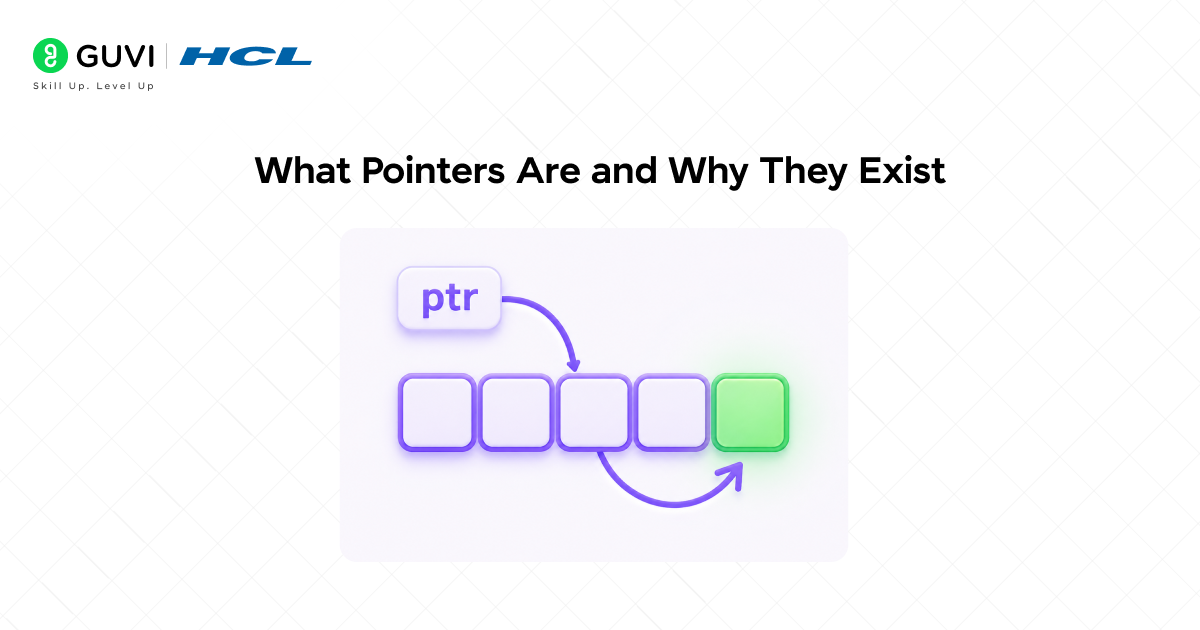
When your program runs, the OS gives it a block of memory. Think of it as a long row of boxes, each holding one byte, each with a unique number called its address.
When you declare int x = 42, the compiler reserves boxes to store 42 and names that location x. A pointer is a variable that stores one of those addresses. Instead of holding 42, it holds the address where 42 lives.
- Why Direct Memory Access Matters
C was designed for systems programming where performance and control matter enormously. Copying large data every time a function needs it is slow. Passing the address and letting the function work directly with it is fast.
Pointers also make things possible that would otherwise be impossible. You cannot know at compile time how much memory a dynamic data structure needs. Pointers let you request exactly the memory needed at runtime and connect pieces into linked lists, trees, and graphs.
Read More: Pointer and Arrays in C
Core Pointer Syntax and Operations
- Declaring, Addressing, and Dereferencing
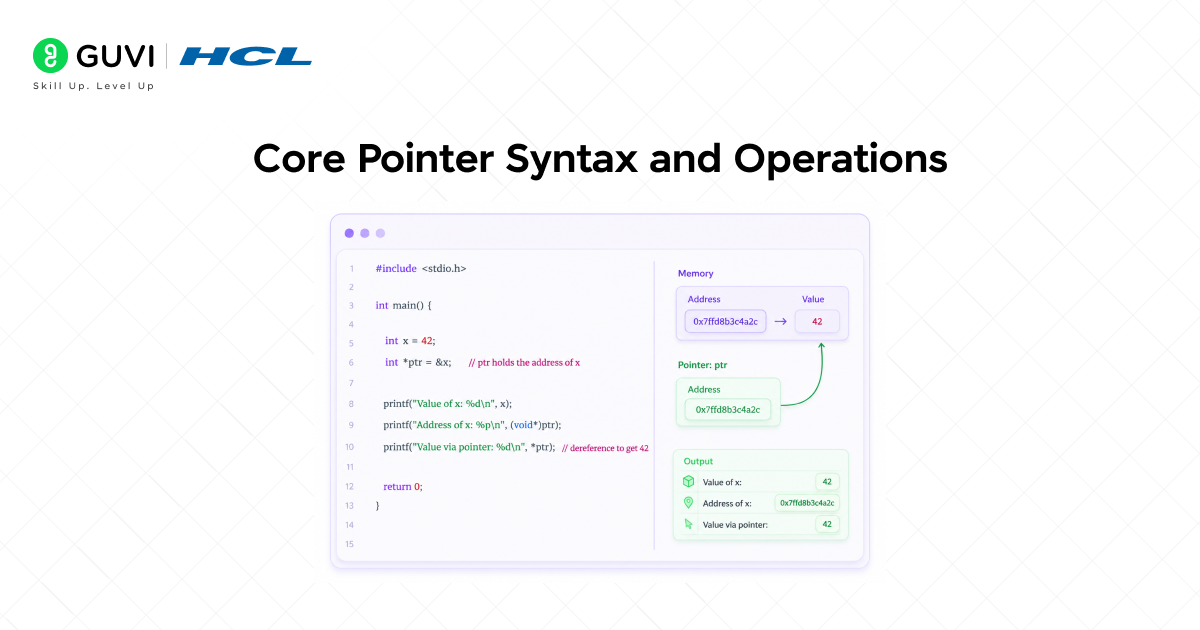
#include <stdio.h>
int main() {
int x = 42;
int *ptr = &x; // ptr holds the address of x
printf(“Value of x: %d\n”, x);
printf(“Address of x: %p\n”, (void*)ptr);
printf(“Value via pointer: %d\n”, *ptr); // dereference to get 42
*ptr = 100; // change x through the pointer
printf(“x is now: %d\n”, x); // prints 100
return 0;
}
The & operator gets an address. The * operator follows an address to its value. These two operators are the foundation of everything pointers do.
- Pointer to Pointer
Pointers are variables stored in memory, so you can have a pointer that stores the address of another pointer.
int x = 42;
int *ptr = &x;
int **pptr = &ptr;
printf(“%d\n”, **pptr); // follows two levels to reach 42
Double pointers are used for dynamically allocated string arrays, functions that modify a pointer itself, and multi-dimensional dynamic arrays.
- Pointer Arithmetic
When you add an integer to a pointer, C scales the addition by the size of the pointed-to type. Adding 1 to an int pointer moves it forward by sizeof(int) bytes, not 1 byte.
int arr[] = {10, 20, 30, 40, 50};
int *ptr = arr;
printf(“%d\n”, *(ptr + 0)); // 10
printf(“%d\n”, *(ptr + 1)); // 20
printf(“%d\n”, *(ptr + 2)); // 30
arr[i] and *(arr + i) are exactly equivalent in C. Array indexing is pointer arithmetic in disguise.
On most modern 64-bit systems, a pointer occupies 8 bytes because it stores a 64-bit memory address. This means an int*, double*, char*, and most other object pointers typically have the same size, even though the data types they reference may have very different sizes in memory. The pointer itself only stores an address; the associated type tells the compiler how to interpret the data at that address and how much memory to access during operations such as dereferencing and pointer arithmetic. This distinction is one of the key concepts that helps programmers understand how memory management works in languages like C and C++.
Reading that &x gives you a memory address and *ptr dereferences it is one thing; running the code and actually seeing the address print out is what makes pointers finally click. HCL GUVI’s online IDE lets you test this instantly, no setup needed.
Pointers and Functions
- Pass by Reference
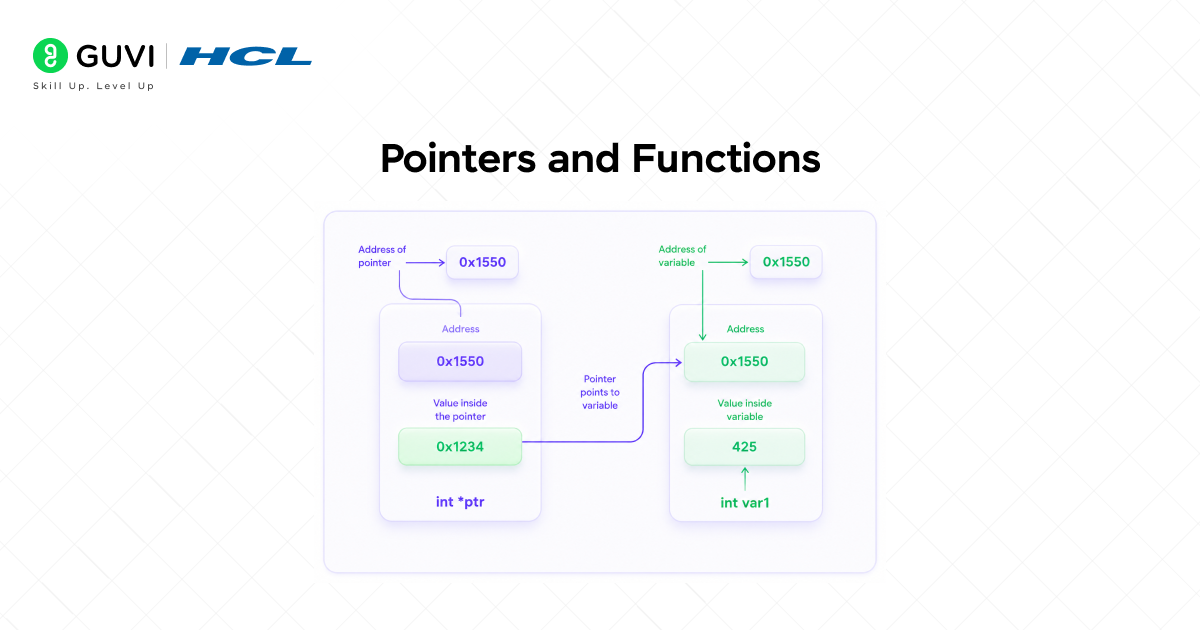
C passes arguments by value, so functions receive copies. Pointers enable pass by reference, letting functions work directly with original data.
void increment(int *ptr) {
(*ptr)++;
}
int main() {
int x = 10;
increment(&x);
printf(“%d\n”, x); // 11
return 0;
}
- Returning Multiple Values
Functions return only one value. Pointers let functions effectively return multiple results by modifying variables passed by address.
void min_max(int *arr, int n, int *min, int *max) {
*min = *max = arr[0];
for (int i = 1; i < n; i++) {
if (arr[i] < *min) *min = arr[i];
if (arr[i] > *max) *max = arr[i];
}
}
int main() {
int arr[] = {3, 1, 4, 1, 5, 9, 2, 6};
int min, max;
min_max(arr, 8, &min, &max);
printf(“Min: %d, Max: %d\n”, min, max);
return 0;
}
- Function Pointers
Functions have memory addresses and you can create pointers to them, enabling callbacks and dispatch tables.
int add(int a, int b) { return a + b; }
int multiply(int a, int b) { return a * b; }
int main() {
int (*operation)(int, int);
operation = add;
printf(“%d\n”, operation(3, 4)); // 7
operation = multiply;
printf(“%d\n”, operation(3, 4)); // 12
return 0;
}
The C Standard Library’s qsort() function achieves remarkable flexibility through the use of a function pointer for its comparison argument. Instead of being tied to a specific data type, qsort() can sort integers, floating-point values, structures, or virtually any other data type, as long as the programmer provides a comparison function. This design made qsort() one of the earliest widely used examples of a higher-order function—a function that accepts another function as input. Long before concepts like callbacks, lambdas, and functional programming became mainstream, C programmers were already building generic, reusable software components using function pointers.

Dynamic Memory Allocation
- The Four Memory Functions
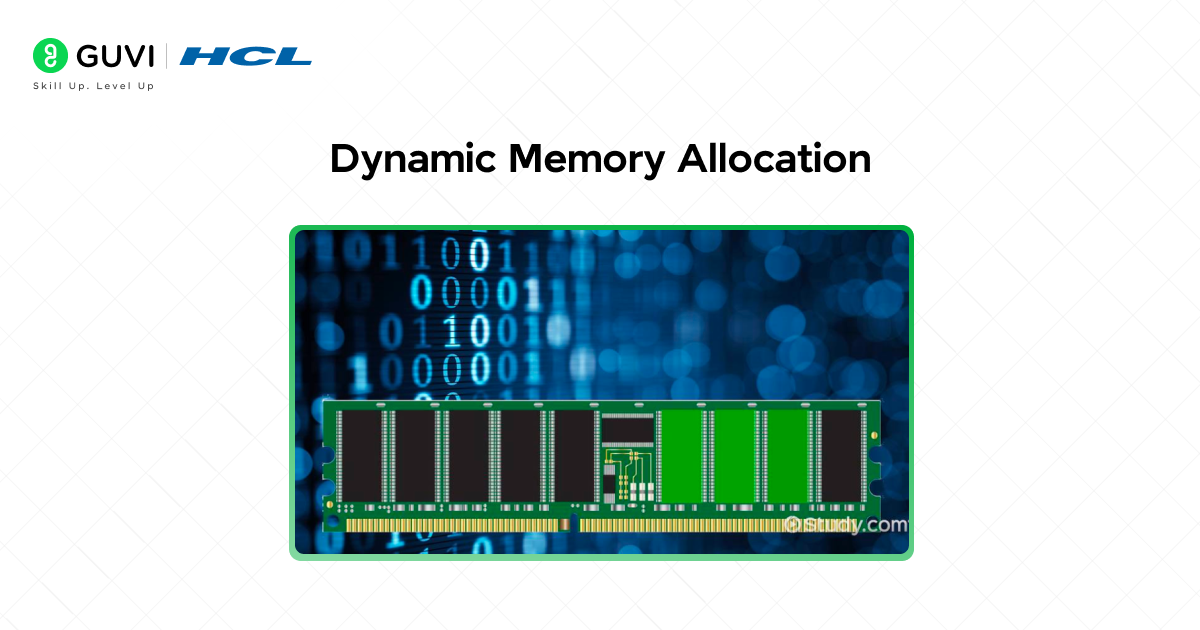
Static arrays require sizes known at compile time. Dynamic allocation lets your program request exactly the memory it needs at runtime. All four functions live in stdlib.h.
malloc allocates raw uninitialized memory and returns a pointer to it. calloc allocates zero-initialized memory for a specified number of elements. realloc resizes a previously allocated block, preserving existing contents. free releases allocated memory back to the system.
- malloc and free in Practice
#include <stdio.h>
#include <stdlib.h>
int main() {
int n = 5;
int *arr = (int*)malloc(n * sizeof(int));
if (arr == NULL) {
printf(“Allocation failed\n”);
return 1;
}
for (int i = 0; i < n; i++) arr[i] = i * 10;
for (int i = 0; i < n; i++) printf(“%d “, arr[i]);
free(arr);
arr = NULL;
return 0;
}
Always check for NULL before using allocated memory. Always free when done. Always set the pointer to NULL after freeing.
- calloc and realloc
int *arr = (int*)calloc(5, sizeof(int)); // zero-initialized
arr = (int*)realloc(arr, 10 * sizeof(int)); // grow to 10 elements
if (arr == NULL) {
printf(“Reallocation failed\n”);
return 1;
}
Never assign realloc directly back to the same pointer without checking NULL first. If realloc fails it returns NULL and the original block remains valid. Losing your only pointer to it is a memory leak.
Pointers and Data Structures
- Strings as Character Pointers
In C, strings are character arrays ending with ‘\0’. Character pointers let you traverse and manipulate them directly.
char str[] = “Hello”;
char *ptr = str;
while (*ptr != ‘\0’) {
printf(“%c”, *ptr);
ptr++;
}
- Building a Linked List
Linked lists are the foundational pointer-based data structure. Each node holds data and a pointer to the next node.
#include <stdio.h>
#include <stdlib.h>
struct Node {
int data;
struct Node *next;
};
struct Node* create_node(int data) {
struct Node *node = (struct Node*)malloc(sizeof(struct Node));
node->data = data;
node->next = NULL;
return node;
}
void print_list(struct Node *head) {
while (head != NULL) {
printf(“%d -> “, head->data);
head = head->next;
}
printf(“NULL\n”);
}
void free_list(struct Node *head) {
while (head != NULL) {
struct Node *next = head->next;
free(head);
head = next;
}
}
int main() {
struct Node *head = create_node(1);
head->next = create_node(2);
head->next->next = create_node(3);
print_list(head);
free_list(head);
return 0;
}
To learn more about Pointers in C, enroll in this HCL GUVI’s C Programming course designed for beginners and aspiring developers. The course covers essential C programming concepts including pointers, memory management, arrays, functions, file handling, loops, operators, and more through hands-on practice and real-world examples. With self-paced learning, expert guidance, and an industry-recognized NSDC certification, this course helps you strengthen your programming fundamentals and coding skills.
Final Thoughts
Pointers are where C stops holding your hand and starts treating you as someone responsible for understanding what the computer is actually doing.
The memory model, address arithmetic, and manual allocation force you to think at a level that higher-level languages deliberately hide. Every programmer who genuinely understands pointers carries a mental model of how programs interact with memory that makes them better at debugging and optimization regardless of what language they use day to day.
Start simple. Declare a pointer, use the address-of operator, dereference it, change a value through it. Build up one concept at a time until the mental model becomes automatic.
Pointers will click. And when they do, a large part of how computers actually work will suddenly make sense.
FAQs
1. What is the difference between a pointer and a regular variable?
A regular variable stores a data value. A pointer stores a memory address pointing to where another value lives. Use & to get an address and * to follow a pointer to its value.
2. Why does C use pointers instead of passing variables directly?
C passes by value so functions receive copies. Pointers let functions work with original data directly, enabling modification of caller variables, returning multiple results, and handling large structures efficiently without copying.
3. What happens if I forget to free dynamically allocated memory?
The memory stays allocated but unreachable after the pointer goes out of scope, creating a memory leak. In long-running programs, accumulated leaks exhaust available memory and eventually crash the process.
4. What is a null pointer and when should I use it?
NULL means the pointer does not point to any valid memory location. Use it as the initial value for unassigned pointers, the return value when allocation fails, and as a sentinel marking the end of linked data structures.
5. How are pointers and arrays different in C?
An array name is a constant pointer to its first element and cannot be reassigned. A pointer variable can be reassigned and supports arithmetic. Both use identical notation since arr[i] is exactly equivalent to *(arr + i).
Success Stories

About the Author
Vishalini Devarajan
An Aerospace Engineer turned content writer, I focus on making complex concepts easy to understand through well-structured, reader-friendly blogs. Whether it’s a technical topic or a non-technical one, I love creating content that is clear, engaging, and impactful.
View all posts by Vishalini Devarajan
Connect with me @











Did you enjoy this article?