


Programming Languages Articles
Product Manager Portfolio: How to Build The Best One That Gets You Hired in 2026
Code Review Best Practices: How to Give and Receive Feedback Effectively


Get In Touch For Details! Request More Information

Python Args and Kwargs Explained: *args, **kwargs & Unpacking with Code Examples
Jul 23, 2026 6 Min Read 34817 Views
(Last Updated)
If you’ve seen *args and **kwargs in Python code and wondered what they actually do, you’re not alone. These two symbols show up everywhere, but most tutorials explain them in one confusing line and move on.
This guide breaks down Python args and kwargs in plain English, with real, runnable code for every use case: *args, **kwargs, list unpacking, and dictionary unpacking. By the end, single and double asterisk in Python will make complete sense, and even a beginner can understand Python programs that use them.
Table of contents
- TL;DR Summary
- Quick-Reference Table
- What Does a Single Asterisk (*) Do in Python?
- Using *args to Accept Multiple Positional Arguments
- Unpacking a List with *
- What Does a Double Asterisk (**) Do in Python?
- Using **kwargs to Accept Multiple Keyword Arguments
- Unpacking a Dictionary with **
- * in Function Calls vs Function Definitions: The Difference
- Common Mistakes with * and ** in Python Functions
- Final Notes
- Quick Quiz: Test Yourself
- FAQs
- What does the single asterisk (*) do in single and double asterisk in Python functions?
- What does the double asterisk (**) do in single and double asterisk in Python functions?
- Can I use both *args and **kwargs together as Python args and kwargs in the same function?
- Is *args or **kwargs a required naming convention?
- Why does Python raise a TypeError when I mix up single and double asterisk in Python?
TL;DR Summary
Here’s the Python args and kwargs story in six bullets:
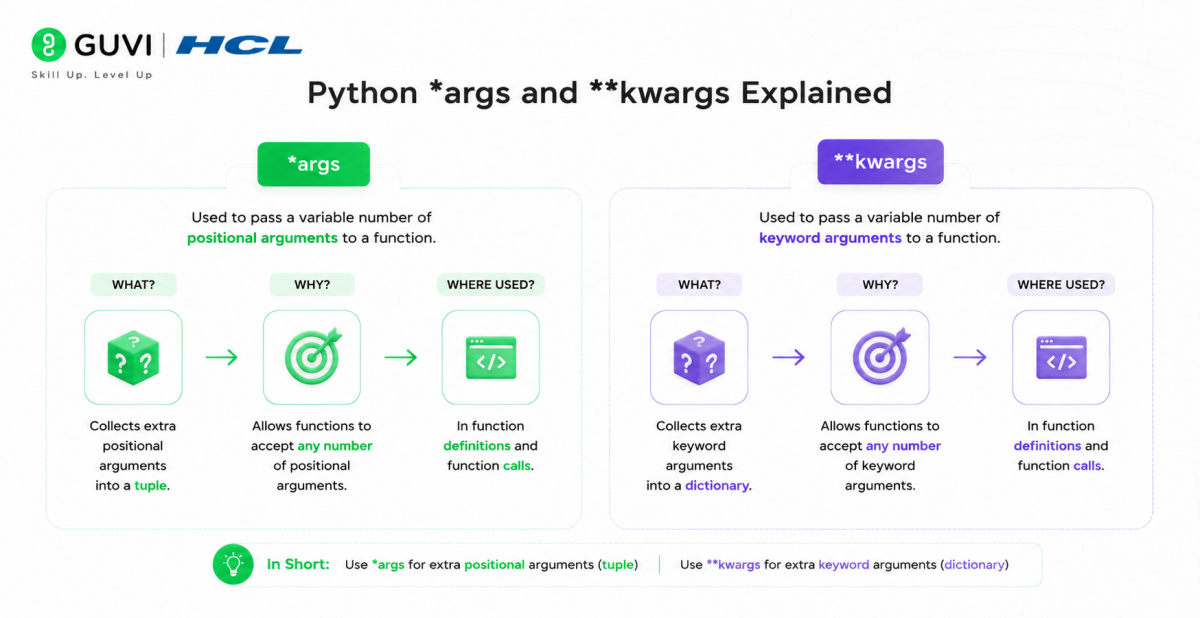
- A single asterisk (*) in a function definition creates *args, a tuple that holds any extra positional arguments.
- A single asterisk (*) in a function call unpacks a list or tuple, spreading its items out as separate arguments.
- A double asterisk (**) in a function definition creates **kwargs, a dictionary that holds any extra keyword arguments.
- A double asterisk (**) in a function call unpacks a dictionary, spreading its key-value pairs out as keyword arguments.
- The single asterisk and double asterisk always follow the order: regular arguments, then *args, then **kwargs.
- Mixing up packing and unpacking, or getting the argument order wrong, are the two most common mistakes beginners make with single and double asterisk in Python.
Quick-Reference Table
Here’s a single and double asterisk in Python cheat sheet you can bookmark and come back to any time:
| Operator | Used In | What It Does | Example |
|---|---|---|---|
| * | Function definition | Collects extra positional arguments into a tuple (*args) | def func(*args): |
| * | Function call | Unpacks a list or tuple into separate positional arguments | func(*my_list) |
| ** | Function definition | Collects extra keyword arguments into a dictionary (**kwargs) | def func(**kwargs): |
| ** | Function call | Unpacks a dictionary into separate keyword arguments | func(**my_dict) |
Understanding Python args and kwargs is one of those small topics that trips up a lot of beginners, and even folks switching over from another programming language.
The good news is that once you see single and double asterisk in Python in action with real code, they stop being scary symbols and start being genuinely useful tools. Let’s break down exactly what Python args and kwargs do, one use case at a time.
What Does a Single Asterisk (*) Do in Python?
A single asterisk (*) placed before a parameter name tells Python two things: there’s no fixed number of input values, and whatever gets passed in should be collected as a tuple. This is the foundation of single and double asterisk in Python, so it’s worth understanding this half thoroughly before moving to the double asterisk.
1. Using *args to Accept Multiple Positional Arguments
This is the *args half of Python args and kwargs, and it’s the one you’ll reach for whenever a function needs to accept a variable number of plain values.
When you use * in a function definition, it’s conventionally written as *args (though the name args is just a convention, not a rule), and it’s the first half of Python args and kwargs you’ll use constantly. It lets your function accept any number of positional arguments:
def add_numbers(*args):
    total = 0
    for num in args:
        total += num
    return total

print(add_numbers(1, 2, 3, 4))
# Output: 10
Here, whatever values you pass in get automatically packed into a tuple called args, no matter how many there are. This packing behaviour is one half of what makes Python args and kwargs so flexible, and it’s worth practicing until it feels automatic.
2. Unpacking a List with *
The same single asterisk can also do the opposite job: unpacking. When you place * before a list or tuple in a function call, it spreads the items out as separate positional arguments instead of passing the whole list as one object:
def add_three(a, b, c):
    return a + b + c

numbers = [10, 20, 30]
print(add_three(*numbers))
# Output: 60
You can also use this single and double asterisk in Python trick to merge two lists together in one line:
list1 = [1, 2, 3]
list2 = [4, 5, 6]
merged = [*list1, *list2]
print(merged)
# Output: [1, 2, 3, 4, 5, 6]
If you want a structured, beginner-friendly way to practice this yourself with mentor support, HCL GUVI’s Python self-paced certification course with IIT Certification walks you through Python args and kwargs with hands-on exercises.
What Does a Double Asterisk (**) Do in Python?
A double asterisk (**) works the same way as a single asterisk, except it deals with keyword arguments instead of positional ones. It’s the other half of single and double asterisk in Python, and getting comfortable with Python args and kwargs together is what really unlocks flexible Python function design.
1. Using **kwargs to Accept Multiple Keyword Arguments
This is the **kwargs half of Python args and kwargs, used whenever a function should accept a variable number of named values.
In a function definition, ** is conventionally written as **kwargs, and it collects any number of keyword arguments into a dictionary:
def print_user_info(**kwargs):
    for key, value in kwargs.items():
        print(f"{key}: {value}")

print_user_info(name="Riya", age=24, city="Chennai")
# Output:
# name: Riya
# age: 24
# city: Chennai
Try passing a positional argument to a function defined with only **kwargs, and Python will immediately raise a TypeError, since double asterisk arguments only accept keyword parameters. This is one of the clearest ways to see Python args and kwargs behaving differently in practice.
The examples in this guide only really click once you run them yourself and see the errors Python throws. HCL GUVI’s online IDE lets you paste in these code snippets, tweak the arguments, and watch the packing/unpacking behavior play out live — no local setup needed.
2. Unpacking a Dictionary with **
Dictionary unpacking is the other everyday use of Python args and kwargs style syntax outside function definitions.
Just like the single asterisk unpacks lists, the double asterisk unpacks dictionaries, completing the single and double asterisk in Python unpacking pair. Placing ** before a dictionary in a function call spreads its key-value pairs out as separate keyword arguments:
def create_profile(name, age, city):
    return f"{name} is {age} years old and lives in {city}."

user = {"name": "Arjun", "age": 27, "city": "Hyderabad"}
print(create_profile(**user))
# Output: Arjun is 27 years old and lives in Hyderabad.
You can also merge two dictionaries this way, which is one of the most common real-world uses of double asterisk unpacking:
defaults = {"theme": "dark", "language": "en"}
overrides = {"language": "ta"}
settings = {**defaults, **overrides}
print(settings)
# Output: {'theme': 'dark', 'language': 'ta'}
Notice that when keys overlap, the later dictionary’s values win, so settings ends up with “language”: “ta” instead of “en”. This kind of dictionary merging is one of the most practical everyday uses of single and double asterisk in Python.
* in Function Calls vs Function Definitions: The Difference
This is where a lot of the confusion around single and double asterisk in Python comes from, so it’s worth spelling out clearly. Nailing this distinction is the fastest way to stop second-guessing Python args and kwargs in your own code:
- In a function definition, * and ** mean “pack whatever extra arguments come in” into a tuple or dictionary.
- In a function call, * and ** mean “unpack this existing list or dictionary” into separate arguments.
Here’s both sides side by side, using the same data:

def describe_pet(species, name, age):
    return f"{name} is a {age}-year-old {species}."

# DEFINITION: no asterisk here, just regular parameters
pet_info = ["dog", "Bruno", 3]

# CALL: * unpacks the list into three separate positional arguments
print(describe_pet(*pet_info))
# Output: Bruno is a 3-year-old dog.

def flexible_describe(*args):
    # DEFINITION: * packs whatever is passed into a tuple called args
    return args

print(flexible_describe("dog", "Bruno", 3))
# Output: ('dog', 'Bruno', 3)
This side-by-side view of single and double asterisk in Python is the clearest way to internalise the packing-versus-unpacking rule.
Same symbol, opposite jobs, depending on which side of the function it appears on. Keeping that distinction straight is the single biggest thing that makes Python args and kwargs click for beginners, and it’s worth re-reading this section once more if it still feels fuzzy.
Common Mistakes with * and ** in Python Functions
Even experienced developers slip up on single and double asterisk in Python once in a while. Here are the mistakes that come up most often:
- Wrong argument order: *args must always come before **kwargs in a function definition, and both must come after any regular positional parameters. Writing def func(**kwargs, *args): will raise a SyntaxError, a classic single and double asterisk in Python ordering mistake.
- Passing a dictionary with a single asterisk instead of double: using *my_dict on a dictionary unpacks only its keys, not key-value pairs. If you meant to pass keyword arguments, you need **my_dict.
- Forgetting that *args only accepts positional arguments: trying to call a function defined with *args using keyword arguments (like func(x=1)) raises a TypeError.
- Using more than one *args or **kwargs in the same function definition: Python only allows one of each per function; you can’t write def func(*args1, *args2): — this is a hard limit built into how Python args and kwargs are parsed.
- Confusing the unpacking * with the multiplication operator: context matters. *numbers unpacks a list, while 3 * numbers (if numbers were an integer) would multiply. Reading the surrounding code carefully avoids this mix-up between the two uses of single and double asterisk in Python.
Getting comfortable with these edge cases is really what separates someone who’s memorised Python args and kwargs syntax from someone who actually understands it.
Final Notes
That’s really the whole story: * and ** either pack values together or unpack them apart, depending on which side of a function they sit on. Once that clicks, *args and **kwargs stop looking like magic syntax and start looking like exactly what they are, two small tools for writing flexible functions.
The best way to make it stick is to open your own editor and try the code from this guide yourself. Tweak the examples, break them on purpose, and see what errors Python gives you; that’s how single and double asterisk in Python actually becomes second nature.
If you are aspiring to explore Python through a self-paced course, try HCL GUVI’s Python self-paced certification course with IIT Certification which covers Python args and kwargs alongside the rest of core Python.
Quick Quiz: Test Yourself
Ready to check how well you’ve understood Python args and kwargs? Try these five quick questions before moving on:
#1. Which operator would you use to store a variable number of records with multiple values as a dictionary?
A. Double Asterisk
B. Single Asterisk
C. Difficult to determine
D. None of the above
Ans. Double Asterisk
#2. What will be the output of the following code?
def func(**int):
for key, value in int.items():
print(“The current key is {} with value {}”.format(key, value))
func(srNo = “1”,item = “Vegetables”)
A. The current key is srNo with a value of 1
That is to say, the current key is the item with value Vegetable.
B. Also, the current key is 1 with value srNo
That is to say, the current key is Vegetables with value items.
C. Again, the current key is 1 with value srNo
This implies, the current key is the item with value Vegetables
D. None of the above
Ans. A
#3. What type of parameters are accepted by double asterisk arguments?
A. Positional Parameters
B. Keyword Parameters
C. Both A and B
D. None of the above
Ans. B
#4. The major difference between the single asterisk and a double asterisk is:
A. Single asterisk accepts positional parameters only whereas double asterisk accepts keyword parameters.
B. Also, a single asterisk accepts keyword parameters only whereas a double asterisk accepts positional parameters.
C. Again, a single asterisk accepts positional parameters only whereas a double asterisk accepts both types of parameters.
D. There is no such difference based on parameters
Ans. A
#5. Which of them is true
A. Double asterisk is used before arguments
B. Single asterisk accepts positional parameters
C. Single asterisk is used post arguments
D. A and B
Ans. D
FAQs
1. What does the single asterisk (*) do in single and double asterisk in Python functions?
In a function definition, it collects extra positional arguments into a tuple (*args). In a function call, it unpacks a list or tuple into separate positional arguments.
2. What does the double asterisk (**) do in single and double asterisk in Python functions?
In a function definition, it collects extra keyword arguments into a dictionary (**kwargs). In a function call, it unpacks a dictionary into separate keyword arguments.
3. Can I use both *args and **kwargs together as Python args and kwargs in the same function?
Yes, but *args must come before **kwargs, and both must come after any required positional parameters: def func(a, b, *args, **kwargs):.
4. Is *args or **kwargs a required naming convention?
No, the names args and kwargs are just widely-used conventions. The asterisk and double asterisk symbols are what actually matter to Python in single and double asterisk in Python, not the variable name attached to them.
5. Why does Python raise a TypeError when I mix up single and double asterisk in Python?
Because *args only collects positional arguments and **kwargs only collects keyword arguments. Passing the wrong type to either raises a TypeError, which is Python’s way of telling you Python args and kwargs were used incorrectly in that call.
Success Stories

About the Author
Jebasta
I translate the language of data into stories that anyone can understand. As a writer with a data science background, I simplify analytics, AI, and decision-making so beginners and enthusiasts can confidently explore the world of data.
View all posts by Jebasta
Connect with me @
















Did you enjoy this article?