


Artificial Intelligence and Machine Learning Articles
CI/CD Pipelines for Machine Learning Projects
A/B Testing for Machine Learning Models
Canary Deployment Strategies for ML Models
What is Model Drift Detection: Keeping Models Accurate in Production


Get In Touch For Details! Request More Information
What is ONNX Runtime: Cross-Platform Model Deployment
Sep 01, 2026 4 Min Read 17 Views
(Last Updated)
ONNX Runtime is an open-source inference engine developed by Microsoft that executes machine learning models in the ONNX (Open Neural Network Exchange) format across different hardware platforms, operating systems, and programming languages. It allows a model trained in PyTorch, TensorFlow, scikit-learn, or any ONNX-compatible framework to be deployed for inference without the original training framework installed, providing faster inference, smaller deployment footprint, and hardware-specific optimizations through execution providers.
Table of contents
- TL;DR Summary
- What Is ONNX
- How ONNX Runtime Works
- Exporting Models to ONNX
- Running Inference with ONNX Runtime
- Basic Inference Pattern
- Quantization Impact Reference
- Conclusion
- FAQs
- What is ONNX Runtime used for?
- What is the difference between ONNX and ONNX Runtime?
- How much faster is ONNX Runtime than PyTorch for inference?
- What execution provider should I use for NVIDIA GPU inference?
- Does ONNX Runtime support large language models?
- Can ONNX Runtime run scikit-learn models?
TL;DR Summary
- ONNX Runtime is a cross-platform inference engine that runs ML models exported to the ONNX format across CPU, GPU, and specialized hardware without requiring the original training framework
- ONNX (Open Neural Network Exchange) is an open standard that defines a common format for representing neural network architectures and weights
- ONNX Runtime typically delivers 2 to 10 times faster inference than running models in their original training frameworks due to graph optimizations and hardware-specific execution providers
- Execution providers are hardware-specific backends including CUDA for NVIDIA GPUs, TensorRT for optimized GPU inference, DirectML for Windows GPU, CoreML for Apple silicon, and OpenVINO for Intel hardware
What Is ONNX
ONNX, Open Neural Network Exchange, is an open standard format that provides a common representation for machine learning models. Supported by Microsoft, Facebook, Google, Amazon, and others, ONNX defines a standardized set of operators, data types, and a graph structure that any framework can export to and any runtime can execute from.
Once a model is in ONNX format, it can run on any ONNX-compatible runtime on any supported hardware without any framework-specific code. ONNX Runtime is Microsoft’s highly optimized implementation of that runtime.
Want to build production ML deployment skills covering model optimization, inference serving, and cross-platform deployment pipelines? Explore HCL GUVI’s Artificial Intelligence & Machine Learning Course, designed to help you develop the practical MLOps foundations that production AI roles demand.
How ONNX Runtime Works
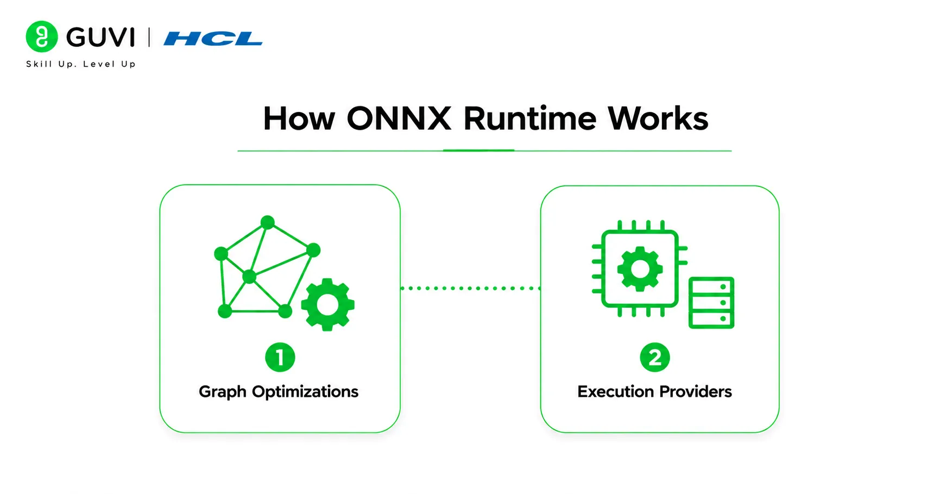
ONNX Runtime takes an ONNX model graph and applies a series of transformations and optimizations before executing it.
- Graph Optimizations
When a model is loaded, ONNX Runtime applies graph-level optimizations that reduce the number of operations required for inference. These include operator fusion, where consecutive operations like matrix multiplication and bias addition are fused into a single kernel call, eliminating intermediate memory writes. Constant folding computes operations involving only constant values at load time rather than at each inference call. Common subexpression elimination identifies identical computations and executes them only once.
These optimizations happen automatically and typically reduce the number of computational operations by 20 to 40 percent compared to the original unoptimized graph.
Read More: AI Meets Edge: Building Smart Applications with LLMs on Edge Devices
- Execution Providers
An execution provider is a hardware-specific backend that ONNX Runtime uses to execute graph operations. Different execution providers are optimized for different hardware and provide different levels of acceleration.
| Execution Provider | Hardware Target | Key Benefit |
| CPUExecutionProvider | Any CPU | Default, universal compatibility |
| CUDAExecutionProvider | NVIDIA GPU | GPU acceleration, 5-10x CPU speedup |
| TensorRTExecutionProvider | NVIDIA GPU | TensorRT fusion, highest GPU throughput |
| CoreMLExecutionProvider | Apple Silicon | Optimized for M1/M2/M3 chips |
| OpenVINOExecutionProvider | Intel CPU/GPU | Optimized for Intel hardware |
| DirectMLExecutionProvider | Windows GPU | DirectX 12 GPU acceleration |
| ROCmExecutionProvider | AMD GPU | GPU acceleration for AMD cards |
| QNNExecutionProvider | Qualcomm NPU | Mobile and edge inference |
ONNX Runtime selects execution providers in priority order. Operations supported by the highest-priority provider run on that provider. Operations not supported fall back to the next provider in the list, ensuring all operations run even if only some can use hardware acceleration.
The ONNX format was first announced jointly by Microsoft and Facebook in September 2017 as a direct response to the fragmentation of the ML deployment ecosystem. Within one year of launch, over a dozen major organizations including Google, Amazon, and NVIDIA had announced ONNX support, making it one of the fastest-adopted open standards in the history of machine learning infrastructure.
Exporting Models to ONNX
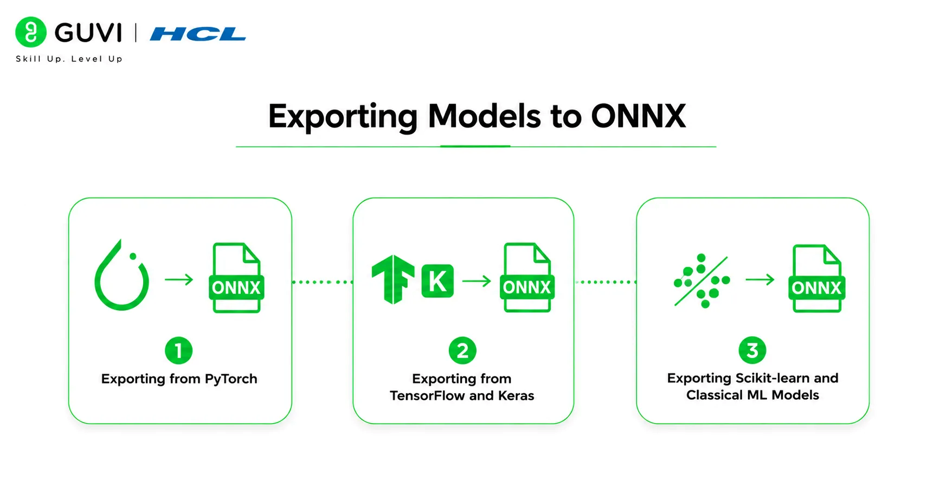
The first step in any ONNX Runtime deployment is exporting the trained model to ONNX format from the training framework.
- Exporting from PyTorch
PyTorch’s torch.onnx.export function traces the model by running a forward pass with example inputs and recording the operations to build the ONNX graph.
| Export Parameter | Value | Purpose |
| model | trained_model | The PyTorch model to export |
| args | (example_input,) | Example input for tracing |
| f | “model.onnx” | Output file path |
| export_params | True | Include trained weights |
| opset_version | 17 | ONNX operator set version |
| input_names | [“input”] | Name for input nodes |
| output_names | [“output”] | Name for output nodes |
| dynamic_axes | {“input”: {0: “batch”}} | Variable batch dimension |
Setting dynamic_axes for the batch dimension is important for production serving where batch sizes vary. Without it, the exported model only accepts the exact batch size used during export.
- Exporting from TensorFlow and Keras
TensorFlow models export to ONNX using the tf2onnx package. The command-line tool converts SavedModel or Keras H5 formats to ONNX with a single command specifying the input model path, output path, and target opset version.

- Exporting Scikit-learn and Classical ML Models
The sklearn-onnx package converts scikit-learn pipelines, random forests, gradient boosting models, and preprocessing transformers to ONNX. This allows scikit-learn models to benefit from ONNX Runtime acceleration and cross-platform deployment alongside deep learning models.
Running Inference with ONNX Runtime
Once a model is exported to ONNX format, running inference with ONNX Runtime requires only the onnxruntime package with no dependency on the original training framework.
Basic Inference Pattern
| Step | API Call | Purpose |
| Load session | InferenceSession(“model.onnx”) | Load model and compile graph |
| Configure providers | providers=[“CUDAExecutionProvider”] | Select hardware backend |
| Get input names | session.get_inputs()[0].name | Identify required input keys |
| Prepare input | {input_name: numpy_array} | Format as dict of numpy arrays |
| Run inference | session.run(None, input_feed) | Execute forward pass |
| Get output | outputs[0] | Access prediction array |
Inputs must be NumPy arrays with the correct dtype matching the model’s expected input type. Outputs are returned as a list of NumPy arrays in the order defined in the ONNX graph.
Microsoft runs ONNX Runtime in production across Bing search, Office 365, and Azure cognitive services, processing hundreds of billions of inference requests per day. Their engineering blog documented that migrating Bing’s web ranking model from the original training framework to ONNX Runtime reduced inference latency by 50 percent and halved the serving infrastructure cost for the same query volume, one of the most publicly documented production ONNX Runtime performance improvements.
Quantization Impact Reference
| Model Type | Size Reduction | Latency Improvement | Typical Accuracy Impact |
| BERT-base (dynamic) | 4x smaller | 2-3x faster | Less than 1 percent |
| ResNet-50 (static) | 4x smaller | 3-4x faster | Less than 1 percent |
| GPT-2 (dynamic) | 4x smaller | 2x faster | Minimal |
| Random Forest | 2-3x smaller | 1.5-2x faster | Negligible |
INT8 quantization typically reduces model size by approximately 4 times and improves inference throughput by 2 to 4 times, with accuracy degradation below 1 percent for most models when calibration is done correctly.
Want to build production ML deployment skills covering model optimization, inference serving, and cross-platform deployment pipelines? Explore HCL GUVI’s Artificial Intelligence & Machine Learning Course, designed to help you develop the practical MLOps foundations that production AI roles demand.
Conclusion
ONNX Runtime solves one of the most practically important problems in production ML: how to deploy models trained in one framework efficiently across diverse hardware and deployment targets without framework-specific serving infrastructure for each configuration.
By converting models to the ONNX standard format and running them through an inference engine with hardware-specific execution providers, teams can train once and deploy anywhere with consistent behavior and optimized performance.
FAQs
What is ONNX Runtime used for?
ONNX Runtime is used to run machine learning model inference across different hardware platforms and operating systems without requiring the original training framework, providing faster inference and smaller deployment footprint than training frameworks.
What is the difference between ONNX and ONNX Runtime?
ONNX is the open standard file format for representing machine learning models. ONNX Runtime is the inference engine that executes models stored in ONNX format, developed by Microsoft with hardware-specific optimizations.
How much faster is ONNX Runtime than PyTorch for inference?
Speedup depends on the model and hardware, but typical improvements range from 2 to 10 times faster on CPU and 1.5 to 5 times faster on GPU compared to PyTorch eager mode inference, primarily from graph optimizations and operator fusion.
What execution provider should I use for NVIDIA GPU inference?
Start with CUDAExecutionProvider for general NVIDIA GPU inference. Use TensorRTExecutionProvider for maximum throughput in latency-critical applications, as TensorRT performs additional layer fusion and precision calibration beyond what CUDA provides.
Does ONNX Runtime support large language models?
Yes. ONNX Runtime GenAI extensions provide optimized LLM inference with INT4 quantization support, KV-cache management, and pre-optimized configurations for popular architectures including Llama, Phi, Mistral, and Gemma.
Can ONNX Runtime run scikit-learn models?
Yes. The sklearn-onnx package converts scikit-learn pipelines, random forests, and gradient boosting models to ONNX format, which ONNX Runtime can then execute with hardware-specific optimizations.
Success Stories

About the Author
HCL GUVI
This article was selected and published as part of the HCL GUVI AI Blogathon 2026, an initiative designed to encourage students, AI enthusiasts, and aspiring tech writers to simplify complex AI concepts through impactful technical content. The contest recognized high-quality, original, and insightful AI-focused blogs, with selected authors receiving publication opportunities on the HCL GUVI blog platform along with official author credits and recognition.
View all posts by HCL GUVI
Connect with me @









Did you enjoy this article?