


Artificial Intelligence and Machine Learning Articles
Finance Manager to Data Analytics: Career Growth, Salary and Seniority
How to Evaluate LLM Outputs in Production Deployments
AI/ML Skills Gap 2026: Why Companies Can't Find Job-Ready Talent
20 AI/ML Interview Questions Recruiters Can Use Without a Tech Background - Best Guide


Get In Touch For Details! Request More Information
Docker for Machine Learning: A Beginner’s Guide
Sep 01, 2026 4 Min Read 322 Views
(Last Updated)
Machine learning projects often depend on specific Python versions, libraries, frameworks, and system configurations. Moving these projects between development and production environments can therefore become complicated. Docker for Machine Learning provides a practical way to package an ML application and its dependencies into a consistent, isolated environment. This guide explains Docker basics, how containers support machine learning workflows, and how beginners can use Docker to build reproducible ML environments.
Table of contents
- TL;DR Summary
- Why Docker Matters for Machine Learning
- What Is Docker?
- Docker for Machine Learning Workflows
- Development
- Experimentation
- Testing
- Deployment
- Key Docker Concepts
- Docker Image
- Docker Container
- Dockerfile
- Docker Registry
- How to Dockerize a Machine Learning Project
- Step 1: Create the ML Application
- Step 2: Create a Requirements File
- Step 3: Write a Dockerfile
- Step 4: Build the Image
- Step 5: Run the Container
- Step 6: Deploy the Image
- Docker in Model Deployment
- Common Applications
- Model Serving
- ML APIs
- Experiment Environments
- Data Processing
- Production ML Systems
- Benefits of Docker for Machine Learning
- Reproducibility
- Dependency Isolation
- Easier Deployment
- Better Collaboration
- Scalability
- When Should You Use Docker for Machine Learning?
- Development Environments
- Model Deployment
- Reproducible Experiments
- ML APIs
- Team Collaboration
- Key Concepts to Remember
- A Simple Docker Workflow for ML
- Develop the Model
- Define Dependencies
- Create the Dockerfile
- Build the Image
- Test the Container
- Deploy
- Best Practices
- Conclusion
- FAQs
- What is Docker for Machine Learning?
- Why use Docker in ML projects?
- What is a Docker image?
- What is a Docker container?
- Can Docker be used for model deployment?
- Is Docker useful for ML beginners?
- How does Docker improve ML reproducibility?
TL;DR Summary
- Docker packages applications with their dependencies.
- Containers create consistent ML environments.
- Docker reduces dependency and configuration problems.
- Dockerfiles define how ML containers are built.
- Containers simplify moving models between environments.
Direct Answer
| Docker for Machine Learning provides an isolated and reproducible environment for developing, testing, and deploying ML applications. Docker packages code, libraries, dependencies, and configuration into containers that can run consistently across different systems. This helps data scientists avoid dependency conflicts, simplify deployment, reproduce experiments, and move machine learning applications from development environments into production more reliably. |
Why Docker Matters for Machine Learning
Machine learning projects frequently rely on specific versions of Python, frameworks, libraries, and system dependencies. Installing these components manually can create inconsistencies between developers’ machines and production servers.
Docker helps address these challenges by providing:
- Reproducible environments
- Dependency isolation
- Easier deployment
- Consistent configurations
- Simplified collaboration
- Better application portability
What Is Docker?
Docker is a platform for building, packaging, and running applications inside lightweight containers.
A container includes the components an application needs to run, such as:
- Application code
- Libraries
- Dependencies
- Runtime environment
- Configuration
Unlike traditional virtual machines, containers share the host operating system’s kernel, making them generally lightweight and fast to start.
Docker for Machine Learning Workflows
Docker can support different stages of an ML project.
Development
Create a consistent environment containing the required Python version, ML libraries, and tools.
Experimentation
Run experiments using controlled dependencies without changing the host machine.
Testing
Test ML applications in an environment that closely matches deployment.
Deployment
Package trained models and inference applications into containers that can run on compatible infrastructure.
Key Docker Concepts
Understanding a few fundamental concepts makes Docker for Machine Learning easier to use.
Docker Image
A Docker image is a packaged blueprint containing everything required to create a container.
Docker Container
A container is a running instance of a Docker image.
Dockerfile
A Dockerfile contains instructions for building a Docker image, including the base image, dependencies, files, and commands.
Docker Registry
A registry stores and distributes Docker images so they can be shared between development and deployment environments.
How to Dockerize a Machine Learning Project
A typical workflow involves several steps.
Step 1: Create the ML Application
Develop your model training or inference code and identify its dependencies.
Step 2: Create a Requirements File
List the Python libraries and versions required by the project.
Step 3: Write a Dockerfile
Define the base environment, dependencies, project files, and command needed to run the application.
Step 4: Build the Image
Use the Dockerfile to create a reusable image containing the ML application.
Step 5: Run the Container
Start a container from the image and test whether the application works correctly.
Step 6: Deploy the Image
Push the image to a registry and deploy it to suitable infrastructure.
Docker in Model Deployment
Docker is particularly useful when an ML model needs to move from development into production.
A typical deployment can include:
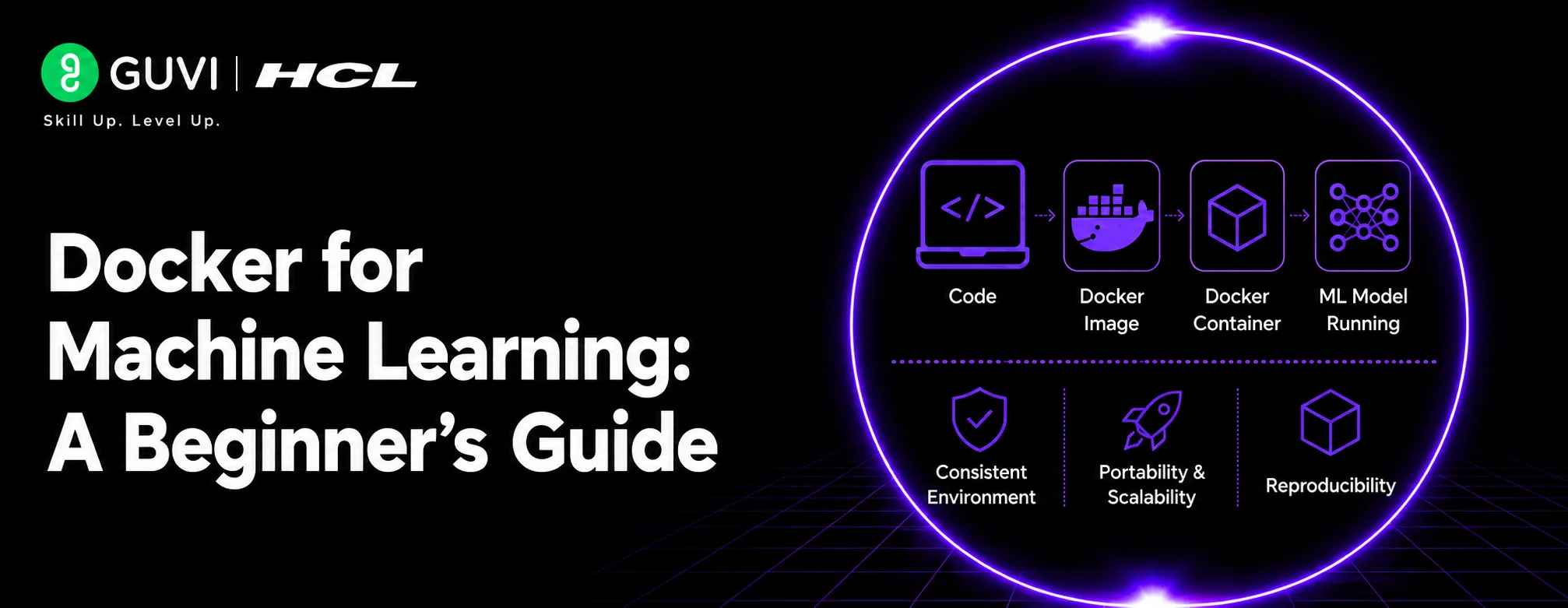
Model → Application → Dependencies → Docker Image → Container → Production Environment
This approach helps ensure that the software environment used during deployment is consistent with the environment tested during development.
Common Applications
Model Serving
Package an inference API and trained model into a container for deployment.
ML APIs
Containerize applications built with frameworks such as FastAPI or Flask.
Experiment Environments
Create isolated environments for different ML experiments and dependency versions.
Data Processing
Run preprocessing and feature-engineering pipelines inside reproducible containers.
Production ML Systems
Use containers as part of larger ML deployment and orchestration workflows.
Do not treat a Docker image as a replacement for good ML environment management. Pin important dependency versions, keep images reasonably small, avoid unnecessary packages, and test the container independently before deploying it to production.
Benefits of Docker for Machine Learning
Reproducibility
The same container configuration can be used across different environments.
Dependency Isolation
Different projects can use different library versions without interfering with one another.
Easier Deployment
Applications can be packaged and moved between compatible environments more easily.
Better Collaboration
Teams can share consistent development environments instead of asking everyone to manually reproduce installations.
Scalability
Containerized ML applications can be integrated into larger deployment and orchestration systems.

When Should You Use Docker for Machine Learning?
Docker for Machine Learning is especially useful when consistency, reproducibility, and reliable deployment are important.
Development Environments
Use Docker when multiple developers need the same Python version, libraries, frameworks, and system dependencies.
Model Deployment
Containerize trained models and inference applications so they can be moved between development, testing, and production environments more consistently.
Reproducible Experiments
Create isolated environments for different experiments without changing dependencies installed on the host system.
ML APIs
Package a model-serving API together with its dependencies into a container for easier deployment.
Team Collaboration
Docker helps teams share a standardized environment, reducing the common “works on my machine” problem.
Professionals interested in machine learning, AI deployment, MLOps, and software engineering can strengthen their practical skills through HCL GUVI’s Artificial Intelligence and Machine Learning Course.
Key Concepts to Remember
Understanding these concepts makes Docker for Machine Learning easier to work with.
- A Docker image is a packaged blueprint for an application.
- A container is a running instance of an image.
- A Dockerfile defines how an image is built.
- A registry stores and distributes Docker images.
- Containers isolate application dependencies.
- Docker improves reproducibility across environments.
A Simple Docker Workflow for ML
A typical machine learning deployment workflow can follow these stages:
1. Develop the Model
Build and test the ML model in your development environment.
2. Define Dependencies
Record required Python packages, framework versions, and other system requirements.
3. Create the Dockerfile
Specify the base environment, dependencies, application files, and startup command.
4. Build the Image
Build a Docker image containing the application and its required environment.
5. Test the Container
Run the container locally and verify that model inference or other ML functionality works correctly.
6. Deploy
Push the image to a container registry and deploy it to the required infrastructure.
The HCL GUVI’s Artificial Intelligence eBook introduces the fundamentals of artificial intelligence, machine learning, generative AI, and practical AI development. It helps learners build a broader understanding of AI technologies and their applications in modern software environments.
Best Practices
- Use specific dependency versions where appropriate.
- Keep Docker images as small as practical.
- Avoid installing unnecessary packages.
- Separate application code from configuration.
- Use environment variables for configurable settings.
- Test images before deploying them.
- Keep sensitive credentials outside Docker images.
- Regularly update outdated dependencies and base images.
Conclusion
Docker for Machine Learning provides a practical way to create reproducible, portable, and isolated environments for ML applications. By packaging models, code, dependencies, and runtime requirements into containers, teams can simplify development, testing, collaboration, and deployment. For beginners learning machine learning engineering, understanding Docker provides an important foundation for building reliable and scalable AI applications.
FAQs
1. What is Docker for Machine Learning?
Docker for Machine Learning means using Docker containers to package ML applications, models, dependencies, and runtime environments so they can run consistently across different systems.
2. Why use Docker in ML projects?
Docker helps prevent dependency conflicts, creates reproducible environments, simplifies collaboration, and makes it easier to move machine learning applications between development and production.
3. What is a Docker image?
A Docker image is a packaged blueprint containing an application’s code, dependencies, configuration, and instructions required to create a container.
4. What is a Docker container?
A Docker container is a running instance of a Docker image. It provides an isolated environment in which an ML application can execute.
5. Can Docker be used for model deployment?
Yes. Developers can package a trained model and its inference application inside a container and deploy it to compatible infrastructure.
6. Is Docker useful for ML beginners?
Yes. Learning Docker helps beginners understand reproducible environments, dependency management, application packaging, and deployment—all important concepts in modern machine learning engineering.
7. How does Docker improve ML reproducibility?
Docker packages the application’s environment alongside its code and dependencies, allowing the same image to be used across development, testing, and deployment environments, reducing environment-related inconsistencies.
Success Stories

About the Author
HCL GUVI
This article was selected and published as part of the HCL GUVI AI Blogathon 2026, an initiative designed to encourage students, AI enthusiasts, and aspiring tech writers to simplify complex AI concepts through impactful technical content. The contest recognized high-quality, original, and insightful AI-focused blogs, with selected authors receiving publication opportunities on the HCL GUVI blog platform along with official author credits and recognition.
View all posts by HCL GUVI
Connect with me @










Did you enjoy this article?