


Artificial Intelligence and Machine Learning Articles
AI/ML Skills Gap 2026: Why Companies Can't Find Job-Ready Talent
20 AI/ML Interview Questions Recruiters Can Use Without a Tech Background - Best Guide
How Industry-Backed AI/ML Bootcamps Are Changing the AI/ML Hiring Pipeline - Best Guide 2026
From IT Support to AI Engineer: A Realistic Career Switch Guide 2026


Get In Touch For Details! Request More Information
Introducing Web Search for Replit Agent
Jul 16, 2026 4 Min Read 692 Views
(Last Updated)
AI has already changed how we write code, but there has always been one limitation. Most AI systems rely on static knowledge and cannot access information being created in real time.
You prompt an AI to help with your app, and it outputs valid code. The problem is that, with outdated APIs, libraries, or hardcoded placeholder values, the result may not be usable in production.
This is where Replit introduced a significant update. With Replit Agent Web Search, your Agent no longer depends only on static knowledge. It can now run web searches, validate information, and build applications using real-time data.
In this article, we’ll explore what this Web Search for Replit Agent feature is, its impact on development, and why it is changing how modern software is built.
TL;DR
- Replit Agent Web Search allows an AI to use live internet data while writing an application in real time.
- The Agent will automatically know when it does or doesn’t need to make a search, rather than being a constant, overzealous web searcher.
- It can pull the newest versions of APIs, libraries, and live data, instead of being able to draw on knowledge it no longer possesses.
- The resulting applications that can be produced are more dynamic and precise than anything we have ever seen before, with much closer proximity to a production-ready application.
- It replaces the previous multi-step workflow.
Table of contents
- What is Replit Agent Web Search?
- Why Replit Agent Web Search Matters
- Knowledge Cutoff Is the Core Issue
- How Replit Agent Web Search Actually Works
- What Makes It Different from Conventional Tools
- The Replit Agent Web Search Core Capabilities
- Intelligent Research Trigger
- Real-Time Application Building
- Content Fetching
- Source Transparency
- Real-World Use Cases
- Practical Example: Building a Live News Tracker
- Evolution of Replit Agent
- Strategic Insight: The Rise of Context Compression
- Best Practices for the Web Search Feature
- Common Mistakes When Using Web Search
- The Bigger Picture: From Tools to Autonomous Systems
- Conclusion
- FAQs
- Does Replit Agent Web Search always search the internet?
- Can I manually trigger Web Search?
- What type of data can it fetch?
- Is the information always reliable?
- Does it replace manual research completely?
- What is the biggest advantage of this feature?
What is Replit Agent Web Search?
Replit Agent Web Search is a new feature that allows the Agent to perform web searches while writing an application. It uses its own knowledge, accesses live data, and helps build an application. The process is automated and seamless; you do not need to intervene.
Why Replit Agent Web Search Matters

Initially, this may seem like just an upgrade, but in reality, it addresses one of the biggest bottlenecks of AI.
Developers previously had to switch contexts constantly between the IDE, search, and documentation. They would often go to Google, read, and copy, then go back to code, creating a disjointed and inefficient experience.
Web Search eliminates this. The Agent now does this work in parallel, eliminating the friction and allowing for development from conception to a runnable application without leaving context.
This isn’t merely a matter of speed; this is a change in how AI code is developed and used.
Most AI coding tools today rely on training data that can be months or even years old, meaning they may not recognize deprecated libraries or invalid APIs. This creates a hidden risk in AI-generated code.
Replit Agent Web Search addresses this by using live documentation and real-time data during development, significantly reducing the risk of outdated or incorrect implementations.
Knowledge Cutoff Is the Core Issue
Many AI tools operate with a knowledge cutoff, meaning they may not be aware of newer:
- APIs released
- Framework updates
- Market trends
- Best practices
This often leaves you with AI-generated code that doesn’t work today. Replit Agent Web Search bridges this gap and ensures that the application you are developing is functional and accurate based on real-time data.
How Replit Agent Web Search Actually Works
The intelligence behind this feature comes from its ability to make decisions.
Step-by-step function:
- You type out your prompt asking what you want to build.
- The Agent assesses if it has the required knowledge at its disposal.
- If it is a problem that can be solved with real-time information, it automatically calls a web search.
- It processes the data it receives and selects only what is useful.
- It then uses that data to build the application.
This behavior follows common workflow patterns for AI agents. It all takes place without the need for your manual input, and the key is that this selective research system does not search all the time.
What Makes It Different from Conventional Tools
Most tools can fetch data, but don’t get it. Replit Agent Web Search is different because it:
- Only searches when needed
- Knows what data to extract
- Combines the data with execution
It’s less of a feature and more of a decision-making engine that makes the AI feel more like a capable developer than just a feature you have to input into an array.
The Replit Agent Web Search Core Capabilities
1. Intelligent Research Trigger
The system is able to trigger a web search on its own based on the problem being addressed without any specific prompt.
2. Real-Time Application Building
The program builds using live APIs, current data sets, and updated libraries, allowing you to build instantly without needing fake data.
3. Content Fetching
The system is able to read entire web pages and extract key data and information that are useful for building the application, and can read all forms of data structures.
4. Source Transparency
All data used by the Agent can be directly traced back to the source information, so you know where it came from and don’t need to take the Agent’s word.
Real-World Use Cases
This capability allows you to build much more than just a demo.
You can develop systems such as:
- Market dashboards that reflect live data on financial market information
- Weather apps that show current, real-time forecasts
- Monitoring systems that keep tabs on competitors and changing market conditions
- Platforms that aggregate and showcase the newest data from startup companies
They are functional applications driven by actual user needs. These are similar to real-world AI agents for startups.

Practical Example: Building a Live News Tracker
We can see the usefulness with a simple yet effective example.
Rather than constructing a broad question that asks about everything, we can design a request that specifies a search and then build.
Prompt example:
“Search for the latest AI news and build a dashboard showing headlines and summaries.”
Example code output:
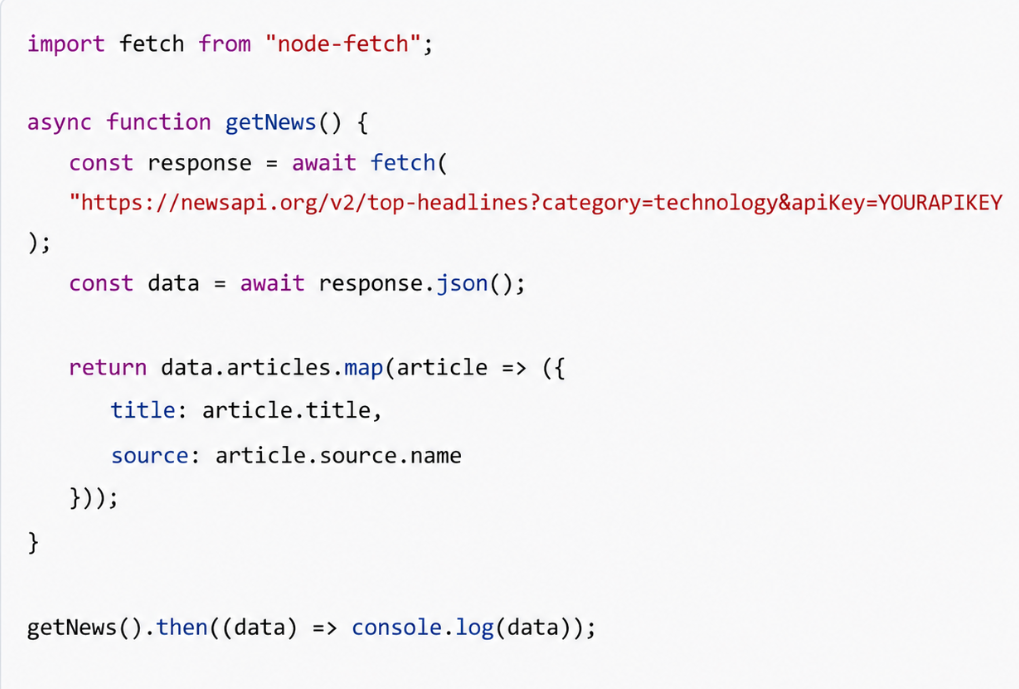
In this scenario, the Agent was able to:
- Locate a viable API
- Gather live data from the internet
- Organize that data into an application
As you can see, this is search + build in action.
If you want to deepen your understanding of building real-world AI-powered applications, explore this ebook for deeper knowledge and understanding.
Explore: Build a Private Bookmark Manager in Replit with Chrome Extension
Evolution of Replit Agent
In order to gain a true sense of how this works, we can observe the evolutionary path of Replit Agent.
Previous AI systems were capable of helping with coding, but lacked an understanding of dynamic, real-world changes.
Replit Agent evolved this first by providing rapid development and deployment of apps, and then Web Search was implemented.
The Agent is evolving into a development tool that can:
- Design
- Gather data
- Develop
- Verify
This marks a clear shift toward agentic coding.
Strategic Insight: The Rise of Context Compression
What is a key takeaway from here?
Context compression. We used to need many tools; context was shared between developers in many different contexts. Now, we can bring it all into one place.
Agent combines:
- Research
- Decisions
- Implementation
The idea of context compression means lower friction, and developers focus on the outcome instead of on the mechanics.
Best Practices for the Web Search Feature
- Always ensure clear and better AI prompts.
- Let the Agent know when to search.
- If you use the Agent to build a production system, you must verify key information.
- If what you want needs real-time accuracy, use a web search.
- Do not include more information in the prompt than is necessary.
Common Mistakes When Using Web Search
Here are some common pitfalls:
- The system always uses a web search.
- The user uses it as their own web search tool.
- Ignoring sources and not verifying the information.
- The expectation that the user can give a messy prompt and expect a perfect outcome.
The Bigger Picture: From Tools to Autonomous Systems

Replit Agent Web Search is less of an additional feature and more of an indication of what development workflows will start to look like. We used to use a large number of different tools for the process. Researching, documenting, coding, and debugging involved lots of back-and-forth.
The Replit Agent automates many of those different pieces and enables everything to be managed within a single system to reduce that friction in the workflow.
This changes how we think of developing software: it is more about clearly defining your goals for the system, providing necessary guidance, and verifying the outcome than actually performing the labor yourself. This shift aligns closely with vibe coding with Replit.
If you’d like to dive deeper into how these AI systems work and are developed, you can consider HCL GUVI’s Artificial Intelligence & Machine Learning course. This course offers knowledge on its real-world implementation, intelligent systems, and integration into today’s development processes.
Conclusion
Replit Agent Web Search represents a significant step forward in AI-powered development.
By combining real-time research with execution, it removes one of the biggest limitations of traditional AI systems.
The result is a faster, smarter, and more reliable way to build applications.
More importantly, it signals a shift toward a future where AI systems do not just assist, but actively participate in the development process.
FAQs
1. Does Replit Agent Web Search always search the internet?
No. It activates only when the task requires up-to-date or external information.
2. Can I manually trigger Web Search?
Yes. You can use prompts like “search” or “research” to explicitly activate it.
3. What type of data can it fetch?
It can retrieve APIs, documentation, market data, and structured web content.
4. Is the information always reliable?
The Agent provides sources, but you should verify critical data for production use.
5. Does it replace manual research completely?
It reduces the need significantly, but verification and refinement are still important.
6. What is the biggest advantage of this feature?
It enables building applications using real-time, accurate data instead of static knowledge.
Success Stories

About the Author
Vishalini Devarajan
An Aerospace Engineer turned content writer, I focus on making complex concepts easy to understand through well-structured, reader-friendly blogs. Whether it’s a technical topic or a non-technical one, I love creating content that is clear, engaging, and impactful.
View all posts by Vishalini Devarajan
Connect with me @











Did you enjoy this article?