


Artificial Intelligence and Machine Learning Articles
How to Evaluate LLM Outputs in Production Deployments
AI/ML Skills Gap 2026: Why Companies Can't Find Job-Ready Talent
20 AI/ML Interview Questions Recruiters Can Use Without a Tech Background - Best Guide
How Industry-Backed AI/ML Bootcamps Are Changing the AI/ML Hiring Pipeline - Best Guide 2026


Get In Touch For Details! Request More Information
The React + AI Stack for 2026: The Complete Developer Guide
Jul 02, 2026 6 Min Read 1598 Views
(Last Updated)
You are building a web application in 2026. Your users expect responses that feel instant, interfaces that adapt to them, and features that would have required an entire AI research team to build just three years ago.
The tools exist to deliver all of this. But the landscape changed fast. New libraries appeared. Old patterns stopped working. The way React applications get built today looks fundamentally different from what most tutorials still teach.
The React and AI stack for 2026 is not just React with a chatbot bolted on. It is a complete rethinking of how frontend applications are architected when AI is a first-class part of the product, not an afterthought.
This guide breaks down every layer of the modern React + AI stack, explains why each piece is there, and shows you exactly how to put it all together into something that works in production.
Quick TL;DR Summary
- This guide explains the complete React and AI stack for 2026 and how every layer fits together to build modern AI-powered web applications.
- You will learn which tools, libraries, and architectural patterns have become the standard for production React applications with AI built in.
- The guide covers each layer of the stack in detail, from the frontend framework to the AI model integration layer and everything in between.
- Step-by-step instructions show you how to set up and connect each piece of the stack so you can start building immediately.
- You will understand not just what to use but why each choice matters and what breaks when you make the wrong one.
Table of contents
- What Is a VLSI Career?
- Why the Old React Stack No Longer Cuts It
- How the Modern React + AI Stack Fits Together
- Layer 1: The React framework base
- Layer 2: The AI SDK integration layer
- Layer 3: The model provider
- Layer 4: State and context management
- Layer 5: The data and retrieval layer
- What This Stack Unlocks for Real Applications
- How to Build With the React and AI Stack: Step-by-Step Process
- Step 1: Set Up Your Next.js 15 Foundation
- Step 2: Install and Configure the AI SDK
- Step 3: Add Streaming to Your React Components
- Step 4: Set Up Zustand for State and Context
- Step 5: Add Your Vector Database and Embedding Layer
- Step 6: Build Your AI-Aware Components
- Step 7: Optimize and Harden for Production
- Common Mistakes Developers Make
- Getting Maximum Value From the React and AI Stack
- Conclusion
- FAQs
- Do I have to use Next.js or can I use a different React framework?
- Which AI model provider should I choose for a React application?
- Is a vector database necessary for every AI application?
- How do I handle authentication with AI route handlers?
- What is the biggest performance difference between getting the stack right versus wrong?
What Is a VLSI Career?
A VLSI career involves working on the design, verification, physical implementation, or testing of integrated circuits. VLSI engineers work at semiconductor companies, fabless chip design firms, and electronic design automation tool providers to create the chips that power processors, memory, communication hardware, consumer electronics, and embedded systems.
Why the Old React Stack No Longer Cuts It
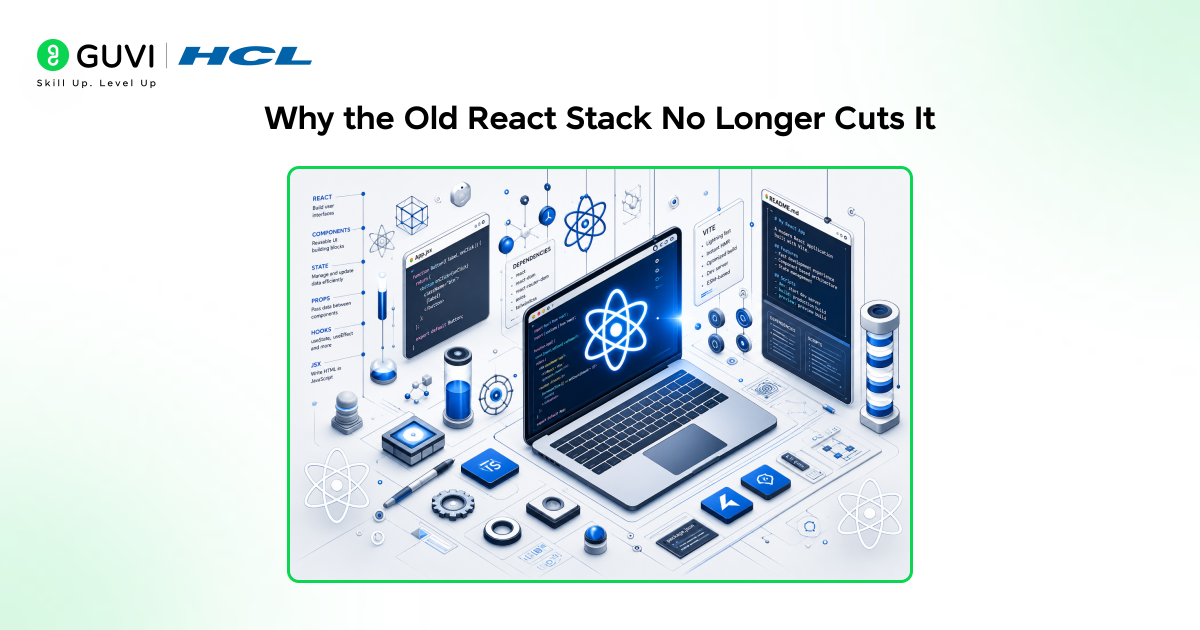
- AI features do not fit the old component model
Traditional React architecture assumes components render data that already exists. AI responses stream in over time, change as the model reasons, and arrive in chunks rather than all at once. The old patterns for managing state and rendering data were not built for this and they show the strain immediately.
- Latency is a first class problem now
When your application calls an AI model, you are waiting for inference that can take seconds. Build your UI around the assumption that data arrives instantly and every AI feature feels broken. The modern stack is designed around latency as a fundamental constraint, not an edge case.
- Context management became genuinely complex
AI features need context. What has the user done? What did the model say before? What is the current state of the application? Managing this context correctly across components, sessions, and server boundaries requires architectural patterns that simply did not exist in the old React playbook.
- Server and client boundaries shifted
With AI inference happening on the server and streaming results to the client, the line between server and client code became critical in a new way. Getting this boundary wrong means slow applications, security problems, or AI responses that never actually reach the user correctly.
- The tooling ecosystem fragmented
Dozens of new libraries appeared for AI integration, state management, streaming, and model interaction. Without a clear picture of how they fit together, most developers end up with a patchwork of incompatible tools that creates more problems than it solves.
Read More: The Ultimate Guide to React Component Libraries in 2026
How the Modern React + AI Stack Fits Together
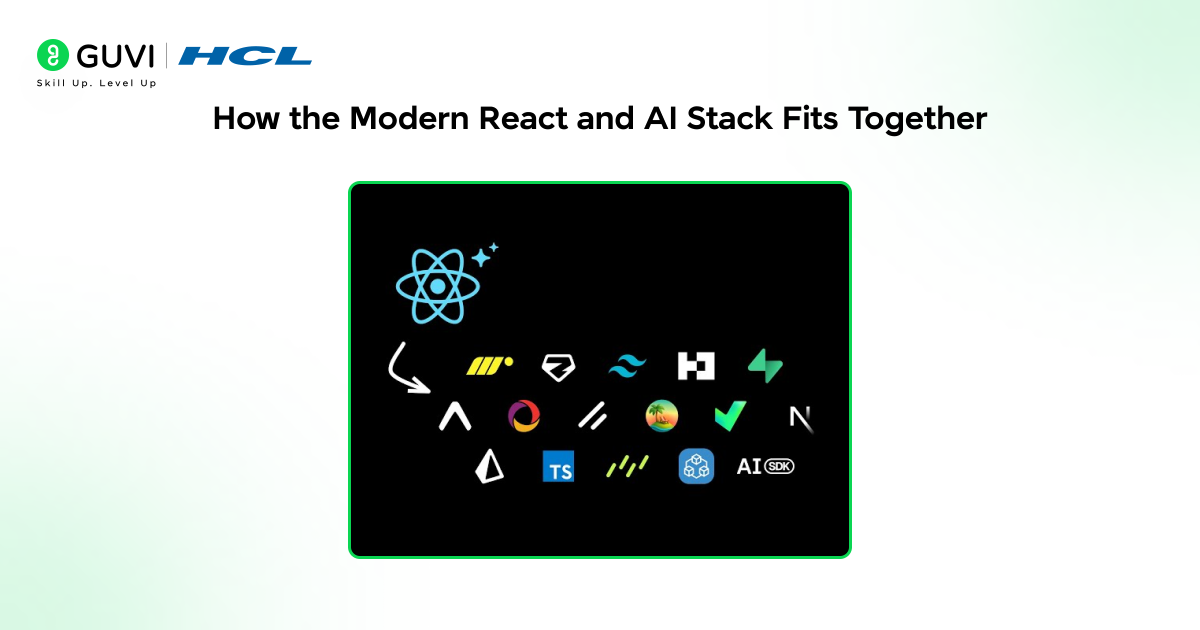
Layer 1: The React framework base
Next.js 15 is the standard foundation for production React applications in 2026. App Router, React Server Components, and built-in streaming support make it the only React framework where AI integration does not require significant workarounds. Everything else in the stack builds on top of this base.
Layer 2: The AI SDK integration layer
Vercel’s AI SDK has become the standard library for connecting React applications to AI models. It handles streaming, manages the client-server boundary for AI calls, provides hooks for consuming streamed responses in React components, and works with every major model provider without locking you into one.
Layer 3: The model provider
The AI SDK connects to your chosen model provider, whether that is Anthropic, OpenAI, Google, or a self-hosted open source model. In 2026 the choice of model is increasingly separate from the choice of how you integrate it, which means you can swap providers without rebuilding your application.
Layer 4: State and context management
Zustand has largely replaced Redux for applications of this complexity. It is lightweight enough not to add overhead but powerful enough to manage the complex state that AI features require, including conversation history, streaming status, user context, and application state that the AI needs access to.
Layer 5: The data and retrieval layer
Most serious AI applications need retrieval augmented generation, giving the model access to your actual data rather than just its training knowledge. This layer includes your vector database, embedding generation, and the retrieval logic that pulls relevant context before each model call.
React Server Components, introduced in React 18 and matured by 2026, are ideal for AI applications.
They allow model inference to run on the server and stream results to the client without exposing API keys or model logic, improving both security and performance.
Kickstart your React journey the smart way! Download our Free React eBook, created by industry experts to help you master the fundamentals, full-stack concepts, and real-world deployment; all in one guide.
What This Stack Unlocks for Real Applications
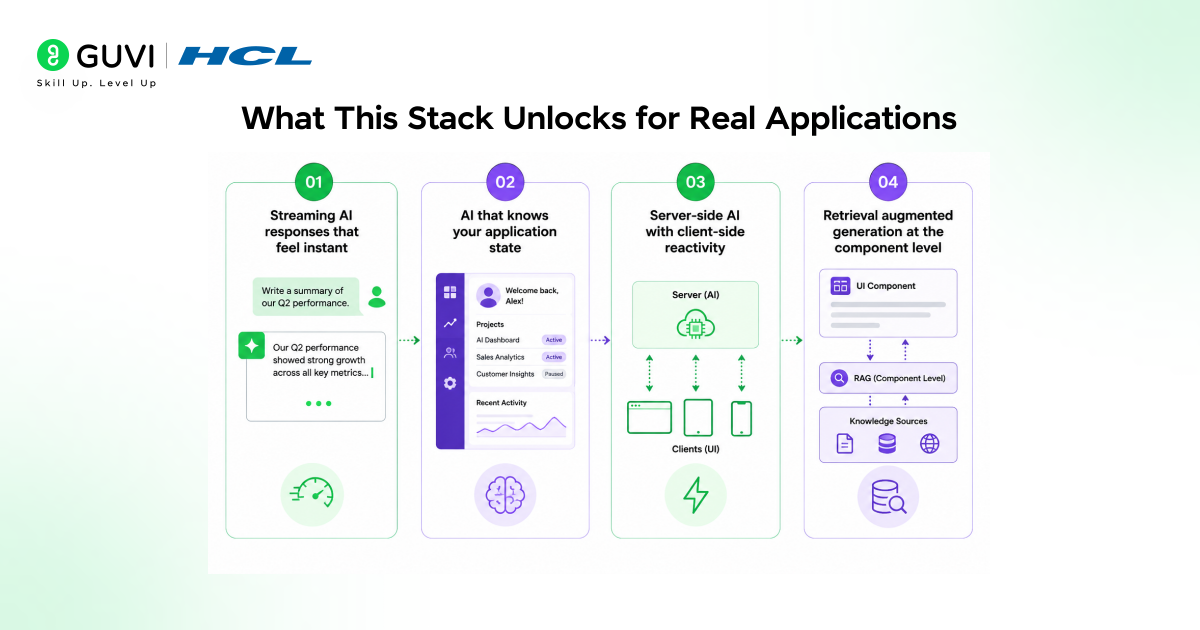
- Streaming AI responses that feel instant
With the AI SDK’s streaming hooks and Next.js streaming support, AI responses appear in the UI as they generate rather than after the full response is complete. Users see words appearing in real time. The perceived performance is dramatically better even when total response time is identical.
- AI that knows your application state
Because Zustand manages both your application state and your AI context in the same store, your model calls have access to everything relevant about what the user is doing. The AI is not isolated in a chat widget. It is connected to the full context of your application.
- Server-side AI with client-side reactivity
React Server Components handle the expensive parts, model calls, database queries, context retrieval, on the server. The client receives streaming results and updates the UI reactively. You get server performance with client interactivity and your API keys never touch the browser.
- Retrieval augmented generation at the component level
With the data layer integrated into the stack, individual components can trigger retrieval and pass relevant context to the model without that logic leaking into your UI code. The architecture keeps concerns separated while making the full capability available anywhere in the application.
How to Build With the React and AI Stack: Step-by-Step Process
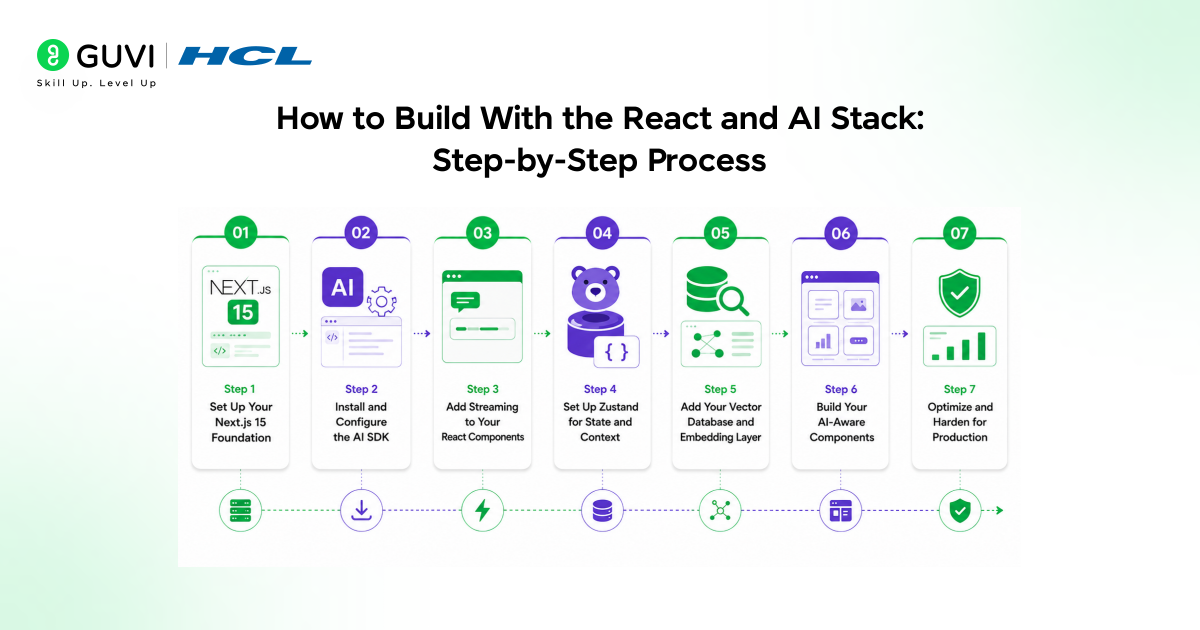
Here is exactly how to set up and connect every layer of the modern React and AI stack.
Step 1: Set Up Your Next.js 15 Foundation
Start with the right base or everything else fights you
Create a new Next.js 15 project using the App Router. Make sure you are using the app directory structure, not the pages directory. The AI SDK’s streaming capabilities and React Server Component integration both depend on App Router.
Run your initial setup, configure TypeScript if you are using it, and verify the base application runs before adding anything else.
Step 2: Install and Configure the AI SDK
Connect your application to the model layer

Install the Vercel AI SDK and your chosen model provider package. Create a route handler in your app directory that handles AI requests server-side. Configure your API keys as environment variables so they never reach the client.
Set up the streaming response using the SDK’s streamText or streamObject functions depending on whether you need plain text or structured data from the model.
Step 3: Add Streaming to Your React Components
Make AI responses feel alive in the UI
Use the AI SDK’s useChat or useCompletion hooks in your client components to consume the streamed responses from your route handler. These hooks manage the streaming state, loading indicators, error handling, and message history for you.
Your component receives a messages array and an input handler and renders the stream as it arrives without any custom streaming logic.
Step 4: Set Up Zustand for State and Context
Give your AI access to what is happening in your application
Install Zustand and create a store that holds both your application state and your AI conversation context. Define slices for user data, conversation history, current application context, and any other state your model calls need access to.
Connect your AI route handler to read from this store when building the context for each model call so the AI always has a complete picture of what the user is doing.
Step 5: Add Your Vector Database and Embedding Layer
Give the model access to your actual data
Choose a vector database suited to your scale. Pinecone, Supabase with pgvector, and Weaviate are all solid choices in 2026 depending on your existing infrastructure. Set up your embedding generation pipeline to convert your application’s data into vector representations.
Write retrieval functions that query the vector database with the user’s current context and return relevant chunks to include in your model calls.
Step 6: Build Your AI-Aware Components
Design UI that works with streaming and uncertainty
Build components that handle three states cleanly: loading before the stream starts, streaming while content is arriving, and complete when the response is finished. Use React Suspense boundaries to handle the loading state gracefully.
Design your components to render partial content as it streams rather than waiting for completion. Add error boundaries for model failures so a broken AI call does not crash your entire UI.
Step 7: Optimize and Harden for Production
The gap between working and production-ready is where most projects stall
Add rate limiting to your AI route handlers so users cannot exhaust your model API budget. Implement caching for responses that do not need to be regenerated on every request. Add proper error handling for model timeouts, content policy rejections, and provider outages.
Set up logging for AI calls so you can debug production issues and monitor costs. Test your streaming behavior on slow connections where the experience differs most from your development environment.
Common Mistakes Developers Make
- Using the pages directory instead of App Router and fighting the AI SDK’s streaming features the entire time
- Storing API keys in client-side code because server component architecture felt complicated
- Not handling the streaming state and showing a blank UI until the full response arrives
- Building AI context as an isolated system disconnected from the rest of the application state
- Skipping the vector database layer and sending entire documents to the model in every request
- Not adding rate limiting and discovering this during a traffic spike that drains an entire API budget overnight
- Testing only on fast connections and shipping a streaming experience that feels broken on mobile networks
By 2026, retrieval augmented generation (RAG) has become the default architecture for production AI applications rather than an advanced technique.
By sending models only the relevant context for each query instead of relying solely on training data, RAG delivers more accurate, up-to-date, and context-aware responses across a wide range of use cases.
Getting Maximum Value From the React and AI Stack
- Keep AI logic in server components and route handlers
- Design for streaming from the beginning
- Use structured outputs for predictable UI
- Cache aggressively at the retrieval layer
- Monitor costs alongside performance
To learn more on React and AI Stack, consider HCL GUVI’s IITM Pravartak Certified MERN Full Stack Developer Course. Build real-world apps using MongoDB, Express, React, and Node.js, earn an IIT Madras Pravartak certification, and get the practical edge you need to stand out in today’s tech job market.
Conclusion
The React and AI stack for 2026 is not a trend. It is the current answer to a real engineering problem: how do you build web applications where AI is genuinely useful rather than a feature that feels bolted on?
Next.js 15 gives you the server and client architecture that makes AI integration clean. The AI SDK gives you streaming and model integration without reinventing the wheel. Zustand gives your AI access to real application context. The retrieval layer gives your model access to real data. Together they form a stack where every piece has a clear job and nothing fights anything else.
The developers who build the best AI-powered React applications in 2026 are not necessarily the ones who understand AI research most deeply. They are the ones who understand how these layers fit together, where the boundaries should be, and how to keep each layer doing its specific job cleanly.
FAQs
1. Do I have to use Next.js or can I use a different React framework?
Next.js 15 is the recommended choice because its App Router aligns most naturally with AI integration. Other frameworks like Remix can work but require more custom implementation for streaming and server-side AI calls.
2. Which AI model provider should I choose for a React application?
Choose based on your capability needs, latency requirements, and cost constraints. The AI SDK abstracts the provider layer well enough that switching providers later does not require rebuilding your entire integration.
3. Is a vector database necessary for every AI application?
No. Skip it if your AI feature works from the model’s training knowledge alone. Add it when the model starts giving outdated or generic responses that better context from your own data would fix.
4. How do I handle authentication with AI route handlers?
Treat them like any other protected API endpoint. Verify the user’s session before processing any model call and never trust user-supplied context without server-side verification.
5. What is the biggest performance difference between getting the stack right versus wrong?
Streaming start time. A well-architected stack shows the first token in under 500 milliseconds. A poorly architected one can take three to five seconds before anything appears, which makes the feature feel broken rather than fast.
Success Stories

About the Author
Vishalini Devarajan
An Aerospace Engineer turned content writer, I focus on making complex concepts easy to understand through well-structured, reader-friendly blogs. Whether it’s a technical topic or a non-technical one, I love creating content that is clear, engaging, and impactful.
View all posts by Vishalini Devarajan
Connect with me @







Did you enjoy this article?