


Artificial Intelligence and Machine Learning Articles
AI/ML Skills Gap 2026: Why Companies Can't Find Job-Ready Talent
20 AI/ML Interview Questions Recruiters Can Use Without a Tech Background - Best Guide
How Industry-Backed AI/ML Bootcamps Are Changing the AI/ML Hiring Pipeline - Best Guide 2026
From IT Support to AI Engineer: A Realistic Career Switch Guide 2026


Get In Touch For Details! Request More Information
Replit Mobile Apps: Prompt to Published in Minutes
Jun 24, 2026 6 Min Read 1349 Views
(Last Updated)
For most of software history, building a mobile app meant battling a frustrating ecosystem: needing a Mac for Xcode, an Apple Developer account, Swift/React Native skills, certificate management, and a submission process that could reject apps over tiny details like icon alpha channels.
Even web devs saw it as a separate, time-sucking discipline with barriers that were technical, financial, logistical, and deeply discouraging for beginners. Replit shattered this on January 15, 2026, letting anyone create publishable, monetizable apps via natural language prompts, no coding or hardware required.
Creators and small businesses go from idea to working app in minutes and to the App Store in days, powered by an invisible React Native + Expo stack. Just describe what you want, and it appears.
In this article, we will walk through exactly how Replit mobile apps builder works, what the full journey from prompt to App Store looks like step by step, what kinds of apps you can build with it, what the Expo partnership enables, and what you should know before you start your first project.
TL;DR
- No-dev mobile revolution: Prompt in English → React Native app in minutes; no Mac/Xcode needed.
- Native stack: Replit Agent + Expo = real apps with camera/GPS/haptics, editable code.
- 5 frictionless steps: Describe → Iterate chat → QR preview → Share prototype → 3-click App Store.
- Build anything: Full-stack with DBs, payments, AI; phone client + Replit server logic.
- iOS focus first: Guided publishing via Expo; Android previews easy, Play Store manual.
- Pro tip: Plan icons/permissions; security-review AI code before live users.
Table of contents
- What are Replit Moblie Apps?
- The Technology Stack Behind It
- Peek Under the Hood
- Replit Agent Orchestrates It All
- Expo Powers Cross-Platform Magic
- Revolutionizing iOS Publishing
- The Step-by-Step Journey From Prompt to Published App
- What You Can Actually Build
- Native Features the App Can Use
- iOS and Android: Where Things Stand
- iOS-First Launch with Guided Publishing
- Cross-Platform Builds and Android Roadmap
- Final Thoughts
- FAQs
- What exactly are mobile apps on Replit?
- What's the tech stack, and is it truly native?
- Walk me through the 5-step workflow from prompt to publish.
- What kinds of apps can I build, and what are the limits?
- Any gotchas before I start?
What are Replit Moblie Apps?
It is a natural language mobile app builder that generates real React Native apps and guides you through publishing to the App Store, with no coding required
Mobile Apps on Replit is a new way to go from idea to fully published app using nothing more than natural language. No native development experience required. No complex setup. No months-long learning curve. Just tell Replit Agent what you want to build, iterate in chat, preview instantly on your phone, and publish when you’re ready.
This is native code, not a web wrapper. During the announcement livestream, Replit pushed back explicitly on the idea that it is simply wrapping mobile websites. “This is native,” a company official said. The apps are real React Native code that compiles to native binaries.
The Technology Stack Behind It
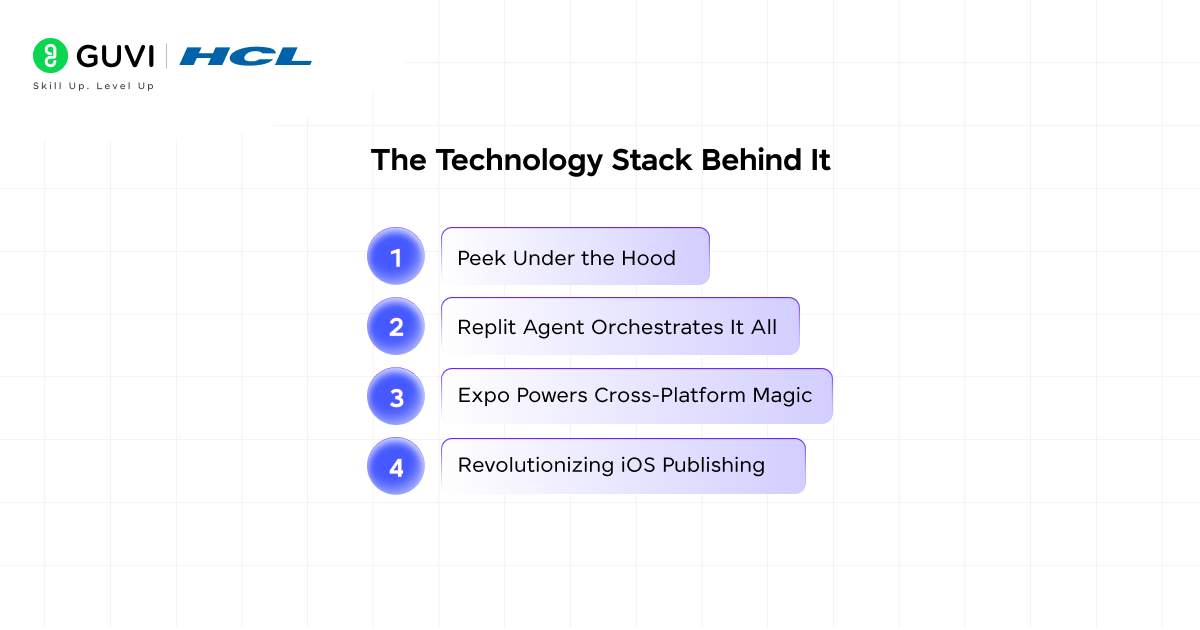
1. Peek Under the Hood
Before getting into the user-facing workflow, it helps to understand what Replit is actually building under the hood when you describe your app. The invisible machinery behind the experience is a combination of Replit Agent, React Native, and Expo.
2. Replit Agent Orchestrates It All
Replit is leveraging Replit Agent to orchestrate a sophisticated stack. The output is standard React Native code. You can still open the file tree, and it is all standard React Native. You can tweak the App.tsx manually if the AI misses a pixel.
This is important for developers who want the convenience of natural language input but also want the ability to dive into the code when needed; both options coexist in the same environment.
3. Expo Powers Cross-Platform Magic
Expo is the framework that handles cross-platform compilation, device testing, and the publishing pipeline. Replit’s most significant shift is on the publishing side.
After building and testing, users can initiate App Store publishing through a wizard powered by Expo Launch, a service built by Expo to abstract many of the steps traditionally required to submit iOS apps.
4. Revolutionizing iOS Publishing
Historically, publishing iOS apps has required Xcode, a certificate, and provisioning profile management, and the process of building and uploading signed binaries. Expo Launch moves that domain knowledge into a service that can be used by web-based platforms like Replit.
As one Expo team member put it during the announcement: not everyone in the world can afford a new Mac, and even experienced developers find the iOS publishing process cumbersome. Expo Launch solves both problems.
The Step-by-Step Journey From Prompt to Published App
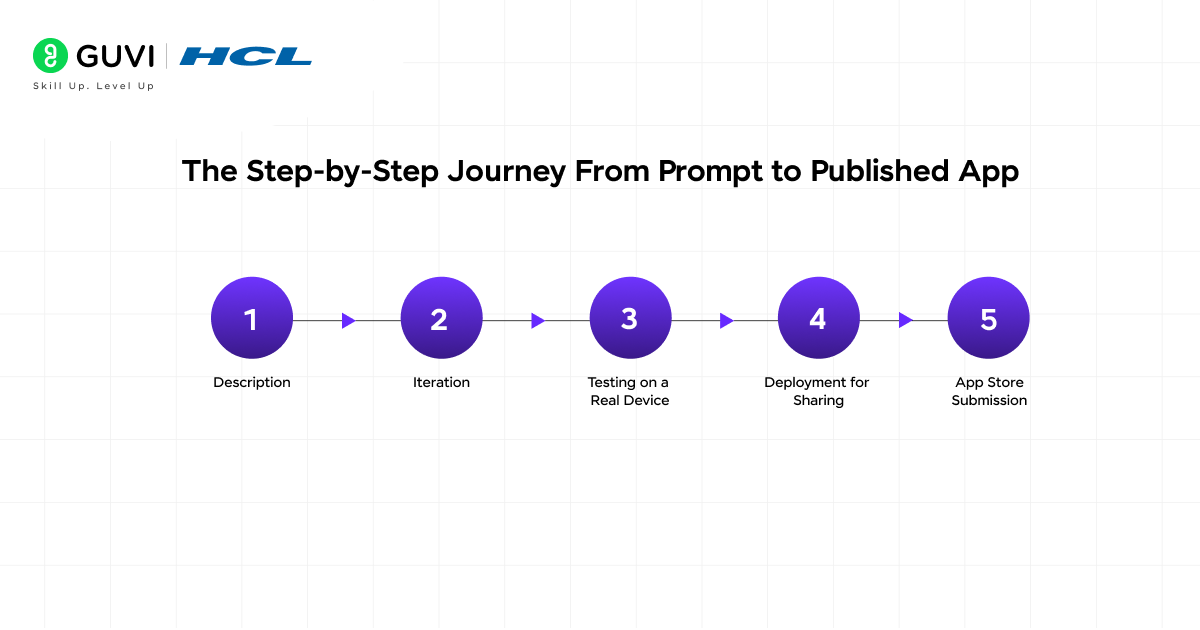
The full workflow from starting to shipping has five distinct stages, each designed to remove friction from a step that previously required significant expertise.
Step 1: Description
You open Replit, select the mobile app builder, and tell the agent what you want to build in plain language. You might say something like, “Build a fitness tracker that logs workouts, integrates with a user database, and sends motivational SMS reminders.
In minutes, the platform generates a complete React Native application, powered by Expo for seamless cross-platform compatibility. Initial builds typically take about seven to ten minutes, followed by prompt-based iteration to fix UI issues and refine features.
Step 2: Iteration
Once the initial build is ready, you refine it through conversation. You can ask the agent to change colors, add a new screen, fix a layout issue, or add a feature, all in the same chat interface.
Tweak your description in the chat, and the AI updates the app in real time. You are not managing code files or running terminal commands; you are having a conversation about what the app should do.
Step 3: Testing on a Real Device
When you click Start App, a QR code appears in the console. Scan it with Expo Go to preview on your device. The preview pane in your workspace shows a web version, which may look slightly different from the native version on your phone.
This distinction matters because the native version on your phone is what your users will actually experience, so testing on a physical device is the right way to validate your app before publishing. Presenters at the live stream highlighted native behaviors such as haptic feedback as part of the experience.
Step 4: Deployment for Sharing
When you click Publish, Replit creates a public URL with a QR code. Anyone with Expo Go can scan it and run your app. This is ideal for prototyping for show investors, gathering feedback, or testing with friends before committing to the App Store.
This step gives you a shareable version of your app without going through the full App Store process, which is perfect for getting early feedback from real users.
Step 5: App Store Submission
Publish to the App Store with just three clicks. You will need an Apple Developer account; that requirement comes from Apple, not Replit, and there is no way around it, but Replit and Expo Launch handle everything else: certificate management, provisioning profiles, binary building, and the submission process itself.
What You Can Actually Build
The range of apps Replit’s mobile builder supports is broader than most people expect from a natural language tool. This is not limited to simple screens with static content. Your mobile app is not limited to static screens.
- You can build full-stack, production-ready apps powered by AI capabilities to build your own assistant, coach, analyzer, or creative tool; built-in databases to store user accounts, content, logs, or structured data.
- Connectors to add payments, SMS, authentication, or external services; and hosting and server-side logic to handle backend computations, workflows, and APIs.
- The architecture that enables this separates the client running on the user’s phone from the server running on Replit.
- This separation gives you flexibility. You can run complex logic on the server where you have access to Replit’s database, object storage, and connectors and keep the client lightweight. As you build, think about what should happen on the phone versus what should happen in the cloud.
- For example, if a stock trader tells the agent to “build an app that tracks the top 10 public companies by market cap,” Replit generates the mobile app complete with a functioning interface and gives users a way to preview and test it.
- Real-world use cases include mobile games, AI-powered personal tools, business storefronts, productivity apps, and anything else that benefits from living on a phone rather than a browser tab.

Native Features the App Can Use
One of the most important distinctions between what Replit builds and a simple web-to-mobile wrapper is access to actual phone hardware.
- This is what makes the apps feel like real mobile applications rather than websites squeezed into a phone screen.
- Build native apps that feel right at home on any phone. Use the camera, track location, and tap into all the features that make mobile apps powerful.
- The phone’s camera, GPS, accelerometer, gyroscope, and haptic feedback systems are all accessible through React Native’s native module system.
- This is why apps like Spookseek AR, the ghost hunting game built by designer Ruth Heasman in one week, could use all of those sensors simultaneously.
- The output of Replit’s mobile builder is not a constrained environment; it is the full React Native toolkit.
iOS and Android: Where Things Stand
iOS-First Launch with Guided Publishing
Replit’s initial launch zeroed in on iOS, making the guided App Store publishing its standout feature. Powered by Expo Launch, this delivers a seamless three-click wizard that handles certificates, provisioning profiles, and submissions; no Xcode or Mac required. It’s a game-changer for creators racing from idea to store shelf.
Cross-Platform Builds and Android Roadmap
You can craft cross-platform apps for both iOS and Android from one React Native codebase, with instant previews on Android devices via Expo Go. Google Play publishing works manually for now, lacking the iOS wizard’s automation. Replit plans to expand Android support soon, leveraging React Native’s strengths so your app runs everywhere. The real gap is just the guided pipeline.
Replit’s mobile apps feature enables even non-developers to build production-ready React Native apps in just 7–10 minutes using chat-based prompts.
These apps can include native device capabilities such as camera access, GPS, and haptics, enabling real-world experiences like AR games.
It has been used in rapid prototypes such as the AR ghost-hunting game Spookseek, reportedly built in about a week.
By partnering with tools like Expo Launch, it abstracts complex iOS setup steps (certificates, Xcode configuration) into a few clicks. However, like many AI-generated apps, security risks such as weak authentication can still appear, so reviewing production code remains essential before handling user data.
What to Know Before You Start
A few practical realities are worth understanding before you begin your first project to avoid surprises later.
- Native changes like app icons or permissions usually require a new store build. This means if you decide to change your app icon or add a new permission like requesting access to the camera after you have already built a store binary, you need to go through the build process again.
- Plan these decisions early in your development cycle so you are not rebuilding multiple times. Security is also worth careful consideration. Vibe-coded software has come under fire recently for security flaws.
- A new study from cybersecurity startup Tenzai found that popular AI-coding agents, including Replit, consistently ship apps with critical vulnerabilities, such as failing to prevent cyberattacks or password brute force attacks.
- If your app handles user accounts, payments, or any sensitive data, it is worth reviewing the generated code for security issues before publishing.
- Replit does have built-in security scanning, but the best practice is to treat the AI’s output as a first draft that benefits from a security review before it reaches real users.
Final Thoughts
Mobile apps on Replit represent a genuine shift in who gets to build and publish software. For founders, small business owners, and non-technical creators, the vibe-coding era means that the distance between a great idea and a downloadable app has been reduced to just a few minutes of conversation.
The combination of natural language input, real-time device preview through Expo Go, full-stack backend capabilities, and a guided App Store publishing workflow removes almost every barrier that previously kept non-developers out of mobile.
Whether you are a founder launching your first product, a small business creating a mobile presence, or a creator with a spark of inspiration, this launch makes mobile app development accessible to everyone.
From idea to App Store in minutes. All on Replit. Start with an idea you have been sitting on, describe it to the Replit agent, scan the QR code on your phone, and see what gets built in the next ten minutes. The process will teach you more about what is possible than any guide can.
Ready to master prompt-to-app magic, build native mobile games, and launch to the App Store? Explore HCL GUVI’s AI and ML Course and supercharge your tech career with Replit-powered skills.
FAQs
1. What exactly are mobile apps on Replit?
It’s a natural language builder that turns plain English prompts into real React Native apps, no coding, Mac, or dev experience needed. Describe your idea (e.g., “fitness tracker with SMS reminders”), iterate via chat, preview on your phone, and publish to the App Store in days.
2. What’s the tech stack, and is it truly native?
Replit Agent generates standard React Native code, powered by Expo, for cross-platform builds, testing, and publishing. Yes, it’s native, not a web wrapper with access to phone hardware like the camera, GPS, and haptics. You can even edit App.tsx manually if you want.
3. Walk me through the 5-step workflow from prompt to publish.
Describe your app in chat.
Iterate via conversation.
Test on the device via QR code in Expo Go.
Share prototype URL.
Three-click App Store submission (needs Apple Developer account; Expo handles certs/profiles).
4. What kinds of apps can I build, and what are the limits?
Full-stack apps with databases, payments, SMS, AI assistants, games, or tools like AR ghost hunters or stock trackers. Client runs lightweight on phone; heavy logic on Replit servers. iOS publishing is guided; Android is manual for now.
5. Any gotchas before I start?
Plan icons/permissions early (changes require rebuilds). Review AI-generated code for security flaws (e.g., vulnerabilities in auth). Use Replit’s scanning, but treat the output as a draft, especially for sensitive data like payments.
Success Stories

About the Author
Vishalini Devarajan
An Aerospace Engineer turned content writer, I focus on making complex concepts easy to understand through well-structured, reader-friendly blogs. Whether it’s a technical topic or a non-technical one, I love creating content that is clear, engaging, and impactful.
View all posts by Vishalini Devarajan
Connect with me @











Did you enjoy this article?