


Interview Articles
My Full Stack Developer Interview Experience: What Nobody Tells You
My Digital Marketing Interview Experience: What They Don't Tell You [2026]
How Long Does Technical Interview Preparation Take? An Expert's Reality Check
Technical QA Interview Questions: What Top Companies Really Ask in 2026


Get In Touch For Details! Request More Information
60+ Web Developer Interview Questions And Answers
Jan 21, 2026 10 Min Read 27020 Views
(Last Updated)
Web development is growing faster than ever as businesses, creators, and customers move online. From simple static pages to complex applications, every digital experience relies on skilled web developers who can build fast, secure, and user-friendly websites.
Since the field spans design and content to backend logic and security, interviews can feel overwhelming. To make your preparation easier, here are the top web developer interview questions and answers you must know.
Quick Answer:
Web developer interview questions help employers understand your grasp of core technologies, your approach to solving real-world problems, your practical coding and debugging skills, and whether you can build secure, scalable, and user-friendly web experiences—all in a single evaluation.
Table of contents
- Top Web Developer Interview Questions and Answers
- General Questions
- HTML & HTML5 Questions
- CSS Questions
- Javascript Questions
- Conclusion
- FAQs
- What skills are most important for a web developer?
- How should I prepare for a web developer interview?
- Do companies expect full-stack knowledge?
Top Web Developer Interview Questions and Answers
General Questions
1. How would you use persistent storage on browsers? What options would you use?
Ans. For HTML browsers, a good choice would be local storage and persistent storage. However, for non-HTML ones, your best bet would be cookies.
2. What is W3C?
Ans. W3C stands for the World Wide Web Consortium, the international standards body for the World Wide Web. W3C came into existence in 1994 & is constantly busy standardizing the web. It strives to make it accessible to all users.
3. What are the two common ways in which you can reduce the load time of a web application?
Ans. Not only two, but there are quite a lot of ways you can reduce load time:
1. Enable browser caching
2. Optimize images
3. Minify resources
4. Minimize HTTP Requests
5. Reduce redirects
Additionally, if you want to explore JavaScript through a self-paced course, try HCL GUVI’s JavaScript certification course.
4. What is graceful degradation?
Ans. Graceful degradation is the property that enables a system to function correctly even in the event of failure of the system or a component.
5. What is DTD?
Ans. DTD stands for Document Type Declaration. And, it tells the browser which version of either HTML or XHTML is in use.
6. What is the difference between “Web development” and “Web design”?
Ans. Web development involves many processes, and Web Design is part of it. Web design represents page layouts and the graphical user interface. It is also a broader term that refers to planning, coding, testing, debugging, etc.
7. What is CORS? How does it work?
Ans. Cross-origin resource sharing (CORS) is a mechanism that allows many restricted resources (e.g., fonts, JavaScript, etc.) on a web page. These pages are requested from another domain outside the domain from which the resource originated. Also, in HTML, a mechanism that manages XMLHttpRequest access to a domain differently supports this.
8. Describe the key advantages of HTTP/2 as compared with HTTP 1.1.
Ans. HTTP/2, among other improvements, provides decreased latency to improve page load speed by supporting:
1. Server push technologies
2. Prioritization of requests
3. HTTP headers Data compression
4. A crucial operational benefit is that it avoids the head-of-line blocking problem in HTTP 1.
5. Loading of page elements in parallel over a single TCP connection.
Learn Web Development: Top 10 Backend Web Development Frameworks In 2026
9. How do you optimize a website’s assets?
Ans. There are several ways to do this, for example, file concatenation, file compression, CDN Hosting, offloading assets, and refining code.
10. What web browser do you use?
Ans. Because web developers should be familiar with all browsers in terms of testing their web projects, the best answer here is all of them.
11. What’s the difference between standards mode and quirks mode?
Ans. Quirks mode is a default compatibility mode that may differ from browser to browser, leading to inconsistent appearance across browsers.
Further moving on to the next section in the Web Development Interview Questions!

HTML & HTML5 Questions
13. What is HTML?
Ans. HTML (HyperText Markup Language) is also the most popular markup language for creating websites that can be viewed in a web browser.
14. What is the difference between HTML elements and tags?
Ans. HTML elements communicate to the browser how to render text. When surrounded by angular brackets <>, they form HTML tags, which come in pairs and surround the text.
15. What does DOCTYPE mean?
Ans. The DOCTYPE (Document Type Definition) specifies the type of HTML used on a webpage. Browsers use DOCTYPE to determine how to render a page. Moreover, failing to use DOCTYPE will load your page in Quirks Mode.
16. What are the limitations when serving XHTML pages?
Ans. The main limitation is the poor browser support of XHTML. Internet Explorer and other user agents cannot parse XHTML as XML. Thus, it is not as extensible a language as one might think.
17. What is the syntax difference between a bulleted list and a numbered list?
Ans. Bulleted lists use the <ul> tag, which stands for “unordered,” whereas <ol> is used to create an ordered list.
18. What is the difference between a and a?
Ans. A <div> is a container element for grouping and styling, whereas a <frame> creates divisions within a web page and should be used within the <frameset> tag. The use of <frame> and <frameset> is no longer popular and is now being replaced by the more flexible <iframe>, which is widely used for embedding elements from other websites (e.g., YouTube videos) into a page.
19. What is the difference between the application model of HTML and HTML5?
Ans. There is not a big difference between the two. HTML5 is a continuum of HTML. There has been no major paradigm shift. From a broader viewpoint, HTML was a simple language for laying out text and images on a webpage, whereas HTML5 can be viewed as a development platform that does what HTML does and more, including better support for audio, video, and interactive graphics. It includes several new features, supports offline data storage for applications, and offers more robust exchange protocols.
Find out: Is Web Development a Good Career?
20. What are some new HTML5 markup elements?
Ans. Among several: <article>, <aside>, <bdi>, <command>, <details>, <figure>, <figcaption>, <summary>, <header>, <footer>, <hgroup>, <mark>, <meter>, <nav>, <progress>, <ruby>, <rt>, <section>, and <time>.
21. What are the new image elements in HTML5?
Ans. The new image elements in HTML5 are Canvas and WebGL. <canvas> is a new element that serves as a container for graphical elements such as images and graphics. WebGL stands for Web Graphics Library, a free, cross-platform API used to create 3D graphics in web browsers.
22. What are data attributes good for?
Ans. data-attribute is used to assign custom data to an element. The stored (custom) data can then be used in the page’s JavaScript to create a more engaging user experience.
23. Describe the difference between cookies, sessionStorage, and localStorage.
Ans. Cookies are small text files that websites place in a browser for tracking or login purposes, and hold a modest amount of data. Meanwhile, localStorage and sessionStorage are new objects, both of which are storage specifications but vary in scope and duration. Moreover, local storage is more secure, and large amounts of data can be stored locally without affecting website performance.
Furthermore, is it permanent? sessionStorage only lasts as long as the longest open tab.
24. What are some of the significant new APIs that come standard with HTML5?
Ans. Among others are Media API, Text Track API, Application Cache API, User Interaction, Data Transfer API, Command API, and the History API.
25. What is the difference in caching between HTML5 and the old version of HTML?
Ans. A crucial new feature of HTML5 is the Application Cache, which creates an offline version of a web application. and stores website files such as HTML files, CSS, images, and JavaScript locally. That speeds up site performance.
26. What is an image map?
Ans. An image map is a list of coordinates for a specific image, used to hyperlink areas of the image to different destinations (as opposed to a normal image link, in which the entire image links to a single destination).
27. What is the advantage of collapsing white space?
Ans. White spaces are blank sequences of space characters, which are treated as a single space character in HTML. The browser collapses multiple spaces into a single space, so we can indent lines of text without worrying about various spaces. This enables us to organize the code into a much more readable format.
28. Do all HTML elements need both opening and closing tags?
Ans. Not really, elements like <img src=””/> or <input type=””/> don’t need a closing tag.
29. What is a marquee?
Ans. A marquee is used to enable scrolling text on a web page. So, to do this, place whatever text you want to appear scrolling within the <marquee> and </marquee>tags.

30. How do you create links to sections on the same page?
Ans. Links can be created using the tag, with references using the # symbol. For example, we can have
<a href=”#top”> BACK TO TOP</a>
which would result in the words “BACK TO TOP” appearing on the webpage and links to a bookmark named top. We can then create a separate tag like:
<a name=top></a>
somewhere on the same webpage so that the user will be linked to that place when clicking on “BACK TO TOP”.
CSS Questions
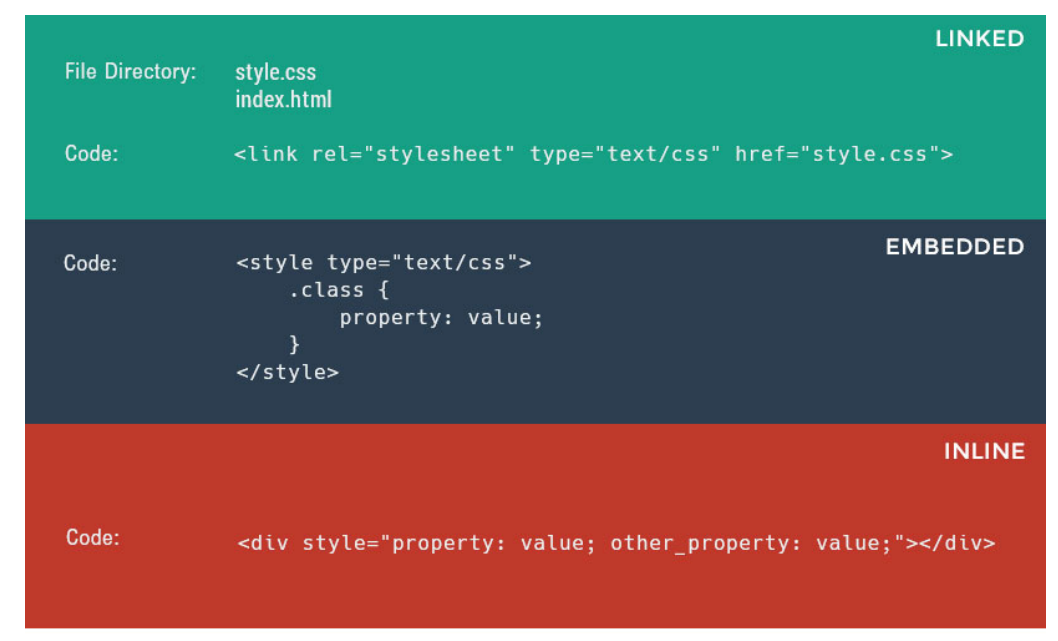
31. What are the possible ways to apply CSS styles to a web page?
Ans. CSS can be applied in the following three ways:
• Linked CSS: Create a separate .css file containing all your styles and link it to the HTML document using the <link> tag.
• Embedded CSS: Include a <style> tag within the <head> section of your HTML file and add all your styles there.
• Inline CSS: Apply styles directly to an HTML element using the style attribute.
32. Explain the CSS box model.
Ans. The CSS box model consists of margins, borders, padding, and content. Furthermore, the box model provides a more structured way to space elements on web pages. So, in your browser’s developer tools, the CSS box model is found at the end of the CSS section, and it looks like this:
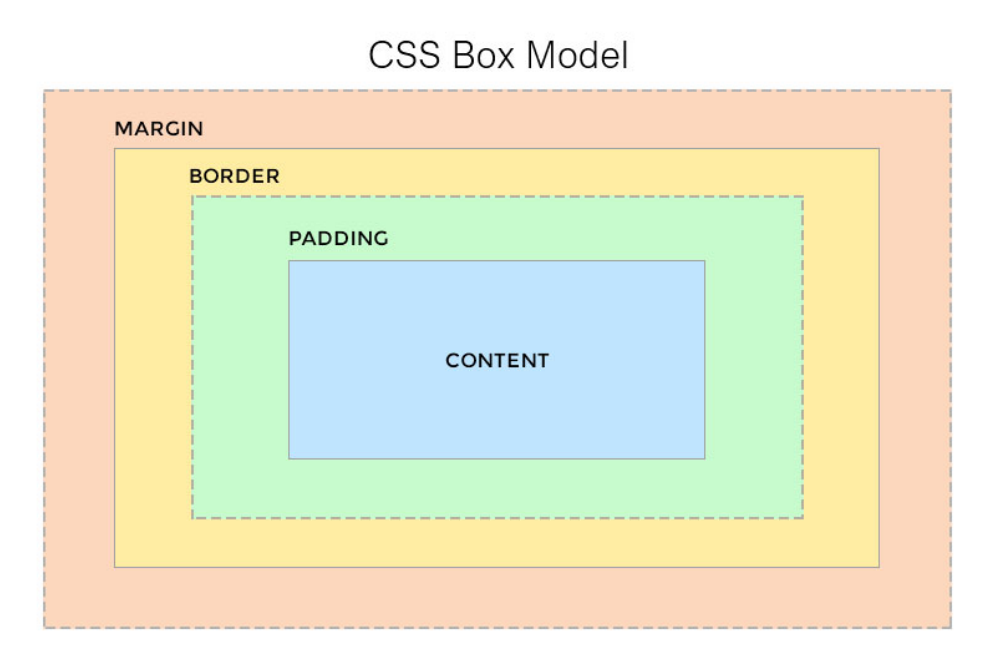
Content – The actual text, image, or media inside the element.
Padding – Space between the content and the border.
Border – The edge surrounding the padding (can have width, style, color).
Margin – Space outside the border, creating distance from other elements.
33. What is the difference between inline and block elements?
Ans. Basically, a block element will take up the whole width available, and comes with a line break before and after. Examples of block-level elements are: headings (i.e <h1>), Paragraphs(<p>), divisions(<div>) etc. In contrast, inline elements take up only the space they need and do not force line breaks. For example: anchors (<a>), spans(<span>) etc.
34. What is grouping used for in CSS?
Ans. Grouping allows multiple HTML elements to have the same styles applied. Moreover, it uses a single declaration, selectors, and is separated by commas. For example:
h1, h2, .my-class {
font-weight: light;
}
Learn HTML & CSS: A Complete Guide to HTML and CSS for Beginners
35. What is a Class selector, and how does it differ from an ID selector?
Ans. Class selectors are used to apply a style to multiple HTML elements identified with the same class. They are called within the CSS document by a ‘.’ dot, followed by the class name, like this:
.class {
color: black;
}
The difference between classes and IDs is that an HTML element can accept multiple classes, but only one ID. That means IDs are unique within an HTML document.
36. What is the difference between visibility: hidden and display: none?
Ans. Although these two properties seem similar, there is quite an essential difference between the two:
• visibility: hidden hides the element, but it will still take up space, which affects the layout of the document.
• display: none also hides the element, but will not take up space, and the page will appear as if the element is not present.
37. What are CSS preprocessors, and why do we use them?
Ans. CSS preprocessors convert code written in a preprocessor language like SASS or LESS into the same old CSS we’ve been using for so long. The main advantages of using preprocessors are:
a. Ability to define variables
b. Ability to use nested syntax
c. Ability to create and use mixins (functions)
d. Use of mathematical and operational functions
However, there are also disadvantages, such as update issues and debugging difficulties.
Become a Web Developer: Most Important React Interview Questions Of 2026!
38. What are child selectors in CSS?
Ans. Child selectors are a way to group (for styling) a set of elements that descend from a parent element. For example:
section > span {
background-color: #eee;
}
39. What are grid systems, and why do we use them in web pages?
Ans. Grid systems are structured rules that enable content to be stacked horizontally and vertically consistently and sustainably.
They are widely used on today’s websites because they increase productivity while coding, are versatile, and are ideal for responsive layouts.
40. How do we use shorthand properties and why?
Ans. Shorthand properties can be applied only to a few CSS properties, such as border, outline, padding, and background. Shorthand properties reduce file size, thus improving page load time. Then the trick is to list all property values on a single line in a predefined order that must be respected. For example:
div {
background-color: #ccc;
background-image: url("img.png");
background-repeat: no-repeat;
background-position: right top;
}
This would be exactly the same as:
div {
background: #ccc url("img.png") no-repeat right top;
}
41. What is the purpose of the z-index, and how to use it?
Ans. The z-index property specifies the stack order of an element within the document area (or a part of it). An element with a greater stack order will always be in front of an element with a lower stack order. However, z-index only works on positioned elements (position: absolute, position: relative, or position: fixed). It can have four kinds of values:
Become a Full Stack Developer in just 90 days: Full Stack Development Syllabus
- Auto: Sets the stack order equal to its parents.
- Number: Orders the stack order.
- Initial: Sets this property to its default value (0).
- Inherit: Inherits this property from its parent element.
42. List some of the new CSS properties introduced with CSS3.
Ans. The following is a list of new properties in CSS3:
1. border-radius
2. box-shadow
3. text-shadow
4. text-stroke
5. background-size
6. text-overflow
7. resize
8. transition
Also, features like multiple backgrounds allow you to use two or more backgrounds in the same selector, and a flexible box model ensures that elements behave predictably as the page layout must accommodate different screen sizes and display devices.
43. Explain what pseudo-classes are and their usage.
Ans. We use pseudo-classes to define a special state of an element. So, note that pseudo-classes find no definition in the markup. We can use them for:
1. Styling an element on mouseover (hover)
2. Styling an element when it gets focus
3. Styling visited/unvisited links
Web Developers: Top 5 Programming Languages For Web Development In 2026
44. What is the CSS selector that allows you to target every element in a web page?
Ans. Call the universal selector and sign with an asterisk (*), which sets all HTML elements to the same styling rules as defined in the property declarations. For example:
{
margin: 0;
padding: 10px;
}
45. What are media queries, and how to use them?
Ans. A media query consists of a media type and at least one expression that limits the scope of style sheets using media features, such as width, height, and colour. Media queries, introduced in CSS3, let the presentation of content be tailored to a specific range of output devices without changing the content itself. And, the usage of media queries is similar to this:
@media (max-width: 768px) {
.problem-class {
property: smaller;
}
}
Javascript Questions
46. Define event bubbling.
Ans. Because JavaScript allows DOM elements to be nested inside each other, if the handler of the child is clicked, the handler of the parent will also fire as if it were clicked. That sums up what event bubbling is.
47. How would you declare a three-dimensional array in JavaScript?
Ans.
You can declare a three-dimensional array in JavaScript using nested square brackets, like this:
var myArray = [[[]]];
It simply means an array inside another array, which is again inside another array.
48. What is the “this” keyword in JavaScript?
Ans. “This” refers to the current object in the code. So, in the global execution context (outside of any function), this refers to the global object, whether in strict mode or not.
Learn JavaScript in detail with more intriguing questions: 42 JavaScript Questions Towards Better Interviews
49. Does JavaScript support automatic type conversion?
Ans. Yes, JavaScript supports automatic type conversion, also called type coercion. It can convert values from one type to another automatically when needed, such as converting a number to a string during concatenation.
50. What is event delegation, and how does it work?
Ans. Event delegation allows us to avoid adding event listeners to specific nodes in the DOM; instead, we add a single event listener to a parent. Using event delegation, it’s possible to add an event handler to an element, wait for an event to bubble up from a child element, and easily determine from which element the event originated.
51. What is the difference between the window.onload and onDocumentReady?
Ans. The window.onload event will not trigger until every single element on the page has been fully loaded, including CSS, images, and/or other assets. The main disadvantage is that it might take a while before any code is actually executed. On the other hand, onDocumentReady executes code as soon as the DOM is loaded.
52. Which is faster, JavaScript or ASP?
Ans. JavaScript is obviously faster. Why? Because JavaScript is a client-side language and execution does not need assistance from the web server. In contrast, ASP is server-side and therefore is slower.
53. What is an anonymous function in JavaScript?
Ans. An anonymous function is a function declared without any named identifier and, in general, is not accessible after its declaration.
54. Explain the role of break and continue statements.
Ans.
• Break statements are used to come out of the current loop
• Continue statements continue the current loop with a new recurrence
55. How are object properties assigned in JS?
Ans. Similar to how a value is assigned to a variable, we assign object properties like this: document.form.
action “submit”
56. What is the difference between undeclared and undefined variables?
Ans.
• Undeclared variables are variables that do not exist in a program and are not declared. If the program tries to read the value of an undeclared variable, then a runtime error is generated.
• Undefined variables are variables that are declared in the program but have not been given any value. If the program tries to read the value of an undefined variable, an undefined value is returned.
A few more general questions are in the list of Full Stack Developer Interview Questions! Also, keep practicing!
57. What would be the result of 5+2+”3″?
Ans. Since 5 and 2 are integers (data type), they will be added together numerically. And since “3” is a string, the result would be a concatenation, meaning 73.
58. Name some JavaScript functions used to convert non-numeric values into numbers.
Ans. There are three main ways to do this:
1. parseInt()
2. parseFloat()
3. Number()
59. What is namespacing in JavaScript, and how is it used?
Ans. Namespacing is used for grouping functions, variables, etc., under a unique name. It is a name assigned to the desired functions, objects, and properties. This enables code reuse and improves modularity.
60. What is a closure in JavaScript?
Ans. A close resembles an object. It gets instantiated whenever you call a function. The scope of closure is lexical, meaning everything contained within the function to which the closure belongs has access to any variable that is in it. A decent example would be:
function wcg() {
var name = "Web Code Geeks";
function displayMessage() {
alert(name);
}
displayMessage();
}
wcg();
wcg() creates a local variable name and then a function called displayMessage(). displayMessage() is an inner
function that is defined inside wcg() and is only available within the body of that function.displayMessage() has no local
variables of its own; however, it has access to the variables of outer functions and so can use the variable name declared in the
parent function
61. What is the event loop in JavaScript, and how does it work?
Ans. The event loop is a fundamental concept in JavaScript that enables asynchronous, non-blocking behavior. JavaScript is single-threaded, meaning it can execute only one piece of code at a time. The event loop continuously monitors the call stack and the task queue.
When the stack is empty, it takes the first task from the queue and pushes it onto the stack for execution. This mechanism allows asynchronous operations, like setTimeout, network requests, and event listeners, to run without freezing the main thread, ensuring smooth performance even with heavy I/O operations.
62. Explain hoisting in JavaScript.
Ans. Hoisting is JavaScript’s default behavior of moving variable and function declarations to the top of their containing scope during the compilation phase. This means you can reference functions before they are declared in the code.
For variables declared with var, they are hoisted but initialized with undefined, so accessing them before assignment returns undefined. Variables declared with let or const They are also hoisted but remain in a “temporal dead zone” until their declaration is reached, preventing access before initialization. Hoisting helps with function organization, but can also lead to unexpected behaviors if not understood properly.
63. What are JavaScript modules, and why are they used?
Ans. JavaScript modules allow developers to split code into smaller, reusable files instead of keeping everything in a single script. Using export and importModules make it possible to share functions, objects, or variables across files while maintaining a clean and organized codebase. Modules also prevent global namespace pollution, reduce dependency conflicts, and improve maintainability in large projects.
Modern JavaScript uses ES6 modules, but earlier approaches included module patterns or CommonJS/AMD in Node.js and browsers. Modules are essential for scalable, professional-level web applications.
64. What is a Symbol in JavaScript?
Ans. A Symbol is a unique and immutable primitive data type introduced in ES6, mainly used as a property key in objects. Unlike strings or numbers, each Symbol is guaranteed to be unique, which helps avoid property name collisions when adding metadata or private properties to objects.
Symbols are often used to define hidden or internal object properties that shouldn’t interfere with other properties. They can also be used with built-in methods like Symbol.iterator to define custom iteration behavior.
65. How does async/await improve asynchronous code handling?
Ans. async/await It is syntactic sugar over Promises that makes asynchronous code look and behave more like synchronous code. Using the async keyword, a function automatically returns a promise, while the await keyword pauses execution until the promise resolves or rejects.
This approach simplifies complex promise chains, avoids deeply nested .then() callbacks, and makes error handling easier using try/catch. It improves code readability, maintainability, and reduces the likelihood of bugs in applications dealing with multiple asynchronous operations, like API calls, file reads, or timers.
If you’re dreaming of a software development career but don’t know how to begin, the HCL GUVI IITM Pravartak Certified MERN Full Stack Developer Course with AI integration is a great place to start. The course helps you learn React, Node.js, MongoDB, Express, Git, and other essential tech skills. You’ll build real projects, work with modern tools, and gain the confidence to launch a successful career in tech.
Conclusion
Preparing for web developer interviews becomes much easier when you understand what employers look for and practice the right questions. Focus on strengthening your core concepts, problem-solving skills, and practical development abilities. With consistent preparation, you can confidently face any interview and stand out as a strong candidate.
FAQs
What skills are most important for a web developer?
A solid understanding of HTML, CSS, JavaScript, responsive design, and basic backend concepts is key. Knowledge of frameworks and version control adds extra value.
How should I prepare for a web developer interview?
Review core fundamentals, practice coding challenges, work on small real-world projects, and revise common interview questions to build confidence.
Do companies expect full-stack knowledge?
Not always. Many roles focus on frontend or backend, but having a basic understanding of full-stack development improves your chances and makes you more flexible.
Success Stories












Did you enjoy this article?