


Python Articles
Excel SQL Python for BPO Professionals Best Guide to Move Into Data Science
Go vs Python for Forward Deployed Engineering Workloads
Python for Forward Deployed Engineers: What You Actually Need to Know
Freelancing as a Python Developer: Getting Your First Client


Get In Touch For Details! Request More Information
Script Mode in Python: How Real Programs Run
Jul 06, 2026 4 Min Read 905 Views
(Last Updated)
Python is one of the most popular programming languages today. It powers automation tools, AI systems, machine learning models, backend applications, data pipelines, and cybersecurity workflows. While many beginners learn Python through the interactive shell, professional development mainly occurs in Script Mode.
Understanding Script Mode is a significant step in moving from simply learning Python syntax to actually building applications.
In this article, you will learn what Script Mode in Python is, how it works internally, how developers use it in modern projects, and why it remains a key aspect of professional Python development.
Table of contents
- TL;DR
- What is Script Mode in Python?
- Example:
- Why Script Mode Matters More Than Ever
- How Script Mode Works Internally
- Example:
- Interactive Mode vs Script Mode
- How to Run Python Programs in Script Mode
- Using Command Prompt or Terminal
- Using IDLE
- Real-World Applications of Script Mode
- Automation Scripts
- Data Analysis
- Machine Learning
- Backend Development
- Cybersecurity
- Modern Python Development and Script Mode
- Example:
- Common Mistakes Beginners Make in Script Mode
- Forgetting the .py Extension
- Running Files from the Wrong Directory
- Naming Files Incorrectly
- Using the Wrong Python Version
- Missing Dependencies
- When Should You Use Script Mode?
- The Future of Script-Based Python Development
- Conclusion
- FAQs
- What is Script Mode in Python?
- What is the difference between Interactive Mode and Script Mode in Python?
- How do I run a Python script in Script Mode?
- Why do professional developers prefer Script Mode?
- Can Script Mode be used for AI and Machine Learning projects?
TL;DR
- Script Mode lets you write Python programs in .py files and execute them as complete applications.
- It is the standard execution method used in automation, AI, machine learning, backend development, and data science projects.
- Python converts scripts into bytecode and executes them through the Python Virtual Machine (PVM).
- Modern Python workflows combine Script Mode with tools like VS Code, Git, virtual environments, and uv.
- Learning Script Mode helps developers move from writing simple Python code to building real-world applications.
What is Script Mode in Python?
Script Mode is a way to run Python programs by writing code in a file with a .py extension and executing that file with the Python interpreter. Instead of running commands one at a time, Python executes the instructions in the file one after the other.
Example:
name = “Harini”
print(“Welcome”, name)
Save the file as:
app.py
Run it using:
python app.py
Unlike Interactive Mode, Script Mode lets you save, modify, reuse, share, and deploy programs across different systems. This makes it the preferred choice for real-world development.
Why Script Mode Matters More Than Ever

A decade ago, Python was mainly seen as a tool for scripting and automation. Today, Python is used for:
- Artificial Intelligence
- Machine Learning
- Data Engineering
- Web Development
- Cloud Automation
- Cybersecurity
- DevOps Workflows
Almost all of these applications rely on Python script files instead of the interactive shell. When developers build APIs, train machine learning models, automate tasks, or deploy backend systems, they typically work with organized Python scripts. This makes Script Mode one of the most crucial concepts for understanding Python.
How Script Mode Works Internally
Most beginners know how to run a Python file, but may not understand what happens behind the scenes. The execution flow looks like this:
Python Script
↓
Bytecode Compilation
↓
Python Virtual Machine (PVM)
↓
Output
When a script runs, Python first converts the source code into bytecode. The Python Virtual Machine then executes this bytecode.
Example:
calculator.py
def add(a, b):
return a + b
print(add(5, 10))
Python may also create a special folder called:
pycache
This folder stores compiled bytecode files to improve efficiency for future runs. Understanding this process helps intermediate learners grasp Python’s execution model instead of viewing it as a black box.
Interactive Mode vs Script Mode
Python offers two main execution methods.
| Feature | Interactive Mode | Script Mode |
| Execution Style | One line at a time | Entire file |
| Best For | Testing ideas | Building applications |
| Reusability | Low | High |
| Project Development | Limited | Excellent |
| Deployment | Rarely used | Common |
| Automation | Not ideal | Preferred |
Interactive Mode is useful for experimentation, while Script Mode is better for actual development. This is why professionals mostly work in Script Mode.
How to Run Python Programs in Script Mode
Using Command Prompt or Terminal
- Create a file: hello.py
- Add code: print(“Hello World”)
- Run: python hello.py
For a detailed guide on running Python files through the terminal, you can refer to this article for a deeper understanding.
Using VS Code
- Create a Python file.
- Write the program.
- Click Run.
- View output in the integrated terminal.
VS Code has become popular among Python developers because it combines coding, debugging, extensions, and terminal access in one workspace.
Using IDLE
Python’s built-in IDE also supports Script Mode. Create a file, save it, and select Run Module. This makes it beginner-friendly while still introducing project-based development.
If you want to practice Python without setting up a local environment, try HCL GUVI’s Online IDE. It lets you write and execute Python code directly from your browser, helping beginners learn, test programs, and build confidence with coding in a simple and accessible environment.
Real-World Applications of Script Mode
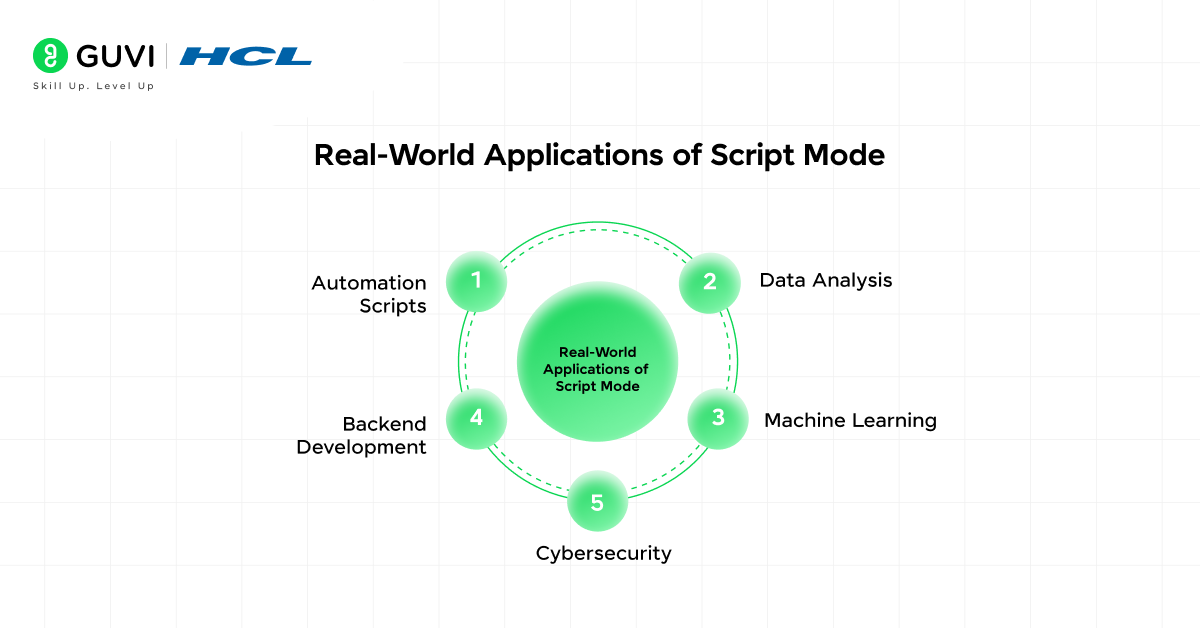
Script Mode shines in real projects.
Automation Scripts
import os
Automation scripts can rename files, move folders, send emails, generate reports, and schedule tasks.
Data Analysis
import pandas as pd.
Data analysts often use Pandas to clean datasets, transform data, and generate insights.
Machine Learning
from sklearn.model_selection import train_test_split
Machine learning workflows often involve multiple Python scripts for training, testing, preprocessing, and deployment.
Backend Development
from fastapi import FastAPI
Modern backend frameworks like FastAPI and Django heavily rely on script-based project structures.
Cybersecurity
Python scripts are commonly used for log analysis, penetration testing, monitoring, and security automation.
You can also download HCL GUVI’s Python ebook to learn more about Python scripts, loops, functions, and beginner-friendly Python programs in one place.
Modern Python Development and Script Mode
Script Mode has evolved significantly in recent years. Modern Python developers rarely work with standalone files. Instead, they often combine scripts with:

- Git repositories
- Virtual environments
- Dependency managers
- CI/CD pipelines
- Cloud deployments
A major trend in 2025 and 2026 is the rise of uv, a high-performance Python package and project manager written in Rust. Many developers are adopting it because it simplifies environment management and substantially increases speed compared to older workflows.
Example:
uv run app.py
This shows how modern Python projects are evolving beyond simple script execution into fully managed development environments.
Python’s execution environment is still actively evolving. Python 3.13 introduced a significantly enhanced interactive interpreter with features such as improved multi-line editing, better command history handling, and colorized output, making the REPL more user-friendly and productive. Building on these improvements, Python 3.14 continues to refine interpreter behavior and execution performance through ongoing optimizations to the runtime and standard tooling. These updates highlight that Python’s development is not limited to new language features—its core execution environment is also continually being modernized to improve both developer experience and application performance.
Common Mistakes Beginners Make in Script Mode
Forgetting the .py Extension
- Incorrect: hello
- Correct: hello.py
Running Files from the Wrong Directory
Use:
cd project
before trying to execute the file.
Naming Files Incorrectly
Avoid names like:
random.py
json.py
These names can cause conflicts with Python’s built-in modules.
Using the Wrong Python Version
Check:
python –version
Version mismatches are a common cause of execution errors.
Missing Dependencies
If a package is not installed, Python cannot import it.
Example:
pip install pandas
These mistakes can waste a lot of debugging time.
When Should You Use Script Mode?

Use Script Mode when:
- Building projects
- Creating automation tools
- Developing APIs
- Working with machine learning models
- Writing reusable code
- Managing large applications
If you want to strengthen your Python skills through practical applications, explore these Python projects for beginners. Building real projects helps you understand how Script Mode is used in real-world development and improves problem-solving skills through hands-on practice
Use Interactive Mode when:
- Testing syntax
- Learning concepts
- Trying small snippets
- Quick debugging
For most professional development work, Script Mode is the better choice.
The Future of Script-Based Python Development
Python is evolving quickly. Recent versions have introduced:
- Improved interpreter performance
- Better development tools
- Enhanced type hinting
- Free-threading improvements
- Faster execution workflows
Modern development is increasingly focused on project-based Python workflows instead of isolated scripts. Tools like uv, modern IDEs, and advanced package management systems are making Script Mode even more powerful for developers working on production-ready applications.
Curious about how these concepts work in real life? Join HCL GUVI’s Python course to build Python projects and learn automation, backend development, and data science fundamentals.
Conclusion
Script Mode goes beyond simply saving code in a .py file. It is the foundation of modern Python development and the backbone of automation systems, AI applications, backend services, and data engineering workflows.
While Interactive Mode is great for learning and experimenting, Script Mode is where real software development takes place. Once you understand how Python scripts are executed, organized, and managed in modern projects, you will think more like a professional Python developer instead of just someone who knows Python syntax.
FAQs
1. What is Script Mode in Python?
Script Mode allows you to run Python programs by writing code in a file with a .py extension and executing that file through the Python interpreter. It is commonly used for building applications, automation scripts, and larger programs.
2. What is the difference between Interactive Mode and Script Mode in Python?
Interactive Mode runs code line by line and gives immediate output, making it great for testing and learning. Script Mode runs an entire Python file and is better for developing complete programs that can be saved, reused, and maintained.
3. How do I run a Python script in Script Mode?
First, save your code in a file with a .py extension, such as:
app.py
Then run:
python app.py
The Python interpreter reads the file and executes all the instructions inside it.
4. Why do professional developers prefer Script Mode?
Script Mode supports code organization, reusability, automation, version control, project development, and deployment workflows. This makes it the standard method for real-world Python applications.
5. Can Script Mode be used for AI and Machine Learning projects?
Yes. Most machine learning, data science, automation, and backend development projects are built using Python scripts because they allow developers to manage large codebases, reusable modules, and project workflows efficiently.
Success Stories

About the Author
Vishalini Devarajan
An Aerospace Engineer turned content writer, I focus on making complex concepts easy to understand through well-structured, reader-friendly blogs. Whether it’s a technical topic or a non-technical one, I love creating content that is clear, engaging, and impactful.
View all posts by Vishalini Devarajan
Connect with me @











Did you enjoy this article?