


Full Stack Development Articles
Claude for Architecture and Engineering Documentation
Freelancing as a Python Developer: Getting Your First Client


Get In Touch For Details! Request More Information
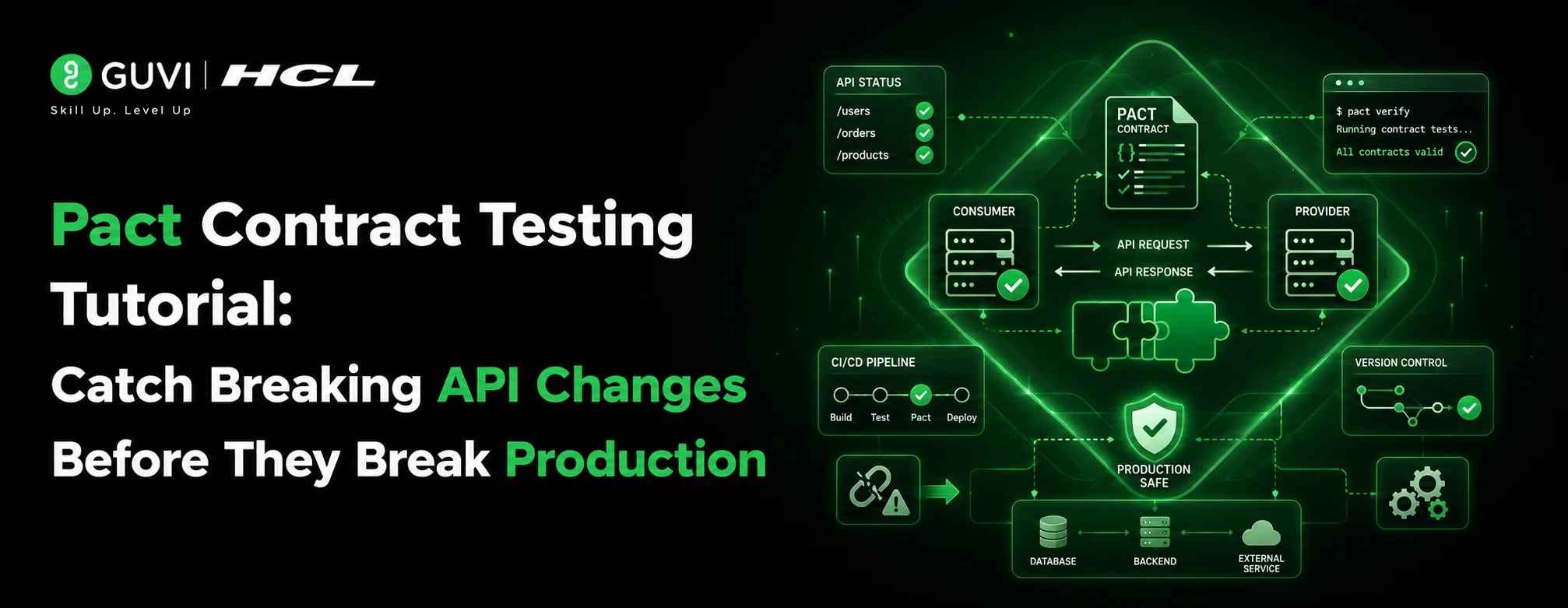
Pact Contract Testing Tutorial: Catch Breaking API Changes Before They Break Production
Sep 19, 2026 7 Min Read 370 Views
(Last Updated)
Pact is a consumer-driven contract testing framework that verifies the interactions between microservices without running all services simultaneously. The consumer writes tests that generate a contract (a ‘pact’), and the provider runs against that contract to confirm it can meet the consumer’s expectations. This catches API breaking changes early before they ever reach a shared environment. Pact supports JavaScript, Java, Python, Go, and more.
Table of contents
- TL;DR - What You Need to Know
- What Is Pact Contract Testing?
- Why Does Consumer-Driven Contract Testing Matter?
- How Does Pact Work? The Full Flow
- Pact vs. Other API Testing Approaches
- Step-by-Step: Writing Your First Pact Consumer Test in JavaScript
- Prerequisites
- Step 1 — Install Pact
- Step 2 — Write the Consumer Test
- Step 3 — Run the Consumer Test
- Step-by-Step: Running Pact Provider Verification
- The Pact Broker: Sharing Contracts Across Teams
- Publishing a Pact to the Broker
- Checking If a Version Is Safe to Deploy
- Real-World Scenario: Catching a Breaking Change
- Pros and Cons of Pact Contract Testing
- Best Practices for Pact in Production Projects
- Key Takeaways
- Conclusion
- Frequently Asked Questions
- What is Pact used for in microservices?
- What is the difference between contract testing and integration testing?
- Does Pact work with REST APIs only?
- What is the Pact Broker?
- Is Pact hard to set up?
- What is 'Can I Deploy' in Pact?
TL;DR – What You Need to Know
- Pact is an open-source framework for consumer-driven contract testing it lets consumers define what they expect from an API, and providers verify they can deliver it.
- It catches breaking API changes before deployment, without running every service at the same time.
- Pact works with JavaScript, Java, Python, Go, Ruby, and more and integrates with CI/CD pipelines through the Pact Broker.
- This tutorial walks you through writing your first consumer test and provider verification in JavaScript, end to end.
- Pact is not a replacement for integration tests it’s a safety net for API contract changes across service boundaries.
Picture this: your frontend team ships a new build. Everything looks fine locally. Then staging falls over because the user profile API changed a field name and no one knew.
This is one of the most common and most expensive bugs in microservices architecture. Two teams, two repos, one unspoken assumption and by the time anyone notices, the damage is done.
That’s exactly the problem Pact contract testing was built to solve. In this tutorial, you’ll learn what Pact is, why it matters more than you might think, and how to write your first consumer-driven contract test in JavaScript step by step.
What Is Pact Contract Testing?
Pact is an open-source framework for contract testing between services that communicate over HTTP or message queues. It takes a consumer-driven approach, meaning the service that consumes an API (the consumer) defines what it expects, and the service that provides the API (the provider) verifies it can meet those expectations.
The output of a consumer test is a JSON file called a pact. That pact gets shared with the provider team (usually via the Pact Broker), and the provider runs it against their actual API to check for any mismatches.
| 📊 Data Point Pact has over 4,000 GitHub stars on its JavaScript implementation alone and is used by teams at Atlassian, REA Group, and ITV. The Pact Foundation maintains official client libraries for 10+ languages. |
Think of a pact like a shared agreement between two teams. The consumer says: ‘I need the /users/{id} endpoint to return an object with at least these fields.’ The provider says: ‘Yes, we can do that here’s the proof.’
Why Does Consumer-Driven Contract Testing Matter?
Microservices move fast. APIs change. And when they do, the teams consuming those APIs are often the last to find out.
The traditional response is a shared integration environment where all services run together. But shared environments are slow, flaky, and expensive. When something breaks, you spend more time figuring out whose change caused it than fixing the actual problem.
| ⚠️ Warning End-to-end tests in a shared environment tell you that something is broken. They rarely tell you which service boundary broke it, or when the incompatibility was introduced. That makes debugging expensive. |
Consumer-driven contract testing with Pact gives you something better:
- Speed — you don’t need to run every service. Each side tests in isolation.
- Clarity — when a provider verification fails, you know exactly which consumer expectation broke and which field caused it.
- Ownership — the consumer team writes the contract, so providers can’t unknowingly remove something a consumer relies on.
- CI/CD integration — pact verification runs as part of every provider build, catching breaking changes before merge.
| 💡 Contrarian Perspective Pact is not magic, and it’s not free. Setting up the Pact Broker, maintaining contracts across teams, and handling versioning adds real overhead. Teams with only 2–3 services and good communication might find Pact more process than it’s worth. It pays off most in organizations with 5+ services and independent deployment schedules. [HUMAN EDITOR: Add your team’s actual threshold here] |
How Does Pact Work? The Full Flow
Here’s the complete lifecycle of a Pact contract, from consumer test to deployment:
- Consumer writes a Pact test — defining the expected request and response for each interaction.
- Pact runs a mock server — the consumer tests run against this mock, which records every interaction.
- Pact generates a contract (pact file) — a JSON file documenting each interaction the consumer depends on.
- Contract is published to the Pact Broker — a central service where contracts and verification results live.
- Provider retrieves the contract — as part of its own CI build.
- Provider runs verification — Pact replays each interaction against the real provider API and reports pass or fail.
- Results are published back to the Pact Broker — so both teams can see the current compatibility status.
- Can I Deploy check the Pact Broker answers: ‘Is this version of the consumer/provider safe to deploy together?’
| 💡 Pro Tip The ‘Can I Deploy’ tool is one of Pact’s most underused features. It queries the Pact Broker and returns a definitive yes or no on whether a given version of your service is compatible with all its known consumers or providers in a specific environment. Add it as a gate in your deployment pipeline. |
Pact vs. Other API Testing Approaches
How does Pact stack up against the alternatives? Here’s an honest comparison:
| Approach | Tests In Isolation? | Catches Contract Breaks? | Requires Running All Services? | Best For |
| Unit tests with mocks | Yes | No | No | Internal logic, not API contracts |
| End-to-end tests | No | Yes (eventually) | Yes | Full flow validation |
| Schema validation (OpenAPI) | Yes (partial) | Partially | No | Syntax, not behavior |
| Pact contract testing | Yes | Yes (explicitly) | No | Service boundary changes in CI |
| Manual API testing (Postman) | No | No (ad hoc) | Often | Exploratory, one-off checks |
Step-by-Step: Writing Your First Pact Consumer Test in JavaScript
Prerequisites
- Node.js 16 or later
- npm or yarn
- Jest installed in your project
Step 1 — Install Pact
| npm install –save-dev @pact-foundation/pact |
| ✅ Best Practice Add @pact-foundation/pact to devDependencies only. Your production bundle should never include testing libraries. |
Step 2 — Write the Consumer Test
Let’s say your frontend service calls a /users/{id} endpoint on a user service. Here’s the Pact consumer test:
| const { Pact } = require(‘@pact-foundation/pact’);const { like, term } = require(‘@pact-foundation/pact’).Matchers;const path = require(‘path’);const { fetchUser } = require(‘./userClient’); const provider = new Pact({ consumer: ‘FrontendApp’, provider: ‘UserService’, port: 1234, log: path.resolve(__dirname, ‘logs’, ‘pact.log’), dir: path.resolve(__dirname, ‘pacts’),}); describe(‘User Service – Consumer Tests’, () => { beforeAll(() => provider.setup()); afterAll(() => provider.finalize()); describe(‘GET /users/42’, () => { beforeEach(() => provider.addInteraction({ state: ‘user 42 exists’, uponReceiving: ‘a request for user 42’, withRequest: { method: ‘GET’, path: ‘/users/42’ }, willRespondWith: { status: 200, body: { id: like(42), name: like(‘Alice’), email: term({ generate: ‘[email protected]’, matcher: ‘.+@.+\..+’ }), } } })); it(‘returns user data’, async () => { const user = await fetchUser(42); expect(user.name).toBeDefined(); expect(user.email).toBeDefined(); }); });}); |
A few things worth understanding in this code:
- like() — tells Pact to match on type, not exact value. So any string for name will pass, not just ‘Alice’.
- term() — lets you match on a regex pattern. Here, any valid email format passes, not just [email protected].
- state — a provider state that tells the provider how to set up its data before running verification (‘user 42 exists’).
- The pact file is written to the ./pacts directory after the test runs. That’s what gets shared with the provider.
Step 3 — Run the Consumer Test
| npx jest –testPathPattern=userService.pact.test.js |
After this runs, you’ll find a generated JSON pact file in your /pacts directory. It documents every interaction your frontend expects from the user service.
Step-by-Step: Running Pact Provider Verification
Now switch to the provider side — the user service. The provider needs to verify it can meet every interaction in the pact file.
| const { Verifier } = require(‘@pact-foundation/pact’);const path = require(‘path’); describe(‘User Service – Provider Verification’, () => { it(‘validates the expectations of FrontendApp’, () => { return new Verifier({ provider: ‘UserService’, providerBaseUrl: ‘http://localhost:3000’, pactUrls: [path.resolve(__dirname, ‘../consumer/pacts/FrontendApp-UserService.json’)], providerStatesHandler: (state) => { if (state === ‘user 42 exists’) { // seed your test database with user ID 42 } } }).verifyProvider(); });}); |
| ⚠️ Warning The providerStatesHandler is the part most teams skip and then regret. Without it, provider state setup is inconsistent — some tests will pass one day and fail the next because the data wasn’t there. Treat provider states as first-class setup code. |

The Pact Broker: Sharing Contracts Across Teams
The Pact Broker is a service that stores pact files and verification results. Instead of sharing JSON files by hand, consumers publish their pacts to the broker, and providers pull from it during their CI builds.
You can self-host the Pact Broker (it’s open source) or use PactFlow, the managed SaaS version from the Pact Foundation.
Publishing a Pact to the Broker
| npx pact-broker publish ./pacts \ –consumer-app-version=$(git rev-parse –short HEAD) \ –broker-base-url=https://your-broker.pactflow.io \ –broker-token=$PACT_BROKER_TOKEN |
Checking If a Version Is Safe to Deploy
| npx pact-broker can-i-deploy \ –pacticipant FrontendApp \ –version=$(git rev-parse –short HEAD) \ –to-environment production \ –broker-base-url=https://your-broker.pactflow.io \ –broker-token=$PACT_BROKER_TOKEN |
| ✅ Best Practice Run can-i-deploy as a mandatory step in your deployment pipeline — after all tests pass but before any artifact is promoted. It’s the gate that makes the whole Pact workflow actually safe. |
Real-World Scenario: Catching a Breaking Change
Here’s a scenario that plays out more often than teams like to admit.
A backend team renames the email field to emailAddress on the /users/{id} response. They update their own tests, their documentation, and their consumers list — but they miss the mobile app team, who’s consuming the same endpoint.
Without Pact, this goes to production. The mobile app breaks. Users can’t log in. An incident is raised.
With Pact, the provider verification step fails the moment the provider team changes that field. The CI build for the user service fails. The mobile app’s pact shows exactly which field is missing. The fix happens before any deployment.
[HUMAN EDITOR: Replace this scenario with a real incident from your team or a project you’ve worked on — the more specific the better. Include the actual field that broke, the services involved, and how long it took to catch before vs. after adopting Pact.]
Pros and Cons of Pact Contract Testing
| Pros | Cons |
| Catches breaking changes before deployment | Adds tooling and process overhead |
| Tests run in isolation — no shared environment needed | Requires buy-in from both consumer and provider teams |
| Works in CI/CD with fast feedback loops | Provider state management can be complex |
| Supports 10+ languages via official Pact Foundation SDKs | PactFlow (managed broker) has a paid tier for larger teams |
| ‘Can I Deploy’ gives deterministic deployment safety | Learning curve for teams new to consumer-driven contracts |
Best Practices for Pact in Production Projects
- Use flexible matchers, not exact values — like() and eachLike() prevent brittle tests that break when test data changes.
- Don’t test business logic in Pact — Pact tests the contract (the shape and format of API responses), not what the provider does with the data. Save business logic for unit tests.
- Set up provider states rigorously — treat them like test fixtures. Each state should produce consistent, predictable data.
- Automate broker publishing in CI — make publishing pacts part of the consumer’s CI pipeline, not a manual step someone remembers sometimes.
- Start small — pick one consumer-provider pair for your first Pact implementation. Prove the value, then expand.
| 💡 Pro Tip The biggest mistake teams make with Pact is writing it as a replacement for E2E tests. It isn’t. Pact tells you that the contract is compatible. It doesn’t tell you the full business flow works. Keep both, and let each do its job. |
If you want a structured, mentor-supported path through everything in a roadmap, HCL GUVI’s IIT-M Pravartak Certified Full Stack Developer Course with AI Integration covers the entire journey, from HTML to deployment, with real projects, live sessions, and placement support. Over 10,000 students have used it to break into product-based companies.
Key Takeaways
- Pact is a consumer-driven contract testing framework that catches breaking API changes before deployment.
- The consumer writes a pact (a JSON contract), and the provider verifies it against their real API.
- Pact runs in isolationb no shared environment, no slow spin-up of every service.
- The Pact Broker (open source) or PactFlow (managed) stores contracts and verification results centrally.
- ‘Can I Deploy’ is a deployment gate that tells you definitively whether two service versions are compatible.
- Pact works best in organizations with multiple independently deployed services the more services, the higher the ROI.
Conclusion
Breaking changes between services are one of the hardest bugs to catch because by the time you notice, the change is already deployed and the damage is done.
Pact gives you a structured way to prevent that. Consumers say what they need. Providers prove they can deliver. The Pact Broker keeps the score. And ‘Can I Deploy’ makes sure nothing ships until the contracts check out.
It takes some setup. It requires cooperation between teams. But once it’s running, it turns one of the most painful categories of production bugs into a CI check that fails in seconds.
Start with one pair of services. Write one interaction. Run it. That first green provider verification is usually enough to convince the rest of the team.
Head to the HCL GUVI blog for more in-depth guides on API testing, microservices architecture, and developer tooling.
Frequently Asked Questions
1. What is Pact used for in microservices?
Pact is used to verify that microservices can communicate correctly without running all services at the same time. The consumer defines what it expects from a provider’s API, and the provider verifies it can meet those expectations. This catches API breaking changes early in the development cycle.
2. What is the difference between contract testing and integration testing?
Integration testing runs multiple services together and checks that they work as a system. Contract testing runs each service in isolation and checks only that the API contract between two services is honored. Contract testing is faster, more targeted, and doesn’t require a shared environment, but it doesn’t replace integration testing.
3. Does Pact work with REST APIs only?
No. Pact supports both HTTP-based APIs (REST and GraphQL with some setup) and asynchronous messaging via message queues like Kafka and RabbitMQ. The Pact Foundation maintains libraries for JavaScript, Java, Python, Go, Ruby, .NET, and more.
4. What is the Pact Broker?
The Pact Broker is a service that stores pact files and provider verification results. It acts as the central source of truth for contract compatibility across teams. You can self-host it (it’s open source) or use PactFlow, the managed cloud version from the Pact Foundation.
5. Is Pact hard to set up?
The basic consumer test and provider verification are relatively straightforward — you can have something working in a few hours. The more involved part is setting up the Pact Broker, wiring it into your CI/CD pipelines, and managing provider states consistently. Plan for a day or two of setup for a production-ready implementation.
6. What is ‘Can I Deploy’ in Pact?
‘Can I Deploy’ is a command-line tool provided by the Pact Broker that checks whether a specific version of a consumer or provider is compatible with the versions of all its counterparts deployed to a given environment. It’s used as a deployment gate in CI/CD pipelines to prevent incompatible versions from being released
Success Stories

About the Author
Vishalini Devarajan
An Aerospace Engineer turned content writer, I focus on making complex concepts easy to understand through well-structured, reader-friendly blogs. Whether it’s a technical topic or a non-technical one, I love creating content that is clear, engaging, and impactful.
View all posts by Vishalini Devarajan
Connect with me @

































Did you enjoy this article?