


Artificial Intelligence and Machine Learning Articles
AI/ML Skills Gap 2026: Why Companies Can't Find Job-Ready Talent
20 AI/ML Interview Questions Recruiters Can Use Without a Tech Background - Best Guide
How Industry-Backed AI/ML Bootcamps Are Changing the AI/ML Hiring Pipeline - Best Guide 2026
From IT Support to AI Engineer: A Realistic Career Switch Guide 2026


Get In Touch For Details! Request More Information
How to Set Up a Claude Workflow in n8n
Aug 05, 2026 4 Min Read 272 Views
(Last Updated)
Table of contents
- TL;DR Summary
- Why Claude and n8n Work Well Together
- What You Can Build
- Basic Workflow Structure
- How To Set It Up
- Prompt Design For n8n
- Best Use Cases
- Debugging And Testing
- Common Mistakes
- Real-World Example
- What To Automate First
- What To Do Next
- Conclusion
- FAQs
- What is Claude used for in n8n?
- Do I need coding to use Claude with n8n?
- What is the best first workflow to build?
- Can n8n send Claude output to other apps?
- How do I make Claude’s output easier to use in n8n?
- Is Claude good for workflow debugging?
- Should I fully automate important tasks?
TL;DR Summary
- Claude works well in n8n when you use it as the reasoning layer and n8n as the automation layer.
- The basic setup is: trigger → Claude processing step → output or action.
- n8n can connect to Claude through API calls or AI agent-style nodes, depending on your setup.
- A good workflow starts with one small use case, then expands after testing.
- Debugging is easier when you keep inputs narrow and outputs structured.
Why Claude and n8n Work Well Together
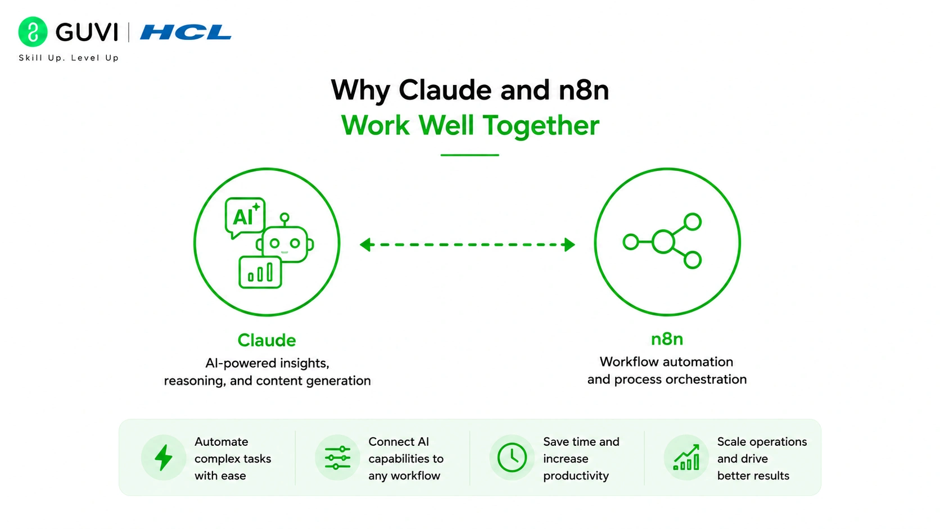
Claude and n8n complement each other because they do different jobs. Claude handles language, interpretation, summarization, and decision support, while n8n handles triggers, routing, integrations, and automation logic.
That makes the combination useful for workflows that need both intelligence and action. For example, n8n can capture a webhook, send the payload to Claude, and then route Claude’s response into email, Slack, Notion, sheets, or another system.
The most important idea is simple: Claude decides what the content means, and n8n decides what happens next.
What You Can Build
A Claude workflow in n8n can support many repetitive tasks. The best use cases are the ones that save time on analysis, drafting, or classification.
Useful workflows include:
- Email summarization.
- Support ticket triage.
- Lead classification.
- Content rewriting.
- Meeting note cleanup.
- Daily briefing generation.
- Internal knowledge extraction.
This kind of setup is especially useful when you want AI inside a larger process, not as a standalone chat tool. n8n gives you the structure; Claude gives you the brain.
Basic Workflow Structure
The cleanest n8n workflow is usually the simplest one. You start with a trigger, send data to Claude, then use the result in the next step.
A basic flow looks like this:
- Trigger the workflow with a webhook, schedule, form submission, or app event.
- Send the relevant text or record to Claude.
- Ask Claude to classify, summarize, or generate output.
- Pass the result to another node.
- Save, send, or display the output.
This pattern works because it keeps the workflow easy to test. If something goes wrong, you can inspect each node without guessing where the issue started.
How To Set It Up
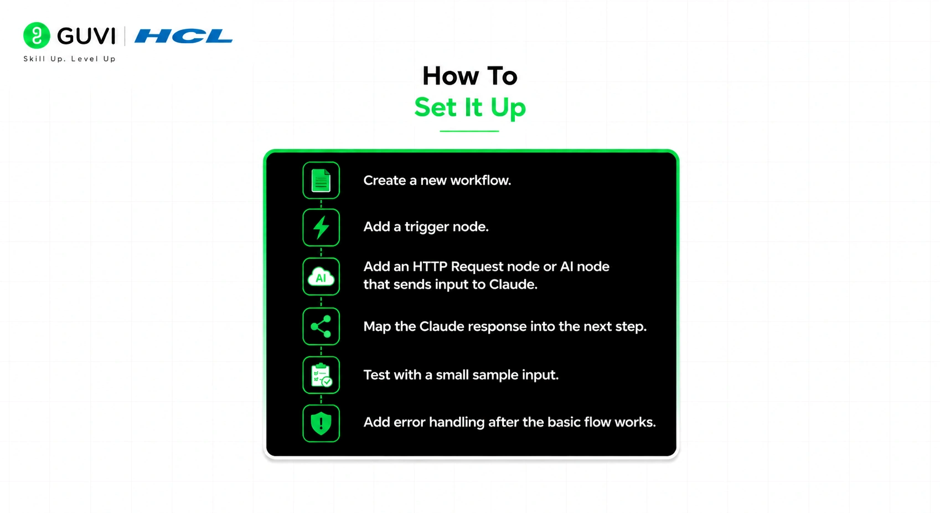
A good setup begins with one simple use case. Do not start with a complex multi-branch automation unless you already know n8n well.
A practical setup plan is:
- Create a new workflow.
- Add a trigger node.
- Add an HTTP Request node or AI node that sends input to Claude.
- Map the Claude response into the next step.
- Test with a small sample input.
- Add error handling after the basic flow works.
If you are using API access directly, the key part is sending the prompt and input data in a clean format. If you are using an AI node, the key part is setting the model and prompt instructions correctly.
Prompt Design For n8n
Claude works better when the prompt is specific and structured. In n8n, that means passing only the necessary fields and telling Claude exactly what you want back.
A strong prompt usually includes:
- Role.
- Task.
- Output format.
- Tone.
- Constraints.
- Source data.
For example, you might ask Claude to summarize an incoming support ticket in three bullets, identify urgency, and draft a reply in a polite tone. That gives n8n a predictable response to pass into the next node.
Pro Tip: Ask Claude to return structured output. That makes mapping in n8n much easier and reduces downstream errors.
Best Use Cases
The best Claude workflows in n8n are the ones that touch repetitive work. You want tasks that happen often, require judgment, and still benefit from human review.
Good starting points include:
- Turning form submissions into summaries.
- Classifying incoming requests.
- Drafting responses from raw text.
- Creating daily or weekly digests.
- Cleaning up meeting notes.
- Building internal assistant workflows.
These tasks are strong candidates because they are useful right away and easy to measure. If the output saves time or reduces manual reading, the workflow is doing real work.
Debugging And Testing
One of the easiest ways to improve a Claude workflow in n8n is to test with small, realistic inputs. That helps you catch prompt issues, mapping mistakes, and formatting problems early.
A good debugging routine looks like this:
- Test with one short input first.
- Inspect the Claude response.
- Confirm the output format matches what the next node expects.
- Check whether the workflow handles missing or malformed data.
- Add fallback behavior for errors.
Debugging becomes much easier when each node has one clear purpose. If one node tries to do too much, it becomes harder to trace the failure.

Common Mistakes
The biggest mistake is making the first workflow too ambitious. If you try to automate a full business process on day one, you may spend more time fixing it than using it.
Other common mistakes include:
- Sending too much unnecessary data to Claude.
- Not defining the output format.
- Skipping test runs.
- Ignoring failure paths.
- Building without human review on important tasks.
- Using a vague prompt and expecting structured output.
⚠️ Warning: For anything customer-facing, financial, legal, or operationally sensitive, keep a review step before the final action. AI should assist the workflow, not silently control it.
Real-World Example
Imagine a support team receives a new ticket through a form. n8n triggers on the submission, sends the text to Claude, and asks for a summary, priority level, and suggested response.
The workflow then saves the result into a help desk or sends it to a Slack channel for review. That gives the team a faster way to triage work without losing visibility.
This is the kind of task where Claude adds judgment and n8n adds structure. Together, they reduce manual sorting and help teams respond faster.
What To Automate First
Start with a workflow that is easy to understand and easy to trust. A single trigger and a single Claude step is usually enough for the first version.
A good rollout order is:
- Summarize text.
- Classify requests.
- Draft replies.
- Route results.
- Add branching and error handling.
This approach lets you validate the core logic before you build more layers on top of it. It also keeps the workflow maintainable.
Set up a Claude workflow in n8n to automate tasks with natural-language prompts and API-powered nodes. Learn AI & ML with HCL GUVI’s Artificial Intelligence and Machine Learning course.
What To Do Next
Pick one repetitive task your team already does manually. If it involves reading, rewriting, or classifying text, Claude is usually a good fit.
Then build the smallest possible n8n workflow that solves that task. Once it works reliably, you can extend it with notifications, approvals, and additional integrations.
Conclusion
Claude and n8n make a strong pair because they combine intelligence with automation. Claude handles the understanding and generation, while n8n handles the flow of work.
If you start small, keep outputs structured, and test carefully, you can build workflows that are both useful and easy to maintain. The best results come from one simple use case that works well, not from a giant workflow that is hard to trust.
FAQs
1. What is Claude used for in n8n?
Claude is used for summarization, classification, drafting, and other language-heavy tasks inside automated workflows.
2. Do I need coding to use Claude with n8n?
Not always. You can often build simple workflows with nodes and API settings, though more advanced setups may need a bit of technical work.
3. What is the best first workflow to build?
A summarization or classification workflow is usually the best first step because it is simple and easy to test.
4. Can n8n send Claude output to other apps?
Yes. n8n can route Claude’s output to email, Slack, Sheets, Notion, CRM tools, and many other apps.
5. How do I make Claude’s output easier to use in n8n?
Ask for structured output, such as bullets, labels, or JSON-like fields, so the next node can handle it reliably.
6. Is Claude good for workflow debugging?
Yes. Claude can help explain failures, inspect logic, and suggest fixes when your workflow input or output is not matching expectations.
7. Should I fully automate important tasks?
Not at first. Start with human review, then add more automation once the workflow is stable and trusted.
Success Stories

About the Author
Vishalini Devarajan
An Aerospace Engineer turned content writer, I focus on making complex concepts easy to understand through well-structured, reader-friendly blogs. Whether it’s a technical topic or a non-technical one, I love creating content that is clear, engaging, and impactful.
View all posts by Vishalini Devarajan
Connect with me @







Did you enjoy this article?